Let’s Review IM Creator: Our Uncut Thoughts on the Website Builder

We may receive a commission from our partners if you click on a link and purchase a product or service on their website. Learn more

rob-binns
Written By
Updated on November 30, 2023

Founded by former Wix employee Jonathan Saragossi, IM Creator has struggled to reach the dizzying heights of the popular drag-and-drop platform where he cut his teeth. Instead, IM Creator finds itself at the foot of the ladder when it comes to the ladder of the best website builders. And for quite a few reasons.

From our research, we found that IM Creator provides a more complicated design experience than it needs to – so, in short, it’s not for beginners. Instead, we recommend IM Creator for users with plenty of web design experience. It even offers a whitelabel plan known as IM XPRS, allowing professional web designers to build client websites through the platform.

For a more user friendly journey, we recommend Wix or Squarespace, which both score higher in our ease of use testing. And, if you’re looking to build an online store with an ecommerce website builder designed for selling online, we suggest Shopify as a first port of call, since it’s the best ecommerce platform we’ve tested.

In this review we’ll cover areas like IM Creator’s template design, tools and features, customer support, and pricing. After reading this article, you’ll know all about the key aspects of building a website with IM Creator, and whether it’s the right platform for you.

Founded in 2011, IM Creator is a website builder that enables you to create a website, then customize it to the needs of your business, without needing coding skills. It’s free for students, artists, and non-profits, and starts from $8 per month for everyone else. While IM Creator is good for those with some web design experience and comes with beautiful templates, we found it hard to use and lacking in features when compared against market competitors like Wix or Squarespace.

Pros:

✔️ Provides aesthetically pleasing templates and design elements – each element can be customized to your chosen template with a quick click.

✔️ Keeps your branding consistent, with all design elements aligning to one particular theme – ideal for those not-so-creative users.

✔️ Offers the ability to change how your website looks on mobile within the desktop editor.

✔️ Paid plans start at an affordable $7.95/month (for a 12 month subscription) – and free if you have proof you’re a student, an artist, or a non-profit.

Cons:

❌ No free trial available on any of its paid pricing plans.

❌ Free account only available for students, artists, and non profit organizations, with formal proof required.

❌ Restrictive interface makes it difficult to create a website, especially compared to the freedom found on GoDaddy and Wix. Also, there is no drag-and-drop editor, and little help offered.

❌ Not for someone just starting out on their website building journey – better suited for simple web design.

❌  Ecommerce and blogging functionalities aren’t very scalable long-term

Believe it or not, IM Creator makes it difficult to actually create a website. This irony stems from a few big issues.

Firstly, unlike most website builders, there is no widget dashboard to help you add elements. With IM Creator, you are required to click somewhere and select the existing element in order to change it.
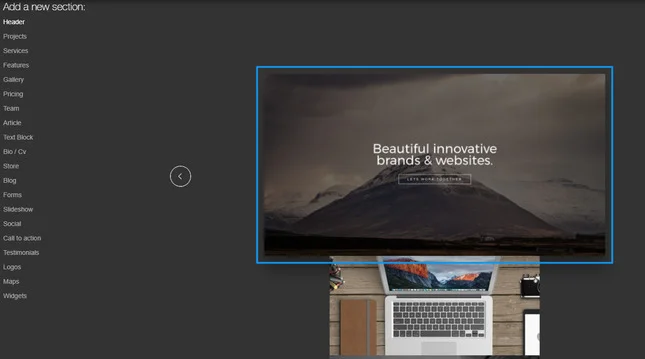
im creator editor page
When designing a website on IM Creator, it takes a while to find the right buttons to click

Secondly, there is no intuitive drag-and-drop feature like on Wix. This is really restrictive because, apart from a few editing clicks, there’s not much you can do with the pre-configured layout. And while it provides more creative freedom than builders like Site123, IM Creator still falls way behind our top scorers for design, Squarespace and Wix, when it comes to customization.
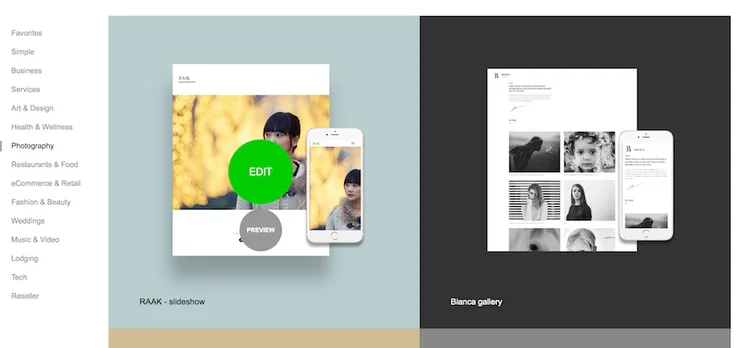
IM Creator templates screenshot
Here are a few more of IM Creator's wide range of slick, good-looking templates for you to build a website on.

Lastly, IM Creator doesn’t provide any prompts or guides. You’re somewhat left in the dark – you have to click on the area you’d like to customize, then on three dots, then an icon. The whole customization process is long winded, rather than a breeze.

In terms of subscriptions, IM Creator offers three plans. Its free plan is for students, artists, and non-profits, which is great news if you fall into one of these categories! If you don’t, then IM Creator’s cheapest plan is its Premium plan for $7.95 per month (billed annually). The final and most expensive plan is the Creator Pro Whitelabel plan for $350 per year.

IM Creator’s $7.95 per month plan is a cheap entry price compared to other top builders. For example, Wix and Squarespace both cost $16 per month on their cheapest plans. However, IM Creator’s lack of scalable features impact its value for money, meaning you may get more for your money with a better quality, albeit more expensive, builder.

Let’s take a closer look at each plan:

Free Plan

Don’t get too excited – the free plan is only for studentsartists, and non-profits. To benefit from this subscription, you’ll need to provide written proof, and a description as to why you need a website. And, as we’ve covered, the customer support is extremely basic on this plan. There’s no other free plan or free trial so if you’re not a student, artist, or run a non-profit, then you’ll need to sign up straight away for the Premium plan.

Premium Plan: $5.95-9.95/month

This is for businesses. You can connect your own domain, which helps to build your brand identity, and enjoy access to unlimited bandwidth, so you can create a large website without worrying about slow loading speeds. Overall, it’s an affordable option compared to the rest of the market.

So, why the price range? Well, how much you’ll pay for IM Creator’s Premium plan depends on how long you sign up for.

  • 3 year plan: $5.95/month
  • 2 year plan: $6.95/month
  • 1 year plan: $7.95/month
  • 6 month plan: $9.95/month

While signing up for three years does offer big savings, it does mean you’ll have to pay for that whole three years upfront. This large outlay won’t suit all businesses – particularly small ones, which need to keep a tight handle on cash flow – so we don’t recommend opting for the longer plans.

It’s also worth considering that IM Creator doesn’t offer a free trial on either of its paid plans. So instead of diving in with a three-year plan to save a bit of cash, we recommend instead taking advantage of IM Creator’s aforementioned free plan if you can first. Doing this will give you time and space to figure out if IM Creator is right for you – before committing to a long-term contract and locking yourself in!

Pro & Whitelabel: $350/year

As the name suggests, this is a plan for whitelabel businesses. For example, it’s for web design agencies looking to create sites for clients using a website builder. As part of this plan, you get unlimited licenses, which means you can build as many client websites as you like using IM Creator.
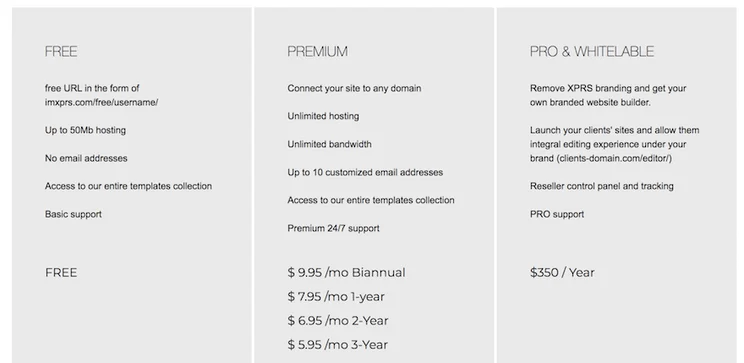
IM Creator pricing plans screenshot
IM Creator offers a free plan to get you started, with an affordable plan starting at just $5.95/month – providing you lock in for three years, that is.

IM Creator offers some slick templates. It has over 30 designs to choose from, which are all mobile responsive so they look good on all screens. These themes are also separated into a wide range of industries, including photography, architecture, weddings, resumes, real estate, and many more.
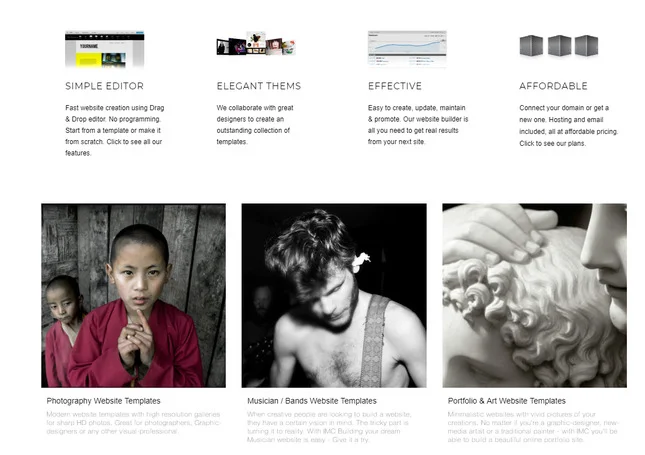
im creator templates
IM Creator has some wonderful templates, with plenty of choice to get you started

Like all website builders, each template is pre-populated with sample content, which you can then customize yourself. With IM Creator, you can change the text, imagery, and overall layout with a few clicks, but this isn’t nearly as simple as it is on Wix or Squarespace. There is no drag-and-drop feature, which makes editing your website feel much longer than it needs to be.

Feeling adventurous? You also have the option to create a design from scratch. However, if you don’t have much web design experience, we recommend sticking to the templates.

IM Creator templates screenshot
Here are a few more of IM Creator's wide range of slick, good-looking templates for you to build a website on.

One of the drawbacks with IM Creator’s design flexibility is that you cannot change your template after publishing. So pick carefully – if you want to change templates down the road, you will have to re-insert all of your content.

Another restriction is that you cannot access the HTML or CSS codes. This can be frustrating if you’re a keen coder and want to make custom edits to the templates. Of course, if you aren’t comfortable with codes, then don’t worry about this.

As you know, IM Creator makes it hard to create a website. This is partly due to the features, and their lack of quality and customizability – they’re quite frustrating to use at times, and if you don’t have any web design experience, you’ll struggle with the tools on offer.

However, what we do like about IM Creator’s features is that you can connect your own domain on all price plans. Also, you can implement a donate button for charity websites, and you have access to stock imagery which can help speed things up when designing your site.

IM Creator loses some serious points by not offering an app store, image editing tools, or any email marketing. These are some important features for building a successful website, and can be found on nearly every other website builder on the market.

But what about features in other areas?

Ecommerce

Despite its flaws, IM Creator is one of the few website builders to offer ecommerce functionality without requiring you to upgrade your subscription. However, its ecommerce offerings are weak.

The ecommerce features available include store analytics, checkout services, and unlimited storage and bandwidth on all plans, but that’s about it. If you’re serious about creating an online store, you’re much better off using a more established platform like Shopify or Wix.

Find Out More:

Blogging

Adding a blog is great for SEO (search engine optimization), because it’s useful for adding keywords to your website. Blogs are also great for keeping your visitors up to date with your latest news or deals. With IM Creator, you can add a blog using the blue ‘+’ button at the top of the page.

With IM Creator, the basics are there, but the toolbox could be much more comprehensive. And when you consider the fact there’s no access to apps, which can help boost your site’s performance, you can see why this platform doesn’t feature high on our list of best blogging platforms.

For a website builder more suited to the demands of establishing and maintaining a blog, we also recommend checking out our guide to the best website builders for SEO.

im creator add a blog
Adding a blog is quite simple, and makes it easy to connect with your visitors

The IM Creator support is quite basic. To benefit from 24/7 customer support, you’ll need to upgrade to the Premium plan, costing $7.95 per month – but what do you get from the free plan?

Well, you get – in IM Creator’s own words – “basic” support. IM Creator uses a ticketing system, allowing customers to submit support tickets with a query or problem, before a support agent comes back with an answer. The average response time is under 12 hours, which is rather impressive considering that IM Creator is currently powering around 11 million websites.

You can also download a helpful user guide, which is something most website builders don’t provide. This gets a big tick from us. On top of that, there is a large knowledge center filled with questions, queries and qualms, which can help you find the answer you need.

If you have the money for IM Creator’s most expensive plan (Pro & Whitelable, which costs $350/year), you’ll enjoy equally “PRO” support. There isn’t too much information on IM Creator’s own website about what this entails, but it appears to include 24/7 assistance, and your own dedicated business consultant on hand to support you with any question or query you might have.

Overall, though, the IM Creator support options could be far more comprehensive. For example, there is no live chat support, and you can’t reach out to IM Creator customer agents over the phone.

We’ve now reviewed all the key areas for building a website with IM Creator. Covering everything from ease of use to customer support, you should now have a clear idea of whether IM Creator is for you.

Still undecided? Don’t worry – that’s why we’re here! Put simply, IM Creator is not for beginners. If you’re building your first website, then you should look at Wix, which scores highest in our ease of use testing. Aternatively, check out the range of small business website builders if you’re looking to start small and build on a budget.

IM Creator provides virtually no prompts or visual cues when you’re building your site, and it lacks the intuitive drag-and-drop features found on other leading platforms.

You could forgive a platform that’s frustrating to use if it had a free plan. And IM Creator does – to an extent. While there is a free option, it’s only for students, artists, and nonprofits. And you’re required to have written proof.

However, IM Creator does provide some beautiful templates, and you can integrate your blog quite easily. But for everything else, including customer support, ease of use, and ecommerce functionality, IM Creator could do much better – to the point where using this platform may actually create problems for your website.

Written By

rob-binns

Hi, I’m Rob:

Hailing originally from West Yorkshire, but growing up in Wellington, New Zealand, I’ve written for brands and businesses all over the world – empowering everyone from solopreneurs and micro-businesses to enterprises to some of the ecommerce industry’s best-known brands: including Yahoo!, Ecwid, and Entrepreneur.

From foretelling the extinction of the high street ATM to attending PayExpo – Europe’s foremost payments conference – I immersed myself in the payments space, which left me with a love of small businesses that remains strong to this day.

It was that love that took me to Website Builder Expert, where I spent half a wonderful year as Content Manager in 2021. During that time, I researched and wrote a portfolio of articles focusing on the technology small businesses can harness to get online – then make an impact there. 

When I left Website Builder Expert, it was for a new adventure – one that’s taken me all the way Down Under. I’m now based in Melbourne, Australia, where I write freelance content.

Going forward, I’ll continue to bring my passion, profile, and personality to bear on my work here at WBE, and at large. My promise? To always keep the reader – be they an individual, a business, or something else entirely – at the heart of my approach.

You can find me on Linkedin here.Rob spent three years writing, editing, and strategising for renowned B2B comparison site Expert Market. With presences in the UK, USA, Canada, Germany, Australia, and Spain, Rob helped drive a wide range of niche content across industries and sectors. He also researched, ideated, and wrote content unpacking a wealth of technologies: including fleet management software, telephone systems, POS devices, and asset tracking.

Specifically, Rob delved into the payments space – crunching, comparing, and contrasting the range of ways for merchants to take credit and debit card payments. And then sharing this with his business audience – empowering them to sell with greater security, convenience, ease, and affordability.

Rob joined Website Builder Expert in 2021, where he took on the role of Content Manager. Besides testing the platforms we review, Rob also applied his excellent research and writing skills, extensive business knowledge, and general motivational attitude to create articles for the site and lead a team of writers to do the same.

Between dissecting the internet’s best ecommerce platforms to its most effective email marketing tools, Rob was in his element. He also mentored and managed several of WBE’s remarkable team members – helping them build the skills and mentality required to progress, grow, and excel in their roles, and get the best out of their prolific writing talents.

Rob left Website Builder Expert for new adventures across the world in Australia, where he now writes freelance content – continuing to share his expertise for Website Builder Expert’s articles, among other projects!

Rob’s commitment for the future is to empower his audience to make better, more effective decisions: whether that’s helping them pick the right platform to build their website with, the best hosting provider for their needs, or offering recommendations as to what – and how – to sell.

So drop him a line, or check out some of his articles below – and leave a comment there if you like what you see. He looks forward to continuing the conversation!

More about

26 comments

Your email address will not be published. Required fields are marked *

  • Alejandro Magana

    I'm a freelance designer that has works firstly on WP and other CMS' but also creates with Wix, Weebly, Square and IMXPRS is an elegant and and solid solution for most my clients. Over the years I find we oversell clients with amazing features they will never use ending up having to maintain WP sites that never fulfill their purpose where IMXPRS is easy to maintain and the whitelabel option is a great help, site is much easier to update and maintain, quick to build, quirky but easy to fix once you understand the little bugs. Great for clients to update themselves and good backup features. I feel is a great tool for my business and clients.
    I think I saw it as a website builder for godaddy using IMXPRS, is that right? Are other big name hosts using it?

    1 reply

    • Adelle Kehoe
      Adelle Kehoe

      Hi Alejandro,

      Thanks for the comment - we agree that many clients don’t appreciate or need lots of fancy features!

      You’re absolutely right, IMXPRS is a really good option for non-technical clients. In regards to platforms using it, IMXPRS have various whitelabel options, therefore it’s hard to tell once a new site is created.

      Interestingly GoDaddy have actually just re-made their own website builder - GoCentral. It didn’t do too well in our rankings, but it’s super quick to create a site. If you’re interested in reading more - check out our new review here.

      Thanks!

  • Bob

    I was liking this website builder until it randomly put things where it wasn't supposed to be after previewing it. It deleted a bunch of sections and text. Super unwieldy to operate and annoying to add things. Also, it's not "free." as much as they would love to say it is. You do have to pay if you want no ads and to connect your domain. 0 STARS!

    1 reply

    • Tom Watts
      Tom Watts

      Hi Bob,

      Thanks for sharing your experiences.

      You're not the first to express dissatisfaction with IM XPRS!

      Have you considered using another builder, one that's more reliable? Our comparison chart of leading website builders would be a good place to start.

      Hope it helps,
      - Tom

  • Aleksanadr

    Hi, I find IM XPRS quite easy to use for people with limited knowledge. I do have some issues, but I don't get any response from support. Tried on the support page submitting several request, no response. I sent email to info@imcreator.com, again no response. I would appreciate if someone could give me directions how I can get in contact with their support. PS. I have paid the subscription.

    1 reply

    • Tom Watts
      Tom Watts

      Hi Aleksanadr,

      Sorry to hear about your issues trying to contact the IM XPRS support team. You can see similar feedback about being 'hard to contact' in some of the comments below (dated January 13th + February 9th).

      Unfortunately this seems to be a growing trend and I can only suggest persevering with your current efforts as I'm not aware of any other ways to get in touch with them outside of email contact...

      If you are considering moving from IM XPRS, I would recommend comparing a few other platforms in our website builder comparison chart.

      - Tom

  • tinzi

    I like everything about imxprs until i found out all my images' quality are being harshly reduced on IMXPRS/IMCREATOR. So landscape pictures look dull and models look blurred out. I spent hours of effort creating a site and i have no option but to quit at this point, can't live with this bizzard feature of reduces quality of every images for about 30-40% -especially if you are a photographer.

    2 replies

    • Darryl

      One of the ways to fix this issue is to go into the cropping tool, and then select opacity and filter. This will recreate the image quality.

    • Tom Watts
      Tom Watts

      Hi tinzi,

      Thanks for flagging up this potential downside of the IM XPRS Creator.

      I think part of the issue comes down to the fact that IM creator is intended for very lean, streamlined websites that don't contain much imagery - so definitely not ideal for photographers as you point out!

      A much better alternative would be Wix or Weebly, who are both great candidates for image-rich portfolio sites. Check out this comparison chart to see which might suit you better.

      - Tom

  • Nicole

    I love the builder and templates, but I experienced security issues and google flagging my site and it not loading and displaying properly. I tried to explain this to them and get told to do what I have already tried again.

    I am extremely dissatisfied with how difficult it has been to receive customer support from these people. I search for help in the help center and no results come up I email a question and get an automated response telling me how they think I could help myself. I have used Godaddy and Squarespace in the past and their customer service is far better than that of IM creator.

    When my storefront is not working the way it should I do not want to have to wait 6+hours to get the help I need to fix the problem with my site. I would give the design 5 stars but the service 2/5 stars. I am asking for a refund and going back to squarespace or testing out another competitor.

    2 replies

    • adam greene

      Same here. Patience is running out on my end. So many glitches that make this difficult to stick with.

      Big problem is things don't look like they do in the editor once you go live. Some thing simple like the background color, or the alignment of text.

      Very close to cancelling my service and asking for a refund.

      1 reply

      • Jeremy
        Jeremy

        Hi Adam,

        Sorry to hear about your experiences. Have you considered testing out other drag & drop website builders? Here are some for you to consider.

        Jeremy

    • Jeremy
      Jeremy

      Hi Nicole,

      Sorry to hear about your experiences. Their template designs are pretty decent - I'd agree with that. But sorry to hear about your personal experiences with their support team.

      If you want our thoughts on Squarespace, here is our review of them. There are a also a few other drag &d drop website builders that you could consider if you want to. We have a comparison chart here.

      Jeremy

  • peter thompson

    Great informative blog post Jeremy. I have tried a lot of builders and IM is really easy to use and the sites look amazing.

    If you do want to change the theme though once you have built and published your site, you can simply email their support team and they will change it for you.

    Thanks again.

    Peter

    1 reply

    • Jeremy
      Jeremy

      Thanks for your feedback, Peter. Very helpful!

      Jeremy

  • Ivan

    I am not in any paid sponsorship with IMXPRS and I have tried it all. I have tried Wordpress, Wix, Weebly, Google Sites, Yola, Joomla, Zyro, Jimdo and never have I seen anything as beautiful, well designed, and professional and easy as IMXPRS, extremley amazing scroll fix and 100% responsive. The only thing I would add to this near flawless tool (and I hope they add this) is a way to make a membership site. I would give this 9.8 % 10

    1 reply

    • Jeremy
      Jeremy

      Thanks for sharing your experiences with us, Ivan.

      Jeremy

  • Steven Denger

    I have used the imcreator off and on for about 3 years. i have build sites with Google Sites and Wordpress. It was aoways so restricted and hared to make even the most basic customiations with word;ress asnd google sites -a little better - but nothing like the imcreator. You can build any kind a page you can imagine and slide everything around exactly like you want it.

    It is always a relief to come back to the imcreator and build a page or website because there is not going to be any hassle hardly at all. There is so many customization features that they got them all beat.

  • Jim

    I used IM Creator for three years, which allowed me to create a great site. When it came time for me to move on, there were some issues with billing. Despite some mistakes on my end, Customer Service was able to provide me with a full refund for unused hosting fees. Even though I was leaving IM Creator, they allowed me to switch providers without penalty, which speaks volumes to the kind of company they are.

    1 reply

    • Jeremy
      Jeremy

      Hi Jim,

      Thanks for sharing your experiences with IM Creator with our readers! Much appreciated.

      Jeremy

  • Lisa

    very cool builder, great templates for weddings like the one I found.
    created a wedding website for our upcoming wedding with RSVP, some pictures and info about the venue.
    Liked the options.

    1 reply

    • Jeremy
      Jeremy

      Awesome Lisa. Thanks for sharing!

      Jeremy

  • Sarah

    Just wanted to comment that IM Creator is NOT compatible with pinterest. None of the photos uploaded to their websites can be pinned which is difficult for businesses that replay on photo traffic.

  • Lianne

    Agree with you that the submenu and pages is not intuitive. I just sent a message through to them on the same thing... something for me that is pretty important.

    I agree too, lean and mean, but found the interface sluggish. I have used other web builders that were far quicker and more intuitive. I would have liked more options - simply because I expected that certain features would come with a basic service. It could be a bug, but it kept autosaving in the background and preventing editing while it was saving every 30 seconds.

    Absolutely, if you want "no frills" and a quick way to have a web presence, go for IM Creator. They have recently started an image search feature, and it seems they plan to integrate this into the editor too.

    1 reply

    • Jeremy & Connie
      Jeremy & Connie

      Thanks for sharing your thoughts and experiences Lianne!

      - Jeremy

  • Philip

    IMCreator is definitely one of the better website builders out there. Sure, it might have its pros and cons but at the end of the day, it's still one of the best out there. I personally use IMCreator and I can say I'm more than contented with what is offers. You guys should go out and give it a try! :)