






Based on our 300+ hours of testing of 12 major platforms, Wix is the best website builder for 2026 because it offers the most comprehensive features, dependable support, and over 2,000 free templates.
In this guide, I’ll walk you through the key features, pricing, and drawbacks of each of these top-rated website builders, so you can find the right fit for you.
- Wix is our top-rated website builder, offering a drag-and-drop editor, quality built-in features like email marketing, and AI tools
- Paid plans range from $2.99 to $299 per month (billed annually) – Hostinger is the cheapest option, while Shopify’s plans are the most expensive
- Wix and GoDaddy have limited free plans which you can stay on forever, but you’ll need to upgrade to sell products
- All of our recommendations offer AI website builders and AI tools – Wix, Squarespace, Shopify, and Hostinger have AI-powered assistants for 24/7 support
- Choose Shopify if you want to sell products online, since it offers the best sales features for multichannel selling (including AI search engines)
At Website Builder Expert, we’ve used our independent testing process to fairly review the best website builders for over 13 years. Our current framework relies on six core categories: website functionality (30%), design features (25%), pricing (15%), user experience (15%), help and support (10%), and reputation (5%).
I’ve also built a website from scratch with each of our top five recommendations to deliver unique insights based on real human experiences. You can read more about our methodology below.
See Our Best Website Builders
Watch our video to learn more about each website builder’s benefits and drawbacks:
Website Builder Comparison Table
Take a look at our top website builder picks side-by-side to see which best suits your needs:
|
Overall rating
|
Positive Sentiment Index Score
A score out of 100, based on how likely surveyed SMBs are to recommend a website builder in 2026.
|
Best for
|
Today's best price
|
Free plan or free trial
|
Number of templates
|
Free custom domain
|
AI website builder
|
AI features
|
Transaction fees
|
Recommended for
|
||
|---|---|---|---|---|---|---|---|---|---|---|---|---|
|
BEST OVERALL
 |
 |
 |
 |
 |
||||||||
|
Wix |
Squarespace |
Hostinger |
Shopify |
GoDaddy |
||||||||
|
4.8
|
4.5
|
4.2
|
4.2
|
4.1
|
||||||||
|
59/100 |
59/100 |
59/100 |
57/100 |
56/100 |
||||||||
|
Best overall website builder |
Easiest website builder |
Cheapest starting prices |
Top sales features |
Quickest setup experience |
||||||||
|
|
||||||||||||
|
Free plan |
14-day free trial |
14-day free trial |
3-day free trial |
Free plan |
||||||||
|
2,000+ |
190+ |
400+ |
1,000+ |
200+ |
||||||||
|
Free for 1 year |
Free for 1 year |
Free for 1 year |
No |
Free for 1 year |
||||||||
|
|
|
|
|
|
||||||||
|
|
|
|
|
||||||||
|
2.9% + $0.30 |
0% – 2% |
No transaction fees |
0.6 – 2% (without Shopify Payments) |
2.7% + $0.30 |
||||||||
|
Businesses promoting their online presence |
Creatives, portfolios and service-based businesses |
Freelancers and budget-conscious users |
Online stores |
Tech novices and side hustlers |
1. Wix: Best All-in-One Builder
- Wix pricing: $0 – $159 per month (billed annually)
- AI website builder: Yes
- Read our Wix review for more information about the builder
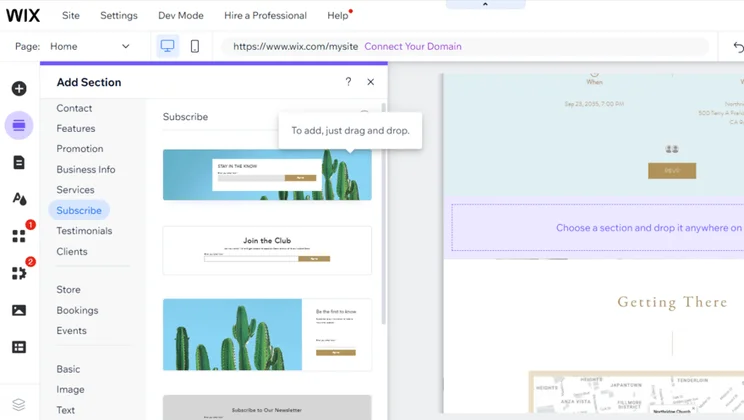
Wix is the best website builder I’ve tested because it offers over 2,000 free templates, a highly flexible drag-and-drop editor, and total creative control. While Wix’s editor is very beginner-friendly, there are a huge amount of styling options and designs to choose from, which can feel overwhelming to start with. That said, Wix does accommodate all skill levels because of the vast range of tools available.
- Drag-and-drop editor
- 20+ AI features to assist with website management
- Over 2,000 free templates
- 24/7 help and support
- Can't change template once live
- Slow loading times
- Limited storage space (up to 100GB, unless you choose the Business Elite plan)
In January, Wix launched Wix Harmony, referred to as the “company’s new flagship AI website builder.” The hybrid tool combines website building and vibe coding to help businesses develop a website from scratch. While it doesn’t replace Wix’s core website editor for now, the process lets you use natural language prompts thanks to the new AI agent, Aria, which can perform tasks for you, such as SEO. Wix Harmony is available with all Wix plans, including the free tier.
Wix provides a user-friendly platform and built-in features to help you start, grow, and manage your website and brand online. In particular, the Wix Automations feature and AI-powered assistant, Aria, can take jobs off your hands and streamline your workflows. Not only does this save you time day-to-day, but it’s helpful for business owners who are short-staffed.
I used Wix’s AI website builder to get set up and it made the process really easy. The chatbot only asked me a few simple questions, then created a custom website and dashboard based on my responses and needs. For me, this made the building journey feel pretty conversational and collaborative. Plus, I could make any tweaks I wanted in the drag-and-drop editor afterwards. I noticed the editor ran quite slowly though, so make sure you give yourself enough time to accommodate this as you build your website.
How Much Does Wix Cost?
| Plan | Price with our discount TAKE10 | Monthly price (billed annually) | Monthly price (billed monthly) | Ecommerce |
|---|---|---|---|---|
| Free | $0 | $0 | $0 | No |
| Light | $15.30 | $17 | $24 | No |
| Core | $26.10 | $29 | $36 | Yes |
| Business | $35.10 | $39 | $46 | Yes |
| Business Elite | $143.10 | $159 | $172 | Yes |
2. Squarespace: Best for Beginners
- Squarespace pricing: $19 – $99 per month (billed annually)
- AI website builder: Yes
- Read our Squarespace review for more information about the builder
Squarespace is the easiest website builder to use due to its intuitive editor and stunning design options. However, due to its grid framework, Squarespace’s editor is more restrictive than Wix’s free-form drag-and-drop interface.
Squarespace also offers great booking tools for service-based businesses, so it’s one I recommend testing if you want to offer appointments online.
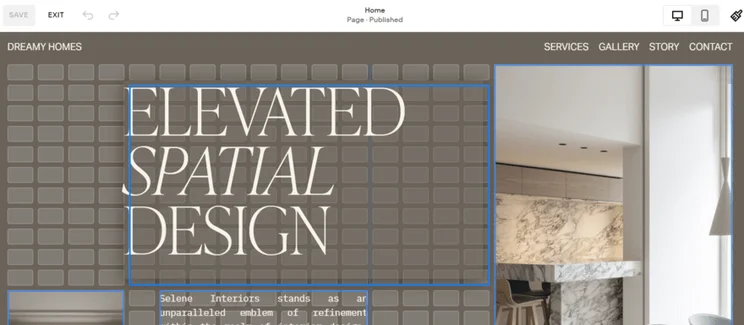
- Easiest drag-and-drop editor, with added grid framework
- Booking tools to offer services (Acuity Scheduling)
- Blueprint AI Builder for guided design support
- No autosave when editing
- No free plan (but a 14-day free trial)
- Less than 50 third-party integrations
- Squarespace increased its pricing in July, with the cheapest plan now starting at $19/month instead of $16/month. The four paid plans now range from $19-$99 per month, with select plans seeing a price hike of 26%.
- Squarespace users can now use the AI Visibility tool to monitor their site’s performance across AI search engines, view trends, and compare with competitors.
Squarespace provides a suite of comprehensive brand building tools to help you solidify your voice and identity online. From its Blueprint AI Builder for site creation to its Acuity Scheduling tool for bookings, these integrated features help you engage with customers at each touchpoint.
In fact, retaining customers through improved customer service is the number one strategy for the 322 SMBs we surveyed in January. So, Squarespace’s built-in tools will help you prioritize engagement and satisfaction.
Squarespace’s Blueprint AI builder is a great starting point for anyone, especially because of its focus on brand personality. The guided experience lends a helping hand, but you’ll want to use the drag-and-drop editor to truly customize your site’s look. That said, Squarespace really handles the design work for you, which is great for beginners, but not always ideal if you want complete creative freedom.
Personally, I could happily spend hours browsing Squarespace’s sections and layouts because they all look so good, especially the animated sections for new products or testimonials.
How Much Does Squarespace Cost?
| Plan | Price with our discount WBE10 | Monthly price (billed annually) | Monthly price (billed monthly) | Ecommerce |
|---|---|---|---|---|
| Basic | $17.10 | $19 | $25 | Yes |
| Core | $26.10 | $29 | $39 | Yes |
| Plus | $44.10 | $49 | $65 | Yes |
| Advanced | $89.10 | $99 | $139 | Yes |
3. Hostinger: Best Budget Builder
- Hostinger pricing: $2.99 – $7.99 per month (48-month term)
- AI website builder: Yes
- Read our Hostinger review for more information about the builder
Hostinger is our expert recommendation for anyone with a small budget because its plans start at just $2.99 per month, which is great when SMBs are struggling with high operational costs in 2026.
Hostinger’s drag-and-drop editor, suite of AI tools, and affordable starting prices make the builder a very beginner-friendly choice for individuals and small businesses. But, Hostinger’s cheap plans have limited features and scalability in comparison to other builders on this list, such as Wix.
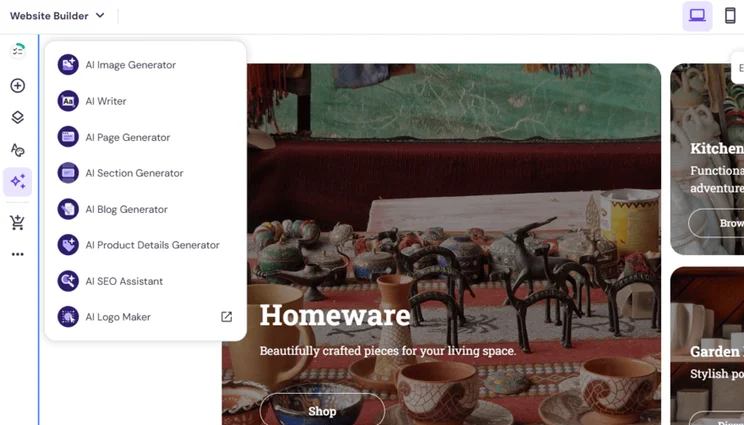
- Affordable starting prices (from $2.99/mo)
- Complete suite of AI tools
- Drag-and-drop editor
- No app market
- Can only sell unlimited products on Cloud Startup plan
- Limited scalability with three plans
Hostinger has launched a new all-in-one business management platform, Hostinger Ecommerce. You can launch and manage your brand’s online presence from one dashboard, whether that’s an online store, social media channels, or simple a shareable link for selling (you don’t need to have a website to start selling). Hostinger Ecommerce has three premium plans, ranging from $2.99 to $19.99 per month.
Thanks to social media and an overload of information online, consumers want to find answers, browse, and shop online with speed. To accommodate these short attention spans, Hostinger has the fastest loading times to help you engage with website visitors and potential customers right away. This is ideal in 2026, especially with the majority of website traffic coming from mobile users.
Hostinger has really been working overtime to improve its website builder and features since last year’s testing. I found the editor very intuitive and straightforward to understand, plus Hostinger’s design options are stylish and modern. This matches the backend experience too, since I could navigate my account easily! Hostinger’s streamlined approach is great for beginners and basic websites, but you’ll struggle if you need to add extra functionality due to the limitations of Hostinger’s two plans.
How Much Does Hostinger Cost?
| Plan | Price with our discount WBE | Monthly price (48-month term) | Monthly price (billed monthly) | Ecommerce |
|---|---|---|---|---|
| Premium | $2.69 | $2.99 | $11.99 | No |
| Unlimited | $3.59 | $3.99 | $18.99 | Yes |
| Cloud Startup | $7.19 | $7.99 | $27.99 | Yes |
4. Shopify: Best for Multichannel Selling
- Shopify pricing: $29 – $299 per month (billed annually)
- AI website builder: Yes
- Read our Shopify review for more information about the builder
If you want to sell products online, Shopify is the best ecommerce website builder on the market. Shopify provides a dedicated platform for online stores to get started and expand, with top quality sales features that even celebrities and familiar brands rely on.
However, Shopify’s starting price of $29 per month is higher than competitors like Hostinger ($2.99 per month), making it less suitable for smaller sellers.
- Sell unlimited products
- Can handle large and complex inventories
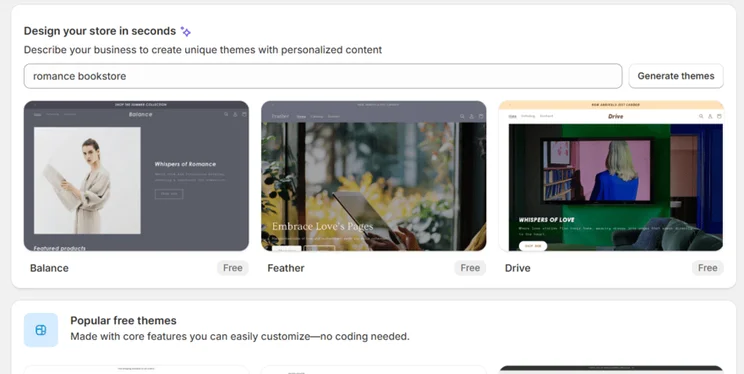
- AI assistant, Shopify Sidekick
- Editor isn't very user-friendly
- Few free templates (23 free templates vs 1,000+ premium templates)
- Lacks advanced AI tools
Shopify merchants can now sell products in ChatGPT, via Agentic Storefronts. Your online store, checkout, branding, and payment methods are all built into the ChatGPT conversation. With customers searching and shopping online in new ways thanks to AI, this helps get your products seen across channels.
And, as of May 2026, Shopify merchants can even manage their storefronts through ChatGPT and Claude directly. You won’t need to leave the conversation to add new products, check orders, or gather insights.
With the rollout of AI and social media, the way customers shop has changed dramatically. They don’t just use Google, but instead look at socials, ChatGPT, Perplexity, and other channels.
Shopify’s Agentic Storefronts help businesses adapt for the era of AI search, getting your products to appear in results within these AI-powered conversations. Customers can then purchase directly from ChatGPT, without needing to visit your website – so, if your New Year’s resolution is to adopt a customer-first strategy, Shopify’s seamless collaboration with AI search engines can’t be ignored.
Shopify’s focus on inventory management and ecommerce features, such as shipping and discounts, as well as Shopify’s history of supporting large enterprises, is a reassuring sign that Shopify can work for businesses of all sizes. But, while this is all very impressive, I found Shopify’s section-based editor a pain to use, since it could hold up the building process. The editor feels restrictive, so I recommend using Shopify’s new AI tool to create custom blocks and designs for you instead.
How Much Does Shopify Cost?
| Plan | Monthly price (billed annually) | Monthly price (billed monthly) | Ecommerce |
|---|---|---|---|
| Basic | $29 | $39 | Yes |
| Grow | $79 | $105 | Yes |
| Advanced | $299 | $399 | Yes |
5. GoDaddy: Best Speedy Setup
- GoDaddy pricing: $0 – $20.99 per month (billed annually)
- AI website builder: Yes
- Read our GoDaddy review for more information about the builder
We recommend using GoDaddy, instead of Wix or Shopify, if you’re looking for a simple builder to get your website live quickly.
GoDaddy offers the fastest setup time, with an onboarding process that can be completed in under 30 seconds, though it’s not as personalized as Wix’s setup. And, while GoDaddy favors speed and simplicity, its basic features do limit its user base. For this reason, GoDaddy is best suited for personal or informational sites.

- Fast onboarding and editor tutorial
- Budget-friendly plans (from $9.99/mo)
- Social post creator and calendar
- Section-based editor limits creativity
- AI templates are dull
- Needs clearer SEO advice
GoDaddy has updated GoDaddy Airo (the platform’s website and app builder) with new features: chat and preview tools now work in tandem, content can be edited directly on pages, Airo now accepts new file types (.DOC, .XLS, and .CSV), and users are given additional guidance post-publication.
In 2026, businesses need to operate and engage with customers across multiple channels, including social media – it’s not enough to just have a website if you’re looking to build brand awareness. GoDaddy’s AI-driven content tools, campaign automation, and marketing suite (including GoDaddy Airo and GoDaddy Studio) make it quick and easy for your business to build connections online.
When testing GoDaddy, I found myself ticking off essential tasks with no real headache, such as editing my site’s SEO and adding products. However, I did have some difficulty with the backend navigation at points, and I had to spend a fair chunk of time polishing my site’s design (because of GoDaddy’s lackluster options), which sort of counters the user-friendly image. For a builder that positions itself as a good option for beginners, I’d argue GoDaddy needs to improve its user experience to compete with other easy-to-use builders.
How Much Does GoDaddy Cost?
| Plan | Monthly price (billed annually) | Monthly price (billed monthly) | Ecommerce |
|---|---|---|---|
| Free | $0 | $0 | No |
| Basic | $9.99 | $21.99 | No |
| Premium | $14.99 | $39.99 | No |
| Commerce | $20.99 | $44.99 | Yes |
How Do I Choose the Right Website Builder?
To choose the right website builder, you should evaluate eight key factors, ranging from user experience and AI capabilities to scalability and SEO features. While we can help you compare website builders, you have to determine your needs and must-haves, and identify what you can live without.
Below, I’ve put together a checklist of key factors to consider when researching or trialing a website builder:
- Is the website builder and editor easy to use and navigate?
- Can you sell products or services online?
- Can you get support from an AI website builder or AI assistant?
- What features do you get for the price you pay?
- Is there 24/7 customer support?
- Can you connect your website to other channels, such as social media?
Can I Switch Website Builders?
All five of our top-rated website builders allow you to cancel your plan and move to another platform. However, switching isn’t straightforward. The difficulty will depend on the builders you’re switching between.
In most cases, you’ll need to start from scratch again. That means redesigning your website, adding your products, and setting up your backend, with your new builder of choice. If you have a custom domain with your existing builder, you can usually swap this to your new provider.
How We Test and Rank the Best Website Builders
We spent 300+ hours analyzing 12 of the best website builders, across 207 investigation areas to determine these rankings and recommendations.
For 2026, we focused on six core categories – each category has been given a unique weighting to reflect what our readers value the most:
- Website Functionality (30%): We examine each builder’s site speed and the quality of features available. This includes SEO and marketing.
- Design Features (25%): We assess each website builder’s AI building tools, aesthetic capabilities, and template options.
- Pricing (15%): We review the pricing of each website builder to see what you get for the money you pay.
- User Experience (15%): We test each builder ourselves to assess its ease of use and accessibility – this helps us speak from experience when recommending a platform.
- Help and Support (10%): We look at a website builder’s support options and responsiveness.
- Reputation (5%): We test how a website builder performs in the wider market to see how it compares to competitors and if users would recommend it.
Wix remains our top choice because it’s difficult for any other builder to compete with the sheer quality and quantity of features, templates, and customization Wix offers. I was really impressed by Wix’s flexible editor, particularly its AI builder, since this simplified the onboarding process for me.
Squarespace and Hostinger are incredibly easy to use, with Squarespace offering stunning templates and Hostinger providing a suite of AI tools to save beginners time and money. And, while I personally found the experience of using Shopify a little underwhelming, its sales features and scalability are ideal for growing stores. GoDaddy, on the other hand, focuses on simplicity and speed, which will lend itself well to beginners and basic websites.
After testing each of these builders, I have my personal favorites, but I stand by our rankings and recommendations. And that’s what makes it so important to read through a list like ours – the perfect builder for one user might not be the right fit for another, so it’s worth knowing what your business needs the most and testing each platform for yourself.

Final Verdict: Which Builder Do I Recommend?
Our research process has determined the top five website builders, and Wix is the best builder for website and business management, whether you’re looking to build a blog or start selling online.
Each website builder has its strengths – and weaknesses – so I know Wix won’t be the right fit for everyone. If you’re unsure of where to start, I recommend checking out the available free plans or free trials to figure out what works best for you.
FAQs
As a starting point, you can use a free plan to build your website and set up your future inventory. However, if you’re looking to present your site as a professional storefront down the line, it’s worth upgrading right away to remove ads and add a custom domain name. You’ll need to upgrade eventually to accept payments and sell products, so it makes sense to start with a premium plan immediately.
Alternatively, you can choose a dedicated ecommerce builder, like Shopify, right away and skip the free plan altogether.
Wix is the best website builder for small business thanks to its drag-and-drop editor, built-in features (such as email marketing), and personalized SEO support. You can get started with its free plan, which is great for entrepreneurs on a budget, but you’ll need to upgrade eventually to start selling online. Ecommerce plans start from $29 per month, but you can save 10% with our code TAKE10.
Wix has the best AI tools we’ve tested, including an AI website builder to help you design and generate a custom template based on your website needs. You can also use Wix’s AI Theme Assistant to get design support directly in the drag-and-drop editor.
Other builders, such as Shopify, also provide great AI tools for website design. For example, Shopify recently improved its AI-powered assistant, Shopify Sidekick. Now, you can click on an area of your site you’d like to tweak, and Sidekick will do the design work for you.
WordPress.org is an open-source CMS (Content Management System), not a dedicated website builder, like Wix or Squarespace. You can build and create websites with WordPress.org, but you need to source and manage everything yourself, including hosting, integrations, security, and software updates.
For example, you can connect your WordPress.org site with Shopify to help sell products online – but I’d just recommend using Shopify if your goal is to set up an online store.
There’s also WordPress.com, which behaves more like a traditional website builder. However, it’s more of a blogging platform, and lacks the functionality of builders like Wix.


1 reply
1 reply
1 reply
1 reply
1 reply
1 reply
1 reply
1 reply
1 reply
1 reply
1 reply
1 reply
1 reply
1 reply
1 reply
1 reply
1 reply
1 reply