






- Quick Comparison: The Top 5 Website Builders for Artists
- 1. Squarespace: Best for Visual Artists
- 2. Wix: Best for Commission-Based Artists
- 3. Shopify: Best for Artisanal Crafts
- 4. Hostinger: Best for Side-Hustle Artists
- 5. GoDaddy: Best for Performing Artists
- What Should I Look for in an Artist Website Builder?
- Our Testing Methodology for Artist Website Builders
- Summary: Which Website Builder Is Best for Artists?
- FAQs
Based on over 300 hours of in-house research, I can confidently say that Squarespace is the best website builder for artists due to its stylish templates, beginner-friendly interface, and monetization options. That said, the leading artist website builder options differ in terms of ease of use, flexibility of design, and cost. Explore the five best options below.
- Squarespace is the top website builder for most artists, since it offers stunning design options and a user-friendly editor
- Wix’s strong SEO and marketing tools are great for getting your artwork seen by potential customers
- Shopify’s robust ecommerce tools and POS products facilitate both in-person and online art sales
- Wix and GoDaddy offer free-forever plans, and Hostinger has the most affordable premium plans, which start at $2.99 per month
- Artists who need a quick and affordable website to showcase their work should consider GoDaddy
We tested 12 of the best website builders for artists to deliver our current recommendations. Along with hands-on user testing, our research focused on six core categories: design features (35%), website functionality (20%), user experience (20%), pricing (10%), help and support (10%), and reputation (5%).
For artists specifically, we looked at key requirements and pain points, such as portfolio uploading tools, template quality, and print-on-demand integration.
Quick Comparison: The Top 5 Website Builders for Artists
Compare the top five website builders for artists side-by-side in the comparison chart below:
|
Overall rating
|
Today's best price
|
Free plan or free trial
|
Number of templates
|
Storage space
|
Free custom domain
|
||
|---|---|---|---|---|---|---|---|
 |
 |
 |
 |
 |
|||
|
Squarespace |
Wix |
Shopify |
Hostinger |
GoDaddy |
|||
|
4.6
|
4.6
|
4.3
|
4.2
|
4.2
|
|||
|
|
|||||||
|
14-day free trial |
Free plan |
3-day free trial |
14-day free trial |
Free plan |
|||
|
190+ |
2,000+ |
1,000+ |
400+ |
200+ |
|||
|
Unlimited |
2GB – Unlimited |
Unlimited |
Unlimited |
Unlimited |
|||
|
Free for 1 year |
Free for 1 year |
No |
Free for 1 year |
Free for 1 year |
1. Squarespace: Best for Visual Artists
- Squarespace pricing: $19-$99 per month (billed annually)
- Best for: Painters, illustrators, photographers, graphic designers, 3D modelers
- Read our full Squarespace review to learn more about the website builder
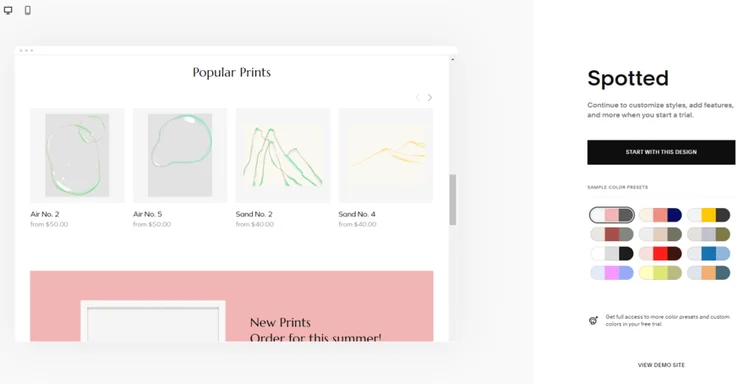
Squarespace is our top choice for visual artists, since its award-winning templates cover a large range of industries and styles, from modern gallery sites to streetwear startups. Plus, its dynamic content blocks give artists full creative freedom to create a distinctive page and impress potential clients.
What Makes Squarespace Good for Artists?
- Built-in monetization – You can create memberships or use Acuity Scheduling to offer creative services (additional $16-$49 per month (billed annually)).
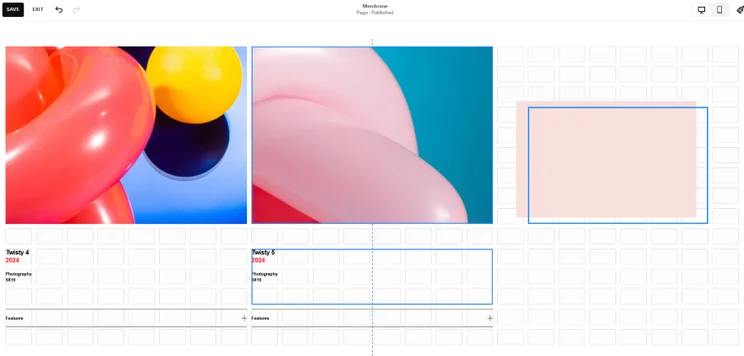
- Ideal for beginners – It’s the easiest website builder I’ve tested, coming with an intuitive drag-and-drop editor that let me simply click and move my desired content into place.
- Seamless customization – You can easily make your page reflect your unique art style.
What Are Squarespace’s Key Downsides?
- Some creative restriction – Though I found Squarespace’s grid framework helpful when aligning page elements, it restricted my creative freedom since I could only place blocks into specific slots.
- Product photo limitations – Product photos were awkward to manage, with Squarespace automatically locking them in a fixed aspect ratio. I had to resize my photos before uploading them, which was time-consuming.
- No autosave function – You will need to manually save your website’s design as you go along.
- User-friendly drag-and-drop editor
- 30+ art & graphic design templates
- Can sell physical and digital art
- Acuity Scheduling tool for art services
- Unlimited storage on all plans
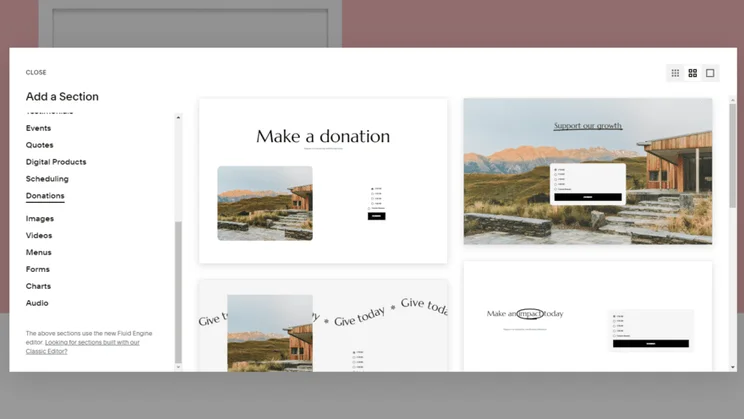
- Can accept donations
- No auto save function on editor
- Grid editor can feel restrictive
- Product photos have a locked aspect ratio
- No free plan
How Much Does Squarespace Cost?
| Plan | Price with our discount WBE10 | Monthly price (billed annually) | Monthly price (billed monthly) | Ecommerce |
|---|---|---|---|---|
| Basic | $17.10 | $19 | $25 | Yes |
| Core | $26.10 | $29 | $39 | Yes |
| Plus | $44.10 | $49 | $65 | Yes |
| Advanced | $89.10 | $99 | $139 | Yes |
2. Wix: Best for Commission-Based Artists
- Wix pricing: $17-$159 per month (billed annually)
- Best for: Artists who work on commission, such as illustrators, tattoo artists, and portrait artists
- Read our full Wix review to learn more about the website builder
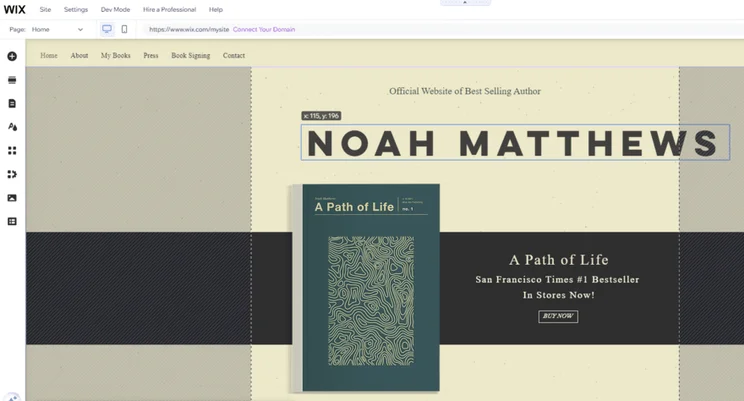
Wix’s AI tools, such as its AI Marketing Agent, is great for commission-based artists, since it generates promotional content and optimizes your site’s SEO to help secure new clients without an extensive marketing team.
And when you do secure that customer, Wix’s members area has a member’s chat feature, where you can discuss creative ideas together, update them on your progress, and ask for project feedback.
What Makes Wix Good for Artists?
- Blogging – Wix is the best blogging platform I’ve tested, so it’s ideal if you want to share your artistic musings with your audience. I could monitor blog-specific analytics and review comments to foster a community with my readers. I could also add social bookmarking.
- Print-on-demand integrations – Wix integrates well with print-on-demand services like Gelato, enabling customers to buy products with your designs on them. It then carries out the order fulfillment for you.
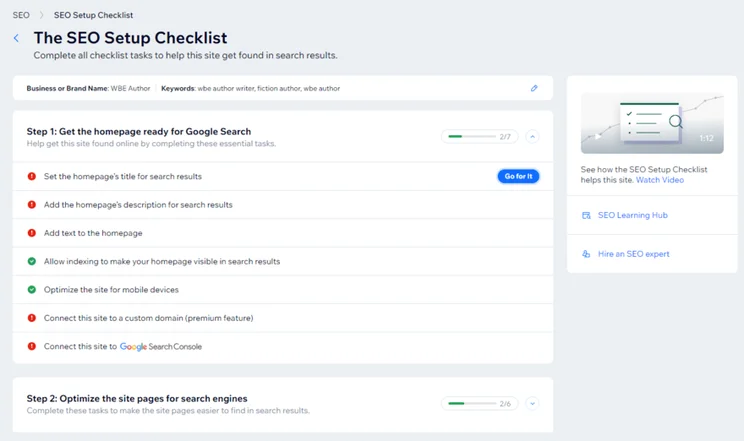
- SEO tools – Wix’s SEO features can help you improve your artist website’s visibility online. The personalized SEO checklist flagged good areas to improve on my site, I could easily add image alt text and metadata, and it took me seconds to connect my site with Google Analytics.
What Are Wix’s Key Downsides?
- Can’t switch templates – You can’t change templates once your website is live, which isn’t ideal if you’re an artist with ever-evolving styles or collections.
- Expensive pricing – For unlimited storage, you’ll need to pay for the Business Elite plan ($159 per month) that will be too expensive for some businesses, whereas Shopify and Squarespace offer unlimited storage across all plans.
- Limited free plan – Comes with Wix branded ads on your website that clash with your own artistic style.
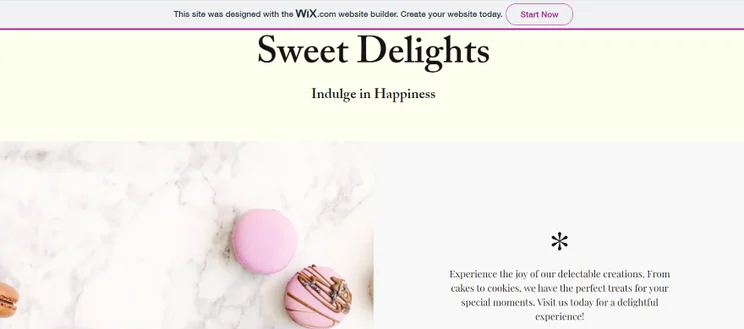
- 130+ artist-specific templates
- Can set up members chats
- Integrates with print on demand services
- Best blogging features on the market
- Great SEO features
- Can't switch templates once website is live
- Expensive pricing plans
- Limited storage on cheaper plans
During testing, I was really impressed by the scope of Wix’s features. The platform provides artists with all the tools they need to create a professional website and reach new customers online, which includes promotional tools like SEO and blogging, ecommerce tools like selling services or art products, and design tools that can help you create a website that reflects your artistic style. I love how much ground this covers!

How Much Does Wix Cost?
| Plan | Price with our discount TAKE10 | Monthly price (billed annually) | Monthly price (billed monthly) | Ecommerce |
|---|---|---|---|---|
| Free | $0 | $0 | $0 | No |
| Light | $15.30 | $17 | $24 | No |
| Core | $26.10 | $29 | $36 | Yes |
| Business | $35.10 | $39 | $46 | Yes |
| Business Elite | $143.10 | $159 | $172 | Yes |
3. Shopify: Best for Artisanal Crafts
- Shopify pricing: $29-$299 per month (billed annually)
- Best for: Ceramic artists, woodworkers, metalworkers, sculptors, jewelers
- Read our full Shopify review to learn more about the website builder
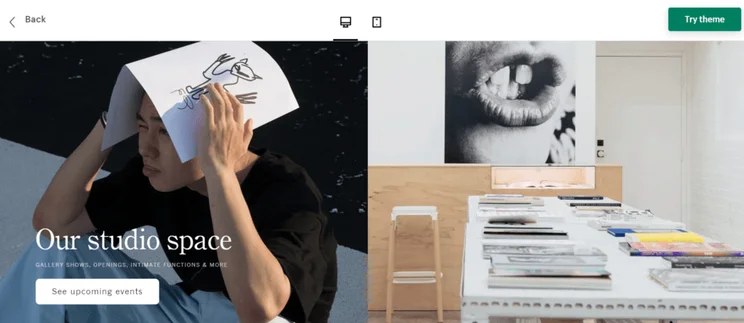
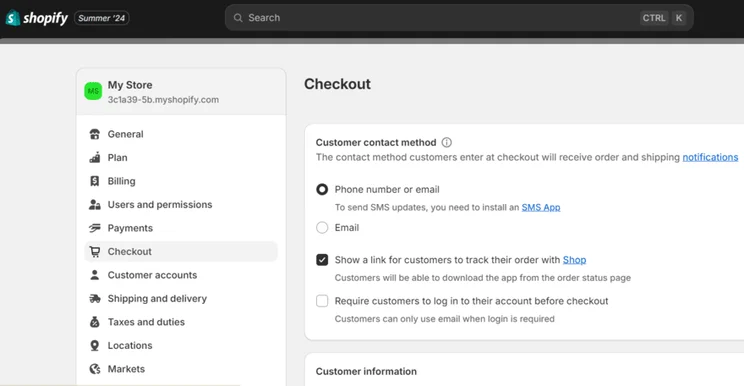
Shopify is the best website builder for artisanal crafts, offering the most versatile sales tools for multichannel selling. As our top-rated ecommerce website builder, Shopify also offers a customizable one-page checkout, agentic commerce, and Shopify POS products, such as card readers that sync all of your sales.
What Makes Shopify Good for Artists?
- Quality sales features – Shopify is best for selling art in high volumes. All plans come with unlimited storage, customizable checkouts, 24/7 support, multichannel selling, discount codes, and abandoned cart recovery.
- Shopify Shipping – You can partner with respected carrier services, including USPS and DHL Express, and access discounted shipping rates. This offers flexibility when selling art online to local customers and customers from other markets.
- Multichannel selling integrations – You can sync your artist inventory with Instagram, Facebook, Pinterest, YouTube, and X to increase your art’s visibility. These integrations sync in near real time, minimizing the risk of overselling stock.
I found lots of helpful apps for artists on Shopify’s App Market. My favorite, Artplacer, is a widget that lets your buyers visualize your artwork on their walls before they buy it.
What Are Shopify’s Key Downsides?
- Limited free templates – Only 24 out of the 1,000+ themes are free to use. The rest come with a price tag that can range from $100 to $500 (as a one-off payment).
- AI tool restrictions – Shopify’s AI-generated website designs often produce generic layouts, lacking the uniqueness needed for stylized artistic portfolios.
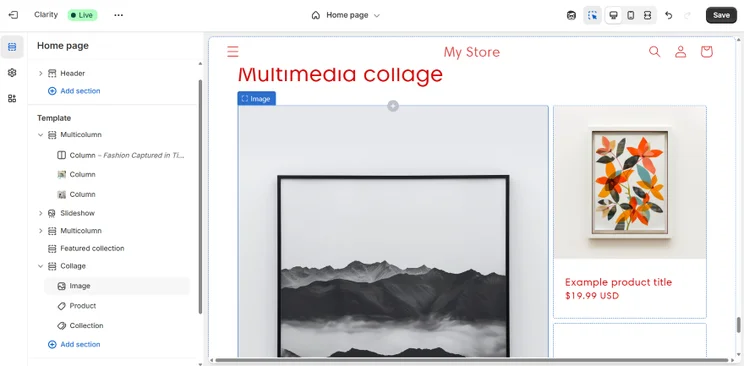
- Design difficulty – I found designing a website with Shopify difficult. The section-based editor limited my options when placing new blocks, and I found it hard to picture a polished website since the designs rely so heavily on you supplying information, such as product photos.
- Best sales features on the market
- 40+ art-specific templates (paid)
- Has Shopify POS syncing for in-person art sales
- Numerous shipping options
- Can download additional website apps for artists
- Can link your store with social media accounts
- Only 24 templates are free
- No free plan
- Free trial is only three days
- Limiting section-based editor
How Much Does Shopify Cost?
| Plan | Monthly price (billed annually) | Monthly price (billed monthly) | Ecommerce |
|---|---|---|---|
| Basic | $29 | $39 | Yes |
| Grow | $79 | $105 | Yes |
| Advanced | $299 | $399 | Yes |
4. Hostinger: Best for Side-Hustle Artists
- Hostinger pricing: $2.99-$7.99 per month (48-month plan)
- Best for: Small crafts, DIY goods
- Read our full Hostinger review to learn more about the website builder
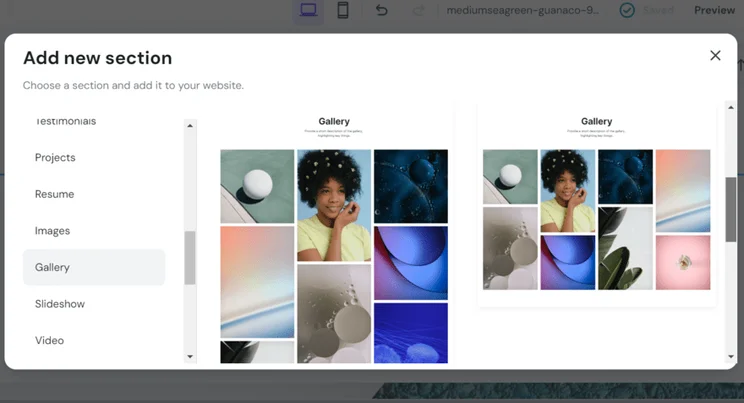
Hostinger is the best website builder for side-hustle artists, providing a less complex and more affordable alternative to Wix. As one of the easiest builders I’ve used, and the top performer in our website loading speed tests, Hostinger is a simple and reliable option for showcasing a wide range of media on.
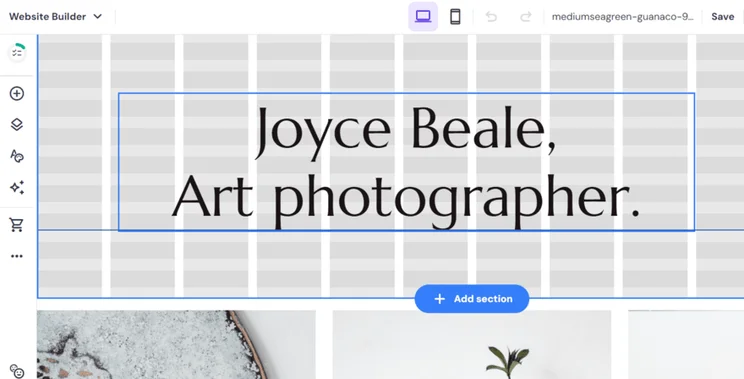
There’s a lot to think about when crafting a website, and a good website builder should make this process easier, not overcomplicate it. I was happy to see Hostinger do just that. The AI builder was simple and concise, and, within minutes, provided me with a fully functional site that accurately reflected my goals. While the final result wasn’t the most showstopping I’ve seen, it would have been a perfect foundation for side hustle artists to make their own, especially those in a rush or on a budget.

What Makes Hostinger Good for Artists?
- Affordable price – Its Premium plan is only $2.99 per month (for a 48-month term), making it the most affordable builder for artists on this list.
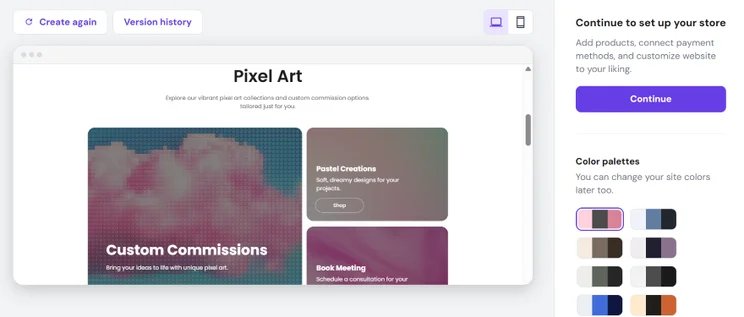
- Effective image gallery – Hostinger has five grid layouts that should appeal to a range of different artists.
- AI tools – Hostinger’s content creation tools, which are available on the Business plan, keep the building process simple and give you more time to focus on your art.
What Are Hostinger’s Key Downsides?
- No app market – You’re limited to the builder’s built-in tools if you want to add additional functionality to your website
- Limited scope – The rest of the builder’s features are quite basic in nature so there’s little to support artists directly. That said, Hostinger now has an email marketing tool if you want to send artist update newsletters to your audience.
- Affordable introductory plans
- Speedy site load times
- Beginner-friendly editor
- Over 400 stylish templates
- Great image gallery for portfolios
- Built-in suite of AI tools
- No app market
- Limited website features to support artists
- Not scalable for larger businesses
- AI generated templates sometimes lack polish
How Much Does Hostinger Cost?
| Plan | Price with our discount WBE | Monthly price (48-month term) | Monthly price (billed monthly) | Ecommerce |
|---|---|---|---|---|
| Premium | $2.69 | $2.99 | $11.99 | No |
| Unlimited | $3.59 | $3.99 | $18.99 | Yes |
| Cloud Startup | $7.19 | $7.99 | $27.99 | Yes |
5. GoDaddy: Best for Performing Artists
- GoDaddy pricing: $9.99-$20.99 per month (billed annually)
- Best for: Actors, musicians, dancers, comedians, performers
- Read our full GoDaddy review to learn more about the website builder
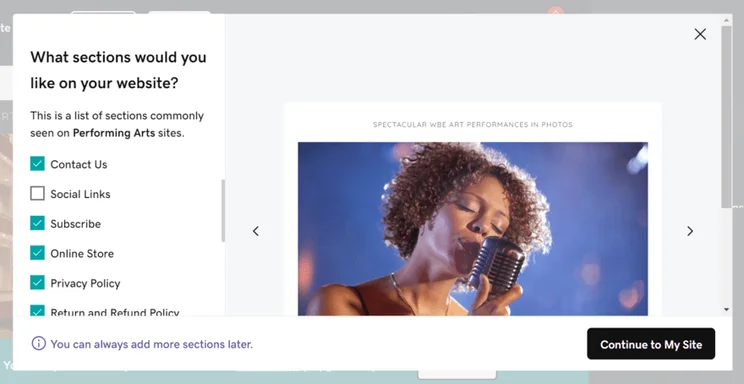
GoDaddy is the ideal solution for performing artists that may not have a consistent income, since it has affordable plans, a quick setup, bookings and revenue analytics, and marketing tools to promote your work.
What Makes GoDaddy Good for Artists?
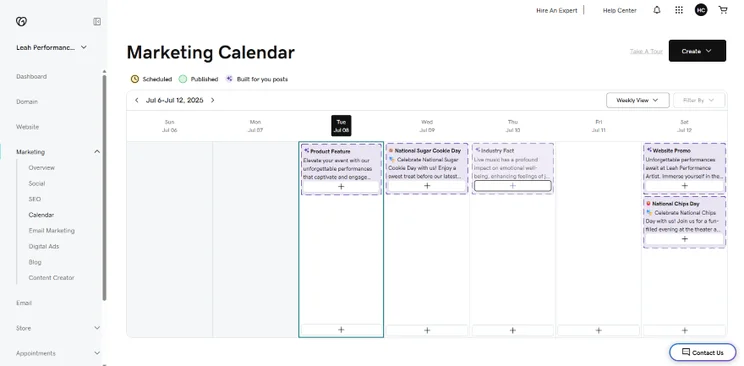
- Excellent SEO and marketing features – I was particularly impressed by its built-in AI-powered Video Editor and Facebook ad functionality. I could design an aggressive ad campaign to mirror the level of a professional agency, all from my website.
- Easy website setup – It’s ideal for artists that aren’t confident about their website design skills, since I could build a functional artist website in an hour with GoDaddy’s AI builder. There are also helpful checklists to support with page optimization and reaching your target audience.
What Are GoDaddy’s Key Downsides?
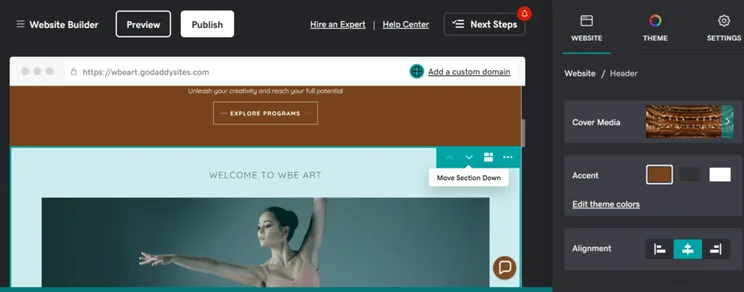
- Site designs lack finesse – I noticed that the AI-generated designs looked generic, which felt very lackluster in comparison to the likes of Squarespace and won’t help your personal brand stand out online.
- Restrictive editor – I couldn’t drag elements around wherever I wanted to make my website my own.
I recommend upgrading from GoDaddy’s free plan to avoid its major limitations, which include:
- No custom domain name
- Access to only the most basic features, like video creation and posting on socials
- Branded GoDaddy ads on your website
- Quick setup times
- Supportive onboarding process
- Cheap pricing plans
- Useful built-in marketing features
- Great social media marketing tools
- Basic template options
- Restrictive editor
- Limited features on free plan
How Much Does GoDaddy Cost?
| Plan | Monthly price (billed annually) | Monthly price (billed monthly) | Ecommerce |
|---|---|---|---|
| Free | $0 | $0 | No |
| Basic | $9.99 | $21.99 | No |
| Premium | $14.99 | $39.99 | No |
| Commerce | $20.99 | $44.99 | Yes |
What Should I Look for in an Artist Website Builder?
When choosing an artist website builder, prioritize professional marketing features, robust ecommerce tools, and deep design customization. Use these questions to help you choose:
- Can it help build my professional presence as an artist? Look for strong marketing features, like Wix’s built-in SEO checklist and blogging functionality.
- Can I sell my art on it? Find versatile sales features for physical or digital wares. For example, Shopify has numerous shipping options, POS, and social media selling.
- Can I showcase my artistic abilities in my website’s creation? You’ll need professional design features like Squarespace offers, with its premium templates and customization options.
- Does it handle high-resolution image uploads? Squarespace automatically formats your site’s imagery for you, while Wix gives you more control with its Wix Pro Gallery feature.
Our Testing Methodology for Artist Website Builders
To find our top artist website builders, we put every builder on this list through our 2025 research process, which analyzed the best options according to six key criteria weighted based on their importance to artists:
- Design features (35%) – Can the website builder support me creatively? We looked at the quality of website themes and the AI builder, as well as the level of creative control
- Website functionality (20%) – How can I promote and market my art? We assessed foundational website features, such as SEO, blogging, marketing, and memberships
- User experience (20%) – Does the builder cater to all skill levels? I’ve created websites with each builder to see how easy they are to use and navigate
- Pricing (10%) – Is it good value for money? We looked at the affordability of the builder, considering price jumps between plans and its long-term value
- Help and support (10%) – What support is available if I run into a problem? I’ve reviewed the customer support options for each builder, checked responsiveness, and compared the quality of responses
- Reputation (5%) – How does the builder compare? We assessed the builder’s popularity and scanned third-party website reviews
Artists considered design features to be most important when choosing a website builder, so our testing methodology places special attention to templates and customization tools. I also included my own firsthand experiences testing each builder, so you can gain a balanced understanding of each option and make an informed choice.
Summary: Which Website Builder Is Best for Artists?
Squarespace is the best artist website builder because its premium templates and customization options help promote artwork and secure new clients. That said, each builder has its own strengths and weaknesses, so take advantage of free trials and free plans to test each option first.
FAQs
Most website builders will have security settings available, such as adding copyright notices to your site to clearly state your ownership over any imagery or artwork. Some builders, such as Wix, can even protect your art by watermarking images on your site. Additionally, I recommend exploring the possibility to disable right-click downloads. All of the builders in this list permit this action, whether it’s through custom code or third-party apps.
A portfolio is a visual representation of your artistic skills and style. I recommend including a variety of your best work, organized clearly and cohesively in a way that gives context for each piece, such as the inspiration behind it, the medium used, and any relevant details. Your portfolio is a window into your mind as an artist, so let it be obvious where your art and creativity come from.
Hiring a web designer offers a more customized and professional touch, but it comes with additional costs. As an artist, your website will be an extension of your creative ability through its design, so it might be better – and more authentic – if you build it yourself.
Squarespace is the best builder for painters looking to express themselves through their website because of its image-centric templates and high level of customization available in the editor. Squarespace’s Acuity Scheduling tool also makes it easy to sell your painting services, whether that’s booking portrait sessions or running workshops.
Hostinger was the fastest loading website builder in our 2025 speed testing. This means it’s a reliable option for creatives needing to upload a lot of media and large files on their site while maintaining a smooth visitor experience.
To ensure your art doesn’t slow down your site’s loading speed, I recommend resizing and compressing your art as best you can, without compromising quality. This will ensure efficient and responsive loading, especially for mobile visitors.
This depends on your space and resources. Selling original physical pieces requires upfront investment in supplies, storage, and shipping, whereas print-on-demand services eliminate manufacturing and delivery costs and can be done directly from your website.
Print-on-demand services, such as Printful or Gelato sync with Wix, Shopify, Hostinger, and Squarespace. They fulfill orders as they come in, printing your artwork onto anything from mugs to hoodies and shipping them to customers.


1 reply
1 reply
1 reply
1 reply
1 reply
1 reply
1 reply