




As our top three website builders for 2025, it’s only fair I put Hostinger, Wix, and Squarespace head-to-head so you can find the right fit for your business. In March 2025, we spent over 300 hours researching, testing, and comparing 12 top website builders, and Wix is our top choice for the 10th year in a row.
But what makes each of these builders one of the best in the market?
- Wix is the best option for most individuals and businesses thanks to its comprehensive suite of built-in features and scalability
- Wix is also the only website builder of the three to offer a free forever plan
- Squarespace’s intuitive editor and designs help beginners create a professional site
- Hostinger is the cheapest website builder, with plans starting from just $2.99 per month
- All three builders offer AI website builders and AI-powered assistants
- We’ve spent over 300 hours testing these builders to offer unbiased, data-driven recommendations
Which Builder Is Best?
Choosing between three builders can be difficult, so you can compare key details in this table before you dive into our summaries:
|
Overall rating
|
Today's best price
|
Free plan or free trial
|
AI website builder
|
Recommended for
|
||
|---|---|---|---|---|---|---|
|
Best All-in-One
 |
Best for Beginners
 |
Best Budget Builder
 |
||||
|
Wix |
Squarespace |
Hostinger |
||||
|
4.8
|
4.5
|
4.2
|
||||
|
|
||||||
|
Free plan |
14-day free trial |
14-day free trial |
||||
|
|
|
|
||||
|
Businesses promoting their online presence |
Creatives, portfolios and service-based businesses |
Freelancers and budget-conscious users |
Which Is the Best for Ecommerce?
Of the three, Wix is the best ecommerce website builder, thanks to its robust suite of built-in sales tools, such as multichannel selling and an easy-to-manage product backend.
While Wix provides a scalable all-in-one solution for growing small businesses, Squarespace and Hostinger both offer ecommerce functionality as well. Squarespace is better suited for creatives and service-based industries with its Acuity Scheduling tool and stunning designs. Hostinger’s ecommerce plan limits you to 1,000 products, but it’s the most affordable choice for new entrepreneurs.
Which Builder Has the Best AI Tools?
Hostinger, Wix, and Squarespace have all adopted AI into their ecosystems to varying degrees, but Wix has the best AI tools overall, from its Business Launcher tool to an AI Logo Maker.
As a standard feature, each builder provides an AI website builder which generates a custom template for you based on your business needs. Squarespace’s Blueprint AI builder is my personal favorite of the bunch, since it guides you through the design journey in a collaborative approach, whereas Wix and Hostinger take your prompts and responses to design the template for you.
That said, Wix’s AI chatbot lets you use conversational, natural language to describe your website, which is really useful for beginners. All three builders also offer AI-powered assistants (Wix Astro, Squarespace’s Beacon AI, and Kodee for Hostinger) to support businesses with queries, design options, and long-term management of their websites.
Personally, I find Squarespace’s website builder the most enjoyable to use, but you can’t ignore the capabilities of Wix. It does it all, without becoming too complex for beginners. While Hostinger is cheap and also easy to build with, you have to factor in the long-term costs of renewal fees and paying for third-party integrations to supplement the limited built-in tools.
For that reason, Wix is my go-to recommendation for most people and businesses. No matter what you want to build, whether it’s a portfolio or an online store, Wix can support you. Plus, it can continue to grow with you as you gain more traffic and visitors.

#1. Wix: Best All-in-One Builder
Wix remains our top-rated website builder for another year, outperforming Hostinger and Squarespace thanks to its impressive built-in features, drag-and-drop editor, and affordable pricing.
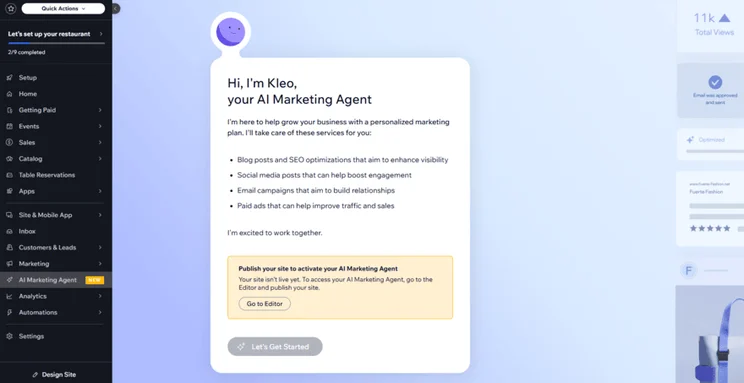
Based on our testing, Wix’s comprehensive features make it the best all-in-one solution, suitable for diverse industries, whether you’re setting up a blog or a full online store. Plus, core functionality like SEO, marketing, and analytics tools is built directly into the dashboard, saving you the hassle of installing and paying for third-party plugins.
✔️ What I Like
- Drag-and-drop editor
- Over 2,000 customizable templates
- AI website builder
- Wix AI features, including Wix Astro
- 24/7 support
❌ Areas To Improve
- Locked into your published template
- Range of features can feel overwhelming for beginners
- Slow to load and use at times
- Limited storage space on cheaper plans
While no new features have been announced in December so far, Wix launched a couple of exciting updates in November. Restaurants using Wix for their website needs can now offer Restaurant Experiences, empowering venues to host, schedule, and manage unique events and experiences. Additionally, Wix merchants in the US can now ship products with UPS via Shippo.
How Much Does Wix Cost?
- Wix has a free plan, but it comes with ads and limited features
- Wix’s four premium plans range from $17 to $159 per month (billed annually)
- You need to upgrade to the $29 per month Core plan to sell online
#2. Squarespace: Best for Beginners
I’ve spent over three years testing website builders myself, and Squarespace is by far the easiest to use. Time and again, I find Squarespace’s guided editor, stunning designs, and structured user experience to be the most beginner-friendly option available.
While Hostinger and Wix are also easy to use, Squarespace keeps things very beginner-friendly. Squarespace’s AI website builder, Blueprint AI Builder, guides you through the setup journey, and the grid framework in the editor helps you keep your pages clean and professional-looking.
✔️ What I Like
- Easiest website builder I tested in 2025
- Guided AI website builder
- More editing support than Wix
- Ecommerce available on all plans
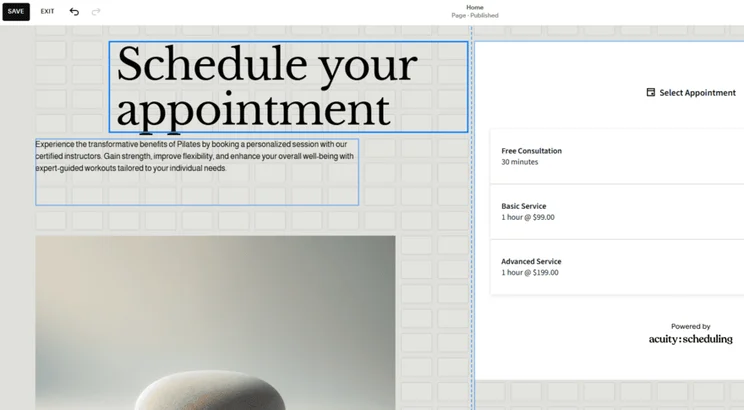
- Use Acuity Scheduling to offer appointments
❌ Areas To Improve
- No autosave feature (remember to save your edits!)
- Only a few Squarespace Extensions to add
- Falls behind when it comes to AI features
Squarespace hasn’t announced anything new since September when it dropped Squarespace Refresh 2025. This update unveiled new tools for websites, including an AI-powered business assistant (Beacon AI), improvements to its Design Intelligence suite, and an AIO Scanner to help you track mentions of your site across AI search engine results.
How Much Does Squarespace Cost?
- Squarespace’s pricing ranges from $19 to $99 per month (billed annually)
- Squarespace has a 14-day free trial, but no free plan
- You can sell online with any Squarespace plan
- Acuity Scheduling costs extra (from $16 per month)
#3. Hostinger: Best Budget Builder
Hostinger is the cheapest website builder of the three. Its two plans cost just a few dollars per month, whereas Squarespace’s and Wix’s plans start at $16 and $17, respectively.
Hostinger’s cheap introductory fees and user-friendly AI tools make it a great starter builder, but I recommend upgrading to another platform once you need advanced tools. For example, online stores with Hostinger can only sell up to 1,000 products.
✔️ What I Like
- Cheaper starting prices than Wix or Squarespace
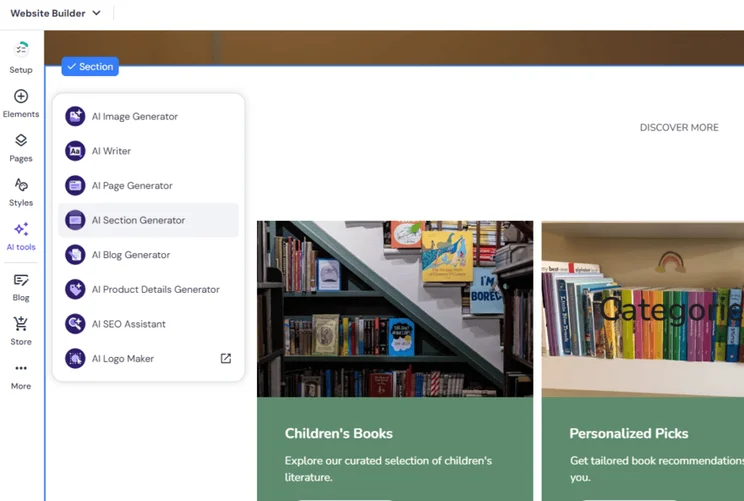
- AI website builder and large suite of AI tools
- Drag-and-drop editor (combines the styles of the other two builders)
- Sell online for less than $5 per month
❌ Areas To Improve
- No app market for extra functionality
- Most AI tools aren’t available on cheapest plan
- Ecommerce plan is limited for businesses
- Lacks scalability
The latest update from Hostinger comes from October, with templates added to Hostinger Horizons (helping businesses source inspiration when building apps and software), as well as options to collect marketing consent at checkout so you can engage effectively with customers.
How Much Does Hostinger Cost?
- Hostinger has two premium plans, with no free plan
- Hostinger’s pricing ranges from $2.99 to $3.99 per month (for a 48-month term)
- You need the $3.99 Business Website Builder plan to sell products
Cost Comparison: Hostinger vs Wix vs Squarespace
For the budget-conscious, we’ve compared each builder’s cheapest premium plan in the table below, so you can easily see the best deal:
| Website builder plan | Price with our discount code | Monthly price (paid annually) | Monthly price (paid monthly) | Ecommerce |
| Wix (Light) | $15.30 with code TAKE10 | $17 | $24 | No |
| Squarespace (Basic) | $17.10 with code WBE10 | $19 | $25 | Yes |
| Hostinger (Premium) | $2.69 with code WBE | $3.99 | $11.99 | No |
Remember that Wix also has a free forever plan, while the other two builders only offer brief free trials. Squarespace has a 14-day free trial, and Hostinger has a seven-day free trial.
How We Test Website Builders
Our dedicated in-house research team spent over 300 hours testing, evaluating, and building websites with Hostinger, Wix, and Squarespace. Our rigorous research process puts these builders through their paces by looking at six core categories, covering 207 areas of investigation. I also carry out hands-on testing regularly to ensure my reviews are up-to-date and helpful.
The six core categories we focus on are listed below – each area has a unique weighting, depending on what is more important for small businesses:
- Website Functionality: 30%
- Design Features: 25%
- Pricing: 15%
- User Experience: 15%
- Help and Support: 10%
- Reputation: 5%
Hostinger vs Wix vs Squarespace: Our Winner
You can’t go wrong by picking Hostinger, Wix, or Squarespace – all three website builders offer AI support, affordable plans, and built-in features to help you grow and manage your site.
Of course, it depends on what you prioritize the most. If you don’t want to break the bank and only need to build a simple site, choose Hostinger. For an easy building experience, Squarespace is your best bet. And, for anything else really, Wix will have you covered.
FAQs
Hostinger Horizons is an AI-powered vibe coding tool which helps users create web apps at a fraction of the time and cost. If you’re a startup looking to launch an app, then Hostinger Horizons is a beginner-friendly and affordable platform to use.
However, if you’re looking to build a website, you’re better off using Wix, Squarespace, or Hostinger’s dedicated website builder.
Based on our 2025 testing, Wix has the best customer support. You can contact Wix in a variety of ways, including 24/7 phone support, weekly live chat, social media, or access its online resources, such as the Help Center or SEO Learning Hub. Wix also offers great in-editor support and its AI-powered assistant, Astro, to help you throughout the website building process.
In comparison, Squarespace and Hostinger lack any phone support.
All three builders are good options for freelancers, but the platform you pick will depend on your website needs and budget.
Hostinger is the cheapest website builder, making it a good starting point for new freelancers. For creatives and portfolio websites, Squarespace’s unique designs can help showcase your work in a professional and eye-catching manner. And, for resume websites, Wix’s well-rounded suite of features and customization options are our top choice.
As part of our website builder rankings, we thoroughly test a builder’s reputation in the market. Hostinger, Wix, and Squarespace performed exceptionally well, with Wix just taking the top spot. This is based on competitor reviews, search volume, online comments, market analysis, and ease of use research.
Based on Trustpilot reviews, Hostinger scored 4.7 out of 5 (with over 57k reviews), Wix scored 3.9 out of 5 (with over 26k reviews), and Squarespace scored 1.2 out of 5 (with 1.2k reviews).
Based on G2 reviews, Squarespace and Hostinger scored 4.4 out of 5, and Wix scored 4.2 out of 5.


0 comments