

Webflow is a responsive website builder built for designers. Its editor is more precise and finely tuned than other platforms, allowing users with design knowledge to create high-quality websites. For this reason, Webflow tends to be used by web designers. It’s ideal for users who don’t want to bother with all the nitty gritty code, but need a platform that’s fully customizable.
It’s a website builder but carries with it a level of customization and power usually reserved for the likes of WordPress. But just like WordPress, Webflow can be a little difficult to use for newcomers. In our 2023 research, we gave it a 3.4 out of 5 overall, because while its design capabilities are top-notch, it’s hard to use for anyone without this web development background.
But what about its other features? Let’s take a deeper dive with our Webflow review!Further Information:
The Best Website Builders – See which platforms made the top 10.
Website Builder Comparison Chart – Compare the very best platforms side-by-side.
What Is Webflow?
Webflow offers classic, precise design tools while also not being entirely code-dependent. With the majority of Webflow users being web developers, they will typically create and release tools, themes, and features for other Webflow users to download and add to their own sites. This community-driven approach to website building is unique to Webflow and helps new users build their sites, though it still helps to have some web developer knowledge.
A few years back, traditional platforms like WordPress and Drupal were used by web developers to build websites for clients. These days though, modern website builders like Wix, Shopify, and Squarespace have opened web creation up to anyone and everyone. Webflow sits somewhere in between the traditional and the modern.
Webflow Pros and Cons
Before we dive into the review, get a sneak peek at Webflow’s pros and cons:
Webflow Pros
✔️ Great levels of design customization, without having to know code
✔️ Excellent range of templates, suitable for ecommerce and dynamic content
✔️Webflow has a free plan you can build on
Webflow Cons
❌ Relatively difficult to use for a website builder, especially in comparison to Wix or GoDaddy
❌Reliant on third-party and user-generated content
❌ No live chat or phone supportWe can give you the pros and cons of using Webflow, but there’s nothing better than hearing about the experiences of actual businesses that have used the platform. Check out our Q&A below to hear from an entrepreneur who uses Webflow on a daily basis.
Webflow in Action: Ship 7

I highly recommend Webflow for its user-friendly interface and reliable customer support.
Q&A
We have been using Webflow to run our website Ship7 for approximately two years.
We started using the free plan on Webflow because it offered a cost-effective solution for building a website.
On the free plan, we were able to create a professional website to showcase our products and services in order to attract new customers.
Although the free plan was a good starting point, eventually, we upgraded to a paid plan for enhanced features and customization options. We gained access to features such as CMS collections (the free plan only comes with 50 items), much wider bandwidth, and additional user slots for our content editors (free only allows 1).
What I like most about Webflow is its intuitive visual editor, which allows us to create stunning and responsive websites without the need for coding expertise (actually, you need zero experience in this because no coding is required at all).
While Webflow is a powerful platform, I believe there is room for improvement in terms of plug-ins and add-ons landscape. I wish Webflow had a policy promoting external contributors to create add-ons and plugins that would complement the platform like WordPress plugins do.
Absolutely. I highly recommend Webflow for its user-friendly interface and reliable customer support.
Webflow Pricing
Because Webflow markets itself as a more sophisticated website builder that offers users greater creative control, you may think it’s only natural that its prices reflect that.
In reality, Webflow actually manages to be cheaper than other competitors. Its starting price for websites is $14 per month compared to Wix and Squarespace’s $16 per month, and its Advanced plan for ecommerce is only $212 per month while Shopify’s is $299.
The issue is that half the features included for this price are things an average user may not need, want, or know how to use. For instance, Webflow’s Basic plan lets you have 10,000 logic flows per month, but no membership areas, scheduling tools, or email marketing capabilities. Additionally, to get the features you actually want means downloading third-party software, which has its own price tag of up to $149!
That’s why, in our research, we could only give Webflow 2.3 out of 5 for value for money. Its price may be cheap, but as an average user, you are not actually getting anything useful for that price.
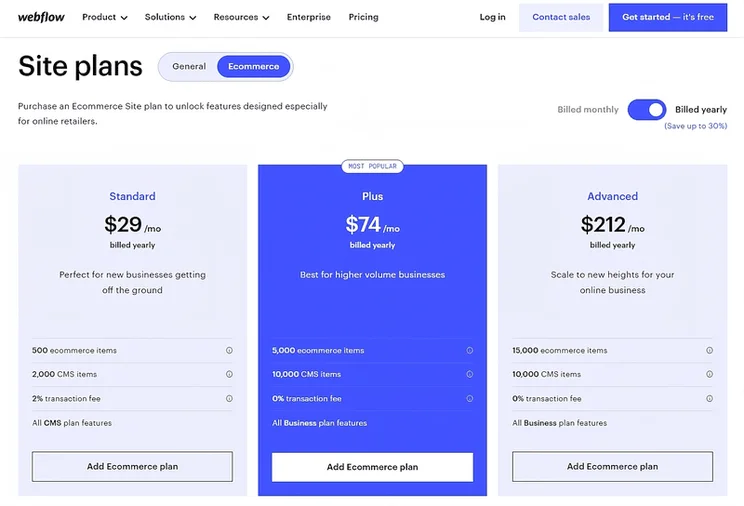
Webflow currently has six pricing plans: three for websites, and three for online stores. The prices shown on Webflow’s website are monthly prices for an annual subscription, and these are the prices we’ll walk you through below.
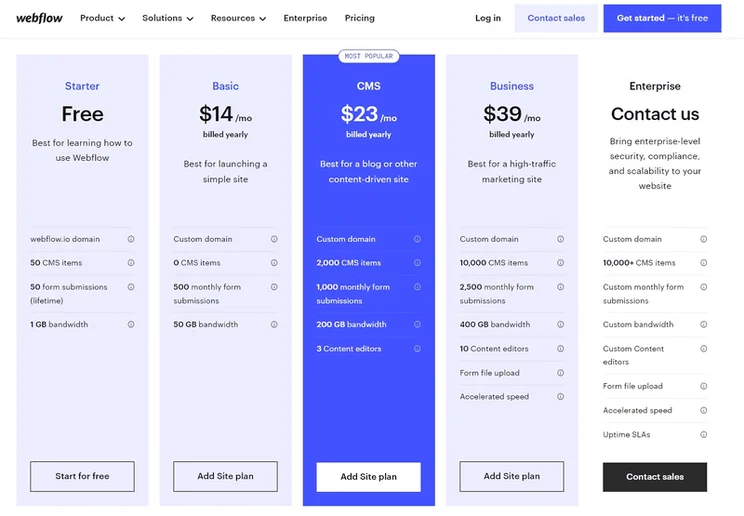
Webflow also has a free plan. You are able to build your site and publish, and unlike Wix’s free plan, your site won’t have to host ads. You will have to put up with a rather clunky webflow.io domain name, plus you can’t sell or get access to the more advanced design tools.
The cheapest paid plan is the $14/month Webflow Basic plan. This is suitable for simple sites that just need a few standard elements, like image galleries, contact forms, or menus.
The CMS plan for $23/month focuses on blogs and content-driven sites, while the Business plan is, unsurprisingly, for businesses looking to market and scale and costs $39/month.
Webflow’s ecommerce plans range from selling a few products on the side (Standard plan) to selling efficiently in bulk (Plus plan), to marketing and managing your products in front of a global audience (Advanced plan). Here’s a breakdown of its pricing (billed annually):
- Standard – $29/month
- Plus – $74/month
- Advanced – $212/month
There’s also Webflow for Enterprise, which is available on a quote-by-quote basis. This is where Webflow will actually help build your site for you, and support you through the entire process. This is a great service, but only really suitable if you’re a large business.Further reading:
Best Cheap Website Builders – 14 platforms that all offer monthly plans under $30!
Best Free Website Builders – 6 platforms where you can create a completely free website.
Webflow vs. Squarespace – See how two design-orientated website builders compare against each other.
Webflow Ease of Use
This is the category where Webflow is the weakest, earning just 2.1 out of 5 for ease of use in our ranking – the lowest of any website builder we’ve tested. From our own experience with the builder, the editor seemed a level of knowledge above what we were comfortable with. Just from looking at the user-generated content, it’s clear you can do a lot with Webflow, but we didn’t have the web development knowledge to achieve it.
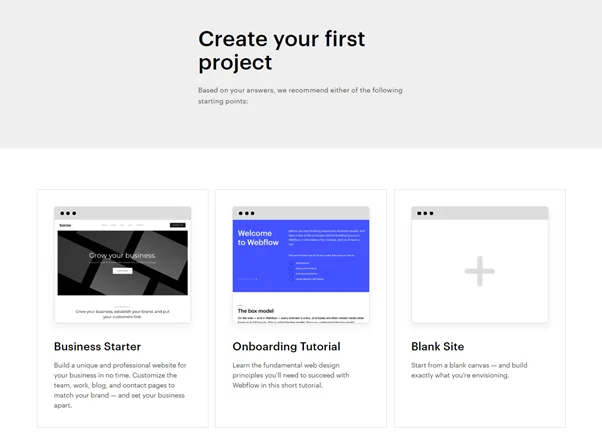
We’d absolutely recommend Webflow’s tutorial to any first-time users, but even then that might not be enough.
Webflow Editor
After you’ve completed your tutorial and picked a template, you’ll enter the editor. Don’t be alarmed if you think your computer has opened Photoshop by accident – Webflow’s editor just happens to look scarily similar.
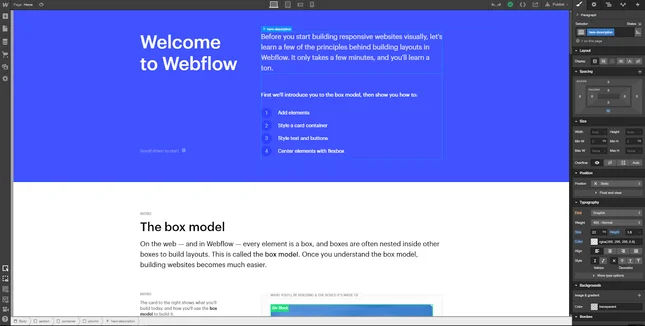
And just like Photoshop, there are many design options to choose from. While web designers will feel like kids in a candy shop, regular folk may well be intimidated.
There’s a lot to take in, and even with the onboarding tutorial, it isn’t immediately obvious how to do a lot of things. As Webflow itself explains, though, it’s best to think of your website as a series of boxes.
‘The Box Model’, as Webflow calls it, is the process of creating a box for every element of your site and overlaying them on top of one another. Image boxes, text boxes, and button boxes all add up to form the layout of your site.
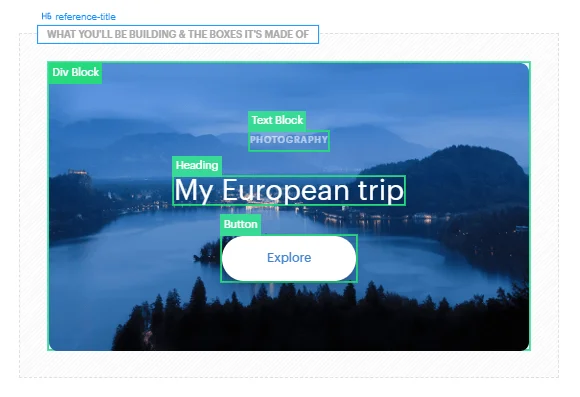
Thinking of your website in this way makes it easier to visualize what you want, but the editing can still be tricky. Ideally, editing should be the simplest part of website building. How are you going to make a website if you can’t even use the tools to build one? So it’s disappointing that a builder with so much potential like Webflow does not have a more accessible option, like Squarespace’s Blueprint for example.
If you’re new to website building, we’d recommend setting aside a couple of hours to get to grips with Webflow before you start creating your website.
Webflow Features
We gave Webflow 2.9 out of 5 for features in our research because while it can do a lot, it just doesn’t have the same suite of features as say, Wix or Squarespace. For instance, just integrating social media like a live Twitter feed or an Instagram page proves to be fairly difficult due to the editor interface.
Creating content through Webflow is set up primarily as a CMS (Content Management System), which is a different structure from other website builders and more like WordPress or Drupal. You create pages via templates in the back end instead of the drag-and-drop method. It’s more precise but difficult to get your head around.
Webflow’s setup is designed for web developers, so the options for average users can be pretty frustrating as they are just too complex. If you are a beginner, it’s worth taking a look in Webflow’s help center – called Webflow University – to see what is and isn’t possible. This will save you time trying to find a feature you think should be really simple to locate.
Many of the more advanced things you can do on Webflow aren’t built-in. Instead, they come as integrations you can add into your site
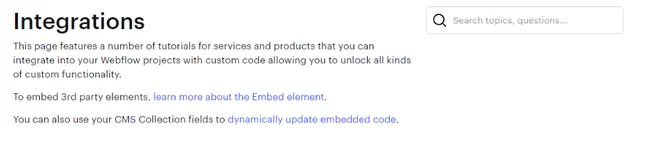
Most top website builders have their own app stores. Webflow integrations are similar, but their addons are made by third parties, not Webflow directly. Many of Webflow’s integrations are made by its own users – the Made in Webflow and Libraries features let you download and clone whole website templates or specific features made by other Webflow users. This content sharing is unique to Webflow and is a great way to learn the platform.
Let’s examine some of the key built-in features Webflow does give you, whether you’re building a regular website or an online store.
Parallax Scrolling, Animations and Interactions
Design is something Webflow clearly values a lot. In keeping with modern web trends, there’s a whole bunch of quirky movements you can add. Parallax scrolling, multi-step animations, and microinteractions are just a few of the cool things you can create with Webflow.
Backups and Security
On a slightly more boring (but very important) note, security is something Webflow also takes very seriously. Alongside providing you with automatic backups – so you can restore your site to the last save point, should something go wrong – it also comes with a free SSL certificate. This helps protect your site, and shows visitors your site can be trusted with their personal information.
Advanced SEO Control
Search engine optimization (SEO) is the process of tweaking your site’s content to help it appear higher in the results pages of Google and Bing. Most platforms let you add/edit metadata, create image alt text, and target keywords. Webflow goes one step further, offering automatically generated sitemaps and customizable 301 redirects.
Webflow’s Ecommerce Features
Webflow also has ecommerce functions, enabling you to build an online store and sell products. However, unlike other ecommerce platforms like Shopify, Webflow has a limit to the amount of products you can sell. The Advanced plan can only handle up to 15,000 products, and the Standard only lets you sell 500.
Multiple Payment Options
As well as accepting standard credit and debit card payments through Stripe, Webflow also lets you accept Apple Pay and PayPal.
Automatic Tax Calculations
Once a customer gets to your checkout, Webflow will automatically calculate the sales tax and VAT owed and add it on. This can save you hours of time inputting different tax brackets and amending VAT costs.Further reading:
The Best Ecommerce Platforms – Discover the seven best options on the market.
Ecommerce Website Builder Comparison Chart – Compare and contrast the top platforms.
Who Do We Recommend Webflow For?
We recommend Webflow if you are a web designer who’s looking for a way to build clients a detailed website, using a platform that doesn’t require coding knowledge. Because of its complex nature, Webflow is not suitable for beginners. If you want an intuitive, easy-to-use website builder that still allows you to be creative, we believe you’d have an easier time with Wix or Squarespace. Alternatively, Webflow works for people who have previously used those builders but want more control over the look and feel of their site.
If you want to see more, click the drop-down to see how Webflow complements each industry:
Webflow lets you sell online with its three ecommerce plans. It provides a few essential features with these plans, such as Mailchimp integration, checkout customization, and support with PayPal and Stripe, but falls a bit flat with no abandoned cart recovery, no POS system, and a limit on how many products you can sell.
As a platform made for web designers, we’d only recommend Webflow for selling professional services or art, as by imposing limits on products, you can’t expect to run a large online store. Online art selling is nothing to sniff at either, with the market equalling $10.8 billion in 2022.
Webflow is slightly cheaper than both Wix and Squarespace – but that does not make it the cheapest builder out there. What Webflow does do well is being able to have complete creative control…as long as you know a bit about web development (or are willing to learn)
If you need a site up and ready quickly, we suggest you look elsewhere. But we do recommend a Webflow website if you are a designer or designer-in-training. It’s a great platform to test your abilities but not so devoid of ease of use as coding a site from scratch.
Webflow makes it onto our list of the best blogging platforms, scoring 3.5 out of 5 overall. It has great customization options with great SEO options on each page. But as we’ve mentioned, it might be too confusing for newcomers due to its more technical focus.
If you already have a bit of technical knowledge, then we’d definitely recommend Webflow for bloggers. If not, then it’s better to go with a builder with a higher ease-of-use score like Squarespace.
Webflow Template Design
Design is Webflow’s greatest strength as a builder. Over time, Webflow has grown in customization by adding more technical elements to its editor. In our ranking, it’s actually joint second with Wix for design functionalities across all the builders we test with a 4.6 out of 5.
Webflow has over 2000 templates in total for you to choose from, including 50 free ones. From our experience, no other templates come with as many in-built animations and smooth page transitions. Each template is different so test them out to find the perfect one.
You can filter templates by industry, free/premium, or ecommerce. This makes it really simple to find a template that suits your needs. You can even preview the designs before making your decision, and see which ones support dynamic content.
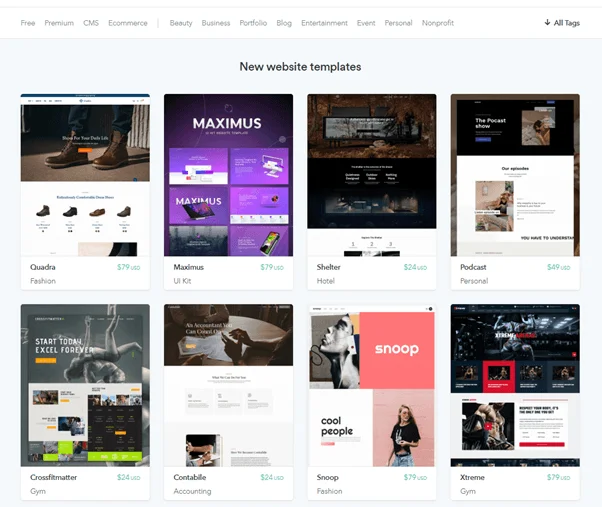
All of Webflow’s templates are responsive, meaning they automatically adapt to fit different screen sizes, depending on the device your site’s visitors are browsing with.
Each template also comes with a brief description that tells you what type of site it’s best for and what your design options are. Most website builders have responsive templates and let you preview their designs, but Webflow’s extended template descriptions are a nice touch.
Premium templates range in price from $19 to $149. Most tend to cost either $49 or $79, which may sound steep, but as a one-off cost, you should see it more as an investment.
Additionally, Webflow’s user-generated templates also provide users with choices for templates. Users may charge for the most premium ones, but the majority are free for you to clone onto your own site to have a play around with!
Webflow’s templates are generally well put together and can hold their own against market leader Squarespace in terms of quality of design. They’re clean, responsive, and fully customizable.Further reading:
How To Design A Website – Our easy to follow eight step guide.
How To Choose Your Website Template – Three simple sets of criteria.
Webflow Help and Support
Webflow has some really helpful tutorials and guides, but the level of personal support leaves a lot to be desired.
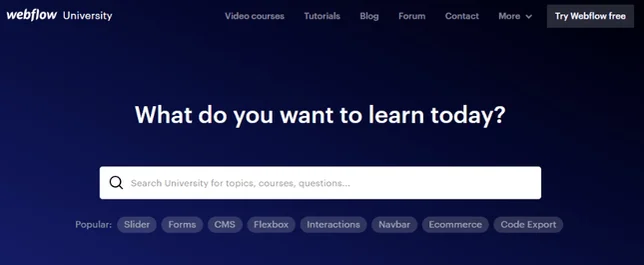
Let’s start with the good stuff. Webflow’s own help center, Webflow University, is an online resource where you can find guides on everything from how to use the platform to how specific integrations work. It’s well presented, easy to search, and should generally be the first place you look if you get stuck.
Failing that, you can always hit up Webflow’s community forum, where users get together to discuss the platform and share their experiences and difficulties. If you need help with something, it’s relatively safe to say someone else will have encountered the same problem.
It’s not all rosy, though. If you want to actually contact Webflow directly, it can be a bit of a hassle. Webflow currently doesn’t provide a phone or live chat service, meaning the only way to get in touch is via email.
Webflow’s response team is on hand 6 a.m. – 6 p.m. PT, Monday – Friday, and you can expect a personal reply within 24-48 hours. You can leave a message and attach files to show precisely what the problem is.
Overall, we gave Webflow 4 out of 5 for its help and support, putting it third overall in our website-building ranking. A platform that operates the way Webflow does needs robust help and support, and Webflow more or less provides it.
Webflow Review: Conclusion
So there you have it – a full Webflow review. As you can see, it’s a website builder with a very specific target audience and one with clear strengths and weaknesses.
Despite not being the cheapest or easiest platform to use, Webflow does stand tall when it comes to design. You can customize all sorts, without having to know code, making it feel very advanced without feeling inaccessible.
Templates are well-designed, mobile optimized, and cover a range of industries. Webflow’s features, however, are rather limited, and you may well have to make use of its third-party integrations.
If you can’t come to terms with Webflow’s lack of accessibility, then Wix is our top-rated website builder overall. It also comes with a free plan, so you can create and publish your website without spending a penny! However, you will have to upgrade to a premium plan if you want to get rid of Wix branding, have your own domain name, and/or sell online.
Squarespace, meanwhile, is a classy website builder that’s more in line with Webflow in terms of design, and easier to use. It offers a 14-day free trial, so you can see what Squarespace is all about before deciding whether it’s worth paying for.
Whatever platform you end up choosing, be sure you’re confident with it, and understand how it works before upgrading to a paid plan. After that, you’re ready to create your dream site – best of luck!Further reading:
Wix Review – Discover why Wix is ranked as the best overall website builder.
Squarespace Review – If you’re design conscious, see what Squarespace can offer you.


1 reply
1 reply