

- Wix vs BigCommerce: Quick Comparison
- 1. Best for Pricing: Wix
- 2. Best for Selling Online: It’s a Tie!
- 3. Best for Marketing Your Business Online: Wix
- 4. Best for Easy Store Setup: Wix
- 5. Best for Templates: Wix
- 6. Best for Help and Support: Wix
- How We Tested Wix and BigCommerce
- Wix vs BigCommerce: Conclusion
When it comes to comparing website builders, how do Wix and BigCommerce fare against each other? Well, if you need an online store, both of these website builders have potential – but your final choice will ultimately depend on your unique needs.
Based on our in-house testing, Wix is the best ecommerce platform out of the two due to its outstanding website features. However, BigCommerce is still a strong contender due to its impressive sales tools that are well suited for large or scaling businesses with growing inventories.
Below, I’ll compare Wix and BigCommerce in greater depth, so you can review each platform’s costs, tools, templates, and other crucial features for your online store.
I’d recommend Wix for…
- Small business owners who want to establish a professional presence online, while selling some physical or digital products on the side
I’d recommend BigCommerce for…
- Business owners in charge of large or scaling businesses who need powerful sales tools that can accommodate the size of their online store
Wix vs BigCommerce: Quick Comparison
Short on time? Here’s a quick overview of both platforms so you can compare their features:
|
Starting price
|
Free plan or free trial
|
Pros
|
Cons
|
Number of templates
|
||
|---|---|---|---|---|---|---|
 |
 |
|||||
|
Wix |
BigCommerce |
|||||
|
$29 |
||||||
|
Free plan |
15-day free trial |
|||||
|
|
|||||
|
|
|||||
|
2,000+ |
200+ |
1. Best for Pricing: Wix
Wix offers cheaper plans than BigCommerce does
Wix’s plans are not only cheaper, but they come with brilliant tools like free ecommerce templates and the biggest number of website features on the market.
Wix’s pricing plans are generally cheaper than BigCommerce’s. For example, Wix’s plans range from $17 to $159 per month (billed annually), while BigCommerce’s plans range from $29 to $299 per month (billed annually). However, you’ll need to be on the Core plan or above to sell online. Here are Wix’s plans in more detail:
| Wix plan | Plan costs (billed annually) | Key features |
| Light plan | $17 per month |
• Free domain for a year • 2 GB storage space • Two website collaborators |
| Core plan | $29 per month |
Everything on the Light plan, plus: • Have 50,000 products in your catalog • 50 GB storage space • Five website collaborators • Website analytics • Accept payments • Sell on marketplaces or social channels • Set up in-person selling • Loyalty programs for customers • Customers can leave product reviews • Customers can create accounts |
| Business plan | $36 per month |
Everything on the Core plan, plus: • 100 GB storage space • Ten website collaborators • Advanced shipping methods • Automated sales tax for 100 transactions per month |
| Business Elite plan | $159 per month |
Everything on the Business plan, plus: • Unlimited storage space • 15 website collaborators • Priority customer care • Automated sales tax for 500 transactions per month |
Do note that Wix comes with a free plan too, but I don’t recommend using it unless you’d like to test out its interface before committing to a billing cycle. Wix ads and a Wix domain (“accountname.wixsite.com/siteaddress”) will show up on your website, which won’t look professional to new visitors.
Though BigCommerce’s pricing is more expensive overall, its cheapest plan is the same price as Wix’s Core plan. On it, you’ll have access to numerous sales tools that are best suited for large or scaling businesses. These include multichannel integrations, gift card and discount creation, and real-time shipping quotes. Familiarize yourself with BigCommerce’s main plans below:
| BigCommerce plan | Plan costs (billed annually) | Key features |
| Standard plan | $29 per month |
• Sell an unlimited number of products • Multiple staff accounts • Multichannel integrations including eBay, Amazon, Facebook, and Google Shopping • Coupons, gift cards, and discounts • Real-time shipping quotes • Customers can leave product ratings and reviews |
| Plus plan | $79 per month |
Everything on the Standard Plan, plus: • Abandoned cart recovery emails • Store credit cards • Customer groups |
| Pro plan | $299 per month |
Everything on the Plus plan, plus: • Google customer reviews • Product filters • Custom SSL (Secure Sockets Layer) |
There is a considerable price jump between BigCommerce’s least expensive and most expensive plans. However, if you anticipate your store becoming quite large, paying for one of these plans might be the better long-term investment due to the powerful sales tools you’ll receive.
Additionally, you can test out BigCommerce’s features first with its 15-day free trial. You don’t need to give BigCommerce your credit card details to get started on this.
At the end of the day, our hands-on testing showed that both platforms are expensive to use, though do come with a strong range of sales features for your business. However, if you need a cheaper option, I suggest turning to platforms like Squarespace or GoDaddy instead, since they also offer high-quality features but at a more affordable price point.
2. Best for Selling Online: It’s a Tie!
Wix and BigCommerce both have great sales features, but for different audiences
Owners of larger stores will appreciate BigCommerce’s built-in ecommerce features fit for scaling inventories, while smaller businesses will find that Wix’s sales tools are enough to cover their needs.
Wix and BigCommerce both come with powerful ecommerce features for online stores, but these features are tailored to two different types of users:
- Wix’s sales features are better for small independent businesses who want to set up a professional online store, but don’t have selling as their main focus
- BigCommerce’s sales features are better for large or scaling ecommerce stores that are experiencing considerable growth
With this key difference in mind, let’s compare their ecommerce features and highlight any notable strengths or weaknesses.
Inventory tools
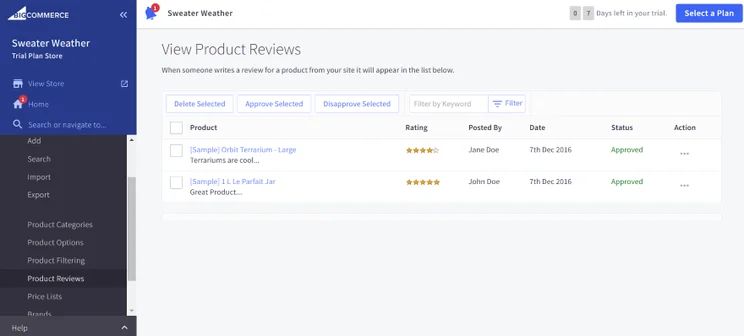
BigCommerce is the clear winner when it comes to inventory management tools, since its tools are designed to accommodate stores with a large number of products to catalog, categorize, and sell.
The platform’s emphasis on selling products was noticeable as soon as I signed up. When entering my dashboard for the first time, I was instructed to add my store’s physical, digital, or service-based products first. The inventory tools enabled me to:
- Upload mass products via CSV
- Create different product variant options to categorize products based on colors, sizes, weight, and other characteristics
- Sell across multiple channels, including online marketplaces like Amazon or social media platforms like TikTok and Instagram
- Add product identifiers like SKUs, MPN (Manufacturer Part Number), or GTIN (Global Trade Item Number)
- Customize stock level settings and choose whether to show stock levels on your store
If you’re not selling a large number of products, Wix’s inventory tools will be enough for your needs. Though BigCommerce’s tools are stronger, Wix did give me access to key sales features like CSV upload, product variants, the ability to sell unlimited physical and digital products, and access to multiple sales channels like eBay and Google Shopping.
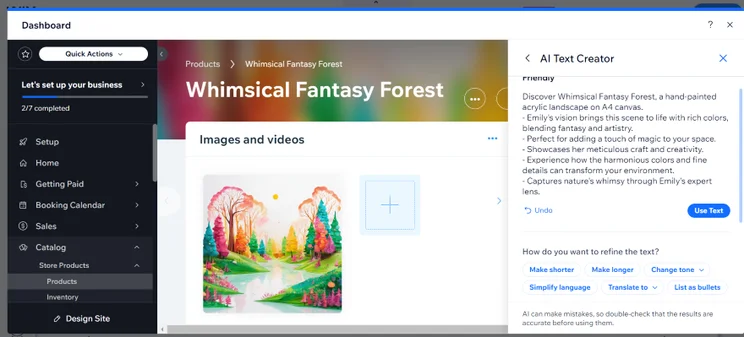
Top Tip: Did you know that you can manage your Wix store on the go? Wix’s mobile app lets you access key dashboard features, chat with website visitors, track your store’s analytics in real-time, and manage your online store’s inventory and product images.
Payment methods
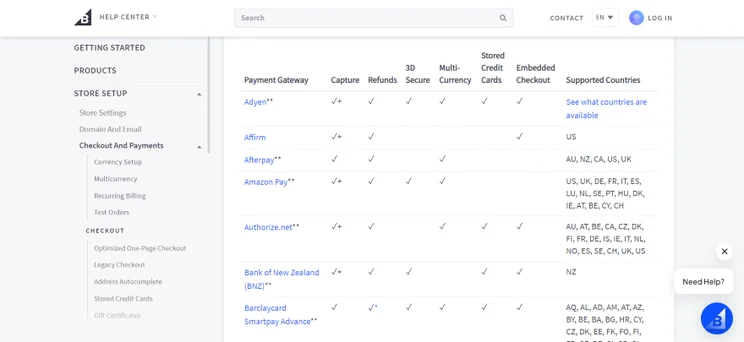
To start taking payments online, you’ll need to set up multiple payment methods on your online store. Luckily, both Wix and BigCommerce come with various options to choose from. BigCommerce can accept over 65 payment methods, while Wix can accept over 70 providers from across the globe. These include:
- Digital wallets like Apple Pay and Google Pay
- Credit and debit cards like Visa, Mastercard, Discover, and AMEX
- Buy now, pay later schemes like Klarna
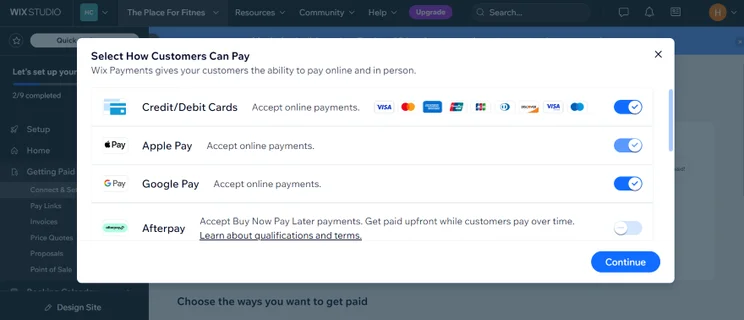
Wix’s payment methods are more convenient, since the platform comes with its own payment solution: Wix Payments. Under “Getting Paid” on my Wix dashboard, I clicked on “Connect & Setup.” This allowed me to connect with multiple payment methods at once, and kept the process streamlined and organized.
You will come across additional fees when accepting payments through your online store.
Though BigCommerce doesn’t charge transaction fees on any of its plans, you will encounter card charges from the payment methods you’re using. This normally amounts to 2% to 3% taken from each sale.
Wix also doesn’t charge transaction fees on its Core plan and above. However, most payment methods you use with Wix will charge you a standard 2.9% + $0.30 (or above) payment fee for each sale.
Shipping methods
Once your payment methods are set up, you’ll also need to think about how to ship your products to customers. Here are some of the main options available when shipping through Wix or BigCommerce:
- Free shipping
- Flat rate shipping that standardizes shipping costs based on the weight of the parcel
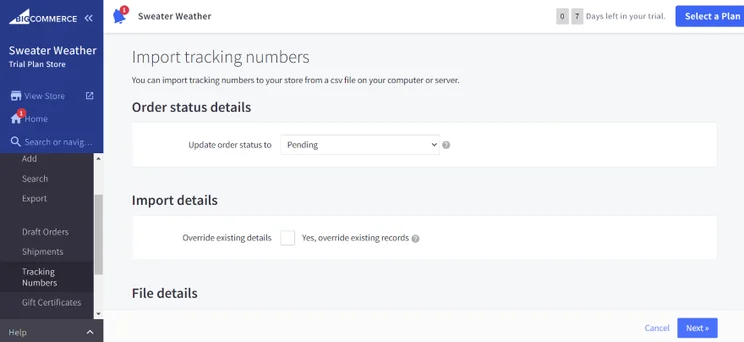
- Real-time shipping quotes that automatically calculate shipping rates for customers at checkout. Wix offers quotes for USPS, while BigCommerce has slightly more choice and offers quotes for USPS, FedEx, and UPS
Security
Since customers will be ordering from you, you need to ensure that your store has strong website security in place to protect their data. During our hands-on testing, we found that Wix and BigCommerce both come with a built-in SSL certificate, secure customer login areas, two-step verification, and the ability for customers to pre-save their card details.

Wix has a slight advantage over BigCommerce in terms of fraud detection, with the platform partnering with fraud prevention specialist Forter to help merchants spot suspicious payments.
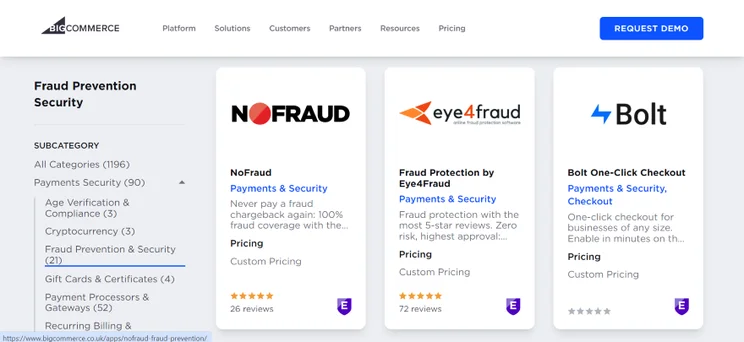
With BigCommerce, you’ll need to download a third-party app like ClearSale, Eye4Fraud, or FraudLabs Pro to keep your website protected. It’s a shame that this system isn’t built into BigCommerce already, since security should be a top priority for any ecommerce website builder.
3. Best for Marketing Your Business Online: Wix
Wix’s marketing suite enables you to promote your store far and wide
With in-depth SEO tools – from detailed resources to a clear SEO checklist – and a professional email marketing feature with sleek templates, Wix is the best choice for growing online.
Once your online store is up and running, you’ll need work on your marketing channels and bring an awareness of your website to new audiences. Let’s explore Wix and BigCommerce’s marketing capabilities and see how they compare.
SEO
All website builders should include basic SEO (search engine optimization) tools, since it’s one of the main ways you’ll bring more traffic to your website through search engines – and Wix’s SEO capabilities scored top marks during our hands-on testing.
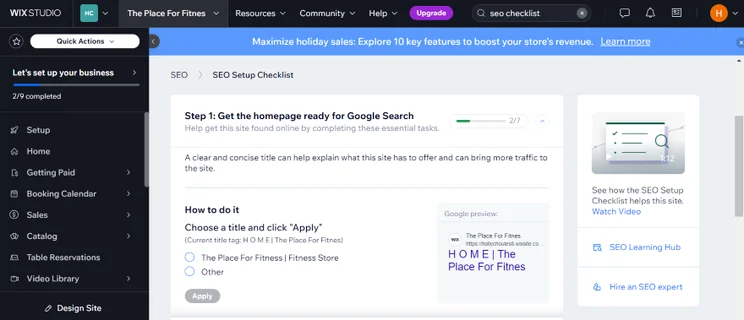
For one, the platform is fantastic for international SEO because it supports multilingual websites, allowing you to change your SEO settings for different languages. Additionally, I could access a dedicated Wix SEO setup checklist from my dashboard. This gave me a clear list of instructions for setting up SEO on my pages, from mobile optimization to adding targeted keywords.
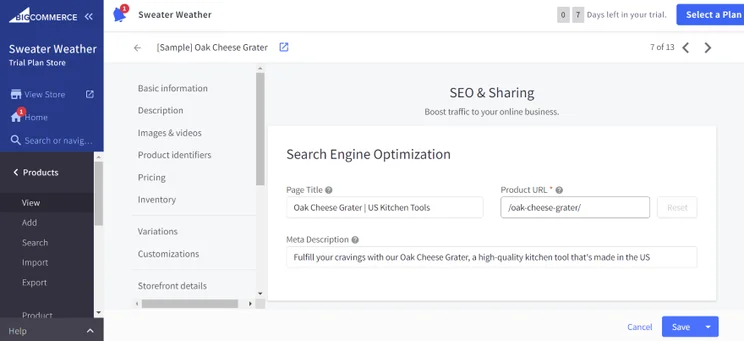
BigCommerce, however, doesn’t have a unified SEO checklist like Wix. Instead, you’ll often need to navigate across different areas of your dashboard to tweak SEO.
Top Tip: To boost your SEO knowledge, Wix has launched a new SEO course for 2024, featuring classes from SEO professionals. It’s currently available from the Wix SEO Training Hub.
Both Wix and BigCommerce do come with these essential SEO features for your store:
- Add meta titles and meta descriptions that summarize a page’s contents on Google search results
- Create custom URLs
- Add alternative text to images to help visually impaired users understand the content of an image if it doesn’t load. It also helps Google contextualise the imagery on your website
- Integrate Google Analytics and Google Search Console for additional data on your website’s performance
Email Marketing
Having an ecommerce email marketing strategy is key to maintaining customer relationships, since you can keep loyal shoppers up to date with your company and showcase new products or offers. In this battle, Wix’s email marketing tools do have the upper hand over BigCommerce’s.
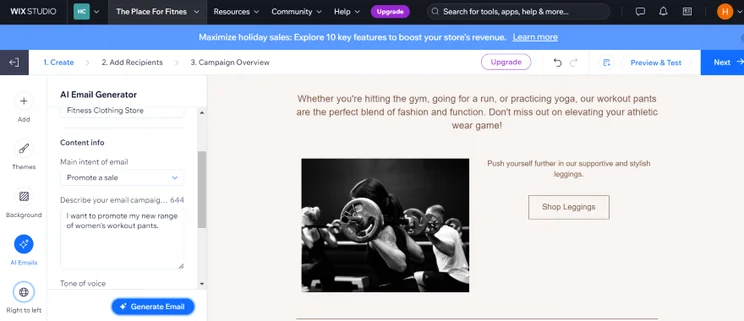
With Wix’s built-in marketing suite, you can choose from multiple mobile-friendly templates, look at email campaign stats, manage your contact lists, and create automated emails to streamline your workflows.
I also found Wix’s email marketing editor very easy to use. I could use the navigation bar to click on different elements – like text or imagery – and add them to my email. I could also click on the “Themes” and “Background” tabs to tweak my email’s design, with an aesthetic range of colors and styles to choose from.
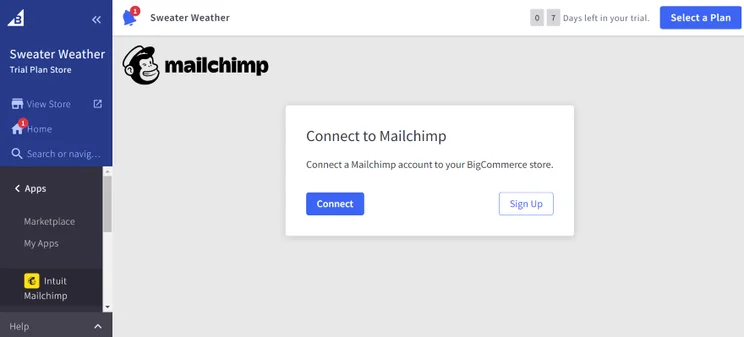
BigCommerce doesn’t have built-in email marketing capabilities, so you’ll need to download a suitable, third-party app from the marketplace to get started, which does mean it’ll take a little longer to create your first email. You can find apps from popular email marketing companies like:
- MailChimp
- Klaviyo
- Google Workspace
- JustUno
Though these apps are free to install, each company will have its own pricing plans. Depending on your needs, you’ll want to look out for packages that are compatible with your budget, but also come with the features you’re looking for.
Social Media Channels
If you’re eager to connect with wider audiences, you should promote your products on social media too. Wix and BigCommerce come with social media tools that enable you to create ads and sell on TikTok, Facebook, and Instagram.
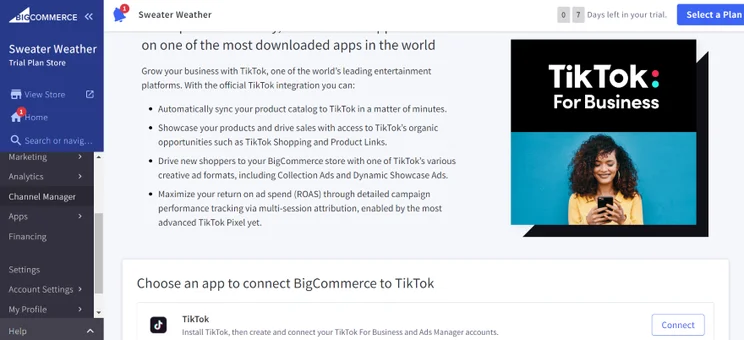
However, Wix does take the cake when it comes to social media, allowing you to create and schedule professional social posts from your dashboard. Once you’ve designed your template, you can publish it on Facebook, YouTube, X, and LinkedIn to build further interest in your brand.
4. Best for Easy Store Setup: Wix
Wix’s user-friendly interface keeps setting up uncomplicated
Beginners can easily navigate Wix thanks to its personalized dashboards, friendly AI chatbot, and straightforward website editor that allows you to drag-and-drop new elements onto your website and shape it how you wish.
Wix beats BigCommerce when it comes to setting up your online store, with a user-friendly approach to help you get your website up and running. Once I’d signed up, I used Wix’s AI website generator to create my website, though I also had the option to choose from Wix’s template selection instead.
In this case, I went for the AI option by clicking on “Start chat.” A chatbot then sent me through a series of questions regarding my online store, like my website’s purpose, its name, the services I offer, and my target audience.
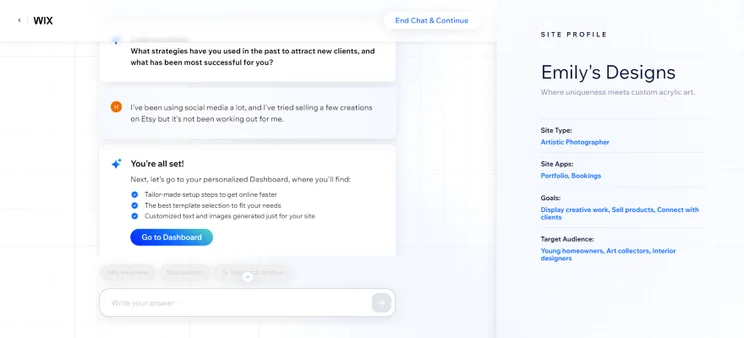
Once I’d filled out all the questions, I ended up on my dashboard, which featured a checklist that was tailored to my needs based on my answers. For instance, because I had specified that I wanted an art portfolio on my test website, the checklist featured an option to add my first project.
BigCommerce, on the other hand, has a slightly longer sign up process that can be buggy at times. When creating an account, I had to fill in numerous details like:
- My first and last name
- My phone number
- My email address
- My password
- My store name
- The size of my business
- Where my online store is hosted
After filling out these details, you can then click “Create your store”. However, be aware that our team has run into technical troubles getting past this stage before, such as the “Create your store” button not working when clicked on. If you run into any similar issues, you’ll need to contact BigCommerce’s customer support to continue.
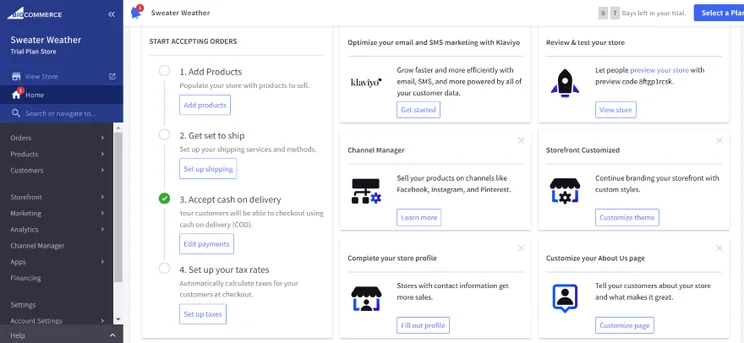
Similarly to Wix, you’ll be greeted by a detailed checklist as soon as you enter your dashboard. BigCommerce’s dashboard (called the Control Panel) is comprehensive, taking you through key online store steps like adding your products, setting up shipping and payments, and establishing your tax rates.
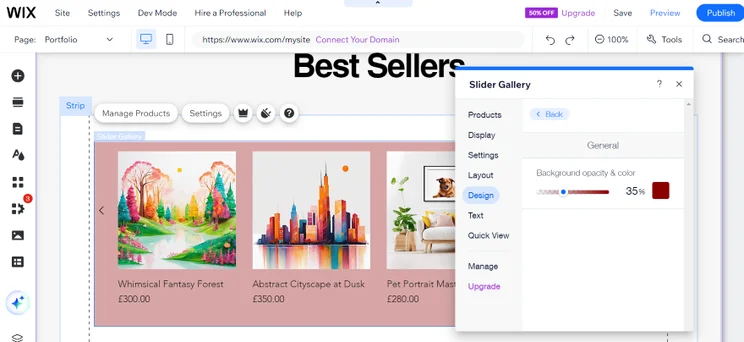
When you begin designing your website, both website builders have editors that are easy to pick up, though the Wix Editor does come out on top due to its intuitive drag-and-drop editor. I could seamlessly drag elements – like text, photos, contact forms, and payment buttons – onto my homepage, and organize each page by adding and arranging new sections.
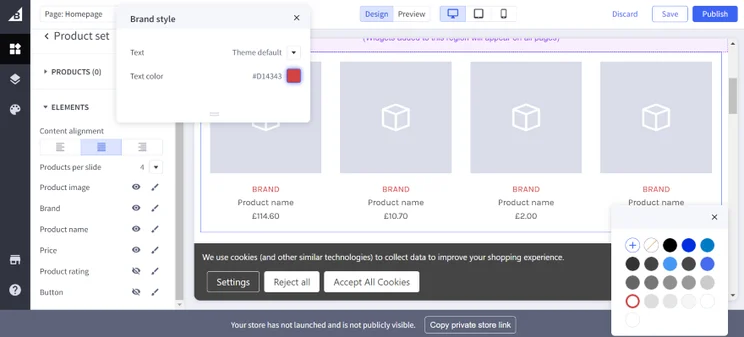
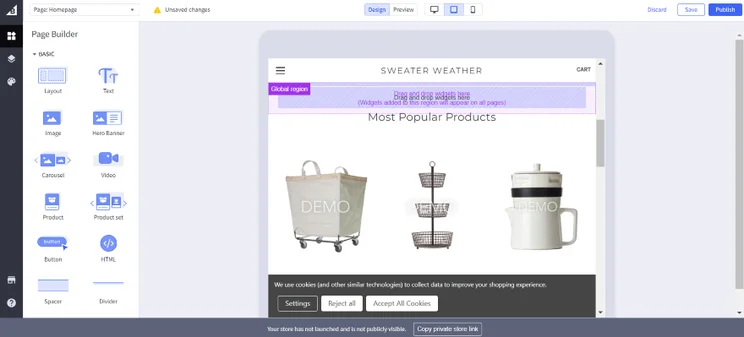
I found BigCommerce’s editor, though fairly easy to use, more restrictive in comparison. Instead of dragging and dropping content, I had to edit my ecommerce website by stacking different sections on top of each other. I could also click on different elements to add them to my site, but I could only drag them into the purple highlighted boxes specified – this limited my customization options.
5. Best for Templates: Wix
Wix has the largest number of professional templates available
With over 900 templates to choose from, you’ll find an impressive design when using Wix that suits your industry well.
In the Wix vs BigCommerce debate, Wix’s numerous templates overshadow BigCommerce’s. As I built my website, I had over 900 free templates to choose from that were split into five main categories: businesses and services, store, creative, community, and blog. Though competitor Squarespace is known for its high-quality designs, our testers still favored Wix due to the significant number of templates available.
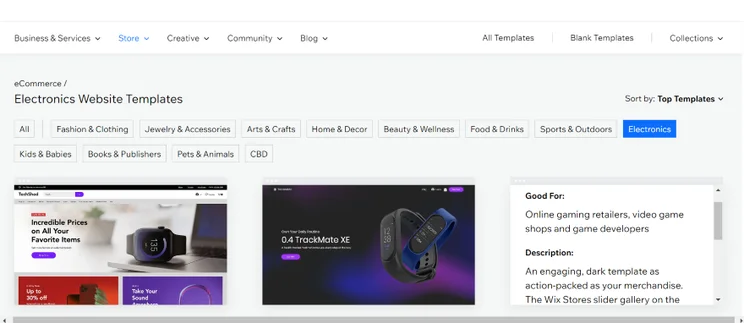
Since I was looking for online store templates, I clicked on the “Store” category dropdown. There, I found Wix templates for 12 different ecommerce industries, which included fashion and beauty, arts and crafts, home and decor, and kids and babies.
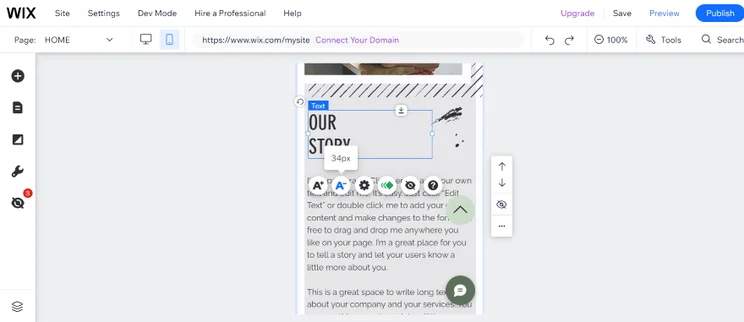
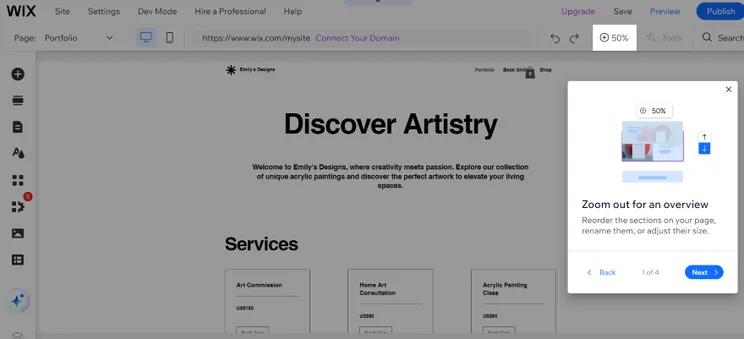
To see these templates in action, I rolled my cursor over my desired design and selected the “Edit” button, which redirected me to Wix’s drag-and-drop editor, where I could tweak its desktop and mobile design. Making sure that your website is mobile friendly is important, since most of your store’s visitors will be accessing your page via mobile.
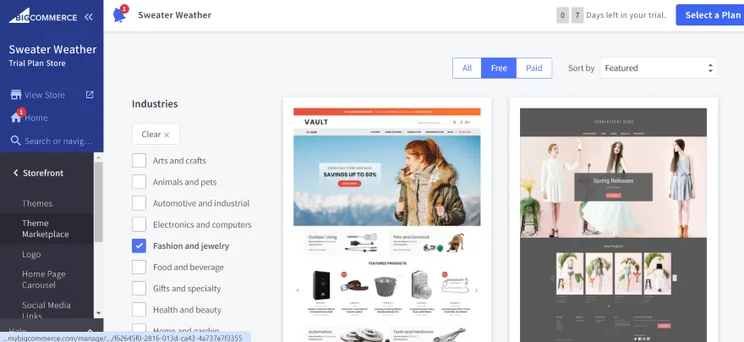
On BigCommerce, templates are referred to as themes. Though there are over 100 BigCommerce themes available on its marketplace, only 12 of those themes are free to use. The rest of them require a one-off payment that ranges between $100 and $400.
BigCommerce’s theme marketplace also had designs for 12 different industries, which included toys and games, sports and recreation, and food and beverage. I could click on a template to view its full list of features, see a demo version in action, and find out which devices they’re optimized for.
What I liked most about BigCommerce’s themes was their flexibility. Unlike Wix, you can change your template at any time, so it doesn’t matter if you ever have second thoughts and decide to go in a different artistic direction.
However, I didn’t like that I couldn’t edit themes in mobile view. Most of BigCommerce’s themes are mobile-friendly, and so automatically reformat for smartphones, but you can’t take direct control of your mobile view and edit it from the editor – this is a big deal if you’re not 100% satisfied with how it looks.
6. Best for Help and Support: Wix
Wix will support you through all the stages of building your online store
From website resources and tutorials to live chat bots and phone lines, Wix has covered all bases when it comes to comprehensive help and support.
If you’re new to website builders or ever encounter a significant issue or bug with the platform you’re using, it’s important to know what kind of help and support is available to you. More so when there’s money, time, and your livelihood on the line.
Wix’s customer service takes the cake in this category, being home to the best customer support out of all the website builders we’ve tested. In fact, the builder has over 100 million users around the world, so it knows to dedicate a lot of its resources to its customers, and it shows. With Wix, you have access to:
- The WixBot – An online form that connects you with a Customer Care Expert
- Live Chat – You can start a live chat with a Wix staff member on Monday to Friday (2am to 6pm EST)
- 24/7 Phone Support – Through the WixBot, you can request a callback from one of Wix’s staff members
- Wix Help Center – On the builder’s extensive resource base, you can access detailed articles, tutorials, and guides
- Social media – Wix is active on major platforms like Instagram, TikTok, YouTube, and X
However, do note that Wix doesn’t offer support over email, whereas BigCommerce does. If email is your preferred form of communication, this could be a dealbreaker for you.
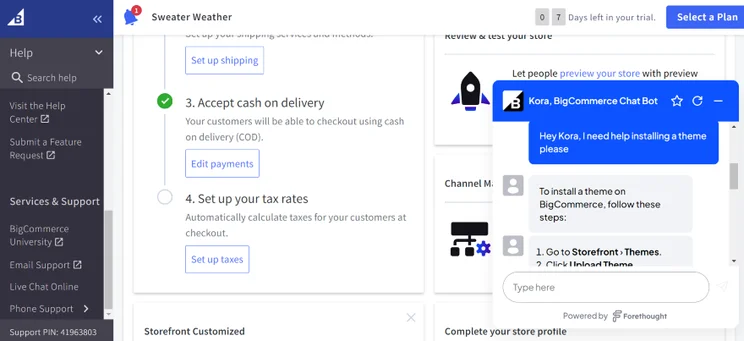
Regarding BigCommerce’s customer support, the company does cover most bases. From the “Help” tab at the bottom left of my dashboard, I could click on direct links to its community forums, Help Center, email support, 24/7 phone support, and live chat.
How We Tested Wix and BigCommerce
To create a fair review of Wix vs BigCommerce, this comparison is informed by data from our hands-on testing, which ensures that we represent each website builder accurately.
We assessed each platform based on seven key areas of investigation that were weighted based on their importance to online store owners:
- Sales features – 40%
- Website features – 15%
- Help and support – 12%
- User experience – 10%
- Design functionality – 10%
- Customer score – 8%
- Value for money – 5%
Once we’d investigated these areas, we then ranked each website builder based on how well it fared in each category. In terms of Wix vs BigCommerce, then, Wix came out on top overall, scoring highly for its sales features, website features, help and support, and design functionality.
Wix vs BigCommerce: Conclusion
Overall, Wix is the easier website builder to use, and it’s more affordable than BigCommerce. With a wealth of website features, sales features, and professional templates, I recommend this platform for small businesses, startups, or independent traders starting from scratch.
However, BigCommerce shouldn’t be overlooked, especially if you’re at the helm of a growing, medium-to-large business. Its impressive inventory management tools and multichannel selling opportunities are suitable for stores that are experiencing significant growth.


1 reply
1 reply
1 reply