
My Squarespace Ecommerce Review: Is It Right for Your Online Store?

We may receive a commission from our partners if you click on a link and purchase a product or service on their website. Learn more

Smiling headshot of Annie Angus looking at the camera
Written By
Updated on June 6, 2025
Advertisement
We may receive a commission from our partners if you click a link and purchase a product or service. This does not impact our ratings, which are determined by years of hands-on testing and expert research.
For portfolios
Basic
See Pricing
  • Sell unlimited products
  • Blueprint AI builder
  • SEO support
For small businesses
Core
See Pricing
  • Removes transaction fees
  • Google Shopping integration
  • Add pop-ups
Most popular plan
For growing stores
Plus
See Pricing
  • Increased video storage
  • Lower credit card rate
For established brands
Advanced
See Pricing
  • Lower credit card rate
  • Unlimited video storage

We’ve created a lot of online stores on a lot of platforms over the years, and Squarespace is one of our favorite ecommerce website builders. It’s an affordable entry into selling online and has unique, fully customizable templates for a range of online stores.

However, depending on your business goals and priorities, it might not be the best option. In this Squarespace ecommerce review, I’ll cover the ins and outs of its selling capabilities, from its sales features to its artful design templates. By the end, you’ll have all the info you need to decide whether you should start selling online with Squarespace.

Prefer to watch? Check out our YouTube video where we cover the pros and cons of selling on Squarespace:

Squarespace updated its plans in May 2025, and offers four new subscriptions that from $16 to $99 per month (billed annually). Perhaps the most notable change is that you can now sell on all four of these plans:

  • Basic ($16) – For online portfolios and side hustles
  • Core ($23) – For small businesses
  • Plus ($39) – For growing online stores
  • Advanced ($99) – For established businesses

Value for Money

Squarespace isn’t the most affordable ecommerce website builder on the market. Its two most expensive plans have seen a sharp increase in pricing, and the jump between plans adds an extra roadblock for businesses looking to scale.

What I will say is that Squarespace’s sales features are top notch, and we found them to be well worth the price. Plus, Squarespace’s new plan structure means that you can now sell online on its cheapest, $16 per month plan, which charges transaction fees of 2.9% + 30¢. To give context, Shopify’s comparable plan, with the same transaction fees, costs $29 per month.

With Squarespace, you’ll also get a 14-day free trial before committing to a recurring payment.

Once you decide on your plan, you’ll receive a free domain for a year and can save up to 30% by paying annually, or you can save 10% on any plan when you use our code “WBE10” at checkout.

We’ve always been impressed by Squarespace’s comprehensive set of sales features, which is one of the reasons why it scored third place, just underneath Shopify and Wix, in our testing. Since its annual product showcase, Squarespace Refresh, in September 2024, this arsenal has only gotten stronger.

These are the standout features you’ll be able to use on all Squarespace plans:

  • Sell unlimited products – there’s no limit to the number of items in your inventory
  • Sell a range of products – you can sell services, gift cards, and digital downloads, in addition to physical products
  • Abandoned cart recovery – customers who’ve left unpurchased items in their cart will receive emails reminding them to check out
  • Flexible shipping options – Squarespace supports a variety of shipping options at checkout, such as pickup and local delivery. You can also configure “fulfillment profiles” for individuals or groups of products
  • Collect and show product reviews – when this feature is enabled, review requests will be emailed to customers two weeks after their purchase
  • Offer personalization with product forms – product forms enable your customers to make requests or leave instructions for a particular product. They appear at checkout and are fully customizable, and come in handy if you’re selling personalized items that require names or measurements

Editing a Squarespace Product Form
When selling personalized items on online marketplaces, I’d often be delayed by chasing customers for missing information. Product forms are an efficient way to manage these requests. You can even select a “required” box to ensure necessary information is supplied before checkout. Source: Website Builder Expert
Quote
Basic plan considerations

Abandoned cart recovery was previously only available on the $52 per month plan, so it’s great to see it now accessible at the lowest price point. However, the Basic plan still lacks many sales features necessary for serious growth, such as product discounts, ecommerce and conversion analytics, and Google Shopping visibility. If you’re looking to take selling seriously, I recommend looking into the Core plan, since you’ll be able to promote your store and continually optimize it for your customers by using analytics.

Smiling headshot of Annie Angus looking at the camera
Annie Angus Writer

As you upgrade past the Basic plan, you’ll unlock even more sales features:

  • Additional shipping options – carrier-calculated real-time shipping rates with UPS, USPS, and FedEx
  • Advanced discounting – you can set discounts to be automatically applied to carts that meet the minimum criteria
  • Product subscriptions – you’re able to offer discounted subscriptions for products that customers are likely to buy again, which is a great incentive for repeat purchases
  • Upsell with add-ons – select up to six related items to show on each of your product pages
  • Omnichannel integrations – linking your business’ Meta account will allow you to sell on Facebook and Instagram and promote your products with social media ads. Plus, you can also control how your product pages appear when shared to social media

Other Squarespace ecommerce reviews might outline the basic facts, but my first-hand testing means I can answer your most important concerns. To get these answers, I created an online store using Squarespace. Here’s how it went:

The Initial Setup

Squarespace’s Blueprint AI is one of the most efficient AI builders we’ve tested, on par with Wix and Hostinger. It asked relevant questions about my brand personality, sector, and website pages – all important areas that should be considered before you create a website. While I had full freedom of choice, at every stage the AI Builder offered suggestions of what would work best for my website.

Choosing a color palette with sqaurespace blueprint setup
I really appreciated the recommendations Blueprint AI gave me throughout the setup, which considered details I’d provided about my website goals and brand personality. Source: Website Builder Expert

It took me around five minutes to complete Squarespace’s Blueprint AI setup, and I was left with a starting point that felt relevant to my business and provided all the necessary pages. Most importantly, its reflection of my brand’s personality and the store functions it added made the process of finetuning my ecommerce store feel like an exciting and achievable, rather than daunting, process.

Adding Products

Squarespace was a firm favorite in our user tests, and after testing it myself, I can see exactly why. Its dashboard houses a store setup guide, which explains how to build an inventory and directed me to a simple, beginner-friendly product page. If you’re a beginner who’s considering using Squarespace for ecommerce, you’ll appreciate the detailed guidance Squarespace provides whenever you click on the blue circular pop-up. From product pages to SEO help, additional tips appeared as I progressed – brilliant for improving your product’s visibility in searches.

product page adding an image
Squarespace’s guides and tips helped me to maximize the effectiveness of my product pages. Source: Website Builder Expert

When it came time to write my product descriptions, I had a chance to test Squarespace’s AI copywriting capabilities. The writing tool gave me a vague choice between writing a pitch, a blurb, or a paragraph, but I found it difficult to understand which was suitable. In comparison, other ecommerce builders have AI copywriting tools, such as Shopify Magic, that use more specific ecommerce phrasing and so make it easier to choose the right option.” However, once the text had been generated by Squarespace’s AI, it was easy to modify its length and simplicity.

One aspect of Squarespace’s AI content generator that I particularly liked was its “Brand Identity” feature, which stores your brand description and tone of voice and uses this to shape all the AI-generated content across your site, making it feel tailored to your store and providing a level of consistency throughout your pages.

Squarespace's brand identity feature
The “Brand Identity” page can be found by selecting the small “i” to the right of the text generator. Once saved, it will shape your site content as well as written email campaigns. Source: Website Builder Expert

When choosing a website builder, you should always explore its app market, which can provide additional functions for your store as it develops. This Squarespace ecommerce review is no exception and, at the time of writing, the app market – Squarespace Extensions – holds 47 plugins, which is very small compared to the 8,000 offered on Shopify’s app market.

That said, Squarespace Extensions is slowly growing, and its apps are well thought out and allow you to expand your ecommerce ventures in many directions. Having looked through each app, here are the most useful ways I’ve found that they can benefit ecommerce stores:

  • Inventory management – these extensions keep track of incoming and outgoing orders and give accurate, real-time inventory tracking
  • Print on demand – if you’re selling artwork and merchandise, you can use POD extensions to print your designs onto various products
  • Dropshipping – these apps help you find products to sell on your store from third-party partners
  • Additional sales avenues – these integrations allow you to sync your inventory to TikTok Shop, sell to other businesses as a wholesaler, and control your product feeds on platforms such as Google, Amazon, Facebook, and Instagram
  • Shipping support – these apps connect you with carriers and smooth out the process of buying shipping labels

Squarespace has a reputation as the reigning champion of sleek and stylish designs, so when I tested them myself, my expectations were high. True to form, every option maintains that trademark visual appeal.

45 of Squarespace’s 180 templates are designed with ecommerce in mind. Once you’ve selected “Online Stores” as your website type in the template gallery, you can easily whittle down your template choice by selecting from one of the 19 categories, which cover everything from fitness to podcasting to weddings.

best templates matches in the fashion category
After selecting your store type and category, Squarespace provides a list of best matches that you can view as demo websites. Source: Website Builder Expert

When editing, I was pleased to see that each Squarespace online store template has a high level of customization, which means you can use one of its expert designs as a baseline and edit it to match your brand colors and style. Once you’re signed in to your Squarespace dashboard, you can change the fonts, colors, buttons, and even the margins of your website. We found Squarespace’s templates to outshine those of its competitors, providing the highest visual appeal and the best overall experience.

What’s even better is that Squarespace’s templates are interchangeable – unlike other builders, like Wix – so if you ever want to rebrand or simply feel the urge to switch up your store design with the seasons, you can download a new template and transfer your content over.

This Squarespace ecommerce review wouldn’t be complete without touching on its search engine optimization (SEO) tools, which increase your site’s visibility in the results pages of Google and other search engines. Squarespace’s native SEO features are impressive and, when used correctly, will help push your products to new customers and increase sales.

From the get-go, Squarespace’s ecommerce templates are designed with clear search engine friendly navigation. Squarespace also provides a helpful SEO checklist that indicates the key areas you should consider while building your website, and beyond.

You’ll have control over the following aspects of your website’s SEO:

  • URLs, meta titles, and meta descriptions for all pages, including product pages – these are automatically set and can be modified at any time
  • Your social image – how your content appears when shared on social media
  • Page visibility – you can hide certain pages from appearing on search engines
  • Translations – if you make use of Squarespace’s multilingual feature, translations are optimized for search engines
Squarespace AI meta data recommendation preview showing how it would appear in google
Once Squarespace's AI SEO tool made its recommendations, I had the option to make adjustments manually or create a different result. Source: Squarespace

Squarespace’s customer service is available 24/7 over email, AI chatbot, and social media. If you want to speak to a human in real-time, you can do so via live chat between 4am and 8pm EST, Monday to Friday. 

However, Squarespace doesn’t offer support over the phone. This may be a deal breaker for some, but its other support channels – especially its live chat – are strong enough to feel like you aren’t really missing out. Plus, the plethora of webinars and video tutorials found in Squarespace’s Help Center can fill any gaps in human connection.

Squarespace is our top recommendation for visually driven businesses that need a stylish and unique website, thanks to its unmatched templates. However, it won’t be the right choice for every business.

  • Shopify is a better option if you’re looking to expand your business and sell in multiple global markets, since it has the most impressive localized selling tools.
  • Wix has the most impressive suite of  marketing tools to help you spread the word about your products and boost ecommerce sales.
  • If a large part of your business involves in person selling, Square Online offers a POS system that’s easy to integrate into your online store.

Here’s a side-by-side comparison of how Squarespace pans out among its competitors:

0 of 0
Overall rating
Starting Price
Free plan or free trial
Number of templates
Standout features
Areas to improve
Recommended for
Squarespace logo black background
shopify
Wix logo black 2025
hostinger logo
GoDaddy logo

Squarespace

Shopify

Wix

Hostinger

GoDaddy

4.7
4.8
4.8
4.2
4.0

$18.99

$3.99/month

14-day free trial

3-day free trial

Free plan

7-day free trial

Free plan

150+

1,000+

2,000+

170+

200+

  • Great booking tools
  • Easiest editor to use
  • Blueprint AI builder
  • Stunning templates
  • Sell unlimited products
  • App market with 8,000+ apps
  • Customizable checkout
  • Multichannel selling
  • AI chatbot builder
  • Branded email marketing
  • AI image generator with different design styles
  • Personalized SEO support
  • Fastest loading times
  • Suite of AI tools
  • Easy drag-and-drop editor
  • Social media calendar
  • Built-in booking tools
  • Quick onboarding
  • Mobile app
  • Autosave functionality
  • In-person selling
  • Phone support
  • Free trial length
  • Restrictive editor
  • Advanced AI tools
  • Storage space
  • Changing templates
  • Loading speed
  • Inventory capacity
  • Limited product space
  • App market
  • Email marketing
  • Ecommerce scalability
  • Customization
  • Template options
  • AI features

Creatives and service-based businesses

Businesses who want to easily scale their store as they grow

Businesses promoting their online presence

Beginners and budget-conscious businesses

Businesses using socials to drive traffic

Here at Website Builder Expert, we provide data-driven recommendations to match you with the perfect website builder for your ecommerce journey. But how do we actually come to these conclusions?

Well, our in-house research team works off a unique methodology, which was formed by surveying 500 small businesses. This brought to light seven key areas to test our ecommerce builders against, each weighted based on level of importance:

  1. Sales features — 30%
  2. Website functionality — 15%
  3. Design features — 15%
  4. Help and support — 15%
  5. Pricing — 10%
  6. User experience — 10%
  7. Reputation — 5%

Sales features are undoubtably the most important consideration for ecommerce websites, so this is our most heavily weighted area.

  • Multi-channel integration – Which additional sales channels can be linked to your site?
  • Payment processing fees – Does the builder charge payment processing fees, or are they included in your subscription?
  • Inventory – How many items can the builder hold in its inventory? How can you import products?
  • Security – Does the builder offer inbuilt SSL certificated?
  • Sales types – Which types of products can be sold, other than physical? Can you sell digital products, subscriptions, and services, for example?
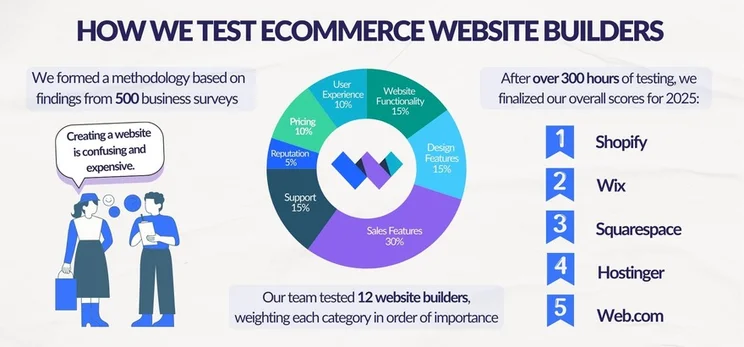
Graphic breaking down Website Builder Expert's ecommerce website builder testing into three steps: conducting business surveys to build a methodology, testing website builders, and finalizing scores

My Squarespace ecommerce review should have answered the question: “Is Squarespace good for ecommerce?” The builder understands the importance of creating and maintaining a consistent brand voice and uses its AI features – from the Blueprint AI setup to its content generator – to help you solidify yours. On top of this, its ecommerce plans are reasonably priced and you won’t have to worry about losing profits through transaction fees.

This said, if you sell globally or plan to expand soon, Squarespace’s lack of localization features and international currencies will act as obstacles to your growth. In our latest round of ecommerce builder testing, the lack of these features is what caused it to fall below Shopify in our resulting ranking. If international business growth is a priority, Shopify is a great alternative.

Written By

Smiling headshot of Annie Angus looking at the camera

Annie Angus is a Writer for Website Builder Expert with a passion for shaping jargon-heavy research into digestible content. She has previously researched and written about industries ranging from tech to fashion, and now, after testing our top website builders such as Wix and Squarespace, she is enthusiastic to share her findings with our readers.

With first-hand experience in utilizing social media and online marketplaces to grow a small handmade clothing business, Annie understands the priorities and concerns held by SME owners, and knows precisely what they look for in a website builder. She combines this unique perspective with her knowledge of website builders to produce engaging content spanning all areas of the small business journey, from creating a strong website to growing and maintaining an audience.

You can read Annie’s articles below, or connect with her on LinkedIn.

More about

226 comments

Your email address will not be published. Required fields are marked *

  • julie

    All sounds wonderful. However I have a small gallery and a friend created my website using squarespace. Recently another friend suggested that I get myself "out there" and sell online. It seemed like a good idea and I knew I should make the move. I said yes and the second friend needed my website info. and is attempting to go online with squarespace to sell. She's got my info. and my website info. Both are squarespace but there are issues popping up. I'm wondering why. I'm wondering where I might find helpful info. as it seems that in this day and age it should be seamless. I am admittedly in the dark when it comes to technology. The two people who are attempting to help are not. Can you shed any light or give any guidance? Thanks in advance, Julie Eldredge-Dykens

    1 reply

    • Emma Ryan
      Emma Ryan

      Hi Julie,
      Thanks for commenting! We're sorry to hear you're having trouble with joining Squarespace. To sell online, you need to make sure you're subscribed to at least the Business plan or above, since these plans include ecommerce features to support selling. If you're still having difficulty, we recommend reaching out to Squarespace's customer service for additional help. Hopefully they can set you on the right track so your business can get going! Let us know if you have any other questions about Squarespace or building an online store, we have plenty of helpful articles!
      Very best,
      Emma

  • Rick

    Lucy, thank you for your quick response, which was complete & very helpful.

    1 reply

    • Jacqueline Renouard
      Jacqueline Renouard

      Hi Rick,
      From the Website Builder Expert team, thanks for your feedback, glad we could help you.
      Warmly,
      Jacqueline

  • Rick

    Hi All, Thank you for all your articles concerning web building sites. As a novice, I've read several of your articles and they're all helpful for my continuing education. As referenced, Squarespace only accepts PayPal & Stripe as payment for products or services. Can you add a third part with an app or code that would allow for payment via regular debit/credit cards ? Thank You again.

    1 reply

    • Lucy Carney
      Lucy Carney

      Hi Rick,
      Thanks for your comment! I'm glad you find the article useful - you're right, Squarespace accepts PayPal and Stripe, and also Square if you sell in person and need to process POS transactions. If you use Stripe you can accept Visa credit and debit cards, MasterCard debit and credit cards, American Express, Discover (US merchants only), Diner's Club, JCB, Afterpay or Clearpay, and Apple Pay. There's no direct way to accept other payment types so you're best off choosing one of these. You'll find some guides online suggest taking a roundabout route of adding an external ecommerce solution like Shopify Lite to your Squarespace site in order to expand your payment options, but I don't recommend this method because you end up paying for two builder subscriptions, which is complicated, often unnecessary, and can become expensive! I hope this helps, best of luck with your store! Lucy

  • G

    Hi ,

    We are Amsterdam , Netherlands based. re. payments here we use "Ideal" - which servies as the payment method for everyday use and it links the customer to their specific bank to make a payment. , or the standard credit cards (Visa, Master card et) - does squarespace connect with those ( besides paypal?) Also you list in advanced options - shipping couriers - can I use that also for shipping starting from Netherlands?
    Many thanks for your support and looking forward to hearing from you on this

    G

    1 reply

    • Lucy Carney
      Lucy Carney

      Hi G,

      Thanks for commenting! Squarespace only accepts Stripe and PayPal, and also has a Square POS integration. So you'd need to use one of those options to accept payments on your site. I believe shipping from Netherlands shouldn't be a problem, but I would double check with Squarespace directly before committing to a plan!
      I hope this has helped, thanks for reading - Lucy

  • Sakshi

    Hi! the article is great!
    It is stated that if you want to save money Wix is better, but Wix has a transaction fee of 2% and if you choose a basic plan of Squarespace, it doesn't. If you have slightly high range products, then isn't it better to go for a basic plan and 0% fee?

    1 reply

    • Lucy Carney
      Lucy Carney

      Hi Sakshi,
      Thanks for commenting!
      Wix doesn't charge transaction fees on any of its plans, so you can choose whichever platform suits your needs best without worrying about extra fees. They're pretty close in terms of value when we put them through our testing; Wix has a slightly cheaper starting price for its ecommerce plans, which is why we said it can be better for small budgets. But there's not much in it, so I definitely recommend choosing the one that serves your needs better! You're right that 0% transaction fees are a good thing to look out for. We have a Wix vs Squarespace comparison in case you find it helpful!
      Best, Lucy

  • Elle

    Is it possible to use a payment provider other than PayPal or Stripe? Both have refused us as we sell high-risk... wait for it....
    Vapes! I am looking for a shop provider where I can plug in a payment provider of my choice and not be extorted by paying a further 2-3%, which is what Shopify have said it will cost. Any advice would be really welcomed. Thanks

    1 reply

    • Lucy Carney
      Lucy Carney

      Hi Elle,
      Thanks so much for your comment! I'm sorry you're having trouble finding a payment provider for your vapes - Squarespace lets you connect Stripe, PayPal, or Square. Unfortunately I believe that a lot of ecommerce platforms place vape products on their prohibited items list (for example, Wix Payments doesn't allow it either). I'd recommend checking out BigCommerce as I know there are vape shops such as Veppo running on its platform! You can view its list of available payment gateways here. I hope this helps, and best of luck!
      Lucy

  • Russell

    Thank for the comprehensive review of Squarespace. The Squarespace website was not forthcoming with a review of its services. It wanted you to jump right in with no idea of the services it was offering.
    Thank you for your integrated review.

  • Bill

    Is there anyway to put a video on Squarespace? Either directly or thru a 3rd party site like Vimeo?

    1 reply

    • Lucy Carney
      Lucy Carney

      Hi Bill,
      Thanks for your question! Yes, you 100% can put videos on Squarespace - you can embed them on your site from YouTube, Vimeo, Wistia, and Animoto.
      Thanks for reading Bill, all the best - Lucy

  • Brandis

    This was extremely helpful article! Thank you!!

  • rachel

    Thanks for the article! If we decide that we just don't want to use squarespace anymore, is there a way to export or backup the site to move to a self hosted website?

    1 reply

    • Charlie Carmichael
      Charlie Carmichael

      Hi Rachel,

      Thanks for your comment. You can export most things on a Squarespace website into an .xml file. You can't export everything as some of it relies on Squarespace's own Javascript and CSS. For the most part though, you should be fine to export your site and move it to a self-hosted platform like WordPress, should you want to.

      Hope that helps.

      Charlie

  • Hannah

    Hi! Thank you so much for your sharing valuable info in this article! I'd just like to ask if you know a good plug in for the products page's quantity selection? I'm in the tourism industry. Our company sells tours. Prices shown are dependent on how many persons are in the group. Squarespace's built in quantity selection just doesn't work for us.

    1 reply

    • Lucy Carney
      Lucy Carney

      Hi Hannah,
      Thanks so much for your comment, I'm glad you found it so useful! Squarespace doesn't have an app market itself, but it is possible to integrate plugins (such as MailChimp). I would recommend checking out Zapier, which allows you to connect your Squarespace site with tons of apps. It's definitely worth having a browse through as there are loads of options that could save you precious time. Here's the link to Zapier's list of Squarespace integrations.
      I appreciate the importance of your problem, and hope this might provide a satisfactory solution! Let us know how you get on, and best of luck with your tourism business.
      Thanks so much for reading,
      Lucy

  • David

    Thanks, Jeremy for this recent and very comprehensive update on Squarespace!

    We are a fledgling idie record label in Canada but we decided to upgrade our SS level to Basic (Commerce) today! We have growing merch sales and felt it was time to do it. We are also a Xero accounting user and so I read with great interest when it got to the Integration part. Unlike in your past article last December, there was no caveat about Xero not being available in Canada. I checked the SS website support page and it STILL says: "Squarespace only supports Xero integration in the United States." If this is true, have you any idea when it will finally get with it and provide this feature elsewhere? As you probably realize, it is essential that any e-commerce businesses of any size must have third-party apps like Squarespace connect to their cloud accounting software. Or they simply have to look elsewhere.

    1 reply

    • Natasha Willett
      Natasha Willett

      Hi David,
      Thank you for the comment, it's great to hear you enjoyed the review. I must admit, this is one of Squarespaces down falls. As a platform and especially for ecommerce (considering they are a website builder first and foremost and are not like your dedicated ecommerce platform like Shopify) they do provide it's users with loads, with in-house features being a really big plus. However their third party integrations is something where they don't have the same noticeable market as someone like Weebly or Wix.
      As you have come to notice, Xero is only currently available within the US, so in the mean time, you can very easily use code to add third-party apps to your site. I haven't personally used this, but check out Quickbooks and use Zapier (a connective app market integration service) see here for more details.
      All the best, and I hope you get something sorted soon.
      Natasha.

  • Maralee

    ARGh! I really want to use Squarespace for my e-commerce store for many reasons but after much research I can't believe anyone can use them to sell products here in the US. It is just not possible to enter all the sales tax possibilities which at least here in California can be down to the individual city and county. That's crazy! Why don't they have some way to do this electronically. Nobody calculates sales tax manually. Doesn't Stripe calculate sales tax? or Apple Pay?

    2 replies

    • Sarah

      I have the same issue! I have customers all over the US (and even some international) and the fact that I have to manually enter a tax code for each state just seems archaic...and potentially impossible. In addition to Maralee's point (individual city and county tax rules), some products are considered taxable in New York and others are not. For example, I will be selling both food and home accessories. Many food items are not taxable, while home accessories are. Clothing is another example - only clothing items above a certain dollar amount are taxable in New York. I asked SS's help desk about flagging specific items as taxable (or non-taxable) and this isn't possible. So it's all or nothing. I either have to overcharge customers who are buying multiple product types or find myself in a tax-filing nightmare. Or simply find a 3rd party platform.

    • Natasha Willett
      Natasha Willett

      Hi Maralee,
      Thank you for the comment. You make a really good point and one not many people really consider, equally Squarespace themselves. Manual tax calculations does give you full control, but automatic could lead to some form of increased convenience. You should reach out to Squarespaces great live chat and ask for yourself why this has maybe not been considered or request that this gets suggested as a new feature update, see here for more details.
      Which platform have you decided to use if Squarespace on this occasion hasn't been able to support your needs?
      Cheers again and all the best designing.
      Natasha.

  • Hithere

    Squarespace has no address or a phone number, this is the first thing as a business person to look at if I was going to do business with. Would you want to leave your business in the hand of a no physical address business? Not me. What if they just packup and disappear with all your work?

    1 reply

    • Fred O'Brien
      Fred O'Brien

      Hi Hithere,

      The details are tucked away to be sure, but you can find Squarespace's addresses on its Locations page. It's true Squarespace doesn't offer phone support (a decision they address here) but we think it would do well to escape millions of users if it packed up and disappeared tomorrow!

      Cheers,

      Fred

  • Terry

    My sentiments, exactly, Jim! Very thorough and helpful! Thanks!

    1 reply

    • Natasha Willett
      Natasha Willett

      Dear Terry,
      Thank you for your comment, really pleased you enjoyed the article.
      Natasha.

  • Natasha Willett
    Natasha Willett

    Hi,
    Thank you for the comment. Personally I think this turnover could sit wherever you wanted, it would be more about what you are selling and whether the platform could support this. So for example with Squarespace you are lucky you can sell physical and digital products with no limitation over the amount of products as it's entirely unlimited. Also the transaction fee with squarespace are 0% when you are on their advanced payment plan - which would defiantly help.
    Cheers,
    Natasha.

  • Jim

    Dude, this is a great review. You answered my questions better than they did lol

    1 reply

    • Fred Isaac
      Fred Isaac

      Thanks Jim, great to hear!

  • Global Exchain

    Found your blog. Its really valuable for us. I appreciate your article. Its important for get good informations on E-commerce services. So thanks for sharing all that important information.

    1 reply

    • Fred Isaac
      Fred Isaac

      No problem at all, hope you found it useful. Have you created a site with Squarespace?

  • Carissa

    Hi Jeremy, This article was very helpful but on #15 on your list please check your link. I don't think you can sell unlimited using the personal plan. You must upgrade to the business plan. Can you confirm? Thank you.

    1 reply

    • Fred Isaac
      Fred Isaac

      Hi Carissa, yes you're right, to sell unlimited products you need to be on the Business Plan or higher. Did you create your store with Squarespace?

  • Linea Ysabel Vintage Online

    I currently have a Big Commerce ecommerce store & have not been thrilled with BC generally. I'm very interested in setting up on Squarespace instead (and your guide to it has been very helpful), BUT I am totally & completely confused as to transaction fees for Business Basic. I understand & don't have a problem with Stripe or Paypal charging their fees, but are you saying that Squarespace ALSO takes a percentage or not? In some places it says Squarespace does not take transaction fees on top of its monthly) fee, it should be noted; in others it seems to say otherwise.

    Also, does SS take a fee or percentage on sales made via FB, if integrated (like BC does), or any other piggybacking of a like nature? And is it true as SS users have complained that any email communications from a SS store carry SS branding despite the fact that we're expected to pay to use the platform?

    In short, I see many attractive reasons to move to SS, but if these questions can't be answered in the negative, I see no particular reason to go to the expense & hassle of moving as of yet.

    Thanks, Jeremy, for providing such a great resource!

    1 reply

    • Natasha Willett
      Natasha Willett

      Hello Linea,
      Thanks for joining the discussion, great to hear you’re finding the content so helpful.

      Let’s talk about fees, as I know they can be a little confusing at first. With SquareSpace personal or business plans, you’ll pay transaction fees of 2% and 3% respectively as well as payment processing fees.
      However, if you opt for SquareSpace’s dedicated ecommerce plan, either Basic or Advanced Online Store, then transaction fees are waived. You’ll still pay the processing fees though (as these are costs required to use Stripe, Paypal, etc). As for the SqaureSpace fee, this is only applied to transactions made using SquareSapce commerce tools such as customizable checkout, payment methods and commerce analytics.

      With email branding, this unfortunately is still applied which does strike me as a little odd especially as you pay for the service. This has been raised a couple of times with SquareSpace, so hopefully we’ll see a change soon. Otherwise, you could always use an external service like Mailchimp if you need more versatility.
      For more info on SS payment plans, this help page will prove useful. (https://support.squarespace.com/hc/en-us/articles/213653237-Transaction-fees)
      Hope that helps,
      Natasha

  • Lewis

    Thanks for this review. It's been extremely helpful to me as I already have a landing page with Squarespace and had intended to use them for my forthcoming e-commerce store. Based on other reviews, I was feeling like being forced toward Shopify, which I didn't want however, following this review, and the fact that everything is seamless with Squarespace, I'm going to build my store with them.

    1 reply

    • Tom Watts
      Tom Watts

      Hi Lewis,

      It's great to hear you found the discussion so helpful - it's always reassuring to know we are helping our readers make the best decisions for their websites.

      Feel free to share on social channels if you think others could benefit too,

      Best of luck with your store and thanks for reading!

      - Tom

  • Roger

    Nice piece but if you sell books for example, there is no way on Squarespace to set the price for shipping for different items. Eg...you sell book A at £100 that weighs 3kg and the postage to send to America is £30. When you add book B to your site you have to stick with the shipping you have set for book A, which clearly wouldn't work. The only other alternative is to do shipping by weight but again this applies to book A and B....one price is only allowed...but books have different values, so what they weigh is irrelevant. Heavy book would cost less than a 1st edition Dickens.

    I asked them about this in 2015 and they said they were working on it. I asked them in 2017 and they said they were working on it.

    Now I need to find a host that can do dynamic pricing. Any suggestions?

    1 reply

    • Tom Watts
      Tom Watts

      Hi Roger,

      Definitely sounds like a frustrating problem, but unfortunately not an uncommon one. You'd be surprised at the number of ecommerce focused web builders that lack this kind of in-built dynamic pricing system.

      Due to the way they are developed, most web builders require you to create individual SKUs for each product you're stocking. Obviously when it comes down to shipping weights and items with varying values, etc. then this system can become a little rigid and uncompromising as you've noticed.

      Squarespace, Shopify and Bigcommerce are all working on developing a native solution to this problem - and as you note, have been for a while! - so hopefully we will see some developments soon.

      It would be worth having a poke around the Squarespace user Answer Forums as the ecommerce conversations there can get quite in-depth and may cover the topic in more detail than Squarespace itself.

      Alternatively you could look into Shopify who offer 3rd party app integration, which can add dynamic pricing to an ecommerce store. Search for 'Dynamic Pricing' in the Shopify App Store and you should find what you need (the app is called 'dynamic pricing - smart optimization).

      Thanks for sharing your experiences with the community, hopefully my advice helps a bit.

      - Tom

  • Nina

    We are currently using Squarespace. It is very easy to use and we like it overall with one exception. Users can't leave feedback on a product they purchased. Comments can be done only the blog pages but on individual items.
    If you are a small business owner, you do want to built credibility and reviews really help.

    Thanks.
    Nina

    1 reply

    • Tom Watts
      Tom Watts

      Hi Nina,

      I'm glad to hear you're enjoying using Squarespace - it's always reassuring to know.

      Unfortuantely Squarspace don't offer a in-built 'product comments' or 'product feedback' feature, however it can easily be achieved through a 3rd party plugin such as Disqus or Facebook.

      Just head to the Squarespace support page here and search for 'Adding product reviews' in the top right corner. I think that should solve your issues.

      Let us know how you get on,
      - Tom

  • Bianca

    Hi Jeremy, do you know if it is possible to integrate shopper approved with a Squarespace ecommerce site? Thank you

    1 reply

    • Jeremy
      Jeremy

      Hi Bianca

      I'm not familiar with Shopper Approved, but it looks like a web app so if you can add custom javascript to your ecommerce site, I don't see why it shouldn't work.

      You may also want to consider using Shopify for your ecommerce store as well because it's a dedicated ecommerce platform and can offer a wider choice of options for your store compared to Squarespace - check out our Shopify review for more details.

      I've checked the Shopify App Store too and it looks like there are a number of customer review apps that serve the same purpose as Shopper Approved. We've got more details on the App Market in the review I've linked to above.

      - Jeremy

  • Mary

    Another downside to Squarespace e-commerce sites, unfortunately, is that they only offer 3 fulfillment options through ShipStation. Not great if you're looking to have another company store and ship your products. If you do choose to go with one of the 3 offered, you will also continue to pay ShipStaion as middleman, and it will not be a direct connect to fulfillment.

    Hopefully Squarespace will look to add additional options in this regard. Otherwise they are limiting their customer base.

    1 reply

    • Jeremy
      Jeremy

      Mary,

      If you're looking for more ecommerce options / flexibility, have you considered Shopify? They are probably the best hosted ecommerce building platform in the market today.

      Jeremy

  • Melia

    Hi! Thanks for this- very useful info. Can i ask if it's easy to migrate from squarespace to shopify?

    1 reply

    • Jeremy
      Jeremy

      Hey Melia,

      I just checked out Squarespace's support page and it doesn't look like you can export products. So if you want to migrate to Shopify, you'll have to setup your products again.

      This can obviously be problematic if you have thousands of products in which case you probably should have started off with Shopify since they are a "pure" ecommerce builder.

      But if you have less products, you can either setup the products again yourself, or hire someone to help (perhaps even a Shopify Expert).

      It's a bit of work, but it might be worth the investment to setup your products all over again as Shopify is a much more advanced ecommerce platform than Squarespace. So setting them up will give you a "clean slate" from one platform to another. Something to consider?

      Jeremy

  • Chris

    What about integration with a third party fulfillment center? I plan to use a company called Sellery to do my order/product fulfillment, how well can Suarespace integrate with a fulfillment company? Are orders emailed or?

    1 reply

    • Jeremy
      Jeremy

      Hi Chris,

      If you need fulfillment integration, I'd suggest you take a look at more comprehensive ecommerce builders like Shopify (see our review here).

      Squarespace has good ecommerce tools, but they're not going to be as comprehensive as pure ecommerce builders such as Shopify.

      Jeremy

  • Sarah Anderson

    This was SO helpful. I was thinking about opening an online store on Squarespace, and this gave me all of the information that I was looking for. Thank you!

    1 reply

    • Jeremy
      Jeremy

      Thanks, Sarah. Good luck with your ecommerce business!

      Jeremy

  • Tesh

    Hi Jeremy

    Quick question. What products are we not allowed to sell on square space.

    Are cannabis accessories like glass bongs, pipes etc. Ok?

    Please let me know

    1 reply

    • Jeremy
      Jeremy

      Hello Tesh,

      I'm not entirely sure. You should review their Terms of Service (you can find this in their website footer section) to see what they don't allow. Generally speaking, as long as the products or content are not illegal, they just might be allowed.

      Jeremy

  • Geoff

    Does squarespace support pre sales?

    1 reply

    • Jeremy
      Jeremy

      Hello Geoff,

      I don't think so - at least I haven't seen anyone use Squarespace to launch pre-sales. If you want to continue to us Squarespace, you can manually collect payments, such as have someone contact you through your contact box, then send a payment request to them via email. It's a bit of a hassle, though, but it'll work.

      Jeremy

  • Jennifer

    Hi Jeremy,

    Thanks for the great article. I'm drawn to Squarespace's slick designs and functionality as a new business owner developing my website, but I'm unclear about some of Squarespace's/Stripes e-commerce capabilities. I have several different customer bases and a "one size fits all approach" will not work for me. Before I spend a bunch of time, energy, money developing my website with Squarespace, does it support the following e-commerce functions?

    1. Wholesale business. User log-in accounts with stored information such as delivery addresses and tax ID #s, no sales tax, order minimums $s and/or quantities), self-tracking inventory availability in real time with the ability to shut e-commerce down on specific items as we "run out of stock."

    2. Contracts with payment terms. For example, we take a non-refundable reservation fee to be applied toward the total due - can we set a date for the balance due and automatically charge the client the same way they paid the reservation fee? So they are not having to go through the whole payment process again and so we we're not manually tracking the payment of the balance?

    3. Payment for private custom contracts. While we could do this offline or through other payment channels, I want to track, manage, and export all sales data through e-commerce on my website. Can it be done privately through Squarespace/Stripe?

    4. We'd like to get set-up with PayPal and Apple Pay. Will we get hit with double transaction fees from Stripe as well?

    5. Facebook Shop. Thinking of offering only one product, but I want to make sure everything can link up through Stripe. I don't think this was always the case, but just want to be sure this is possible and if there are any pitfalls I should be aware of.

    Will Squarespace be able to do these things and if not, do you recommend something else that is just as attractive and easy to use as Squarespace?

    Thanks!
    Jennifer

    1 reply

    • Jeremy
      Jeremy

      Hello Jennifer,

      Thanks for your question.

      I think what you're looking for probably require some level of custom work. Squarespace and other drag & drop website builders are great at delivering "standardized" features to the mass users. If you want specific features such as wholesale pricing for each wholesaler, private contracts, etc, you might have to go with a more customizable platform (such as WordPress or Magento).

      Jeremy

  • TK

    "Reason #2) Full Control Over Product Variants" is not entirely true. Squarespace doesn't have product variants when it comes to digital products. I found that out pretty late after building half of my shop. I'm wondering if there is any ecommerce platform that has digital product variable feature which I can plug into the already built Squarespace site? I don't want to start from scratch again if I don't have to.

    1 reply

    • Jeremy
      Jeremy

      Hi TK,

      Thanks for your comment. I suppose it's generally rare for digital products to have variations. It's more likely that physical products will have variations of the same product, such as item color, size, etc that may not be applicable to digital products (again, that's generally speaking).

      Take a look at Ecwid. They're an ecommerce widget and I believe they can get integrated with Squarespace.

      Jeremy

  • Leslie Villarreal

    Squarespace needs to catch up with the world and offer membership options for website owners. the 3rd party options for protected passwords for each individual are not only pricey but not that great.

    1 reply

    • Jeremy
      Jeremy

      Hi Leslie,

      Thanks for your comment and I also think it would be awesome if Squarespace built their own "native" membership function. It will just function much better if it's built-in instead of bolting on a third party widget.

      If this feature is important to you, check out Wix or Weebly. Both website builders are great and they both have build-in membership functions.

      Jeremy

  • Rachel

    Hi. Is it possible to export my products/inventory from square space to a CSV or something?

    1 reply

    • Jeremy
      Jeremy

      Hey Rachel,

      Unfortunately they don't have this function. You could export orders (pending orders, fulfilled orders, cancelled orders) into a CSV file, but not your entire inventory listing.

      If this is important to you, check out Shopify. You can export your full product listing into a CSV file.

      Jeremy

  • James Katt

    The biggest limitation of SquareSpace is that it does not allow you to create a membership website with premium content. This is a huge and crucial failure for SquareSpace since this is how many people earn a living on the web. This rules out SquareSpace as an option. There are kludges with third parties. But these are not as secure as a real SquareSpace option. I have no idea why SquareSpace is refusing to create this option with their customers. So unless you have something physical to sell, SquareSpace is not for you. It is a fail.

    1 reply

    • Jeremy
      Jeremy

      Hi James,

      I'm not entirely sure if Squarespace not offering a membership subscription automatically means that they are a bad website builder! Sure, it's a feature that some customers may want, but not all will need it. In fact, I'd take on a friendly wager that majority of ecommerce stores won't need this tool!

      Would it be awesome to have it? Yes, for sure. I'd love to see more website builders such as Squarespace offer native premium content membership gateway features. But at the mean time, one will have to use external membership tools (such as Sentry Login) to get things going.

      Thanks for adding to this discussion! I'm sure if more and more people request this feature, they'll add it.

      Jeremy

  • cheryl

    Hi Could You tell me how to attach an ssl certificate to the squarespace e commerce site. I know the check out is ssl protected through stripe but that seems pretty pointless if you cant get any customers to actually come to the site in the first place because with out an ssl certificate all people get when searching through google is a big red warning from that your site is not secure.

    1 reply

    • Jeremy
      Jeremy

      Hello Cheryl,

      I don't think you can add an SSL certificate to a Squarespace website yet (except for the check out cart, as you pointed out).

      From my own view, I don't think it's a big concern. When I purchase products online, as long as the check out cart is encrypted / protected, so that my own personal information is not compromised, then I'm okay with moving forward with my purchase.

      If webpages are not encrypted, I'm not as concerned as I'm just clicking around the pages looking at product descriptions and images.

      But that's just my own view. I'm curious to see if others are concerned? Please leave a comment if you agree or disagree!

      Jeremy

  • Graham

    Does SS E-Comm integrate well with CRMs? I'm looking to collect a significant amount of client information when they purchase one of my services and need it to load into my CRM.

    Can I make custom input fields for the checkout?

    1 reply

    • Jeremy
      Jeremy

      Hey Graham,

      I'm not entirely sure, actually. I guess it also depends on which CRM you are using.

      In my experience (I've used Infusionsoft before), the best way to collect data is to use the CRM to power all aspects of your ecommerce functions. So that way, a lot of the data is already collected for each customer. Infusionsoft does that and it also powers your email campaigns so you can collect a lot of behavioral data based on that too (if they are clicking on the emails, etc).

      What I'm saying is that if working with your CRM is very critical for your business, then it might be worthwhile considering a more powerful platform such as WordPress, which is a lot more flexible than Squarespace. The downside is that it's much more technical and you'll either need to do the coding yourself, or hire someone to manage that for you.

      Here's a discussion about Squarespace vs WordPress.

      Jeremy

  • Cynthia Hizer

    Been using the ecommerce in Square - easy to build and lovely. such a pretty face! getting e-commerce set up was a breeze.

    biggest drawbacks: 1) no "continue shopping" button - which never gets mentioned but has been a huge problem. 2) getting PayPal integrated 3) no integration with brick and mortar store inventory.
    thanks for your review!

    1 reply

    • Jeremy
      Jeremy

      Hi Cynthia,

      Thanks for sharing your feedback. Very valid points indeed!

      One of the frustrations with Squarespace's ecommerce platform is that they only integrate with Stripe. Although Stripe is a very reliable and popular payment processor, it would be nice to have other options made available as well.

      As for integration with a physical storefront, Shopify has a Point of Sale system that can fully synchronize with an online store built with their platform. Shopify, in my view, is one of the best ecommerce website builders today.

      Thanks for adding to this discussion!

      Jeremy

  • Abe

    Hi Jeremy,

    Nice review very very helpful,

    I like Squarespace, and i wanna build my online shop with it, but i have questions:

    1. can i set up a membership gateway on SS ?? because, I let people to explore my site and see all of my products, and when they wanna to buy my products i require them to be member first

    2. like you said SS integrated with Stripe as payment services provider, but the problem is its not available for my country (Indonesia )...so do you have any solution about this when i wanna built my site with SS ?

    3. if SS not support what i want...can Wix do it?

    Thank You

    Abe

    1 reply

    • Jeremy
      Jeremy

      Hey Abe,

      Squarespace doesn't offer a membership gateway function yet. However, you can check out Sentry Login, which is an independent membership plugin widget that you can add to your Squarespace site.

      With Sentry Login, they can integrate with Stripe and also PayPal. So you can accept membership payments with PayPal. However, if you use Squarespace's ecommerce function to sell your products, you can only use Stripe to collect payments.

      Another option is to use Ecwid, which is an ecommerce widget that accepts much more payment processors.

      Given what you want to achieve, it looks like you might have to bolt on a few non-Squarespace widgets, which isn't completely ideal.

      Have you considered using Weebly? At the right premium plan, you get membership functions and you can integrate more payment processors.

      Take a look at our discussion about their membership function here, and their ecommerce functions here.

      Jeremy

  • sharon

    Do you know if SquareSpace or any other supporting developers has created an API to integrate with fulfillment centers so that it doesn't have to be done manually?

    I know shopfiy has this.

    Thank you!
    Sharon

    1 reply

    • Jeremy
      Jeremy

      Hey Sharon,

      I'm not entirely sure. But here is the link to some Specialists that know Squarespace inside and out. They might be able to offer you some assistance.

      Jeremy

  • Derek

    Hi Jeremy,

    Really enjoyed your write up.
    I presently operate a small business in Toronto, Canada. I will be moving the business to a full on-line service and have a couple of questions for you to hopefully assist me in my decision making.
    Q. Can SS be adapted it into a fully functional interactive buyer/supplier registry?
    If not, who would you suggest?

    Hope to hear from you soon.

    Thx
    Derek

    1 reply

    • Jeremy
      Jeremy

      Hi Derek,

      Could you elaborate a bit more about what you mean by buyer/supplier registry?

      Generally speaking, Squarespace's ecommerce functionality only caters to a "typical" online store. So they allow you (the merchant) to set up a website to sell physical or digital products using their drag & drop tools. So you don't need to understand how to code at all.

      They also integrate with a payment system (Stripe) so you can start collecting payments.

      So in a way, it's rather straight forward and gets the job done quite well. Anything "fancy" or customized beyond an online store, probably won't be suitable for using Squarespace.

      Jeremy

  • George Cartwright

    Nice clear, concise review. I've been using SS for a while and like it a lot. When I venture into the Word Press world there are so many choices and options that it make me dizzy. I like that SS keeps just a few themes that you can adapt to your needs . Thanks for the review I'm going use it to propose a new SS site to a client.

    thanks

    1 reply

    • Jeremy
      Jeremy

      Thanks, George!

      Glad you enjoy using Squarespace. Less options (such as Squarespace) can be hugely advantageous compared to too many optons (such as WordPress). It can often lead to decision paralysis. Also, Squarespace makes sure all their tools are fully synchronized and functional - it just works "out of the box".

      Thanks for sharing your experiences with us!

      Jeremy

  • Shlomo

    Hi,
    One thing that isn't clear. If you are using stripe via squarespace there seems to be fees from both squarespace and stripe.
    That makes transaction fees very very high for any given purchase.

    1 reply

    • Jeremy
      Jeremy

      Hi Shlomo,

      Squarespace does charge a transaction fee if you don't enroll in their ecommerce plans. If you do subscribe to their commerce plans, there are no transaction fees from Squarespace. This is highlighted above under point 15.

      However, Stripe (and any other payment processors such as PayPal) do charge a payment processing fee. So this fee is in addition to the Squarespace transaction fee (if applicable).

      The payment processing fee is unavoidable as it is the fee for the payment processor (Stripe, not Squarespace) to collect payments from your customer, process it, and deposit the money into your bank account.

      All merchants (online or offline) have to pay this. For instance, if you purchased groceries from your local supermarket and used your credit card to pay, the supermarket have to pay their payment processor a fee to process your payment.

      So if you are running an ecommerce store, I'd recommend that you subscribe to one of Squarespace's commerce plans. This will remove any transaction fees charged from Squarespace. But you will still need to pay the payment processing fees charged from Stripe.

      Hope this clarifies things!

      Jeremy

  • Stan

    Hi Jeremy.

    Sadly, my WordPress eCommerce site was hacked a little over a month ago. I have had several really bright people trying to remove the hack for me, and none of them can do so.

    Finally, a wise man in Silicon Valley wrote me the following:
    "My suggestion is: Do No Repair the hacked site you have. Move it to a non-hackable place. (this was in bold!)

    My suggestion is to get to a hosting site where they are responsible for hacks, updates and backups. Squarespace is such a site. For about $30/mo you get a website builder, and commerce support to sell unlimited items. Also, I think you will find that you can import a wordpress site into the squarespace site easily without rebuilding it."

    Squarespace has a page on their site for exporting from WordPress. I dove into it, and got hung up about three minutes in.

    How do I find someone I can pay to do this migration? I have Googled
    "export WordPress eCommerce to Squarespace consultant" and nothing of value appeared.

    Thanks. -Stan

    1 reply

    • Jeremy
      Jeremy

      Hi Stan,

      Sorry to hear that your site got hacked. As you mentioned, one of the advantages of using a hosted website builder such as Squarespace is that they manage all the IT security for you. But even so, do try to create a strong password for your log in, and try to rotate it once in a while (best practice).

      If you want to hire someone to help you set up, Squarespace does have some recommended consultants here.

      Good luck!

      Jeremy

  • Madison

    Do you think that Squarespace will ever offer a POS system? I am looking for a platform where I can sell online and in store and not have to keep two inventories. Shopify seems like the only thing close to Squarespace that offers an in store purchasing kit and automatic inventory updating.

    1 reply

    • Jeremy
      Jeremy

      Hi Madison,

      I'm not entirely sure and I haven't heard anything about it. You're right in that Shopify does offer Point of Sales system, that fully integrates with your ecommerce website (sharing the same platform so both online and offline systems are fully integrated). So at the moment, I'd definitely recommend exploring Shopify.

      Jeremy

  • Peter

    I am consider convert our existing e-commerce site from wordpress to squarespace, including the woocommerce. Would I lose a lot of features set up on woocommerce?

    Also, would I lose all the past SEO? I worked with Squarespace to build a website but never e-commerce. Would Shopify a better suggestion in my case?

    Thanks.

    1 reply

    • Jeremy
      Jeremy

      Hello Peter,

      If you are migrating your WordPress site to Squarespace, make sure you do proper 301 redirect so search engines (such as Google) knows that your old page structures are permanently moved to the new pages. 301 redirects can be done at the domain level when you log into your domain name registrar account.

      If you are keeping your same domain name, try as much as possible to set up your Squarespace webpage addresses the same as before (Squarespace allows you to customize your page address, so that feature will be helpful here).

      There is no guarantee that your SEO won't be impacted. But with careful planning, it is possible that nothing will be affected. So if your ecommerce store is quite established, definitely make sure the migration is a necessity as there is some level of risk associated with platform migrations.

      Jeremy

  • Elisa

    Thank you for sharing this information. You really took time to explain all the features. My question, and the main question I'm searching for in an ecommerse website builder is, does it include SSL? After all an online store is useless if you can't assure shoppers its safe to shop.

    1 reply

    • Jeremy
      Jeremy

      Hello Elisa,

      Yes - when your visitor checks out and purchases your products, the check out process is protected by SSL. Squarespace's uses Stripe to power its shopping cart process, and Stripe protects your customers' privacy via SSL.

      Hope this clarifies things,

      Jeremy

  • Michelle

    I do love the ease of use that Squarespace provides. And I get lots of compliments on my site. However, there are a few things that have come up recently regarding commerce functionality and it may be enough to have me change platforms. Firstly, users have been asking since at least 2013 for the ability to offer gift cards on their SS site. The answer that I received today is that they will forward my request. I responded that this request has been forwarded since 2013 and that nothing has yet been done about it and asked where in the development process it was. They could not provide me with an answer. Very disappointed. If they want to be a real commerce platform, they need the ability to offer gift certificates.

    Secondly, Stripe has rejected perfectly good credit cards (ones that worked on other merchant platforms) and Stripe will not give any indication as to why. I would very much like to see their false positive stats.

    1 reply

    • Jeremy
      Jeremy

      Hi Michelle,

      Thanks for sharing your thoughts on the ecommerce features that Squarespace offers.

      It's unfortunate that they have yet to implement the gift card feature. I'm sure they get a lot of requests for a variety of ecommerce functions to be built into their existing set of tools. I'm speculating that the gift card feature is not as high of a priority on their list. I'm not suggesting that it should or should not be higher on their list. Take a look at Shopify as they are a "pure" ecommerce website builder and so you will be able to find a lot more comprehensive tools that may suit your business needs.

      As for Stripe - I think it's just part of running an online store. In our previous ventures, we've had perfectly good / legit credit cards declined when we used PayPal to power our shopping cart as well. It is indeed frustrating. What I found out is that it is not necessarily the payment processor (PayPal or Stripe), but the customers' credit card issuer that was having issues with the transaction (as part of their safeguard process). So we had to tell them to call up their credit card issuer to tell them that they are about to purchase something online, then the transaction cleared right away.

      I suppose it's the same thing as making a purchase abroad and having the credit card declined. It's frustrating at times for sure.

      In any case, just sharing some of my own experience with payment processors.

      Jeremy

  • Ron

    I'd like to sell collectible stamps but wanted to avoid credit cards and paypal. Can I configure payments to accept, say, just checks or money orders?

    1 reply

    • Jeremy
      Jeremy

      Ron,

      Squarespace doesn't have the ability to provide offline transactions. But Shopify does.

      If you haven't heard of Shopify before, here's our discussion about them. They're a pure ecommerce website builder and so have way more advanced online shopping related tools than Squarespace.

      Jeremy

  • BH

    I'd like to move forward but will selling service subscriptions that recur every month. Squarespace Commerce looks to be perfect except there aren't subscriptions built in using Stripe.

    How best can I make this work? Really hoping to figure this out as everything else looks perfect.

    Thanks.

    1 reply

    • Jeremy
      Jeremy

      Hi BH,

      I don't think Squarespace is configured to enable you to sell subscription services (yet). But I found this help article that you might want to take a look at. It might provide a solution for you, while being able to use Squarespace!

      Alternatively, check out Shopify which is a pure ecommerce store builder, and has the ability to sell subscription based products / services.

      Jeremy

  • craftwork

    Jeremy,
    Thank you so much for this article. It really clarified so much for me. I already have a website with Squarespace and I want to build a new separate e-commerce/website. Is Big Cartel just an e-commerce site or can you also have a website with it? I would like to stick with SS but I am still not sure it's the best fit.

    1 reply

    • Jeremy
      Jeremy

      I think that Big Cartel is a separate ecommerce online store builder. So it is completely separate from Squarespace.

      So you can't mix both of them together in a single website.

      If you don't to use Squarespace's ecommerce tools, I think that either the Shopify Buy Button or Ecwid offer you the ability to use their ecommerce tools with Squarespace website builder.

      Shopify is one of the best ecommerce website builders in the market today. You can either use them to build a complete online store, or just use their Buy Button to convert your existing website into an online store - you can see more about them here.

      Ecwid is not a full online store builder, but they offer you to use their tools along with your website builder.

      Jeremy

  • Gamerado

    I made my SS website no problem but then I found out that you can't pay a SS website using PayPal, anyone knows a good website builder with PayPal integrated?

    1 reply

    • Jeremy
      Jeremy

      Hi Gamerado,

      Sorry to hear that. At the moment, Squarespace only connects with Stripe (which is a good payment processor). However, the fact that they don't integrate with other payment processors is one of the limitations that we discussed.

      If you really like to stay with Squarespace, you can consider using Ecwid, which is an ecommerce widget that apparently can be integrated / used with Squarespace. They will allow you to run your online store using PayPal.

      If you want to consider other ecommerce software, take a look at this comparison chart (all the online store builders here can integrate with PayPal, except for Squarespace).

      Jeremy

  • Aidan duncan

    hey jeremy Square space sounds awesome great review but i have a huge question that is holding me back from signing up right now.

    On Squarespace can you set a section of e-commerce like eBay? so what i am asking is is there the ability to go both ways so a person can create an account on "my site" post a listing and someone else buy it from that individual person. hopefully this question makes sense. thanks for a response!

    1 reply

    • Jeremy
      Jeremy

      Hi Aidan,

      Thanks for your question. With Squarespace, you can only control your own product listings. So other people cannot go to your Squarespace site to create their own listings to sell products. I think what you're trying to create is more of a "marketplace" type of website which is a lot more complex.

      To build a good marketplace, you'll most likely need to hire a very strong developer to help you create one, and use a much more advanced web builder platform.

      Jeremy

  • Carol

    I would switch to SS in a heartbeat if Paypal was fully integrated. Customers are much more inclined to make a sale when they see the Paypal option.

    1 reply

    • Jeremy
      Jeremy

      Hey Carol,

      Thanks for your thoughts. I'd agree that Squarespace should consider integrating PayPal into their ecommerce check out cart for sure!

      Stripe is actually quite reputable and reliable too, but they are by no means as popular as PayPal at the moment.

      There are other ecommerce website builders that are fully integrated with PayPal, such as Shopify, Bigcommerce, Weebly. Here is a comparison chart that you might find helpful, if you are ever considering testing out a new online store builder.

      Jeremy

      1 reply

      • Carol

        Thanks Jeremy! I'm leaning toward using Shopify at this time.

  • Jane

    Hi Jeremy, I have a few questions about setting up an ecommerce website with Squarespace.
    1. Is it capable of tiered pricing-price based on quantity?
    2. Is it possible to offer 3 shipping options, with one being free ground shipping without the need to apply a coupon code?
    3. With the Business plan, is the shopping cart, ShipStation included in the package or will I need to buy it separately? Same question with the accounting package Xero Accounting.
    4. I currently have a website, is there someone who can transfer the information, pictures, etc to a new Squarespace website for me or is it all "do it yourself".
    Your review has been extremely helpful!
    Much thanks!

    1 reply

    • Jeremy
      Jeremy

      Hi Jane,

      1) Maybe what you can try is to create multiple product variations, and the variation being if you purchase 2 items it's price A, and if you purchase 3 items it's price B, etc.

      2) I don't think you can manipulate the shipping function like this. But I can't be 100% sure. Perhaps consider asking Squarespace's support team?

      3) You will have to subscribe to Xero and ShipStation separately as Squarespace doesn't power those applications / services. The Business plan just allows you to integrate your ecommerce site with those services.

      4) That's completely up to you! You can either do it yourself, or you can hire someone to help you. But Squarsespace doesn't include site migration services. You can probably hire someone relatively cheaply if you post a job on your local Craigslist listing or something like that. Or else check out Elance or oDesk.

      Jeremy

  • Ravshan

    Thank you Jeremy! Very usuful article!

    1 reply

    • Jeremy
      Jeremy

      You're very welcome Ravshan!

      Jeremy

  • Glenn M

    I am new to this, but I need to build a website for a missionary friend of mine in Africa. I really like Squarespace templates. We need to accept donations for him. (Only donations... nothing to sell.) I would think the best templates would be those for a business - but do we need to choose one for eCommerce in order to take donations? Thx!

    1 reply

    • Jeremy
      Jeremy

      Hey Glenn,

      To use Squarespace's donation block, you will have to use their ecommerce feature in order for that to work (to collect donations).

      You don't necessarily have to use an "ecommerce template" as all of Squarespace's template can be used with ecommerce features.

      Here is more information about this feature from Squarespace.

      Jeremy

  • J Main

    I would like to know the following. Can I have a Canadian bank account and sell in the USA? Products will be produced in the USA and shipped to Canadian and American customers.

    Thank you

    1 reply

    • Jeremy
      Jeremy

      Hi J,

      Yes I believe you can do that. Once you set up your Canadian bank account you just need to connect it with a payment processor (such as Stripe for Squarespace) and you can start selling. It doesn't matter where your customers are paying from.

      Obviously your products are manufactured in the US so you will have to manage the exchange rate between Canada and the US. But you can do that with your Canadian bank.

      Jeremy

  • Aliye Kurumlu

    Dear Jeremy

    I have been reading your different reviews about ecommerce site builders. They all have very interesting. Thanks for sharing them.

    I would like to build an ecommerce website. And I do like that squarespace is a comprehensive website builder. That you don't have to look further for external app for extra features. What I am not really sure is payment module.

    I am based in Belgium and the website will be build in Belgium as well but my clients will be in Turkey. It looks Belgium is one of the supported countries but Turkey not.

    Do you think this is a major problem?

    have a nice day

    2 replies

    • Aliye Kurumlu

      Hi Jeremy

      Thanks for the feedback. Yes I have actually looked Wix and Weebly but Squarespace is more stylish. That is why I wanted to use it.

      I think I will become Wix than.

      thanks a lot
      Aliye

    • Jeremy
      Jeremy

      Hi Aliye,

      Stripe currently isn't available to merchants in Turkey (which is where your client is based), so unfortunately I don't think it will work for your client.

      You can use PayPal but then it won't be fully integrated with the other Squarespace ecommerce functions.

      Have you considered using another website builder, such as Wix or Weebly? Both have pretty good online store features. Here is a comparison chart that will help you benchmark the differences.

      Jeremy

  • Dianne Heidke

    Excellent Review Jeremy!...Thank you. Can you tell me if SS allows you to embed an "auction" type function? We are using Stripe with SS and I can't figure out how to do this or if its possible.
    Any help wold be greatly appreciated.
    Thanks again.
    Dlh

    1 reply

    • Jeremy
      Jeremy

      Hello Dianne,

      I don't think Squarespace offers an auction function at all. We haven't had the need to use an auction function so I can't recommend anything! Perhaps you can ask their support team and see if they have any suggestions?

      - Jeremy

  • Rob

    Thanks for the info. I'm bout to launch an online shop. So bloody much to consider. Jumped straight into WP (using woocommerce) cause I've a blog with WP, and so know my way around the dash. But from everything I've read, seems it's (WP, that is) the most susceptible to hacking (for ecomm sites), and the slowest.

    Shopify seems too... shoppy for me. Squarespace looks like it's a nice mixture between shopify and WordPress. A little pricier, like Shopify, but has a warmer feel, and better blogging ability, like WP. Stripe also seems pretty rad. That it doesn't direct shoppers to a different site is great. Glad it's up in Aus now.

    Do you have any idea what SS is like in terms of integrating social media straight into your site? For instance, say you wanna do a page that is there exclusively as a gallery, imported from your Insta account. Is stuff like that possible?

    THanks again. Great post.

    1 reply

    • Jeremy
      Jeremy

      Hi Rob,

      Glad our discussions here are helpful for you. In terms of importing images from Instagram, I'm not entirely sure if you can do that. You can do a search to see Instagram has a feed widget, that can feed your images directly into a webpage?

      If they do, I suspect you will then use the inject code function in Squarespace to insert the Instagram widget directly into your page. Similar to how you will set up a FB or Twitter feed using their (FB and Twitter's) plugins.

      - Jeremy

  • Shaun

    Great review, Jeremy. Worth mentioning is that SS does not integrate with Paypal completely (yeah, you can generate buttons and all that), which was a deal breaker for me. A lot of my customers like using Paypal Credit (which offers great terms like no payment for 6 months on purchases over $99), and achieving that is a bit cumbersome in SS. So until SS integrates with PP ;-) I am going to stick with ugly design.

    1 reply

    • Jeremy
      Jeremy

      Hey Shaun,

      Have you considered other options such as Shopify, Bigcommerce (both are large dedicated ecommerce online store builders)?

      Or if you want something simpler, check out Weebly. All of them have PayPal fully integrated into their checkout system!

      - Jeremy

  • nancy

    Hello Jeremy,
    Thanks for such an informative review. I am not computer savvy, so this web building is going quite slowly. I am looking for a site that will allow me to have a "donate here" button - can I do this on square? I currently have a square up reader for my droid and my i-pad. Will this also integrate in the best way, or should I consider something else?
    Thank you in advance for your reply!

    1 reply

    • Jeremy
      Jeremy

      Hi Nancy,

      Yes - Squarespace does have a donation block that you can use to help you collect donations. You can see more about it here.

      - Jeremy

      1 reply

      • Nancy

        Thank you Jeremy. I have had quite a few people say even if they do not purchase craKroc candy, they would like to donate. Your review/information makes things much easier. Best to you both.

  • Frank

    Jeremy, nice site and great information - it was key for me in selecting a platform for my e-comm site. I am learning as I go and though my site is mostly built out now, I have run into a few issues. We're trying to create a subscription e-comm business. Subscription (recurring) payments were initially a problem as Stripe has this capability, but apparently not when used with Squarespace. I then found MoonClerk (which works with Stripe) to process recurring payments, but now I am not able to use the Friend Referral system that I wanted to use (Referral Candy, which seems to work with Squarespace, but not if MC is processing the payments). Any ideas or suggestions on what recurring payment processors or Friend Referral systems can integrate with Squarespace. I'm not a developer (hence the use of Squarespace) so custom coding would be difficult.

    1 reply

    • Jeremy
      Jeremy

      Hi Frank,

      As Squarespace is not an open source system, they do have some limitations in terms of flexibility versus a complete custom built website (which can cost you thousands of dollars at the very least).

      Having said that, Squarespace does have a developers platform where developers can custom built a site using this option - but obviously this is reserved only for those who know what they're doing!

      One thing you might want to check out is their Specialist section, where they have freelancers available for hire and perhaps one of these specialists will be able to help you customize your site to do what you want it to do!

      - Jeremy

  • Brian

    I want to start an online store on square space....Do E-Commerce come with square-space business package or do I have to buy it separately?

    1 reply

    • Jeremy
      Jeremy

      Hi Brian,

      Squarepace's ecommerce features come with all their plans (Personal, Professional and Business) but you get more features as the plan level goes up.

      For instance, you can sell 1 product with the Personal Plan, 20 products with the Professional plan and unlimited products with the Business Plan.

      You can see a bit more discussion about their pricing plan here.

      - Jeremy

  • AR

    I enjoy your reviews, I am trying to start an online shop - the $24-30 monthly is not a problem, I love the Squarespace 'visuals' and intergrated ease, I currently have a PayPal merchant account - is Stripe the only option for Squarespace? If so, why? Right now I am trying to decide between Weebly & Squarespace - I love Shopifly & BigC, but I feel their $79.+ monthly is a bit much for us. What do you think about a US online business NOT offering PayPal as a payment option?

    Thank you for you help.

    1 reply

    • Jeremy
      Jeremy

      Hi AR,

      You can use PayPal and insert its payment buttons into Squarespace if you want to, but the downside is that the PayPal button will not be fully integrated into Squarespace's ecommerce system. But if you're selling just very simple items and don't need it to be integrated with Squarespace's other ecommerce tools, then this is an option.

      But in terms of why they only use Stripe is a bit unclear to me. But Stripe is also a very reputable payment system. Squarespace makes it so that you can quickly set up your payment system, and have Stripe directly deposit money into your bank account.

      Your customer won't see "Stripe" when they check out. They will only see your payment form, offering to accept credit card payments. It's not bad at all!

      - Jeremy

  • Mitch

    Jeremy, if I secured my ecommerce domain name through GoDaddy, but want to build my site through SquareSpace (or Shopify, for that matter), what options do I have with regard to email? I of course want myname@mydomain.com. Can I get that through SS or Shopify, or do I have to just pay GoDaddy $4/month to get my email up and running? Thanks!

    1 reply

    • Jeremy
      Jeremy

      Hi Mitch,

      You can definitely get that through GoDaddy. We personally use Google Business Apps to power our custom email (with our own domain address of course) and the price is similar to GoDaddy's. The key preference for us to go with Google's email app is that the email user interface is just like Gmail, which we are used to.

      - Jeremy

  • One minor setail

    Square space charges you more money if you want to sell lots of items. In other words you need to upgrade your service. After they upgrade you they turn around and then tell you that that they need to charge you more money for the ecommerce kit.

    1 reply

    • Jeremy
      Jeremy

      Hey there,

      That's correct. As per their pricing page, if you want to sell up to 20 items, you need to upgrade to their Professional Plan. Beyond that (selling unlimited items), their Business plan will be appropriate. We have a more indepth discussion on their pricing plans here.

      The increase in monthly investment comes with additional tools, and also allowing you access to unlimited bandwidth so that you can power more of your website to allow for a better experience for your shoppers.

      If one was to compare their higher pricing plans to other website builders such as Weebly (their Business plan is also $25 per month), or Shopify (a dedicated online store builder) which starts at $29 per month, Squarespace's monthly pricing is pretty aligned given the tools they provide you.

      I suppose the idea is that if you are building an ecommerce store to earn extra income (or a full time income), $20 - $30 per month to get your store up and running, while not having to worry about technological infrastructure, in my view, is a pretty good investment!

      - Jeremy

  • Fabi

    Hi Jeremy,

    Do you know if it's possible to build an online store on squarespace and then import it to Shopify? I really wanted to use Squarespace for my online store but it doesn't work in Brazil. So I'll probably use Shopify. If that's not possible, do you know any other web builder I could use to do that?

    The reason I wanted to do that it's because I wanted to use one of Squarespace's templates!

    Thanks a lot!

    -Fabi

    1 reply

    • Jeremy
      Jeremy

      Hi Fabi,

      What you can do is use Squarespace to build your website, then insert a Shopify Widget to power the shopping cart on your Squarespace website. This way, you should be able to sell products in Brazil!

      Click here to see our discussion about Squarespace and using the Shopify widget.

      - Jeremy

  • Ashley

    Can you set up wholesale, &retail customers? Like one item I sell to you for $5.99,& to Susie retail $10.99. On the shipping can you set this per item or is it one or the other for all items you sell? Thank you!

    2 replies

    • tawster

      See my comment on the topic. The answer is "no". There is no concept of a type of customer.

      Interesting comment about "Sentry" by Jeremy. I am not familiar with that, but I am not sure how you can have differentiated pricing without having multiple Squarespace accounts... which would get pricey.

    • Jeremy
      Jeremy

      Hi Ashley,

      I don't think you can do that with the existing features from Squarespace. But I would assume that you probably don't want to share your wholesale price points (along with your retail price points) to all of your visitors anyway?

      One way to get around this is to use Sentry Login (which can set up a membership area with your Squarespace site), and "hide" your whole sale pricing behind a membership gateway. This way, only qualified wholesalers that you approve will have access to the lower wholesale price points.

      - Jeremy

  • Shirley

    We signed up with Squarespace and we're very happy. Thanks for your review.

    There's one issue wondering if you can help us with. We'd like to customize the "Order Shipped" notification to include a tracking #. Their support says we have to send a separate email but since the notifications can be customized, shouldn't there be a way? Please advise, thanks!

    1 reply

    • Jeremy
      Jeremy

      Hi Shirley,

      I'm not entirely sure as we haven't customized Squarespace sites before. But they do have a list of recommended developers who can be helpful if you want to check them out.

      Another alternative is to see if you can hire a freelancer to help with your needs on either Elance or oDesk. I've seen a lot of Squarespace users hiring freelancers to make customizations to their sites!

      - Jeremy

  • Bryan

    Unfortunately it's not all roses and sunshine.

    The key limitation with Squarespace is flexible extensibility. SQSP is a captive environment so if it's not in the box - it's not available.

    This would normally not be a problem but if you need a feature like pdf watermarking of digital products you can't get it.

    What makes it even more difficult is their approach to not publishing a roadmap. So you can't develop a site with some upcoming feature in mind because you never know when (let alone if) a new feature will be incorporated in the site.

    Shopify is not as neat from a presentation perspective but because of its rich ecommerce feature set and plug-in extensibility provides flexibility and an openness that you wont get with SQSP.

    1 reply

    • Jeremy
      Jeremy

      Hi Bryan,

      Thanks for sharing your thoughts. You're right in that Squarespace's ecommerce functions is not as comprehensive as that offered by Shopify (our review here). It's just that Squarespace is not a dedicated e-commerce store builder, whereas Shopify is.

      However, one option is to combine Squarespace and Shopify but using the Shopify widget in your Squarespace website. You can then use a lot of the ecommerce tools offered by Shopify, but on a Squarespace website!

      - Jeremy

  • izzi

    a most excellent review! thank you :)
    for those of us new to the tech world (and gosh I'm only 30!) this was very helpful.
    square space is easy to navigate but your additional information has opened up much more than I realized they offered. In addition to the 200 mb limitation, it is a shame...I feel they could expand in dramatic ways by increasing that minimum. Let's cross fingers they do!!!
    cheers, izzi

    1 reply

    • Jeremy
      Jeremy

      Hi Izzi,

      Glad this article is helpful for you! Just to clarify, even with Squarespace's lowest plan (the "Personal" plan), you get 2 GB in storage (which is plenty) with 500 GB in bandwidth (also plenty unless you are getting tons of traffic)

      But I'd agree, let's hope they increase those even more!

      - Jeremy

  • Matthew

    Hi,

    I read in your recent comment under weebly ecommerce review that it is not an ideal platform if you have hundreds of products to manage. You suggested shopify or bigcommerce instead. Does squarespace faces similar issues like weebly if we have hundreds of products ?

    Thanks.

    1 reply

    • Jeremy & Connie
      Jeremy & Connie

      Hi Matthew,

      If you have a few hundred products to manage, I'd suggest you use a dedicated e-commerce builder such as Shopify and Bigcommerce. Hope this helps!

      - Jeremy

  • Matthew

    Hi,

    I am living outside of the countries which squarespace commerce is available to, does it mean that I can't sign up their business plan or I just cant use this feature?

    I would like to use Paypal for checkout instead. Is it possible and how can I go about doing it?

    Thanks.

    Matthew

    1 reply

    • Jeremy & Connie
      Jeremy & Connie

      Hey Matthew,

      If you are living outside of jurisdiction that Stripe caters to, you will have to use other shopping cart alternatives, such as PayPal which you can integrate into Squarespace by using their "embed" block, where you can insert PayPal's purchase button codes.

      One other alternative is to use Ecwid, which is a large independent shopping cart solutions provider which works on Squarespace's platform. It is a pretty comprehensive platform that gives you all sorts of e-commerce tools. Ecwid has instructions on how to integrate their tools into Squarespace.

      - Jeremy

      UPDATE: We wrote an article on another excellent option if you don't want to (or can't) use Stripe to power your Squarespace ecommerce store. This involve setting up an online store with Shopify (a leading ecommerce online store builder), and embedding your entire Shopify store (or just specific products) into your Squarespace website using their widget. Shopify offers you over 70 payment gateways so they can definitely power your check out cart, while you still get to use the website building tools from Squarespace to build out your website.

  • J Main

    I am interested in doing e-commerce using Square Space. What I would like to do is provide a list of products with descriptions and price points and have customers select what they want, (no pics are required). Also, does Square Space e-commerce site allow customers to upload image files to go with their selected product and price point.

    Thanks for your help

    J

    1 reply

    • Jeremy & Connie
      Jeremy & Connie

      Hey J,

      I don't think Squarespace has the capability to allow your visitors to upload their own images to be implemented with the product you are selling. I think you might need a very customized solution / website for this and I'm not aware that most website builders provide this.

      But if you just want to list out products with prices, and your visitors can then purchase them, then yes - Squarespace is fully capable of doing that!

      - Jeremy

  • NA

    Does the SquareSpace/Stripe payment feature allow sellers to collect payment details, but delay payment processing until AFTER the seller manually approves the order? Our business requires manual approval of each order. So we need to collect payment details, but delay processing until we can review the order. Thanks!

    1 reply

    • Jeremy & Connie
      Jeremy & Connie

      Hi there,

      I don't think so. I don't know of any payment processors that allow you to do that, as I think most processors don't even tell you the shoppers' credit card information for security reasons. Most processors do provide you with names and addresses, but not the credit card numbers.

      - Jeremy

  • Michele

    Jeremy & Connie,
    THANK YOU for your invaluable insights on the hunt for the best e-commerce sites!!
    And thank you to the people who share their experiences with e-commerce.
    I'm getting ready to make my 4th ecommerce change due to not really knowing what I would need for my online store.
    Based on your reviews and the comments from users about Big Commerce I'm going with Shopify. I was with Etsy. This is a large shopping site for people who handcraft products. You are limited with what you can add like video. You have to constantly check to make sure your products haven't expired. You pay a fee each time you renew a product or if you sell something. They don't have live support. Just email and you might get lucky for a response. You also are on a site with a million other people who are selling similar products so you have to spend a lot of time getting noticed.

    Then I was sold Infusionsoft which is way beyond what I need as an ecommerce site. It's got a steep learning curve to use their campaign software...what I found is that mostly people selling services use this site and they end up hiring an expert. It is pretty expensive. When I signed up with Infusionsft I was told it was so easy to use. Yes...if there aren't a million other things you need to take care of as a solopreneur.

    Will definitely forward your site to others.

    1 reply

    • Jeremy & Connie
      Jeremy & Connie

      Hey Michele,

      Glad you found our discussions helpful! Shopify is a fantastic, focused e-commerce online store builder (our review here). If you have a lot of products and have plans to really scale up your online business, Shopify does have tools to help you grow.

      Squarespace also has a pretty good online store builder as well, but definitely as comprehensive as Shopify. Squarespace is great for those who have 20 or so products, but anything beyond that, I'd strongly consider using a dedicated / focused e-commerce builder such as Shopify or Bigcommerce.

      Thanks again for sharing!

      - Jeremy

  • David Hunter

    I am looking to add a shopping page to my website: 'bigapplephototours.com. I am confused as to the choices presented to me. Should I use the Squarespace ecommerce platform or Shopify? Perhaps there is another alternative? Your expertise is welcomed. Thanks!

    1 reply

    • Jeremy & Connie
      Jeremy & Connie

      Hi David,

      Both Squarespace and Shopify are both hosted website builders, so if your site is built on a different website builder, you won't be able to use their e-commerce tools (a minor exception is Shopify, which is integrated with some specific website builders).

      What might be helpful for you, if you want to bolt on e-commerce tools to your website, is to check out Ecwid which is an e-commerce widget add-on that can be added to most websites.

      - Jeremy

  • Rupal Sathavara

    Great article ! I was wondering if I could start an ecommerce business myself and this article gave me quite an insight into what I could do with a fresh idea. Convert it into a business really! True that going online with a business helps, but the competition really sucks! Let’s hope I make it big.

  • Claudia

    Thank you so much for this helpful information. After reading it, I am highly considering choosing the e-commerce option for my SS site. I sell a service (classes) and was also looking into Big Cartel. I read on SS that it can be flawlessly integrated. I wonder if you have an opinion about Big Cartel. My goal is to have the title of the class and fee pop up as you hover over the pic. I'm wondering if the SS e-commerce allows for this hovering option. I'll look into it further but would appreciate your opinion on Big Cartel. Thanks!!!

    1 reply

    • Jeremy & Connie
      Jeremy & Connie

      Hi Claudia,

      Unfortunately we haven't had a chance to use Big Cartel before, so we don't really have any thoughts on them. As for hover effects for Squarespace, I'm not entirely sure if they have that. But since you already have a site, it should be a quick test for you to find out. Or else try shooting their support team for a quick answer! I'd love to know what you find out!

      - Jeremy

      1 reply

      • Claudia

        Cool. Thanks! I'll play around with it on my site and ask the support team as well. I will let you know what I find out.

  • tawster

    Product Tax Categories and Customer Types missing.

    Just a word warning. There are still a few gaps...

    (1) If you have a mix of wholesale *and* retail customers, that can be complicated. Thus far, I can't determine how a wholesale customer logs in so that they don't pay sales tax and so they get a discount.
    (2) If you sell different types of items that trigger various tax rules (outside of services and digital items) SquareSpace doesn't have a means to address these kinds of products.
    (3) Entering in tax rates is a painful, overly tedious process.

    They have a clean interface. It seems well designed. I suspect these particular issues will be addressed in time. For many customers, from my experience, SquareSpace is a great platform.

    1 reply

    • Jeremy & Connie
      Jeremy & Connie

      Hi Tawster,

      Thanks for sharing your experiences and adding to this discussion! Have you raised these suggestion points to Squarespace? I'm sure they're continuing to improve their interface!

      - Jeremy

      1 reply

      • tawster

        Yes. I sent a lengthy PRD (Product Requirement Document) to them. ;)

        I was focused on my tax challenges -- very limited differentiation of type of product -- but I included loads of other advice and requirements to become a complete package.

        They are on the right track... but they have a ways to go. We are still using them, but we have to correct a lot of orders with partial refunds... and wholesale folks: We process them by hand. Alas.

        1 reply

        • Erik

          Hi Tawster, I'm just starting to sell online using my squarespace site and I'm confused on how to sell to my wholesale folks as well.

          Have you found a new solution, or are you still processing them by hand?

          And yes, entering all the tax rates is painful! I wish there was a 3rd party app. to make it easier.

  • Amanda

    Hi there, thank you for this great article! We have been using Squarespace and love it, but the one thing that I am still struggling with is SEO help. While I know that this may be something I just need to invest in separately, I really wish that Squarespace (or any other?) e-commerce site would provide an easy, seamless way to integrate that into the process when you are designing your site.

    Now, it could be I just totally missed the boat on this and that support is readily available, but I have so far had a difficult time finding anything... any tips or recommendations would be great!

    Thanks,
    Amanda

    1 reply

    • Jeremy & Connie
      Jeremy & Connie

      Hi Amanda,

      Actually Squarespace probably has the best SEO settings amongst most of the website builders we discuss! They allow you to alter the URL structure of your pages, so that you can better reflect the topic of the page, and also the "keyword" that you are targeting when it comes to SEO.

      Also, they make it easy for you to integrate Google Authorship. If you haven't seen our comparison chart yet, check out our notes on SEO (note 5).

      SEO is a very broad, and sometimes complex topic. There are many SEO experts who debate what is the best onsite and offsite approaches. But I personally think that at the end of the day, how much high quality content you produce and how you promote them to your readers, leveraging off social channels and also newletters, can have a huge impact on how popular your website becomes!

      - Jeremy

      1 reply

      • Amanda

        Thanks Jeremy! I am going to dive into it and see what I can do. As I said, I love Squarespace, so I figured that it was out there and I just didn't have the knowledge yet to really utilize it like I should. I am inspired now though! :)

        Thanks again,
        Amanda

  • graham donnelly

    A great review of Squarespace e commerce features. I signed up about 6 months ago and the e commerce function and ease of use was definitely a deciding factor for me.

    I would like to point out however, that when selling digital products through Squarespace, you are capped at a 200mb file size. Now this may not be a problem for some. But for me, who sells sound effect packs, 200mb will barely cover a single hi res audio file, let alone a whole library pack.

    I am sure that there are photographers and film makers out there who would like to sell stock footage and other large file items and would be a bit put off by this.

    I have spoken with Squarespace on a few occasions regarding this and have pleaded with them to increase the digital file size, even if it means paying more. As running a website and selling through them has been an absolute joy so far.

    Thought it deserved a mention.

    Thanks for the great review.

    G

    1 reply

    • Jeremy & Connie
      Jeremy & Connie

      Hi Graham,

      Thanks for sharing your thoughts about the digital download sizes. It would be awesome if Squarespace expanded the allowable download size and as you pointed out, it would make a great option for those who don't mind to pay a bit more for it. Glad you found their e-commerce functions useful for your purpose. Thanks again for adding to this discussion!

      - Jeremy

  • Pam

    I really like the Squarespace setup, but will primarily be an e-commerce site that will likely be selling internationally, so now I'm considering Shopify. On Shopify, can you sell downloadable content like on SS?

    1 reply

    • Jeremy & Connie
      Jeremy & Connie

      Hi Pam,

      Yes you can sell digital / downloadable products on Shopify. If you haven't seen our review on Shopify, check it out!

      - Jeremy

  • Omar

    Squarespace is beautiful but is not good if you want to have an e-commerce shop with an extensive range of products. Some missing features are:

    1- no way to add a searchbar into your products page (they have a searchbar, you just cant put it on your shop page)

    2- Searchbar searches the whole website, cant make it target a specific page only

    3-Cannot arrange your products alphabetically (you have to switch it around manually)

    4- No way to add a "next page" or "previous page" to the bottom of your product page.

    This is a great website if you only have a few products you intend to sell. If you have alot of stuff to sell and intend to run an extensive online store. I would find a different provider

    That being said, does anybody know of a good service provider for someone like me who intends to have an extensive "shop" page up and running?

    I eventually want to build up to have a hundred products listed, then a couple hundred and then maybe even a thousand products listed!

    1 reply

    • Jeremy & Connie
      Jeremy & Connie

      Hey Omar,

      Very valid points indeed - thanks for sharing your experiences. I would also agree with your observations that Squarespace is probably not the ideal choice if you want to create an extensive online store.

      For that, I'd recommend Shopify or Bigcommerce. You can also check out our e-Commerce Store Builder Comparison Chart here.

      Hope this helps and thanks again for adding to this discussion!

      - Jeremy

      2 replies

      • peter balo

        What is the point if having a great looking e-store with fantastic photos of your product if Shopify takes 7 to 10 days to give you the cash. I have to mail my product out to my customers the next day. In 10 days I would lose all my customers. Nobody is discussing
        what e-commerse site gives you same day or next day access to your cash after customer payment.

        1 reply

        • Jeremy & Connie
          Jeremy & Connie

          Peter,

          Typically a lot of transaction processors hold on to the money for a certain holding period just in case there are any claims, such as unauthorized transactions or refunds are demanded from the purchasing party. It's a pretty common mechanism in the transaction processing industry.

          For PayPal, even though the money lands in your account instantly, PayPal can still reverse the transaction if someone filed a claim / dispute against you. So technically the money is in your PayPal account, but they reserve the right to reverse the transaction if someone makes a claim.

          - Jeremy

      • Omar

        THANK YOU! I got really excited when I saw your reviews on Shopify and Bigcommerce. I was initially looking at moving to Jimdo but now I am considering either shopify or Bigcommerce. Shopify seems to have that polished look that is visually similar to Squarespace design themes so that may help me make the transition without my customers going "HUH?!"

  • Tynesha

    Your review was very helpful! I have been contemplating if I would continue to use Squarespace since I love there templates but what's completely sold on the e-commerce component. But I have made up my mind to continue using them.

    1 reply

    • Jeremy & Connie
      Jeremy & Connie

      Glad you found our thoughts helpful Tynesha!

  • Dan

    How does it compare to Shopify. I am considering both platforms and wanted to know the benefits and weaknesses of each

    1 reply

    • Jeremy & Connie
      Jeremy & Connie

      Dan,

      Check out our e-commerce store builders comparison chart if you haven't seen it yet. You can benchmark Shopify and Squarespace there.

      But in general, Shopify is a much more powerful online store builder as their entire platform is built specifically for building e-commerce sites. Their tools are geared towards building online stores, and they have an App Market (we go over this in our Shopify Reviews article) which gives you a lot of tools to help you automate your store, and grow your businesses.

      So at the end of the day, if you have a lot of products to sell and need much more sophisticated tools, I'd recommend giving Shopify a try. But if you have a limited number of items to sell, and just need basic e-commerce tools that does the job well without too many bells and whistles, Squarespace is a very good candidate as well.

      Hope this helps.

      - Jeremy

  • Nithya

    I live in India and i would like to open a jewelry and clothing store. I like square space but as Stripe is not available in India please let me know how to integrate other payment options or let me know your suggestions..

    1 reply

    • Jeremy & Connie
      Jeremy & Connie

      Hi Nithya,

      If you can't use Stripe, you can check out Ecwid which is an external ecommerce widget that may work with Squarespace.

      - Jeremy

      UPDATE: You can also use Shopify to power your ecommerce functions while building your website using Squarespace. Shopify is a leading ecommerce online store builder, and they give you the ability to either embed an entire store or just specific products directly into your Squarespace website. We have discussions on how to embed Shopify Widgets into your Squarespace website here.

      1 reply

      • Nithya

        Hi Jeremy,

        Thanks for your help.

  • Mary Ann Einarson

    Oh my gosh – this was SO helpful. Thank you for a very thoughtful and thorough review. Everything was easy to follow (and I'm a luddite), and interesting.

    I've been on Shopify for over a year. Though there are many things that I really like about their platform, I'm frustrated by the complications of altering the home and product pages. I'll be starting my SquareSpace 14-day trial today!

    1 reply

    • Jeremy & Connie
      Jeremy & Connie

      Hi Mary Ann,

      Thanks for your comment! Glad we can be helpful. Shopify is a very powerful e-commerce platform, but if you need something simpler, Squarespace is definitely a good alternative to test out. I'm glad you've decided to give it a test run.

      Please do share this article by clicking on the social buttons at the top of the page or on the left hand side to share this article with others! You never know who else can benefit from this!

      - Jeremy

  • Joan

    Can we sell and use gift certificates through this e commerce program?

    1 reply

    • Jeremy & Connie
      Jeremy & Connie

      Hi Joan,

      You can definitely sell physical products (such as gift certificates) with Squarespace e-commerce. I would assume it's the same as selling any physical products. If it is an electronic gift certificate, you can deliver them through email as well as Squarespace has the ability for you to sell digital products.

      - Jeremy

      1 reply

      • Teresa

        You can also set up coupon codes which will either take a percentage off a product or $ amount, therefore you could sell 'gift certificates' with a unique code.

        1 reply

        • Jeremy & Connie
          Jeremy & Connie

          Thanks for your tip Teresa! Really appreciate it.

          - Jeremy

  • Mazlina Zulkifly

    Hi! I read with interest your articles on Ecommerce website building. Thank you for the good work!
    But unfortunately none can really apply to me as I'm in Malaysia. Have you come across any useful options for me? My only issue is payment -credit card, cash deposit into account and local online banking is prevalent here

    1 reply

    • Jeremy & Connie
      Jeremy & Connie

      Hi Mazlina,

      As Squarespace fully integrates Stripe into its e-commerce functions, Stripe is yet to be made available to all the countries around the world.

      If you need a whole suite of e-commerce functions, I would actually suggest you check out Shopify (see our review here). They are a leader in the e-commerce website builder space and have a lot of flexibility and add-on's available. Check them out and see if they can help you out.

      - Jeremy

  • Sara

    Jeremy & Connie - I just can't thank you both enough!

    Your detailed review helped seal the deal for me about Squarespace, as well as answer ALL my questions, including those about e-commerce.

    Many thanks!!!
    :D

    1 reply

    • Jeremy & Connie
      Jeremy & Connie

      Hi Sara,

      Glad we can be helpful! You can also help others by clicking on the social sharing buttons on the left hand side to share our articles. You never know who you might help along the way!

      - Jeremy

  • Teresa

    Stripe does not work for Australian customers on squarespace. still.

    1 reply

    • Jeremy & Connie
      Jeremy & Connie

      Hi Teresa,

      That's what I heard from other users as well. I heard that Stripe is currently in Beta in Australia, so hopefully it will be formalized sooner rather than later.

      However, Squarespace does have commerce services in Australia according to their website. But I'm not entirely sure which payment transaction services provider they have available there.

      Does anyone know? Feel free to share!

      - Jeremy

      UPDATE: You can also use Shopify to power your ecommerce functions while building your website using Squarespace. Shopify is a leading ecommerce online store builder, and they give you the ability to either embed an entire store or just specific products directly into your Squarespace website. We have discussions on how to embed Shopify Widgets into your Squarespace website here.

  • angela

    Hi Guys,

    Thanks for the great write up...just noticed this on the bottom of the SS business plan pricing on their homepage "Commerce is currently available in the U.S., the U.K., Canada, Australia, Belgium, France, Germany, Ireland, the Netherlands & Spain"...does that mean it has been updated to suit us guys in Australia?

    1 reply

    • Jeremy & Connie
      Jeremy & Connie

      Hey Angela,

      Thanks for sharing this - I had no idea that Squarespace Commerce is now available for a much broader geographical area! That's wonderful news. Based on the description on the page, I suppose that means the Australian users can now use their Business plan with e-commerce tools! It's strange that I haven't seen a blog post on it yet, but perhaps it's forthcoming.

      Thanks for sharing this news with all of us :)

      - Jeremy

  • Danno

    Hi,

    Given the other articles on SS in Aus, I thought I might try my luck with this query: I've imported my Big Cartel products into my SS site, but it looks as though payment is still required through Stripe (the beta is not hooked up with SS yet).

    Do you know if there's any way to embed the Big Cartel checkout process in my SS site? Otherwise it looks like I still have to send the user to the Big Cartel site to select products and pay, which seems to defeat the purpose of importing my account into my SS site in the first place... Confusion=me!

    Thanks!
    Dan

    1 reply

    • Jeremy & Connie
      Jeremy & Connie

      Hey Dan,

      Thanks for sharing your experience. I'm not entirely sure how to do that. Given that Squarespace allows you to import products from Big Cartel, you would think they should have a way to manage the shopping cart part. Have you tried reaching out to their support team for more details on this? Or is it just something they are still working through in Australia?

      - Jeremy

      [UPDATE - Squarespace Commerce is currently available in the U.S., the U.K., Canada, Australia, Belgium, France, Germany, Ireland, the Netherlands & Spain]

      1 reply

      • Danno

        Having looked into it some more.... SS allows you to import your products from other providers, but you still need to use the SS payment system, i.e. through Stripe. The only other alternative is to link to your products from SS and send the user to your e-Commerce site, in my case Big Cartel. Looks like my job now is to make my Big Cartel site look and feel like my SS site as much as possible.

        No word from Stripe or SS yet on when integration with SS will occur......

        D

        1 reply

        • Jeremy & Connie
          Jeremy & Connie

          Hey Danno,

          I did some digging and you can actually integrate Squarespace with a Shopify shopping cart! Shopify is one of the best e-commerce builders out there (see our detailed review here - https://www.websitebuilderexpert.com/ecommerce-website-builders/shopify/shopify-reviews/).

          Check out Squarespace's support section (type in Shopify) and it will show you exactly how to integrate the Shopify cart to Squarespace. We really like Shopify and they are one of the leading (if not "the" leading) e-commerce builder in the market.

          - Jeremy

  • bobbi

    how long will it be before it's international?

    1 reply

    • Jeremy & Connie
      Jeremy & Connie

      Soon I hope! Someone commented below that Stripe started testing in Australia, so hopefully Squarespace commerce will be available there soon.

      Would love to hear from someone from Squarespace about their timeline.

      - Jeremy

      [UPDATE - Squarespace Commerce is currently available in the U.S., the U.K., Canada, Australia, Belgium, France, Germany, Ireland, the Netherlands & Spain]

  • Diana Maldonado

    Are there any plans to add other credit card gateways or Paypal@

    1 reply

    • Jeremy & Connie
      Jeremy & Connie

      Hey Diana - I'm not entirely sure. Squarespace has been growing via Stripe on their e-commerce platform, which is limited to certain countries only at the moment.

      However, if you want to use any other shopping carts, you will need to use their "Embed Code" block to integrate external carts into the Squarespace website. This should work with the likes of Ecwid, Shopify, BigCartel, e-Junkie, etc.

      It's an excellent question and if anyone else has seen any news on this, do share!

      - Jeremy

  • caroline

    Hi,

    I am interested in Squarespace, but being based in Australia we cannot use the E-commerce site that comes with it.

    I'm a quick learner, but I am still just a learner. Is there anyway to include a shopping cart that is not part of Stripe? I can't use Stripe being based in Aussie. We love the layout, and after adding products etc, have only recently discovered that it's not compatible. Pain!

    Caroline

    2 replies

    • Katie

      Further to Caroline's reply.. I too am in Australia and wanting to use Squarespace.
      I recently noticed that stripe in available in Australia from 23 Aug, but only in a private beta ..
      Any idea how the "private beta" works for stripe ?

      2 replies

      • Teresa

        Hi,

        If you are an Australian seller and would like to use Stripe with Squarespace, you will have to email Stripe for an invitation to open a beta account. Once you have opened an account you can link it to Squarespace as an exisiting user.

        Check out me website to see the Australian stripe in action! works perfectly.

        'www.vetiverandco.com

        1 reply

        • Jeremy & Connie
          Jeremy & Connie

          Hey Teresa,

          Thanks so much for sharing this with our community! Your online store looks really awesome - thanks for sharing it with us!

          - Jeremy

          1 reply

          • YT

            Hi Jeremy,

            can I ask, does this method (as stated above) work for Singapore-based sellers? I really like Squarespace's layouts. Also, are their checkout system fairly quick?

            Much thanks!

            1 reply

            • Jeremy
              Jeremy

              Hi YT,

              Try shooting Stripe an email to see if they have made any progress for Singaporean based websites.

              If not, you can try using Shopify widgets to power your online checkout process for your Squarespace website. We have a bit more discussions on how to do that here.

              - Jeremy

      • Jeremy & Connie
        Jeremy & Connie

        Hi Katie,

        Not exactly sure how they are rolling out the beta version of Stripe - but I suppose that is great news from the perspective that hopefully Squarespace's e-commerce tools will be able to provide in Australia soon!

        If anyone hears of any updates or have any further insights, please do share with all of us!

        - Jeremy

    • Jeremy & Connie
      Jeremy & Connie

      Hi Caroline,

      Thanks for your comment. You're right, Stripe is not available in Australia yet, but there are a couple of ways you can get around this while still using Squarespace:

      1) You can use a Shopify widget in your Squarespace website. Shopify is an awesome e-commerce tool and it is an e-commerce store builder that has over 60,000 paying customers. We have a review of them here - https://www.websitebuilderexpert.com/ecommerce-website-builders/shopify-review/ . To find out how to integrate a Shopify store into Squarespace, just go to Squarespace's help forum and type in Shopify.

      2) Another way is to embed a shopping cart widget using the "Embed Code" block from Squarespace. Search for "Sell items with squarespace" in the help forum and in the article "Can I Sell Items with Squarespace" you will find a few external widgets such as Ecwid, BigCartel, etc that you can integrate to help you sell products.

      All these shopping carts are global and so they will work for you.

      Hope this helps!

      - Jeremy

      [UPDATE - Squarespace Commerce is currently available in the U.S., the U.K., Canada, Australia, Belgium, France, Germany, Ireland, the Netherlands & Spain]

  • Kevin

    While Squarespace certainly is a "one size fits all" type of website builder, I believe there are advantages to a more focused e-commerce service such as Shopify. For one thing, in addition to supporting Stripe they support Paypal, and a bunch of other payment gateways (Braintree, Authorize...)

    In addition, it's alot less expensive than Squarespace's offering; $14/month.

    Disclaimer: I build alot of Shopify websites but I don't use tools that I find are complicated or overpriced.

    2 replies

    • Kelly | Sucre + Confetti

      I have to agree with Jeremy. As much as shopify is great I dislike the fact that they take a % of your sales and you also have a cap on the number of products you can add to your shop. If you want to compare apples to apples then you'd need a 179$ a month account with shopify and honestly that doesn't even come close to 24$ a month like squaresapce.

      I've been going back and forth for months on which e-commerce platform to use. Wordpress (woocommerce), big cartel, shopify, bigcommerce, wix and honestly I think squarespace might just be what I was looking for. Thank you for the review

      1 reply

      • Jeremy & Connie
        Jeremy & Connie

        Thanks for your thoughts Kelly! Squarespace Commerce is definitely a pretty good deal considering you get a very wide, practical range of e-commerce tools, and their website builder / themes are really gorgeous and professional.

        Shopify on the other hand, do have a broader range of tools, especially with their Apps store which you can "bolt on" to your store to help you manage and do a lot more than Squarespace (more here - https://www.websitebuilderexpert.com/ecommerce-website-builders/shopify/shopify-reviews/).

        They are probably better suited for online stores that sell a lot of products (around 50+) as they are a bit easier for product import.

        But at the end of the day, if a user has a smaller number of products to sell, Squarespace is most definitely a very strong e-commerce platform.

        Thanks for adding to this conversation!

        - Jeremy

    • Jeremy & Connie
      Jeremy & Connie

      Thanks Kevin for sharing your thoughts. Yes - Shopify does have a lot more "e-commerce power", and we do recommend it if one was building a pure e-commerce store selling products (see our review here - https://www.websitebuilderexpert.com/ecommerce-website-builders/shopify/shopify-reviews/)

      However, if one was creating a website that's not a pure e-commerce online shop, and like to have a lot of flexibility to display slideshows, images, etc, Squarespace is an excellent choice, that also allows its user to include a shopping cart.

      For instance, if a photographer wants to display a lot of beautiful images, and also have an opportunity to sell some of his photographs, Squarespace is an excellent tool to help him/her accomplish this.

      Having said that, for sure, Shopify is a very powerful online shop creator, but it really depends on what a person wants to get out of the website.

      Thanks for contributing to the discussion!

      - Jeremy

  • Casey Armstrong

    Love this guide. Thanks for this. Definitely referring to this for all future Squarespace Commerce implementations.

    1 reply

    • Scott

      I liked your deep and comprehensive review of Squarespace. It certainly looks like it has the potential to support my e-commerce site; however I need to know something about how the inventory can be added up updated. I am interested in setting up a diamond wholesaler's website whereby we could be selling thousands of stones. There is a nightly feed which arrives with updated inventory, photos and descriptions. Would you happen to know if SS can accept those feeds and/or API calls? I haven't been able to determine this and thought you may know. I know Shopify and Big Commerce has the ability, however I am a bit nervous going with them given their spotty customer service.

      1 reply

      • Jeremy
        Jeremy

        Hi Scott,

        To be honest I'm not completely sure if Squarespace can be customized to do this. I know that they have a Developers Program which opens up access for those who know what they're doing to customize things, but I'm not sure if you can tap into their ecommerce platform that way.

        It might be worth it to contact some Squarespace specialist to see what they think.

        From a high level perspective, it sounds like you might need something more flexible (from an ecommerce perspective) that someone like Shopify might offer.

        - Jeremy

        1 reply

        • Tere

          Can I place advertisements on my Squarespace site?

          1 reply

          • Jeremy
            Jeremy

            Tere,

            Yes you can, including Google Adsense.

            Jeremy