





- Comparison Table: Top 5 Website Builders for Small Businesses
- Video Review
- 1. Wix: All-in-One Builder to Manage Your Business
- 2. Shopify: Best Builder for Selling Online
- 3. Squarespace: Manage Online Bookings Seamlessly
- 4. Hostinger: Easiest Builder for Small Businesses
- 5. GoDaddy: Great Social Tools for Promoting Your Store
- What Are the Hidden Costs of Using a Website Builder?
- How Do I Migrate My Site if I Outgrow the Builder?
- How To Choose Your Small Business Website Builder
- How We Test and Rank the Best Website Builders for Small Businesses
- Final Verdict: Which Is the Best Small Business Website Builder?
- FAQs
Over 300 hours of research, analysis, and hands-on testing across 12 platforms went into our rankings of website builders for small businesses. As a result, I can confidently say that Wix is the most flexible option for small businesses looking to promote their brand and sell online, offering over 2,000 free templates, built-in features, and scalable apps.
Of course, Wix won’t be the right fit for every small business, which is why we’ll dig into other top recommendations, including Shopify and Squarespace.
- Wix and Shopify are our top-rated builders from our 2025 testing, with Shopify excelling in sales features and Wix having plenty of high-quality SEO, marketing, and product management tools
- Hostinger’s suite of AI tools will support your website building and content creation for a low cost, with plans starting from $2.99/month
- Squarespace is recommended for service-based businesses due to its Acuity Scheduling tool and modern design templates
- If you want to sell across multiple channels, GoDaddy offers a social media calendar and content creation tools
- Our rankings are based on a methodology that heavily weighted sales features, user experience, and help and support
We combined 300+ hours of data collection and hands-on user testing to determine the best small business website builders. I also built a functional online store with our top recommendations, testing ease of use, product management, payment options, scalability, and promotional tools.
For this guide, we focused on seven core areas of investigation, with each category weighted uniquely depending on the importance to small businesses: sales features (30%), help and support (15%), user experience (15%), website functionality (15%), design features (10%), pricing (10%), and reputation (5%).
You can get a detailed breakdown of our full methodology process in the dedicated section below.
Comparison Table: Top 5 Website Builders for Small Businesses
Before I dive into each builder’s key features for small businesses, take a look at our quick comparison table:
|
Overall rating
|
Today's best price
|
Free plan or free trial
|
Number of templates
|
AI website builder
|
Transaction fees
|
||
|---|---|---|---|---|---|---|---|
|
BEST ALL-IN-ONE
 |
BEST FOR SELLING
 |
BEST FOR ONLINE BOOKINGS
 |
BEST FOR EASY USE
 |
BEST FOR SOCIAL TOOLS
 |
|||
|
Wix |
Shopify |
Squarespace |
Hostinger |
GoDaddy |
|||
|
4.8
|
4.8
|
4.7
|
4.2
|
4.0
|
|||
|
|
|||||||
|
Free plan |
3-day free trial |
14-day free trial |
14-day free trial |
Free plan |
|||
|
2,000+ |
1,000+ |
190+ |
400+ |
200+ |
|||
|
|
|
|
|
|
|||
|
2.9% + $0.30 |
0.6 – 2% (without Shopify Payments) |
0% – 2% |
No transaction fees |
2.7% + $0.30 |
How Much Do Small Business Website Builders Cost?
| Website builder | Starting price | Renewal price | Cheapest ecommerce plan |
| Wix | $17/mo (billed annually) | $17/mo | $29/mo |
| Shopify | $29/mo (billed annually) | $29/mo | $29/mo |
| Squarespace | $19/mo (billed annually) | $19/mo | $19/mo |
| Hostinger | $2.99/mo (48-month term) | $10.99/mo | $3.99/mo |
| GoDaddy | $9.99/mo (billed annually) | $16.99/mo | $20.99/mo |
Video Review
Watch our video if you’d rather have someone talk you through the key pros, cons, features, and pricing of our top five small business website builders:
1. Wix: All-in-One Builder to Manage Your Business
- Wix pricing: $0 – $159 per month
- Read our Wix review for a detailed look at the website builder
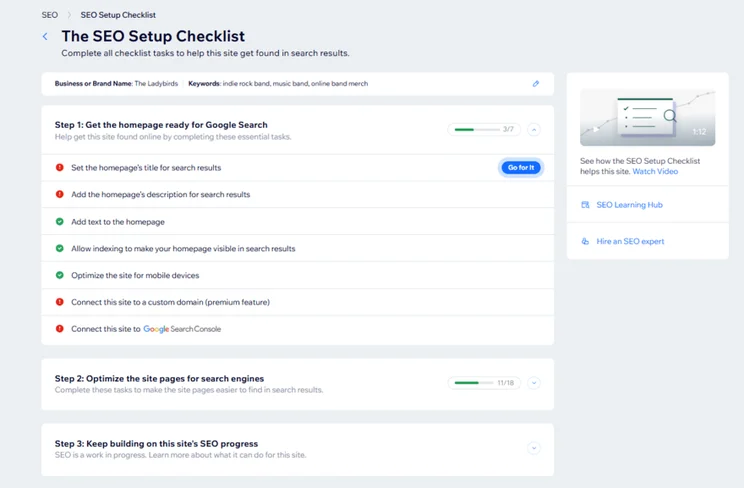
Wix’s features support businesses at every stage of their website journey. For example, Wix’s AI features and intuitive AI builder help generate a custom template for your business, produce website copy, and offer design suggestions.
Another great benefit of Wix for SMBs is its email marketing tool and personalized Wix SEO recommendations, helping to boost your site’s visibility and customer engagement.
- Email marketing with cheapest plan
- Keyword support from Semrush
- Great AI features
- Personalized SEO support
- 2.9% + $0.30 processing fee
- Interface can be overwhelming for beginners
- Slow loading times
How Much Does Wix Cost?
| Plan | Price with our discount TAKE10 | Monthly price (billed annually) | Monthly price (billed monthly) | Ecommerce |
|---|---|---|---|---|
| Free | $0 | $0 | $0 | No |
| Light | $15.30 | $17 | $24 | No |
| Core | $26.10 | $29 | $36 | Yes |
| Business | $35.10 | $39 | $46 | Yes |
| Business Elite | $143.10 | $159 | $172 | Yes |
2. Shopify: Best Builder for Selling Online
- Shopify pricing: $29 – $299 per month
- Read our Shopify review for a detailed look at the website builder
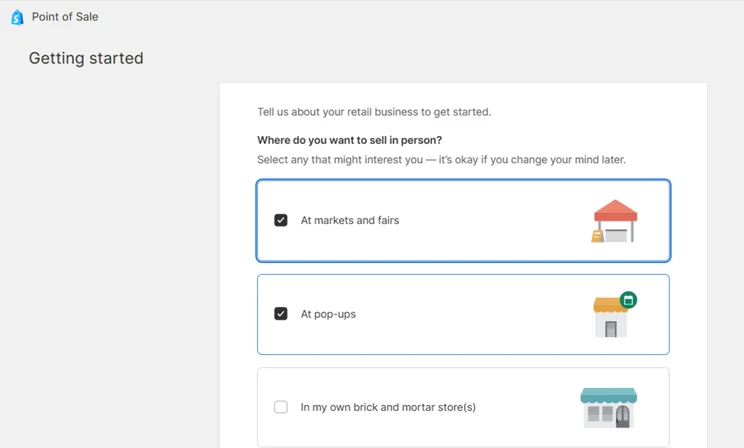
Shopify is the best builder for selling online because it provides industry-leading tools for multichannel sales, tax automation, and inventory management. As a powerful ecommerce website builder, Shopify’s plans are suitable for small businesses of all sizes.
Shopify also supports over 100 payment gateways, as well as its native Shopify Payments, which you don’t have to pay transaction fees on.
- Intuitive product backend
- Great scalability for complex inventories
- Sell on socials, including TikTok
- Manage your business bills easily
- Not the most beginner-friendly builder
- Limited store customization
- Heavy reliance on third-party apps
How Much Does Shopify Cost?
| Plan | Monthly price (billed annually) | Monthly price (billed monthly) | Ecommerce |
|---|---|---|---|
| Basic | $29 | $39 | Yes |
| Grow | $79 | $105 | Yes |
| Advanced | $299 | $399 | Yes |
I’d recommend Shopify as a great option for small businesses because of its simple backend tools that let you add products easily, as well as its huge app store which is great for helping small businesses grow and adapt. You’ve got apps like TikTok that can help grow your audience or Klaviyo which is great for setting up email and SMS marketing!

3. Squarespace: Manage Online Bookings Seamlessly
- Squarespace pricing: $19 – $99 per month
- Read our Squarespace review for a detailed look at the website builder
Squarespace is the top choice for service-based businesses due to its integrated Acuity Scheduling tool, helping you offer and manage appointments online.
Plus, first impressions make all the difference, especially if you’re trying to get people to book services with you. Squarespace’s 200+ templates, sleek design elements, and quality content tools are the best for small businesses looking to make a stylish online store.
- Ideal for creative businesses
- Offer services and appointments with built-in booking tools
- Unique content tools available
- Easy-to-use website editor
- Not suitable for larger inventories
- Less creative freedom than Wix
- No POS integration

How Much Does Squarespace Cost?
| Plan | Price with our discount WBE10 | Monthly price (billed annually) | Monthly price (billed monthly) | Ecommerce |
|---|---|---|---|---|
| Basic | $17.10 | $19 | $25 | Yes |
| Core | $26.10 | $29 | $39 | Yes |
| Plus | $44.10 | $49 | $65 | Yes |
| Advanced | $89.10 | $99 | $139 | Yes |
4. Hostinger: Easiest Builder for Small Businesses
- Hostinger pricing: $2.99 – $7.99 per month
- Read our Hostinger website builder review for a detailed look at the website builder
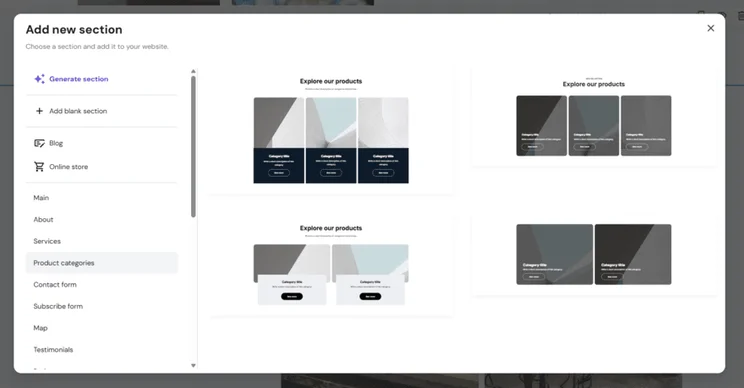
Hostinger offers brilliant AI tools and a beginner-friendly editor to help small businesses start selling online. Because of this, and the cheap introductory deals, Hostinger is the best choice for side hustles or entrepreneurs testing out a new business idea.
To sell online with Hostinger, you’ll need at least the $3.99 Unlimited plan to unlock the builder’s ecommerce features and the ability to sell up to 1,000 products. Or, upgrade to the Cloud Startup plan to sell unlimited products. And, for such a low price, the upgrade doesn’t seem as big a leap as with other website builders.
- Impressive suite of AI tools
- Fast loading times and responsive editor
- Very affordable starting prices
- Limited scalability for growing businesses
- No app market
- Steep renewal prices after first term
How Much Does Hostinger Cost?
| Plan | Price with our discount WBE | Monthly price (48-month term) | Monthly price (billed monthly) | Ecommerce |
|---|---|---|---|---|
| Premium | $2.69 | $2.99 | $11.99 | No |
| Unlimited | $3.59 | $3.99 | $18.99 | Yes |
| Cloud Startup | $7.19 | $7.99 | $27.99 | Yes |
I think busy entrepreneurs would really benefit from Hostinger’s suite of time-saving AI tools. This is what makes Hostinger a smart choice for small businesses – it gives you a helping hand with things like website creation, content generation, and tracking customer engagement.
With no app market and limited plans, it’s not the most scalable option, but when you’re a new business owner juggling all the tasks that come with those early days of building and running a website, these AI tools can make a real difference and help you set up fast!

5. GoDaddy: Great Social Tools for Promoting Your Store
- GoDaddy pricing: $0 – $20.99 per month
- Read our GoDaddy review for a detailed look at the website builder
GoDaddy offers an impressive suite of social tools to promote your store and its products across social media channels. You can populate GoDaddy’s social media calendar with the AI Social Post Creator, review your scheduled content, and identify the right days to post.
And, though we found GoDaddy’s editor and features to be quite simplistic overall, the speedy onboarding gets your business online quickly. You’ll be asked a few questions about your business needs before GoDaddy generates a custom template, making it a great option for beginners.
- The simple editor is great for beginners
- Budget-friendly plans
- Mobile app management
- Lacks quality designs in comparison to Squarespace
- Limited functionality in the editor and backend
- Basic SEO support

How Much Does GoDaddy Cost?
| Plan | Monthly price (billed annually) | Monthly price (billed monthly) | Ecommerce |
|---|---|---|---|
| Free | $0 | $0 | No |
| Basic | $9.99 | $21.99 | No |
| Premium | $14.99 | $39.99 | No |
| Commerce | $20.99 | $44.99 | Yes |
What Are the Hidden Costs of Using a Website Builder?
There are plenty of additional fees to expect after your initial subscription fee, including domain renewal rates (around $20 per year), the cost of paid apps and additional website functionality, such as scheduling tools, and subscription price hikes after introductory offers have expired.
- Renewal costs – some website builders, like Hostinger and GoDaddy, will increase your subscription price after the initial term ends (for example, Hostinger’s Premium plan jumps to $10.99 after the first 48 months)
- Domain names – most builders include a domain name for free for your first year, but you’ll need to pay around $10 to $20 per year after this offer ends (rates are decided by the length, authority, and popularity of your domain name)
- App subscriptions – some plugins will charge a one-time fee or operate a subscription model
- Additional functionality – for example, Squarespace’s Acuity Scheduling tool starts from $16 per month, doubling the cost of its cheapest website builder plan
How Do I Migrate My Site if I Outgrow the Builder?
Websites can be migrated using a website builder’s built-in import tools, third-party migration apps, or manual content transfers, depending on the platforms you’re moving to and from. For example, Squarespace has a wide range of import tools in its dashboard, whereas Wix is much more rigid, requiring everything to be copied over manually.
Most website builders want you to stay within their ecosystem, so the migration process is difficult.
Migrating an ecommerce store is more straightforward, thanks to third-party apps that support customer and product data transfers, such as Shopify’s Store Migration plugin.
- Blog posts
- Static pages
- Media (images, video)
- Products
- Domain
- Templates
- Layouts
- Fonts
How To Choose Your Small Business Website Builder
To choose the right website builder, evaluate your business model: use Wix for general promotion, Shopify for high-volume sales, or Squarespace for service bookings. Of course, we’ve discussed our top five options in this article, but how do you know which one is right for you? What do you need to consider?
- Identify your primary goal – Does the builder accommodate your selling needs? Are you mostly looking to promote your business? Do you need to take online bookings?
- Determine your budget – Compare plans to see how much you need to pay for the features your business requires.
- Recognize your skill level – If you’re new to building websites, choose a builder with an easy-to-use editor, like Hostinger or Squarespace, or look out for good AI tools to simplify the process.
- Plan for your future – Does the builder you’re looking at offer scalable plans? How many products can you sell? Will you need to switch platforms eventually?
How We Test and Rank the Best Website Builders for Small Businesses
We spent over 300 hours conducting independent, user-led research to find the best website builders for small businesses. Our research process for ecommerce builders includes 283 areas of investigation, spread across seven core research categories:
- Sales Features (30%): We look at the ecommerce features on offer to support your online store, from payment options to abandoned cart recovery.
- Help and support (15%): We test a builder’s contact options and knowledge centers because we know every small business might need a helping hand now and then.
- User experience (15%): We look at a website builder’s ease of use and accessibility by testing the builders ourselves.
- Website functionality (15%): We look at the quality and quantity of a builder’s features, such as SEO, AI, and email marketing.
- Design features (10%): We cover a website builder’s aesthetic capabilities and design options, such as templates and mobile editors.
- Pricing (10%): We review a website builder’s pricing plans and what you can get for your money.
- Reputation (5%): We see how a website builder performs in the market and against competitors.
Final Verdict: Which Is the Best Small Business Website Builder?
Based on our 2025 testing, Wix is the best choice for small businesses. The builder offers a powerful all-in-one platform, providing essential website features and sales tools that cater to a range of industries, such as hotels and restaurants.
Of course, the builder you choose will depend on your small business needs and priorities. You can see how Wix compares head-to-head with our other recommended choices: Wix vs Shopify, Wix vs Squarespace, Wix vs Hostinger, and Wix vs GoDaddy.
FAQs
A free plan is only really suitable for personal projects or testing. Free plans come with ads, limited features, and immediate blockers for small businesses looking to sell.
For a professional look, you’ll want a premium plan right away – this will allow you to remove ads and add a custom domain name, improving your brand recognition online. And, if you’re planning to sell products, all of our top-rated small business website builders require you to upgrade to a paid plan.
For side hustles looking to expand into a small business, Hostinger is a cheap website builder that lets you sell up to 1,000 products. However, the right website builder will depend on the scale of your business and your future plans.
If you’re selling more than 1,000 products, I recommend Shopify. Shopify has a Shopify Starter plan for $5 per month, which lets you sell via socials, making it an ideal option for side hustles. You can then upgrade to its premium plans when ready, since these offer more scalability for online stores.
Based on our testing, Squarespace is the best website builder for service-based businesses because of its built-in Acuity Scheduling tool. You can set up different appointment types, such as 1:1 sessions, tweak your availability, take bookings, and manage payments. You can manage your website and services all in one place.
There’s a 14-day free trial, but you’ll need to pay an additional monthly or annual fee for the feature (from $16/month).
Of our top five small business website builders, Wix, Shopify, and Squarespace offer the most advanced features. Wix is a great all-rounder, with built-in tools for a wide range of industries, such as restaurants and hotels. Shopify has the best advanced features for selling products online. And Squarespace offers top level customization tools and scheduling capabilities.
Squarespace has the best website templates for small businesses. You can generate a custom template with its Blueprint AI Builder, or choose from over 180 free professionally-designed templates for your site. These can be filtered by website type, such as “Online Store” or “Blog,” or you can browse different industry categories, such as “Events” or “Local Business.”


1 reply
1 reply
1 reply
1 reply
1 reply
1 reply
1 reply
1 reply
1 reply
1 reply
1 reply
1 reply
1 reply
1 reply
1 reply
1 reply
1 reply
1 reply
1 reply
1 reply
1 reply
1 reply