Best Website Builder Templates for Every Site

We may receive a commission from our partners if you click on a link and purchase a product or service on their website. Learn more

maura monaghan
Written By
Updated on March 25, 2022
best website builder templates

We’ve compiled a list of the most stunning free website templates out there, so you can choose from the best of the best!

Trying to choose a website builder template from the thousands of options available is like being taken to a buffet, then being told you can only pick one item to eat. Except no buffet could boast the sheer volume of options that most website builders do – Wix alone offers over 500.

It’s hard to figure out which template is best for your specific goals. If you’re a creative, you’ll want a template that beautifully emphasizes visual work. If you’re looking to sell online, you’ll want a layout with an easy-to-navigate digital store. If you’re a local business, you’ll want to create a user experience that encourages potential customers to visit in person… the list goes on. And you don’t want to choose lightly, since nearly 40% of users will stop engaging if they think a website’s layout is shabby. 

Our team at Website Builder Expert has tested and researched the best website builder templates extensively, creating sites that cater to all of our different interests. So now, you don’t have to sweat the hard part – we’ve compiled an ultimate ranking of the best free website builder templates, organized by industry.

1. Utica by Squarespace

best website builder templates 1

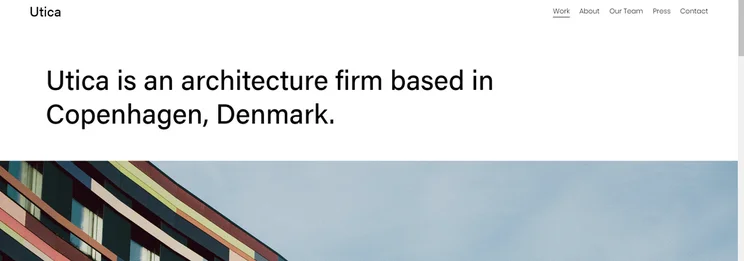
The Utica theme from Squarespace is perfect for creatives looking to show off photography, artwork, and the like. Its simple black-and-white framework and clean fonts allow your work to take center stage, and you can choose singular images to serve as links to the rest of a project. That means points for organization and style!

Utica’s clean layout also lends itself to a great “Our Team” page, which is invaluable – 52% of visitors said the first thing they want to see on a company’s website is their “About Us” page. The theme emphasizes big headshots with personal bios underneath, so every team member can add a personal touch.

Squarespace is also a great place to start if you’re considering an entry into the world of podcasting. With an array of aesthetically-pleasing podcast website templates on offer, you can create the perfect online presence to accompany your show, in moments.

2. Christian Adams by Site123

best website builder templates 2

Site123’s Christian Adams template will inspire any creative. It allows you to customize a background image for your landing page, meaning you can impress visitors with your work right from the get-go. Then, once they inevitably keep scrolling, they’ll find a preview of your portfolio organized as thumbnail images that enlarge with one click. All of this engagement can happen without navigating away from the landing page, so your work is more likely to be seen by as many visitors as possible.

3. Kevin Matsuya by Squarespace
best website builder templates 3

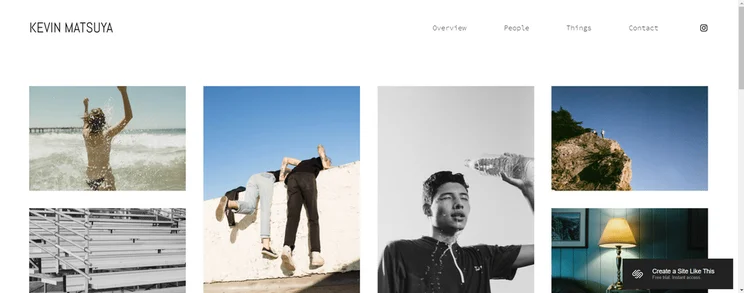
The Kevin Matsuya template from Squarespace is unique in its bold presentation of images. The landing page features a striking arrangement of photographs of different sizes – a visual disruption that makes the overall arrangement more exciting to look at. Since posts with images produce 650% higher engagement than all-text posts, this is the perfect template for calling attention to the work that you’re most proud of.Find Out More:

4. Acquire – Slick by Weebly

best website builder templates 4

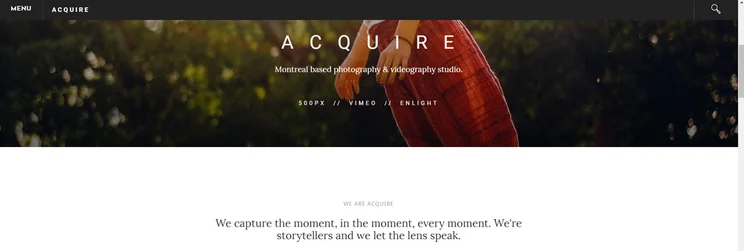
When you’re going for a site with a professional vibe, it’s still important to engage people with images. The Acquire – Slick template from Weebly gives you tons of control over the number and placement of those images throughout your site. It’s great for enticing people to come by in person, whether you’re displaying delicious menu items or action-packed fundraising activities.

5. Barbosa by Squarespace
best website builder templates 5

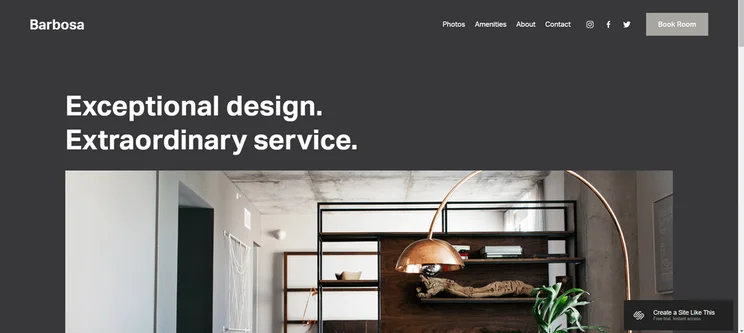
Squarespace’s Barbosa template commands attention with simple style – ideal for smaller, local organizations, or for eateries looking for one of the best restaurant website templates around. As users scroll through the landing page, you can use “Learn More” buttons to link to other parts of your site – essentially giving people a preview of the rest of your content.

You can also link to social media pages in the site’s navigation menu, which means that checking out your company’s Instagram account is as easy as visiting an internal page.

6. Clean Lines by Weebly
best website builder templates 6

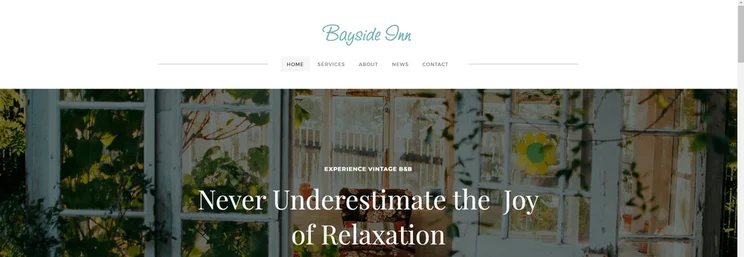
The Clean Lines template from Weebly infuses your site with an ideal amount of personality, without becoming overwhelming. This balance allows your organization to come across as both unique and professional – a winning combo for sure. The default centered navigation bar directly below the site header also racks up points for neatness and ease of use.

The “News” section of this template, which basically works like a blog, has a built-in sidebar with an “Author Profile” and “Archive” section. Curious readers will have all of the information they need to learn more about you!

7. Kitui by Squarespace

best website builder templates 7

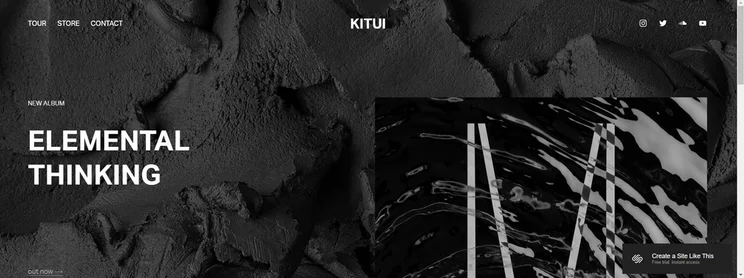
The most important part of any artistic website is the art itself. Squarespace’s Kitui template is perfect for rising above the noise and talking about the music. You can choose to showcase your latest project proudly on the landing page, so it’s the first thing visitors see.

Squarespace’s signature visual emphasis is also in full swing with Kitui. The minimal text on this template lets your work speak for itself.

8. Press Kit by Wix

best website builders template 8

Wix’s Press Kit template offers just about every function you could want in a promotional website. The organized layout shows off your discography, bio, tour dates, and performance videos in style.

Press Kit’s chic emphasis on visuals is ideal for musicians in particular, because your album artwork can really shine here if you want it to. There’s also an option to write a brief, polished-looking bio with a button that links to your longer, fleshed out CV – so your most devoted fans can keep up!

9. DJ Beat by Site123
best website builder templates 9

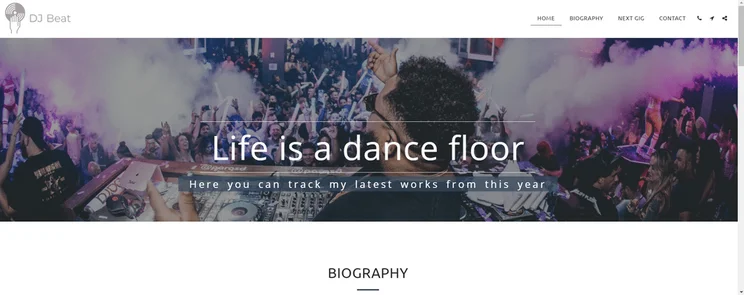
DJ Beat is Site123’s coolest music template. Its fresh font options and simple image placements come together to create a simple and attractive user experience. 

The “Next Gig” page is unique because it accentuates each individual event, rather than blandly listing all of your upcoming shows. Visitors will appreciate the chance to read tailored descriptions for each performance, and you’ll be able to put the spotlight on your next appearance.

10. Bedford by Squarespace

best website builder templates 10

We’ve already covered the undeniable connection between images and engagement. If words are your medium of choice, you might think this leaves you in a tough spot – but there are plenty of templates that skillfully use images to accentuate your writing, rather than overpower it. The Bedford template from Squarespace is one of them.

Bedford features an optional banner area at the top of every page, in which you can upload an image of your choice to call attention to whatever content will be beneath it. You can adapt this banner area to serve different purposes – for example, a banner area at the top of the “Blog” page could include a slideshow of featured blog posts.

11. Personal Blog by Wix
best website builder templates 11

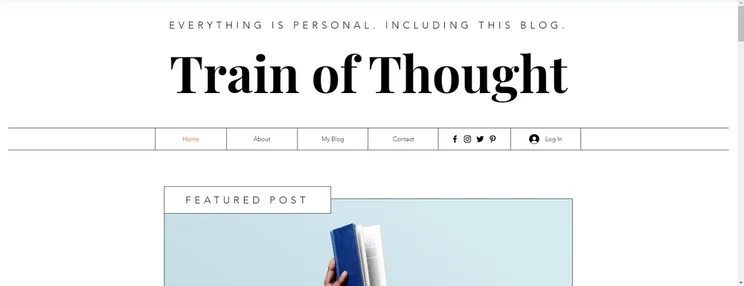
Don’t let the name “Personal Blog” fool you – this template from Wix is pretty special. Our favorite part is the option to set up a feed of blog posts adjacent to your “About Me” section, so that users can immediately put a face to all of the great content they’re seeing. Above that, you can display a featured post at the top of the page to draw readers’ attention to your most recent masterpiece.

12. The Traveler by Site123
best website builder templates 12

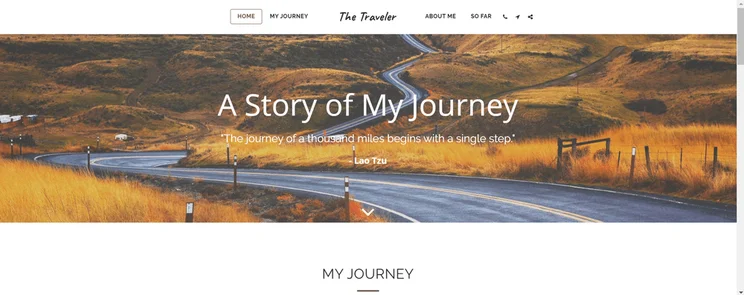
Any writer knows how difficult it is to organize different stories into one neat-looking place. Site123’s The Traveler template solves this problem beautifully. Easy-to-read boxes – each with a featured image – display the title, summary, and post date of every blog entry. At the bottom of each box is a “Read More” link to the full entry.

Once you’ve dazzled readers with your contemplations, it’s nice to know that The Traveler also features a really sleek “Subscribe” section, where users can enter their email and receive updates from you at the click of a button.Find Out More

See our shortlist of the best Informational Websites Examples for inspiration from real-life blogs and brochure sites.

13. Carmine by Squarespace

best website builder templates 13

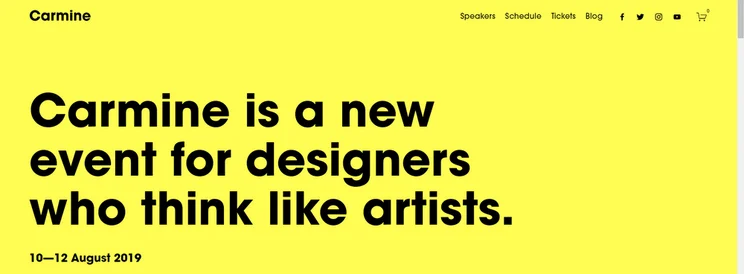
Squarespace’s Carmine template rocks a solid background color with large text, making it ideal for advertising an upcoming event. Important information like dates and location won’t be lost on anyone, and images that appear while you scroll keep the layout from becoming a bore.

Straightforward links and navigation mean that people can sign up for your event with ease, and the minimalism of this theme feels artsy and fresh – perfect for a creative exhibit or intellectual display.

14. Tech Meetup by Site123

best website builder templates 14

Site123’s Tech Meetup template is great for communicating all of the information that potential attendees will need to know about your event. Underneath the large page header is space to include the date, time, and place of the event, so that visitors will know the essentials immediately upon finding your landing page.

With Tech Meetup, you can also include a page called “When & Where?” with a map to your event’s location. You can even add in a straightforward “Checkout” box for users to purchase tickets through.

15. Business Conference by Wix
best website builder templates 15

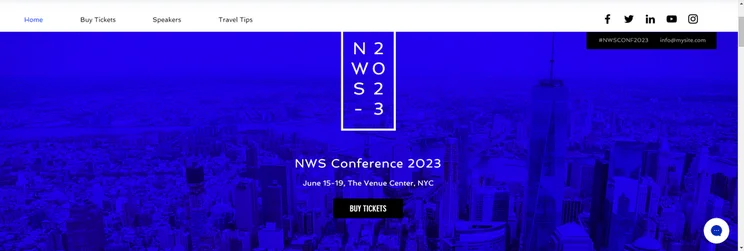
The Business Conference template from Wix is great for organizing a professional event. By keeping your landing page simple, you can highlight one important action at the top of the page – this is the function that the “BUY TICKETS” button serves in the demo. 

Our favorite feature of Business Conference is the option to include a gallery of speaker headshots, which each reveal a bio when you hover the mouse. Interactive touches like this make it fun to seek out more information!

For more of our favorite event website templates, check out our top 9 list.

Somewhere among the thousands of website builder templates hanging around the internet is the perfect layout for your site. We’ve sifted through as many templates as possible to create this list of our fifteen favorites, so you have a more selective place to start searching. To recap, these are our favorite website builder templates for:

  1. Visual artists: Utica, Christian Adams, Kevin Matsuya 
  2. Local businesses and community non-profits: Acquire – Slick, Barbosa, Clean Lines
  3. Musicians: Kitui, Press Kit, DJ Beat
  4. Wordsmiths: Bedford, Personal Blog, The Traveler
  5. Events: Carmine, Tech Meetup, Business Conference 

First and foremost, the best website builder templates will accentuate the content that you bring to your site – because it is your site! One quick tip: Squarespace came out on top in our research for best design, so if you still haven’t found your perfect match, it’s a good place to start!

Written By

maura monaghan

Hi, I’m Maura:

I first started as a Content Writer for Website Builder Expert in 2019, but as of 2022, I’ve moved to work as a Content Specialist for Mastercard. I grew up scribbling in notebooks, and the thought of relocating my writing to the digital world seemed like an impossible goal. 

But when I finally took the plunge and created an online portfolio, I immediately saw the benefits of having my work on the web. Since then I’ve learned everything I can about creating different websites, so that I can help those in a similar situation get online without a similar headache.

During my time at  Website Builder Expert, I delved into topics like web design and ecommerce – working my way from a Content Writer to Sub Editor for the site. I’ve attended some cool events on ecommerce, and use my BA in English and Political Science to shape the content I write and edit.

You can find me on Linkedin here.Outside of Website Builder Expert, Maura’s writing has been featured on various parts of the web, both technical and non-technical. In particular, she enjoyed talking about web design on Paldesk and new tech trends on SmallBizDaily. 

Maura expertly wrote articles, then moved on to become a Sub Editor, quality checking the content on the website, before leaving Website Builder Expert. Since May 2022, Maura has moved to a Content Specialist role with Mastercard, writing on Tourism Innovation and finance topics.LinkedIn: Maura Monaghan

More about

38 comments

Your email address will not be published. Required fields are marked *

  • Ernest

    Hello. Read websitebuilderexpert coverage on website builders--very informative. However, I'm kinda a tech-peasant. I'm looking to put together a simple website to showcase my advertising print work; just need to put in the pic of the ad and have a separate text box to include the headline and copy (as it probably would not be legible in the pic of the ad). Don't need lots of bells and whistles.

    Can somebody please recommend a website builder? Thanks. Ernest

    1 reply

    • Jacqueline Renouard
      Jacqueline Renouard

      Hi Ernest,
      Thank you for taking the time to comment, and for your question! Most builders will be able to add images and text to the screen, if you're looking for a beginner friendly builder with great features we recommend Wix. In our research we found it to be the easiest to use and should help you create a great advertising print work website. Take a look at our Wix review for more details on the pros and cons to see if it's the builder for you.
      Warmly,
      Jacqueline

  • Lesley

    Im sorry but this is probably the most basic of question youve been asked - Im a proper tech dinosaur.....how do I go about getting a website address? I know you have to pay for the domain is that correct and where do I start?

    1 reply

    • Samuel Jagger
      Samuel Jagger

      Hi Lesley!
      Thank you for leaving your comment! Your are in fact correct! Your domain name is in fact what appears in the web address search bar. For example, our domain name is "websitebuilderexpert". Most website builders will give you the option to have a custom domain name, so you can name your site whatever you want to! Don't feel bad about your question either. This stuff is confusing, and a basic question shows you're on the right track! Hope this helps. All the best - Sam.

  • mona

    Thank you for the very informative page

    1 reply

    • Tom Watts
      Tom Watts

      Hi Mona,

      Glad it proved useful to you,

      Thanks for reading,
      - Tom

  • Daniel

    Thank you for the very informative page. I am completely new at this and have kind of basic question. Since we are prof. photographers, we would like to use our own pictures in these templates.

    1) Is it possible?
    2) Is it difficult to change only a picture(s)?
    3) Do we need any special "koding/programing" know how for this?

    Thanks in advance.

    1 reply

    • Jeremy
      Jeremy

      Hello Daniel,

      Good question. You can definitely swap out the "pre-set" images with your own. The current images inside the templates are there for illustration only, so you can swap them out and insert your own. No coding required.

      Jeremy

  • webtady

    All template are looking so beautiful.
    Thanks for sharing.

  • Eleanor Reaume

    Your resources have been so helpful. Thank you beyond these words that I'm typing!

    1 reply

    • Jeremy
      Jeremy

      Thanks Eleanor! Please do share our website with others by clicking on the social sharing buttons to the left of this page. I'd really appreciate it!!

      Jeremy

  • Vanessa

    Wow Jeremy Thanks for making my decision on where to go to create a website so clear. What a wonderful resource you have made. I have a question that I'd thought I'd ask you in case you know and because I can't find where to get a ticket for customer service on wix. If I want to use 2 of their templates, one for a website, and one for a blog, but I want them to be under the same domain name and have the blog on the menu of the website page - is that possible??Is it possible anywhere? Cheers

    1 reply

    • Jeremy
      Jeremy

      Hey Vanessa,

      Thanks for your feedback and glad you're finding our discussions helpful!

      Regarding your question, I don't think you can create a single website with two distinct design templates. If you want two different templates, you'll have to create two different websites.

      One thing you can consider doing, is to give your blog website a subdomain of your main domain name. For instance, if your main website is 'www.example.com, then your blog site can be blog.example.com. In a way, it will be sharing the same domain brand. You can configure this with your domain name registrar.

      On the menu bar of your main website, you can create a menu bar item, and link it to your blog website.

      Hope this points you in the right direction!

      Jeremy

  • Julie

    Hi Jeremy, to build my own web page on a domain website builder like godaddy, am I able to use these sites? Weebly etc. I remember MySpace had the options of pasting codes. Is this a little alike; however, I don't have the set boxes or categories like MySpace. Incorporating so I need to do this asap. Thanks

    1 reply

    • Jeremy
      Jeremy

      Hi Julie,

      Do you mean you want to import one of the templates above into your GoDaddy account?

      If so, then unfortunately you won't be able to do that. If you want to use one of the templates above, you will have to use the website builder that provided the template design.

      Jeremy

  • levi

    Hello Jeremy, do these website builders, teach you how to bring in traffic, like "Site build it", or will your advised site builders, like sqaure space do the same thing for us?

    1 reply

    • Jeremy
      Jeremy

      Hi Levi,

      None of the website builders really teach you how to bring in traffic. But there are plenty of resources online to learn more about them, and these principles can be applied across all web builders.

      I haven't used Site Build It before, but I'd imagine they will be teaching you similar ideas as those you can find online.

      Jeremy

  • Julian

    I have been really digging into your site over the last week, and wanted to say a big thank you. Really well communicated and so thorough.

    While I am firing of the compliments, I might ask if the SEO optimisation is the same in Weebly as in Squarespace? I need simple easy and to be found.
    Thanks Julian

    1 reply

    • Jeremy
      Jeremy

      Hey Julian,

      Thanks so much for your compliments!

      Regarding SEO for Squarespace and Weebly, take a look at our comparison chart here, especially the footnotes about SEO. That will give you an overview of our thoughts.

      Jeremy

      1 reply

      • Julian

        Thanks Jeremy, I hadnt looked down further. Interesting because a few years ago I met buildit.sitesell.com. A website online business and was influenced by their thinking.Have you heard of them?
        But their templates are incredibly unattractive, there emphasis being on constructing an online 'business'. A combination of very powerful SEO and Design sounds like perfect combination to me. :) I really love the style of Squarespace.

        1 reply

        • Jeremy
          Jeremy

          Hey Julian,

          I've heard of them when I was doing some research a few years ago, but haven't seen much about them since.

          From my own perspective, I think design is very important to give your visitors confidence about the quality of your business. But of course, the ability to have your site rank well in search engines is also very important. But I think ranking well has a lot to do with what you do outside of your website as well, more so to what you do inside the website.

          Promoting your website / business well is important to bring in traffic. The more traffic you get, the higher the word of mouth and social discussion around your website. All those are positive signals to search engines like Google, and the higher you might be able to rank in search results. It's a long process but that's how successful businesses are built!

          Jeremy

  • Sean

    Hello Jeremy

    I am not an IT expert and your tips have been very helpful. However, I have heard that Wordpress is also a good site to use for building websites. I was wondering why you do not include it in your comparison of web building sites? Are there significant disadvantages by comparison to the sites that you compare? Is Wordpress free?

    Thank you

    Sean

    1 reply

    • Jeremy
      Jeremy

      Hi Sean,

      Our discussions are focused on drag and drop website builders, which are a lot easier and intuitive to use than WordPress. WP is really powerful if you know how to use it and if you are proficient with codes. If not, the learning curve can be quite steep and technical.

      So a lot of people rather use a drag and drop builder as it saves them time and can get a good looking website up and running a lot faster.

      WordPress.com does have a free plan, but if you want to add things to it, then you have to subscribe to their higher plans.

      Jeremy

      1 reply

      • Sean

        Thank you Jeremy. I think you have saved me a lot of time. :o)

        I will be looking more closely at the websites that you discuss.

        Thank you again.

        Sean

  • Anne

    Hello Jeremy,
    Thanks for all your tips and suggestions. My husband is a professional hiking guide and I am helping him to start his own company offering high-end hiking services. My preference goes for Squarespace as their templates are very sleek and look professional. Which one do you think is easier to adapt for our business? In particular we want a template that has a great visual impact (pictures first) for the wow factor but also the flexibility to add required information on the tours and importantly an online booking and payment system.
    Thanks again for your help!
    Anne

    1 reply

    • Jeremy
      Jeremy

      Hi Anne,

      I'd agree that Squarespace probably has some of the best looking templates and can definitely make a visual impact on your visitors!

      Regarding booking, they do have a Calendar Block which you can highlight upcoming events.

      They don't have any payment system that ties directly into their Calendar Block, but if you visit their Help Page and type in Calendar, they show you how to integrate a few external booking tools into your Squarespace website.

      Hope this helps!

      Jeremy

  • Carrie

    Jeremy,
    I am a photographer by trade so I know about photography websites, but I am opening a new candy buffet business and need a website for that. Since we won't need any e-commerce stuff, but something that takes Paypal, what do you suggest? Thanks! Carrie

    1 reply

    • Jeremy
      Jeremy

      Hey Carrie,

      It's tough for me to say which template design is good for you business. I'd actually suggest that you spend some time and take a look through some of the available templates from Squarespace, Wix and Weebly (the templates above are from them).

      If having a mobile friendly website is very important for you, I'd suggest you focus on Squarespace first, as all their design templates are responsive so will look great across mobile devices!

      - Jeremy

  • Toby Beavers

    Hi Jeremy,

    Thanks for all those great templates.

    Which one(s) do you think are BEST for real estate agents and the ability to incorporate IDX (MLS) listings?

    Regards, Toby

    1 reply

    • Jeremy
      Jeremy

      Hey Toby,

      I think in general, none of the website builders are fully integrated with IDX. So you will have to get the MLS listing widget and manually insert the widget into the website builder.

      For instance, here is how to do that for Squarespace.

      I can't quite comment on which one is best for your needs, as it is a pretty subjective decision, depending on your style, the type of real estate you are listing (multi dwelling, vacation homes, large family homes, etc).

      - Jeremy

      1 reply

      • Toby Beavers

        Excellent. Thanks J!

  • Susan

    I have been researching your info and website builders for a few days. I have not been able to find an answer to a few questions that I need to know before choosing.
    1. I need a specific template that pertains to exotic birds, specifically parrots. I am starting up a bird sitting business. All of these website builders do not have the right template. I foundsome beautiful templates for pertaining to parrots elsewhere, but you have to buy the template. That is fine, but I have no idea what to do next if I just bought the template ????

    1 reply

    • Jeremy
      Jeremy

      Hi Susan,

      Try looking beyond what is displaying on the templates, as you can change out the default images in the template and insert your own birds related images, effectively customizing the templates to show whatever you want.

      The ease of using the templates we've shared above is that they are all supported by drag and drop website builders, so you don't have to worry about "next steps". Just sign up, select the template and start building your site!

      - Jeremy

  • Abed

    Hi Jeremy

    First I want to say that I learned a lot by viewing this website. And now I am preparing to start my own E-business , but since I have only very little knowledge in coding I need Web designers like that shown on this page and my problem is that I cant find any designer that allow me to give Limited access to some of my customers to offer their Products. Plus I am not understanding how a Resell host will be better than normal one, especially if I am going to buy all the offers (Lock, Mobile beautiful view,...).

  • Jodie

    Hi Jeremy,

    Are these templates available to people who already have websites with Weebly? Or do you have to sign up for a new account/pay for a new page in order to use the templates?

    Thanks!
    Jodie

    1 reply

    • Jeremy
      Jeremy

      Hey Jodie,

      The templates above are a blend of templates from Weebly, Squarespace and Wix (we picked some of our favorite ones to showcase here!)

      If you already have a Weebly account, you should have access to the templates from Weebly to apply to either your new or existing Weebly website. You can click here to see what is available from Weebly.

      If you don't have access yet, try shooting their support team an email with a screenshot of the template and inquire as to why you don't have it yet?

      - Jeremy

      1 reply

      • Mohamed

        it is ok thank you

        but i need to download the template may i get it
        i need to apply my own web

        1 reply

        • Carla Houston

          Mohamad, i recommend you to find some more template I also used webgen.com for this purpose you can see there lot of free templates & designs they guys offer even more attractive plans.