
How To Use Wix: A Complete Guide for Beginners

We may receive a commission from our partners if you click on a link and purchase a product or service on their website. Learn more

Headshot of Emma Ryan
Written By
natasha_willett
Reviewed By
Updated on June 27, 2024
Advertisement
We may receive a commission from our partners if you click a link and purchase a product or service. This does not impact our ratings, which are determined by years of hands-on testing and expert research.
For personal sites
Light
See Pricing

Starting from $17/month

$15.30 with code “TAKE10”

  • No ads
  • Free domain for 1 year
  • 24/7 support
Cheapest paid plan
For small businesses
Core
See Pricing

Starting from $29/month

$26.10 with code “TAKE10”

  • Sell online
  • Unlock basic marketing
  • Increase storage space
Best value
For established businesses
Business
See Pricing

Starting from $39/month

$35.10 with code “TAKE10”

  • Advanced ecommerce tools
  • Multiple currencies
  • Automated sales tax
For scaling businesses
Business Elite
See Pricing

Starting from $159/month

$143.10 with code “TAKE10”

  • Unlimited storage
  • Priority phone support
  • 100 collaborators
For trying Wix
Free
Try for Free

$0

  • No credit card required
  • Basic features
  • AI website builder
Includes ads on site

According to our tests, Wix is the best website builder, powering over 200 million websites and sitting at the top of our rankings for nine years straight. Whether you’re a beginner or looking to switch to Wix, the builder caters to a broad audience with its drag-and-drop editor, AI builder, 900+ templates, and impressive features.

In this beginner’s guide to using Wix, I’ll walk you through setting up your account with Wix, using the editor, adding ecommerce functionality, and more in this detailed guide.

To get started with Wix, you’ll need an email address to create an account – you won’t need to enter any card details until you’re ready to purchase a premium plan.

After signing up, I was immediately presented with two options:

  • Use Wix Editor
  • Use Wix Studio

Wix Studio is a new editor type for advanced creative control, built with freelancers and agencies in mind. Wix Editor will be sufficient for the average user, specifically small businesses and individuals looking to build personal websites.
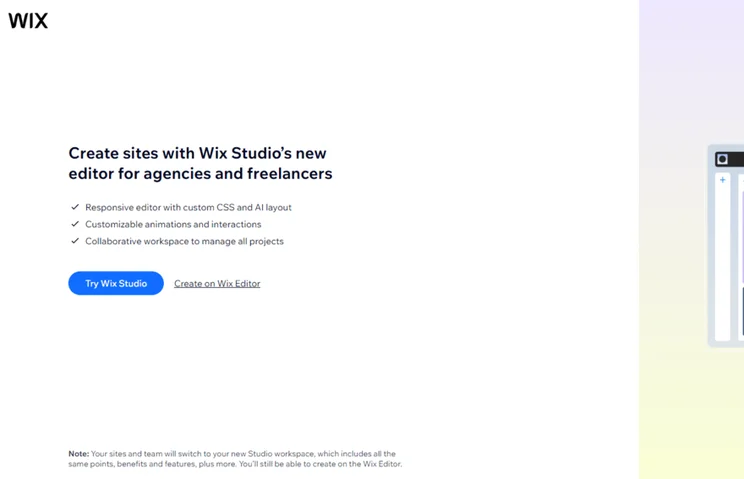
Wix onboarding asking users to try Wix Studio or create with the Wix Editor
My first choice was to choose between Wix’s Editor and the new Wix Studio. Source: Website Builder Expert

I chose the Wix Editor and was directed to use the recently launched AI chatbot. This new AI website builder tool asked me basic questions about my website and business needs, such as “What is your unique selling point that sets your historical bookstore apart from others?”. I watched in real-time as the AI generated a tailored site plan for my website, recognizing what to include based on my responses.

For example, Wix’s AI chatbot recognized my goals as an online bookstore to be: “Sell books,” “Promote the website,” and “Build a community.” It also set my target audience as “history enthusiasts” and “educators and parents” – reflecting my answers accurately.
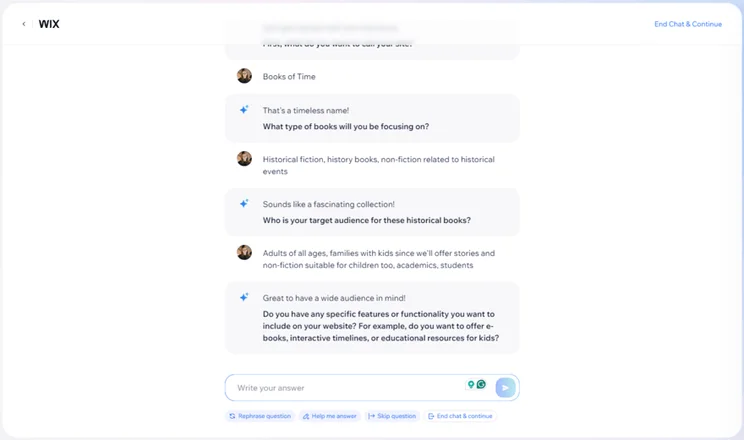
Wix AI chatbot asking questions about the website and business to build a site profile
My conversation with Wix’s AI chatbot impressed me because it tailored its questions based on my business. Source: Website Builder Expert

The conversation lasted roughly a minute or two, sending me to my Wix account dashboard at the end. This is the central hub, providing access to all of Wix’s key features and settings, such as sales management and analytics.

To complete the initial onboarding, Wix provides a personalized setup checklist. For my test website, I had steps such as “Set up payment methods” and “Get found by customers on Google.”
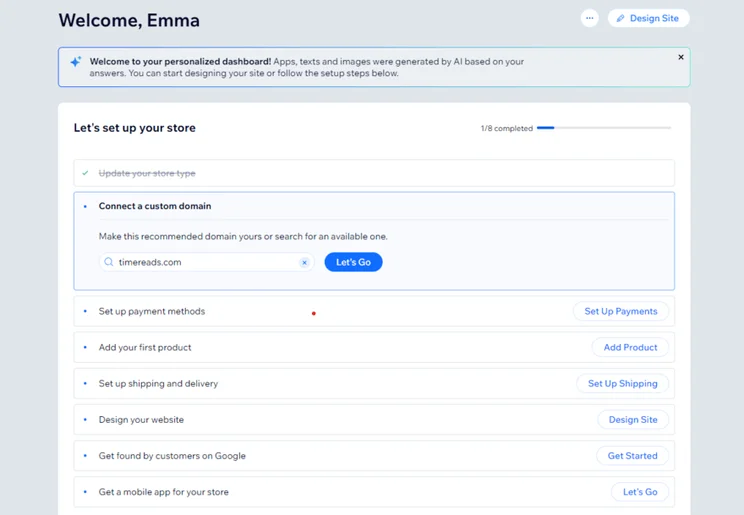
Wix onboarding checklist to set up a website
Wix provided a personalized setup checklist so I could follow along step-by-step when building my site. Source: Website Builder Expert

Another step in the checklist is “Design your website”. There are two available paths:

  • Generate a design with AI
  • Customize a template

We’ll discuss templates in detail later on, so I finished setting up my website with the support of AI. I found this option slow to load and unusable during my testing. In fact, Wix became completely unresponsive in my multiple attempts to use the feature and I had to reload the AI designer.

I’ve used the feature to design a website before, and the AI responded quickly then, but speed clearly isn’t guaranteed. In this instance, I tried again and again and again – eighth time’s the charm, right? Once responsive, it took roughly 15 minutes to generate a site based on my chatbot conversation and site profile.
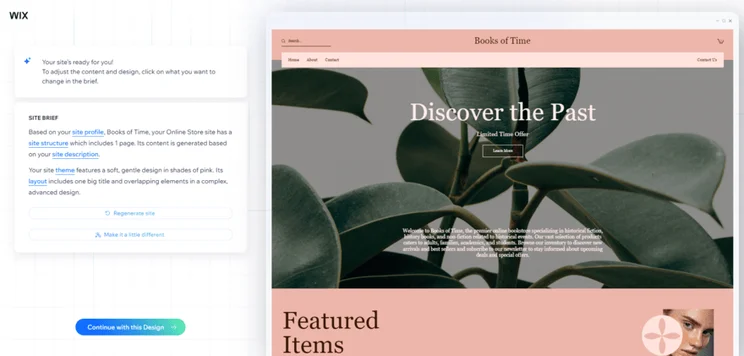
Wix's AI designer generating a website template based on my site profile
I found designing a site with Wix’s AI tool to be incredibly slow and frustrating, and the template wasn’t very tailored to my business beyond the copy. Source: Website Builder Expert

I could ask the AI to regenerate the template or tweak elements myself, but after the headache of testing the tool, I simply clicked “Continue with this Design”. While the tool aims to create a design that’s tailored to your business needs, I’d recommend choosing a template to begin with to avoid the potential wait time.

As you can see from the image above, the AI didn’t replace stock imagery with visuals of bookshops or books to tie into my online bookstore. Still, I appreciated that the website’s copy had been updated to reflect my business since that gave me one less thing to do when editing.

Choosing a Template

The alternative to using AI to design your website is to choose one of over 900+ Wix templates – these are all professionally designed and pre-equipped with useful features.
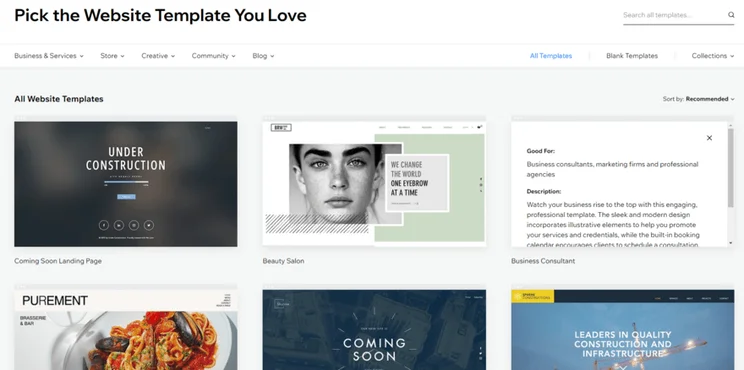
Wix's template library showing six template images
I checked what each template included in terms of built-in features before choosing from Wix’s catalog. Source: Website Builder Expert

Helpfully, I could filter the template library by category, such as “Professional CV” or “Music”. And, if I hovered over an image, I could view information about specific Wix templates. For example, this “Beauty Salon” template comes with Wix Bookings and an Instagram gallery pre-installed.

You can preview a template in desktop and mobile view before selecting it. But, be warned – you can’t swap your Wix template once your site has been published. Because of this, I recommend experimenting with a few options to know which template best works for your needs, or keeping things simple with a stripped-back template that’s easy to tweak and edit when necessary.

Getting a Domain Name

Setting up your website’s domain name is step number two on Wix’s onboarding checklist. You can check your domain’s availability in your account dashboard, and Wix will suggest similar alternatives if your first pick isn’t an option.
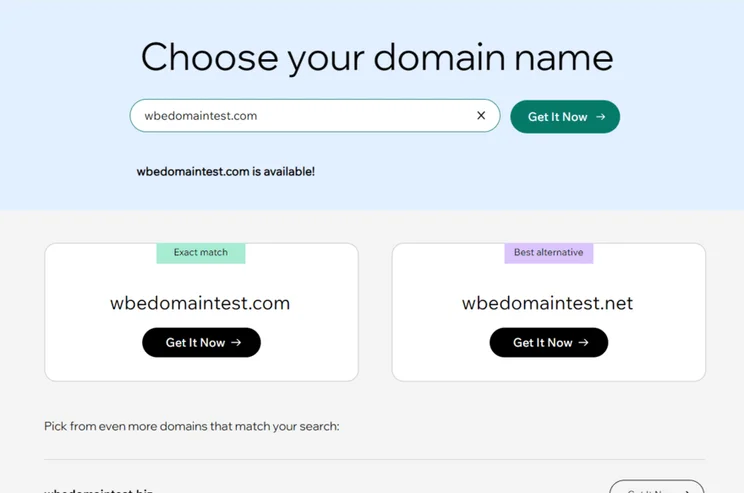
Wix's domain name checker, showing available options for "wbedomaintest"
I used Wix’s domain name checker to view availability and pricing. Source: Website Builder Expert

All of Wix’s premium plans come with a free custom domain name for the first year, but sooner or later you’ll need to pay for the domain itself. With Wix, a .com domain name will set you back between $15 to $17 per year, depending on the term length. There are alternative domain name registrars, such as GoDaddy, with which a .com domain will cost around $22 following an introductory discount – something other registrars offer as well, like Hostinger.

You’ll also need to subscribe to one of Wix’s premium plans to attach a custom domain name to your site, even if you’ve bought the domain name from an alternative registrar. If you use Wix’s free plan, you’ll be stuck with a domain name that looks like www.accountname.wixsite.com/siteaddress.

Wix’s pricing ranges from $17 to $159 per month (billed annually), spread across four main plans: Light, Core, Business, and Business Elite.

There’s also a free plan which you can stay on for as long as you’d like. This is a great testing ground to help you get familiar with Wix’s editor and features, but the free plan has its drawbacks. It places ads on your published website, offers limited storage space, and you can’t add a custom domain name. You’ll want to upgrade to a premium plan when you’re ready to publish and promote your site.

The Light plan is ideal for personal projects and small, informational sites. If you want to sell online, you’ll need the $29 per month Core plan or above to unlock ecommerce tools.

If you’re looking to compare against other popular platforms, Wix’s ecommerce plan costs the same as Shopify, our top ecommerce website builder, but overall GoDaddy and Squarespace are the best value for money. However, you can get 10% off your Wix plan with the code “TAKE10”.

Once I finished onboarding and settled on a basic design – in my case, an AI-generated template – I could start editing my website. When you first launch into the editor, you’ll be shown what each sidebar icon means, but you can also look under the “Help” section in the header to find an editor tour for more guidance.

In my experience, like the AI designer, I found the editor a little frustrating at times due to slow loading, but I valued the freedom granted by it.

New Elements & Sections

Wix uses a drag-and-drop editor, giving you total creative control when designing. This is one of the easiest building methods and a popular choice with other website builders, including Squarespace and Hostinger.

The top of the editor sidebar features a plus symbol, which you click to “Add Elements”. There are 23 element types, such as “Gallery,” “Button,” and “Bookings.” I could drag these elements directly onto the page and move them where I wanted.

In addition to individual elements, Wix’s catalog of pre-designed sections is there to help add structure to your pages and site. For example, I could add a testimonial section to my page and choose from six layouts for it. To add, I simply had to drag and drop it to the page, just like the elements.
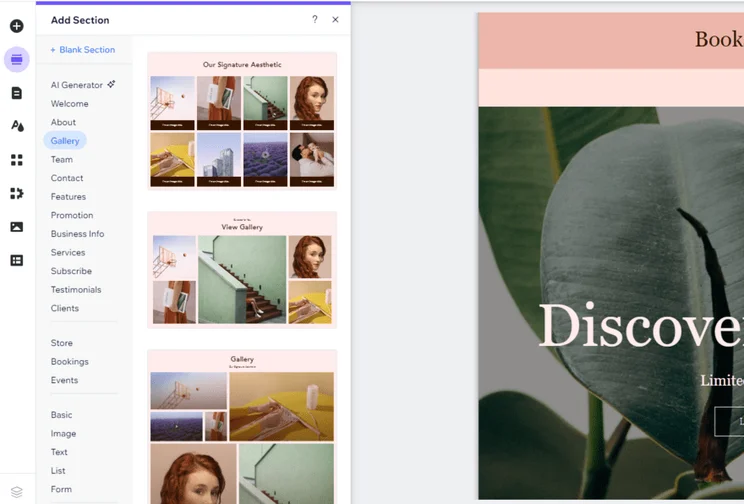
Wix's section library in the sidebar of the editor, showing layouts for a "Gallery" section
I could easily drag and move elements or sections around my pages with Wix’s editor. Source: Website Builder Expert

Customizing the Layout

If you’d like to customize your website’s layout further, there’s plenty you can do. For instance, I could click on the up and down arrows on the right-hand side of the screen to move a section vertically.

Additionally, I could click on the “Explore section layouts” button to access a range of different designs. From here, I could completely transform my section’s current layout.
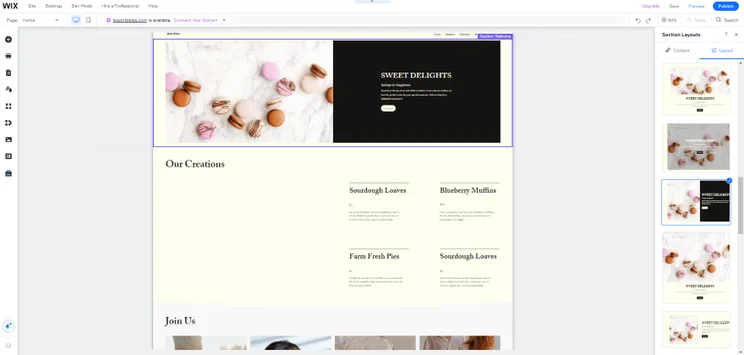
Screenshot of a Wix website with multiple sections.
I wanted my hero section to stand out more, so I changed the design via the "Explore section layouts" button. I had 25 different designs to choose from! Source: Website Builder Expert

If you want to create a new section from scratch without using a pre-built design, you can click on “Add new section” and then “Blank section” in the sidebar that appears. From here, you can drag in different elements and make it your own.

As you drag elements into your new blank section, pink grid lines will appear. These will help you keep everything aligned on the page.

Changing Copy

To change text, click on the copy and edit it directly on the page. Some other builders, like Shopify and GoDaddy, make you edit the text in a separate sidebar, but Wix’s editor speeds the process along.

You’ll notice when changing text that a pop-up box will appear with “Text Settings.” This is where you can change the style, font choice, and font size of your text, and add any effects.
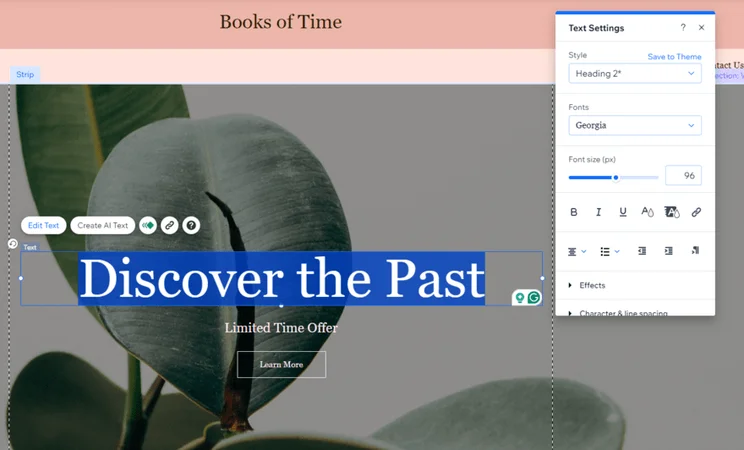
Editing a text box in Wix editor, with a pop up box of "Text Settings"
It was quick and simple to edit text directly on the page. Source: Website Builder Expert

Adding Imagery

You can add website imagery through the elements or sections mentioned previously. When testing, I clicked on an individual image and was presented with the option to change it, edit it, crop it, add filters, use AI to generate a new image, and more.

To change or replace an existing image, a pop-up screen appeared where I could upload media or browse Wix’s stock image libraries. Wix’s comprehensive media library offers thousands of free photos, even for niche subjects like “Video games” or “Cupcakes.” You can also search through top stock photo libraries like Unsplash and Shutterstock.

I was taken to Wix’s Photo Studio to make advanced edits to an image. From here, I could resize, add filters, and adjust granular settings like brightness and contrast.
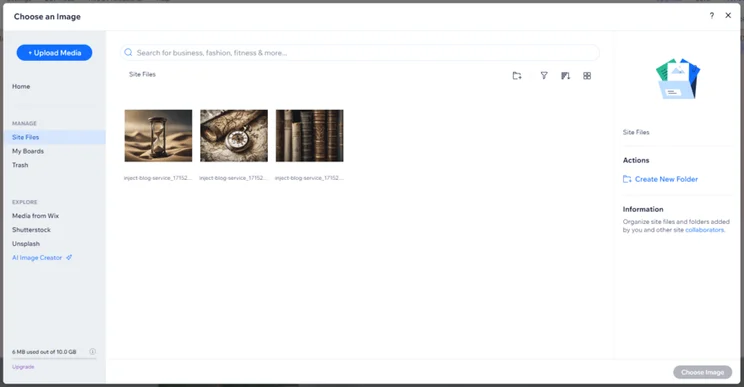
Wix's image library showing uploaded images and tabs for other media libraries, such as Unsplash
I could view and manage my site’s media through the image library. Source: Website Builder Expert

Creating Pages

Another essential part of setting up a website is creating pages. With Wix, this is accessible via the editor sidebar as well – under the third icon from the top, appropriately shaped like a page.

The “Site Pages and Menu” lets you organize and add to your website’s navigation and create new pages. When adding a new page, Wix offers another library of pre-made templates, whether you’re looking to add a “Services” page or “404 Error Page.” There are a few layouts within each section, making it easy to find a suitable match for your website. And, of course, these can be tweaked in the editor directly.
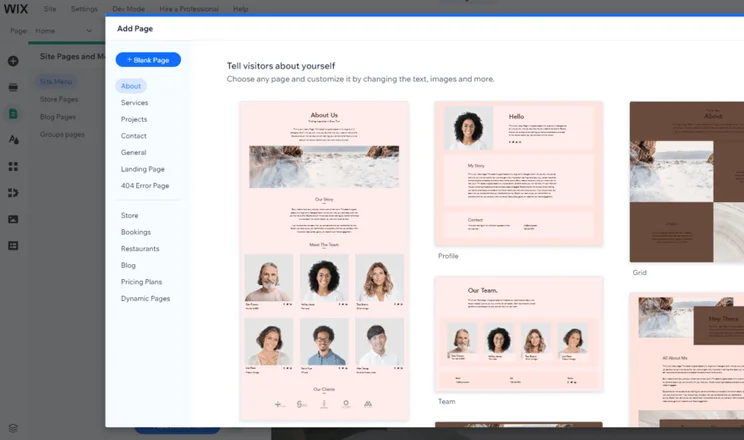
Wix's page library showing layout options for an "About" page
I used Wix’s pre-designed page templates to build my website. Source: Website Builder Expert

Preview & Publish

Once you’re happy with the look of your website, you can click “Preview” in the top right of Wix’s editor. This is where you can review your work and toggle between desktop and mobile views to check everything’s in order.

Don’t skip testing your Wix website on mobile. Google prioritizes pages that are mobile friendly, so you need to ensure that your website is well-optimized to improve your overall search ranking.
Additionally, since most website visitors use mobile, you’ll need to ensure that their user experience is seamless. Make sure that your mobile website is responsive, easy to navigate, and isn’t stuffed with pieces of content that are difficult to distinguish from one another.

It’s also the time to check links, buttons, and rid your site of any copy errors or out-of-place elements. I recommend getting friends, family, or colleagues to take a look over your pages too – a fresh perspective can be useful to spot mistakes, especially if you’ve been working closely on the website for some time.

Think of this preview stage as a dress rehearsal. Once you’ve smoothed out any kinks, optimized your pages, and ensured the user journey is straightforward, it’s time to click “Publish”!

For further information on how to use Wix’s editor, check out this video tutorial:

Everything store-related can be managed in the back end, under the “Getting Paid,” “Sales,” and “Catalog” headings.

Adding Products

When testing, I found it easy to add new physical and digital products using Wix’s form. From here, I could tweak the product name, pricing, and variants, view and update my inventory count, and set up subscriptions.

And, like Shopify, Wix lets you use AI to generate product descriptions, which helps businesses save time when uploading their inventories.
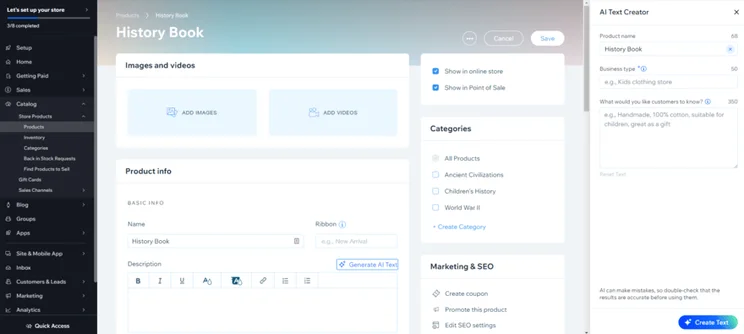
Adding a new product in Wix, showing the options to add images/videos, set categories, and product info
Wix’s AI text generator is great for adding product descriptions, but it’s not as customizable as Shopify Magic. Source: Website Builder Expert

Setting Up Payments

To sell online with Wix, you’ll need to subscribe to the Core, Business, or Business Elite plan – pricing ranges from $29 to $159 per month (billed annually). These plans will allow you to accept payments online.

First, you’ll need to set up a payment gateway – the gateway collects a customer’s payment information. It’s then securely sent to a payment processor, which forwards that data to the bank for authorization.

There are a range of payment gateways to choose from, including Wix Payments and PayPal. Your preferred payment gateway and processor can be set up under the “Getting Paid” section of the dashboard.

Wix provides lots of built-in features with its website builder, but Wix’s app market is there to provide additional functionality if required. There are over 800 apps to browse and install, and I could filter the marketplace by categories such as “Sell Online,” “Design Elements,” and “Communication.”

Alternatively, I could browse Wix’s “Team Picks” or shop around based on my specific website needs, such as “Collect Leads.” To install an app, simply click the button that says “Add to Site,” wait for the download, and complete the quick setup process.
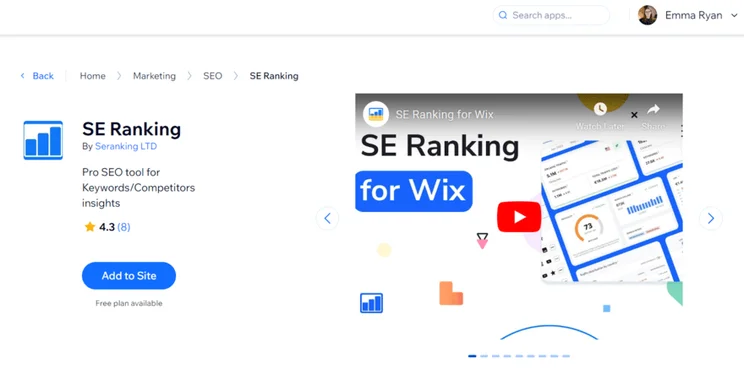
SE Ranking app in Wix's marketplace, showing a button to "add to site"
I could easily add apps from Wix's marketplace with a click of a button. Source: Website Builder Expert

Wix’s app market is home to a mix of free and premium apps. Select apps come with pricing plans of their own, separate from your Wix website subscription. However, you can set up your payment and billing cycle for each premium app through Wix instead of a third-party website.

Plenty of the apps are built by Wix itself, such as the recent addition of Wix Hotels to help hospitality businesses grow. Other third-party tools or partnerships, such as the SE Ranking app, offer a range of premium plans in addition to a free plan or trial. For example, the SE Ranking app plans start from roughly $5 per month.

Understanding how to use Wix doesn’t start and end with creating your website. Once you’re happy with your design and have published your site, it’s time to market and promote your site across the web. This will help you reach your target audience, engage with customers, and boost traffic to your pages.

Search Engine Optimization

Wix is the best SEO website builder, helping websites and businesses build awareness and improve rankings across search engines with its suite of built-in features. Wix provides the essentials, such as metadata and mobile optimization, and every website gets the support of a handy SEO assistant.
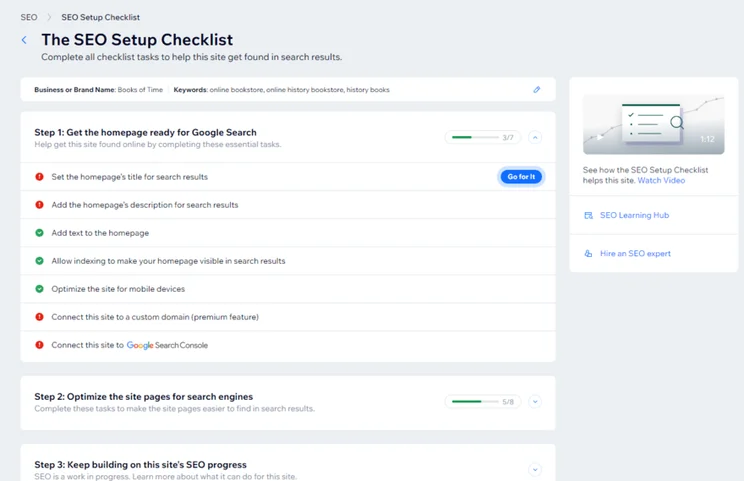
Wix SEO setup checklist showing three steps for website improvement
Wix gave me a personalized SEO checklist based on my business and keywords. Source: Website Builder Expert

Wix’s SEO Assistant helps you optimize your site by running audits and giving personalized recommendations based on:

  • Getting your site ready for Google Search – such as adding a page description and connecting to Google Search Console
  • Optimizing your site pages for search engines – for example, adding alt text to images
  • Improving your site’s SEO progress over time – this section of the checklist directs you to additional resources and guides, such as Wix’s SEO Learning Hub

The assistant will even remind you to review your site again if it’s been a while! Wix’s SEO support and features can be found in the “Site & Mobile App” section of the dashboard, under “Website & SEO.”

Email Marketing

Wix’s built-in email marketing tools help you share news and deals through personalized email campaigns and newsletters. You can even set up automations to recover abandoned carts or alert customers to back-in-stock products.
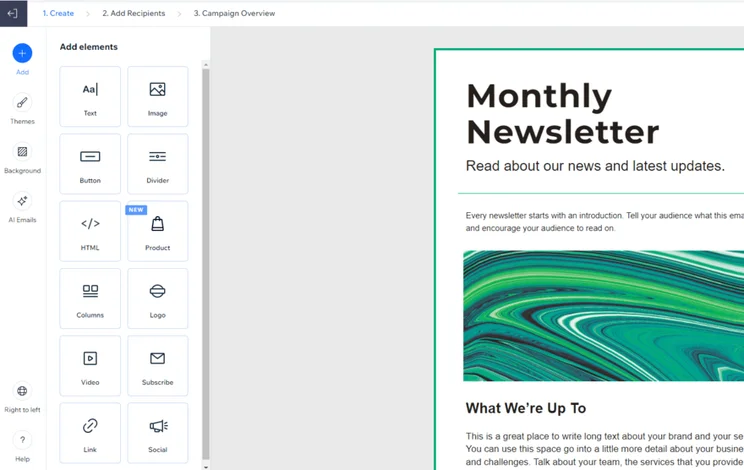
Wix's email marketing template editor for a monthly newsletter campaign
I found Wix’s email marketing editor easy to use since it’s so similar to the main website editor. Source: Website Builder Expert

I found Wix’s email marketing features very beginner-friendly, guiding you through the process of setting up your first email. I could create an email from scratch or choose from a range of templates, including:

  • Introduce a dish – a great way for restaurants to spotlight new additions to their menu
  • Share a blog post – send your latest blog content to readers
  • Announce a flash sale – alert your customers to offers and deals through an email campaign

The editing process was familiar since I could drag and drop elements anywhere on the template, just like Wix’s website editor.

Once you’re happy with the design, the next step is all about adding recipients. I could add these manually or import contact lists to speed up the process. There’s also the option to preview the template and review the campaign’s details before scheduling or sending the email.

Social Media

Like SEO and email marketing, social media is another useful channel to engage with your target audience, boost your site’s traffic, and encourage an online community. On Wix, you can add social elements to your pages, such as a “Social Bar” showing platform icons, or a Facebook feed to show off your latest posts.

When testing, I found my way to the “Social Media Marketing” section of the “Marketing” group. You’ll need to connect your social media platforms to your Wix account, but this is easily done from the same Social Media Marketing dashboard.

Once connected, I could create social posts, schedule content, analyze performance, and manage my online presence, all from the Wix dashboard. There’s no need to waste time and effort jumping between platforms. Plus, there are dozens of social post templates to choose from for Instagram, LinkedIn, Facebook, YouTube, and Twitter/X.

You can also send visitors and customers from Instagram and TikTok directly to your Wix site and product pages through a Link in Bio. This is a great way to encourage sales and engage with your community in places they’re already browsing.
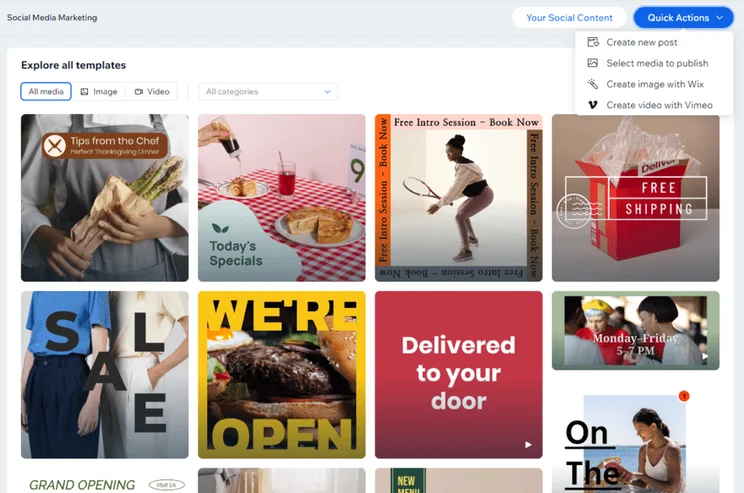
Selection of social media post templates made by Wix
I used Wix’s social media templates to create and schedule posts for other channels. Source: Website Builder Expert

Website Analytics

When your website goes live, you’ll need to track its progress. Thankfully, Wix comes with detailed analytics that are accessible from your dashboard.

To access them, I headed to my dashboard and clicked the “Analytics” button in the left sidebar. This redirected me to my “Analytics Highlights,” a section dedicated to my website’s metrics. I could view key stats such as unique visitors and form submissions, along with where my visitors were coming from based on traffic sources and location.
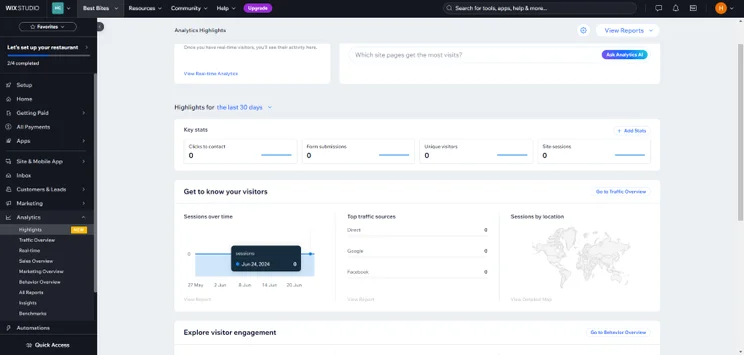
Screenshot of Wix analytics from the dashboard featuring key metrics on traffic and sessions.
I could roll my cursor over the “Sessions over time” section and see how many website sessions my test website had on particular days – it’s a handy way to keep track of your progress over time. Source: Website Builder Expert

Scrolling down the highlights page, I also had the option of connecting my website to Google Search Console, a free platform that shows you your website’s performance in search results. I had to click the “Connect to Google” button to activate it.

Wix is incredibly beginner-friendly to use, providing a setup checklist, AI support when building, and a stack of resources including its SEO Learning Hub to help you feel confident when using the platform and growing your site’s presence online.

In this guide, I’ve walked you through signing up to Wix, using the simple drag-and-drop editor, and how to navigate the back end dashboard. But, test out Wix’s free plan to give the builder a go for yourself – this is the best way to see if Wix is right for you.

And, when you’re ready, explore our page of Wix website examples to get inspiration.

  • Still unsure if Wix is right for you? Discover more options with our article on the five best website builders.

Written By

Headshot of Emma Ryan

Emma is Deputy Editor of MVF’s B2B brands, specializing in website builders, ecommerce, marketing, and vibe coding. Emma combines her wealth of knowledge and years of hands-on testing with a passion for helping small businesses and website owners navigate the highs and lows of being online. Her work has been featured in Newsweek, Digiday, TechRound, and Industry Today.

More about

Reviewed By

natasha_willett

Natasha brings her expert credentials – a BSc, Ma, and MMRS – to Website Builder Expert. Natasha has qualifications in Advanced Statistical Analysis, MRS certificate in Market Research, Brand, Finding the Story in the Data, and Big Data: Measuring and Predicting Human Behaviour. These have allowed her to carefully analyze over 64 providers across website builders, ecommerce web builders, and hosting.

Natasha began building websites when studying sports science, originally using Weebly to create websites to help students learn in a more interactive way. During her first week at Website Builder Expert, she realized that website builders would become important in giving business owners full control over their websites. She began creating a rigorous methodology of research that centered around testing providers and products against a large set of mixed criteria turned into quantitative findings, comparing value for money, design, ease of use, and more. All to provide the most honest and objective insights rather than just looking at their claimed features.

In five years at Website Builder Expert, Natasha has attended multiple expos in her field, including ESOMAR, MRS, eCommerce Expo, Ad World, Digital Customer Engagement Summit, and IMRG, just to name a few. Natasha has also worked alongside website builders directly to share her research with them, so that they might improve their products for users.

She’s clocked an impressive 9,600 hours of product research and testing, pulling data from multiple sources and providing the Website Builder Expert team with the scores and product details they need to give you the best recommendations to succeed online.

More about

32 comments

Your email address will not be published. Required fields are marked *

  • Heneyj

    What is the Membership Base of AsiaMe? The AsiaMe website was started in 1998 and because then assists single individuals all over the world to find their best companions. After AsiaMe validated the customer's account, individuals can start surfing accounts, set search filters, and involve with other individuals. You have the ability to change practically all details in your account, with the exemption of your total name, sex, citizenship, and birthday, which you have actually shown while signing up. After you are done authorizing up, a kind for your excellent match will stand for you to fill up. You can also make use of the website's tag attribute to choose descriptions that match who you are, and AsiaMe will certainly after that auto-generate a paragraph concerning you utilizing the tags you chose. Users need to have credits to utilize all those functions. You will additionally need Flash. Once the phone call request is verified and the time is established, you get the customer ID that will be saved in the Scheduled Call folder. They include messaging solutions, such as e-mail, live chats, and call solutions like calls, video clip calls, and Camshare.

    That is why AsiaMe attracts attention from the crowd, offering a large range of tools for interaction: live and video conversations, emails, phone calls. There are a selection of functions for communication that involve video cameras such as online chats and Camshare. Live chats and Camshare are paid according to the duration. Instant messaging and video clip chats are paid per duration. What is the Messaging Services Provided on the Platform? Most of the necessary attributes on the system are fee-based. The attributes are uncomplicated and informative. All messaging features are paid. Does the Website Provides Free Messaging Features? The site is sustained by all sorts of browsers, including Google Chrome, Firefox, Opera, and Safari. The mobile app works with Android and iOS tools is offered on Google Play Market and Apple App Store cost free. Moreover, mobile gadgets additionally have the choice of downloading and install the mobile application. You can utilize the mobile application on iOS and Android to always remain in touch.

    As a policy, Asian beauties have an actually solid accent and you'll need to make use of translation services to connect more comfortably. Do Users Need Camera on AsiaMe? Users initially require to turn on the service and then turn on the video camera. If you intend to examine their full profiles, you just require to click on them. To do this, click the "Forward it to my e-mail" button. The perk factors are increasing when you are completing your account. The moment your free bonus credit histories went out, you are informed that you need to pay. Sharing images and videos in the messages cost extra credit ratings. As an example, analysis and sending messages to cost one credit scores. All the complying with messages cost one credit scores. To put it into perspective, I calculated that it would cost me over $1000 AUD simply to obtain any kind of contact details, and that's thinking the women wished to offer me their information! Your call checklist will certainly show the top 100 people you have actually talked with for the last 180 days. All members can create a Fave List and send out Admirers Letters to individuals they such as to reveal them their passion.

    AsiaMe keeps the checklist of the top 100 individuals with whom you have been in contact for the last fifty percent a year. As individual evaluations show, the site is best for people that dream about producing a household and have youngsters. The net website is aimed at supplying safe and secure, easy to use, and professional remedies to its people. She concentrates on assisting millennials to have a growing and satisfying lovemaking and assists individuals to understand just how relationships mirror exactly how they see themselves. Asiame makes certain to produce a comprehensive search and filtering device that assists you obtain that suit with whom you can start communication. CamShare: This feature permits individuals to start video clip phone calls, making it possible for a much more individual interaction. Thanks to her ability to empathize and soothe her clients, they can review and strategize also their worst partnership and personal challenges. Relationship takes place first and transforms right into a connection only when people feel they need to take that step. Age 18-24 and 25-34 take about 10% each. Around 24 % of men come from the 45-54 age. However, it is oriented to men who are wanting to locate Asian ladies. There are much more men than ladies on the site.

    The AsiaMe site was started in 1998 and [url=https://www.pinterest.com/asiamescam/]asiame.com[/url] given that after that helps solitary people all over the globe to find their excellent companions. After AsiaMe validated the customer's profile, users can begin browsing accounts, established search filters, and engage with other individuals. Once the call demand is validated and the time is established, you obtain the caller ID that will be stored in the Scheduled Call folder. That is why AsiaMe stands out from the crowd, using a huge variety of tools for communication: live and video conversations, emails, phone calls. CamShare: This attribute permits customers to initiate video telephone calls, allowing an extra individual interaction.

  • Henghs

    Shark drone device builds

    The move 's coming a four year drate litigation and this also focused to help discover sharks coupled with pick up particulars activities shark methods was considered run across those especially traditional 10 Noosa Beach, Coolum, Alexand evenra Headlranges islands including september 2020 April 2024.

    through the tryout SLSQ aircraft pilots held 17,954 drone aircraft comparing september 2020 coupled with April 2024 (16,601 located on south east Queensland beach locations, 1,353 within northern Queensland beach streets) protecting 7,181km.

    their drwhenes seemed to be operated saturdays, populace holidays and Queensland summer break and the hours numerous depending on varying weather conditions, other than usually going in cases where coast patrol starts up each and every morning, suffering from drones flown twice your hour, to the point in existence midday. nearly flying was about 20 moments. all over five % attached to aircraft were being terminated considering harmful survive.

    A report on the trial offer exhibited sharks received sighted on 3.8 % of most aircraft, having 676 shark sighting times noted down (A sighting special event could be 1 sufferer shark or sometimes one or more), amounting regarding 4,959 sharks enjoyed across the demo.

    these 676 sighting presentations, 190 used to be extensive sharks approximately in order to >2m as a whole time-span and thus SLSQ cleared everyday people from your on 39 events being a expected risks from large sharks sighted.

    The insider report pointed out to the sheer numbers of drone shark sighting celebrations (676) grow to be seriously upwards of quantity of sharks trasmitted appearing in Shark control prepare nets or drumlstationedes at a those same once over period (284).

    a different connected with fluff sharks acquired sighted concerning dres (23) as compared to identified all over netting in addition to the drumles (26); for the other hand, the very netting in addition drumlines seen 64 gambling sharks vivid white five sharks, however purely one white wines shark was regarded as sighted on drones rarely are tiger sharks.

    The information agreed this may indicate that competition sharks as well as light sharks from continue to just offshore or that these parrots are snared the particular night that drones not necessarily functioning.

    netting in addition to drumlines were built with a [url=https://www.pinterest.com/asiamescam/]asiame[/url] much faster enviromentally friendly effects in comparison to drones as a consequence earn towards 123 low ideal fauna (excluding un deal with sharks) at this 10 islands during the court at all, often the test discovered.

    Minister in Primary sectors Tony Perrett rumoured typically drone computer software are already grown to a few of Queensland most well liked, and in addition largely brimming, seashores.

    "when i enhanced your time and money into the Shark supervision program in 151 percent, creating close to $88 million of more finance during these life of the payment plan to take it back to the actual primary purpose; to guard swimmers at make a decision on those faraway from shark episodes, he said.

    "prominently, 60 per cent of the property brings the not for fatal as well as,while artistic merchandise that had been crucial highlight of the focused Shark care system 2025 2029.

  • 91 club login

    Great tips on using Wix! I particularly loved the section about promoting your site through social media. It's so important to get the word out once your website is live. Can’t wait to try out some of these strategies!

  • d06 app

    Thanks for the detailed guide! I found the step-by-step approach really helpful, especially the tips on promoting the website after building it. I can't wait to try out the SEO features you mentioned.

  • tt 789

    Great post! I found the step-by-step guide really helpful, especially the tips on promoting your site. I’m excited to start using Wix for my own project. Thanks for sharing your insights!

  • Andrew

    I’m wanting to temporarily close my website how to l do this. I have done the Error page with information for viewers to see but the rest of website is still there

    1 reply

    • Emma Ryan
      Emma Ryan

      Hi Andrew,
      Thanks for the comment! From my understanding, it sounds like you want to temporarily unpublish your website so it's no longer accessible to viewers. Luckily, we have a handy guide to walk you through this process step-by-step! Once you're ready for visitors to see your website again, you can simply republish the website. Alternatively, you can create a landing page (to say it's "Under Construction" or "Coming Soon", for example) - you just need to make sure there's no header or footer so visitors can't navigate elsewhere, and you can set the page as your website's homepage. However, visitors might still be able to find additional pages through search results, so we'd recommend unpublishing if you want to avoid that issue! We hope that helps!
      All the best,
      Emma

  • Bryan

    Here is all I want: A nice little blogging site talking about the craft of writing while having a spot in the corner that advertiser's my two novels. I want the visitor to have the option to click on them or the 'buy' button that will take them to the purchasing site. Can ADI do this or do I need to go to editor? For now I'm opting for the free version. I want to start slow and get used to things.

    1 reply

    • Lucy Carney
      Lucy Carney

      Hi Bryan,
      That sounds like a lovely website! Yes, you can set up the basics of your site using ADI, and then you'll probably need to customize it to get the exact features you want (for example, ADI can set up a blog for you, but you may need to add the advertisement for your novels in the corner yourself). Starting with the free version is a great idea, we always recommend it for starting out, and then upgrading if you want a custom domain or to remove Wix branding. Definitely try out the ADI option first - if you don't like it, you can create your site using the editor since they're both free! Hope this helps, have a great day - Lucy

      1 reply

      • Chris

        I don’t know what button I pushed but my wix-site changed from Wix ADI to Wix editor, I really don’t like this version of Wix. Please tell me that there is a way to go back :(

        1 reply

        • Jacqueline Renouard
          Jacqueline Renouard

          Hi Chris,
          Thanks so much for your question! I'm afraid it's not great news Chris, once you have moved your site to the Wix Editor, you will not be able to put it back to ADI. Frustratingly you can go from ADI to the Wix Editor, but not the other way around! Our advice would be to start from scratch, or contact Wix Support to see if they can help you transfer some files over from your original website. We hope you're able to get your website back up and running!
          Warmly,
          Jacqueline

  • Taru

    My Wix site's (free version) Site Search doesn't work. What can I do?

    1 reply

    • Emma Ryan
      Emma Ryan

      Hi Taru,
      Thanks for commenting! We're sorry to hear your Site Search feature isn't working. For Wix Site Search to work, you need to make sure you allow search engines to index your site. This guide from Wix shares more steps on this! Alternatively, these two Wix guides about Site Search and adding the feature could be helpful too.
      Very best,
      Emma

  • Tim

    Interesting article. How can I edit the email address for the Contact Us section, and add a BCC email address?

    1 reply

    • Samuel Jagger
      Samuel Jagger

      Hi Tim! Thank you for your comment. To change the address associated with your contact forms, go into your Wix account and go to "My Forms". There, click the "Edit" button and go to the "Email Notifications" section. From there, you'll be able to replace the email address. Simply click and "Save" and you're good to go! Hope this helped! All the best - Sam

  • kevin

    Helpfull article. Thank you. Is there any way to get pdf's onto the site by converting them into jpegs prior to uploading?

    1 reply

    • Emma Ryan
      Emma Ryan

      Hi Kevin,
      Thank you for the comment! This Wix article details how you can upload PDFs to your website using the PDF Viewer app. Hopefully that helps!
      Very best,
      Emma

  • Helen

    I cant change images - I am getting a pop-up saying that the format I am using is not recognised. But it is a standard jpeg or psd ; what do I do with this? V
    Can anyone help?

    1 reply

    • Jacqueline Renouard
      Jacqueline Renouard

      Hi Helen,
      Thanks for reaching out to us! Okay so it can get a little complex with images so lets break it down for you. The aspect ratio should be 1.91:1. The width should be 1.9 X the height. File size no larger than 8MB. Image size should be 1200 X 630 pixels (px). Minimum size is 200 x 200 px. Lastly, Wix supports JPEG, PNG, JPG, ICO, GIF, BMP, TIFF image file types. I know that looks complicated but if you check the file and image sizes and file types against these hopefully you should see the issue. If it's the size of the image there are plenty of free image resize tools online for you to quickly correct your image!
      Warmly,
      Jacqueline

  • Teresa Forbes

    Would it be possible to help me find a site I started some years ago (2011 if im not wrong)
    wix.com/tina_santana/art

    1 reply

    • Jordan Glover
      Jordan Glover

      Hi Teresa,
      Thanks for your comment! Unfortunately, we aren't Wix, so we're probably not the best people to ask about this! I'd recommend contacting Wix's customer support directly and they should be able to help you out with this. IF you need help finding the best way to contact Wix, our article on Wix customer service might help!
      Best wishes,
      Jordan

  • Jackie

    When I am editing my six website the layout doesn’t look like in the pictures. I’ve been trying to find tutorials of how to do certain things but can’t figure it out because none of it is the same layout. Is this new or older?

    1 reply

    • Jacqueline Renouard
      Jacqueline Renouard

      Hi Jackie,
      It's difficult to say without knowing what image of the layout you're referring to, have you seen a Wix template and you are trying to recreate it? When you begin with Wix you should have a lot of template options but then once you choose a template you are able to drag and drop - able to reposition things to your liking. We hope this helps with your query!
      Thanks,
      Jacqueline

  • Mamta Jharia

    i want to buy premium plan of wix , but before to buy do i need to choose template and create website or after buying the plan i can choose template and add.

    1 reply

    • Jacqueline Renouard
      Jacqueline Renouard

      Hi Mamta,
      We're not sure on the question, if Wix has premium templates then we're unsure if Wix does premium ones. But, also you can create a Wix website and then upgrade to premium! We hope this answers your question!
      Warm regards,
      Jacqueline

  • Humera

    I need more help related to the wix development i need a mentor with i can practice to make website on wix this article was very informative

    1 reply

    • Lucy Carney
      Lucy Carney

      Hi Humera,
      Thanks for your comment! The good news is that you can create as many free Wix websites as you like, so there's plenty of opportunity to practice! If you want to hire someone to help you, you can check out the Wix Marketplace to hire professional help, or take a look on freelancer sites like Fivver and Upwork.
      Hope this helps, best of luck with your project!
      Lucy

  • dave

    hope i can get your help here.....is there best practices as far as bringing elements, particularly images, into a post with the dashboard versus the post editor. seems behavior is a little different. probably dont have text wrap if pulling in image from dashboard editor. thanks!!!

    1 reply

    • Lucy Carney
      Lucy Carney

      Hi Dave,
      Thanks for your comment! I don't believe there's a best practice as such, mostly your personal preference! When creating webpages in Wix I usually add images and elements straight into the editor as I find it faster and easier. But when creating blog posts in your dashboard, you can use it like a Word processor to format your images within your copy - in terms of best practice, the main thing is to make sure yor images are the right size! Wix recommends images less than 1,000 x 1,000 pixels for blog posts.
      Hope this helps!
      Best, Lucy

  • Gideon

    We have a WIX based web site .
    We need to update just few words in some of the pages.
    Can you direct me to the procedure how to do that?

    1 reply

    • Jordan Glover
      Jordan Glover

      Hi Gideon,
      I can certainly help with that! Once you're in the Wix editor, all you need to do is click on the text boxes that you need to change and begin typing. To swap between pages, use the 'Pages' dropdown menu in the top-left corner to find the page you want to edit. Click on it, and it should appear in the editor.
      I hope this helps!
      Jordan

  • Arieh Tsentsiper

    Question, not comment.
    I have built a store site and marked the PayPal as payment address. How can I check the functioning of the store? do I have to "activate" it?

    1 reply

    • Jordan Glover
      Jordan Glover

      Hi Arieh,
      If you've built your store, and you've chosen one of the Wix ecommerce plans, the only thing left to do is publish it (if you haven't already!). You can do this by hitting the 'Publish' button in the top right corner of the editor. Once this is done, you store is officially live!
      I hope this helps,
      Jordan

  • Matthew

    can you build your site for free, and then upgrade after you've built it?

    1 reply

    • Lucy Carney
      Lucy Carney

      Hi Matthew,
      Thanks for your comment. The answer to your question is: yes, absolutely! You can build your Wix site on the free plan, publish it, and then upgrade at any time you want to.
      Hope that helps, and happy building!
      Best, Lucy

  • Glyn Jones

    Hi I am interested in getting a Wix Unlimited plan but I already have a website with my own domain. If I move to Wix I understand that I can keep my domain name. Is that correct? Also I find the task of moving my domain somewhat daunting and cannot find and help notes that would guide me through this.
    Hoping you can help.

    1 reply

    • Fred O'Brien
      Fred O'Brien

      Hi Glyn,

      You can indeed keep your domain name. Domain registration is a separate process to site building, so there's no risk of getting one stuck on a platform you don't want to use any more. Wix is great at walking you through the domain transfer process step by step when you sign up. There's an official video guide here if you'd like a sense of how it's done.

      Hope that's helpful!

      Ta,

      Fred