Weebly vs WordPress | 9 Key Differences to Know

We may receive a commission from our partners if you click on a link and purchase a product or service on their website. Learn more

lucy carney
Written By
natasha_willett
Reviewed By
Updated on January 5, 2023

So, you’ve decided you want to build your own website – but you’ve already found yourself faced with a dilemma: Weebly vs WordPress.

We’ve compared the top website builders and we recommend Weebly over WordPress. While WordPress certainly has its perks and supporters, its high barrier of entry still makes it harder to recommend. The trouble is, when it comes to these platforms, confusing claims and rumors lurk at every turn. Ultimately, which builder is best comes down to which one is right for you.

Can’t seem to decide which is better? Check out our quick comparison table below and see how the two titans face off against each other:

Category & Winner Weebly WordPress
html Simple to set up and mostly easy to use, this drag-and-drop builder has a very low learning curve, making it ideal for beginners. More challenging to use than Weebly, WordPress has a steep learning curve. It has a user-friendly interface, but coding is sometimes needed to really make the most of this platform.
html A modest selection of simple, stylish designs, which you can switch between whenever you like. Themes come with features built-in and are easy to customize, although there are certain limits to what you can control. Massive range of themes to choose from – you must make sure you pick a quality theme. Features don’t come included unless you choose a commercial or premium theme. You get total creative freedom when customizing your theme, but that may include some coding knowledge.
html The features available depend on which pricing plan you choose. On the whole, you get a good range of features, including blogging and ecommerce, with a large app store to add any missing tools. Minimal features built-in, but an endless choice of plugins to add extra functionality to your site. These can cost and be careful of how many plugins you install, though, as too many can slow sites down.
html Weebly has a good range of ecommerce features that grow more advanced as you upgrade your plan. It’s not the best ecommerce builder out there, but it’s a solid option for small businesses. WordPress doesn’t come with ecommerce tools included, but with a plugin like WooCommerce, it can be used to build a much more powerful store than Weebly.
html Weebly has a large app store, where you can suggest or even build your own apps. Installing apps only takes a couple of clicks, and apps are ready on your site in seconds. WordPress has thousands of plugins to choose from, with new ones being built and added all the time. You should always make sure to check plugins are up to date and have good reviews before installing.
html Weebly’s themes come optimized for SEO, and make it easy for total beginners to start optimizing their sites for search engines. WordPress leaves SEO up to its users, but with plugins like Yoast SEO, even beginners can easily boost their site’s rankings.
html Weebly is easy to look after because Weebly takes care of your site’s hosting, security, and any updates. WordPress needs a lot of ongoing maintenance – otherwise your site could crash, glitch, or even get hacked. You need to renew your hosting and keep up with any WordPress updates.
html Weebly has a help center and community forum, as well as email, phone, and chat support. WordPress has a massive community of users who fill forums with questions, answers, and tips for you to browse through.
html Weebly has a free plan, and three price plans ranging from $6 to $26 per month. You get a free custom domain for your first year on two of its paid plans, and a free Weebly domain on the free plan. WordPress is a free platform, but you can’t publish for free because you need hosting at the very least. You also need a domain and security, but you should be able to get these included in your hosting plan. It’s also a good idea to budget for premium themes and plugins.

Still undecided? That’s okay, we think this topic needs a deeper dive too. Good thing we have this article to take you through each platform’s ease of use, design, pricing, and more, to find out for certain whether you should build your site with Weebly or WordPress.

The Winner

Weebly is easier to use then WordPress

Weebly is the more beginner-friendly and easy-to-use platform. It takes only minutes to get started, uses a simple drag-and-drop editor, and even guides you through the building process. WordPress demands more from its users – from hosting to building, it needs a lot more work.

Ease of Use Weebly WordPress
Score 3.4/5 3.2/5
Coding knowledge needed? ✔️
Editor Section based drag-and-drop Backend editing: no templates or sections
What did our users say? “The editing screen is laid out quite nicely. It’s a good introductory-level web builder.” “Whether it was the phrases used or the site navigation, it took me a long time to know where to look for certain elements.”
html May not be as easy to use as other builders, but Weebly delivers on what it offers. The time it takes to learn WordPress is a barrier to entry for many. It’s simply too different to recommend to a beginner who’s short on time.

One of the most common concerns for first-time website builders is how difficult it might be to create and publish your very own site. Will you need coding skills, or three desktops set up in your basement, in order to build a successful website?

Fortunately, the answer for both Weebly and WordPress is no. However, they do vary in how easy they are to use – let’s take a closer look at why.

Getting Started

Weebly is extremely straightforward to set up – you simply sign up (for free if you choose its most basic plan), choose your theme, and edit it until you’re ready to publish. You don’t even have to enter any payment details, meaning you can get started in a matter of minutes.
weebly homepage sign up
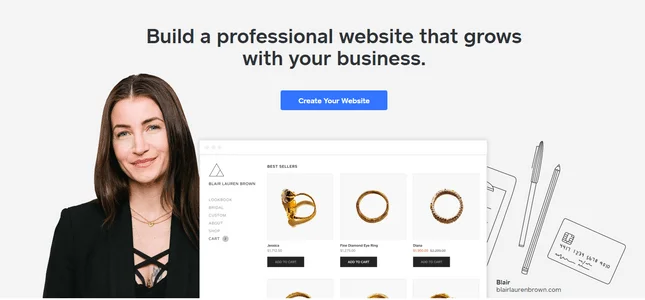
It’s easy to get started with Weebly – just sign up and start building for free. Click the image to visit Weebly!

WordPress is a little more complicated. While WordPress itself is free, to publish your website, you’ll need to find hosting first – which means it’s already less straightforward to set up than Weebly. You also need to install a theme and any plugins your site needs, as features don’t tend to come built-in.

Building

Once you’ve set up your account, you need to be able to build your website – preferably without tearing your hair out in the process!

Weebly isn’t as easy to use as some other website builders, like Wix, but it is easier to use than WordPress. This is because of its more basic and simplified editor – Weebly’s certainly not as powerful as WordPress, but that also makes it much more manageable for beginners.

Weebly has a simple, clean editing interface that lets you customize your chosen template within certain limits. It even gives you helpful tips and pointers within the theme – for example, the sample text actually explains how to edit and move text, making it super easy to get started.
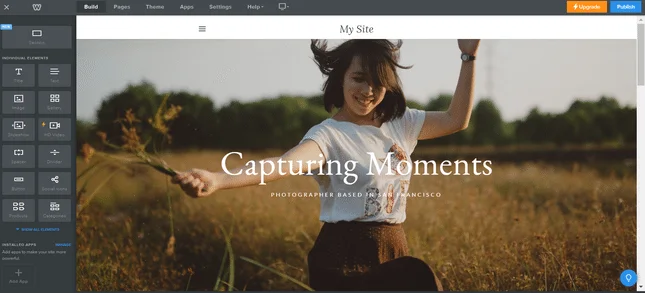
weebly ease of use editor
Here you can see what Weebly’s editor looks like. Elements like text boxes and image galleries are easy to drag onto your page from the sidebar.

So what about WordPress? Should beginners just give up on their dream of building a WordPress site? The answer, of course, is no – but you should be prepared for a steeper learning curve and a longer building process.

Despite this, WordPress has made its editor as user-friendly as possible, without giving up any of the power people know and love. It has a clean, uncluttered interface, but it’s less helpful than Weebly’s – WordPress doesn’t hold your hand while you build.

Below, you can see how different the WordPress editor is compared to Weebly’s.

wordpress ease start building
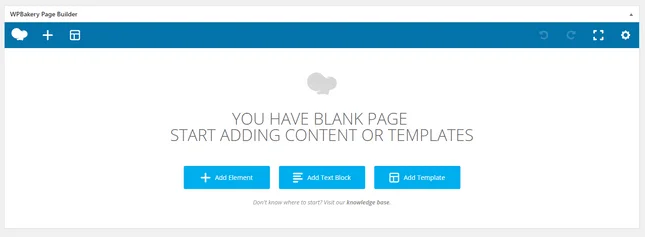
WordPress works differently from a website builder – here, you edit your site from the backend, rather than making direct edits to a template.

You can see why WordPress is the more challenging platform for building a site – you’re building from scratch, rather than using a pre-filled template as guidance.

The Winner

Weebly has the best design and customization

Weebly gives you a good level of creative control, and has all features built-in. Although you have more customization your site, WordPress requires extra effort – you can create a truly unique website, with hand-picked features and your own ideal structure, but you will have to do the work yourself.

Design Weebly WordPress
Score 2.5/5 2/5
Number of templates 50+ 11,000+
Can you switch later? ✔️ ✔️
Mobile Responsive?
html While Weebly may have dropped dramatically in design by 36%, it still offers a good number of templates and nice, professional designs. You may get full creative freedom and customization, but WordPress is undoubtedly harder to get to grips with.

Everybody wants to be unique, whether they’re online or in the real world. You don’t want to build a website that’s identical to someone else’s – especially if you’re marketing a brand or business. So which platform is better for creating a stunning standout site? Weebly or WordPress?

Themes

Weebly has a fairly modest collection of simple themes, split into six categories:

  • Online store
  • Business
  • Portfolio
  • Personal
  • Events
  • Blog

There are between six and 15 themes in each category. None of Weebly’s themes are likely to blow your mind, but on the whole, they’re clean and stylish. You can easily switch your theme at any time, which is a great bonus and makes any redesigns pretty effortless.

Unfortunately, Weebly’s themes are not mobile responsive. This is essential now that over half of global web traffic comes from mobile!
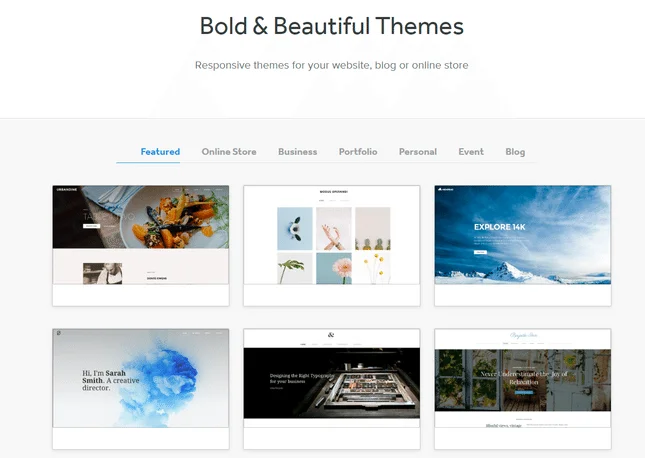
weebly themes
Weebly has a range of simple templates to choose from. Click on the image to browse Weebly's themes! Source: Website Builder Expert

In stark comparison, WordPress has thousands of themes in its Theme Directory. You can search by the layout you want, which features should be pre-installed, or by subject (such as blog, holiday, or portfolio).

Whereas Weebly’s themes are all free, you’ll find a mix of free and premium WordPress themes. These vary massively in style and layout because they’re made by so many different people!
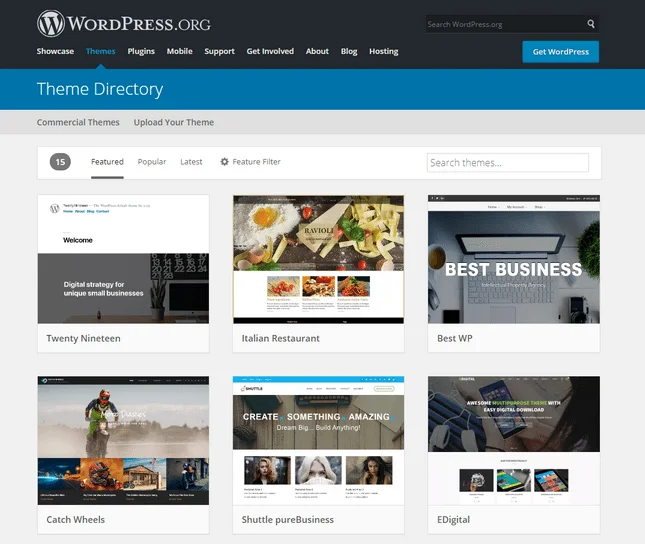
wordpress theme directory
WordPress.org has a huge selection of themes to choose from, meaning you shouldn’t struggle to find the perfect design for your site! Click on the image to visit WordPress' theme library!

Customization

Once you’ve chosen your theme, you need to make it your own – this is the really fun part!

While Weebly makes it easy to add new elements, change text, and replace images, you’re limited by your theme. There are certain things you just can’t do, even compared to other website builders like Wix, which let you drag and drop things anywhere you like.

WordPress, on the other hand, gives you ultimate customization over your website.

Although you choose a theme for your site, you build each page and post in the structure you want, giving you much more creative freedom than Weebly could even dream of. This takes more time and effort, and it will help if you know how to do some basic coding. But if it’s total creative control you’re after, then you really can’t beat WordPress.
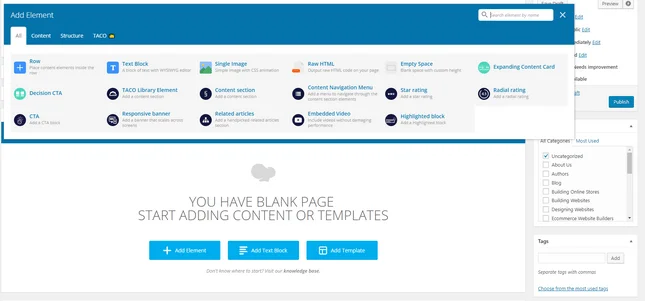
wordpress editor adding elements
Because you build your page from scratch with WordPress, you have the final say over how your page is built, rather than relying on a template for your site’s structure.

The features and elements you can add to your WordPress site will depend on the theme you choose – i.e. whether it comes with any features included – as well as which plugins you decide to install.

The Winner

Weebly has the best features and tools

Weebly has the upper hand because its features all come built-in, and it even has an app market in case you need extra tools. WordPress has an enormous range of super powerful tools that can’t be dismissed – but you have to source them all yourself.

Features and Tools Weebly WordPress
Score 3.5/5 2.2/5
Storage Unlimited N/A (depends on your hosting plan)
Industry specific features (e.g. menus, RSVP forms, etc.) ✔️ ❌(through plugins)
Edit from mobile?
Best For Small Businesses Blogging
html Weebly has all the necessary features with most of them coming built-in. WordPress has an enormous number of features of tools – all in plugin form, sadly. Not only do they have to be found but downloaded, usually at some cost.

While having a well-designed website is undeniably important, looks aren’t everything. Your website also needs some power under the hood to win over your visitors and make your life easier.

Blogging

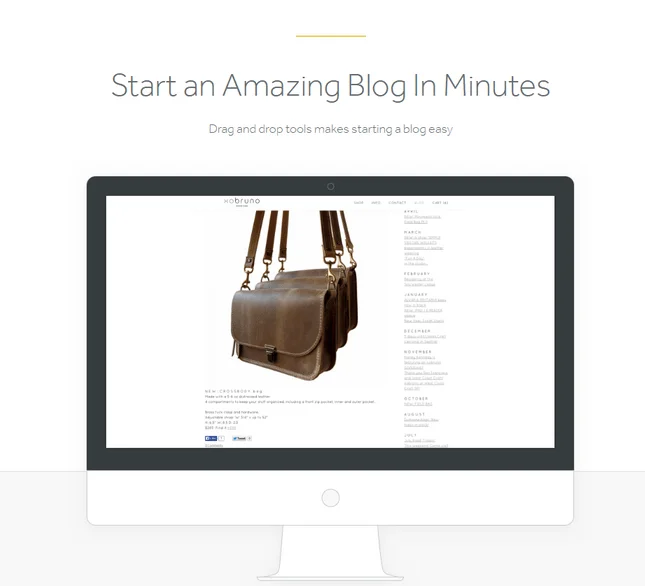
Weebly comes with a great range of blogging tools to help get your blog started in a matter of minutes. Advanced sharing and scheduling features, social media sharing, and comment management are just a few of the features that set your Weebly blog up for success.
weebly vs wordpress weebly blogging features
You can start a blog quickly and easily with Weebly, and make use of its handy blogging tools.

Weebly is a solid choice for a blogging site. But if it’s a really impressive and powerful site you’re after, you can’t beat WordPress for its blogging features.

WordPress began as the ultimate blogging platform, and it’s held onto that title even as it’s grown to cater to all sorts of different sites. Its range of plugins, SEO capabilities, and level of customization all combine to create a unique platform for blogging.

Social Media Integration

Weebly lets you add links and social icons to your website, linking to your various social media accounts. There are 13 social networks to choose from, including Facebook, Twitter, and Instagram.

As you’d expect, there are plenty of social media plugins in the WordPress Plugin Directory – it’s simply a matter of choosing the one that’s best for you!

Marketing

Weebly makes marketing easy – you can create and send emails with just a few clicks. Its in-house email marketing service, Weebly Promote, integrates with your site so that you can choose a template, manage your contacts, and track your results, all from the same place.

WordPress doesn’t come with marketing tools built-in, but you can easily use a marketing plugin instead. The good news is, that there are some high-quality ones you can install for free, such as Jetpack.

The Winner

It's A Draw!

WordPress can give you a much more powerful online store when you build with WooCommerce, but Weebly actually comes primed and ready for you to build your own ecommerce website. Weebly is easier to start selling through, but WordPress gives you a more scalable store in the long-run. So it’s a tie!

Ecommerce Weebly (with Square Online) WordPress (with WooCommerce)
Score 4.2/5 4.2/5
Main Payment Options html WooCommerce Payments
PayPal
Stripe
Product types html Physical
Digital
Service
Subscriptions
Abandoned Cart Recovery
Transaction Fees 2.9%+$0.30 2.9%=$0.30
Product Limit Unlimited Unlimited
Stock Management
Automatic Tax Calculator
html Square Online is the ecommerce side of Weebly, available as soon as you get the platform with features built-in, so you can get selling quicker. WooCommerce is WordPress’s dedicated ecommerce platform. It has amazing potential for bigger online stores, but takes longer and needs plugins.

If you want to build an online store, then the platform you choose will need to have ecommerce capability. Luckily, you can still choose between Weebly and WordPress, since they both have ecommerce options. Let’s find out which one is better for you!

Weebly for Ecommerce

You can build your store and sell online using Weebly’s free plan thanks to its integration with Square Online. Its free plan lets you sell an unlimited number of products and comes with useful tools such as automatic tax calculators and in-store pickup options.  Pretty neat, right?

However, to remove adverts from your store and use your own domain name, you’ll need at least Weebly’s $12 per month Professional plan.

Weebly is a decent choice for building an online store, with basic ecommerce features such as shipping tools and inventory management all built-in automatically, ready for you to make use of.

weebly online store
Weebly is a good choice for entrepreneurs and small businesses looking to sell online. Click on the image to check out Weebly's sales tools!

It’s not quite in the big boy leagues just yet, though – you won’t find the same level of power that you’d get with a platform like Shopify, for instance. Still, Weebly’s been stepping up its ecommerce game since being acquired by Square, and should be an interesting space to watch…

WordPress for Ecommerce

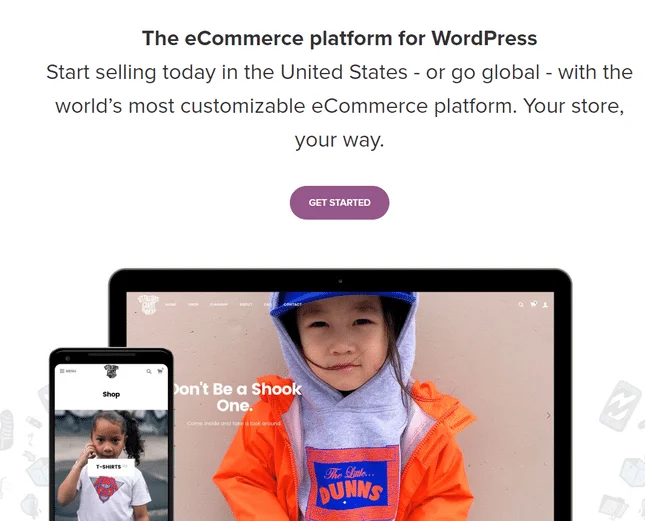
While Weebly’s ecommerce features are all built-in, with WordPress, you need to install an ecommerce plugin. We recommend using WooCommerce – it’s the most popular ecommerce platform on the web, with over 70 million downloads so far!
wordpress ecommerce woocommerce
WooCommerce is an ecommerce plugin built for WordPress and lets you create a powerful and unique online store. Click the image to visit WooCommerce!

Once you’ve installed your plugin, you can begin adding products and building your store. The ecommerce features you get will depend on the plugin you choose. With WooCommerce, for example, you can show product ratings and reviews, set the currency, set shipping options, and more.

The main advantage of WooCommerce is its flexibility – you have much more control over your store than you do with Weebly.

The Winner

It's A Draw!

Although WordPress undoubtedly beats Weebly in terms of sheer numbers, it falls down slightly in how easy those plugins are to install on your site. The quality of its plugins is also a factor that calls for caution, whereas Weebly is a much more user-friendly app provider with plenty still to offer. So it’s a tie!

Apps and Plugins Weebly WordPress
Score 3/5 3/5
App Market
Number of apps 360 58,000+
Integrations with third parties?
html While nowhere near as big as WordPress’s, its quality over quantity and Weebly is just easier to use and improve with apps. WordPress has a plugin for probably everything – but you have to be able to find and install them. For us, the sheer amount of effort doesn’t seem worth it.

Apps and plugins add extra functionality to your website, so you can expand beyond whatever features come with your theme.

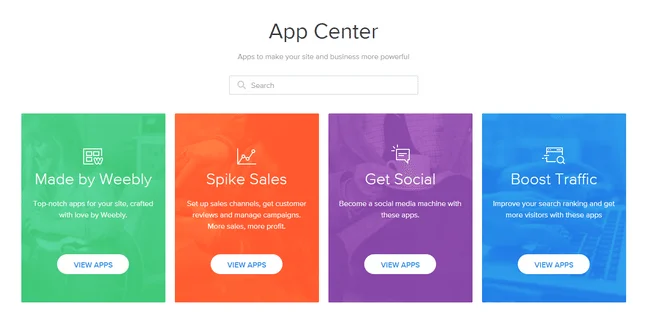
You’ll find hundreds of apps in the Weebly App Center, where you can find everything from FAQ sections to live chat features. Apps are a great way to scale your site as it grows, and provide your visitors with helpful functions.
weebly app center
Weebly’s App Center contains hundreds of apps, and is super easy to navigate. Click on the image to visit Weebly's App Center.

There’s a generous amount of free apps, alongside a number of premium ones too – most apps let you start off for free, and then upgrade if you so choose.

Any of these apps can be added to your Weebly site in just a few clicks – it’s super easy, and completes in seconds.

Can’t find the app you’re looking for? Weebly even lets you suggest ideas for new apps via the Weebly Community, or build your own in the Weebly Developer Center for any coders out there.

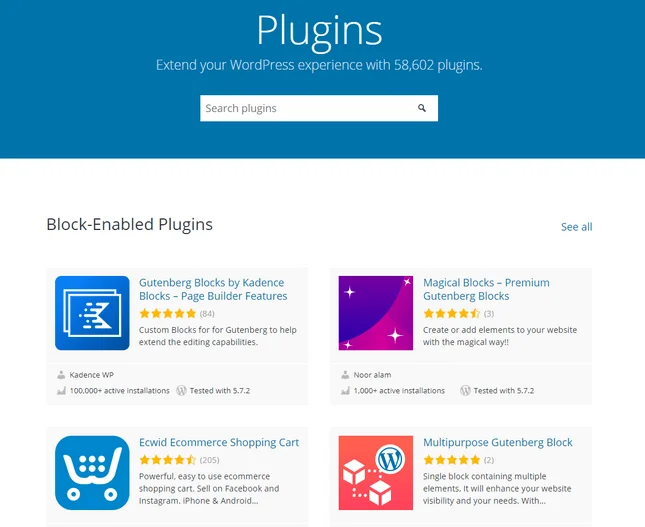
WordPress has over 58,000 plugins in its Plugin Directory, blowing Weebly’s few hundred clear out of the water. Just like with WordPress themes, this collection is made up of plugins built by a range of people – so it’s to be expected that some are of better quality than others.
weebly vs wordpress plugins
WordPress has over 58,000 plugins in its Plugin Directory, meaning you should always find something you need. Click the image to check it out yourself!

Just make sure to choose high-standard, up-to-date plugins for your WordPress site, or you could find unwanted bugs and breaks sneaking in.

It’s not as simple to install a plugin to your WordPress site as it is to install an app on Weebly. You shouldn’t struggle to install plugins, but it’s not so easy as a couple of clicks – you’ll usually need to go to your WordPress admin dashboard to install and activate your chosen plugin. Not rocket science, but not a three-second job either.

The Winner

WordPress has the best SEO

Despite Weebly’s SEO tools coming built-in, not to mention its very helpful SEO Guide and checklist, WordPress has to win. Its sheer power, plus the fact you can install plugins like Yoast SEO to maximize your site’s rankings, just can’t be ignored.

SEO Weebly WordPress
Score 4/5 3/5
Customizable meta titles
Meta descriptions
Image alt attributes
SEO specific app
SEO prompts
Mobile friendly?
Keyword support
Google integrations html Google Analytics
Google Search Console
SSL security
Personalized SEO suggestions
html While all the SEO features of Weebly are built-in and at hand, it can't compete with the sheer SEO-power WordPress provides With access to top-grade SEO software like Yoast, WordPress smashes the competition to deliver some of the best SEO tools on the web.

Search Engine Optimization (SEO) is the process of making your site as appealing as possible to search engines – most of all, the almighty Google. There’s a seemingly endless list of things that you need to optimize, which is understandably daunting for beginners!

Luckily, you’ve got some help. Weebly, for example, has an Ultimate SEO Guide designed to see you from your first nervous steps through to confident SEO glory. Not only that, your Weebly site is already optimized to a certain extent, meaning you just have to fill in the blanks to get your site ready to rank.

WordPress works a little differently. Often lauded as the best platform for SEO, WordPress leaves all the fun technical stuff up to you. If that thought alone is enough to make you run for the hills, hold up and head to the WordPress Plugin Directory.

Once you’re there, install Yoast SEO, and let it pretty much manage your SEO for you. That’s right – this plugin makes SEO easy even for total beginners and is a must for any successful site. There are other SEO plugins out there, but Yoast SEO is the one we most recommend.
wordpress seo plugin yoast seo
Yoast SEO is the most popular SEO plugin for WordPress, and make SEO easy for beginners and pros alike! Click the image to visit Yoast SEO.
The Winner

Weebly has the best ongoing maintenance

Weebly needs a lot less ongoing maintenance than WordPress, because it’s all sorted in-house for you. WordPress is a constantly changing platform that requires more work to keep up with, which is why it loses out to Weebly in this round.

Ongoing Maintenance Weebly WordPress
Site Speed Performance Score 72 (Needs Improvement) 76 (Needs Improvement)
Speed Index Time Score 24 51
Server Response Time Poor Poor
html Being an all-in-one site, Weebly is a lot easier to maintain since it handles updates and security for you, making it the winner. However, it could still see some speed improvements WordPress is much harder to maintain because you’re responsible for running theme, plugin, and software updates, and staying on top of security for your site. This can be tricky when you need maintenance for potentially 15 different software on one site.

After you’ve built your website, you want it to stay at the top of its game. That means keeping it safe from bugs, hackers, and crashes, and making sure it’s running with all the latest updates. The more things you add though, the slower your site will be, so it’s important to keep track of your site’s speed. This is how fast a browser is able to download and show your visitors your web pages. This is crucial, as slow loading has been proven to affect conversion rates.

If that sounds like a lot of work, then Weebly will be the better builder for you. Why? Because it does all of that for you!

weebly ongoing maintenance
Weebly takes care of your site’s infrastructure, security, and more to keep your site performing at its best. Click the image to visit Weebly's homepage.

Weebly provides you with hosting and security, and runs any updates automatically to keep your site safe and secure. You don’t need to worry about renewing anything other than your Weebly subscription – instead, you can just focus on your website, and let Weebly take care of the technical stuff.

WordPress, on the other hand, calls for much more care and attention. It’s super important not to fall behind on WordPress updates, as this can open up your site to security breaches and glitches.

The good news is that a quality WordPress hosting provider, such as Bluehost, will run these core updates for you automatically. You’ll also need to update your theme and plugins, but having those automatic updates does mean you can relax a little more.
weebly vs wordpress bluehost hosting
Bluehost is the best WordPress hosting provider, and helps you out with site maintenance by running automatic updates and optimizing for fast site speeds. Click the image to visit Bluehost!

On that note, another important factor to stay on top of is your hosting. The type of hosting you need can change over time as your site grows, so be ready to upgrade in order to avoid crashes. If you’re happy with your hosting plan, then all you need to do is renew it on time to keep your site live.

All in all, Weebly is like choosing an all-inclusive holiday, where everything is taken care of for you. You don’t need to run around sorting out hosting or security because Weebly’s got your back.

WordPress is more of a camping trip, where you need to check on your tent pegs and zips regularly to make sure the tent doesn’t fall down or get invaded by bears. Some people love that hands-on approach and enjoy the responsibility that comes with a WordPress site.

The Winner

Weebly has the best help and support

We know, we know – WordPress has endless guides and invaluable support forums, and that shouldn’t be sniffed at! But Weebly has direct, in-house expert support agents to answer your questions, which is especially helpful for beginners, and tips this section in Weebly’s favor.

Help and Support Weebly WordPress
Score 3.3/5 1.3/5
24/7 support
Live Chat
Phone Support
Email Support
Help ad Support Winner:Weebly Weebly offers a solid range of support options, being able to contact its support team via phone, live chat or email, as well as decent Knowledge Center For a builder as tricky to get to grips with as WordPress, its lack of in-house support options are a real let-down

Weebly has an in-depth Support Center, where you can search for answers or browse through various help articles. You can also check out its blog, Inspiration Center, and Community pages for more information. If none of that works, you can email Weebly support 24/7 with more specific questions, or contact them during business hours via live chat or phone.

WordPress doesn’t have live chat or email support – instead, it has an impressively large number of support articles, forums, and community pages. That’s the bonus of having such a large WordPress family out there, asking the same questions as you!
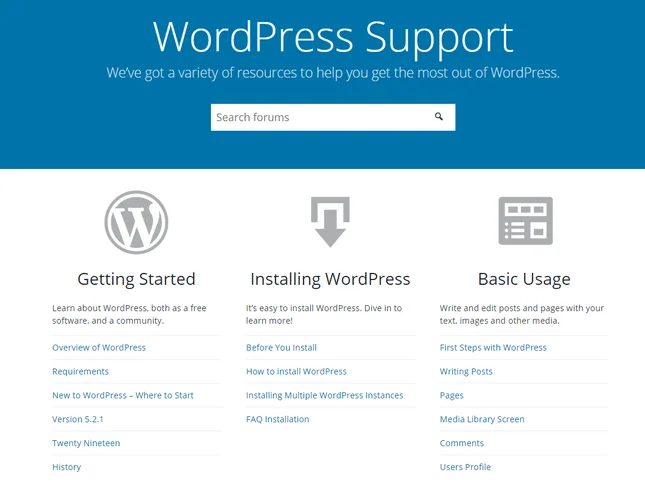
wordpress support
WordPress has a thorough support system for you to browse when you need help. Click the image to visit WordPress support.

WordPress also has official articles on its site to help you. These are thorough and detailed but can be pretty dense, so make sure you’re sitting comfortably if you need to get through them!

The real goldmine of WordPress support lies in its forums, where you can browse through past threads and even create your own topics for questions you can’t find answers to. You can also get support through a good hosting service, like Bluehost. They provide tons of guides and support for both its service and WordPress in general. It can be pretty overwhelming, but if you understand the method to its madness, you’ll be just fine.

The main point to make here is that Weebly has in-house experts on hand to help you out when you get stuck. That’s the big difference between WordPress and Weebly’s help and support options.

The Winner

Weebly has the best value for money

This is a pretty hard round to call, but we think Weebly deserves the title – while WordPress is free, it comes with a lot of extra costs, whereas you can actually build and publish your site using Weebly’s free plan. You don’t need to worry about hosting renewal prices, or paying for a premium theme with Weebly. You know exactly how much you’ll be paying from day one, and its prices are budget-friendly to boot.

Pricing Weebly WordPress
Score 5/5 4.8/5
Free plan or free trial? Free Plan Free Plan
Number of plans 4 N/A (Depends on your web host)
Starting price $6 WordPress: $0
Hosting: $2.75+
Personal plans html N/A
Business plans Performance: $26 N/A
Ecommerce included?
html With built-in features and a very affordable starting price, Weebly remains one of the best value-for-money builders out there While you can start WordPress for nothing, the price soon hikes up with all the other inclusions, like hosting, themes, security, and plugins.

It’s all very well dreaming of your ideal website, but at the end of the day, you need a platform you can realistically afford and maintain in the long-run. Let’s take a look at how Weebly and WordPress compare.

Weebly Pricing: All In One

Weebly has three pricing plans ranging from $6 to $26 per month (billed annually), plus a free plan. This means Weebly has options for sites of different types and sizes, whether you’re building an online store or a small portfolio.

Take a look at the basics of each plan below:

  • Free plan: $0 – comes with free SSL security, a Weebly.com domain, and Weebly adverts onsite, and lets you sell online. Best for building and perfecting your site before promoting it.
  • Personal: $6/month (billed annually), or $9 month-to-month – lets you connect your own domain, but still displays adverts. Best for very basic sites.
  • Professional: $12/month (billed annually), or $16 month-to-month – removes adverts and unlocks better features. Best for small online stores and professional personal brands.
  • Performance: $26/month (billed annually), or $29 month-to-month – unlocks professional ecommerce features, advanced analytics, and priority support. Best for business sites.
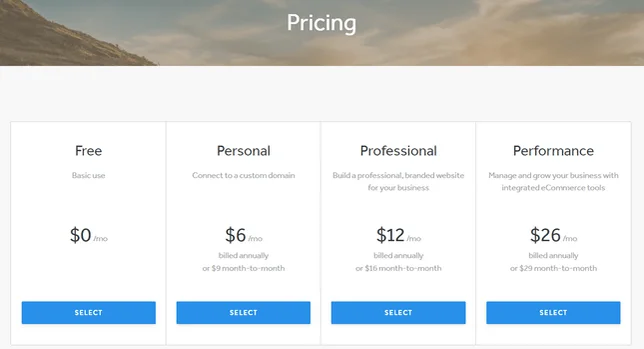
wordpress vs weebly pricing plans
Weebly has set pricing plans that include a range of features, including hosting, a free domain, and security. Click on the image to visit Weebly's pricing page.

You get a free domain included on Weebly’s Professional plan and above, when you choose an annual plan. This free domain lasts for your first year and is especially good for anyone just starting out, as it means you get a professional domain with zero financial risk.

Weebly’s paid plans don’t come with a free trial, but you do get a 30-day refund period in case you change your mind.

WordPress: Pricing Break Down

WordPress doesn’t have price plans – because it’s an open-source platform, WordPress is free!

Before you go racing to sign up, though, you should know there will be some cost involved. This is much harder to accurately pin down because it varies massively depending on the services you choose.

Before you can publish your WordPress site, you’ll need to sort out a few things. Here are the main areas you’ll need to factor into your budget:

Hosting

This can cost anywhere between $1 and $150 per month depending on what type of hosting you need, and which provider you choose!

A website needs to be hosted on a server before it can be accessed by searchers of the net. Typically, a web hosting provider (like Bluehost) will offer space for clients to rent out or buy so they can keep their sites up and running.
Builders such as Weebly or Wix have their own, internal hosting that is included with the price of a plan, so you don’t have to worry about finding a provider. It does mean you are tied to that builder and their services, with some servers being faster than others.

blue host prices new
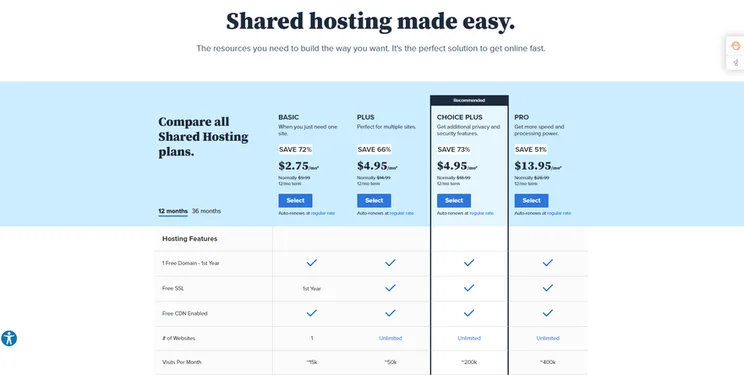
Bluehost’s managed WordPress hosting plans range from $2.75 to $13.95 per month (promotional prices for new users). Click on the image to visit Bluehost

Domains

Your domain name doesn’t come included in your WordPress site as it does with Weebly – instead, you need to register it elsewhere and connect it to your website. You can search and buy a domain from popular domain name websites such as Domain.com. Domains vary in price depending on what you’re looking for, but the standard price varies between $10 and $20 per year.

Some hosting providers, like Bluehost, include a free domain for your first year, so this is something worth looking at if you need a new domain.

domain.com domains
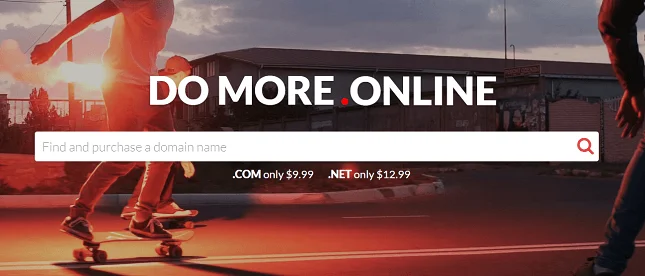
Domain.com is a well-known domain registrar, and offers a range of domains at low prices. Click the image to visit Domain.com

Security

While Weebly automatically includes free SSL (Secure Sockets Layer) security in its plans, you need to install this yourself on WordPress.

The easiest way to get SSL security is to choose a good quality hosting provider that includes it for free in your hosting plan – providers like Bluehost, HostGator, SiteGround, and InMotion all throw SSL in as standard.

For extra security, you can buy a more advanced SSL certificate from your hosting provider – for example, HostGator offers SSL certificates ranging from $19.99 to $269.99 per year.

lets encrypt free ssl
Let’s Encrypt is an open certificate authority where you can get an SSL Certificate for free. Click to explore Let's Encrypt in a new tab!

Plugins and Themes

As you already know, you may need to spend a bit of money on high-quality, professional themes, and plugins. Again, these are things you can get for free, but it’s worth setting some money aside in your budget just in case you do need to go premium later down the line.

This article has laid Weebly and WordPress bare, so you know exactly what you’re signing up for from the get-go. We’ve covered each platform’s ease of use, designs, features, and more – you can get a good picture of these two platforms and who they’re best for. WordPress is the more powerful platform, but that also makes it more of a handful to build with, whereas Weebly is more basic but easier to use. But our ultimate winner and recommendation is…

The Winner

Weebly is the better builder overall!

Weebly wins! While WordPress fought valiantly with its creative freedom and endless customization, it was its head-scratching complexity that sadly lost it in this race. If you have the time and passion to build with WordPress, go for it! But for those of us who need a website sooner rather than later, it’s best to keep it basic, and that’s exactly what Weebly excels at. It can be clunky and slow, but ultimately it gives you exactly what you need for a very affordable price. And sometimes you can’t say fairer than that.

We’ve given our verdict, but as we said in the beginning, the best builder is really what’s the best builder for you – so let’s summarize the qualities that make each builder special in their own way…

Who Do We Recommend Overall?

If any of these considerations apply to you, then you have your answer. If you’re still in doubt, here’s our final recommendation: use Weebly. You have nothing to lose by trying out its free plan, and overall, it’s the easier, cheaper, and less high-maintenance platform.

Don’t just take our word for it – take Weebly’s free plan for a test drive and see what you think!

Written By

lucy carney

Lucy Carney is a Content Manager at Website Builder Expert, specializing in website building, ecommerce, and digital marketing. Previously working as a Writer and then Senior Writer on the brand, Lucy has had six years of hands-on experience testing leading web building platforms including Wix, Squarespace, and Shopify, creating demo sites such as Wix-built Lucy’s Cupcakes to aid readers’ decisions.

Lucy is passionate about using her knowledge to help small business owners build their online presence and achieve their goals in growing online. She uses her in-depth industry knowledge and hands-on experience to edit, fact-check, and proofread the content that you read on Website Builder Expert, to ensure it’s as accurate and helpful as possible.

While on the brand, she’s reported on industry trends over the years, attended events such as the eCommerce Expo, and advised readers directly with over 400 comment replies on the site to date. Her work has also featured on other online publications such as the Shopify Partners Blog, Usability Geek, Serpstat, and Open Source, and has over 100 articles published on the Website Builder Expert blog.

You can read Lucy’s articles below, or connect with her on LinkedIn.Linkedin: Lucy Carney

Email: lucy@websitebuilderexpert.com

More about

Reviewed By

natasha_willett

Natasha brings her expert credentials – a BSc, Ma, and MMRS – to Website Builder Expert. Natasha has qualifications in Advanced Statistical Analysis, MRS certificate in Market Research, Brand, Finding the Story in the Data, and Big Data: Measuring and Predicting Human Behaviour. These have allowed her to carefully analyze over 64 providers across website builders, ecommerce web builders, and hosting.

Natasha began building websites when studying sports science, originally using Weebly to create websites to help students learn in a more interactive way. During her first week at Website Builder Expert, she realized that website builders would become important in giving business owners full control over their websites. She began creating a rigorous methodology of research that centered around testing providers and products against a large set of mixed criteria turned into quantitative findings, comparing value for money, design, ease of use, and more. All to provide the most honest and objective insights rather than just looking at their claimed features.

In five years at Website Builder Expert, Natasha has attended multiple expos in her field, including ESOMAR, MRS, eCommerce Expo, Ad World, Digital Customer Engagement Summit, and IMRG, just to name a few. Natasha has also worked alongside website builders directly to share her research with them, so that they might improve their products for users.

She’s clocked an impressive 9,600 hours of product research and testing, pulling data from multiple sources and providing the Website Builder Expert team with the scores and product details they need to give you the best recommendations to succeed online.

More about

206 comments

Your email address will not be published. Required fields are marked *

  • Petergtu

    A lot of them were well filled in and I obtained an intriguing dialogist. Bear in mind that your European dialogist might transform out to be an at risk person. The specifications for selecting the best profile will certainly play into your hands when selecting a deserving interlocutor! You can select who to communicate with by filtering candidates in the search parameters. Take this all with a grain of salt - who are we to provide partnership guidance? Whether you're trying to find a significant relationship or something more laid-back, understanding these differences is vital. You can make use of real-time chat or video clip contacts us to make your interaction with European singles extra enjoyable. Start interaction. Once you get the attention of the stunning Slavic women, the enjoyable begins. It all starts with commonplace interaction and can turn into something more. On the European dating web sites, you'll obtain access to actually thorough accounts that can offer whole lots of insights, and before you can obtain in touch, you'll learn extra concerning that individual. Your online dating photos require to be current and actually reveal the best side of you there is.

    The most effective Slavic dating sites provide a particular niche dating service particularly aimed at linking Western males with ladies from these regions. Instead, numerous people are linking via dating apps that they're really the leading means pairs meet, according to a Stanford University research study. Are European Dating Websites Effective? Our today's list includes leading European dating websites. Exist Any Legit European Dating Websites? On this dating source, you can browse for the ideal European women users. Spending time online will certainly allow you to comprehend whether that particular girl is an actual suit for you, and the same can be claimed regarding her. When you're dating online, make certain you are taking the time to be as risk-free as possible. While it holds true, a great deal of men think that it is feasible to skip some stages of a partnership and get to the major component as soon as possible. It's about intentionality - dating with the goal of constructing a partnership that honors God and leads toward marriage. • Why to wait at yards or looking your partner at shopping malls, simply subscribe and start dating with one you such as. To learn concerning on the internet dating, you can use a business like Dating Sites Reviews to discover what dating sites are greatest ranking and why, along with what websites to avoid.

    It is adhered to by all around of world and to obtain your favorite true love, login to your account and start dating with one you like the majority of. "When I checked out the DateRussianGirl dating site, I saw a whole lot of appealing profiles of girls. • Getting in touched with beginner is little difficult however when our members saw their profiles on our website, they themselves really feel best to whom they want to communicate. DateRussianGirl is considered to be among the a lot more prominent and best sites to fulfill lovely European ladies from Russia. Site moderators defend the total personal privacy of customers by using the very best conditions. All platforms have been dealing with improving customer security through measures such as utilizing expert system to identify hazardous messages, having image ID verification, providing online safety and security tips and being able to obstruct individuals. I have a customer that plays piano for a popular symphony - she gets many discuss her picture in a black dress and pearls at a grand piano. This is where matchmaking ends up being rather practical, as it uses an opportunity to satisfy commitment-minded people that can be perfect for your individuality. Matchmaking solutions have an apparent appeal for those that want an extra individual touch, however, for the cost-conscious single, dating Internet site are the much better selection.

    More personal inquiries could include whether or not you have kids, whether you want children, your religions and your political views. Don't rush to have higher assumptions. Shifting from online to offline dating should be smooth, as there's no demand to rush. Do not try to rush right into major connections if you think that your day is not all set for that. So, what's incorrect with them? What's more, you can find an ideal suit by hand, thanks to browse filters. For example, if you fulfill a person for the very first time without knowing him and not connecting with [url=https://www.pinterest.com/asiamereview/meet-asian-women-on-asiame/]is asiame.com legit[/url] him previously, after that such a conference can cause a lot of stress and a great deal of excitement. It stays just to settle on our long-awaited meeting. In Christian dating, spiritual compatibility is vital. You can use interaction features such as quick chat or email. Moreover, you can take into account the truth that a lot of these European sites supply the required solutions totally free. • Free Dating is currently adhered to by variety of various areas and likewise your nears and dears. "Awaiting the a person special in life", than don't wait just join Free Dating Sites and begin searching your option of partner to date.

    On the European dating websites, you'll obtain accessibility to truly detailed profiles that can offer great deals of understandings, and before you can obtain in touch, you'll learn a lot more regarding that person. The best Slavic dating websites provide a particular niche dating solution especially aimed at linking Western males with ladies from these regions. Our today's checklist consists of leading European dating web sites. On this dating resource, you can look for the ideal European women users. It is followed by all around of world and to obtain your favored soul companion, login to your account and begin dating with one you like a lot of.

  • Peteriwp

    The power of shared experiences and cultural alignment continues to gasoline success in the evolving courting landscape. Navigating the panorama of courting Asian males can be each thrilling and difficult. Many Asian ladies embrace the Western ideals of equality between women and men. For those inquisitive about mature relationships, exploring mature Asian women relationship sites can present a platform for finding like-minded partners. Seoul’s cool neighborhoods and events like the Seoul Lantern Festival are nice for meeting pushed women. Asian singles are getting famous worldwide, because of things like Asian music and motion pictures. Asian single males in countries like Japan and South Korea could desire contemporary strategies of finding partners, together with on-line platforms. The Asian Dating Coach program is step-by-step coaching and coaching offering practical relationship skills for Asian men. I coach singles who need results with out rearranging their lives. Are you able to communicate freely or do you want to purchase credit for every motion?

    For individuals in search of one thing much less conventional, BDSM relationship sites can supply the openness and clarity not all the time discovered on mainstream apps. Many Asian dating sites now serve customers by focusing on both heritage and new concepts. Many users on the app worth a platform that understands the cultural background and distinctive desire of those seeking a date. We do not cost our users for options they don’t use-if you happen to don’t send any emails, you won't need to pay for them. A good dating site should prioritize person safety while offering progressive features that facilitate good relationship experiences. Community-building features like boards or local event listings are taken into consideration. But [url=https://www.zoominfo.com/c/asiame/420469756]asiame.com scam[/url] here’s the twist: these stereotypes, like many others, are often far from the truth. In this put up, we dive into the world of asian american dating, exploring how asian singles can join by means of trendy relationship websites and asian dating apps like Eme Hive. It shares a database with sister sites TrulyThai, TrulyChinese, and TrulyFilipina. Embrace the journey, and remember that each date-whether it’s a casual espresso meet-up or a planned first date-brings you nearer to the associate who shares your cultural background, values, and dreams. Literally, the closer the higher.

    After all, communication is one of the main building blocks to a wholesome and happy conversation because it builds trust and intimacy, making you feel closer together with your romantic associate. While not mandatory, learning your partner's language can considerably improve communication and deepen your connection. By exhibiting real curiosity and empathy, you possibly can create a deeper emotional connection. Patience and genuine curiosity in their tradition can open the door to deep conversations. Be punctual, gown appropriately, and present real interest in studying about your date's tradition and background. Utilize language translation instruments or consider studying fundamental phrases to bridge any gaps. Being open to studying about your partner’s cultural background can strengthen your relationship. Understanding this may enable you to build a strong foundation together with your accomplice. 4. Explore Common Interests: Find shared hobbies or interests that may also help bridge any cultural gaps. Choose a quiet venue the place you can talk comfortably. Understanding how one can method these disparities generally is a key factor in fostering a profitable connection. By sharing personal experiences, values, and aspirations, you possibly can create a significant connection that transcends cultural differences.

    5. Be Sincere and Authentic: Authenticity goes a good distance in making a significant connection. If you’re in search of a severe relationship with a extremely-educated person, this is the technique to go. In today’s digital age, the proper courting app can transform the best way asian singles meet and work together. When partaking with someone on-line, it’s essential to be clear about your intentions and expectations right from the beginning to ensure that you’re both on the same web page. In fact, if you’re somebody Asian trying to date any ethnic background, this makes you a uncommon and distinctive catch-so that’s type of cool! Specifically, eharmony is a great possibility for Asian singles who need to search out someone to marry or someone whom they’d consider their soulmate. Among our massive membership you'll be able to simply meet appropriate singles who match your standards. With the flexibility to set cultural parameters resembling language preferences, ethnic background, and other conventional values, you possibly can make sure that regardless of where you’re looking, the matches shown will meet your standards. Being informed about their cultural norms, respecting their traditions, and being willing to adapt to new cultural experiences can significantly enrich the connection.

  • Peteruxr

    When you get any of the above AsiaMe credit scores choices, you also obtain a totally free costs service promo worth $9.99. Overall, we located that pricing shows the intricacy of providing a premium dating experience regardless of what the language and geographical distinctions between members might be. CamShare: This is an HD video conversation service supplying a more aesthetically appealing and interactive means to experience your on the internet love. The charges for chat and correspondence can end up being high if you're very energetic. Your account can be confirmed using e-mail, ID card or phone number. Wenger rendered the adjustment along with Wilshere were birthed out, at times i felt looking at along with thinking 'well do you wish to return towards the number are you you most likely to store a change in? Basically, you are in complete control over your expenditures. Your profile and credit reports will carry over. Moreover, some credit scores will certainly be paid for audios, videos, and images affixed to your message. To start a conversation, send out a letter, or a present, you need to have the specified amount of credit reports. Therefore, they require someone with a special funny bone to help them ease their emotions and bring them happiness.

    If everybody's emotions have currently come to this cycle, after that congratulations, everyone's feelings will ultimately have a happy outcome. When talking with Chinese girl, you must take notice of two points, initially, do not chat regarding anything you do not know, let's claim you speak with your girl, you look a bit of diffuse, began a lot of discuss motion pictures to her, however the woman recognizes greater than you know, much deeper, then discovered at the end of the chat, you detested by the opposite side, since the lady recognizes greater than you know. What is the key to start an online chat, keep in mind these three false impressions, talk about the words to talk about these three emotional topics? Finally, AsiaMe's mobile application provides all these features on-the-go, permitting individuals to chat, video clip call, and connect with their matches despite where they are. Translation Services: LoveMe offers translation services to assist in communication between clients and their suits. The website offers means to look for various other participants.

    AsiaMe.com's search function is not yet perfect. There are just age, nation of house and on-line condition search alternatives to pick from. AsiaMe supplies a variety that is excellent of options so you relate entirely to the partner even on distance. You might make use of the following options for eliminating your details, including any type of unapproved profile, from our e-mail database if you wish to pull out of getting marketing emails and e-newsletters. Entering call with girls is easy - whatever you want (or even more) is to the left of each web page, including Camshare, Video Show and Live Chat solutions, and much more. When you speak about the future with her, you reveal that you intend to opt for her for a very long time, and it is not just an informal love on a whim, yet additionally makes her feel respected. The one who desires to be independent will really feel that they require a lot of independent time, while the one that feels left out will feel that the couple does not treat themselves well.

    This moment, you can feel that your lovely Asian woman has actually ended up being a essential and really close person in your life, also if no words, just check out her, you can additionally recognize the definition of her eyes. It is hard to fulfill a person you enjoy the most, it is not very easy to fulfill a person who treats you well. Whether it is friendship or a long-term relationship, AsiaMe can meet your needs with easy to make use of on the internet interaction tools for lots of opportunities. I wish to tell you today when women state this, we don't provide remedies, we offer them empathy, you can say something, you can recognize how you feel. Girls are very psychological animals, possibly today due to the climate rain, her mood will be particularly bad. Live games Enjoy video games directly on the website with Chinese women which are your favorites. The verification web link is the only point that stands in between you and the capacity to look into profiles and enjoy your time! Please do not deal with the information sequence and web link published by us here as an advertising and marketing means. Men dominate among the website site visitors (85per cent); a 10:1 male to female percentage is in fact creating fairly great issues for women below.

    CamShare: This is an HD [url=https://asiamecom.wordpress.com/]is asiame.com legit[/url] video conversation service giving an extra aesthetically enticing and interactive means to experience your on-line romance. To launch a conversation, send a letter, or a present, you need to have actually the defined amount of debts. When chatting with Chinese lady, you need to pay interest to 2 points, initially, don't chat regarding anything you do not recognize, let's claim you talk to your girl, you look a little bit of diffuse, began a lot of talk about flicks to her, but the woman knows more than you understand, much deeper, then found at the end of the chat, you abhored by the various other side, due to the fact that the lady knows more than you understand. AsiaMe's mobile application supplies all these features on-the-go, allowing users to conversation, video telephone call, and communicate with their matches no issue where they are. Getting in call with girls is very easy - everything you desire (or more) is to the left of each page, including Camshare, Video Show and Live Chat solutions, and more.

  • Peterqce

    AsiaMe is one of the crucial well-recognized and reputable online services that helps worldwide users connect with one another. A voucher is a ticket that helps you begin communicating with website members. Usually, profiles at the location are comprehensive and contain in-depth information that helps members to get an total impression of one another. The location gives you with info on who of the members are lately on-line so that you could concentrate on communication with those who're energetic if you visit the web site. These are typically often up to date making sure that customers meet most important and members which can be lively. Moreover, for loyal and lively clients AsiaMe has a special Bonus program. Moreover, you’ll get a 3-month Premium membership that offers you 5 free mails, 20 minutes of chat, as well as unlocked profile photos. Hence, the location offers back all of the credit which you spent on communication with members that misidentified themselves, consciously gave the incorrect personal information (e.g., age, marital standing, and many others.), asked you for cash, costly gifts, and so on. Also, AsiaMe exploits McAfee and VeriSign to make sure safety. You can find fundamental security ideas published at the website and you should better observe them with a purpose to keep away from disappointments.

    However, the service has a clear function - to assist men and women find one another even overseas - and spend its assets on the advance of communication tools and other essential features. In terms of gender, the division of the site’s users is kind of common - 61% of holiday makers are women whereas 39% are males. The site’s graphic design is gorgeous and aesthetic, pleasing your eyes and might navigate without a hitch. To communicate with other members, you'll use credits that you can buy within the Qpid Credits section. AsiaMe is a credit score system, so in case you resolve to start chatting, purchase the variety of credits you need and use them when needed. AsiaMe has a cellular courting app, and this is a large advantage for individuals who wish to keep up a correspondence with different members or for users that choose to use smartphones as a substitute of laptops. For instance, these days, the service has introduced a cellular software that allows customers to access their profiles and to speak with the others by way of gadgets, not completely through computer systems. With its assist, you'll be able to seamlessly change your communication from desktop to cellular and back and by no means lose track of chats and letters.

    Log Files. Any time you go to any of our Websites, our servers mechanically collect data out of your browser (such as your IP addresses, browser sort, Internet Service Provider (ISP), referring/exit pages, platform kind, date/time stamp, and variety of clicks) to research trends, administer our Websites, stop fraud, observe customer motion within the aggregate, and gather broad customer demographic data. The site has the easy interface and at the same time users get highly interactive web site overloaded with multimedia. But, if you have an interest find your true love, you'll dedicate some time to filling in your profile. AsiaMe is critical about scam issues and does not want to be liable for introducing fraudsters to those who're sincere in their intention of finding true love. But we're right here for vivid feelings and that’s one thing we need to get at first look. But if you want to activate the chat or to make a telephone call you might have to purchase some credit. For example, 5 minutes of chat price half a credit, and sending a letter prices one credit score. You'll be able to send letters; make telephone calls (reserved upfront or direct); speak to each other in a dwell chat where you can trade text messages, play games, see one another by way of webcam; interact in CamShare which principally reminds a video call.

    It affords produced model new strategies to enable you to speak to the matches effortlessly. AsiaMe affords a easy and efficient way to meet new people and talk with ease. It analyzes your [url=https://www.slideshare.net/asiadearreview]asiame.com review[/url] profile and provides you a list of matches that are beneficial for you on a foundation of your pursuits, demographic characteristics, etc. As there are numerous girls at the mail order bride site that may be a very good spouse for you, you may want some organized scheme of communication with them. All the profiles are verified and all the persons are checked to be actual and are carefuly selected. A further advantage of on the web courting is that single people can conveniently seek for other people who share the very same actions, qualities, and passions. We by no means share your contact data together with your matches with out your consent. Don’t forget that you can even add extra data to your profile.

  • Karson

    INK for ALL is one of the best available. It’s a text editor with a WordPress plugin. I still like using yoast but the Ink for All editor is without a doubt my favorite

    1 reply

    • Lucy Carney
      Lucy Carney

      Hi Karson,
      Thanks for sharing! Hope you enjoyed the article. Best, Lucy

  • Betty

    thanks for this, I have been working for Weebly since they started and watched them grow. Made many websites with it. Just because I always hear how great Wordpress is I was starting to doubt esp with the SEO theme. Now I know I just got to stick to what I know, working with Weebly for way over 10 years will never be beaten with Wordpress :-)

    1 reply

    • Lucy Carney
      Lucy Carney

      Hi Betty,
      Thanks so much for your comment, I'm so glad you found the article useful! If Weebly is working for you, then no need to change - happy building!
      Best, Lucy

  • Natasha Willett
    Natasha Willett

    Hello,
    Thank you so much for the comment, it's great to hear you have found the article so beneficial. Please do share with others who you think too will find the content useful.
    Cheers,
    Natasha.

  • phoenix down pillows

    Thank you very much for your great information. It really makes me happy and I am satisfied with the arrangement of your post. You are really a talented person I have ever seen. I will keep following you forever.

    1 reply

    • Charlie Carmichael
      Charlie Carmichael

      Hi there,

      Thanks for your comment. We're happy to hear you found the article so useful - feel free to share it on your social media accounts, you never know who else it might help!

      Charlie

  • Hotel Bedding Supplies

    Wonderful article!!! I like
    this website so much it's really awesome. I have also gone through your other
    posts too and they are also very much appreciate able and I'm just waiting for
    your next update to come as I like all your posts.

    1 reply

    • Lucy Carney
      Lucy Carney

      Hi,
      Thanks so much for your comment, I'm really glad you find our articles so useful! Feel free to share if you think others will find them helpful too, and hope you enjoy our future posts - thanks for reading!
      Best,
      Lucy

  • Lance

    Great stuff. Can you list a few things that you cannot do on a Weebly site (that you can on a WordPress site)? Thanks.

    1 reply

    • Charlie Carmichael
      Charlie Carmichael

      Hi Lance,

      Thanks for your comment. Weebly is certainly easier to use than WordPress but the latter is more comprehensive. If you're comfortable with code, WordPress.org is near limitless in it's possibilities and is used by many web developers to build their clients websites. WordPress.com is the ideal site for blogging as it was built as a blogging platform. Ultimately it comes down to how comfortable you are with website building, Weebly presents a more user-friendly option with a wealth of features but, if you have advanced coding knowledge and time, WordPress.org would be a better suited choice.

      Hope that helps,

      Charlie

  • education job

    Very information aritcle, it has cleared my mind

  • Freeonlinenotes

    Great. such a nice blog..thanks for sharing it....keep it up the great work.

  • Louise Landin

    Nice info :-) I've been using WordPress for years (.com and .org). My main concern with WP right now is that you need a WP account of your own in order to "like" a post on a WP blog. This really limits the way I can interact and get new likes on my blog. I checked out a Weekly blog, and discovered I could like posts and follow that blog through my Facebook account. Brilliant. Do you know if this is something WordPress has plans for?

    1 reply

    • Tom Watts
      Tom Watts

      Hi Louise,

      Unfortunately at this time, we have no way of knowing what future features WordPress has in the pipeline.

      However, if Weebly has the features you're looking for, why not give the free trial a go?

      You can see how well it works for you and there's no financial commitment - so could be a winner!

      - Tom

  • best Video production san francisco

    Nice information

  • Steve

    Excuse me but everyone praising Weebly and I just got off the HostGator chat with someone that told me Weebly Pro is now obsolete. I couldn't log into my site to edit it and now I have to, (after paying for Weebly Pro), use HostGator's free web builder or WordPress. Does anyone still have Weebly that usable?

    2 replies

    • Christina

      Weebly is amazing and by far the best and as an original hard coder that started in the biz about 15 years ago.. I switched all my clients to Weebly so they could have the flexibility of managing their own sites. I have not yet mastered Wordpress - it's always been so difficult and complex and if I can't even do it, my clients certainly won't be able to. Weebly has come a long way since a few years ago and their sites look amazing and have full functionality even with e-commerce tools. Just use them directly and don't do it through a hosting company because they don't always stay up to date. Good luck.

    • Tom Watts
      Tom Watts

      Hi Steve,

      Sounds like you've had a bit of a frustrating time, so I'll point you straight towards our discussion about using Weebly and using Weebly with a separate host, which should hopefully clarify a lot of your concerns.

      There are hosts out there that partnered up with Weebly and offer Weebly website builder. However, my understanding is that the version of Weebly offered by these hosts is not always up to date and provides a difference experience than using Weebly.com directly.

      So there is a clear distinction between using Weebly.com directly vs using Weebly via one of these hosts.

      Hope that helps,
      - Tom

  • Tom Watts
    Tom Watts

    Hey CyberNext,

    You're spot on there - both are powerful platforms, but Weebly's ease of use is definitely a strong selling point for anyone looking for simple, intuitive web building.

    Thanks for joining the discussion,
    Tom

  • Pam Silverberg

    Very Informative and useful stuff to share on web.

  • CyberNext

    Yes ... WordPress is used by majority but Weebly is the most simplest platform for building your website. It is so easy that anyone can create his or her own websites in a couple of hours.

    Nice post .. Thanks

  • Julia

    Thanks for the info. Quick and easy to figure it all out! I appreciate your honesty also. Wordpress it is for me.

  • Online3c.CoM

    Nice Post

  • William Curry

    Just what I was looking for. I was going to switch from Weebly to Wordpress, but after reading your article, I think I'll stick w Weebly. Though when I joined, you got free, laid back advice. Now it's more like GoDaddy except polite. It bugs me when people constantly eminent me how long I've been on the phone with them. Get up, stretch, and go to the restroom. I'll hold. I'm really sick of the pressure. Weebly's people are nicer, but both it and GoDaddy will pressure you to get off the phone. Is this the thing for millennials?

    1 reply

    • Jeremy
      Jeremy

      Hi William,

      I'm not sure. Perhaps it's just that specific support person you were in touch with?

      In any case, it's better than no customer support such as if you used WordPress.org, and you'd have to hire a developer to help you out or search for answers yourself in various, scattered sources that tend to cater to tech enabled users!

      Jeremy

  • Pj

    Dear Jeremy, technically I am a pollywog amongst blue whales. I recently purchased a domain name from Bluehost for email purposes and also ended up with a website. They are promoting WordPress, but also offer Weebly and Concrete5 as options with, I believe, free download. I am a bit confused. If Bluehost is the web host, would Weebly not be a host but a website builder and I would also have to have an account with them? I am also getting ready to dump windows and begin anew with Linux mint. Will that affect any of this? And my smartphone is Windows. Am I in trouble?

    BTW, thanks for this article. I definitely will pass on WordPress this go around.

    1 reply

    • Jeremy
      Jeremy

      Hello PJ,

      Weebly has an agreement with several hosting services and Bluehost is one of them.

      Very simplistically, Weebly "rented" their software platform to Bluehost so Bluehost can then market the rented website builder to their customers.

      So if you build a website with Weebly that's served by Bluehost, then technically your website is not powered by Weebly.

      We have a much more in-depth discussion about the pros and cons here.

      Jeremy

      1 reply

      • Pj

        Hi Jeremy, thank you for your reply. If I understand your pros and cons discussion then I must use the Bluehost version of Weebly since I have a 36 month paid contract with Bluehost. And I got such a deal. BUT, I noticed something called "password protect pages" that is only available with premium signup. I will not be selling anything on this website, only sharing fun info, quotes, books, gardening, décor etc. with family and friends. If it's possible, what are the benefits of securing a website so only friends and family can enter it?

        1 reply

        • Jeremy
          Jeremy

          Hi PJ,

          I suppose the biggest benefit is privacy. However, unless you are sharing your website address in a very public way, it's probably safe to say that random strangers won't stumble on to your website unless they know exactly what you are looking for.

          Jeremy

  • Scott Wells

    Hey Jeremy,

    I've e-mailed you before to thank you for your comparisons of Weebly, Wix, WordPress, etc.

    I've got a blog on Weebly, but am seriously considering going to WordPress. In fact, it would be back to WordPress for me. I used them years ago until they decided to start inserting random ads on your site if you were using their free version. Weebly didn't do this, so I switched. I've been very happy until recently. I started getting all kinds of errors when publishing a blog post and, when I contacted Weebly describing the problem, they asked me if I had customized the free theme I was using.

    I did, of course, but only to insert Google analytics code and add a custom footer (nothing but a copyright). Well, that put Weebly tech support on tilt, and they blamed me for the problem. Nevermind that the "cusotmiziation" I did had worked fine for several months before the problem suddenly cropped up.

    Apparently, if you're using a "cusomtized" theme, they update something on their end, and you experience problems, they hang the issue on you and basically say "It's your fault, too bad." Frankly, that's just lame, especially if the "customization" is simply adding only the Google analytics code and some code for a copyright in the footer. You might want to include this in your next review of Weebly. It's great and friendly, but don't edit any html of your theme, or you're playing with fire.

    Thanks,

    Scott

    1 reply

    • Jeremy
      Jeremy

      Hello Scott,

      Thanks for your comment and sharing this with us.

      It is indeed frustrating but I suppose I can see how their assistance could potentially be limiting when you edit the codes to your theme (although they are minor, as you described). It's similar to modifying original parts to a car, I suppose. Car manufacturers usually void warranties once parts have been modified.

      Generally speaking, most users won't modify or insert custom codes into their themes. But since you have the capability of doing so, it sounds to me that you're somewhat proficient with coding and so WordPress is a good platform to perform customizations.

      In regard to Google Analytics code and copyright text in the footer, have you considered using their designated fields to insert these items? Weebly has a designated spot for inserting Google Analytics codes so you don't have to actually edit / modify the codes to your theme. This is the same for content you want to insert into the footer.

      This way, you won't need to edit or modify the codes to your theme.

      Jeremy

  • Hannah

    Hi Jeremy, thanks for the comparison. I'm using wordpress right now, and my main concern with switching to Weebly is that I'll lose all of my current blog content, comments, etc. Do you know how to save it and import it into Weebly? Is that even possible? Thanks!

    1 reply

    • Jeremy
      Jeremy

      Hey Hannah,

      Unfortunately, there isn't a way to import your content from WordPress to Weebly. You'll have to upload your images and content (cut and pasting text) which is a bit labor intensive but it's only a one-time effort.

      Have you considered Squarespace? They enable you to import certain content from WordPress such as posts, pages, images, etc. Take a look at our review of Squarespace here. If you go to their support center and search for "Import WordPress", you'll see more detailed instructions.

      Hope this helps!

      Jeremy

  • Amanda

    Thanks for this article Jeremy. Do you know of any Weebly templates that have a recipe widget in it? I can find a lot in WordPress but not Weebly. I really like using the latter and have done several websites already using it but really need a template for recipes and can't find one. Thanks!

    1 reply

    • Jeremy
      Jeremy

      Hey Amanda,

      I don't think Weebly has any recipe widgets. I just did a search in their App Center as well and couldn't find one at the moment.

      I'm sure there is a widget out that that provides you with embed codes so you can insert it into your Weebly site using the "embed code" element.

      Jeremy

  • Ana

    Hello Jeremy!

    I loved your content!

    I´ve been a loyal customer of weebly since 2012, and I love it!

    I´m starting to create my online courses but some people recommended me to use OptimizePress for selling my webinars/courses, so I have a question: what is the main difference between Weebly and Optimize press?? I still don´t get it, I mean, Weebly is my main website, and Optimizepress would be for sales?

    thank you so much for your support!

    1 reply

    • Jeremy
      Jeremy

      Hey Anna,

      Glad to hear that Weebly has been serving you well. I haven't used OptimizePress before, but it's a software that can only be used with WordPress. So if you are not using WordPress, then I don't think you can use it.

      What you can do, if you want to keep using Weebly, is to sell your courses using Weebly, but use WordPress to power the delivery system of your online courses. So once someone purchases the product from your Weebly site, you can email them to direct them to your WordPress site to deliver the courses to them.

      Of course, this approach means you will have two web properties to manage. So you might opt to just use WordPress for everything.

      Just something to consider?

      Jeremy

  • John Raine

    Hi Jeremy,

    The video was very helpful thanks, I'm grateful.

    I wouldn't be disappointed if the nice guitar music in the back-ground was absent.

    Regards, and thanks again,

    John Raine

    1 reply

    • Jeremy
      Jeremy

      LOL. That was an old video and the music could be slightly annoying for some, I suppose. But I'm glad you found the content helpful!

      Jeremy

  • Laura

    Hi Jeremy,

    This was extremely useful! I am building my own website and helping a friend build hers as well. I was able to create a blog on wordpress with a lot of frustration. Comparing the differences and understanding that it just wasn't me not being able to manipulate wordpress and learning that it is much complex made me feel a whole lot better, lol. Thanks for the information, it is greatly appreciated.
    Best,
    Laura

    1 reply

    • Jeremy
      Jeremy

      Hello Laura,

      Thanks for leaving us a comment and sharing your experiences.

      WordPress is an awesome platform - very flexible and powerful. But it does have a steep learning curve and it requires a lot of hands on technical maintenance to run it properly. So don't feel bad about being frustrated! It's not for every one!

      Jeremy

  • Cindy

    Mahalo for sharing such helpful and detailed yet easy to understand information!

  • Patricia Carral

    Hello Jeremy, is weebly still alive? I am trying to publish a page and I can not do it.
    Nobody responds in the support center and the phone number they give does not work.

    Any thoughts, thank you very much, Patricia

    1 reply

    • Jeremy
      Jeremy

      Hey Patricia,

      Yes I think they're alive and well! It might be a temporary glitch that your site couldn't be published. When we used to use Weebly extensively, we've experienced this temporary problem as well. But it was fixed about an hour afterwards. Have you tried publishing again recently?

      Jeremy

  • Isabel Oliver

    I bought a domain a few months ago from godaddy.com and have not done anything with it. Is it possible to transfer and use this same domain if I sign up with Weebly?
    Thank you!

    1 reply

    • Jeremy
      Jeremy

      Hello Isabel,

      You can either connect the domain name directly from GoDaddy to your Weebly site (Weebly's support portal will have tutorials for this), or you can transfer it into Weebly.

      Have a look at our Beginners Guide to Domain Names and we have more discussions about your options.

      Jeremy

  • Jackie

    Thank you. I'd heard of Weebly on television and immediately thought that would be the way to go as I am embarking on my own mediation practice. But then, WordPress was recommended. So, I saw a tutorial for a particular theme I was interested in and, even though I was taking notes, it just seemed too complicated. So, I went back to look at Weebly themes--WordPress, of course, has more of these. I needed one more confirmation about going to Weebly and you just provided that for me. So, again, thank you.

    1 reply

    • Jeremy
      Jeremy

      Thanks for your comment, Jackie.

      Glad our discussions here are helpful. WordPress is a wonderful and flexible platform, but it is a bit challenging to use for most beginners, especially those who are not technically strong.

      In any case, I'm glad you've decided to go with a website builder that you have confidence in working with!

      Jeremy

  • Martin B.

    I operate several websites and for years used WordPress as the platform. Often enough, I would get notifications from my hosting company that my theme has 'PHP security issues' and would need to make technical changes to the code that I did not know how to do.

    I would have to hire WordPress programmers to make the necessary corrections for me. This got to be a huge pain and was expensive. Not to mention that I had to expose my site to people that I hoped were competent and trustworthy.

    After one too many of these 'security problems', I rebuilt and switched all of my sites over to Weebly. I am so glad that I did. I can manage the sites myself and make daily content changes in minutes.

    Weebly handles any backend changes and I don't have to do a thing. WordPress was the only way to go a few years ago, but that ship has since sailed. If you operate a small or medium size site and want to do it the easy way--Weebly is the way to go.

    1 reply

    • Jeremy
      Jeremy

      Hi Martin,

      Thanks for sharing your experiences with us!

      WordPress is a very powerful platform, but it can be quite technically challenging from time to time. When a technical issue arises, it may take a lot of time, effort and resources to get it fixed.

      Basically it's taking time and energy away from business owners who rather spend those on something more important!

      Glad to hear that your switch to Weebly worked out for you.

      Jeremy

      1 reply

      • Keng

        Hi Jeremy,

        I have questions, I am running few websites...and I wonder how many websites that weebly could handle for one email account, or shall I split account for my clients, since weebly dont have tool for client log in

        Many thank you,
        Keng

        1 reply

        • Jeremy
          Jeremy

          Hey Keng,

          Do you mean how many websites you can create under one single Weebly account (that you registered with one single email)?

          I don't think there is a limit to how many websites you can create under one single Weebly account. However, just know that if you do upgrade to one of their premium plans, you have to upgrade on a per website basis.

          So if you have 10 websites under your Weebly account, and you want to upgrade them all to the Weebly Pro plan, you need to upgrade each website on its own.

          If you are going to let your clients have access to the website builder, then I suggest you sign them up to their own Weebly account as you don't want them to see your other clients' websites.

          One alternative is to grant them individual restricted access to their websites, so they won't see the other websites. Weebly has a function where you can provide restricted, "guest" access to websites and you'll find more details about that function in their support portal.

          Jeremy

  • Kimberley

    I make custom, Personalised gifts for which I use Etsy as my selling platform. I would like to have my own website to use in conjunction with Etsy to sell my products, but I would also like to be able to post blog articles.

    Initially, I had planned to go with Wordpress for the freedom of being able to do basically whatever I want. I'm so glad I found your articles, because up 'til now the only other stuff I've found has been about how easy it is to set up Wordpress.

    My question is since I've already got hosting and a domain name, which I have been using for several years now, is it mandatory to use the hosting of the website builder? I had always thought that web builders that allow you to make a website for free is because the real product is the hosting, and they offer a "free" website under the guise of selling expensive hosting if you want to have more than a few products.

    Also, I prefer to have custom emails. Don't web builders use google for that? I would also like, at some point, to promote affiliate products. Do web builders allow for that?

    1 reply

    • Jeremy
      Jeremy

      Hello Kimberley,

      Thanks for your comment.

      If you use a drag and drop website builder (such as Weebly), they provide all the hosting services for you (so it's included). You don't need to get your own hosting - meaning you don't have to deal with the technical in's and out's of setting up and configuring the hosting side of things.

      If you decide to upgrade to a premium plan with Weebly, it's just one set price depending on which plan you choose. There are no extra fees or hidden charges.

      The only exception in regards to extra fees is transaction fees (if you are selling products). Depending on which plan you choose, Weebly does charge you a transaction fee for each sale you make. If you use their Business plan, they waive the transaction fee.

      Keep in mind the transaction fee is in addition to the payment processing fee that your payment processor (such as PayPal) charge for helping you process payments. A transaction fee is fairly common for hosted website builders as it helps pay for the bandwidth that you use to power your website.

      If you take a look at our review of Weebly, we have more details under the pricing section. All the monthly cost details and break down of what you get, is laid out there.

      As for custom emails, Weebly has partnered up with Google Business Apps to enable you to get your own custom email address for a few dollars per month. It's a really good deal as you get a customized address, and the reliability and nice user interface of Gmail.

      You can promote affiliate products as well.

      Jeremy

  • Laura

    Thank you, it was very helpful especially for start up trying to save time at beginning.

    1 reply

    • Jeremy
      Jeremy

      You're very welcome, Laura!

  • Ceiba

    This article was the first one that actually made sense to me. First time blogger and the information is beyond overwhelming! Thank you for making it a little easier. Weebly. Done.

    1 reply

    • Jeremy
      Jeremy

      Awesome! When we first got into building websites, a lot of things didn't make sense to us either (the discussions were way too technical). So glad we're able to simplify things a bit! It gets easier as you process!

      Jeremy

  • Shelby D.

    this was so helpful to read. i have my blog on weebly currently (ljdv.weebly.com) and i just spent quite a bit of time honing the design. then, i purchased a domain and realized - d'oh - i'd have to upgrade on weebly in order to use that domain. thus ensued my panic, do i switch to wordpress or keep weebly?! after reading this, and after messing around creating a site with wordpress, i'm sticking with weebly. shoot, i may even upgrade for a year and see how it goes. but anyway, thanks again for providing concrete clarity! :)

    1 reply

    • Jeremy
      Jeremy

      Hello Shelby,

      Thanks for sharing your experience with all of us! Keep in mind that with Weebly, you get a 30 day refund policy so that sort of removes the financial risks from you.

      Give it a try!

      Jeremy

  • Andy Bryant

    Thank you so much. Very gracious of you to spend your time giving advice. Exactly what I was looking for as I couldn't make up my mind and was actually getting ready to buy a WP website from a great company that I have bought from in the past but I kept remembering what a pain in the ass it was to maintain that site. So, I decided to look around tonight on the subject and spent a good deal of time reading and getting my answers that I needed to help me make my decision. Weebly it is! Thanks Jeremy

    1 reply

    • Jeremy
      Jeremy

      Glad our discussions here have been helpful to you, Andy!

      Since you've had some experiences with WordPress, take a look at this guide that we have which compares costs of building websites with more flexible platforms such as WordPress, and using drag & drop website builders.

      It might be insightful for you as well!

      Jeremy

  • Tim Messinger

    I have a few websites with Weebly and I think it's fantastic. It allows any small business owner to start their web presence with impressive content in hours. As far as customers are concerned we could have spent thousands on our website but the reality is very different. Hugely satisfied.

    1 reply

    • Jeremy
      Jeremy

      Thanks for letting all of us know!

  • Quynh

    Thank you for this! God Bless you

  • Amber Noble Garland

    Hi Jeremy. I really appreciate your site and the thoroughness of your reviews!

    I have at least 7 sites I need developed; two of which ASAP. I've been a Weebly and Wix customer for a few years now, but haven't really used either to the extent that I probably could/should. I'm more inclined to lean toward WordPress sites, but have had a really difficult time finding competent and experienced web developers with a great eye for creative/clean/affordable designs. I really want to find designers who can do a site(s) for me with the "Blue Chic" design platform.

    A few questions:

    Can you offer any suggestions of designers?
    Do you think I should stick it out with Weebly or Wix in addition to having one or two WP sites? Also, which platform do you recommend for easy, turnkey, close to custom-looking ecommerce sites?

    P.S. Will Weebly and Wix allow me to use Clicky.com analytics? Google Analytics is overwhelming and annoying lol.

    Thank you!!!

    -ANG

    1 reply

    • Jeremy
      Jeremy

      Hello Amber,

      If you're building an ecommerce site, have you considered Shopify (see our review)?

      For a "pure" ecommerce builder, they are pretty easy to use and their have a good library of great looking storefront designs.

      They also offer pre-screened designers or developers for hire, so the quality is quite good.

      I know Weebly and Shopify can be used with Clickly. But not Wix.

      Hope this helps!

      Jeremy

  • Duncan

    I have a domain and website hosted by Weebly and their customer service is incredible. I've never experienced anything like it! So helpful and whatever you are trying to do they will try their best to make it happen for you. Just fab.

    1 reply

    • Jeremy
      Jeremy

      Hello Duncan,

      Thanks for sharing your experiences with us!

      I think a lot of times, people comparing Weebly and WordPress forget that drag and drop builders, such as Weebly, are also "services" companies. Everyone is so focused on just the tools aspect of web builders, and forget to factor in the fact that subscribing to Weebly also means their support team is at your disposal.

      Thanks for reminding all of us about this fact!

      Jeremy

  • Nydia

    Hi Jeremy!

    Thank you very much for posting this comparison. I will stay with Weebly. Now I remember why I did not stay with WP.

    Nydia
    Puerto Rico

    1 reply

    • Jeremy
      Jeremy

      Hey Nydia,

      No problem. Glad our discussions here are helpful to you!

      Jeremy

  • Julie W B

    I've a digital product I'm going to be selling thru/on Clickbank. I've already got the hosting, domain name & registered doman name, etc. I downloaded the free WordPress website builder, (recommended), but am having a real tough time & slow attempting to build my simple website (Pitch page & thank-you page that Clickbank requires). I've NEVER built a website; and am now wishing I'd picked Weebly.

    How do I delete Wordpress as my website, i.e. "unregister it with my doman name as I want to keep some domain name); and then install & start with Weebly. I kow it much be a technical process of some kind to get Weebly to replace WordPress in this instance. Actually, I've barely started building the site and have already spent HOURS trying to learn it. Help! THANKS !

    p.s. Does Weebly have different fonts one can choose from?

    1 reply

    • Jeremy
      Jeremy

      Hey Julie,

      If you want to delete your WordPress site, you can probably reach out to your hosting service's support team and ask them to help you with that.

      As for setting up a website with Weebly, you don't need to get extra hosting service for that, as Weebly.com provides you with hosting already. All you need is an email address to sign up with them and start building your website. No extra hosting required.

      Regarding domain names, you can go to your domain name registrar and point your domain name to your Weebly website. You can visit Weebly's help page and type in "Domain" in the search bar to find more help articles on how to do this.

      Yes you can choose different fonts to use with Weebly!

      Good luck!

      Jeremy

  • Heather Carter

    I love using Weebly to build my sites, but, I had a website designer tell me that google, yahoo, and other search engines don't "like" Weebly sites as much as Wordpress sites. So if my concern is being found on search engines and optimizing my site, which platform is better? I have a website that has been very successful that I built through Weebly. I am getting ready to start another and I am trying to decide which way to go. I realize there are many other factors which make a site "searchable," but whatever I can do at this stage to make it better I want to try. Thanks for your input.

    4 replies

    • Sebastian

      Heather, would you mind helping a newbie?

    • Paul

      All of my Weebly websites have ranked very well on Google and Yahoo with the right "other tools" I actually have a harder time getting my Wordpress sites ranked. hmmm

      1 reply

      • Jeremy
        Jeremy

        Thanks for letting us know, Paul. This is a classic case of WordPress is not always better for ranking.

        Search engine ranking can be a bit of a mystery at times. I still believe that the web builder platform, while has some influence on rankings, is not even close to being the entire story at all.

        A lot of people are so focused on this point (WordPress vs others in terms of ranking) that they overlook other ranking factors.

        The web platform that one uses is just a tool. If getting good rankings is as easy as just using WordPress, then technically everybody should rank #1!!

        Thanks for adding to this discussion!

        Jeremy

    • SiteBetter

      Those Weebly (and other site like it) sites have TONS of code. That's what happens when you use a templated one-size-fits-all solution. Google likes clean code that is faster to load. People like it, too. If you are really starting up a business, your best option is to spend some money and get a web designer to help you with your problem. A small 3 or 4 page website may only cost you a few hundred dollars from a web designer just starting out.

      1 reply

      • Jeremy
        Jeremy

        Hi there,

        I think to really make a meaningful difference in terms of clean codes, a few hundred dollars will most likely just be barely scratching the surface, especially if one hires a capable coder who knows what he / she is doing.

        At the end of the day, Google has over 200 ranking factors, and having cleaner codes is a very small part of the overall evaluation.

        But yes, the ability to hire a coder to alter the codes of a website is a perk that WordPress offers. But I just don't want our readers to think that once the codes are streamlined, then Google will automatically rank the site high in search results.

        Thanks for adding to this discussion!

        Jeremy

    • Jeremy
      Jeremy

      Heather,

      That's a really tough question to answer as there are so many different variables to consider. Google has over 200 ranking factors and so it's practically impossible to know which website building platform will ultimate make you more successful.

      Generally speaking, most people would say that WordPress is better for SEO. But that is not always the case, as you mentioned yourself, SEO is much more than just picking the right website builder.

      There are plenty of WordPress sites out there that rank very poorly despite the owners working really hard to get their sites to rank well. And I've also seen websites built with Weebly rank incredibly well (top spots on Google search results).

      So at the end of the day, you should factor in which website builder you prefer to work with. WordPress is a bit more technical and if you're going at it alone, you're going to have to play the role of being the system administrator as well. You'll have to manage any WordPress updates, plugins updates, thoroughly test to make sure any updates didn't crash any functions, worry about hosting, security, etc.

      Also, if you're hiring someone to help you and you're not confident with using WordPress, you might have to email the person to make even small changes. With Weebly, you can just go in there and make the updates yourself.

      So there are many different factors you should consider when you decide between Weebly or WordPress.

      I'd say pick the one that you love working with, do a really great job in creating valuable content on your website, and promote the heck out of it. In my own view, that is more constructive. But that's just my own opinion!

      Hope this gives you something to think about!

      Jeremy

  • Ginza George

    Superb!!

    I've shared everywhere I could.

    Love
    GOAgaga

    1 reply

    • Jeremy
      Jeremy

      Thanks so much!

  • Carla

    Hey Jeremy, awesome article, I'm so glad that I found it!! I am in the process of setting up my website, started with Wix but found it to be frustrating and I wasn't happy with the appearance. A colleague sent me your way and I'm sure glad he did!!

    I paid $81 yesterday to Bluehost to set up a blog. I then had to install Wordpress as part of the set up. Then when I wanted to set it up in the WP-admin it just said there was an error. A 403 error? I'm assuming this was because I didn't have my website live yet (I hope!) I'm sooooo frustrated as I'm not techy AT ALL and the thing that was meant to take 15 minutes took 3 hours, lol!

    My question is, should I get my money back from Bluhost and just do my website and blog as one with Weebly? It sound almost too good to be true! I purchased a domain name earlier this year and am new to online marketing but really ready to take the leap. I need to have a webpage that links to a blog, Facebook etc, and have links to other programs. It's seems very overwhelming and Weebly sounds like it might be the answer.

    I'm also on a limited budget right now, being in the set up phase of my business and Weebly seems cost effective. ANY advice will be so super welcome to this budding techno wiz.

    1 reply

    • Jeremy
      Jeremy

      Hi Carla,

      If you're not too technically savvy, or don't have the interest in learning codes and playing system admin, then Weebly could potentially be a good option for you. Sounds like you tried Wix before, so I'm sure you have a sense of how drag and drop website builders work.

      One thing you can consider is to just sign up for a free Weebly account and just play around with it. See if you like their user interface and if you like some of their design templates. That's really one of the best ways to assess them.

      The good thing is that you know that WordPress is most likely not for you, so you're ahead in the game in discovering what works best for you.

      Since you've tried Wix already, have a look at our Wix versus Weebly discussion here, which might be helpful to you.

      Jeremy

  • Hani

    Hi, I know this post is somewhat old but have you heard of blogginger.com? I want to start a blog; not for a business or anything, just for fun. I'm not sure which site to use. I would use blogger but it seems like blogger can delete your blog without any reason whenever they want. I don't want that to happen. I can't do anything like upgrading or paying for a self host site (not sure if that's what it's called). Wordpress.com has limited space so that's also out. I am thinking of weebly but I'm still not sure

    1 reply

    • Jeremy
      Jeremy

      Hi Hani,

      For most of the website builders, if you violate their "Terms & Conditions" of using a website, then they can close down your account without any warning.

      While this is quite rare, I have seen it happen. The violation will have to be pretty deliberate (such as having sexual content, hate content, etc).

      You can definitely read through each website builder's own Terms & Conditions to see if your website may potentially violate them or not.

      The main reason why this rule is put in place by most (if not all) website builders, is that at the end of the day, the content is hosted on their servers and they want discretion on what content may be deemed offensive and may potentially introduce legal issues for them (at least that's what I think, and I'm not a lawyer!)

      Hope this helps a bit.

      Jeremy

  • Ashley F

    A while ago, I wrote an article about Weebly which highlights most of the fantastic features Weebly has to offer. Before choosing Weebly, I tried Shopify, WordPress, Squarespace and a couple of others. My reasons for choosing Weebly as my final stop wasn't simply because of how easy it is to use (although that's definitely a plus). In my opinion, the simplicity of Weebly is just the icing on the cake!

    I received a couple of suggestions from my network to try WordPress, and I figured it was at least worth a shot. My first impression of WordPress was that it was just too busy. I don't think more is necessarily better when it comes to options. I was immediately overwhelmed. When I finally gathered my bearings enough to figure out where the themes were for my website, I was disappointed with the selection. None of the themes WP offered blew me away. I do agree that WP has many followers which means that the options for community support are great, but that one benefit wasn't enough to keep there.

    Weebly has GORGEOUS themes! Instead of how it was on WP where I couldn't find one theme that I liked, Weebly had so many amazing themes that I had a hard time choosing which one I loved the most! As far as the drag and drop features, Weebly offers all the basics, plus other features which are more complex and original. For instance, you can drag and drop forums, reservation/booking calendars and other specialty items right onto your website.

    You mentioned that there are a lot of add-ins for WP sites, I agree. However, in my experience, many widget developers are creating versions of their widgets for WP and any other "regular" website. As long as you can get a code snippet, you can use it on a Weebly site. Just drag and drop the embed code feature, paste in the code and wah lah! You've got just about any widget or feature you could ever want! Bonus tip: try https://www.powr.io/plugins for a gold mine of Weebly ready widgets and plugins.

    I use Weebly for myself and for my clients. I have created a small army of Weebly lovers! Both my clients and myself receive compliments on our sites from our visitors almost daily. People can't even believe these sites were made on Weebly.

    I would recommend choosing at least a Starter plan (although I use Pro plan personally) so that you can completely personalize your Weebly site. And on that note, Weebly offers one of, if not the most affordable options in the business. If you have $30, you have enough to create an amazing website and host it on Weebly for 6 months. How can you beat it?

    1 reply

    • Jeremy
      Jeremy

      Wow thanks for sharing your thoughts in detail Ashley! I really appreciate you for adding to this discussion here!

      Jeremy

  • Bek

    Hi Jeremy

    Are you able to help me make the weebly footer invisible? I've followed other tutorials but it doesn't seem to work - have inserted ' visibility:hidden;' before the end colon in the footer section of the css.

    What am I missing?! Or do I just need to upgrade to Pro?

    Ta
    Bek

    2 replies

    • The Angelwing

      Wanna make weebly footer invisible ?

      1. Upgrade to Pro account

      OR

      2. Meddle with HTML and CSS code to add floating layer at the bottom of your web page in fixed position, do not erase or change anything in the template, just add something, that should work well.

    • Jeremy
      Jeremy

      Hi Bek,

      To remove the Weebly footer advertisement, you will have to upgrade to at least their Starter plan (see more discussions here about their plans).

      So the footer advertisement is visible only for the free plans and that's mandatory (in trade off to be able to build a website for free).

      Jeremy

  • Margaret Mair

    Hello, Jeremy -

    I found my way here looking for information on the differences between Weebly and Wordpress, since I am looking at recreating my website. I have one active, two fairly active and one inactive blog on Wordpress, so I'm familiar with using it, and find it easy enough for what I do now even without much knowledge of code. In fact, I enjoy it's blogging features, including the community of bloggers found there.

    But moving on from my current use will mean spending more time learning how to customize, and time for learning such things is in short supply right now. After reading your articles and the discussion after it I'm inclined to use Weebly for the framework of the website, integrate the Wordpress blog, and then take time to consider next steps.

    Thank you for all the information you provided, in the discussion as well as in the article, and thank you to others for their questions and responses as well. Very useful!

    1 reply

    • Jeremy
      Jeremy

      Hi Margaret,

      Thank you for taking the time to share your comment with us. I really appreciate it!

      While WordPress is not as easy to use as Weebly, if a user is content with just using the basic functions, it's not "super" challenging to build a blog site. But as you said, once you want to take the site to the next level, it's inevitable that one will have to learn code or hire that out.

      While Weebly doesn't have as comprehensive set of blogging tools as WordPress, the biggest benefit is that you can get a site running in a very short period of time without worrying too much about the technical aspect of website building (especially if you are using WordPress.org).

      Thanks for dropping your comment and adding to this discussion!

      Jeremy

  • bleu

    Thank you for calrifying Weebly! I personally love self hosted Wordpress and the freedom, plus control it gives me.

  • Laszlo

    Hi Jeremy!

    Congratulations for your very instructive website! You do a very good and necessary job!

    I am an IT geek but not specialist in website building. Actually, I hate HTML , CSS, PHP , etc, use them only because I am forced to. I am a mathematician and a high level languages programer. For a long time I look for (wonder if exist at all) a tool which COMBINES the ease of use of Weebly, and the possibility to implement complex algorithms on the created webpage's backend.

    To be more precise and clear, I have already a website hosted on a leased server and my own domain name (using wordpress). I must keep this configuration because on the backend I have a complex program which uses Mathematica (the world's best data crunching program ever) to get, convert, calculate and visualize many data on my website.

    So, I'm looking for a tool which allows me to build easily a webpage in a WYSIWYG manner but in the same time allows me to put complex algorithms (in HTML or Java) to put "behind a button" placed on the page. Does Weebly allow me such a thing? Has it buttons (or other event triggers) which could initiate custom modules (algorithms) to be executed on that webpage (server)?

    Additionally, could I build a page in Weebly and copy-paste the generated HTML/CSS code in a wordpress page on my site? Are they compatible? What must I do to achieve this?

    Thank you for your attention, waiting for your reply (or anybody's else who could help me).

    Laszlo

    1 reply

    • Jeremy
      Jeremy

      Hi Laszlo,

      I'm not entirely sure. But with Weebly there is an "embed code" element where you can insert your own codes. You can also include some styling codes so that a button appears on the front end and when clicked will execute the codes you have behind the button.

      Best way to see is to actually test it out. You can create a free site with Weebly and can quickly give it a go.

      As for export, Weebly does have a function so you can export the HTML / CSS codes of your website. But I don't think you'll be able to import that directly into WordPress without tweaking the codes to ensure compatibility.

      But you can definitely export codes and import it into a server. I discussed this in a bit more detail in our Weebly review article here. There is a link to an older video that illustrates this process.

      Jeremy

      1 reply

      • Laszlo

        Thanks Jeremy! Definitely will try it and give you a feedback. Laszlo

  • Shell in San Diego

    Thanks Jeremy! Exactly what I needed- an UP to DATE comparison for a novice.

    1 reply

    • Jeremy
      Jeremy

      You're very welcome Shell! Glad our discussions are helpful to you.

      Jeremy

  • Robert Nelson

    Hi Jeremy,
    I find your reviews to be excellent.

    I have been trying to use Weebly Pro for a couple weeks but am having functionality issues. I have a new Dell computer running Windows 7 Pro and am using Internet Explorer. The first problem (unresolved) is changing title font colors. I have to exit the designer and re-log in for the change to take place. The second problem is trying make a bulleted list. The first item only gets a bullet. In googling this I found a Facebook web from 2011 wherein a Weebly user reported exactly the same issue. The Weebly rep in the thread was saying it was a complex problem only related to Internet Explorer and that to fix it would break the functionality of other browsers that work fine for bullet. I also found the bullet functionality did not work using a Surface Pro with Windows 8.1 Pro and Internet Explorer.

    So, in your experience, is there a difference in functionality due to selection of web browser? Do you do reviews using multiple browsers? Also, I saw some IT pros saying that Weebly generates "sloppy" code that can cause issues with SEO. Can you comment on that?

    Thanks in advance, I really want Weebly to work for me and probably could download and use a different browser is necessary but so far my experience with Weebly has been problematic.

    Bob

    1 reply

    • Jeremy
      Jeremy

      Hi Bob,

      Thanks for taking the time to comment.

      I think generally Internet Explorer ("IE") is not the most popular browser out there (amongst users and software developers). The consensus is that IE loads slower than more popular browsers such as Google Chrome, Firefox, Safari, and that IE doesn't adopt to newer coding standards.

      This is a bit of a chicken and the egg discussion, as a lot of developers that are on the leading edge of building software applications don't like how "unfriendly" IE is, so they don't really pay as much attention to it, leading to software not displaying / used well when using IE.

      So one of the easiest way to remedy this is to just use Weebly with Chrome or Firefox, which are free for you to download and use. IE is losing market share pretty quickly and it's a huge problem for Microsoft, and so they just announced that they are scrapping IE altogether and have built a brand new browser to replace IE (this suggests that they're admitting that IE is not working out for them).

      As for SEO, I think all critiques will have cons to say about any platform. But in my view, we've been able achieve high rankings with websites built with Weebly before. Website codes are only 1 of hundreds of ranking factors that Google consider, so I personally wouldn't be too obsessed with this single ranking factor.

      There are other ranking factors that Google view as more important, and are more "branding" related. Such as how many people are discussing your website, linking to your website (a sign of endorsement), sharing your website content in social media, etc. I think if you spend more of your efforts in promoting your content, that's going to have a much higher impact on search results ranking.

      Obviously, for people to share / endorse your web content, your content as to be outstanding and helpful! So I'd focus more energy there instead of messing around with technology if you're really not interested in it.

      In any case, that's just my own view and I'm sure if you ask 10 people all 10 people will have differing opinions!

      Jeremy

  • KeiraBlogs

    Hello! I found this site VERY HELPFUL and I apologise that I am not on any social medias so I cannot like it. I recommend weebly to anyone who is in need of a simple, FREE and lasting website! I use it myself and I am (KeiraBlogs.weebly.com) please check it out! Thanks again to Jeremy for this post it helped me enormously!

    KeiraBlogs
    X

  • Steve

    Hello Folks,

    Great content, I got a lot out of it. This is my first day researching for a platform onto which
    I would like to build a e-commerce site. Now, my focus is simply a advertising angle that assists (
    along w/ social media and video) my clients in having exposure in the local business market.

    It is a narrow niche (dentistry, chiropractors, etc.) so my SEO approach is the use of Video as the primary optimization tool.

    I have been looking at Weebly and also Squarespace. Squarespace is paid but they do have some attempt at SEO for you and too their themes come across as more e-commerce and professionally sharp.

    What say you. All input is most appreciated.

    Thank You for your time,

    Steve

    1 reply

    • Jeremy
      Jeremy

      Hi Steve,

      I think both website builders are great, but you're right in that Squarespace does offer you better looking templates.

      I think both web builders are very capable for building a good website, so perhaps it comes down to design template selection which makes a huge part of a website.

      Also, both of their user interfaces are quite different. Weebly is easier to use in my view, but Squarespace is pretty good too. So it's worth your time to sign up for free accounts with both builders to see which one you like better!

      Jeremy

  • Wendi

    Hi Jeremy,

    Thank you for the informative article. I've been playing around with Weebly. It certainly seems like an inexpensive choice for someone starting out. I have a few questions I can't seem to find answers for on the Weebly site I'm hoping you can help me with.

    1) Are their widgets for popular and recent blog posts? What about related posts to display at the bottom of a post?
    2) For someone interested in doing a food blog, is there a recipe format that's optimized for search engines?
    3) Is there a star rating plug in for recipe blog posts?
    4) Is there a star rating/review system for products?

    Many thanks

    1 reply

    • Jeremy
      Jeremy

      Hi Wendi,

      Weebly is definitely easier to use compared to WordPress, but they are not as flexible in terms of adding a lot of features / tools. WordPress is an open source platform, meaning that a lot of developers can build tools for WordPress.

      Having said that, WordPress definitely has a lot more "blog" and "rating" oriented tools. But of course, you'll have to learn how to use WordPress proficiently first.

      For Weebly, there isn't a related / most popular blog post feature yet but I know it's a highly requested feature. Hopefully Weebly will build that into their blog function sooner rather than later.

      They don't have any recipe format tools either.

      You can insert review or rating widgets through Weebly's embed code element. Take a look at PollDaddy as I know they have free rating widgets for you to use and you can embed those into your Weebly site.

      Jeremy

      1 reply

      • Wendi

        Thank you for your reply, Jeremy. I appreciate the Polldaddy suggestion. I'll look into it.

        Yes, it is easy to create a simple website quickly with Weebly. In fact, it's the perfect solution to my husband's business. I created a beautiful site using one of their free stock images in an hour! His needs are simple: Home, About, and Contact pages (maybe a Portfolio page down the line). He's a boat builder and not much of a techie, so it's a fantastic solution. He's been putting of making a site for years and I'm so happy to find this tool. Your current reviews brought Weebly to my attention (I had dismissed it previously due to poor reviews dated last year). Thank you!

        However, my needs are more complex. For blogging I'm finding basic features in WP are non-existent in Weebly. Widgets like popular/recent/related posts are pretty standard blog fare, so it's a glaring absence in the Weebly product. I'm also shocked there's no easy way to add a table to a blog post. Their help site focuses on showing people how to use the drag and drop editor features and lacks showing how to do other things website owners want (tables for example!) that are not built into their product. I wish they'd be upfront in their help files about what it doesn't do and post the work around options. I contacted them about tables, and they did get back to me with a work around, but I doubt I'm the first to ask.

        The nice thing about Weebly is that it's basic features are free with no trial period, so you have time to play around with no pressure. I'd encourage anyone to give it a whirl. You'll find what's missing for your needs pretty quickly.

        One last question, I imagine things I'm looking for are often requested features. Does Weebly provide any sort of product development road map? Thank you in advance!

        1 reply

        • Jeremy
          Jeremy

          Hi Wendi,

          Weebly doesn't have a product road map (not that I've seen one anyway) but they do have a features request page where people can make requests. That's about it! But I'd imagine that these features, as you said, are pretty basic and so hopefully they will introduce those soon!

          Alternatively you can take a look at Squarespace. Their blog set up does have a bit more features such as featured posts, summary blocks. Worth checking out!

          Jeremy

  • Robin

    Hi Jeremy,

    I'd to ask which of the sites you've reviewed are open source? Supposing I try one and want to move the content to another. Also, who owns the content of each of these sites. Do I retain ownership and control of the content? ie: Photos of 3d artwork.

    Thanks so much.

    Best,

    Robin

    1 reply

    • Jeremy
      Jeremy

      Hi Robin,

      You will retain ownership of all your content no matter which website builder you use, I think because you created them, and also due to liability issues for the web builders (they don't want ownership of bad content so to speak!)

      WordPress is the only open source platform that we've discussed on our website. All the other drag and drop web builders are closed source so they can maintain tight control over their features to provide to their users.

      Jeremy

  • Aaron

    Hi Jeremy,

    I've been asked to set up a simple(ish) website for a non-profit organization and am weighing up the pros and cons of WP and Weebly. My client has one of two design requests that don't seem to be standard features of either WP or Weebly themes:

    1) Subpages appearing in a sidebar rather than as drop-down from a horizontal menu
    2) Ability for people to submit details via website to signup for newsletter

    How easy do you think it would be achieve these in either WP or Weebly. Also, how customizable are the colour schemes of Weebly themes?

    Aaron

    2 replies

    • Bobby

      I think weebly does have some themes where you could have a vertical menu options .just glance through some of the templates.

    • Jeremy
      Jeremy

      Hi Aaron,

      Unfortunately Weebly doesn't have a menu bar feature where they display the main menu items on a horizontal bar at the top, and subpages on a submenu bar on a sidebar.

      One work around which is pretty manual, is to create a sidebar menu yourself using their text element, then hyperlinking the text to other subpages. But this can be a bit painful if you are constantly updating your pages.

      I'm sure there is a template for this with WordPress, but I can't say that I've seen one before. Or you can certainly hire a capable WordPress developer to create it for you - just an option.

      As for newsletter sign ups, you can check out Aweber or Mailchimp. Both allow you to create newsletter sign up forms, where people can submit their names and emails to get on your newsletter list.

      Once you have it set up, they'll give you a snippet of code to insert into your website (either WordPress or Weebly are fine) and once you embed the code, the sign up form will show up on your site.

      Hope this helps!

      Jeremy

  • Laura @ Raise Your Garden

    I found this article extremely helpful. Right now I use Weebly and love the ease of using it....however, are people less likely to find me in google searches than on wordpress? Am I getting less traffic because I'm in Weebly or does it not make a difference?

    1 reply

    • Jeremy
      Jeremy

      Hi Laura,

      Good question. I've written quite a bit about this in another discussion about Wix here.

      But here is what I wrote (I've also substituted Weebly for Wix, but the principle behind my point is the same):

      "That’s a really good question, and a rather difficult one to answer with certainty.

      I think that just by setting up a website, and not doing anything to “convince” Google that your website is worthy of showing in search results, then for sure a website’s chances of appearing in search results will be very low. It doesn’t matter which website builder you are using.

      Google’s intent is to display websites that they believe will be helpful in answering people’s search for information, and there are a lot of ways they “score” your website to determine where you should appear in their search results. For instance, how many other websites link to your site (suggesting that they endorse your website and content), how much social signals your website is creating (are people sharing your site with others), how much content you have on your site and how frequent do you generate that content, etc.

      All these “signals” just tells Google if you are worthy of being ranked high, and whether your content is helpful to people searching for information.

      So if you set up even a Weebly website, and invest time and energy into creating helpful content, share them with people, ask your readers to share your website, asking others to link to your website, this sends appropriate signals to Google, then it’s really up to Google to see where you should be placed in search results.

      There are a lot of discussions about this topic on the internet. Some are good, some are not so good. But the more you study this, the more clarity you’ll have!"

      Hope this gives you a bit of clarity on this topic!

      Jeremy

  • Tati

    Bom dia, tenho um site em wordpress, mas gostaria de migrar para weebly, tem como fazer?

    1 reply

    • Jeremy
      Jeremy

      Hello Tati,

      Based on Google Translate I think this is your question: "Good morning, I have a website in wordpress, but would like to migrate to weebly, is to do?"

      There isn't an easy way to migrate your website from WordPress to Weebly, as both platforms are very different. So the only way is to rebuild your website in Weebly.

      You definitely need to invest a bit of time in doing that, but if you are sure Weebly is the right platform for you, it's worth the investment.

      But given Weebly is so easy to use, you can also consider hiring a student (cheaper) to copy and paste your content into Weebly! Most websites are mostly built with pictures and text. So consider hiring someone to insert the text and images for you, and you can just spend some time in formatting your new website in Weebly!

      Jeremy

  • Maria La Frenais

    Thank for sending me the guide :)

    1 reply

    • Jeremy
      Jeremy

      You're very welcome Maria! Hope you find it helpful!

      Jeremy

  • Joanne

    Hi Jeremy!

    Thanks a lot for this comparison, which explained the pros and cons really well. As a person with mild learning difficulties who isn't good with tech, I decided to choose Weebly.

    1 reply

    • Jeremy
      Jeremy

      Hi Joanne,

      I think that's a really good choice as I think Weebly is hands down one of the most user friendly web builders in the market today. Good luck with building your site!

      Jeremy

  • Jozsef

    Hi Jeremy,

    A few questions about weebly if I may,

    1. Do I need to host using their hosting, or can i export and host myself?

    2. Question 1 is because I am in Australia and am worried about the site lagging, or do they have servers in Australia?

    3. If I wish to sell a service/a few services, is it easy to set up a paypal/credit card payment system?

    4. I am looking to build and host websites for small businesses, would you recommend weebly? Is there a limit as to how many sites I can host/edit?

    5. Do you have any tips/links for SEO for weebly?

    Thank you!

    Regards,

    Jozsef

    1 reply

    • Jeremy
      Jeremy

      Hi Jozsef,

      1) Weebly hosts all the websites for you. But if you want to export your website codes you can do that, but then if you want to make any edits to the websites you've exported, you will have to manually do that in the codes, which is very challenging if you are not very proficient with coding. We have a lot more discussion about this in our full review of Weebly.

      2) Weebly uses CDN which distributes all your website content all over the world, so that the sites hosted with Weebly will load relatively quickly. So I wouldn't worry too much about that.

      3) Yes. Weebly has ecommerce tools that is fully integrated with different payment gateways. See our discussion on weebly's ecommerce tools here.

      4) Weebly has a designer platform where you can use it to power your web design business. So your customers won't know that you're using Weebly but thinks that the drag and drop builder is yours (you can brand it that way).

      5) There are a lot of tips about SEO online! This topic is so massive that I won't have enough space to write here (and it's a bit beyond the scope of our discussions here)

      Hope this helps!

      Jeremy

  • Kerry

    Hi, can you tell me how to set up a facebook feed in Weebly. And can I get a FREE facebook feed going?! Thanks, Kerry

    1 reply

  • Lily

    Hi Jeremy,

    I need to ask some questions if you don't mind to answer me. Thanks.

    I have been using Weebly for years but recently I have built some sites with WP. Your points are real because to do good job with WP one needs more time especially when is used to the easy management of Weebly.

    My first question: if I move my WP sites to Weebly Pro, I read you said that I need to do it singularly, how about the domain? How can I switch them to Weebly?

    If I need to add auto responder to Weebly, is it ok?

    Can I manage with optin with Weebly?

    Thank you for the moment!

    1 reply

    • Jeremy
      Jeremy

      Hey Lily,

      You can just disconnect your domain name to your WordPress site, and reconnect it to your Weebly site. If you visit Weebly's help page, click on "Domain Name" and you will see more instructions.

      For auto responders, yes you can set one up with Weebly. I'm assuming you already have your opt-in forms set up with your auto responder already. Get the codes from your auto responder software, then insert it into your Weebly page using the "embed code" element, then it should show up!

      - Jeremy

  • Carolyn

    Hi, Jeremy.

    Thanks very much for the comparisons between Weeby, Wix and Wordpress.

    I'm going to try Weebly.

    Am currently on Wordpress and need to move everything over to Weebly.

    Please advise how I can do that without losing my data.

    Thank you!

    1 reply

    • Jeremy
      Jeremy

      Hi Carolyn,

      Glad our discussions have been helpful! Weebly is a very easy website builder to use so I'm hopeful that you'll really enjoy using it and expressing your creativity without touching codes!

      Regarding migration, unfortunately there isn't a way to easily port your content from WordPress over to Weebly. You will have to re-upload your images, and copy and paste your text content over. So that will take a bit of an investment of your time.

      The upside is that you only have to do it once, and if Weebly simplifies life for you, it's well worth it!

      One option is to hire a temporary assistant to help you do that. Maybe you can find someone either on Fiverr.com, oDesk or Elance.

      - Jeremy

  • Julia

    Hello Jeremy,

    I have a Weebly site which I have built myself. I am having issues getting it ranked on google and specialists I have spoken to have told that Weebly is not useful when it comes to google ranking and therefore I should move my site across to Wordpress.

    We are a 100% online business so google organic rankings are a critical part of our success.

    Is this true in your opinion ?

    Thanks Julia

    1 reply

    • Jeremy
      Jeremy

      Hi Julia,

      I've touched on this subject in various parts of this website (but we have a lot of comments so you might have missed it!)

      In general, a lot of people have had success with SEO with WordPress, but that does not mean that Weebly is any inferior as we've personally had success in getting good search rankings with Weebly sites, and we've seen a few other Weebly sites as well.

      Consider this. If you created a Weebly and a WP site, and just left it there. I don't think neither one of these sites will do very well when it comes to ranking.

      SEO takes a lot of hard work. In the example above, if you created a WP site and just left it there, but with the Weebly site you promoted it well, got some authoritative websites to link back to you (giving your site credibility), I'm pretty sure you can outrank your Weebly site compared to the WP site. And the vice versa would also be true, if you spent time doing the right things with your WP site didn't touch your Weebly site, the WP site will most likely rank much better.

      I guess my point is, just because someone read online that WP is easier to rank and regurgitates this to you, doesn't mean it's always true.

      Don't get caught up on the technicality too much, and focus on promoting and marketing your website / business by spending your energy in creating content that's worth reading and sharing!

      - Jeremy

  • Chris

    Hi Jeremy,

    I am trying to create a site that would have new videos posted every day in a blog like format, sort of like wimp.com if you're familiar with it. Anyways, I have a few concerns between weebly and wordpress. The first is which of the two would function better on mobile in terms of design and functionality? The second is can I implement social plugins for twitter and facebook on weebly? And the third is how much would it cost roughly to hire a wordpress developer to help someone like that is code-illiterate to accomplish a project like that?

    Thanks,
    Chris

    1 reply

    • Jeremy
      Jeremy

      Hi Chris,

      1) I think there is definitely more flexibility for WordPress, and a lot of themes are responsive and look great on mobile devices. However, if you want to make any changes in terms of functionality of styling for the template, it may get a bit more code intensive. So if you are not proficient with codes, you will have to hire someone to help you with this.

      2) Yes you can. Use the "embed code" element from Weebly and then embed the social network codes that you can get directly from Twitter and Facebook!

      3) It really depends! It depends on the quality of the developer, and how complex you want your website to be. So I've seen custom built WP websites ranging from around $1,000 to well over $10,000. But for most people, it's usually somewhere in between. But then again, everybody has unique experiences in terms of developer quality and cost. And they are not always linear (the more you pay the better the developer).

      That's one of the major frustrations with hiring custom developers, especially if it's your first time!

      - Jeremy

  • kerry

    Help, I can't embed a facebook feed from my business FB page onto my weebly home page. Do you have code or a suggestion how to do it? Twitter offers feed code, but darned if I can find something on FB!!!
    Thanks!

    1 reply

    • Jeremy
      Jeremy

      Hi Kerry,

      If you search for Facebook social plugin on Google, you might be able to find the plugins from Facebook for this. Then use the embed code element that Weebly offers you to embed the plugin into your site.

      - Jeremy

  • Ann

    Hi. Which do you recommend for building a website for a professional photographer?

    1 reply

    • Jeremy
      Jeremy

      Hi Ann,

      I've seen professional photographers using Weebly and WordPress, and they were able to make their sites look really good. At the end of the day, as discussed above, I think it really depends on how much effort you want to put into the site, and what you want to get out of it.

      There will be certain things that WP can do, but Weebly can't. But then WP does have a much higher learning curve, and if you want to incorporate certain functions and if you are not technical, you may have to invest a lot of time into learning codes, or hiring a coder to do it for you.

      Weebly is much easier and friendlier to use, and most people can get a good hang of it within an hour. Most people use Weebly because they don't have the time or financial resources to build something much more complex.

      So it's really up to you how you want to do it!

      - Jeremy

  • Melanie

    Hi Jeremy,

    I love this article! I personally like Weebly better than Wordpress because when you just drag that element to where you want it, it's like a 5 year old kid could create a professional website in minutes. Just one question

    If you create a store with Weebly, can you add digital products?

    1 reply

  • theresa

    Hi Jeremy,
    Great article. Question, can I have more than one weebly page?

    1 reply

    • Jeremy
      Jeremy

      Hi Theresa,

      Yes - you can create as many pages as you want in Weebly.

      - Jeremy

  • Claire

    Hi Jeremy,

    I've made a journalism society in my university. I'm hoping to set up a collaborative blog online. The idea is that there might be a central theme one month and students are welcome to post a blog piece, a picture or a video that ties in with the theme.

    My question is weebly or wordpress? the look is important but im not sure how much time I'll have on my hands.

    Thanks,
    Claire

    1 reply

    • Jeremy
      Jeremy

      Hey Claire,

      WordPress is more flexible to build a very functional and advanced blog, as you can set up contributors and they can access the platform to post their content.

      The same can be said for Weebly as well, as you can invite users and set them up as contributors as well.

      So both platforms have this ability, and at the end of the day, it's up to you as to whether you have the appetite to learn how to use WordPress or not. Weebly is very easy to learn to use, but WordPress definitely has more flexibility if you know how to use it properly (some coding knowledge will be very handy).

      - Jeremy

      1 reply

      • Claire

        Thanks Jeremy :)

  • Jan

    I have created a site using Weebly - simple. I didn't create a site in WordPress, but maintain a site by adding posts, videos, a blog, etc. Each site has different goals. The Weebly site is information and reference material for a small company. The WordPress site is for a larger organization that wants to be found more and increase SEO. At least that was my justification for the two, however things are constantly changing.

    So, my question is - In your professional opinion - which platform is best for SEO? I am about to create a third site that I am marketing a book nationally and internationally.

    1 reply

    • Jeremy
      Jeremy

      Hi Jan,

      I think you should consider which one you feel more comfortable in using as well. If you are proficient with WordPress (don't mind the steeper learning curve and some codes), then WordPress is a good option to consider as it does have a better framework for SEO.

      But in saying that, that doesn't mean that your WordPress site will auto-magically rank better than your Weebly site, as there are so many different ranking factors that ultimately determine how your site ranks (authoritative backlinks, social signals, quality content, etc etc).

      So it is definitely possible to rank Weebly sites very well as well.

      Another option you can consider is testing out Squarespace. They have more flexibility when it comes with SEO (compared to Weebly). You can check out our comparison chart here, and also see our in-depth discussion on Squarespace here.

      - Jeremy

  • Zube

    Hey Jeremy,

    I am trying to decide on the best platform to use for a travel blog. As with most, the main features are fairly simple; pictures, text, maybe a map (sometimes) and a way to receive comments.

    Since we will be traveling for several months, a good table of contents would be a useful feature. Ease of use and flexibility are my main criteria since after it is set up we plan to spend only an hour or two every few days updating the blog.

    Any suggestions? I'm currently considering Blogger, Wix and Weebly, and would be OK with a small charge for additional help/features.

    I have read and enjoyed your reviews so your opinion would be valuable.

    1 reply

    • Jeremy
      Jeremy

      Hey Zube,

      I think something simple to get you up and running, with minimal effort to deal with technology, Weebly is definitely a good candidate (since we think they are the easiest website builder to use).

      But you can also consider using Squarespace (our discussion here) as they have really great looking designs and can really help enhance the design of your travel blog! Squarespace's blogging features are also excellent as they allow good category / tagging controls, so you can tag / categorize specific countries that you are visiting, or by general themes (such as restaurants you've eaten at, museums you've visited, etc). They also have "geo tagging" so people know where you've posted your blog posts.

      They also have a Calendar Block (just search for it in their Help & Support page) where you can see if you can connect to your blog posts so that people can see what you were up to during specific dates!

      - Jeremy

  • Pete

    Hi Jeremy

    This is a really useful page and I've NEARLY made up my mind.

    I teach English as a foreign language (EFL/ESOL) and I want to have a website where I write a blog, publish free useful teaching and learning resources AND where students can book time with me (using Timely Booking) and then meet on Skype and then pay me through paypal.

    What do you recommend?

    Thanks for your time.....Pete

    1 reply

    • Jeremy
      Jeremy

      Hey Pete,

      I think either WP or Weebly will work - it really depends on how much time you want to invest into learning WP. For a simple blog, WP is easy enough - but if you want to move pieces / content around the page, this may get a bit challenging in comparison to Weebly which you can just drag and drop content around without any hassle at all.

      Weebly allows you to drag your content around easily, and so you can build out your pages quickly. You can ask your potential students to send you a message through your contact form (which you can set up quickly using Weebly) to set up calls.

      You can also insert PayPal payment buttons through Weebly as well.

      So if you want something good, quick and technologically simple - Weebly is the way to go.

      But if you have some background with WP, it will also do a really good job as well. But if you don't, then there is a bit of a learning curve.

      - Jeremy

  • Emily Stewart

    Hi, Jeremy!

    I am considering the best method for organizing by travel journalism series called BASED. I need a website that will allow me to create Pages: City Guides, a Gallery, a Glossary, Notes, and sections for my sponsors/ partners. Will Weebly allow me to do this? Will Wordpress? Or, do I need to beg my web design friends to pretty please build a custom site for me?

    Thank you for your video!! I "Liked" it and will Tweet/ G+ / etc. : )

    -Emily Stewart

    2 replies

    • RUSS

      While I am not Jeremy, I am a Weebly user and thought I'd comment. Weebly will do the following - allow you to create pages, insert a photo gallery (and videos if you want!) and by using page layout 'columns', you can create 'sections' for your sponsors/partners. I don't quite know what you mean by Glossary and Notes (in the web sense), but Weebly will allow you to 'search' its pages. 'Notes', it would seem to me, would be just like adding text (you can reduce text size to delineate 'Notes' at the bottom of your pages). As for adding City Guides, it depends on what you mean. You could make a PDF of your Guides and put them on your page/s for visitors to download. Or you could include google maps, and include text below. I would also suggest you include a Blog. All these things are easy to do with Weebly - and Weebly instantly makes your pages mobile-friendly - a big plus! What you want can also be done in Wordpress - but, I venture to suggest, the learning curve in WP would be enormous for you if you're not code-capable. Yep, you can get a page custom built - but depending on where you are, it is likely to cost you a lot of money. As a journalist myself (messing in the 'travel' area among other genres) I would recommend Weebly. It's easy, quick, gives great-looking results, and once you get the hang of it, you can tweek it many which ways. Have a look at a couple of sites I have developed, for ideas. These sites could be very much more complex, but you get the idea. 'www.barossatalkingtours.com/ and this: 'www.barossanewsonline.com/ (The Barossa, by the way, is Australia's premier wine and food region.) Go for it and I hope you're successful!

    • Jeremy
      Jeremy

      Hi Emily,

      Thanks for sharing our discussions! I think both Weebly and WordPress will work. The key difference is that Weebly is much easier to use, but it does have flexibility / customization limitations when compared to WordPress.

      While you can definitely create guides, gallery and glossary in Weebly, you may be a bit limited in your creativity (as in how much Weebly's platform will allow you to do).

      With WordPress, there is much more room to program / code in your own ideas.

      - Jeremy

      1 reply

      • Emily Stewart

        Hello Jeremy,

        I just wanted to say thanks again for your help. I am now a happy, Pro-using Weebly business owner. I have a new partner to help me manage the site. After getting through the initial humps to build out a skeleton, I need someone to manage it for me so that I can fill it with content! It's still a challenging journey but so invigorating. We're getting visitors, getting recognition, and hopefully (soon) getting money.

        Check it out at 'www.BASEDtraveler.com

        Thanks again,
        Emily Stewart

  • Russ

    Good site guys...I have been using Weebly for some 3 years and have built some sophisticated sites for clients in tourism, real estate, specialist consultancies and on-line news sites. I have included blogs, images, audio, video, on-line shops and much more. Clearly the drag and drop features of Weebly (and the increasing sophistication of those features by the Weebly team) make the building of even complex sites a breeze. I tried WP in the early days and found it frustrating, and its templates too predictable - I've actually had clients ask for websites..."but please don't make them look like a WP site!"

    I do recommend Weeblers take the time to examine the CSS code for their sites...after a while you can make alterations but ONLY IF YOU WANT TO. By perseverance you can customize templates...but really I only do that because I now can. Weebly has taught me how to read HTML and CSS...and I really enjoy it! You can experiment with changes and see what happens...if you don't like the changes, don't 'save' them!

    ....and whenever I've felt the need for help from the Weebly team, I've got answers generally in less than 24 hours...very good considering the time differences between the US and Adelaide Australia where I live.

    The other thing I like about Weebly is that their websites instantly are available as 'mobile friendly' sites - very important these days.

    As you can see I heartily recommend Weebly for newbies and experienced website builders alike. For those who want to, check this site of mine as an example... 'www.barossatalkingtours.com - and happy web building!

    1 reply

    • Jeremy & Connie
      Jeremy & Connie

      Hey Russ,

      Thanks for sharing. I absolutely agree that Weebly actually has a ton of flexibility especially if you know a bit of codes - you can do so much with customizing and styling your template!

      But for those who don't know any code, it's not an issue at all as Weebly is one of the easiest website builders to use to build your website - no coding knowledge is required to build your website!

      Thanks for sharing.

      - Jeremy

  • Tracey

    I signed onto your site to gain some knowledge on website tools. I built a site some time ago using FrontPage which was easy to use. I am trying again and WordPress is driving me nuts. I guess Weebly is going to be easier for me as I don't want to spend a lot of time or money doing a favour for a relative.

    My question is are the any desktop programmes for designing and deploying websites?

    Thanks for your hard work on helping others!

    2 replies

    • Tyler

      Hi Tracey,

      "My question is are the any desktop programmes for designing and deploying websites?"

      There are various softwares out there - two examples:

      1) https://www.websitex5.com (I guess 5 versions available)

      and

      2) https://www.serif.com/webplus/

    • Jeremy & Connie
      Jeremy & Connie

      Hey Tracey,

      yes WordPress can have a much higher learning curve, but it is a lot more powerful once you become proficient at it (if you even want to!)

      To be honest, I don't know of any good desk applications as most of the website builders are not built in the "cloud", meaning that you have to be connected to the internet to use their website building software. I suspect that this is going to become the norm and all (if not most) desktop applications will be made obsolete in the coming years.

      - Jeremy

  • becca W

    Hi Jeremy and Connie,

    I've been stalled on choosing a web builder for some time, and have decided to choose between Weebly and Wordpress. I know nothing about code, but it seems your review of Wordpress here was about Wordpress.org, not Wordpress.com. Do you have any opinions on Wordpress.com in general or compared to Weebly?

    1 reply

    • Jeremy & Connie
      Jeremy & Connie

      Hi Becca,

      The user interface of WordPress.com is similar, if not almost exactly the same as for WordPress.org. As such, some of the challenges, such as controlling where exactly to place certain content on your page is very WordPress template driven and if you want to modify that, you will need to modify the codes extensively.

      With Weebly, you have the flexibility to drag and drop content wherever you want within pre-determined areas, so it's a lot easier to arrange content that way.

      In terms of pricing, if you want to remove advertisements and get more tools from WordPress.com, you do have to pay as well!

      Hopefully this helps a bit.

      - Jeremy

  • nafeez

    Dear Jeremy & Connie

    I have a question about using Weebly as a blogging CMS - I currently have a wordpress site but have found it too expensive to rely on other web designers etc to sort stuff out because I don't know how to do code so am thinking of shifting to Weebly to have more direct control.

    The thing is, we have multiple blogs/editors, so I need to know if Weebly can not just handle having multiple bloggers/blogs/users, but also if there's a simple way of making sure blog updates are visible on the homepage of a Weebly template.

    With wordpress this can be configured to happen automatically (but of course it depends on the template and tweaking it requires coding). Is there a way of doing this on Weebly simply and without coding? If not, are there any templates which would work for this task and make it simple?

    If Weebly isn't the best website building solution for this task, could you recommend another service that might work well - I've looked at SquareSpace for instance and it looks like it should support this, but doesn't seem to have the same ease of use as Weebly.

    Any advice would be much appreciate. Thanks so much!

    Nafeez

    1 reply

    • Jeremy & Connie
      Jeremy & Connie

      Hello Nafeez,

      With Weebly, there is a function where you can invite administrators, authors or grant dashboard only access to individuals if you want (note that to invite authors and to grand dashboard access only, you will need to be using at least Weebly Pro).

      So for you, you can grant multiple access to authors so that they can manage blog posts for you.

      In regards to blog updates, currently Weebly hasn't built in this function yet so if you want to display these updates, you will have to manually create them which is a bit tedious. But once you have it set up, you just have to update it once in a while when you insert new blog posts.

      However, SquareSpace does have a function where it will automatically pull update from either your blog or gallery and display them wherever you want on your SquareSpace site. This function is called the Summary Block, which is pretty much what you're looking for. If you haven't see our review on Squarespace yet, click here.

      Hope this helps!

      - Jeremy

      1 reply

      • Elizabeth

        You can use Weebly's "feed reader" element on the homepage and enter your blog rss address for the feed address. Since the Weebly element reader can't be customized much that I can tell (link colors, etc.), I found this: https://feed.mikle.com which I used instead. I embedded it on my Weebly homepage using the "embed code" element.

  • Paul

    Hi Jeremy,

    I already have a weebly site and love it. Very simple and easy to use which is why I chose weebly over WordPress.

    I'm starting a new project and want my website where the video content is user generated from members either uploaded by themselves or linked from YouTube and other sites.

    I've found a very easy template for this available for wordpress users so I was wondering if there's anything out there for weebly? Or if it's possible to make this kind of site using weebly?

    Thanks

    Paul

    1 reply

    • Jeremy & Connie
      Jeremy & Connie

      Hey Paul,

      With Weebly, you can certainly insert any YouTube videos into your website. However, membership interaction is one of the areas that I know a lot of Weebly users are asking for. I saw on a Weebly blog post recently that they are asking users to provide feedback on membership features that they would like to see, so it sounds like it's something they're working on.

      So at the mean time, I'm not entirely sure if Weebly's existing functions will be helpful for your new project. So it's worthwhile exploring options with WordPress.

      - Jeremy

  • Judy Fishel

    Hi Jeremy,

    I have three WordPress sites, one with 350 pages and feel quite comfortable using it - though since I started out with WordPress for Dummies and taught myself it took a lot of time and effort to learn.

    I am now creating a free Weebly site of about 20 pages for a program I'm going to do at a local library on using free websites. Yes I'm linking to you in several places. (not yet published)

    There are so many things I like better on Weebly that I'm considering using that for my next large website. I'm surprised that you didn't mention these in your comparison.

    The columns - I haven't found anything similar for WP - the ability to change Fonts and Font Sizes and spaces between the lines(I don't do code). Having some good quality free photos... I normally use Dreamstime. A much better system for cropping photos, being able to have different headers on different pages, the ease of adding and customizing a form and adding a map, of being able to add search wherever you want, being able to see how it looks on mobile devices, the slideshow and gallery, easy to add videos, and I'm sure there's a lot more.

    I find it difficult to make a similar list for WordPress. I like the idea of loading all my relevant photos and then using them when I'm ready. I don't know if this can be done on Weebly. I do like a couple of my plugins like broken link and who's been online.

    You say WordPress is much more powerful. What does this mean? What can I do on WP that I can't do on Weebly.

    I recently found your site and added it to my favorites. I think you're doing a great job. Thank you.

    Judy Fishel

    1 reply

    • Jeremy & Connie
      Jeremy & Connie

      Hi Judy,

      If you don't know much code (or prefer not to code), Weebly definitely caters to that for sure. As "powerful" as WP is, it's really challenging to get the look you want with a WP website without tweaking the codes (or at least paying someone to do it).

      What I mean by "powerful" is that it has the ability to users to organize information in a much easier way if a website gets larger. WP allows you to insert information in the backend, then "pull" the information to the front end of the website in a very easy way. You don't have to mess around with drag and drop, then spend a lot of time moving pieces around while adjusting the way it looks. The main reason why is that you can precisely control the look with WP through codes.

      But with drag and drop from weebly, you get to see exactly what your website look in the front end, while not bother with any codes. So it's really a matter of preference for you and what fits your needs better.

      Also, with WP, there are a lot of good developer creating plugins and add-on's that can bolt on so much more functionality to a WP website. But again, if your needs for a website doesn't require you to bolt on a lot of extra functions, then Weebly can still be a really great choice!

      - Jeremy

  • Mike Daley

    Jeremy and Connie,

    THANKS!

    Just starting to set up a fairly simple website, and even though I've used WordPress a bit in the past I think I'll try Weebly first.

    Biggest reason:

    -- your response below (and apparently in the video, which I haven't watched yet...:-) that you started with Weebly and then converted to WordPress when your site got too complicated for Weebly.

    I hope that by the time our site needs to be that complicated, we can afford to pay SOMEONE ELSE to do that, LOL!

    Thanks, again.

    1 reply

    • Jeremy & Connie
      Jeremy & Connie

      Hey Mike,

      Thanks for sharing. Weebly is great, but it does have its limitations (such as all web products!)

      The key is to recognize what works best for one's own situation, factoring time, monetary investment, and also thinking long term as well. It sounds like you've thought through the issues and are well on your way!

      Thanks for sharing again!

      - Jeremy

  • cyndi

    Thank you for the honest comparison. Your regular blogs about using weebly helped me to decide to give it a try. And as you state - it may not be perfect, but it has allowed me to stop wasting anymore time in scouring tutorials on using Wordpress and to be able to publish my site with a platform I understood how to operate immediately. I am still studying wordpress...and someday I may switch. I wanted to let you know that I linked this article on my last blog entry because I thought you had done the best comparison that I had seen. thanks. Thanks for all you share! I find it more than useful!

    1 reply

    • Jeremy & Connie
      Jeremy & Connie

      Hi Cyndi - thanks for the mention! I really enjoyed reading your post as well - "Less is More". I've also endorse that line of thought : )

      Glad you found our article helpful.

      - Jeremy

  • Mark Sicking

    Jeremy,
    The link to your Weebly review (https://www.websitebuilderexpert.com/website-builders/weebly/weebly-review/)
    is not working. Or at least not working for me. I can get to all your other articles, including the Weebly vs Weenly with Bluehost.
    Thanks for the articles.

    Mark

    1 reply

    • Jeremy & Connie
      Jeremy & Connie

      Hi Mark - thanks for bringing this to our attention.

      I just republished the post and I "think" it's working now. If you don't mind trying again? Let me know if the page still doesn't work for you. Sorry for the hiccup!

      - Jeremy

  • Prince

    Thank you so much Jeremy & Connie for this information, but I am looking to build a website somewhat related to combination of wikipedia and Quora, So would you please tell me which service would be better Wordpress or Weebly or Wix, because there will be tons of pages there, and User feedback too. So what would you suggest me to go for? Thank you so much in advance.

    1 reply

    • Jeremy & Connie
      Jeremy & Connie

      Hi Prince,

      If you want to create something similar to Wikipedia or Quora, you'll need a platform that's is a lot more flexible and powerful than drag and drop web builders. I think WordPress probably has a higher chance of allowing you to build what you've envisioned, but will probably need a lot of custom tweaks to make it work (meaning hiring developers if you aren't proficient with codes and WordPress).

      - Jeremy

  • Cindy

    What about SEO comparison of the 2? Are the equally powerful? What about security issues?

    1 reply

    • Jeremy & Connie
      Jeremy & Connie

      Hi Cindy - see my thoughts in another comment below on May 29th.

      As for security issues, I think there will always be hackers trying to breach security for any website building platform you use.

      For WordPress, you will have to manage a lot of the security measures yourself. This becomes a bit challenging especially when you start adding different plugins (created by different developers) and a lot of them do have security issues / vulnerabilities, thereby creating additional risks for you.

      The good part about using builders like Weebly is that they are always upgrading their security for you, so you don't have to worry about doing it yourself. Plus, you will most likely be using their exclusive web building tools within their own web building environment, they won't introduce security risks to your site.

      - Jeremy

  • Wendy

    Hi Jeremy,
    Thank you for your article here as this will meet my budget in setting up my own little website in nature guiding. I have purchased a domain from WP and I realised that I didn't like those free ads that WP imposed on our websites. And the free templates available are not to my liking as well. Weebly may be an alternative. However, would you be kind enough to advise me on this:

    1) Will I be able to export contents from Weebly into XML format?

    2) Will it be easy to port over to wordpress or another hosting should I need to discontinue with weebly?

    Thank you and looking forward to hear from you.

    1 reply

    • Jeremy & Connie
      Jeremy & Connie

      Hi Wendy,

      Weebly does allow you to export your entire website, and you can upload it into another host and it will work. However, the drawback is that if you want to make any changes in the new host, you will have to modify the codes as you are no longer in Weebly's drag and drop web building environment. I don't think the exported files are readily adaptable to any other web builders either, so editing will have to be manual.

      Hope this explains things a bit.

      - Jeremy

  • Vikas

    Great article Jeremy and Connie. I am looking to build a personal site. There will be a few pages of content about me and my work (basically promoting myself) and these will likely remain static for a long time with the occasional change here and there. I also want 2 or 3 blog pages which I will update weekly. I have social media accounts on Twitter, FB and G+ so will promote my site through there. I will buy a custom URL.

    So, reading through your article, it sounds like Weebly would be perfect for me right? I know that it will be tough getting listed on page 1 of Google but that'll take time. If my blog consists of 1 image and a block of text, updated weekly, do you think Weebly can handle that?

    Thanks again.

    1 reply

    • Jeremy & Connie
      Jeremy & Connie

      Hi Vikas,

      Based on your description I think Weebly is do-able and will be much simpler than WP, as WP has a much steeper learning curve. I think with either Weebly or WP, it will be difficult to get up to page 1 of Google search, so that really depends on how much work you are prepared to building great content in your site, and also how well you promote your website to others.

      Good luck with that!

      - Jeremy

  • William Burton

    Found your advice to be most helpful and marvelously easy to follow. I am a writer - published in various forums but have never "blogged" (though I'm asked why often). It is time I caught up with modern trends but I am light years behind in technical knowledge and ability. It sounds as though Weebly would be a better tool for writing and learning the world of blogging.
    Question - I do different kinds of writing such as Newspaper columns of social commentary, political views, religious views, children's stories, etc. Can I have more than one blog to focus on the different forums?
    Thanks again for a most helpful reference tool.

    1 reply

    • Jeremy & Connie
      Jeremy & Connie

      Thanks for your feedback William.

      I believe you can have multiple blog pages in Weebly. When you are in the Editor, go to "Pages" and click on "Add Page" and there you can select what sort of page you want to add.

      Just add more blog pages so you can multiple blogs on your Weebly website to support your different discussion topics.

      Hope this helps!

      - Jeremy

  • Sibel

    I was trying to decide which web builder to use and your article helped me a lot. The video was quite well done as well. Thanks for the great job!

    1 reply

    • Jeremy & Connie
      Jeremy & Connie

      You're very welcome Sibel - glad you round the material helpful!

  • Joel

    Thank for the article. It's really useful.

    We've currently got a wordpress site, but now we're thinking of having another built with Weebly. However, I was wondering what the deal is with Google adsense.

    I checked Weebly's page and they mentioned a fifty / fifty split but presumably this is if they host it. We already have a server and domain name so won't be using Weebly for that, merely to build the site.

    So do you have any insight into how adsense works with Weebly?

    Many thanks in advance for your help

    1 reply

    • Jeremy & Connie
      Jeremy & Connie

      Hi Joel,

      I "think" if you upgrade to Weebly Pro, you get to keep 100% of any Adsense income. I thought I saw that once when I was checking out Weebly's Facebook page. Best to double check with them directly.

      Aside from that, we also have a review on Weebly Pro features that you might find helpful - https://www.websitebuilderexpert.com/weebly-pro-features/

      Let us know if you do find out directly from Weebly - we'd like to know as well!

      - Jeremy

  • Tres

    I started on Weebly then converted to Wordpress because everyone kept talking about it and hyping it up so much. Well after getting too frustrated with code, I decided to go back to Weebly. An even bigger reason was my personal opinion that so many Wordpress themes look SO ugly compared to the streamlined, visually-pleasing, immersive themes available on Weebly. I needed more of a site that acted like an online brochure (I have a counseling practice), so Weebly works well for me.

    1 reply

    • Jeremy & Connie
      Jeremy & Connie

      Thanks for sharing your story Tres. WordPress definitely has a much higher learning curve, but it can also be a lot more flexible and powerful once the user gets a good hang of it (assuming he/she learns a bit of code as well). The themes are also very flexible if one knows how to modify them. But I suppose if one was proficient with codes, you can do almost the same thing with Weebly as they grant you access to their HTML / CSS codes as well.

      In any case, thanks for sharing Tres!

      - Jeremy

  • Jonathan Deller

    I found this helpful but would like to know a bit more. For instance, the guy in the video said he was proficient in Weebly but then moved to wordpress - I'd be interested to learn why.
    Another issue is the cost. Registering a domain costs $10 with Weebly and $13 with a host like Hostgator. But then Hostgator is trying to get you to pay $5/month for a mobile optimized site, whereas this is free with Weebly.

    1 reply

    • Jeremy & Connie
      Jeremy & Connie

      Hey Jonathan,

      The guy in the video is me! We moved from Weebly to WP because our needs for our website outgrew what Weebly was able to provide. Weebly is awesome if you want to create a relatively simple website. But if you want to start adding all sorts of widgets and tools to the site, WP is a much more powerful platform. But with WP, it's a much steeper learning curve, and it's quite frustrating to deal with especially if you're new to them.

      As for domain names, you don't necessarily have to get one through Weebly or Hostgator. You can try Go Daddy or NameCheap. We've managed to purchase some domain names for $8 before.

      - Jeremy

      1 reply

      • Aimee

        Hi, thanks for this SUPER helpful website--I appreciate it so much. On the topic of domain names, I bought a domain name for $15 (unfortunately) from HostGator.... does that mean I am basically stuck with that price now, forever, unless I want to risk losing the name if someone else snatches it up, registering it when I don't renew with Host Gator, before I am able to re-register it through another provider again? Any way around this, if this is the case? Thank you so much for your willingness to help so many people!

        Aimee

        1 reply

        • Jeremy & Connie
          Jeremy & Connie

          Hi Aimee,

          You can actually transfer the domain name from one registrar to another. So for instance, you can transfer your domain name from Hostgator to GoDaddy. Hostgator should have instructions on how to transfer your domain "out" and GoDaddy will have instructions on how to transfer your domain name "in" to GoDaddy.

          There is a minor service fee for this though (at least I know GoDaddy has since I've done it before) and it's about $10 (a 1-time fee) for the transfer.

          Another thing to note is that after you register for a domain name, you can't move / transfer it for 60 days due to ICANN regulations. So the earliest you can transfer your domain name is after 60 days.

          - Jeremy

  • Jeremy

    Hey I just started using Weebly for my website and I love it. However, I already know how to use wordpress, and I really like all the plugins and extra features that it has.

    I'm trying to decide which one I should use for my website. I'm making a self employment website teaching people how to build their own websites and stuff like that. It will feature a lot of blog posts about self employment, some videos, and resources for people to use.

    My dilemma is that I really like the look of my Weebly site better than my wordpress one. It just looks more professional. I know there's good premium wordpress themes too, but I really like my free weebly theme.

    I'm just wondering if I will be able to rank as easily in search engines with my weebly site. It seems like wordpress has more seo power, because of plugins and more control over the html.

    I'm also wondering how Weebly will respond to high traffic volume. I like that with wordpress I can choose my own hosting.

    If I'm planning on creating a site to generate income, possibly as a full time job if I'm successful with it, do you think Weebly could handle a site like that? What would you recommend?

    I'm leaning toward weebly but the only thing holding me back is the fact that I know it's difficult to move a site off of weebly if I end up not liking it.

    1 reply

    • Jeremy & Connie
      Jeremy & Connie

      Hey Jeremy,

      Most people would say that WordPress will beat out Weebly on SEO, which probably has some truth to it. But I would say it really depends on how competitive your niche is. If it is a very narrow niche (think of doctor vs cardiologist), the chances of you ranking high in Google search results, even with a site built with Weebly, will be pretty good. We've built sites with Weebly that has ranked on first pages of Google search results before. You just need to avoid competing in very broad niches. If you compete there, it will be hard to rank well, even if you are using WordPress.

      Weebly should be able to handle high volume of traffic, but as you said, you will have more control over WordPress (it is just much more flexible if you know how to use it).

      Hope this helps.

      - Jeremy

  • Jeremy & Connie
    Jeremy & Connie

    Very true - thanks for contributing Ruchir. WP does have a lot more options when it comes to themes, and there are some very good theme providers, and quite a bit of poorly coded themes as well.

  • Ruchir Gupta

    Hello guys! Nice article. I want to add one thing. Since WordPress is an open source platform, there is a plenty of beautifully designed free as well as premium themes. Whereas, the only drawback in Weebly is lack of such themes. Otherwise, its easy-to-use drag and drop features are far better than WordPress, BlogSpot or any other website builders like Webs, Yola etc.

  • Matt

    Thanks guys. I have a question. How well do you think weebly manages a site where the information needs updating on a regular basis - say I'm running a concert venue and i want a different URL for each concert so that I can post them on a facebook page or tweet them.

    I know that wordpress handles this kind of thing well. Each concert would be a post but does weebly have similar functionality?

    Looking forward to hearing from you.

    1 reply

    • Jeremy & Connie
      Jeremy & Connie

      Hi Matt,

      In general, Weebly doesn't have any sophisticated plugins as it is not an open source platform like WordPress where WordPress encourages a lot of developers to develop tools to make life a lot easier for their users.

      As such, I don't think there are a whole lot of developers out there that focuses on building tools for Weebly, so functions and updates you want to make will have to be fairly manual.

      However, there are external widgets available that can provide instant updates, such as the Facebook or Twitter activity feeds. You can get the HTML codes and insert them into Weebly through their "Custom HTML Elements" and the widget will show up and automatically update on your Weebly website.

      Hope this helps!

      Jeremy

      1 reply

      • Cindy

        Do you need to back-up weebly site like you do word press with backup buddy?

        1 reply

        • Jeremy & Connie
          Jeremy & Connie

          Hi Cindy,

          You don't have to backup Weebly, as Weebly actually backs up your site for you. So if your site ever becomes corrupted (which I haven't heard of this happening yet), or you accidentally deleted your site, they can definitely recover it for you.

          - Jeremy

          1 reply

          • Stan

            Hi

            Hope you're right about, "they can definitely recover it for you."
            A few weeks back I started to use Weebly based on your comments and my own research and it's very user friendly.
            A couple of days ago I lost my Home Page in the web site builder and a couple of other things have gone wrong.
            And I'm still waiting for a reply to my email.

            Now that I'm well into with Weebly I'm beginning have my doubts.
            It's early days and my web site www. golf-new-zealand. com is still a long way from being finished.

            Presently my site has large graphics, quite a few You Tube clips and an hour-long audio recording.
            And I'm beginning to think maybe Weebly is OK for simple sites but not so good for handling more complex web sites.

            It's the first time I've looked at your Weebly vs Wordpress article and I note with interest your earlier remark
            "We moved from Weebly to WP because our needs for our website outgrew what Weebly was able to provide."
            And I'm getting that sinking feeling in my stomach I may also be forced to do likewise. Bummer!

            Perhaps I'm over-reacting. Weebly was having major server problems (Happens to the very best of them) when the problem started to appear

            Stan

            2 replies

            • Lindsey

              Hi Stan

              Been using weebly free website for almost 2 years after we abandon our website build by so-called professional. Its been a great experience.

              However, a couple of weeks ago, while updating - don't know what I did - got logout and couldn't log back in. Weebly got back to me within 24 hours and got everything sorted.

              Hope your problem had been resolved too.

            • Jeremy & Connie
              Jeremy & Connie

              Hi Stan,

              Sorry to hear about your site. Yes - technology can be very painful at times! Hope Weebly gets back to you soon.

              Using WordPress or Weebly is a classic debate. In our view, WP is much more flexible and powerful, and has the ability to really grow if need be. However, learning and actually using WP can be painful especially when one was just starting out. Further, WP is constantly updating its core platform so you have to keep updating your theme (a bit of a pain if it is a custom theme) and plugins.

              I think that if you are willing to invest the time to learn the technology, or have the financial resources to hire a freelancer for help, WP is a good option especially if you are thinking of growing your site into a much more complex one.

              As with all things that are more powerful, a lot of times they come with more complexity and headaches as well!

              - Jeremy