



- How Do Wix and Squarespace Compare?
- Is Wix or Squarespace Cheaper?
- Is Squarespace Easier To Use Than Wix?
- Does Wix or Squarespace Have Better Sales Features?
- Which Builder Has the Best Website Features?
- Does Squarespace Have Better Templates Than Wix?
- How Do Wix and Squarespace’s Support Options Compare?
- Can You Switch to Wix or Squarespace?
- How We Test Website Builders
- Final Verdict: Should You Use Wix or Squarespace?
- FAQs
After 300+ hours of research comparing the top website builders, we recommend Wix as the superior all-in-one builder for 2026 due to its 2,000+ templates, ecommerce scalability, and advanced SEO and marketing tools.
Still, Wix and Squarespace both ranked highly in our latest round of testing, so read on to find out which is the best platform for your needs.
- Squarespace is easier to use than Wix, which has an editor that can feel overwhelming
- Squarespace’s AI website builder is more collaborative than Wix’s, and takes slightly longer to set up
- While Squarespace is cheaper than Wix, Wix’s plans are better value for money
- Wix has a free-forever plan to build and publish your site, but Squarespace requires upgrading after its 14-day free trial
- You can sell on any of Squarespace’s plans (from $19/mo) but Wix requires upgrading to the Core plan ($29/mo) or above
- Both builders offer 24/7 help and support, yet Squarespace doesn’t have a phone number you can contact
To understand how Wix and Squarespace perform in the market, we tested 12 leading website builders across six core research areas: the quality and range of website features (30%), customization options and AI design support (25%), affordability and value (15%), how easy the platform is to use (15%), customer support channels (10%), and reputation (5%).
We can then fairly compare Wix and Squarespace within this wider context and carry out hands-on testing with both builders to see what they’re like to use.
Get a full breakdown of our testing methodology in the detailed section at the end of this review.
How Do Wix and Squarespace Compare?
Use the table below for a quick summary of Wix vs Squarespace:
|
Overall rating
|
Today's best price
|
Free plan or free trial
|
Number of templates
|
AI website builder
|
Standout features
|
Recommended for
|
||
|---|---|---|---|---|---|---|---|---|
|
Best overall
 |
Easiest to use
 |
|||||||
|
Wix |
Squarespace |
|||||||
|
4.8
|
4.5
|
|||||||
|
Free plan |
14-day free trial |
|||||||
|
2,000+ |
190+ |
|||||||
|
|
|
|||||||
|
|
|||||||
|
Businesses promoting their online presence |
Creatives, portfolios and service-based businesses |
Is Wix or Squarespace Cheaper?
Wix is better value for money than Squarespace even though it’s slightly more expensive, thanks to its free-forever plan and its extensive range of website features.
Wix has five plans to choose from:
- Free: $0
- Light: $17 per month (billed annully)
- Core: $29 per month (billed annually)
- Business: $39 per month (billed annually)
- Business Elite: $159 per month (billed annually)
Squarespace has four premium plans to choose from:
- Basic: $19 per month (billed annually)
- Core: $29 per month (billed annually)
- Plus: $49 per month (billed annually)
- Advanced: $99 per month (billed annually)
Both Wix and Squarespace carry additional costs beyond monthly subscriptions, including domain renewals (around $20 per year), third-party app fees, and additional functionality, such as booking and email marketing tools.
- Additional functionality: Such as Squarespace’s Acuity Scheduling (from $16/mo), and its Email Campaigns tool (between $5 and $48/mo).
- Apps: Plugins range from free to around $40/mo.
- Domain renewal: A free custom domain name for a year will renew at around $20/year.
💸 For a full breakdown of plan tiers, features, and additional costs, check out our Wix pricing and Squarespace pricing guides.

Wix is better value than Squarespace
Despite Wix and Squarespace having similar starting prices, you’ll get more bang for your buck with Wix’s premium plans. Plus, Wix has a free plan which is a great option for personal sites and budget-conscious businesses who want to test things out before committing to a plan.
Is Squarespace Easier To Use Than Wix?
Based on 300 hours of testing, Squarespace is the easiest website builder for beginners, due to its structured grid editor and intuitive user interface. Wix utilizes a conversational AI chatbot for personalized site generation, while Squarespace offers ‘Blueprint AI’ as a guided, five-step design solution.
How Does Wix’s AI Setup Work?
- Conversational chatbot
- Questions about your site type, apps, goals, target audience, and tone of voice
- Builds a site profile in real time
- Generates a custom website template and setup checklist
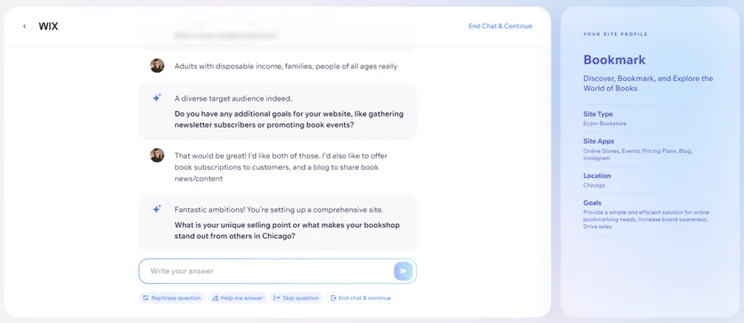
During my tests, I was impressed by how personalized the questions became following my answers. For example, I set out to create a website for a bookstore, and Wix’s AI chatbot asked: “Do you have any additional goals for your website, like gathering newsletter subscribers or promoting book events?”
Of course, the AI tool isn’t without error – I named my bookshop “Bookmark”, and the chatbot focused heavily on that word when building the site profile, resulting in “bookmarking needs” as a goal. That said, I’d recommend using the AI builder, as opposed to just picking a template, if you want a more personalized experience. You’ll get more control over the outcome.

How Does Squarespace Blueprint AI Work?
- Hands-on web design solution with AI assistance
- Five steps that cover site personality, sections and pages, and theme fonts and colors
- Builds website preview that that adapts at each step
Find out more about Squarespace Blueprint AI, and watch our video demonstration:
How Easy Is It to Edit Your Website?
Squarespace’s grid-based editor is easiest for beginners because the structured layout prevents common design errors and ensures element alignment, whereas Wix utilizes an unstructured drag-and-drop editor for total creative freedom.
➡️ See how Hostinger, another intuitive drag-and-drop builder, compares in our Hostinger vs Wix vs Squarespace review
Squarespace’s mobile app focuses on design and content editing, while the Wix app prioritizes business management tools like live customer chat and order fulfillment. Still, both platform’s mobile apps support analytics, blogging, and marketing for on-the-go management.

Squarespace is easier to use and beginner-friendly
Both builders help you get online quickly and easily, but Squarespace’s Blueprint AI and editor offer additional guidance. I felt incredibly supported throughout the onboarding process, and I loved the flexibility and stylish designs available in Squarespace’s editor. I could simply place and rearrange elements to my liking, and the grid overlay helped me keep sections aligned with one another.
Does Wix or Squarespace Have Better Sales Features?
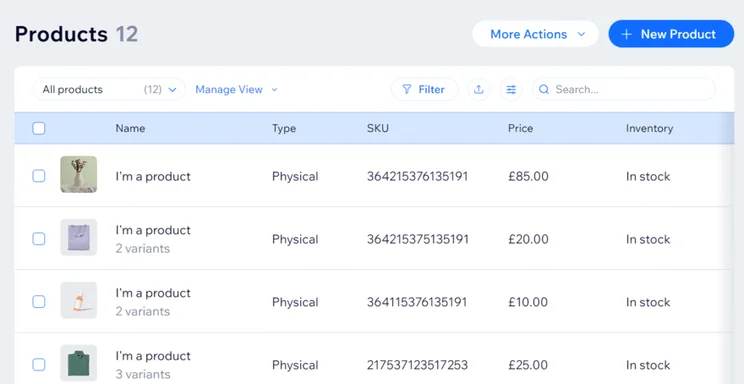
Wix is a stronger ecommerce website builder than Squarespace, with powerful sales features, such as POS, omnichannel selling, and unlimited storage included.
What Ecommerce Features Does Wix Have?
- POS products that sync in-store and online sales (Squarespace doesn’t do POS)
- Multichannel selling across social media and marketplaces such as Amazon and Facebook
- AI-powered adaptive content that offers a hyper-personalized consumer experience to increase sales and engagement
🛍️ Find out more about Wix’s sales features in our Wix ecommerce review.
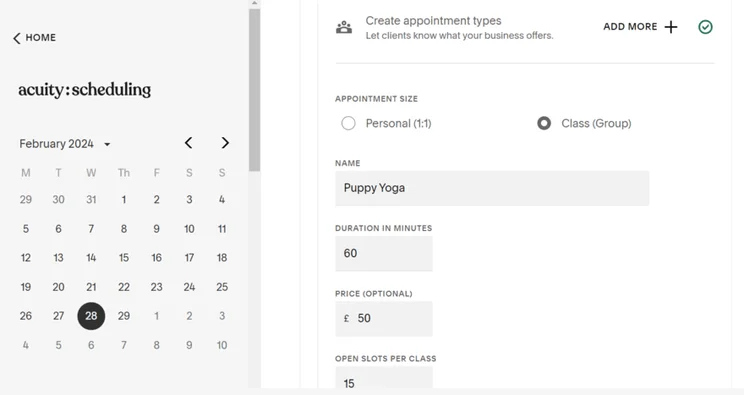
What Ecommerce Features Does Squarespace Have?
- Acuity Scheduling to take online bookings, including automation tools, such as calendar syncing, confirmation and reminder emails, and customer time zone detection
- Unlimited storage space and products across all plans
🛍️ Read our Squarespace ecommerce review for a full list of sales features.
What Payment Options Do Wix and Squarespace Offer?
Wix and Squarespace both have native payment solutions, Wix Payments and Squarespace Payments, although Wix Payments supports a wider range of third-party gateways and waives transaction fees on all plans.
Wix is the better option for online stores
Wix provides scalable plans and native sales features, such as AI assistants, abandoned cart recovery, and advanced shipping options, that help you serve your customers effectively.
However, for large online stores, I would still recommend Shopify, our top rated ecommerce builder, over Wix or Squarespace.
Which Builder Has the Best Website Features?
Based on our 2025 research, Wix has the best tools to help you improve visibility and promote your business to your target audience, including built-in email marketing and powerful SEO support.
How Do Wix and Squarespace Marketing Tools Compare?
Wix offers superior email marketing scalability, providing a monthly limit of 1,000,000 emails compared to the 500,000 cap on Squarespace. Wix also unlocks new email marketing features as you upgrade, such as multiple send addresses and Mailchimp integrations, which help you grow subscribers and use automations, such as welcome emails.
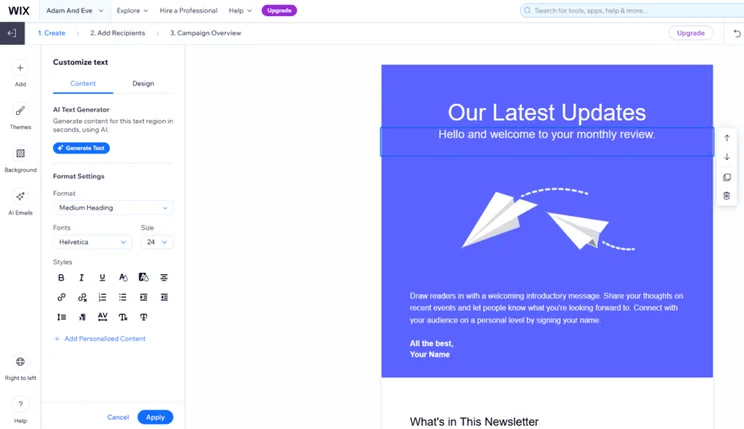
Which Builder Offers More Advanced Blogging Features?
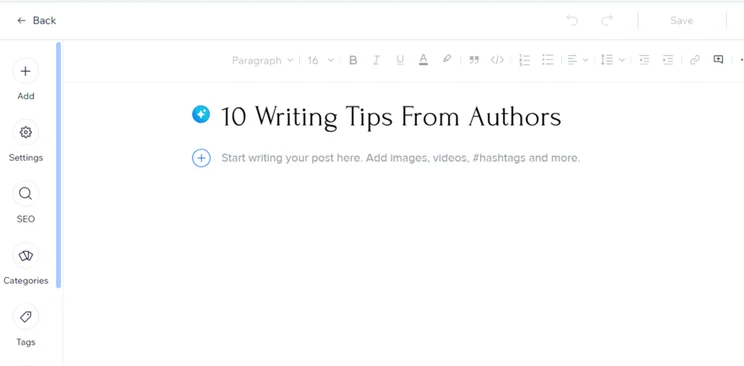
Wix also has the most advanced blogging platform, equipped with more post management tools and performance reports. Both builders have dedicated blog sections that make it easy to create and schedule content, set up blog-specific SEO, monetize posts, search blog content, and create categories.
I tried Wix’s AI writer to generate blog content for my test website, which is really handy if you need to churn out a high quantity of blog posts. It was really simple to use, and it created a detailed and well-structured blog post for me based on a headline prompt. I could even request different post types, such as a listicle or how-to guide, as well as the number of images and desired tone of voice. Of course, I always recommend reviewing any AI-generated content for errors and to add a human touch before publishing, but it’s a useful starting point for your blog.
Squarespace’s blogging tools lack the post-specific analytics and post-archiving functionality offered by Wix. That said, Wix’s advanced functionality for blogging won’t be necessary for casual bloggers and is best suited to businesses and online stores. Squarespace is a better option for media-focused and creative blogs.
How Do Wix and Squarespace AI Tools Compare?
Wix is rated as the best AI website builder in our latest round of testing, offering specialized tools for text and logo generation, SEO audits, and natural language site building via Aria.
✨ See the full range of Wix AI features.
- Automations Assistant: Wix Automations users can use the new AI assistant to draft automations (including triggers, actions, conditions, and timing) from natural language prompts (April 2026).
- Voice support in Aria: Users can now speak their questions and receive audio responses from Wix’s AI design and business agent (February 2026).
Squarespace’s AI tools include unique branding enhancement opportunities, such as the Brand Identity feature, which generates personalized text in your brand’s tone of voice. However, Squarespace offers fewer native AI tools than Wix, lacking a dedicated logo maker, social media caption generator, and AI marketing chatbot.
Is Wix or Squarespace Better for Search Engine Optimization?
While Wix and Squarespace provide similar basic SEO tools, including AIO and GEO support, mobile optimization, and 301 redirects, Wix’s SEO is more advanced, including:
- Easy onboarding with a custom SEO setup checklist and AI SEO assistant
- AI meta tag creation
- Semrush keyword research integration
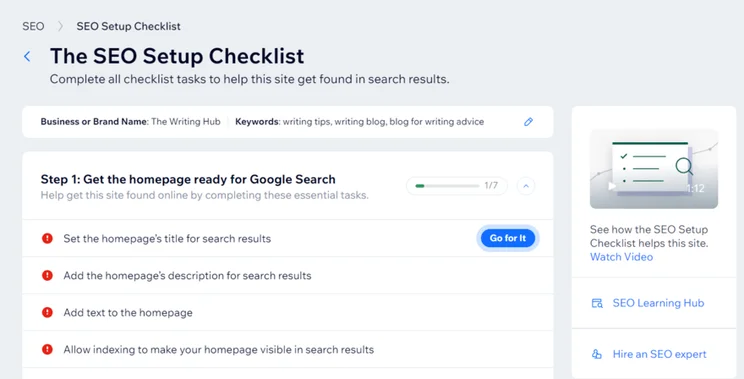
Wix offers a more comprehensive set of native website features than Squarespace
Wix is an all-in-one solution for building, managing, and growing your online presence, with built in SEO, blog monetization, and email marketing tools. Wix’s app store also offers 800+ plugins for additional functionality, whereas Squarespace has 50 Extensions.
Does Squarespace Have Better Templates Than Wix?
Squarespace has the best quality templates, while Wix offers a wider range (2,000+) to choose from. As of April 2026, Squarespace has over 190 unique and professionally designed templates to choose from, which are a great fit for creative businesses and portfolio sites.
Templates cannot be changed after your site is live with either Wix or Squarespace (if you’re using Squarespace’s 7.1 editor), which means design updates must be edited manually, which can be time consuming.
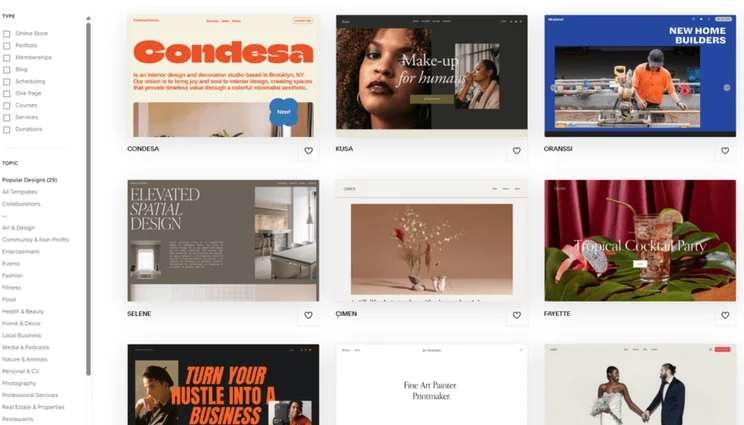
Squarespace offers high-quality designs
While Wix has more template options to choose from, Squarespace can’t be beat when it comes to the quality and professionalism of its designs. They’re sleek, modern, and intuitive to navigate around.
How Do Wix and Squarespace’s Support Options Compare?
Wix offers superior help and support via live chat, social media, knowledge center, 24/7 phone lines and more, the latter of which isn’t offered by Squarespace.
| Support options | Wix | Squarespace |
| Live chat | ✔️ Mon-Fri (2AM-6PM EST) | ✔️ Mon-Fri (4AM-8PM ET) |
| Phone | ✔️ 24/7 | ❌ |
| ❌ | ✔️ 24/7 | |
| Social media | ✔️ | ✔️ |
| In-editor support | ✔️ | ❌ |
| Knowledge center | ✔️ | ✔️ |
| Video tutorials | ✔️ | ✔️ |
| SEO learning hub | ✔️ | ❌ |
| Community forum | ✔️ | ✔️ |
📲 Find out more about Squarespace’s customer support options.
Wix offers 24/7 customer support
I found Wix’s contact options, such as the 24/7 phone support and live chat, to be more responsive and accessible. Plus, Wix provides a lot of expert guidance in the form of its SEO Learning Hub, video guides, and interactive online courses.
Can You Switch to Wix or Squarespace?
It is possible to switch your website content over to Wix or Squarespace from another platform. However, neither Wix nor Squarespace offers an automated migration process, and it’s not possible to create an exact match of your old site’s style.
Which Has the Easiest Migration Process?
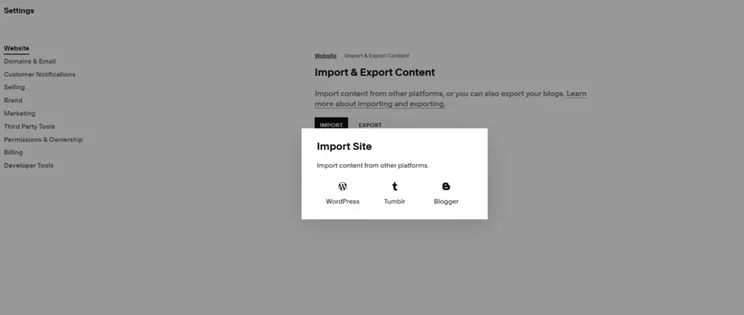
It’s easier to switch your website to Squarespace than to Wix due to Squarespace’s extensive content import options. While Wix only supports importing blog posts from WordPress, Squarespace lets you import pages, blog posts, and other content from a WordPress, Tumblr, or Blogger site.
However, Squarespace can’t duplicate fonts, templates, or your page layouts, so you’ll need to start with a template that suits your site.
Both Wix and Squarespace support bulk product importing via CSV files and prompt you to transfer an existing domain during initial setup, which speeds up the remainder of the migration process. If you get stuck along the way, you’ll have the option to hire a Wix or Squarespace expert to handle the switch.
➡️ Review your options in our detailed Wix vs Squarespace vs WordPress comparison.
How We Test Website Builders
When comparing two of the top website builders, like Wix and Squarespace, we carry out regular testing to guarantee that our recommendations and judgments are accurate.
After over 300 hours of data analysis and hands-on testing with each builder, Wix and Squarespace have been awarded a star rating out of five for each core area of investigation in our research process:
- What website features do I get? (30%): We looked at the range of built-in functionality, such as blogging tools for content creation, SEO for online visibility, and email marketing for audience engagement
- Can I build a professional and stylish website? (25%): We analyzed each platform’s AI website builder, the flexibility of the editor, the quality of templates, and the level of creative control available
- How much do Wix and Squarespace cost? (15%): We compared pricing plans, the balance of features for the subscription fee, and potential hidden costs
- Is the builder easy to use? (15%): I carried out hands-on testing with both builders to experience the onboarding process, editors, backend management, and available features for myself
- Are there reliable support options if I have a problem? (10%): We looked at customer support channels, such as live chat and phone, as well as knowledge centers and AI assistants
- How do people feel about the platform? (5%): We reviewed how each builder compares in the market, based on existing customer reviews, third-party reviews, and brand trust
I sat down and built websites with both Wix and Squarespace myself, so you know that any insights I share on using the builders are based on real, first-hand experience. I’ve included tips and screenshots of my testing throughout this comparison to help you decide which is the best platform for you.
Wix is a great option for a variety of website needs and industries due to its broad range of templates and tools. Because of this, I recommend Wix to everyone, but particularly small businesses looking for a central hub to manage and grow their brand. It’s really the best all-in-one resource for website owners.
Squarespace sits just behind, providing a beginner-friendly editing experience, stunning templates, and great booking tools. As a result, I recommend Squarespace to creatives and service-based businesses who want an aesthetically pleasing site.
Final Verdict: Should You Use Wix or Squarespace?
While both website builders performed well in our testing, Wix is the best platform overall thanks to its outstanding ecommerce, marketing, and SEO tools. It offers a comprehensive suite of features and templates for most industries and business types.
If you’re still deciding between Wix or Squarespace, the best advice I can offer is to make use of Wix’s free plan or Squarespace’s 14-day free trial to test out the platforms for yourself and see if it’s a good fit for you.
FAQs
Wix is our top choice if you’re looking to build a photography website. The builder provides a built-in photo studio so you can edit and optimize your photos for your site, minimizing the risk of slow-loading times. You can also password-protect your image galleries, protect your images from theft, and watermark your photos.
Wix is the better option for membership websites, since it offers advanced tools, such as members-only emails, profile badges, and customizable pages. You can accept payments for memberships, as long as you’re subscribed to Wix’s Core plan ($29/month) or above.
Migrating your content to a new website builder can be painful – you can’t simply click a button and have everything transferred over automatically. You can pay for migration services from an external party or manually copy and paste content over to your new site. Either way, a lot of your existing website content won’t transfer over seamlessly, since you’re starting again with a new website builder and its unique infrastructure.


1 reply
1 reply
1 reply
1 reply
1 reply
1 reply
1 reply
1 reply
1 reply
1 reply
1 reply
1 reply
1 reply
1 reply
1 reply
1 reply
1 reply
1 reply
1 reply
1 reply
1 reply
1 reply
1 reply
1 reply
1 reply
1 reply
1 reply
1 reply
1 reply
1 reply
1 reply
1 reply
1 reply
1 reply
1 reply
1 reply
1 reply
1 reply
1 reply
1 reply
1 reply
1 reply
1 reply
1 reply
1 reply
1 reply
1 reply
1 reply
1 reply
1 reply
1 reply
1 reply
1 reply
1 reply
1 reply
1 reply
1 reply
1 reply
1 reply
1 reply
1 reply
1 reply
1 reply
1 reply
1 reply
1 reply
1 reply
1 reply
1 reply
1 reply
1 reply
1 reply
1 reply
1 reply
1 reply
1 reply
1 reply
1 reply
1 reply
1 reply
1 reply
1 reply
1 reply
1 reply
1 reply
1 reply
1 reply
1 reply
1 reply
1 reply
1 reply
1 reply
1 reply
1 reply
1 reply
1 reply
1 reply
1 reply
1 reply
1 reply
1 reply
1 reply
1 reply
1 reply
1 reply
1 reply
1 reply
1 reply
1 reply
1 reply
1 reply
1 reply
1 reply
1 reply
1 reply
1 reply
1 reply
1 reply
1 reply
1 reply
1 reply
1 reply
1 reply
1 reply
1 reply
1 reply
1 reply
1 reply
1 reply
1 reply
1 reply
1 reply
1 reply
1 reply
2 replies
1 reply
1 reply
1 reply
1 reply
1 reply
1 reply
1 reply
1 reply
1 reply
1 reply
1 reply
1 reply
1 reply
1 reply
1 reply
1 reply
1 reply
2 replies
1 reply
1 reply
1 reply
1 reply
1 reply
1 reply
1 reply
1 reply
1 reply
1 reply
1 reply
1 reply
1 reply
1 reply
1 reply
1 reply
1 reply
1 reply
1 reply
1 reply
1 reply
1 reply
1 reply
1 reply
2 replies
1 reply
1 reply
1 reply
1 reply
1 reply
1 reply
1 reply
1 reply
1 reply
1 reply
1 reply
1 reply
1 reply
1 reply
1 reply
1 reply
1 reply
1 reply
1 reply
1 reply
1 reply
1 reply
1 reply
1 reply
1 reply
1 reply
1 reply
1 reply
1 reply
1 reply
1 reply
1 reply
1 reply
1 reply