I Compare Wix vs WordPress: Which Is Best for Your Website?

We may receive a commission from our partners if you click on a link and purchase a product or service on their website. Learn more

A smiling headshot Holly Choules
Written By
natasha_willett
Reviewed By
Updated on December 12, 2025
Advertisement
We may receive a commission from our partners if you click a link and purchase a product or service. This does not impact our ratings, which are determined by years of hands-on testing and expert research.
For personal sites
Light
See Pricing

Starting from $17/month

$15.30 with code “TAKE10”

  • No ads
  • Free domain for 1 year
  • 24/7 support
Cheapest paid plan
For small businesses
Core
See Pricing

Starting from $29/month

$26.10 with code “TAKE10”

  • Sell online
  • Unlock basic marketing
  • Increase storage space
Best value
For established businesses
Business
See Pricing

Starting from $39/month

$35.10 with code “TAKE10”

  • Advanced ecommerce tools
  • Multiple currencies
  • Automated sales tax
For scaling businesses
Business Elite
See Pricing

Starting from $159/month

$143.10 with code “TAKE10”

  • Unlimited storage
  • Priority phone support
  • 100 collaborators
For industry leaders
Enterprise
See Pricing

Custom pricing

  • Dedicated account manager
  • Custom Wix editor
  • Specialized support
Not for small stores
For trying Wix
Free
Try for Free

$0

  • No credit card required
  • Basic features
  • AI website builder
Includes ads on site

Either Wix or WordPress could be a suitable option for your next website, but how do these two website builders compare?

Wix is recommended for easy website management, since it gives you access to all the features you need to run a functional website, from generative AI tools to email marketing. But for more control over your website, WordPress may be a better fit. On its CMS, you can use code or additional apps to shape your website how you want to.To find out which platform is right for you based on your unique needs, keep reading. I’ll compare all-important details, such as website features, ecommerce, total costs, and more.

I’ve updated this article to reflect the latest prices of Wix and WordPress’ add-ons and plugins. I’ve also added information about ongoing website maintenance and migrating Wix and WordPress websites to help inform your decision.

This article covers WordPress.org, which is a content management system (CMS) used to build and manage websites. This differs from the website builder WordPress.com, which is similar to Wix in the creation capabilities it offers. It’s more streamlined than its CMS counterpart and provides more structure if you’re less tech-savvy, but it’s not as powerful as WordPress.org.

For an overview of Wix and WordPress’ key features, below is a quick comparison you can refer to:

0 of 0
Overall Rating
Today's best price
Free plan or free trial
Number of templates
SSL security included on free plan
SEO
Marketing Capabilities
Wix logo black 2025

Wix

WordPress.org

4.8
3.4

Free plan

Free to install

2,000+

13,000+

check
check

Custom SEO checklist, Semrush integration, AI support, Google Business Profile, analytics, SEO Learning Hub

Excellent

AI marketing agent, weekly newsletters, email shout-outs, social post creator, abandoned cart recovery

Blogging features, SEO-friendly, marketing plugins needed for further integrations

Need a quick snapshot of both platforms? Here are the key differences between them:

💡 Use Wix If:

  • You want to set up quickly – Wix’s intuitive drag-and-drop editor and pre-built templates can help you set up with ease
  • You want a range of built-in features – Wix’s dashboard has the best website features on the market, from bookings integrations to an SEO checklist
  • You want access to AI tools – Unlike WordPress, Wix has impressive AI functionality, including its AI chatbox website builder and AI text and photo generator
  • You’d rather stick to a recurring payment plan – Wix has four key plans to choose from, ranging from $17 to $159 per month (billed annually)

💡 Use WordPress If:

  • You already have experience creating websites – With WordPress, technical expertise is key since you’ll need to edit website code in the backend
  • You want more control over your website’s design and functionality – You’ll have to source themes and additional features yourself, giving you free rein to make your website your own
  • You want more control over your website’s costs – Because WordPress doesn’t offer hosting, domains, themes, and plugins in pre-built packages, you’ll need to source these aspects of your website yourself and find the best prices
  • You plan to create a complex, content-heavy site – WordPress is a content management system, which means it’s great at storing, organizing, and presenting a huge amount of content at once
The Winner

Wix and WordPress’ pricing is a tie

Because Wix is a website builder and WordPress is a CMS, the pricing model of each platform is very different. Wix is best if you want to pay for an all-in-one plan that already comes with the features you need, while WordPress is best if you want more control over particular website costs, such as website hosting or domains.

Before you create your website, we must ask the age-old question: how much will it all cost? Let’s take WordPress for starters.

How Much Does WordPress Cost?

WordPress’ CMS is free to install, though additional costs will come from domains, a website hosting plan, paid themes, and plugins available from third-party sources. You’ll be in charge of researching and purchasing these yourself.

Costs vary depending on the third-party providers you buy from, but here’s a rough estimate based on average costs:

What to purchase Average cost What is it for?
Domain name $10 – $20/year Your website address
Website host $36 – $600/year The service provider that hosts your website’s files on a secure server
Themes Free – $130/year (one-off charge) Your website’s design
Plugins Free – $129/year (ongoing or one-off charge for a plugin) Apps you can download to add additional features to your website

Based on the above, WordPress is a solid choice if you want flexible pricing that isn’t limited by an all-in-one plan, and you would rather look for the best third-party deals yourself.

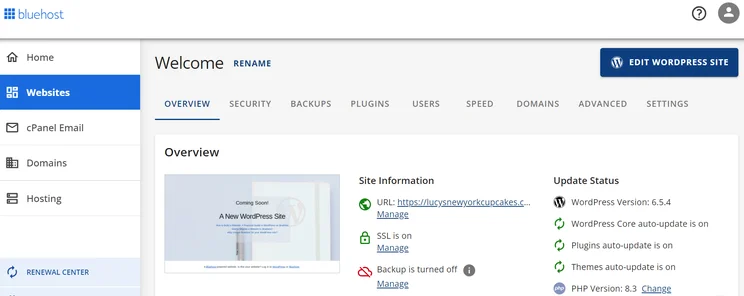
Screenshot of BlueHost's dashboard with multiple tabs like security and backups.
Once I'd installed Bluehost, its dashboard gave me access to key aspects of my website, from security to its speed. Source: Website Builder Expert

💰 Want more advice on pricing? Check out our WordPress pricing guide for further details

How Much Does Wix Cost?

Wix’s pricing plans cost between $17 and $159 per year (billed annually). The plans come with all the built-in features you need to set up your website, including a free domain name for your first year, website hosting, and over 2000 website designs to choose from.

You can also get 10% off your purchase by using the code “TAKE10” at checkout.

This table outlines each plan for you:

Wix plan Price (billed annually) Key features
Light $17/mo • Free domain for one year
• 2 GB storage space
• Marketing features
• Up to 2 collaborators can work on your site
Core $29/mo Everything on the Light plan and:
• 50 GB storage space
• Up to 5 collaborators can work on your site
• Set up an online store
• Accept payments from customers
• Accept bookings from website visitors
Business $36/mo Everything on the Core plan and:
• 100 GB storage space
• Up to 10 collaborators can work on your site
Business Elite $159/mo Everything on the Business plan and:
• Unlimited storage space
• Up to 100 collaborators can work on your site

Because Wix’s plans are all-in-one, the builder is fantastic value for money due to the sheer number of features included. If you use WordPress instead, you might need to source these additional features yourself, which could increase your total costs.

💰 Need more pricing plan details? Refer to our guide to Wix’s pricing, which explains them in more detail

The Winner

Wix's set up times are speedier than WordPress'

Wix is the best platform if you want to set up fast. The intuitive editor, useful AI features, and arrangeable page elements mean that creating a professional page is easier than you think.

Out of the two, Wix is best for beginners because it’s one of the easiest website builders to use and helps you set up your page in a few hours. 

Setting Up With Wix

Wix’s intuitive drag-and-drop editor is simple to create your site with, since it lets you move elements – like images and social bars – across your website with ease, and restore older versions of your website via the site history tab if you make a mistake.

Additionally, you can make use of various AI tools to speed up website creation. Wix has expanded its suite of tools in the past few years, and it now includes:

  • Wix AI website generator: its chatbot website builder that uses a series of prompts to help you build your website from scratch
  • AI text generator: generates text in different lengths and tones of voice
  • AI image generator: generates images from a prompt in different visual styles 
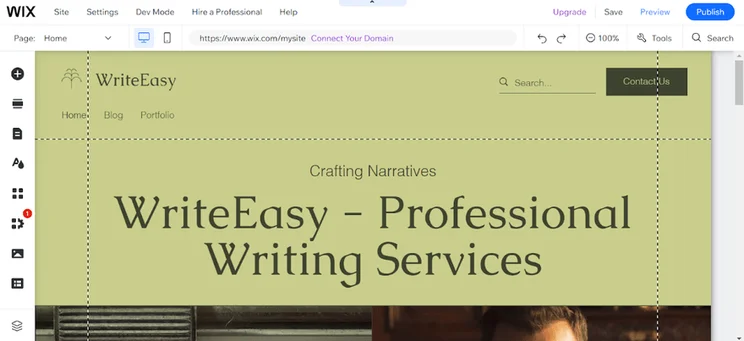
Wix website in the editor, for a professional writing service
This was the website Wix AI generated for me. I was impressed by the layout, text, and website features it created. Source: Website Builder Expert.

WordPress doesn’t have built-in AI features like Wix, so you’ll have to look for AI plugins yourself and install them on your website.

Setting Up With WordPress

In contrast, setting up a website with WordPress will take you more time. You’ll need to download and install its CMS first, and then look for additional features you might need, like plugins. However, you do have the option of finding a website host that offers one-click or auto installation for WordPress (Bluehost is a good example).

While coding knowledge is useful when working with WordPress, you also don’t necessarily need it to set up your website.

WordPress plugins like Elementor (from $9.99 per month) and Visual Composer (from $49 to $349 per year), will give you access to accessible, drag-and-drop editors like the ones found on website builders.
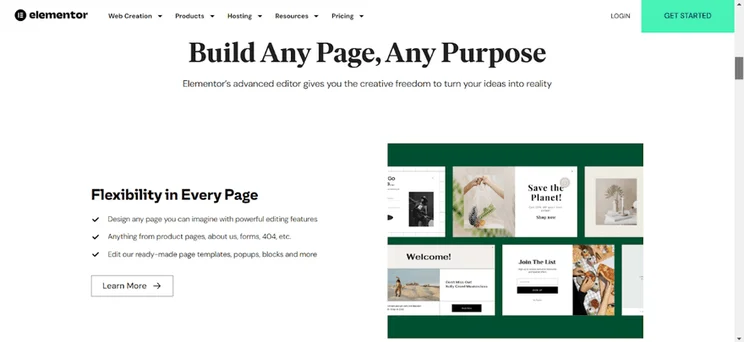
Elementor website
During my research, I came across Elementor’s WordPress plugin. It made the process look so easy and I no longer had to worry about coding or other technical skills. Source: Website Builder Expert.

Which Platform Is Easiest To Set Up Overall?

Based on these key points about WordPress, I would stick with Wix if you’re looking for the easiest experience and speedy set up times.

However, the more you put into your WordPress website, the more you’ll get back. If you take the time to study the platform and how it works, you could end up with a site that’s better customized to your unique needs.

The Winner

Wix has better industry-specific templates for businesses

From Wix’s 2000+ templates, you’ll find an eye-catching design fit for your ideal website, be it an ecommerce store selling to pet owners, a beauty blog, or an events page for your wedding.

To create a homepage design that wows website visitors, I recommend Wix.

The platform comes with over 2000 free templates to choose from, split into five distinct categories: business and services, store, creative, community, and blog. Whether you want to sell your services online or set up a blog in your niche, you’re bound to find a design that suits your unique business model.
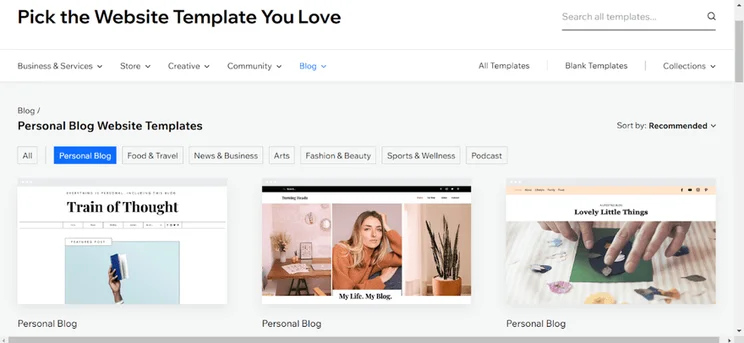
Three Wix template results in the template library for "Personal Blog" filter
After heading onto Wix’s template page, I found plenty of attractive designs to choose from, spanning online stores, blogs, and events pages – a great starting point for my site! Source: Website Builder Expert.

But there is one catch: you can’t switch between template designs once you’ve picked one. If you change your mind once your website is live, you’re not allowed to migrate to a new design, so pick carefully.

Quote
🚨 One thing I noticed during testing

When I tested the platform, I was overwhelmed by the number of templates available, so take your time when making your choice. You can use Wix’s filters to narrow down your options, or click on the “Edit” button to play around with each design before deciding. Does the template have the right design features for your website? Or is anything important missing?

A smiling headshot Holly Choules
Holly Choules Writer
  • 🤔 To avoid confusion… templates and themes both refer to your website’s design. Wix calls them templates, while WordPress calls them themes.

With WordPress, you’ll find thousands of free and paid themes for your website and, unlike Wix, you can also switch between themes on your live website. If you’re comfortable with code, it’s possible to customize these themes further by editing the theme’s code directly.

However, it’s best to stick with one of the official WordPress themes when creating your design. If you download from an external source, it needs to have secure coding that won’t leave your website vulnerable to a data breach – nobody wants a compromised website.
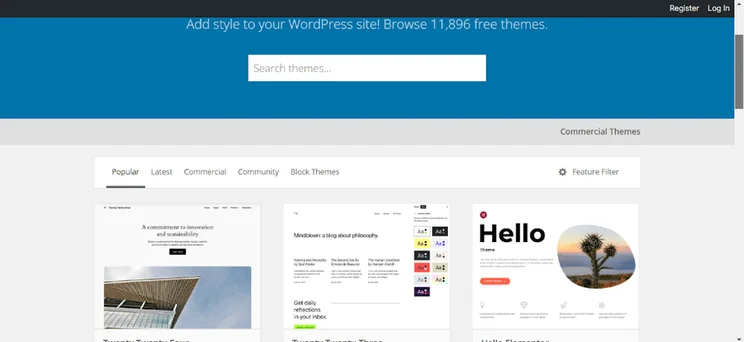
Three themes in the WordPress theme library
With 1000s of themes on offer, I needed a lot of free time to sift through them all. I did, however, find some beautiful templates along the way. Source: Website Builder Expert.
The Winner

Wix has the most advanced features to help your business grow online

From its in-depth scheduling tool to a bustling app market, Wix’s key features make it easy to create, manage, and grow your website. Setting up these features won’t be difficult either, since they’re all built into the website builder.

During our hands-on testing, I was blown away by Wix’s high-quality features that were more comprehensive than the other builders I tried. Though you can also access additional functionality on WordPress, it depends on which plugins you opt for – and the quality does vary between them.

Let’s compare both platform’s features below:

Sales Features

To make money from your website, you’ll need a platform with ecommerce capabilities, like Wix. In three of Wix’s paid plans, priced between $29–$159 per month (billed annually), you’ll receive a range of sales features that are ideal for small businesses.

Wix’s Selling Features

Listed below are some of Wix’s best built-in ecommerce features:

  • Create abandoned cart emails
  • Create store discounts and coupons to offer shoppers
  • Send back in stock notifications to customers
  • Integrate your store with online marketplaces and social channels
  • Set up Point of Sale for in-person transactions
  • Transaction fees from 2.9% + $0.30, or no transaction fees when using Wix Payments
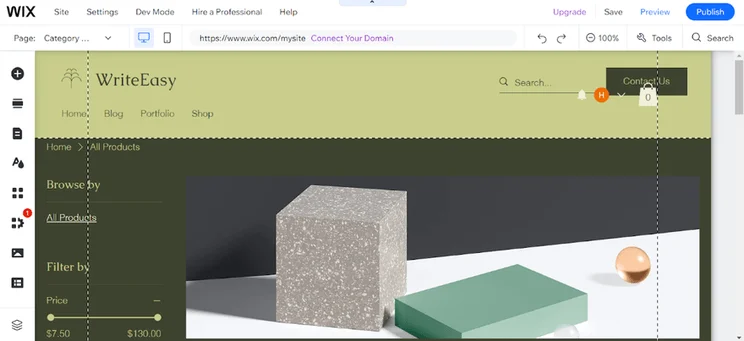
Wix editor in action editing a produt page
At a click of a button, I was able to load a store into my pre-existing website. The store template was appealing to the eye and maintained the color scheme of my current design. Source: Website Builder Expert.

Despite the number of sales features available, Wix isn’t optimal for larger stores. To dramatically scale up your store, I recommend Shopify instead, since its management tools are better at accommodating large ecommerce inventories.

🛒 Want a detailed look at Wix’s sales capabilities? Refer to our guide to Wix ecommerce

WordPress’ Selling Features

In contrast, selling on WordPress takes a little more work. 

You’ll need to download a plugin first that allows you to sell products and services on your website, the most popular, free ecommerce plugin being WooCommerce. This platform will provide you with essential sales features for your store, such as:

  • Order management tools
  • Optimized sales page designs
  • WooCommerce Sales App for taking in-person payments
  • Integrations with online marketplaces and social media
  • Secure payment methods like WooPay, Apple Pay, and Google Pay
  • Variable transaction fees depending on your payment gateway

Though WooCommerce takes longer to set up, you’ll have the advantage of being able to customize your store how you see fit through hosting, domains, ecommerce themes, and plugins – giving you complete control over your store.
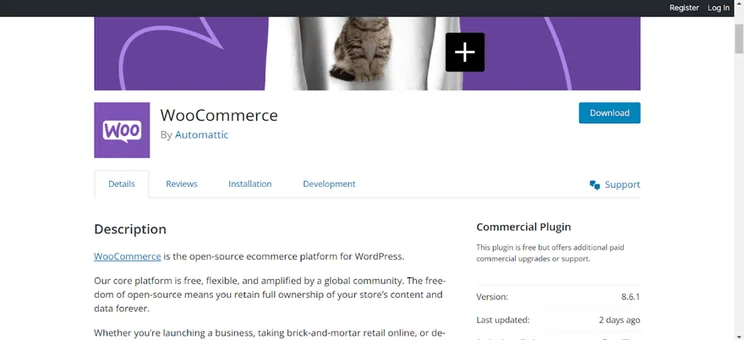
Plugin page for WooCommerce showing description, version, and download button
Installing WooCommerce does add an extra step to creating your online store, but they do make it easy for you. It doesn’t take long to connect the plugin with your WordPress site. Source: Website Builder Expert.

Scheduling Tools

Need to sell a service online? You should know about Wix’s integrated bookings tool, Wix Bookings. This feature is most suitable for small business websites and creatives who need to set up appointments or meetings while selling services online.

You can accept bookings through your website on the Core plan and above, which will enable you to:

  • Offer services
  • Manage your clients
  • Accept card payments from clients
  • Sync your personal calendar to let clients know when you’re available
  • Send clients SMS messages
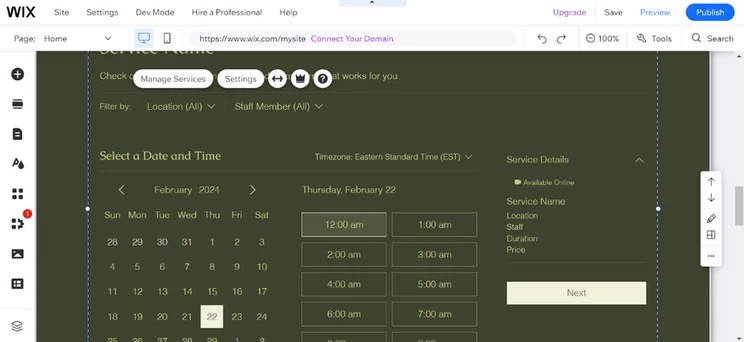
Wix Bookings in action in the editor, with "Settings" and "Manage Services" buttons visible
After installing the Wix Bookings, I had new elements I could add to my website. As an example, I added this calendar on my landing page where clients can book appointments. Source: Website Builder Expert.
Quote
🚨 One thing I noticed during testing

During hands-on testing, I was impressed by the huge number of features Wix Bookings has. I recommend making use of the tool’s SMS feature, since you can set up automations that’ll send out your messages under certain conditions. For instance, you could request payment after a session, or thank clients who’ve attended one.

A smiling headshot Holly Choules
Holly Choules Writer

But is there a scheduling tool for WordPress? Yes, if you’ve found the right plugin for it that is. One of the best extensions on the market that I’d recommend is Bookly. With this plugin – that has a free and paid version for $33 – you can also schedule and book appointments.
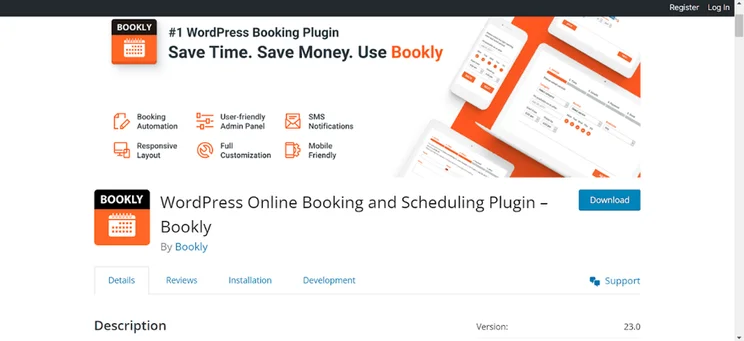
WordPress plugin page for Bookly
When looking for a WordPress scheduling alternative, I came across Bookly. I liked that they had a booking automation as well as responsive layouts for desktop and mobile. Source: Website Builder Expert.

App Store

WordPress is an open source platform that anyone can create features for, so you’ll find thousands of WordPress plugins, from technical SEO extensions to all-in-one security packages. With these plugins, you can make sure that your website has the exact features you need.
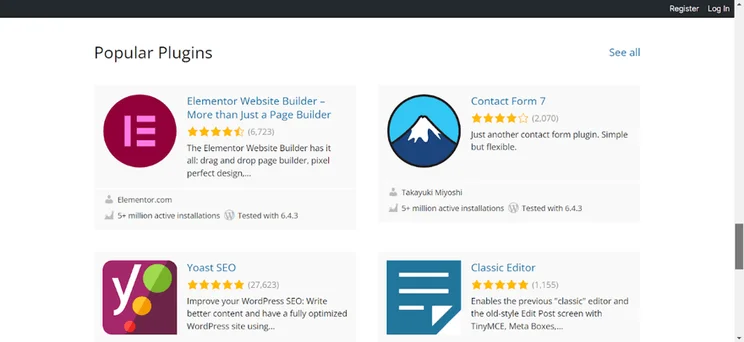
Four popular plugins showign in the WordPress plugin directory
WordPress’ plugin selection did seem like a lot to take in at first, but I was able to find a selection of reputable plugins from its store. Source: Website Builder Expert

WordPress plugins can range anywhere from $0 to $200 or more per year, and since they are open-source, their quality isn’t always guaranteed. To reduce overall costs and keep your website safe from attacks, be selective with your plugins and conduct research before downloading anything.

If you’re using Wix, you can download over 800 free and paid apps from the App Market. Unlike WordPress, all of the apps are approved by Wix and are compatible with its websites, so you won’t have to worry about the safety of each app. While Wix has plenty of free apps, some require a paid Wix plan to install.
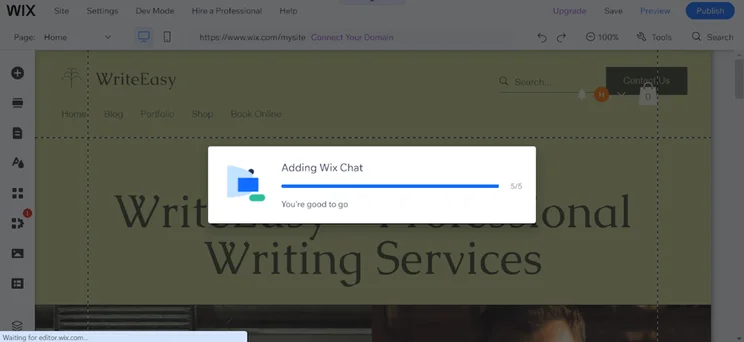
Wix editor showing a progress bar for installing the Wix Chat app to a site
Installing an app to my Wix website was simple. After clicking the install button from the app store, I was taken to my site for a quick installation. Source: Website Builder Expert.

Website Security

For the best website security, I recommend Wix over WordPress. It comes with key security features, including secure customer login areas, SSL certificates, two-step verification, and fraud prevention through security specialist Forter. 

Because WordPress is a self-hosted platform, security is placed in the hands of its users instead. For this reason, I don’t recommend WordPress for beginners. Using a poor host or downloading sketchy plugins could leave your website vulnerable to attack.

However, this doesn’t mean that WordPress is devoid of security features. Since the CMS houses millions of websites, its core software is adept at spotting common security vulnerabilities. Additionally, the WordPress Security Team works alongside security researchers and hosting companies to uphold user safety.

The Winner

WordPress and Wix’s marketing features are a tie

Though WordPress and Wix’s marketing features differ, their quality is consistent. Wix’s built-in email tools will help you develop a reliable marketing strategy through newsletters, while WordPress’ brilliant blogging platform and SEO foundations makes it well-suited to content creation that’s optimized for search.

To spread word of your business online, you’ll need to put on your marketing caps and create a strategy consisting of SEO, email marketing campaigns, social media, and potentially a blogging platform, too. I’ve compared Wix and WordPress’ marketing capabilities below:

SEO (Search Engine Optimization)

  • Yoast SEO for WordPress pricing: Free for basic SEO and $9.90 per month for advanced tools
  • Wix’s SEO pricing: Basic tools included for free, but a paid plan is required for all SEO Assistant tools

WordPress is an SEO-friendly platform and gives your website a head start when it comes to showing up on search engines.

Though WordPress gives you more control over your SEO, you do need to know what you’re doing for it to be effective. This could mean downloading SEO plugins like Yoast ($118 per year), optimizing website speeds, and crafting SEO-friendly URLs to make sure that your website can reach its full potential on search results.
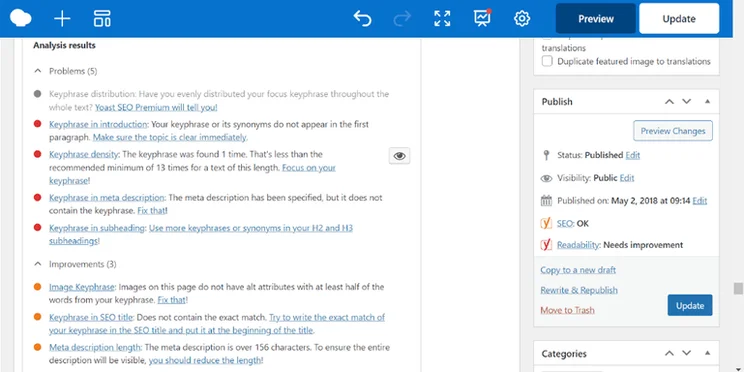
WordPress editor with Yoast SEO installed
When writing up my blog post on WordPress, the Yoast SEO was useful at spotting key things I had missed out. It was useful to know that I’d missed a targeted keyword in the introduction. Source: Website Builder Expert.

On the other hand, all of Wix’s SEO features are already baked into its website builder. During hands-on testing, I was impressed by the number of SEO tools available, which cover key SEO basics like optimized meta descriptions and keyword support. Key tools include:

  • Alternative text for website accessibility
  • Google Analytics and Google Search Console integration
  • Semrush integration
  • Mobile-friendly pages
  • Schema mark up to appear in Google search snippets
  • 301 redirects

Unfamiliar with some of the above terms? If you’re new to website building and have limited knowledge in this area, Wix will guide you through each step of the process with its dedicated SEO checklist from the dashboard.
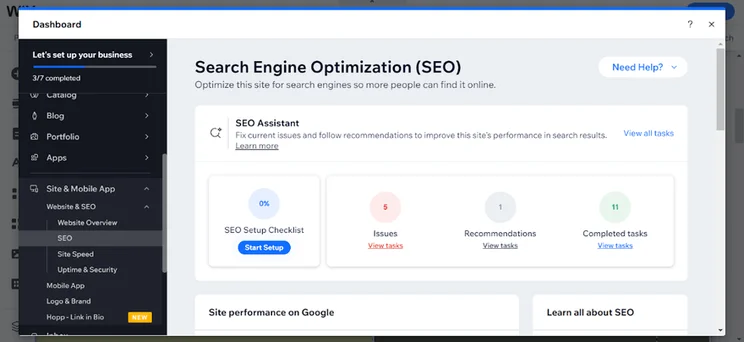
Wix SEO setup checklist in the Wix dashboard backend
When looking through Wix’s SEO offerings, I came across a handy SEO setup checklist that takes you through the entire process. It spots issues, offers recommendations, and even tallies up your completed tasks. Source: Website Builder Expert

Email Marketing

  • Mailchimp for WordPress pricing: Free to send 500 emails per month, and paid plans cost $13 to $350 per month
  • Wix’s email marketing pricing: Free to send 200 emails per month, and paid plans cost $10 to $49 per month

A standout feature from Wix is its free, built-in email marketing tool. With it, you can create and edit your own professional emails, implement automations to streamline the process, and track advanced email analytics.

During our 2025 testing period, I tried out Wix’s AI email generator.  The AI asked me to fill out important information, like the intent of the email and what it should contain, and then generated a template for me.

Results were mixed. Though I was happy with the quality of the email campaign copy it created, the images generated weren’t relevant to my niche, so you’d still have to replace them yourself before sending.
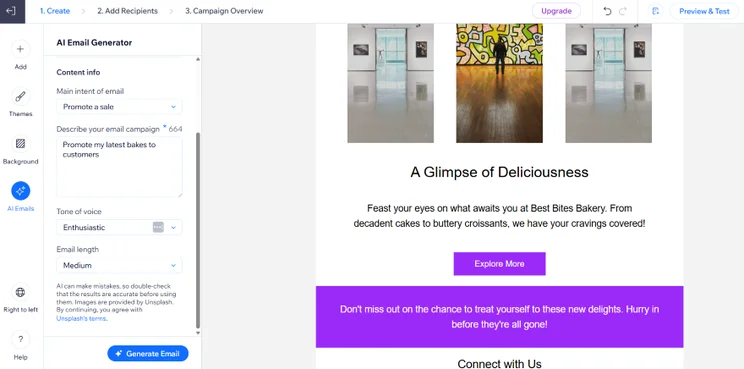
An email marketing template with photos and text copy the AI generator had created
The AI email generator also let me select my email’s length and tone of voice. Source: Website Builder Expert

Because WordPress doesn’t have a built-in email marketing tool, you’ll need to find a suitable WordPress plugin. Its plugins store has a range of options, including MailPoet, GroundHogg, and MailChimp, that will all help you create eye-catching email campaigns to generate clicks and conversions.

Blogging

  • WordPress blogging pricing: Free
  • Wix blogging pricing: Free

WordPress started out as a powerful CMS specializing in blog content. Because of this, your blog will be able to handle large amounts of content, allowing you to write numerous posts and showcase your personal brand or expertise online.

These are just a few of WordPress’ key blogging features:

  • Built-in commenting capabilities between other WordPress users
  • Multiple user accounts for bloggers
  • Solid blog SEO
  • Post archiving
  • Private or password protected posts
  • Featured images and post thumbnails
  • Backdating

Wix’s blog features aren’t as extensive, though it does provide essentials such as categories, post scheduling, writer profiles, social media sharing, and a selection of free media to make your posts more visually appealing.

The Winner

Wix offers more dependable customer support than WordPress

Wix is the best platform if you want speedy solutions to your problems via phone or live chat. Its wealth of learning resources makes it a suitable platform for beginners that want to pick up new skills, too.

Wix offers a more dependable and accessible customer service support than WordPress, with 24/7 phone and live chat support. Because WordPress is open-source, it relies on community forums and third-party developer support, making Wix the clear winner for users who want a simple, built-in help system.

Alongside Wix’s customer support, you’ll find additional resources from the Wix Help Center, or by hopping onto its community forums to find help from fellow users.
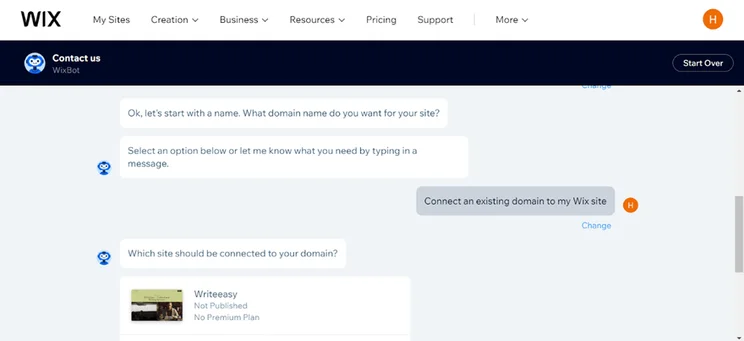
Wi chat support in action between Holly and Wix support
I needed help connecting an existing domain to my Wix site, so I went through Wix’s live chat to help me get set up. Source: Website Builder Expert.

Meanwhile, finding help and support for WordPress can be stressful. There are no direct support lines, and you’ll have to sift through the large amount of resources available on the internet; many of them featuring outdated information.

Also, since most plugins and themes come from external providers, you’ll need to track down their respective help and support services to be seen too.

Despite this flaw, WordPress is known for its active community of users who are familiar with the platform. From the global support forums, you can ask the community for help on all manner of WordPress related issues.
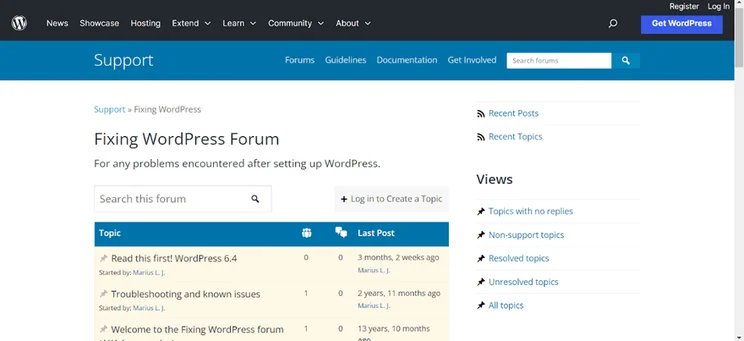
WordPress commuity forum showing support posts
After encountering an issue after setting up my WordPress website, I headed to the community forums for answers. Source: Website Builder Expert.
The Winner

Wix offers an all-in-one solution for busy business owners

Wix is the better option for businesses wanting a streamlined, hands-off approach to website management, whereas WordPress requires a greater level of ongoing care and attention.

Wix’s fully managed service offers a more straightforward and hands-off approach than WordPress by automatically handling platform and app updates and maintaining hosting and security.

On the other hand, WordPress’ self-managed system requires a more involved upkeep than Wix’s. For example, WordPress users will have to regularly:

  • Run core updates
  • Update themes and plugins
  • Manage website backups
  • Pay for hosting providers and security certificates

If you’re struggling to choose between Wix or WordPress, it is possible to move your website from one to the other. While neither has a straightforward process, it’s much easier to migrate from Wix to WordPress than from WordPress to Wix, thanks to WordPress’ import tools.

Migrating from Wix to WordPress

WordPress does support Wix migration at a limited level. From your WordPress dashboard, you can import static pages, images, menus, and your site title.

However, you won’t be able to import:

  • Your Wix theme
  • Your fonts and color scheme
  • Blog posts

Instead, you’ll have to manually select the closest style matches to your previous Wix site.

WordPress also has an RSS import plugin, although this only syncs your 20 most recent blog posts.

Migrating from WordPress to Wix

Wix doesn’t support migration from other sites, so everything – from your text and images to your pages and blog posts – will have to be copied over manually.

Still not sure whether Wix or WordPress is the right fit for you? I’m here to help. Before you come to a decision, it’s important to think about the key features you’re looking for in a website builder. I’ve listed a few pointers for you to start with:

Will it help me establish my online presence?

  • Stylish templates that reflect brand identity
  • Social media integration
  • SEO tools for visibility

Does the platform have strong blogging capabilities?

  • Strong content management
  • Eye-catching blogging templates
  • Sharing buttons
  • Blog monetization
  • Commenting

Can I sell products and services?

  • Inventory management
  • Payment methods
  • Varied shipping options
  • Scheduling tools to set up meetings with for clients

Will it allow for quick and easy set up?

  • Easy-to-use editor
  • Pre-built templates
  • 24/7 customer service
  • Resource center

Are there extra costs that will build up over time?

  • Price plans that have the key features you’re looking for
  • Free themes
  • Free extensions
  • Provided hosting and domains

To compare Wix and WordPress, I applied our rigorous website builder research for 2025, which investigated six key criteria. These are weighted based on importance, reflecting what businesses are most concerned about when choosing a platform:

  1. Website functionality: 30%
  2. Design features: 25%
  3. Pricing: 15%
  4. User experience: 15%
  5. Help & support: 10%
  6. Reputation: 5%

For instance, the “website functionality” criteria is most important, and covers key builder features like blogging and AI. When writing this article, I made sure to include a range of features from both Wix and WordPress, so you can better identify the platform that will best satisfy your needs.

During this period, I also tested out each platform myself, using my findings to add informed, first-person insights to this article.

After testing Wix and WordPress, I can confidently say that Wix is the best website builder overall. Its built-in features will help you manage your website effectively, while its simple-to-use editor means you can set up fast.

However, this doesn’t mean that Wix will be the best fit for your needs. Based on what we’ve covered, here’s a summary of both platforms and what they can offer your business:

  1. Wix is most suitable for beginners who want to set up and establish their online presence fast. Its built-in features, such as its marketing suite and intuitive editor, also contribute to easy website management.
  2. WordPress is more suitable for businesses that have a bit more tech experience and want extra control over their website’s functionality. You can choose your own host, plugins, and themes, while adding additional website code where necessary.

🆘 Still not sure what platform is right for you? Refer to our guide to the best website builders of 2025

Wix offers an out-of-the-box solution with all the essential website tools and features included in a subscription fee. This streamlined approach is perfect for beginners with less time and technical knowledge, but it also means there’s less flexibility for customization.
WordPress gives you a much greater deal of control over your website’s look and function, and can manage any amount of content. With thousands of apps available, the cost is completely tailored to your use, although this can lead to overspending if you don’t know which apps to pick.

WordPress is arguably the most powerful CMS on the market, capable of storing, organizing and displaying a huge amount of website content. It’s also highly customizable with plenty of themes and plugins, so it’s the best choice for complex and content-heavy sites.

Written By

A smiling headshot Holly Choules

Holly Choules is a Writer at Website Builder Expert with a background in researching and crafting engaging content for digital platforms. In previous roles, she has demonstrated her wordsmith skills by writing for public facing brands in a range of industries. After gaining hands-on experience using leading website builders, like Wix and WordPress, she is now keen to share her findings through informative, easy-to-follow articles that help small business owners get online and grow their presence.

Since joining the team in 2024 and transitioning into the tech sphere, Holly is passionate about applying her three years of content writing experience and upholding Website Builder Expert’s position as an authoritative source on website builders, ecommerce, and digital marketing.

You can read Holly’s articles below, or connect with her on LinkedIn.

More about

Reviewed By

natasha_willett

Natasha brings her expert credentials – a BSc, Ma, and MMRS – to Website Builder Expert. Natasha has qualifications in Advanced Statistical Analysis, MRS certificate in Market Research, Brand, Finding the Story in the Data, and Big Data: Measuring and Predicting Human Behaviour. These have allowed her to carefully analyze over 64 providers across website builders, ecommerce web builders, and hosting.

Natasha began building websites when studying sports science, originally using Weebly to create websites to help students learn in a more interactive way. During her first week at Website Builder Expert, she realized that website builders would become important in giving business owners full control over their websites. She began creating a rigorous methodology of research that centered around testing providers and products against a large set of mixed criteria turned into quantitative findings, comparing value for money, design, ease of use, and more. All to provide the most honest and objective insights rather than just looking at their claimed features.

In five years at Website Builder Expert, Natasha has attended multiple expos in her field, including ESOMAR, MRS, eCommerce Expo, Ad World, Digital Customer Engagement Summit, and IMRG, just to name a few. Natasha has also worked alongside website builders directly to share her research with them, so that they might improve their products for users.

She’s clocked an impressive 9,600 hours of product research and testing, pulling data from multiple sources and providing the Website Builder Expert team with the scores and product details they need to give you the best recommendations to succeed online.

More about

Popular topics

594 comments

Your email address will not be published. Required fields are marked *

  • Prashant Dwivedi

    Thanks a lot for sharing this information. It's very useful.

    1 reply

    • Emma Ryan
      Emma Ryan

      Hi Prashant,

      Thanks for the kind comment, we're glad you found the review useful!

      Very best,
      Emma

  • Samira

    very insightful

    1 reply

    • Annie Angus
      Annie Angus

      Hi Samira,
      Thanks for the feedback! I hope we've helped you choose the right platform. If you're still on the hunt, check out our best website builders for more recommendations.
      Very best,
      Annie

  • Samuel Jagger
    Samuel Jagger

    Hi Johnny. Thank you for your comment. We base our reviews and versus articles on hundreds of hours in-house research, but we know that everyone is different in their opinion! We aim to to find the best website builder for our audience, and the majority of our audience are people with little to no online experience. As much we respect WordPress's customization, we also know it can be a little harder for new users compared to Wix. But the best builder is the one you prefer, ultimately! I hope this helps. All the best - Sam

  • Mahsa

    Thank you for sharing. Very useful

    1 reply

    • Samuel Jagger
      Samuel Jagger

      Hi Masha! Thank you for your comment! We love hearing from readers like you. Glad we could've helped you on your online journey. All the best - Sam

  • Alan

    Very clear. Thanks for this

    1 reply

    • Samuel Jagger
      Samuel Jagger

      Hi Alan! Thank you for your comment! We're glad you enjoyed the article. All the best - Sam

  • Chris

    I’m new to both in terms of hosting. I like WIX. but I want to host it on a different server (where I’ve been invited by a friend who has unlimited sites for same price already). Can I create in WIX but host there?

    1 reply

    • Lucy Carney
      Lucy Carney

      Hi Chris,
      Thanks for your comment! Unfortunately you can't build on Wix but host separately. Wix handles all its own sites' hosting, and it all comes tied in together - meaning you can't have a third-party server hosting a Wix site.
      I hope this helps, even if it's not quite what you were hoping for!
      Take care, Lucy

  • Premjit Pv

    Hello
    I use wix for 7 years. It was very affordable and I could do it myself and that was the reason I did that. After using it, I liked it and liked the CRM/Workflow part very much. My plan allow me some extra automations as it is an old plan and automation were free when I started.
    I have a few challenges. Let me know if you can help
    1) I am not able to create structured data/ Schema markup
    2) I want to take leads in to the contacts and workflow by webhook which wix dont allow. I am wanting this since I use multiple landing pages and want to keep my master data of leads in wix
    Is there a way to get leads in to wix using webhooks or by Velo. I dont want to manually import.
    3) My pagespeed insights are low.

    In addition to this, if you can redesign my website for a user exp, I would like to seek your help.
    TIA

    1 reply

    • Jordan Glover
      Jordan Glover

      Hi Premjit,
      Thanks for your comment. Wix's knowledge base has a ton of really useful articles that can help with each of your queries. I've linked them below:
      - Adding Structured Data Markup to Your Site's Pages
      - Wix Automations: Connecting With a Webhook
      We've also written an article all about page load speeds, and have included some helpful tips on how to improve your website's loading speed. You can take a look at this here:
      Unfortunately, we don't offer any website design services.
      I hope this helps!
      Jordan

  • Richard

    Great post. One thing that hasn't been mentioned is with Wix, you cannot change the name servers which is required if you want to use something like Ezoic to create ad revenue. I have switched to wordpress to allow me to sign up to Ezoic.

    1 reply

    • Lucy Carney
      Lucy Carney

      Hi Richard,
      Glad you enjoyed the article! Thanks for commenting, I'm sure it's something other readers will find useful. You can create ad revenue on Wix using Google AdSense, but yes for changing name servers you'd need to use WordPress. I'm glad you found the best platform for your needs!
      Take care, Lucy

  • Matt

    Great article, this is the side-by-side comparison I've been looking for. Thanks!

    It looks like two of the main concerns are scalability and platform captivity (which to me are two sides of the same coin): I've seen the charge that "if your business outgrows Win, then you're stuck."

    However, if you're an independent and have limited need for scalability (as you're not going to go from a freelancer to a multinational any time soon, nor do you necessarily want to) , I shouldn't think being "stuck" with Wix a bad thing.

    Would you agree?

    1 reply

    • Hannah Whitfield
      Hannah Whitfield

      Hi Matt,

      Thanks for joining the conversation! Yes, I'd totally agree with that assessment - 'outgrowing' Wix definitely isn't a concern for all types of sellers, you're totally right, and that's a really important thing to keep in mind.

      Best,

      Hannah

  • Ashwini

    HI,
    A very informative article. It will help to select WordPress themes for beginners like me in WordPress development.
    Thanks for sharing.

  • Sarah Marsters

    Thanks for the detailed comparison. Has anybody tried migrating to WP from Magento 1? I've decided to switch the platforms since M1 is no longer an option for me. WooCommerce seems to be a great substitute, but I'm not sure whether I'll cope with the data transfer. Recently I've tried moving the data using Cart2Cart's migration preview option. Has anybody used this service for a full migration?

    1 reply

    • Lucy Carney
      Lucy Carney

      Hi Sarah,
      I'm sorry your comment slipped through the net at our end! I'd definitely recommend WooCommerce over Magento - did you have any luck with the migration? If not, perhaps one of our readers will have a helpful insight to share. I've never used Cart2Cart for a full migration, but it is one of the recommended methods in this WooCommerce guide, which is a good sign!
      Apologies again for the late reply, all the best - Lucy

  • Alan Owen

    Hi there, is it possible to own the blog or add another host on Wix and be able to add affiliates links etc?

    1 reply

    • Dan Barraclough
      Dan Barraclough

      Hi Alan,

      Your Wix site is already hosted for you but you can't switch hosting providers, however you're definitely able to add affiliate links! I hope this helps.

      Thanks,
      Dan

  • guru

    hi
    I bought a domain on WIX almost a year back and now is the time for renewal of DOMAIN.
    The issue is that I have transferred all my information to WORDPRESS.
    So do I pay for renewal of DOMAIN to WIX or WORDPRESS

    1 reply

    • Dan Barraclough
      Dan Barraclough

      Hi,

      If you are no longer using Wix then you won't need to pay for another year for your domain. Instead, you will most likely need to pay WordPress for the year ahead.

      Thanks,
      Dan

  • Al

    I have read quite a few comparison articles between Wix and WordPress, but one important thing that nobody mentions is that you do not own your Wix Code (any web-builder offer)!! This means you cannot move it to another hosting platform if you are unhappy, and you cannot develop anything bespoke if at some point you find you need a very specific functionality.

    WordPress website is yours, which means if you are not happy with the service of your hosting provider, you can up and go. With Wix you are stuck. You either have to lump it, or go to another platform (WordPress, Joomla, etc.) and start all over again.

    If you need a special functionality now or in the future, with WordPress you can get a developer to create it for you (or you can learn to do it yourself). However, there is a high chance that there is a WordPress plugin for what you want to do, as somebody, somewhere may have come across the special functionality you need.

    This is really important point that none of the comparison sites ever mention.

    1 reply

    • Dan Barraclough
      Dan Barraclough

      Hi Al,

      Thanks for your post!

      We agree. If you want to build a totally bespoke website, then you should use WordPress and not Wix. WordPress outshines Wix in the coding flexibility department!

      Thanks,
      Dan

  • Jen

    Thank you! I have tried (and given up) with Wordpress with all the glitches and difficulty and I was nodding my head at all the cons you were mentioning about it... (also agreed with the Pros) so I knew you were accurate from experience. I think I'm going to re-start in WIX - I'm feeling hopeful!

  • Daniel

    This was such an informative article as I was complete baffled how to proceed with either Wix or Word Press. In the past, I've used both and absolutely agree with the article when it is mentioned that Wix provides more ease of use and support while WP is more powerful but requires effort. I'm building a blog to eventually sell e-books and found Wix to be much faster to put together a quick website that looks awesome. I absolutely love the fact that it has its own hosting service also (an all in one box solution). The only knock I have on Wix is their customer support. Depending on who you get, they will be very familiar with the product and be of great help. Other times, I've got someone who wasn't as helpful. Since I used to do web development, WP is perfect if you really want to build a customized site that nobody else has but there is a lot of work involved. If you want to focus on your business, you'll definitely double-time it as a manager and web developer. In this regard, also keep in mind that Wix has something called Wix Code which will also allow you to customize.

  • Pete

    Congratulations! I find your site one of the best in terms of accuracy, independency and quality of the information.
    Please allow me to add some technical information:
    I am a Software Engineer and have lately dived quite deeper in WEB Development. Even though, I'm using WIX as my main Development Platform; here is why:
    1) WIX Code, supporting the newest JavaScript version, gives you enormous power and flexibility and enables you to do introduce to your (or your customer's) Websites practically any additional functionality and behaviour you want/need.
    2) WIX's Support of iFrames and HTML Objects enables you to create your own WEB Elements using HTML and CSS and introduce them seemlessly into your WIX Sites.
    These and other advanced features make WIX much more flexible and creativity promoting as many people think.
    What I finally mean with all this, is that nowadays WIX cannot ONLY be considered a fantastic platform for beginners and non-programmers. Even professional developers could be astonished when diving into WIX!

    1 reply

    • Dan Barraclough
      Dan Barraclough

      Hi Pete,

      We're so glad you enjoyed the article, and thank you so much for your added insight! That will prove invaluable for our readers.

      Thanks,
      Dan

  • Anshika

    Helpful !!! Thanks a lot.

  • Rogel

    Great article! Love it! It's clear, concise and really helped me better understand the diffdrence between Wix and Wordpress. I personally use Wix but I have been thinking of trying out WordPress too. With my limited time as an entrepreneur, I believe Wix is still best for me. Your article has made this clearer to me. Thanks so much! More power and God bless!

    1 reply

    • Dan Barraclough
      Dan Barraclough

      Hi Rogel,

      Thank you so much for the comment, we're happy you enjoyed the article!

      Thanks,
      Dan

  • nilu

    I want to create my own psychotherapy website. I have no clue about coding. I started creating the website using WIX (havent finished it yet). Now I have read that WIX isnt really good when it comes to competing with other psychotherapist and optimizing it. Does it mean if I want people to find my website easily on google i should use wordpress? I was hoping to just create the website myself with wix and then hire somebody who takes care of the SEO. But maybe im just naive because I have not idea about all this. Any advice would be appreciated.

    1 reply

    • Dan Barraclough
      Dan Barraclough

      Hi Nilu,

      Thanks for the comment. SEO is very important, but you'll find Wix has all the tools you need to help your website rank on Google. Check out our Wix SEO Review for some more detail, you'll probably find you don't need to spend too much on an SEO expert, or any money at all!

      Dan

  • Marty Patry

    Hi!

    Thank you for the post, really useful :)

    What about "location based search"? Does Wix offer this option? I run a small coffee place and I would like people nearby to find me when typing their ZIP codes or address.

    1 reply

    • Dan Barraclough
      Dan Barraclough

      Hi Marty,

      Yes they do offer this feature, check out their helpful guide on using localized SEO.

      We hope this helps,
      Dan

  • Tex

    Thank you for this really helpful article. I spent hours today toggling back and forth between which platform to use for my new blog. This helped give me the clarity I needed. Thank YOU!

  • hirewordpressdeveloper

    I appreciate to blogger for wonderful post. will definitely share this blog to my group.

  • Lotte Lund

    Thank you so much for a very informative article - and most of all USEFULL. I had a lot of ??? - that is now solwed.

    1 reply

    • Lucy Carney
      Lucy Carney

      Hi Lotte,
      Thanks so much for your comment, I'm so glad you found it useful! That's great the article answered your questions - please feel free to share it if you think others might benefit too!
      Lucy

  • Miley Cyrus

    Your article Awesome Thanks for this information, very informative as well as Modern.

    1 reply

    • Lucy Carney
      Lucy Carney

      Hi Miley,
      Thanks for your comment, we appreciate your lovely feedback!
      Hope you continue to enjoy the site,
      Lucy

  • Karen

    Great read! I have used wordpress.com for 10 years for a static blog so was familiar with some of the dashboard and also used Wix for around 4 years.
    Having decided to build another 2 websites for different businesses I decided to give Wordpress.org a go as the websites required memberships with the plug ins available this look the best choice for me. I spent several months trying to use a theme I had purchased, then getting to understand the updates, child themes, breadcrumb, slug etc. all new terminology to me. Well I certainly learnt a lot, but have now given up on Wordpress, way too many things were going wrong and also lack of support both from the theme builder and also the host, each would only help with their bit so to speak which is understandable. I found the whole thing much more complicated than expected and to be honest not enjoyable at all. I have limited coding knowledge and certainly not enough to build the website I wanted. I feel with wordpress you do need to work with an experienced developer and not alone. So my advice is if you are tech savvy with coding Wordpress will be less of a steep learning curve for you and you will in no doubt build a great website. If you have less knowledge then Wix is the way to go. Hope this helps.

    1 reply

    • Lucy Carney
      Lucy Carney

      Hi Karen,
      Thanks for sharing your experiences with both Wix and WordPress! WordPress.org can definitely be tricky for those without coding skills - which is most of us! I'm sorry you didn't enjoy using WordPress, but am glad you've shared what you learned with us here - I'm sure a lot of people will find it useful to read. I agree, Wix is much more beginner friendly than WordPress, although it is a less powerful platform. That's great you stayed with WordPress.com and Wix for so long, and I hope you found the right builder for you after leaving WordPress.org? If not, check out our Website Builder Comparison Chart to see our recommendations.
      Thanks so much for your helpful insight Karen, hope you enjoy the site!
      Best, Lucy

  • Kerstin

    Nice and neutral comparison. Seems that Wix prices increased in time for Christmas though :(

  • Gia

    VERY nice article. Complete, neutral, interesting. Thanks.

  • Asen

    Hi Jeremy,

    This is a great comparison.
    However, I disagree with your statement that in Wordpress, you cannot see the changes you make live, while you are actually making them.
    It really depends on the WordPress theme that you use and most importantly on the page builder. Most of the page builders like WP Bakery and Beaver for example have the option to see the changes live.
    I have never used WIX but I really doubt that anything could be easier in terms of user experience than WP.
    I build floatingathome.com entirely on WP with WP bakery builder.
    Two thumbs up for the awesome post.

    1 reply

    • Charlie Carmichael
      Charlie Carmichael

      Hi Asen,

      Thanks for your comment. To clarify, we mean you cannot physically see how the changes you make look on WordPress until you hit 'Preview' and then flick between your preview tab and the backend editor. With Wix, you literally edit the previewed version of your site, meaning you can see there and then how changes look, without having to go back and forth. Using WP Bakery undoubtedly makes WordPress a lot smoother, but it's still not as user-friendly as Wix.

      Hope that helps clear things up! All the best,

      Charlie

  • Mark R

    Having decided to start with Wix having considered WordPress and SquareSpace among others this was a very useful review. Thank you for such a comprehensive comparison

    1 reply

    • Charlie Carmichael
      Charlie Carmichael

      Hi Mark,

      Thanks for your comment. Best of luck with Wix!

      Charlie

  • Parash

    Great Insight into website building and comparison between the two . As a beginner ,one always is bound to get confused without research and guys like you who constantly provide free stuffs for beginners like us is really doing a great job.

    1 reply

    • Lucy Carney
      Lucy Carney

      Hi Parash,
      Thanks for your comment! So glad you enjoyed the article and found it so helpful - that's what we're here for! Hope you continue to enjoy our pieces, feel free to share any articles you think others might benefit from too.
      Thanks for reading,
      Lucy

  • Cindy Young

    Thank you for your article it is very helpful.

  • Susan Taunton

    DearJuanito, This may be true, but how the dramatic increase in website builders like Wix affects website professionals is not relevant to folks who simply need to decide between a proprietary commercial website builder like Wix and open source Wordpress. So a comparison that is truly fair would be of great interest.

    1 reply

    • Charlie Carmichael
      Charlie Carmichael

      Hi Susan,

      Thanks for your comment. You're absolutely right - products like Wix are designed for individuals who want to build their own website, whereas the likes of WordPress are either for those with high levels of technical competency, or developers.

      Charlie

  • Linda Moon

    Great article Jeremy. Very helpful.

    1 reply

    • Charlie Carmichael
      Charlie Carmichael

      Hi Linda,

      Thanks for the kind words, we're glad you enjoyed the article. Feel free to share it on any of your social media channels - you never know who else it may help!

      Charlie

  • Geno

    I'm not often one to leave comments on blogs such as these. I am by no means a technical expert, but I am pretty savvy with figuring out things. I am a startup entrepreneur, and I have had numerous problems and frustrations using Wix. Firstly, they charge you in full for whatever subscription you purchase (kind of strange to me, as the whole point of a subscription model is to allow customers to pay periodically, but whatever, it's business, I understand.) Many companies do that, but the most customer-centric ones typically leave it optional to the customer. Designing websites on Wix isn't the best idea for entrepreneurs who are actually progressing with their business. Everything past the simple design of a landing page is a headache. Even speaking on the phone with them over the years has been a headache. WordPress I have used briefly (again, I have limited technical skills), initially I felt overwhelmed in learning how to use it, but it became progressively easier as I learned more. With both experiences into consideration, I'd highly recommend WordPress over Wix. Wix is decent if you are just setting up a site for a high school or college project or something. But DEFINITELY not worth the investment or headache that comes with it.

  • Michael Kovacs

    Jeremy, Thank you for the excellent comparison/information. Exactly answered my questions.

    Michael Kovacs

    1 reply

    • Natasha Willett
      Natasha Willett

      Dear Michael,
      Thanks for the comment, great to hear you enjoyed the article.
      Natasha.

  • Madi

    Thank you so much! This was an extremely helpful article.

  • Khivan Oberoi

    Can you speak to the SEO effects? I'm finding that the SEO development on my Wix site is quite limited. Most of what I'm learning from interviewing SEO developers is that they can't do much w/o the Yoast plugin on Wordpress.

    1 reply

    • Natasha Willett
      Natasha Willett

      Hi Khivan,
      Thanks for the great comment. Claims that Wix is not SEO-friendly are not strictly true. In our experience, Wix covers all the SEO essentials that your site needs to have a great chance of being picked up in Google. The Wix SEO Wiz can really help you optimize on-site, but you should know that SEO is more than just updating keyword rich headings and metadata, check this article out for more information. Wix also support apps such as Rabbit SEO, SEO rankingCoah or Site Booster all which can assist you improve your search engine traffic, much like Yoast.
      Cheers,
      Natasha.

  • Emily Philipa

    I think this review is a great idea and very well written but not complete and thus misleading as it is missing a fundamental section regarding Live Site Usability - after all that is why we build websites (to use them).

    For example: Wix sites do not function on Android Tablets, unless the mobile friendly version is switched off, and that is clearly not an option.

    1 reply

    • Natasha Willett
      Natasha Willett

      Hi Emily,
      Thank you for the comment pleased you enjoyed the article. You raise a really valid point and one which should 100% be considered. Having a site up and running effectively is so important, it is also a really personal affair and one within your control. Hopeful the information we provide helps the community make an informed decision over which platform is going to be support them and the growth of their website. With your mobile responsiveness example, although wix support mobile responsiveness, tablets can be a little more challenging this is why they suggest putting a ticket in for their tech team to personally adjust should you so wish, this article in particular should help.
      Thank you again for your comment and the recommendation to really consider the end goal - having a functional site up and running effectively for you and your needs.
      Natasha.

  • Juanito Johnson

    Companies such as wiz and weebbly have hurt a lot of use design professionals because they make it seem like it so easy to do our jobs when in fact there websites that people do on them that fale ada laws because they are not user or mobile friendly . The people like my self spend years in school and also have a passion for what we do this is what hurts our job placement

    1 reply

    • Charlie Carmichael
      Charlie Carmichael

      Hi Juanito,

      Thanks for your comment. A lot of website builders these days are mobile responsive and they're only improving in terms of their design and the features they offer. We agree they may not be for everyone, though and there's definitely still a place in the market for talented designers such as yourself!

      All the best,

      Charlie

  • Fanny

    Thank you, very good article!

  • Aiham Safieh

    It is really very helpful article. moreover it is enjoyable to read it as the author language is simple and attractive.
    information is very helpful.

  • Ayla

    Thanks so much! I kept going back and forth between Wordpress and Wix and this helped me decide on Wix. I find it easier to use and I enjoy the simple themes and fonts I am able to select. Wordpress is super confusing and trying to start a blog, work full time, be a mom, and manage code sounds like no fun.

    Thanks so much!

    Ayla

    1 reply

    • Charlie Carmichael
      Charlie Carmichael

      Hi Ayla,

      Thanks for your comment. It's great to hear we've helped you make your choice. Sounds like the right one to us!

      Best of luck,

      Charlie

  • oladapo

    thanks for making the difference much clearer. i had already designed a website with wix but i wanted to do it with wordpress. is it a must to hire a developer to help me design and is not possible to learn how to do it online?

    1 reply

    • Fred Isaac
      Fred Isaac

      Hi Oladpo, you can hire a developer to help you with WordPress. What I would say is it's very difficult to learn the ropes yourself if you're not technically minded. You might find this guide useful - https://www.websitebuilderexpert.com/designing-websites/how-to-hire-website-designer-graphic-developer/

  • Mukunda Raj Mahat

    Sir/mam Very nice and educational article. I am your daily reader and follower in every social media. Thank You So much and please keep it up. Keep Providing us educational articles like this. Thank You . I just got motivated from this.

  • Tim

    I think it is important to mention that mobile-first is extremely important and while you can manipulate the mobile version in Wix, it looks clunky and quite frankly bad.

    Wix can be a great option for small businesses and I understand the desire for a drag and drop builder (ahem, Gutenberg) but the majority of websites I see built with Wix become inconsistent over time and are a mess due to how much control someone has who isn't familiar with design (never mind web design).

    I also have to point out, if the desire is to have a robust website similar to websitebuilderexpert.com Wix is not at all an option. Which is why websitebuilderexpert.com was built in WordPress!

    Happy coding!

  • Hugo

    I have tried Wordpress before and having no coding knowledge it became a nightmare and after spending much money getting help from a developer the whole project was a waste. Yet, I wanted to get a better understanding as to why it is so popular. Having stated that, this article was great, thank you. It really helped me make my decision.

  • Jason

    Hey there. I am a psychologist who is looking to make a virtual learning environment, in which I upload videos and other content for subscribers who are looking for a thorough self-help program. I see that Wix sites are limited to 20gb. Let's say I want my program to have around 100 videos (basically one video a week for the two year program), with length anywhere from 10 minutes to 60 minutes. Can Wix's 20gb limit support this? Or would I need to create the videos as private on youtube and link them to Wix?

    1 reply

    • Fred Isaac
      Fred Isaac

      Hi Jason, Shopify has unlimited storage, so it might be worth checking them out?

  • Sharon

    Thank you for this detailed comparison. It is very helpful.

    Appreciate if you can answer to my doubt which is why certain customer user would prefer to look for web developer to build their website using WordPress instead of using Wix despite paying higher range for plans and developer? And at the same time, there are possibility of bugs too.

    1 reply

    • Fred Isaac
      Fred Isaac

      WordPress does give you greater customization potential in the long run, but for most users drag-and-drop builders like Wix are a perfect option.

  • Mark Smillie

    Hi Jeremy,

    Thank you for your well written article, this has helped me considerably.

    Thank you again.

    Best wishes,
    Mark

    1 reply

    • Fred Isaac
      Fred Isaac

      Thanks for the comment Mark, glad you found the guide helpful!

  • div9

    Good article. Well done

    1 reply

    • Fred Isaac
      Fred Isaac

      Thank you!

  • Felicia

    Hi Jeremy,

    Great article and very helpful. I want to set up a simple site, at least it seems simple, that will allow connection to another site. I am starting a t-shirt business and using the tee spring platform. Most of the T's will be able to be purchased from tee spring, but I will take customer orders too that will not go through tee spring. So I want my customers to be able to click on a button that will connect them to the tee spring site, but I also want to be able to take customer orders that will not go through tee spring. I will fill these orders and take payment.

    I also want to be able to write short blogs about the T-Shirts on the same site.

    This is my first attempt at doing anything like this.

    Thank You

    1 reply

    • Fred Isaac
      Fred Isaac

      Hi Felicia, have you checked out our guide on the best small business website builders - https://www.websitebuilderexpert.com/best-small-business-website-builders/. It might have some useful info for you.

  • Pete

    Sure this has been mentioned, but very important to reiterate a MAJOR difference.

    Biggest most important difference is that you OWN Wordpress sites and have total control.

    WIX you own NOTHING! And have fun converting your stuff out of WIX, not going to happen, they are not going to give you the code. So you really own nothing.

    That is major if you run a site that also has a storefront. You essentially have no control over the ownership of your store, they own your store code. BOOOOOOO!

    Stick with WordPress!

    1 reply

    • Fred Isaac
      Fred Isaac

      Hi Pete, you do have control over your Wix site's styling, what content appears there, how it looks and feels and much more. For most people, this is more than enough. The trade-off for the total control of WordPress is that Wix will handle all the technical side of running your site for you.

  • Cristi

    Thank you for this article. I was hired to liaison between my company and developer updating their website. The quotes were expensive for the simple update we wanted to do. After reading articles on the free DIY sites I gave Wix a try and found it easy to use for someone with no code experience and accustomed to using MS Office. Then I tried WordPress' free and can't figure out what to do and don't want to invest the time to learn. Wix has been very responsive to my questions as I was building. Wix yearly premium plan will cost the same as the low end of the proposals we received. The only thing Wix cannot do that we want is a text reel which is apparently available in WordPress. At some point I'll learn about WordPress and give them a another try.

    1 reply

    • Fred Isaac
      Fred Isaac

      Hi Cristi, great to hear you've found Wix a good solution for your needs. Thank you for the comment.

  • Jes

    Thank you so much for the comparison! You answered all my questions and then some. I really appreciate the details about security and updates. I created a website with Wix five years ago. I am trying to start an online business and have read through numerous articles comparing Wix, Wordpress, Squarespace and Weebly. I narrowed it down to Wordpress versus Wix and am so happy I came across your post. This is the best comparison post I have seen! After reading this, I have no doubt in my mind that I'm going with Wix. Thank you!

    1 reply

    • Natasha Willett
      Natasha Willett

      Hi Jes,
      Thanks for your comments, really pleased that you found the article so useful, Wix is really a great choice.
      All the best,
      Natasha.

  • United Guard Force India

    Hey Thanks for sharing knowledge related to Wix vs Wordpress.

  • AK

    Great comparisons! Thank you for the detailed review. I'm a single person operation that started with Wix years ago, left because they didn't have the functions I neede), moved to WP and never could make it work properly, used Squarespace and it just wasn't a good fit for me and after paying someone to set it up, it was a dormant online 'brochure' for two years. Since time has passed, Wix has added many features I previously needed and I'm running back to their arms to see if I've finally found the right home for my website functions and sanity.
    Cheers!

    1 reply

    • Fred Isaac
      Fred Isaac

      Thanks AK - let us know how you get on with Wix and good luck!

  • Gary

    Thank you for having a balanced review of both products.

    1 reply

    • Fred Isaac
      Fred Isaac

      No problem Gary, thank you for the comment.

  • Ken

    Very helpful! Thank you for posting this.

  • Karen

    We are a small non-profit school and need a registration/payment page. We would like to move our website to Wix and want to make sure we will be able to create a registration/payment form. The template shows a lot of stores, but that isn't exactly what we need. Will Wix work?

    1 reply

    • Fred Isaac
      Fred Isaac

      Hi Karen, Wix lets you create fully customized forms, so you should be fine. There's more info here - https://support.wix.com/en/article/adding-a-form

  • Mark

    Important to note is you can't export from Wix.

    You can capture the 50 most recent blog posts via the RSS feed, but that's it.

    With WordPress (and most others) if you decide to change, you can easily grab an export of your data and move along.

    For this reason alone I would never recommend Wix for anything other than very simple, very small websites.

  • Dimitri

    Fantastic read. Best article i've found online on this topic without being biased. Many thanks for this.

    What worries most about WIX are two things: 1) SEO and appearing on Google, and 2) taking excessive amount of time to load the page.

    What is your experience on this matter and what should I consider to avoid these two worries ?

    Many thanks again !

    1 reply

    • Fred Isaac
      Fred Isaac

      Hi Dimitri,

      Glad to hear you found the post useful!

      In our experience, claims that Wix is not SEO-friendly are simply not true. Wix covers all the SEO essentials and your site will have a great chance of being picked up in Google.

      As for load time, this is another thing I wouldn't worry too much about. Wix is a top website builder and your site will be fine loading quickly.

      Hope this helps allay your concerns.

      Fred

  • ParSye

    Wix never really loads easily unless your visitors have patience, web browser and really high speed internet. Wix is especially bad if you are advertising using FB or Google Adwords. The mobile site never loads easily whatever plan you choose. We tried for over a year on Wix for our 3 sites and even though its painful and a little more expensive to use wordpress, its totally worth it. What is a site without a visitor?

    1 reply

    • Adelle Kehoe
      Adelle Kehoe

      Hi ParSye,

      Thanks for your comment. Sorry to hear you’ve had problems with Wix. From our experience, and through getting others to test Wix, we’ve never encountered an issue with loading speeds. It may be worth contacting Wix’s help and support directly to clarify if there is any issues that are specifically causing your site’s poor loading speed.

      Thanks,

      Adelle

  • Luis

    Thank you for this article!
    I am preparing to launch a page that helps consumers make decisions when it comes buying furniture and mattresses. Since ive been a sales manager for the last 10 years, i want to upload videos and articles on DIYs, FInancing Explenations, and much more stuff. I The only thing i want is to have a newsletter subscribtion plug in. My ultimate goal is to be able to use affiliate program links. Can i do these two things with wix ?

    1 reply

    • Natasha Willett
      Natasha Willett

      Hi Luis,
      Welcome to the community. Wix can indeed do both. I would however personally look to set up a mailchimp account for the newsletter subscription, as this would allow you to track your email marketing better.
      Cheers,
      Natasha.

  • Kelly Weppler

    Great write-up. I've got a good deal of experience with Wordpress, but I've got a client who currently has a Wix site that needs to be redesigned.
    The site will likely end up being about 30 pages. We'd also like to integrate landing pages, possibly a pop-up, maybe a chat window. Can you do those things easily with Wix? I've not seen any mention of that.

    Is this a Wix site?
    Much thanks.

    1 reply

    • Fred Isaac
      Fred Isaac

      Hi Kelly,

      Through its App Market and integrations, Wix lets you do a surprising amount. Adding a pop-up and chat window is certainly doable in a Wix site.

  • best investigator

    Terrific writing on random topics. Im currently trying to
    accomplish something such as what you have here except for
    on
    a totally different topic. Thank you for the inspiration to
    write better content.

  • Jackie DuBose

    Can you own your domain name on WIX?

    1 reply

    • Fred Isaac
      Fred Isaac

      Hi Jackie,

      Absolutely you can!

      Wix's paid plans will almost all give you a free domain name.

      Hope this helps,

      Fred

  • Mick Hugh

    I haven't used Wix but I've run several sites through Wordpress.

    What I want to add to this article is that Wordpress has EXCELLENT support. I've had dozens of inquiries answered within minutes through the instant-messaging thingy they have through which you can contact support. I couldn't figure out the CSS to adjust a sidebar on a homepage (CSS=downside) but within 60 minutes I'd chatted with a support guy who plugged in the CSS and gave me a quick rundown on how to get what I needed from the CSS he'd added to the page. IT WAS AWESOME!!!

    WORDPRESS SUPPORT IS AWESOME!!!

    2 replies

    • Joffa

      I find the same - you can use Wordpress divi builder or visual composer - support is great. Website runs as fast as the hosting you buy - and you can put in ANY functionality. No doubt about it wordpress is an absolutely fantastic platform. I tried wix - it was way to limiting for me. The adaptive rather than responsive layout is very amateurish. Wordpress gives you both (with the right plugins - and thats the key - knowing what to put in).

    • Fred Isaac
      Fred Isaac

      Hi Mick,

      Good to hear that you've got the support you need through WordPress. Generally, we've found Wix's support is more accessible. You can get to the information you need very quickly and don't have to be technical at all (more of a requirement with WordPress when trying to understand the support on offer).

      Thanks for the comment!

      Fred

  • Virginia Oliver

    Hi, Very nice article! In our little company of four people, one of my hats is Webmaster (sort of). Originally, we had a web site created in Dreamweaver, but then we hired a company to create a new web site for us, and they gave us one created in Wordpress. I AM a developer, but I have struggled with Wordpress every step of the way, and I'm considering starting over (myself) with Wix. However, we host our site on Web.com along with our email, FTP sites, and SSL certificate. Will that have to change if we switch to Wix?
    Thanks,
    Virginia Oliver

    1 reply

    • Fred Isaac
      Fred Isaac

      Hi Virginia,

      Thanks for the praise and sorry to hear you're having difficulties with WordPress.

      You will be able to transfer your domain but the others aren't currently possible I'm afraid. For more information on how to do this, I'd take a look at their helpful guide [https://support.wix.com/en/article/transferring-a-domain-purchased-elsewhere-to-wix].

      Hope that clears up any confusion.

      Thanks,

      Fred

  • Ali

    Hello, Very good information. I need to create a website that has newsfeed page. I want my website users to upload contents, manage their settings and appear them on home page. It is like facebook. Is wordpress the best option for me or wix can handle it? Thank you

    1 reply

    • Tom Watts
      Tom Watts

      Hi Ali,

      That sounds like quite a platform you're planning!

      I would say that WordPress is better suited to a shared content creation platform, as you can manage contributors in the back-end of WordPress.org, set their permissions (i.e. are they an admin, editor or contributor?), and allow them to edit/post content. However, it may take more time and technical skill to set up the website as a whole.

      With Wix, it's easier to create your website and also quite straightforward to manage contributors to your Wix Blog. I'd suggest starting by adding the membership plugin. Once your contributors have created membership profiles for your website, you can then change their reading/writing permissions (you can read about how to do this in this Wix help guide). This will allow members to add posts, manage their posts and manage comments on their posts, while you retain overall control of the site.

      Hope that gives you some food for thought.

      It's definitely worth exploring both options, only because WordPress can be trickier to get started with if you're new to website building!

      Let us know how it works out,

      - Tom

  • ali

    Hello, this is a great article. I would like to ask a question about members post. I am a wix.com user and have eCommerce account. I want my website members to publish contents, links, photos, uploads etc. and want them to appear on my home page like facebook. Is there a feature like this on wix? if not what feature would be a close one? Thank you for your help.

    1 reply

    • charlie Carmichael
      charlie Carmichael

      "Hi Ali,

      Thanks for the kind words.

      It's certianly possible to allow memebrs to post content on your Wix site, but whether you can create an actual 'feed' (like in Facebook), I'm not so sure.

      You'll defintiely need a memebrs plugin so users can create accounts (see this guide for more info.

      Then you can change their account permissions so that they can start posting, Wix has a guide on how to do this that you can [see here].

      I hope that helps, let us know how you get on.

      Best of luck,

      Charlie
      "

  • Jay

    Great article. I have a question. I already have my own domain, so I would like to know which one is better for doing a website to write articles and has the most storage for the money. I don't have programming experience, so I was thinking of Wix, but I'm not sure.

    1 reply

    • Tom Watts
      Tom Watts

      Hey Jay,

      As WordPress and Wix are hosted differently, you might need to have a little poke around to see what the best deal you can get for your money.

      Wix is a 'hosted' website builder so as soon as you subscribe to a paid plan they'll take care of hosting and storage for you. Wix's most popular plan is the 'Unlimited Plan', which gives you unlimited bandwidth and 10gb of storage for $14/mo if you pay for an annual subscription. This also includes access to the editor, ability to connect your personal domain, removal of Wix ads, and all sorts of other benefits.

      You can read more in our Wix Pricing Plans guide.

      WordPress on the other hand is a 'self-hosted' platform, which means you need to go and find the hosting plan yourself and do all the legwork to connect it. You'll also be responsible for creating your site from scratch. It's a more technical solution, but if you're up for the challenge then you can create a really great site with WordPress.

      One WordPress host we've looked at in the past is 'BlueHost', which is a popular choice for WordPress users as it makes installation easier and has some decent plans (around $15/mo for unlimited storage). You can read more here.

      For what it's worth, I consider Wix as the easier platform to use, so if you don't have too much technical website building experience and are just starting out it might prove to be the savvier choice for you.

      Hope that helps,
      - Tom

  • Darryl

    Hi, I'm someone with zero web building experience and I think overall Wix would work best for me however, I was wondering if you own your blog/website and content?

    1 reply

    • Tom Watts
      Tom Watts

      Hi Darryl,

      I think you've made a good choice, you'll Wix quite easy to get to grips with if you're just starting out.

      As for ownership of your content, this is actually a fairly common question! And it's definitely one many new website makers like yourself are curious about.

      Here's what Wix say on the subject:
      - Free Sites: The owner of the site or content is the person who created the Wix account.
      - Premium Sites w/ connected domain: The owner is the person to who the domain is registered to in the WHOIS domain registration database.

      Essentially, whoever made the account (aka You), or whoever bought + registered the domain name (aka hopefully You!) will be the owner of your content.

      Hope that gives you peace of mind,

      - Tom

  • Asaf Haiim Preiss

    Hi Jeremy,
    I've just read your article. very good!
    But... what about who of the both goes well with Google, Bing, etc?
    I have a WIX web-site for almost a year.
    Now I'm asking myself whether to convert it to move it into wordpress or to stay with Wix, because of this matter.
    I will appreciate your sincere answer.
    Thanks.
    Asaf Haiim Preiss

    1 reply

    • Tom Watts
      Tom Watts

      Hi Asaf,

      If I understand you correctly, you're talking about getting your website to rank better in search engines?

      The Wix SEO Wiz can help you optimize on-site, but you should know that SEO is more than just updating keyword rich headings and metadata.

      You need to create quality content for your target audience that engages them, keeps them reading and provides real value. This is the an essential starting point.

      The Wix Blog can be a great tool for creating regular new content of interest to your audience. This is known as 'content marketing' and is an invaluable part of improving your ranking in the eyes of Google, Bing, etc.

      Building your backlink profile is important too, which you can read about in our SEO backlink guide.

      We've also got guides about improving your anchor text and website architecture too.

      These principles are also applicable to WordPress - so they're worth being aware of even if you do swap platforms.

      Hope that helps,
      -Tom

  • Diane Saull

    I'd like to try Wix but would like to know what "limitations" they impose...I'm a noncoder so the drag and drop and simplicity is very appealing...

    I want to build a relational database for tennis players to use and couldn't find a good plugin for WP...is this something that I can do for free on Wix?

    1 reply

    • Tom Watts
      Tom Watts

      Hi Diane,

      Wix is impressively flexible for a drag and drop builder and is easy to pick up and use. I guess the limitations would be directly related to what you wanted to achieve on the platform, but without a bit more info, I couldn't say specifically.

      As for your tennis player database, Wix launched a new tool called 'Wix Code' recently, which is pretty much built around using relational datatables so it could be the solution you've been looking for.

      Have a read of our Wix Code overview and see if it's for you.

      Thanks for reading,
      Tom

      (PS. Wix Code is included in Wix's free plan so you should have no trouble registering and giving it a go!)

  • Bruno

    Thank you for this awesome insight. The time and effort to make this comparison is invaluable.

  • Alexander

    Hey Jeremy Wong, I really like the way you define the difference between Wix and WordPress. As from my perspective i think WordPress is more easy and simple as well as a opensource platform where we have several plugins to make our work easier than other platforms but ofcourse for security purpose we have do some necessary things to secure our website using WordPress.

    1 reply

    • Tom Watts
      Tom Watts

      Hello Alexander,

      Thanks for the kind feedback, glad you found the comparison handy.

      I think there's a time and a place for both platforms and the fact you mention open source and multiple plugins really flags this up.

      For many non-technical users, those words can be quite intimidating! And for me, that's why Wix is preferable - it's simple, easy and self-contained.

      With Wix, even the apps to add functionality are more like apps on your phone - there's no installation or messing around with custom code!

      But if you feel more technically comfortable and know what you're doing, you can achieve great things with WordPress!

      Thanks for your comment,
      - Tom

  • Stacy

    I also really enjoyed this post! Thank you--it was written so clearly and thoughtfully.

    I already own a domain and have a WordPress blog up and running. I would like a new theme but don't have a lot of money to spend on it. I'm not techy. Do you happen to know if you can build a website design on Wix and use it on a WordPress blog? Or do you have other ideas for non-expensive WordPress themes?

    Thanks!! :)

    1 reply

    • Tom Watts
      Tom Watts

      Hiya Stacy,

      Glad to hear you found the discussion interesting.

      Unfortunately you can't design a site on Wix and use it on a WordPress blog - they just aren't compatible in that way I'm afraid.

      As for WordPress templates, it's been such a while since I last had a browse, I'm not sure I'd know where to start! But if I needed to I'd search Google for something like 'best free wordpress themes' - that should cover you :)

      - Tom

      1 reply

      • Stacy

        Ok! Thanks, Tom! I really appreciate you taking the time to reply.

        My next question is, if I started a Wix website, is there an easy way to transfer my content from WordPress to it? I'm assuming no, but I think Wix's great advertising has really gotten to me, so I'm just wondering if there's any way for me to create on Wix without starting over again content-wise.

        If I wanted to manually repost my blog posts, it would be possible, correct?, since I own my .com. I could technically build a new website on Wix and use my .com for that site?

        1 reply

        • Tom Watts
          Tom Watts

          Hey Stacy,

          You're most welcome, no trouble!

          As for your new question, unfortunately you can't make a straight swap and transfer from WordPress to Wix.

          You're correct in assuming that there's nothing stopping you from manually copying over all your content + images. It's a little time intensive but the best way of going about things.

          One thing I'll recommend though is to keep copies of your content as text files (MS Word or Google Doc) as this will keep all your information in one palce and make it easier to transfer in future if you decide to move again.

          Hope that helps,
          - Tom

  • Natalie

    Well written, unbiased comparison, very helpful.

  • Anna

    Hello!

    Thank you for your article, it was very useful. I have set up a blog on Wix, however I am having trouble with displaying full blog posts on the home page, rather than having half the article show and then a "press here to read full article"-button. In order to attract readers, I think it is vital that they do not have to go back and forth between the home page and the different blog posts. Do you have any ideas and tips on how to fix this?

    1 reply

    • Tom Watts
      Tom Watts

      Hi Anna,

      Good to hear you found the discussion useful.

      I'm not 100% sure that can display full blog posts on your homepage (eventually it would become such a long page it would become almost unusable!).

      But there might be a fix you can try to increase the amount of text displayed...

      You would need to click your on-page blog element when in the editor, click the settings icon ( a cog), scroll down to 'Post Text' and drag the 'Max characters' slider to increase the number of characters displayed.

      Hope that helps,
      - Tom

  • Trevor Field

    This was really helpful. Thank you so much. I like the way that you clearly nudge inexperienced starters towards Wix while being clear that you yourself, for professional reasons, use Wordpress. I found this very fair and it made the whole review so honest. I have built a website in the past using Expression, but am now being asked to make one for my wife's (very) small business venture, and one of these on-going sites seemed preferable. You have made the choice very much easier!

    TF

    1 reply

    • Tom Watts
      Tom Watts

      Hi Trevor,

      thanks for your kind feedback. We do try and make it clear that different builders are for different uses.

      We just would not be able to run this site on Wix as it is not geared towards it! We did try many years back when we were smaller, but not anymore.

      Wix would be a good option for a small business website though, so best of luck.

      Thanks for reading,
      - Tom

  • Bluetech IT Services

    Thanks a Lot!
    Your article was very helpful!
    I am so glad that I had found it!
    Thanks

  • Anne Fagereng

    I just started a wix blog a few weeks ago and feel that it is very slow. It seems to me other wix sites also tend to be slower than average. Is this your experience and would Wordpress be a better option in light of this?

    1 reply

    • Tom Watts
      Tom Watts

      Hi Anne,

      I know how frustrating a slow loading website can keep - it's one of the modern world's major annoyances!

      However, Wix might not be to blame because site speed can be affected by numerous things, including:
      - size of images, video and media
      - number of images + videos on a page
      - your own internet connection
      - the computer you are browsing on
      - and many more.

      I haven't personally had too many issues with load speeds on Wix sites, so it could be worth reviewing on site content first to see if this is causing a lag.

      If you built your website on WordPress, you would still need to consider all of the above issues - so I can't really say whether it would definitely be faster or not I'm afraid.

      Hope that points you in the right direction,
      - Tom

  • Sandy

    Can you monetize a WIX website and have affiliate partnerships?

    1 reply

    • Tom Watts
      Tom Watts

      Hi Sandy,

      Yes you can!

      As with any other affiliate marketing, you'll need the specific links from your partner site to use on your own website, but otherwise Wix doesn't restrict this as far as I know!

      - Tom

  • Peter James Coleman

    I disregarded Wix - Wordpress is something I've used for years but having just seen a very good website built on Wix I will have to look! Very impressed and yes, as the article states, Wordpress is an ongoing process with plugin updates etc.

    1 reply

    • Tom Watts
      Tom Watts

      Hey Peter,

      I used to be in the same camp as you, but Wix really has improved a lot in recent years. You can achieve some really impressive things on it.

      Why not have a read of our in-depth Wix review and then test out the free two week trial? That'll let you get stuck in without having to splash any cash.

      Hope it works out for you,
      - Tom

  • Codseus

    Thank you so much for your post and summary.

    1 reply

    • Tom Watts
      Tom Watts

      Hello Codseus,

      Thanks for letting us know the discussion was helpful to you.

      It's always good to know we're helping our readers :)

      - Tom

  • Kueez Martin

    This is the great article,explaining wordpress functionality.This is of great interest to me.Thank you for sharing this blog.

    1 reply

    • Tom Watts
      Tom Watts

      Hi Kueez,

      Great to hear you found the discussion helpful!

      Feel free to share on your social media - you never know who else might benefit!

      Thanks for reading,
      - Tom

  • Donna

    Thanks, this really helped a lot!

    1 reply

    • Tom Watts
      Tom Watts

      Hello Donna,

      Thanks for letting us know how helpful the discussion was!

      It means a lot to know we can help.

      Feel free to share if you think friends and family could benefit too :)

      - Tom

  • george

    hi , first I want to thank you ffor this article, im currently an onnline marketing student and found wix very intuitive and easy to use but im constantly beeing discouraged about using it because ive heard its too difficult to possition on google using seo techniques , like google seaarch engine bots are nevver gonna see my wix web page or something, what do you think , some people also say wixs server is slow and regularly goes dow off line

    1 reply

    • Tom Watts
      Tom Watts

      Hi george,

      I think Wix gets a bit of an undeserved reputation when it comes to SEO and ranking factors - but it's not as bad as some make it out to be. Google didn't use to crawl Wix websites, but it definitely does now.

      There is still a belief that SEO (search engine optimization) is still all about putting as many keywords into an article as possible - but it isn't.

      Many factors affect your ranking potential. These include ensuring your pages have relevant meta-data (page descriptions), images have alt tags (image descriptions), your headings are driven by the intent and focus of the on-page content, your on-page content is unique and not copied from anywhere else.

      There's lots more factors but the above is a good place to start. The key thing to help you rank better george is to continually be creating top-quality, fresh content than is of interest to your target audience.

      For example, a photographer who writes about the type of film he or she uses to photograph landscapes will have a better chance of appearing higher in Google results if people search for something like "best film for landscape photos", than someone who doesn't write about it.

      Hope that gives you some food for thought,
      - Tom

  • Diren

    Thank you for sharing your analysis...These are highly useful informations to me ...

    1 reply

    • Tom Watts
      Tom Watts

      Hi Diren,

      Good to know the discussion proved useful.

      Feel free to share on your social channels if you like - you never know who else might benefit!

      Thanks for reading,
      - Tom

  • Christiaan

    Very useful analysis, thank you very much!!

    1 reply

    • Tom Watts
      Tom Watts

      Hello Christiaan,

      Great to hear you found the discussion useful.

      Feel free to help us spread the word by sharing on social media if you like - you never know which friends might benefit!

      Thanks for reading,
      - Tom

  • Rasmus Jürs

    I can see comparing Wordpress.com to Wix but comparing a consumer service to a professional CMS as wordpress is kind of pointless.

    It's like comparing a Sony Handycam with an Arri Alexa. Sure they are both cameras but the Alexa is pretty much useless unless you have the infrastructure to handle the output. But it also has the capabilities to create something far superior in quality and scope that the handycam.

    A usefull comparison to WIx would be to compare it to some of the wonderfull pagebuilder options there are in the Wordpress community like Beaverbuilder, Siteorigin Pagebuilder, Visual Composer and Divi and Elementor.

    1 reply

    • Tom Watts
      Tom Watts

      Hello Rasmus,

      I understand the point you are trying to make.

      However, I would consider WordPress to be a consumer service for the vast majority of its users. It is only a professional CMS (Content Management System) for those individuals with the technical skills to make the most of its potential.

      With this in mind, for non-technical individuals - who this discussion is designed for - both platforms offer the same core features, so it would be worth understanding what separates them.

      Hope that makes sense,

      - Tom

  • Piyush

    Do wix allow google adsense to display their ads?

    1 reply

    • Tom Watts
      Tom Watts

      Hi Piyush,

      Yes you can display AdSense adverts on your Wix website.

      You need to install the Google AdSense App though, which you can find in the Wix App Market.

      Hope that helps,
      - Tom

  • Olivia Abraham

    Uesful compare .. thank you

    1 reply

    • Tom Watts
      Tom Watts

      Hello Olivia,

      Great to hear you found the discussion useful - thanks for reading.

      - Tom

  • Joseph Garda

    Hi I was wondering if wordpress let's you make a site visitor history section for your visitors to see their recently viewed items. And What about another section that recommends items to them based on their viewing history. Are there any plugins that can do this? Thank you so much and keep up the awesome posts

    1 reply

    • Tom Watts
      Tom Watts

      Hello Joseph,

      You know, I actually haven't heard of a plugin like this for WordPress!

      I would be surprised if something didn't exist though as it sounds like a very practical tool for an ecommerce website to have!

      If you turn something up during your research, definitely let us know.

      Thanks,
      - Tom

  • Ann

    Great info!

  • YOGI

    omg im not able to clear my doubts it just going on an on , all messed up, i just want to know which one i go for , im doing this 1st time so please clear it for me wix or word press , one more thing i want to know which is major points , is like if i create a website through wix and later on i want to switch to wordpress can i switch it to that if yes then how , 2nd major point is i heard actualy read somewhere that wix do not allow private domain web address like if my domain is ABCTRAVELL.com and i want my web address is ABCTRAVELL.com only but i read that wix will show wix.com/ABCTRAVELL ?

    1 reply

    • Tom Watts
      Tom Watts

      Hi YOGI,

      There's no need to be stressed, I'll try and lay out your options for you.

      Generally speaking Wix is ideal for newcomers to website building who want to create amazing looking websites without learning how to code, etc. WordPress, on the other hand, has a much steeper learning curve and requires a greater time and money commitment in order to create an amazing website.

      You get a lot more freedom and versatility in WordPress to create a site exactly how you want it - but again you need to know how to code in order to do this, or be willing to spend money to hire a developer to do it for you.

      So, question 1. If you build with Wix you cannot export and migrate your site to WordPress at a later date. They are built on different platforms that are unfortunately don't allow for switching entire website between them.

      And for question 2. Only FREE Wix websites contain '.wix' in the website address (URL). If you get a paid plan and purchase your own domain then you can use this (e.g. if you purchase the domain 'abctravel.com' then you can use this with a paid Wix account).

      Hope that helps,
      Tom

  • Pradeep Silva

    Hello there,

    Can someone help me please. The Wix load time is so slow. This is ruining the effort and time I put into marketing and advertising.

    1 reply

    • Tom Watts
      Tom Watts

      Hi Pradeep,

      Page load speed can be a complicated topic as there a many factors that can affect it.

      The most common issues is uploading oversized images instead of images with the correct dimensions for the page. This is because while the images will look right on your website, they will be loading the full size images with their large file sizes and then just resizing them.

      This is a common error and is the cause of of most slwo page load speeds.

      Check your images and see how you get on readjusting the sizes, hopefully that should improve your load speed a bit.

      Try to be careful how how many elements (e.g. images, text boxes etc) you have on each page too, as depending on internet connection speed, excessive amounts of media can really slow down the load speed.

      Hope that helps,
      - Tom

  • Tailor

    Hello,

    Initially I was leaning toward GoDaddy. After further research I was thinking Wix, however I see issues about Wix's speed and something about Google not liking it. I'm trying to create an author page where I'll post some writings and links to purchase my books, but I find this whole website builder search process to be a little overwhelming. Thoughts on what would be best for me?

    1 reply

    • Tom Watts
      Tom Watts

      Hi Tailor,

      First off, don't listen too much to hearsay about Wix's speed and SEO (google search results) issues as these are largely blown out of proportion.

      Certain Wix sites can load a little slowly if overloaded with large images, videos and media files - but this is the case with most websites. Likewise, Google has come out and publicly said that it doesn't penalize Wix websites for being Wix websites.

      Getting better rankings on Google depends on ensuring your on-page mate/alt/heading tags are all properly placed and that you have strong, relevant content on your pages. We've more info on SEO here.

      Perosnally, I'd recommend looking into a Wix ecommerce plan as this will allow you to host a blog, sell books and create an author page. The editor is very intuitive too so you could play with it and see how you get on during the free trial period Wix offers.

      You can check out Wix's plans here.

      Hope that helps,
      - Tom

  • Andreas Kviby

    Hey
    One important thing you should really write about is WIX Code being released soon. It’s been in beta for a time now and we have done some amazing things with it. With WIX Code you can code almost anything, connect and talk to API and external sites.

    1 reply

    • Tom Watts
      Tom Watts

      This is something we will be looking at in the coming months! A very exciting development that will offer a whole host of benefits to Wix users.

      Great spot Andreas,
      - Tom

  • Lori

    Thanks, very helpful!

  • Stacy I.

    Thank you for the comparison. I would add that Wix has no option for creating a back-up or export of your site. Wordpress includes an export option for this in addition to plugins that will allow you to run automatic back-ups on a regular basis and store them off site (highly recommended) such as UpDraftPlus. So with Wix, you're trusting that the company will be around for the life of your site or you'll be stuck with no site until you can recreate it somewhere else. Even apparently stable companies have been know to fold suddenly.

    I have experience with both platforms and prefer Wordpress.org for a professional web site.

    Stacy I.

    1 reply

    • Tom Watts
      Tom Watts

      Hi Stacy,

      Thanks for joining the discussion.

      From my understanding Wix is currently working on import/export functionality for its ecommerce plans - so it's a start at least.

      I also take your point about backing up your website offline, as it does make sense. But I would disagree with your reasoning as Wix may be responsible for hosting and managing the sites on its servers, but I would be very surprised if Wix folded overnight.

      It is the market-leader in its sphere and has consistently grown year-on-year as its website building capabilities have been improved.

      Wordpress is a good choice for a professional site, but Wix must be doing something right as many businesses run successful websites using Wix as their platform of choice. It all comes down to the time and expertise you are willing to invest I guess.

      - Tom

  • Kelly

    Useful article thank you.
    I've decided to go down the Wix route & am in the process of pulling it together with no previous experience.
    I was setting up draft blog posts in the old blog, then at the end of July I noticed the new Wix Blog in their apps so thought I'd try this as if it's new it's bound to have improvements.
    It's really easy to set up the posts & break down by category, and the homepage of the blog is automatically populated. But I also want to feature my blog posts on the homepage of my website which I can't work out how to do & im not sure about social media share buttons either - both are pretty key.
    Aaarrrgghhh!!!
    Any advice? I raised a ticket with Wix but they didn't fully answer what I was asking them.

    1 reply

    • Tom Watts
      Tom Watts

      Hi Kelly,

      Glad to hear you found the discussion helpful.

      The new Wix blog, while very good, does have a few drawbacks that I believe you've started to stumble on!

      What used to be a very straightforward task, i.e. featuring recent blog posts on your homepage, is now not even available! Super frustrating! This feature is currently under development by Wix, so if you sit tight I'm sure it will be rolled out sooner rather than later.

      To add social buttons (and I hope this is what you mean!), you just need to head into the Wix Editor, click the '+ Add' button, the 'Social' from the drop down menu. All you need to do then is drag and drop them wherever you want them - voila!

      Hope that helps,
      - Tom

  • GWS Daily Deals

    Very helpful, Nice Work please keep it up…

  • Jim Redmond

    Jeremy,
    Interesting info. It definitely looks as if you prefer Wix, although I see this site is built with WordPress?
    Please explain why.

    Thank you, Jim R

    1 reply

    • Tom Watts
      Tom Watts

      Hi Jim,

      We run WBE on WordPress because it is able to host larger databases of content than Wix currently can. Without the WordPress infrastructure we wouldn't be able to host so much in-depth content, nor all the comments that we get.

      So we've effectively chosen the best platform for our purpose. Since WBE is a blog, we picked the best tool for our needs. Having said that, we've all also spent years learning how to code.

      WBE didn't start off with WP. In fact, when the site was just starting out it was developed used drag & drop website builders. We then migrated to WordPress where we could do more heavy customization.

      Thanks for joining the discussion,
      - Tom

  • Inger Grape

    I didn't see much about wordpress.COM. When I set up a blog on wordpress.org, yes, the learning curve was steep (took me 2 years man). So I set up my business website on wordpress.com, which is only costing me $3/month TOTAL. It was quite simple to set up (this time it took me only about a week) with no plug-ins to speak of. Do you know of security issues specifically with WP.com?

    1 reply

    • Tom Watts
      Tom Watts

      Hey Inger,

      We haven't looked at WordPress.com in this discussion as it is a much more limited platform compared to WordPress.org, and is geared more towards casual bloggers who don't need any additional plugins or features.

      It's very hard to maximize your websites potential on WordPress.com, so it would be an unfair comparison to put it up against Wix, whose expansion and customization potential is huge.

      Regarding security, I would suggest following the actions we recommended in the discussion above, such as updating themes, etc. when updates are available and ensuring you are always updated to the latest WrodPress platform.

      Thanks for joining the discussion,
      - Tom

  • Peter

    Hey, Jeremy.

    Great info, very in-depth comparison and much-appreciated.

    Do you have any experience moving a Wordpress site over to Wix?

    Cheers.

    1 reply

    • Tom Watts
      Tom Watts

      Hi Peter,

      Good to hear the information was useful.

      I've a limited amount of experience migrating websites, so am no expert. However, as far as I know Wix doesn't currently support importing content or data from external sources, which means that you cannot directly export your WordPress site and import it like-for-like to Wix.

      This is because both platforms are designed to work and run differently, even though they offer similar experiences. It would be like putting a Ford motor in a Ferrari - both are cars but the internal mechanics aren't very compatible.

      With that in mind, you should be able to at least save out or download any imagery, video, or media content you have on WordPress as well as copy or save existing posts. You'll need to recreate the design on Wix (or create a new one entirely), which could take a bit of time but will definitely be worth it as the design options on Wix are huge - just see!

      By the way, if you have purchased your own domain name then you can still use this on your new Wix site.

      Hope that helps,
      - Tom

  • David Reaves

    I picked Wix in part based on your article. I'd be interested in seeing how Wix and WordPress hosting speeds compare. I've spent quite a bit of time building a site in Wix. Ome of the features I REALLY LIKE the the ability to easily restructure the site for mobile/phone access. I was able to update my site for mobile use with about 45 minutes of extra adjusting. Pretty good!

    Now that I'm ready to go live I discover the performance REALLY (REALLY) sucks. My homepage/site takes anywhere from 10-20 seconds to load when tested from several sites on WebPagetest servers. The culprit appears to be JavaScript with 85% of the requests and 75% of the data (1.4 Mb) being JavaScript. Anecdotally, the performance is similar on friends and family computers. I even created a splash page with almost nothing on it to speed the initial user view... very little benefit gained.

    I have an open support ticket with Wix, but I'm going to be really disappointed if I have to spend hours rebuilding my site. That's even more onerous since Wix doesn't have any way to export a website. Most of the images are mine, and I can capture all the text, but still a lot to redo if the page performance can't be improved. The size of the JavaScript has nothing to do with my file sizes, though I could probably eliminate much of it by building the menu with html.

    Just something to consider, and host performance wasn't really mentioned in any of the site builder reviews I looked at. Sucks to be me right now.

    1 reply

    • Tom Watts
      Tom Watts

      Hi David,

      Sorry to hear about your frustrating situation and understand your concern as slow load speeds can have knock-on effects that impact things like SEO and search page rankings - and we don't want that to happen.

      It may be worth reviewing the type of content you are uploading to your site as this is almost always the cause for slower loading times. Javascript may play a part, but every site built in Wix makes these requests before loading a page and it would be a much more commonplace complaint if this was the cause of slow load times.

      Here are two ways to reduce page loading time:
      - optimize image size (don't upload a massive image then shrink it using drag & drop tools, as Wix will load the original size)
      - compress your images before uploading (there are many free tools available online that can do this for you)

      We'll definitely bear in mind loading speed tests for future reviews!

      Hope the above goes some way to helping you out,

      Thanks,
      - Tom

  • Sumit

    Hi Jeremy Wong
    Great Article. You mention all the Pros and Cons about Wix and Wordpress and now it is simple to choose between both, which one is best and I go with Wix now, before reading this post my vote was for Wordpress.
    Really helpful article. Thanks for the sharing.

    1 reply

    • Tom Watts
      Tom Watts

      Hi Sumit,

      Glad to hear that you found the article useful - I hope that using Wix helps you build a brilliant website!

      - Tom

  • vaneesalwjl

    it helped me alot since i have never been tech savvy and a beginner myself! Good comparison and actually resolved my confusion between the two.
    Thanks!

    1 reply

    • Tom Watts
      Tom Watts

      Thanks for the feedback. Help non-tech savvy individuals is exactly what we are here to do, so I'm really glad to hear this article proved useful to you vaneesalwjl.

      Feel free to share the article on social media using the buttons above if you like - it really helps spread the word about the site and who knows who else might benefit from reading it!

      - Tom

  • Ed Lewis

    Hi Jeremy!

    I have a wordpress website but as you said it's not the easiest to use.

    This is probably a daft question but I have built what I believe is a decent wix site but have not yet published it. I want it mainly to run on our adwords campaign, so my question is, would it be ranked with Google, or would it end up cost me more per click than with wordpress?

    Also, if I wanted to use my wix site as my main site, would it rank in the organics.

    I hope you can advise me...

    Thanks
    Ed

    1 reply

    • Tom Watts
      Tom Watts

      Hi Ed,

      There's no reason your Wix site shouldn't rank organically in Google's search engine results pages (SERPs) if the content you have is relevant to what users are looking for. It may take some time to rank but stick with it. We've got more information in this guide to website builder SEO.

      On the AdWords front, the platform you use shouldn't be as big a factor as the keywords you are bidding on and the quality and relvancy of your landing page + ads. The best thing is probably to trial a couple of weeks to month on both your Wix and WordPress sites, then use the results of that tests to decide what is best going forward.

      Keep us posted on how you get on!

      - Tom

  • Jude Ainsley

    Thanks for this article Jeremy. It's very timely for me as I'm researching how best to set up a blog. I have already built a wix website that I'm happy with but their blog app doesn't auto share to business fb or to twitter. I've done a little research and it seems that for blogging, wordpress is best. Did your research touch upon the specific blog offerings of both providers? I think where I am headed is a wordpress blog attached to a sub domain of my wix website but I'm not clear on what all the differences of the blog facilities are. It would be far easier for me to just set up a wix blog and live with having to share to fb and twitter manually but I don't know what else I would be missing out on by not using wordpress for my blog.

    1 reply

    • Tom Watts
      Tom Watts

      Hey Jude,

      Glad you found the article useful.

      From my experience, both are great blogging platforms. WordPress is definitely a skill-level up from Wix though, but can be very powerful if you have the time to get to grips with it. WP is a lot more flexible than what Wix offers, but that flexibility is generally dependent on whether you are technical, know how to code, or have a budget to hire someone to help you implement such features.

      Wix's blog is less feature-rich, but is much more user-friendly than WordPress.

      So those are the Pros / Cons.

      Fortunately, Wix now offers the ability to share blog posts automatically to Facebook. You'll need to open your blog manager, click 'Settings' and then toggle 'Automatically Publish to Facebook' so that it is on. Then you need to log into Facebook and click continue on the request that pops up.

      Voila - should be all sorted! Hope that helps Jude.

      - Tom

  • Berna

    Hi Jeremy!

    It's really a very helpful article. And now I just want to know if Wix can support product rating, and review wherein visitors can also leave their own comments.

    I am so excited to use Wix <3 <3 <3

    Thanks,
    Berna

    1 reply

    • Jeremy
      Jeremy

      Hi Berna,

      Great to hear you're excited to get stuck into Wix - it really is a fun platform to work with!

      Wix itself doesn't support customer comments and ratings, but there are many 3rd party apps that you can download from the Wix App Store that cover this very problem! If you haven't used the Wix App Store before then I'd recommend reading our in-depth discussion on it here.

      Otherwise just head to the Wix App Store and search 'customer comments' or 'product ratings' and have a look through your options.

      Hope that helps,
      -Jeremy

  • rauf saddique

    very helpful thanks for sharing

  • Sarah

    Outstanding article. Balanced, unbiased and detailed. Thank you.

    1 reply

    • Tom Watts
      Tom Watts

      Hi Sarah,

      Thanks for the kind words - really glad you found the article useful.

      Please feel free to share it on social media - you never know who else might find it helpful!

      - Tom

  • liz

    i am a wordpress user and what you write about it is absolutely true, i am a beginner and i am stuck, i have no time to learn Html, it does not do what i want and the design i make is different after upload, so i am considering to change... even when that means that my blog pages have to be redone.

    1 reply

    • Tom Watts
      Tom Watts

      Hi Liz,

      I understand WordPress can seem daunting to someone who isn't familiar with HTML and it's definitely not suited to everyone's tastes, but thankfully you can use the visual editor to simplify things. If you select 'Visual' instead of 'Text' in the top right of the editor then you may find it easier to work on WordPress.

      However, if you're looking to build a good-looking and functional website without the need to use HTML, then definitely take a look at Wix or Weebly. Both have simple to use drag and drop interfaces that let you design your site as you see fit (without needing to learn any code!).

      Check out this Wix review, it might solve a few problems for you.

      -Tom

  • K

    Thank you, Jeremy, for the great advice. I am a doctoral student, and I will be blogging, posting videos, etc. And hopefully creating podcasts. I started on Wordpress and it is driving me crazy. My question is, can I blog on WIX and is it very difficult? Also, are there private people who can assist in real time?

    Thank you for any insight and help!

    1 reply

    • Jeremy
      Jeremy

      Hi K,

      Wix is pretty easy to use, in my mind. Have you tried them out with their free account yet? That's the best way to see for yourself!

      Wix does allow you to create a blog although WordPress has more features, though as I'm sure you'd agree, WordPress is not always the easiest to use for some users.

      As for real time assistance, I'm not quite sure. Your best bet is to see if your local community has any one who can help you with that? Maybe a Craigslist posting of some sort?

      Jeremy

  • Isabelle

    Reading this was my saving grace! I've been trying to figure Wordpress out all week- the moment I thought it was starting to all make sense, it all fell through! I feel much more comfortable with what to choose for my blog in regards of Wordpress or Wix.
    Thank you SO much Jeremy!

    1 reply

    • Jeremy
      Jeremy

      Hey Isabelle,

      Thanks for your comment. Glad you found our guide here helpful. Both platforms have their pros and cons. So whichever one you feel more comfortable with is probably a good one to proceed with!

      Jeremy

  • Silje

    Nice evaluation. Regarding Google-setup and ranking, what are the possibiliteise with wix vs. wordpress?

    1 reply

    • Jeremy
      Jeremy

      Hi Silje,

      We have an SEO guide that's dedicated to this topic. Hope you find it helpful!

      Jeremy

  • R. H.

    Very helpful, thanks!

  • Claudia

    Hey Jeremy! Thanks for the info. I'm thinking to build a site that includes a podcast and a poll tracker. With this in mind, do u know if Wix support this plug-ins, and second, if so, what type of plan should I pick?

    1 reply

    • Jeremy
      Jeremy

      Hi Claudia,

      Wix currently doesn't have a tool that's dedicated to podcasting. But you can definitely insert a SoundCloud player into your webpages while using Wix.

      Wix's app market does offer some polling tools.

      With WordPress, I'm sure a lot of developers have created podcasting and polling tools. I haven't used any one of them so I can't suggest any. But I'm sure it's a fairly quick find using Google.

      Jeremy

  • Tom

    Jeremy,
    You do a great job! Your knowledge of the subjects is very impressive. Too, your articles are well organized and written. Especially for us laymen.
    Wish you continued successuccess.
    Regards,
    Tom

    1 reply

    • Jeremy
      Jeremy

      Thank you, Tom. Glad you found our discussion helpful!

      Jeremy

  • KayNYC

    Thank you so much. This was very helpful.

  • Jordan

    Thank you ! I'd been planning on using squarespace but half way into my free trial I found out they don't support .fr domaines (which I already have!!). I found myself at the last minute trying to decide between Wix and Wordpress and this definitely made my decision easy! Thank you for such a clear comparison :)

  • Ryan

    Hello,

    I am starting up a tutoring agency where tutors can create a profile and set a fee. Students will also be able to set up an account and search through the tutors. Once they have found a tutor the like they can send a message to the tutor and if agreed make payment.
    Which site do you think would be better for me. I am a little techy but do not know how to code etc.

    Thanks

    1 reply

    • Jeremy
      Jeremy

      Hi Ryan,

      It sounds to me you are trying to build a tutor marketplace, where students can be matched to tutors. In this case, you should probably try looking for a marketplace website builder - try Googling for this.

      Wix won't have the capability to help you build this. You can probably build one with WordPress but it will need to be heavily customized by a capable coder.

      If you're considering this route, we have a guide on how to hire a coder. You might find it helpful.

      Thanks,

      Jeremy

  • Mark Smith

    Very useful article that answered many of the questions I had on this topic, thankyou ( invaluable)

  • favour

    Hello i am planning on starting a lifestyle blog with focus on college life as a premed student. i am not technical. I wanted to ask which will be the best for that because i have done a lot of research but really don't know which will be a good for a beginner

    1 reply

    • Jeremy
      Jeremy

      When it comes to comprehensive features / tools for blogging, WordPress is probably the best in the industry. However, to use WordPress.org well, you do have to be more technical than using a drag and drop website builder such as Wix.

      The advantages of using WordPress is that you can take advantage of their built-in blogging tools (which are awesome) and also plugins that offer you really good features such as "most popular posts" or "latest blog post".

      However, if you want to make design changes or just want to move things around on your page, it's not as straightforward as dragging the piece of content to the new location. This is where Wix offers you the capability to do. Just drag and drop - no coding required.

      So there are definitely some pros & cons between Wix and WordPress. Perhaps the best way to get a sense of which one works better for you is to test them out? See which one you prefer?

      Jeremy

  • Hannah

    Hello! Thanks for the great information. Which is better to have your own blog? And currently which one has more users?

    1 reply

    • Jeremy
      Jeremy

      Hey Hannah,

      When it comes to blogging functions, WordPress wins hands down. You have so many more options and functions with WordPress.

      However, just bear in mind that it's not as easy to learn how to use WordPress effectively. If you want to customize your design or where you place your content, you'd have to be able to code in order to make these changes (or hire a developer).

      With Wix, you can make custom changes without knowing how to code as they make it really easy for you to drag and drop content around. But, the downside is that it is not as blog features rich as WordPress.

      Perhaps give both a try? You'll get a much better idea of the differences that way.

      Jeremy

  • zeedee

    Thank you. This article was helpful. Being a non-technical person, I was not sure if I made the right decision to go with Wix, but now I see that I have.

  • Kc

    Conveinant you leave out that that "free"domain from Wix isn't really yours. They keep ownership of it. Also, that damn near any feature or app you want to add on wix, is an additional monthly charge. And what plugins are you paying for on WordPress that are $15- $30 each? I've been building WordPress sites for years and it's very rare you have to buy plugins. Assuming you purchase a theme, the necessary plugins come included and if they dont, pick a different theme. I will agree that going WordPress route is 100% more upfront but by they time you add everything needed to wix, you'll be paying $100+ a month depending on add-on you pick.

    1 reply

    • Jeremy
      Jeremy

      Hi KC,

      Thanks for sharing your views. We always appreciate hearing what others think.

      As for domain names that users purchase from Wix, they can actually transfer the domain names out of Wix and into their own choices of domain name registrars. The only restriction is that you cannot initiate any transfers within the first 60 days of purchasing the domain name. This is an ICANN limitation (a non-profit organization that helps govern domain names) and is applied to all domain name registrars.

      So no matter where you purchase a domain name, you're restricted from transferring the domain name. After the initial 60 days, you are free to transfer the domain name as you please. This works the same for Wix, as well.

      We have a guide on domain names for those who want to find out more about how domain names work.

      As for the cost of setting up a WordPress site, it's true that there are a lot of free themes and plugins. However, one thing that a lot of people who are still in the exploring stage (such as our readers) don't realize is that they won't get what they have in mind just by installing a theme or a few plugins.

      In order to create a website that represents their brand or how they want the website to look and feel, they'll have to modify the design by editing the codes to the theme. So to use WordPress effectively, users need to be fairly proficient with coding or have a healthy budget to a coder to implement any customizations.

      With a drag and drop website builder such as Wix, you can design your website without knowing any code, nor do you need to hire any help as Wix manages all aspects of operating a website for you (such as security, hosting, customer support, etc).

      This is not to say that WordPress is a bad website builder. Far from that. WordPress is an excellent website builder if you know what you're getting into in order to use it effectively (such as coding, hiring help, solving your own tech issues). But for users who prefer not to dive into that world, Wix is an excellent alternative.

      Thanks for your comment!

      Jeremy

  • Anne-Laure Vincke

    Hi Jeremy,
    Thanks for all these info.
    I have a WP blog and I struggle since the beginning to get it into nice shape. The end result never looks like what it shows on the editing process, the result is massy. I pay for a application to be able to personalize it but I can't work out how to use it, so I find the whole thing very limitating in fact. I am considering first of all creating a website in stead of a blog and going to Wix.
    My questions:

    -Can I transfer the domain I already have onto Wix has it would not be convenient for me and my clients to change the name at this stage.

    -Do you know if they have an option to have the site in more then one languages?

    -I just read the comment about the emails: "I have just found out Wix does not allow emails to be forwarded. Sop the only option is to setup a external personal gmail account which can add up at a monthly gmail cost. Wix fail to mention this and its a huge issue"

    I don't really understand what that means. At the moment, people can send me a message from my blog and I receive it on my gmail account, that works perfecly well for me. Would it be any different with Wix?

    Thanks

    1 reply

    • Jeremy
      Jeremy

      Hello Anne-Laure,

      - You don't have to transfer your domain name to Wix. You can just connect it from your existing domain name registrar (such as GoDaddy) to your Wix website. Wix's support center have tutorials on how to do that (just search for "domain name"). We also have a domain name guide that covers this topic - you might find it helpful.

      - You can. See this guide (check out the section for Wix)

      - Wix doesn't offer it's own email services. They partnered up with Google to offer you G Suite (basically Gmail for businesses) where you can have your own custom email addresses. We G Suite ourselves as it's affordable (about $4 per month), reliable, secure and has a friendly user-interface.

      - For a blog built with Wix, you can set it up so that you receive an email notification when someone comments. In the blog setup, there is a field where you can insert your email address.

      Hope this helps!

      Jeremy

  • Charles

    Hi Jeremy I have been using Wix after leaving WP however after building several websites for clients I have just found out Wix does not allow emails to be forwarded. Sop the only option is to setup a external personal gmail account which can add up at a monthly gmail cost. Wix fail to mention this and its a huge issue, your thoughts?

    1 reply

    • Jeremy
      Jeremy

      Hello Charles,

      I actually thought that you'd have to use G Suite (basically the business version of Gmail) as Wix doesn't offer their own email services.

      Even though G Suite is a few dollars per month, we always use it ourselves as we find it to be professional (allows you to have custom email addresses), reliable, secure and has a good user-interface (Gmail).

      In the past, Wix didn't offer email services, just like some other leading website builders. Then Google offered their business email services to website builders' users and I thought it was a very helpful integration.

      Jeremy

  • Dany

    HI, could you let me know wich one it's the best for the SEO

    1 reply

    • Jeremy
      Jeremy

      Hello Dany,

      WordPress can be more flexible when it comes to SEO (that is if you know how to configure them effectively).

      Take a look at our website builder SEO guide for more comparison details.

      Jeremy

  • Kailey

    Hi Jeremy,

    I have a Wix premium account and domain - does this mean I can put my own ads on my site? I am new to blogging and trying to figure out if monetizing a website works the same on Wix as it does on WordPress.

    Thank you!

    1 reply

    • Jeremy
      Jeremy

      Hello Kailey,

      Yes - you can definitely insert your own ads if you want to! You are in control of and are responsible for your own website content.

      Hope this answers your question!

      Jeremy

  • CAP

    Okey - looks like I go for WIX just based on time and long learning curve. One question I did not find a answer is Who own's the domain name if I purchase a premium plan from WIX? WIX or I?

    2 replies

    • Ralston Smith

      You do not own your domain name, wix does. if you purchase your domain through one of wix's plans, you cannot move the domain to another registar if you are unsatisfied with Wix. I have a client that is going through that nightmare right now.

      My Client started with wix and tried to move her domain to Bluehost and we are told that it cannot be move to another registar since it was bought on a payment plan with wix.

      My advice would be to buy your domain name through godaddy or 1 and 1 hosting, etc and change your dns address to point to your wix site.

      1 reply

      • Jeremy
        Jeremy

        Hi Ralston,

        You actually CAN transfer your domain name out of Wix. If you are signed into your Wix account, click on "Domains" > "Advanced" > "Transfer Away from Wix" > "Send Code"

        The code is then sent to your email and you just have to forward the code to your new domain name registrar to start the domain transfer process.

        You'll find the tutorials on how to do this if you search for "domain transfer out" in Wix's support center.

        Having said that, under ICANN rules, you can't transfer your domain name out of Wix if you purchased the domain name within 60 days. You can only transfer it out of Wix after 60 days of your initial purchase. This is not a restriction by Wix. Rather, it's a rule that's applied across the board for all domain names - no matter where you purchased them.

        Hope this explains things!

        Jeremy

    • Jeremy
      Jeremy

      You will own the domain name as long as you continue to pay the annual registration fee.

      If you purchase it through Wix, and if you decide to leave Wix, you can transfer it out of Wix and into a domain name registrar such as GoDaddy.

      We have a domain name guide here that you might find informative.

      Jeremy

  • Beatriz

    I'm an analytical type and this has been a long time coming - the switch....I have a WordPress site and the maintenance has kept me stagnate for a year. Not knowing what to do at times, formatting pictures, choosing pictures and videos to fit the site was time consuming. I just want to have information and ease in using it on a continuous basis... to setup my site and leave it alone!!!! I want to have easy to install forms and plugins as well. WP is a pain, I am grateful for the experience in learning, although some were in the form of time consuming YouTube tutorials. I will make the switch before my site anniversary 3.15.17 and it will be up and running like it has to be ~ fully functional. THANKS JEREMY!

    1 reply

    • Jeremy
      Jeremy

      Thanks for your comment, Beatriz. Glad you found this comparison guide helpful. Good luck with your website!

      Jeremy

  • Valkay

    Thank you so much Jeremy for this amazing information. This is exactly what I need to help me get started on building my first website, with no technical knowledge and without the financial muscles to go for WordPress, which was my initial choice before I came across this article.

    WordPress sounded like a good choice earlier, but with their paid themes and plugins, I was really skeptical about punchasing a plan from a Web hosting company (Bluehost) which offers a one-click installation for WordPress, and having to pay hugely for themes and plugins on WordPress, knowing fully well that I will need a few good plugins to achieve this aim.

    Having read this article, I think Wix is the way to go for me and my small (and financially handicapped) team.

    1 reply

    • Jeremy
      Jeremy

      Hi Valkay,

      Glad you found this comparison helpful. If you don't have any technical skills and a smaller budget, Wix is good place to get started!

      Good luck!

      Jeremy

  • Jolie

    Oh my gosh, Jeremy, as a beginner in building my website, thank you 1000 times for the invaluable information. I am so glad I discovered you just yesterday and I have read several of your articles thus far. You deserve sainthood for techies. I will go with Wix for a quick start up. If necessary, I will hire someone to set up WP later. Also, I noticed I can type questions I have about Wix into google and step-by-step instructions often appear at the top. How cool is that to save time? Thanks a bunch for your diligence. I will revisit again and again. Best regards.

    1 reply

    • Jeremy
      Jeremy

      Hi Jolie,

      You are too kind! Good luck with building your website, and glad you found our comparison guide helpful!

      Jeremy

  • r

    Thank you very much for the article,
    I am a wix fan

    1 reply

    • Jeremy
      Jeremy

      Thanks, R.

  • Elizabeth Harper

    I currently am helping with a site that is WP. It has been hacked with malware and is now blacklisted. So if I create a new site with Wix and then just point the domain to wix, that will abandon all of the malicious files? Worried about future issues if I keep the same domain name.

    Just built a different site with wix and I am happy with the ease of use. Wondering about its security features.

    1 reply

    • Jeremy
      Jeremy

      Hi Elizabeth,

      Sorry to hear that your WordPress site got hacked and blacklisted. I'm not entirely sure if you redirect your domain name to a Wix site if that will fix things. I suppose it depends on who blacklisted it, what was hacked / manipulated, and what they recommend you do to get out of it.

      Have you considered hiring a capable developer to help you clean the files that are infected? I actually don't have much experiences in this area so I can't provide any further helpful guidance. Sorry about that.

      But building a new website with the same domain name just might work. But I'm not 100% sure....

      Jeremy

  • Rob Dunford

    Hi Jeremy.

    Great article! I was wondering if you looked at other aspects of these website building tools.

    In particular, if we are a commercial B2C and B2B company competing for rankings on the search engines. WE have the budget to pay someone to manage our site for us. Which platform is going to help us get to the top of Google search using best practices of SEO?

    Also, I have read that you cannot install Google Analytics on a Wix site. Are there other tools that we can use on a Wix site to help guide content creation decisions and guide us on where to spend our advertising dollars from tracking traffic and conversion information?

    Your thoughts on this would be appreciated as we are in the middle of our research ton this exact topic.

    Thanks Rob

    1 reply

    • Jeremy
      Jeremy

      Hello Rob,

      Thanks for your comment.

      If you have a healthy budget and want flexibility, I'd actually suggest you consider WordPress. With WordPress, the sky's the limit as you can heavily modify / control the website if you have a capable developer (or team of developers) to help you manage the day to day aspect of running the website.

      If you're interested, we have a guide on how and where to hire developers.

      Just as a side note, you can definitely use Google Analytics with Wix. If you visit their support center and search for "Google Analytics" you'll see tutorials on how to have it set up. But in terms of having tighter control and insights over your marketing spend, WordPress will have a lot of good tools for that.

      Hope this helps.

      Jeremy

  • Philippa Makepeace

    A great article, thank you. I have used both Wix and WordPress and have been most successful with the former. It is much more intuitive and you really could have a website up and running in a few hours. I found WP very frustrating and very difficult to find help on specific problems, especially using a bought in theme, and I consider myself pretty tech savvy and tenacious at finding solutions. I think wix is much more suitable if you want to get a website up and running, whereas WP might be more suitable if you're interested more in the process of doing so!
    And by the way, I'm VERY impressed that you seem to have commented on every reply, most commendable.
    Thank you again

    1 reply

    • Jeremy
      Jeremy

      Hey Philippa,

      Thanks for your comment and for sharing your experiences with us. I do agree with your assessment. Each platform (Wix or WordPress) has their own set of pros and cons. It's really a matter of picking one that best suits what you want to accomplish!

      Thanks for sharing and adding to this discussion!

      Jeremy

  • Yana

    Thanks for the detailed review! Now I definitely know what's the right choice for me!

    1 reply

    • Jeremy
      Jeremy

      Hi Yana,

      Glad this comparison is insightful to you. Good luck with building your website (whichever one you decide to use)!

      Jeremy

  • Badsister

    Hi, interesting article thank you.
    I use and love WordPress as it's features are great, although it's a little hard work.
    After using Wix for small projects and liking it, I purchased an e-commerce Wix plan so I could have an online shop. Huge mistake for me!

    I cannot add an SSL certificate (HTTPS) to the site and so the pages on my Wix shop are insecure. Instead of a padlock in the address bar for visitors, there is an exclamation mark.

    This means anyone coming to my site / shop from Google, Firefox or Bing receive a warning that the site is insecure and they should not to enter any personal details as they could be stolen by hackers. How can I sell anything or even get visitors to subscribe to my newsletter with his warning? They won't want to give any personal details and the warning may cause them to bounce on the first page.

    Wix is great for small projects and good for beginners who just want a basic site. I just wish I understood about the HTTPS and how not having it could majorly affect a shop on Wix.

    1 reply

    • Jeremy
      Jeremy

      Hello there,

      Your concerns are valid for sure. But technically speaking, when your shoppers proceed to the shopping cart, that page will be secured with HTTPS. That's the crucial page as your shoppers will be required to insert credit card / payment details.

      But I understand how you might be concerned that your shoppers don't feel secure. But factually, their information is fully protected as they won't input any private information on your normal product pages.

      One thing you can consider doing is inserting some sort of banner / logo saying that their information is protected when they go through the payment process. A lot of ecommerce sites insert some sort of "Secure" banner / logo in their footer area, and also in the shopping cart payment page. This reinforces that the entire shopping experience is secure.

      I believe that Wix will probably add SSL certificates (so becoming HTTPS) in a matter of time (just my own speculation as I haven't heard anything). Squarespace and Jimdo have done this already and so I feel that it is a gradual update for the other website builders.

      Jeremy

      1 reply

  • Ken Wills

    I am a non-techie and started with Word Press but then tried WIX because of a comment that someone left about Word Press being so hard and they were going back to WIX. I find that the drag-and-drop of WIX is much easier but I am going to have to call them about changing the domain name "pointer" from WP to WIX. I am also having trouble saving and then finding the changes but I think this will probably be pretty simple once I am told how to do it.

    Thanks for a very informative review.

    1 reply

    • Jeremy
      Jeremy

      Hey Ken,

      Thanks for sharing your comment with us.

      Regarding disconnecting your domain name from WordPress to connecting it to Wix, your domain name registrar should have tutorials on how to do that.

      Also, if you visit Wix's support center and search for "connect domain name", you'll find detailed instructions on how to point your domain name to your Wix website.

      We have a guide to domain names here that you might find helpful.

      Jeremy

  • Helen

    Very helpful thanks

  • jessica

    Thanks for your information. Keep do more posts related web design. now i am doing service for school website design and just now started this business service and your guidance of way of using web design tool us more helpful. keep update many things.

    1 reply

    • Jeremy
      Jeremy

      Hi Jessica,

      Thanks for your comment. We also have a page that showcases some other design tutorials.

      I hope these design tutorials will continue to be helpful to you!

      Jeremy

  • Scott

    I'm looking at building a blog that will include affiliated marketing links to Amazon.com. Can Wix or another drag and drop site do this or do I need to use WordPress?

    1 reply

    • Jeremy
      Jeremy

      Hi there Scott,

      If you have the affiliate link from Amazon, you can certainly embed it into a website built with Wix. You can embed the link into text / phrase or images.

      You can also do so with a website built with WordPress, as well.

      Jeremy

  • Marc

    Great article, just getting started and my focus is on writing, coaching, and speaking. I'm going with Wix, thanks for the comparisons.

    1 reply

    • Jeremy
      Jeremy

      Thank you, Marc. Good luck with building your website with Wix!

      Jeremy

  • Sarah

    Really helpful - thank you!

  • Elizabeth Brien

    Hi - thanks for the C&C on Wix v Wordpress... how do they compare when it comes to SEO ranking? I thought that WIX should be avoided as although it's user-friendly, it isn't compatible with the search engines - esp Google! Having a pretty website isn't enough... advertisers must have a compatible platform to rank organically SEO wise, and have trackable platforms if conducting PPC... I'd be interested in your thoughts on this. As I was told to still clearly away from WIX from an advertising point of view - which is the most important aspect in gaining an online presence.

    1 reply

    • Jeremy
      Jeremy

      Hello Elizabeth,

      Take a look at our website builder SEO guide here. It will dive deeper into this discussion and hopefully answer your questions.

      Jeremy

  • Jane Yates

    Great information, thanks. I've been with WIX for years...just a bit slow at actually finishing my site and getting my business sorted to the point where I can fully make use of my site and publish it...I am due to renew my yearly plan - eCommerce - but because I hear so much about WordPress sites I thought I needed to compare the differences...your site was easy to find, and read - and I have decided to stay with WIX after reading the info you have provided. Thanks again.

    Jane.

  • Mandy

    Hi Jeremy,
    Thank you for writing such a thorough article on comparing these two.

    I currently run a Wordpress website and occaisionally run into little hiccups with updates of wordpress and plugins and conflicts that sometimes occur all of a sudden after an update. I am not a wordpress expert. I'm an artist and run online courses. I'm not yet there where I can afford a webmaster to keep my site flawless yet, so I was thinking of moving my site to Wix until I can.

    I see that Wix now offers a simple membership option, which is really all I need - together with password protected pages. But I'm wondering about the speed of the site. Currently my caching plugin causes a really annoying redirection problem that I can't get fixed and this would typically be something I don't expect to run into when making a site with Wix.

    My concern, though, is whether Wix sites keep speed when they're packed. I have loads of content on my website and don't want to have a site that drags. Doesn't have to be Speedy Gonzalez, but certainly not on the slow side either. Can you tell us something about that?

    1 reply

    • Jeremy
      Jeremy

      Hey Mandy,

      I think if you are just using a normal shared hosting service for WordPress (such as the standard Bluehost service), then the speed will be fairly similar to what you get from Wix. But if you are using an "upgraded" hosting service that is a lot more powerful (faster) and more expensive (such as WP Engine), then of course it will be faster than what Wix offers you.

      One thing to consider when you're trying to optimize your website speed is not to overload it with unnecessary bells and whistles, such as over-sized images. That's actually a key culprit to a slow loading website.

      Make sure you keep the design clean, simple, and re-size all your images to the size you want them to appear (i.e. don't insert an image that's 6 by 6 inches, and shrink it down to 2 by 2 inches as the website will load the original larger image and slow down your website speed). Use an image editor to re-size the images before uploading them into your website.

      Also, use an image compressor to compress your image size. This really helps. Here's one that we use ourselves.

      Just another thing to consider - Wix does offer you membership gated function, but it doesn't have the capability for you to accept paid membership (monthly subscription). So just something to consider.

      Jeremy

  • Marney

    Hi Jeremy,
    Well I am one of those people who has very little knowledge when it comes to computers or building websites, so many years ago, when I needed a website, had someone else build one for me. HTML was a foreign language, and in spite of buying the 'book for dummies', knew it was far better - and safer, to hire someone to do that job, instead of trying it to do it myself!

    Fast forward a number of years, and while I still am not 'comfortable' with working with a computer, I am not quite as intimidated! Your articles, comments, comparisons, and taking your quiz as to what would be the best website buidler to use (in my case Wix), are a biggest reasons for that feeling, and the advice you and Connie have written about, makes me feel I have 1/2 a chance if not a great chance, of going it alone.

    I do have 1 simple question tho. With already having an existing website, and domain name (I will be buying a plan right off), what is the best way of making the switch from old to new - as easily and completely as possible?

    Thanks so very much for all your thoughts and recommendations - very much appreciated!
    Cheers,
    Marney

    1 reply

    • Jeremy
      Jeremy

      Hello Marney,

      Thank you so much for your feedback! I'm thrilled to hear that you're finding our discussions helpful. Very encouraging for sure!

      If you have an existing domain name, what you can do is disconnect your domain name from your existing site, and re-connect it to your new website. All the website builders (such as Wix) will have detailed tutorials in their Support Center on how to do this.

      Note that you don't need to connect your domain name until you are ready to publish the final version of your website, just so your visitors can still access your existing site while you build out your new website.

      We have a guide to domain names here, which you might find helpful.

      Regarding your existing website's content, unfortunately there isn't an automated way to transfer your webpages into Wix (or other drag and drop website builders). So you'll have to invest some time into re-uploading images and copying and pasting your text into the new website. It's slightly time intensive for sure, but it's a one-off exercise.

      Good luck!

      Jeremy

  • Barb Elgin

    jeremy - one of the big knocks against wix, however, is in the SEO. isn't wordpress better? with wix you run off their platform not your own.

    1 reply

    • Jeremy
      Jeremy

      Hello Barb,

      WordPress has more flexibility when it comes to optimizing your site for SEO, as it is a much more flexible platform. But you'll have to understand what you're doing in order for this to be effective.

      We do have a detailed discussion comparing SEO with WordPress and with drag & drop website builders such as Wix. It will give you a better understanding as there are a lot of misconceptions around this topic.

      Hope this helps.

      Jeremy

  • Lym Relampagos Ongoy

    Hi Jeremy, reading your fair comparison, views and reviews on Wix ad Wordpress, I find Wix is so easy to create and to customize. Although wordpress is 3 years older that wix but latter is a great website builder. Great job Jeremy!

    1 reply

    • Jeremy
      Jeremy

      Hi Lym,

      Good to hear that you're enjoying using Wix to build your website.

      Jeremy

  • Rob

    So what is it about WIX that makes some assume it's not an optimal template for finding traffic through search engines?

    Isn't the content that the user enters what matters the most? I.E. Key words, back door links and etc.?

    1 reply

    • Jeremy
      Jeremy

      Hey Rob,

      WordPress is just more customizable when it comes to overall website structure, including aspects that affect SEO (search engine rankings). So if you know what you're doing, you can have more control over that aspect of your website.

      However, Wix has the basic SEO features and just as you said, there is more to getting good search engine rankings beyond just picking a website builder. So picking WordPress doesn't automatically mean a website will be the first website suggestion that pops up in Google search.

      We have a detailed discussion on this topic, comparing website builder and WordPress SEO here. Hope you find it helpful!

      Jeremy

  • Hans Nis-Hanssen

    Thanks Jeremy for your Wix Vs WordPress comparency, it was really helpfull.

    If we have an exsistent web-site in WordPress, can we then build a new site in Wix without loosing all our SEO/SEM and internet marketing?

    I thank you in advance

    1 reply

    • Jeremy
      Jeremy

      Hi Hans,

      I think that might be a challenging feat, though I won't say it's impossible (one can't predict the how Google behaves, afterall!)

      With WordPress, you can heavily customize various SEO aspects of your website. Wix has less flexibility due to the nature of it's "closed" platform - so you can build a website without knowing code. So you will lose some of the ability to modify your site to make it more SEO optimized.

      Make sure you setup your new pages with the same page addresses as before. Wix has a URL editor so that you can match your page addresses. If not, make sure you 301 redirect your old page addresses to the new page addresses.

      We have a website builder SEO guide that you can read. It won't address your question directly but you might find it supplementary to your understanding of SEO.

      There are a lot of resources online discussing platform migration issues. Some are pretty informative so make sure you invest time into understanding them.

      Jeremy

  • Unleash Design

    Thanks Jeremy,

    Finally an unbiased factual review. we have been working with Wix for several years now and were frustrated to find some of the incorrect and misleading information people publish about Wix. we believe both platforms are good depending on the requirements and the budget available. WordPress is suitable for businesses with a marketing budget or a dedicated technical person. Wix is perfect for small business with a small budget and little or no technical skills.

    WordPress is open source and that is great but because of the technical complexity of the platform people often end up in the hands of agencies that charge high fees for every little change. this helps keeping the old model of content being controlled by "professionals" rather than by "the people".

    Wix might not be open source but it is to websites what the personal printer was to Desktop Publishing or YouTube to film making. through the simplification of the manufacturing process the control of the content is in the hands of the content producers, it is a democratization of the space which allows normal people who want to publish whatever their heart’s desire to do so and with that bringing the rich and wonderful diversity that we like seeing online.

    Cheers

    Unleash Design

    1 reply

    • Jeremy
      Jeremy

      Thank you for your comment.

      I've never thought of how drag and drop website builders are like YouTube to film making! That's a very insightful perspective!

      I think it's definitely possible for a normal non-technical person to learn how to use WordPress proficiently. I'm just one of them, but it did take time to learn how to code. I used drag & drop website builders for years before being able to tackle WordPress well. So it is possible! Just takes a conscious investment of time and energy.

      Thank you for your comment! Insightful indeed.

      Jeremy

  • Cameron

    Great informative read, thank you. If I make a website with wix, but decide later on that I want more customisation as I get more comfortable with coding, is it possible to export the code of the site to wordpress, or would I have to start again?

    1 reply

    • Jeremy
      Jeremy

      Hello Cameron,

      Unfortunately, you can't export a Wix website's codes (at the moment). That's one of the drawbacks in return of being able to use a code-free, drag & drop website builder.

      If that's an important consideration for you, check out Squarespace (see our review of them here). You can export a good portion of your content from a Squarespace website into WordPress.

      Jeremy

  • Jasmine

    Loved this article! thank you so much for creating this!

    1 reply

    • Jeremy
      Jeremy

      Thanks for reading, Jasmine! Glad you found it helpful.

  • Vicki

    Just wanted to say thank you for this review, it's so helpful!

    1 reply

    • Jeremy
      Jeremy

      Thanks, Vicki. Glad you found this guide informative!

      Jeremy

  • Reesa

    Thank your for actually leaving an unbiased review about wix. So many people are on the hype wagon to bash wix, (and almost all of them are web devs who feel competitive about wix) I think your review is one of the most honest ones out there, and people should actually consider reading this article to receive unbiased opinions. I recently made a wix site (www.cal-billingsolutions.com) and many people are impressed or intrigued with the site interface.

    I am by no means good with any code or know anything about it, and a site was needed to be made in a short amount of time. Wix was perfect for me and it made a decent site that was enough to cater to doctors. I think wix is perfect for small businesses or sites that doesnt warrant a lot of consistent traffic. It's perfect for beginner websites without a lot of know-how, so it's not absolutely terrible like what a bunch of web devs want to bash on it for.

    Thanks for your insights as an experienced web dev yourself! i felt terrible when everyone has been saying that wix is terrible and I should leave it although many people love my website. I enjoyed reading this article thanks!

    1 reply

    • Jeremy
      Jeremy

      Hi Reesa,

      Thanks for your comment! Your website looks awesome! I really like the way you used the motion / video background. Hard to believe that you built the website by yourself, without touching codes.

      Thanks for sharing again!

      Jeremy

  • Omo

    Thanks for this Jeremy. Can i use wix to design a marketing website? Where my clients have the ability to enlist their businesses and info making it automatically appear on the search.

    1 reply

    • Jeremy
      Jeremy

      Hey Omo,

      I'm not entirely sure if I fully understand your question? In general, you can create a website and insert your clients' business information on your website.

      If you want your website to appear higher in search rankings, you'll have to focus on SEO (Search Engine Optimization) and we have a discussion about that here.

      Jeremy

  • cynthia

    Heya Jeremy, Thanks for the concise comparison, now i was on blogspot and i got paid by the adds on my blog by adsense now my big question for WIX is do you get paid by wix or by companies that wan't to place adds on your blog?? or you dont see any revenue at all? i hope my question makes sense.

    1 reply

    • Jeremy
      Jeremy

      Cynthia,

      You can certainly put Google Adsense into a Wix website and earn advertising revenues. It won't be any different than your current site on Blogspot.

      Jeremy

  • Dawn

    I want to use Wix for a new website for my business. Once developed, I'll need to update content and images myself fairly regularly and from playing around with it, it's very user-friendly. However, in searching for web designers, it seems that many only work in Wordpress and tell me that Wix is not good for SEO. I'm not fully convinced. My understanding from alot of independent articles, is that this was true in years past but with updates and improvements Wix has made, I needn't be worred about SEO so long as we focus on keyword choices. Can anyone speak to this as it relates to the current state of Wix sites?

    1 reply

    • Jeremy
      Jeremy

      Hi Dawn,

      This is a good debate and I've written more thoroughly about it here.

      I think with WordPress, it's so flexible that you could optimize it for SEO to your heart's content. But that doesn't necessarily mean you will achieve good search rankings at all.

      Getting good search rankings is SO much beyond that. Our guide (linked above) will discuss this in more depth.

      Hope it will provide some insights!

      Jeremy

  • matt story

    This info was immensely helpful and spot on. Brilliant and balanced and even unbiased. I hesitate to comment because the others have said it all but had to express my thanks.

    I have a very successful wix site and just implemented a small store to supplement my original art sales with higher volume direct print sales ('www.mattstory.com). But I've struggled for years to stay with wix because of the limitations and sense that it was too remedial. I constantly wanted to cut over to wordpress for the almost infinite added functionality.

    But staying focused on your core competency (when its not web programming) is critical and I've probably saved hundreds of hours of my time and thousands of dollars by staying with wix. And here I was, yet again, twisting in agony in the middle of the night thinking I should again over complicate things...and your article clarified it for me (again) like a lightning bolt. THANK YOU!

    1 reply

    • Jeremy
      Jeremy

      Thanks for sharing your experiences with us, Matt. I think you're spot on in that if you're not a web programmer, and if you don't have an interest in becoming one (or hiring one), just stick with what you're good at!

      Jeremy

  • Lisa

    Hi Jeremy,

    Thank you for this wonderful article. I am starting a blog and am debating about which platform I want to use...WP or Wix. I'm not as familiar with Wix, so can you tell me if they allow ads to pop up (other than Wix ads)? I have friends who blog and tell me that in order to make money with advertisers, you want to allow ads on your blog but I haven't seen ads w/wix other than their own ads.

    Thank you, Lisa

    1 reply

    • Jeremy
      Jeremy

      Hello Lisa,

      You can certainly insert banner ads into your Wix website. It can be as simple as inserting an image and linking it to your advertisers, or inserting some sort of code snippet that your advertisers provide you.

      At the end of the day, you should consider what you want to get out of your blog. WordPress is hands down a much more advanced and flexible blogging platform. However, you should also consider the complexities of using WordPress, as compared to Wix.

      Jeremy

  • Yonas

    I know wix is very user-friendly and anyone can drag and drop to put things together, but from the way I see it web development is not only about putting together. It is also about knowing what to put and where. You have to be able to understand your customers experience and convenience to digital marketing. So I believe it is always a good idea to see it in this form and try to consider everything altogether or hire a professional who understands all this.

    1 reply

    • Jeremy
      Jeremy

      Hi Yonas,

      I totally agree with what you're saying.

      One thing to consider is that people new to building websites need to start somewhere. So the fact that Wix enables you to get your website setup in a matter of days, where you can place your content however you want to - just to get started - is invaluable compared to spending an excessive amount of time just trying to figure out WordPress (or other technically challenging platforms).

      I've always believed in launching and modifying as quickly as possible. Put something out there quickly, get feedback, and improve. This is entirely possible (and easier) with Wix.

      I've seen so many people stop dead in their tracks due to technological hurdles. In such cases, I always suggest taking the "path with the least resistance" - use a website builder that works well with you, and start building a business (e.g. sales, marketing, product development, managing, etc).

      But you make a good point though, and thanks for adding to this discussion!

      Jeremy

  • Roger Rowe

    I currently am using Yahoo site builder and host. I assume this would be called a 'hosted website builder', and they also supply a free domain name. I wish to quit Yahoo. If I rebuild my site on WIX, how can I get the Yahoo domain name linked to WIX. This is important in that I do not want to loose my audience with a new domain name.

    1 reply

    • Jeremy
      Jeremy

      Hi Roger,

      What you'll have to do, is transfer your domain name out of Yahoo, and into either Wix or another domain name registrar (such as GoDaddy).

      If you transfer it to a domain name registrar, you can then connect it to your Wix website. Wix's support center will have tutorials on how to do that.

      But the easiest, most direct route is to transfer your domain name from Yahoo to Wix (their support center will also have tutorials on how to do this).

      We have a guide to domain names that will go over some other important concepts and basics about domain names. You just might find it helpful.

      Jeremy

      1 reply

      • Roger Rowe

        Thank you Jeremy. I have been trying to get an answer on that for some time and you have solved my issue. We are a local neighborhood club, with no commercial interest. Can I use a "Combo" account, or because it is club oriented and not 'personal', would I be required to get an 'Unlimited' account? Since we post a lot of photos, I suppose we may run out of space on a Combo account anyway. I appreciate your advice.

        1 reply

        • Jeremy
          Jeremy

          Hey Roger,

          You can always start off with the "Combo" plan and go from there. If you run out of space, you can always upgrade later.

          Jeremy

  • Lee Kelso

    Great article!

    Personally, I would like the greater flexibility in WordPress, however I am not so technical these days and will trade flexibility for ease of use.

    Actually I had a WP site (blogging) that a friend set-up for me but I couldn't keep it going. Nobodies fault but my own of course.

    My brain has changed in the past few years and less technical is better for me. When cashflow might support/necessitate for greater flexibility, then I will consider reassessing.

    Thanks!

    1 reply

    • Jeremy
      Jeremy

      Thanks Lee, and thank you for comment.

      WordPress is a really powerful and flexible website builder, but it's not for everybody. I'm glad to hear that you gave both platforms a try, so sounds like you're making an informed decisions.

      Jeremy

  • Peter Tong

    Excellent, just what I wanted to know. Thanks. Peter Tong, author/screenwriter

    1 reply

    • Jeremy
      Jeremy

      Thanks, Peter.

      Please do share this comparison with people you think can benefit from our discussions here. Just click on the sharing buttons to the left!

      Thank!

      Jeremy

  • Teresa

    Surely it's about offering your customer the best service? I'm a non-technie & have been using wix & am happy with the creative templates (cheating I know). I focus on small sites, but have had issues with using certain website extensions ie .co.za That's why I'm looking at various options???

    1 reply

    • Jeremy
      Jeremy

      Hi Teresa,

      Using their pre-made templates is not cheating at all! It's just a shortcut to building a great looking website!

      I just visited Wix's support center, and looks like you can connect a .za domain name to a Wix site. You just can't purchase a .za domain name through Wix, but you can certainly purchase one through other domain name registrars (such as GoDaddy).

      Have you tried actually connecting the domain name to your Wix site?

      We have a domain name guide here which will answer more questions about this topic. Hope you find it helpful!

      Jeremy

  • TANYA

    I am a student and I want to start a fashion blog. I have started the blog on Wix and i am thinking to upgrade to remove the Wix ad. Should I upgrade to the Combo?

    Is Wix upgrade worth it or should I use another site?

    1 reply

    • Jeremy
      Jeremy

      Hey Tanya,

      It's really up to you if you want to upgrade. Do you feel comfortable working with Wix? Does their blogging and website building tools suit your needs?

      If you want other options to test out, consider Squarespace or Weebly - if you want a drag & drop website builder. You can see how they compare to Wix here.

      If you don't mind learning how to use WordPress (steeper learning curve, and best if you know some code), it is a fantastic blogging platform.

      Jeremy

  • Rob Dnford

    It appears from this post, you are much in favour of Wix over WordPress yet you have used WordPress for your site if the reader is a DIY type.

    Do your answers change if the question is, Which is better for business when the business has a marketing budget and measures ROI for their investment?

    1 reply

    • Jeremy
      Jeremy

      Hey Rob,

      We favor Wix for beginners to even intermediate users. If you asked me to use WordPress from day one (which I did, way back in the days), I'd struggle quite a bit (which I did, in fact).

      We're using WordPress to build this website as this is a "blog" and WordPress is the best tool to use to build this type of website. Further, we've been building websites for more than 5 years, so we've invested a lot of our time into learning about different website builders, how to code, amongst other things!

      As for your situation, it really "depends". If you are technically savvy, and have a budget to hire help, then WordPress can be a good option. WordPress is a lot more powerful and flexible than Wix, but it also has a much higher learning curve and to use it proficiently to exploit the best parts of what WordPress can offer, you have to be good at coding.

      Having a healthy budget to hire people to resolve technical issues is definitely a good option. But a lot of people who visit our website are in the beginner category, which I'd recommend using Wix to get started.

      One can always graduate to a more advanced platform down the road, just like how we did.

      Thanks for commenting!

      Jeremy

  • Namit

    Hi Jeremy,

    I want to start a content side. The interlinking of content, commenting and social sharing is quite critical to its functioning. Just wondering which platform would be better suited for that?

    Cheers,
    Namit

    1 reply

    • Jeremy
      Jeremy

      Hey Namit,

      I think either platform will be fine from a functions perspective. It really comes down to which website builder you prefer working with.

      If you're technically inclined, don't mind learning how to code a little bit, can some financial resources to hire someone to help, or have the time to invest into learning WordPress, WordPress is a great option.

      Wix is also a good choice if you want to get a website up and running very quickly, and without touching any codes.

      So perhaps you should test out both platforms to see which one better suits your working style?

      Jeremy

  • Nabeelah

    Hi

    Great article! I would like to set up an ecommerce soon, I feel like I might choose Wix. What are your thoughts on this?? Will it be able to handle a high traffic? Thank you!

    1 reply

    • Jeremy
      Jeremy

      Hi Nabeelah,

      Wix certainly has the basic ecommerce features to help you set up a basic store. It depends what you mean by "high traffic". Are you anticipating getting thousands of visitors? Or hundreds of thousands and above?

      Wix shouldn't have an issue handling a few thousand visitors per day. But anything beyond that, I'd suggest you take a look at larger ecommerce builders such as Shopify or BigCommerce. Those are hosted ecommerce builders so they're a bit similar to Wix.

      If you don't mind managing the technical aspects of your online store, then WordPress is worth considering as well but just make sure you get a premium hosting service such as WP Engine to help handle the high number of visitors.

      Jeremy

  • Rafael Lopez

    Hello there,

    Do any of the website services (Wix, Squarespace or Weebly) allow you to have a production and development site?

    Thanks
    Rafael

    1 reply

    • Jeremy
      Jeremy

      Hi Rafael,

      Do you mean if any of the website builders provide you with a separate website so you can experiment with and make changes without affecting the "live" site?

      If so, then unfortunately none of the website builders that you highlighted provides you with this function. All changes you make to the site, once published, will be made live. So you won't have a separate development website to experiment with.

      I know some WordPress hosting services (such as WP Engine) provide this feature.

      Jeremy

  • Kate

    I was a complete novice and technophobe but when it came to taking over the running of my Wix website from an initial website 'designer' a year ago I've really enjoyed re-designing it and find it pretty easy/straightforward. Plus, Wix are very helpful and professional.

    1 reply

    • Jeremy
      Jeremy

      Hey Kate,

      Thanks for sharing your experiences with us!

      Wix is really easy to use and empowers those who are not technical to design beautiful websites. I'm glad you're having a lot of fun using them!

      Jeremy

  • Paul Sainato

    So so helpful, the exact article I've been looking for, thanks for breaking it down. Saves me a lot of time and head aches :)
    Thanks heaps!

    1 reply

    • Jeremy
      Jeremy

      Thanks for your comment Paul. Glad you found this discussion helpful!

      Jeremy

  • Jef

    Probably a really dumb question. Not to tech savvy here. I have a domain name hooked up with a company in Australia. my website hasn't been working for months, so I am most likely building a site and changing my domain over to wix. My question is my current email which is with Office 365. If i disconnect my domian with the australian company which i think was originally hosted thru office 365, will it affect my email which includes my domain name, or is that an entire separate issue.

    1 reply

    • Jeremy
      Jeremy

      Hi Jef,

      I think it should be okay, as long as you keep your email plan with your existing service provider. But just to be sure, you might want to consult with your email service provider.

      Jeremy

  • rahul chandran

    Sir,i have a question,Does google adsense support the free wordpress.com ?

    1 reply

    • Jeremy
      Jeremy

      Hey Rahul,

      Yes, you can insert Adsense on WordPress.com websites.

      Jeremy

  • Camila

    Hi Jeremy, thanks for the article!
    I am new in this, so I have a question, maybe too basic... Once you get your domain, and you have chosen the website to develope it, it is posible to change the website for another one (like going from wix to wordpress)? or your domain stays linked to that website anyway?
    Thanks for you answer!

    1 reply

    • Jeremy
      Jeremy

      Hello Camila,

      You can definitely disconnect your domain name from your Wix website, and reconnect it to your new website builder (such as WordPress).

      However, you won't be able to export your content from a Wix website and into a newly created WordPress website. If that's important to you, I'd suggest you take a look at Squarespace (see our review of Squarespace here). You can export certain items from a Squarespace site and into a WordPress site.

      Hope this helps!

      Jeremy

  • Logan

    This is a very cool write up. Thank you. I especially liked the applicable links to other pages at the bottom. I am hiring a website developer from another country that speaks english well very inexpensively from upworks.com. I am actually using freelancers I have found through them for software development as well. I lost touch with a good web developer that I knew in my city and look forward to trying these freelancers out. If anyone knows of good ecommerce developers in the US; which I am also open to, please let me know in a reply. I am going with Wix because you mentioned they are easier to maintain.

  • Paul Wright

    I used wix and found it a breeze. My only concern is that if I search what m website is called it doesnt show up on google. That concerns me. Not hugely, as I don't get work through it, but If someone googled to try and find me, it might be an issue. 'www.paulwrightdirector.com is the site.

    Overall though, I'm hapy with Wix.

    1 reply

    • Jeremy
      Jeremy

      Hi Paul,

      Glad to hear that you're happy with Wix.

      I just searched "paul wright director" in Google and found a lot of sources about you - such as IMDB, YouTube, Twitter, and a few other major media sources. That's fantastic.

      Sometimes your own website might not rank at the very top, as these other major media sources have a lot more weight in search rankings (from Google's perspective).

      The key thing, at least in my mind, is that you direct people back to your website. For instance, your Twitter account comes up on page one (pretty high on the page) and so when people click through to your Twitter account, they will be able to find your website listed there.

      Jeremy

      1 reply

      • Paul Wright

        Yeah, the twitter stuff is good. Unfortunatley the imdb page and stuff isn't me. There is some other cad who makes films with the same name. Swine... :)

  • Abdulla Alnaama

    I have just started working on my online personal training website using Wix and was thinking to learn about Wordpress. After coming across your article I now believe that I made the right choice to oick wix over wordpress. Wix truly is easier and gets the job done oretty quick, specially that I'm working on it all alone.

    1 reply

    • Jeremy
      Jeremy

      Thanks for sharing your thoughts with us, Abdulla. Wix is indeed really easy to use so you don't need to hire help. Best of luck going forward!

      Jeremy

  • Rich Vincent

    Thank you so much for this review, it has been extremely helpful. I have a Wix website at the moment which I have found very easy to set up but I'm not a web designer. The design does need revamping and I have been unsure whether to stick with Wix or get a Wordpress designer to start from scratch. After reading this I'm going to stay with Wix and have a Wix design professional revamp it for me and then I can continue to maintain it easily thereafter.

    Thanks again.

    1 reply

    • Jeremy
      Jeremy

      Hey Rich,

      Thanks for your input. If you're not technical, and want to be able to manage a lot of the design and content creation process by yourself, Wix is probably a better option for you. So I agree with your assessment!

      Jeremy

  • Farid Hossain

    Hi. Thanks for the post! It answered many questions I had.

    I want to make a travel blog and do you think that Wix is a good option for me? I like their templates. The fact that they give you the option of selecting mobile and desktop website is very helpful.
    And in terms of posting articles which one is more reliable?

    Thanks!

    1 reply

    • Jeremy
      Jeremy

      Hello Farid

      Thanks for your comment.

      WordPress is a much stronger blogging platform than Wix. Having said that, they are not as easy to use, as described in my discussion above.

      As for reliability overall, Wix is pretty solid, and for WordPress it depends on which hosting service you use. There are some really good ones, and some crumby ones.

      If you want to pursue using WordPress with your own hosting services, take a look at Bluehost which is one of the better hosting services. But this also means you will have to manage the technical aspects of running your website.

      Jeremy

  • Chester Hall

    Wow! This cleared up any questions I had in my mind concerning the shift I was about to make. I have been speaking with many coders and developers and they all swear by WordPress, but they were coming at it from a coder's perspective, not a small business owner (an army of one, specifically!)

    I agree with Stacie though...blogging isn't the greatest, and sending ShoutOuts is an additional fee after the three free ones per month. I haven't delved too far into ShoutOuts, so it may be untapped potential for now. I agree that Wix has always addressed any concerns I've had, and they are constantly updating their wares. The most recent feature is Parallax Scrolling, which given the right design can make a killer looking site!

    I'm glad I ran across this article. I've had my Wix site for about two years and was considering moving to WP, but I think I'll stay where I am for now...it's served me well so far.

    Thanks for the write up!

    1 reply

    • Jeremy
      Jeremy

      Thanks for sharing your thoughts with all of us, Chester.

      Both Wix and WordPress have their place in the world of websites. It really depends on what you are trying to achieve given your goals and resources.

      And I agree that Wix is always coming up with relevant design and tools. That's one thing I do admire about Wix, is that they are on top of the current trend, while other website builders haven't really innovated much over the past year or two.

      FYI, here is a summary list of new features they've released, categorized by month and year.

      Sounds like you're on the right track!

      Jeremy

  • Stacie Haas

    Really appreciate your site and this recommendation helped me to choose Wix. I love Wix--my site was beautiful in less than day and live in that same timeframe. The huge disappointment with Wix, however, was the blog itself. It doesn't have a real subscription option--you can only get people onto an email list to then sent out your blog as a "Shout Out." Your "followers" don't get real-time updates. That is a huge drawback and it's very frustrating as someone who loves every other part of Wix. When you go to Wix support, they are fast to respond and sincere, but the answer is that they don't have that functionality--yet. They allow you to "vote" for this feature, but as of now, there is no timeframe that they have publicized.

    1 reply

    • Jeremy
      Jeremy

      Hey Stacie,

      Thanks for sharing your feedback on Wix. Glad you're enjoying using them!

      In regards to sharing your new posts, I personally prefer website owners to email me when they release a new post. That way, I will know and have something in my inbox to remind me to read the post.

      Other ways that I stay on top of updates, is if I follow the website owner on Twitter or Facebook. When they release a new post, they usually share it on social media so that's another way I get notified as well.

      Maybe that will also work for you and your followers?

      Jeremy

  • Allan Nxy

    Woah, really nice article! It killed my doubts for good.
    Thank You

    1 reply

    • Jeremy
      Jeremy

      Thanks Allan!

      Please do click on the social sharing buttons on the left side of the article, if you think it will benefit others. I'd really appreciate it!

      Jeremy

  • Jay Wilder

    Hey Jeremy,

    Great Article ! I'm a One man army looking to start an Entertainment/Lifestyle Review Blog & monetize it ASAP. (looking for a source of passive income). I'm just too anxious to invest even a dime at all until I see that My work has value & can bring in people(never done this before).

    I've heard WordPress.com is the best there is, but being skeptic(as always), decided see what else we got (which brought me to you !)

    Is there way to start free & then pay when you know you gonna make helluva more than that.

    I'll take your word as gospel. I want to start my online business blog journey. Guide me Sensei

    1 reply

    • Jeremy
      Jeremy

      Hello Jay,

      Thanks for your comment - and please don't take my opinion as gospel! It's worthwhile to invest time into testing out different platforms to determine which one works best for you. There are no "absolute" rights or wrongs, so definitely spend some time and get some hands on experiences with some of these website builders. Even if one particular website builder works well for you needs, if you hate working with the tool, then it might be worthwhile to explore other options. So try a few different options - that's the only way you'll know!

      In terms of blogging, Wix does have a blogging tool, but it's not going to be as sophisticated as what WordPress offers you. WordPress is one of the best blogging tools out there and will have a lot more advanced options than what Wix has to offer you.

      Having said that, to use WordPress proficiently, you'll have to be handy with codes or hire someone who is comfortable with codes. If you want to change the design of your website, such as moving your content around, WordPress is not as flexible with that unless you modify the codes to the template design. With Wix, it's as simple as drag & drop.

      So generally speaking, WordPress has a lot of blogging friendly tools - much more than what Wix has to offer. But when it comes to ease of use, Wix is a lot better.

      Give both a try! You'll get a much deeper sense of what I'm talking about in a couple of hours of "playing" with both platforms.

      Jeremy

  • Wesley

    Helpfull article! Congratulations and thank you for!

    1 reply

    • Jeremy
      Jeremy

      Thanks Wesley! Glad you found this discussion helpful to you.

      Jeremy

  • Juju G

    Hi Jeremy,

    Thank you so much for the article. I want to start a monetized blog but read in a website that you can do a lot more in wordpress than you can on wix. Is that true or will I still be able to make money off my blog with six.

    Thanks again!

    1 reply

    • Jeremy
      Jeremy

      Hello Juju,

      I think you can create businesses with both WordPress and Wix. Of course, WordPress has a lot more flexibility as you can customize the codes to pretty much anything you want.

      But if you are not code savvy, it can be a challenge, in which case I'd suggest you use Wix.

      Keep in mind that a website is only a tool for your business. Just because you create a website does not mean you will make money. It's what you do with your website, how you grow your business, your strategy, that ultimately determines how well you do!

      Jeremy

  • Heidi

    Hello

    What is your opinion of 2 site with regards to ad-words tracking and also search engine results
    ( Wix sites vs WrodPress sites.)
    We are currently using WIX and have been advised to migrate to WordPress due to the 2 above points.

    Thanks

    1 reply

    • Jeremy
      Jeremy

      Hi Heidi,

      In terms of SEO, take a look at our FAQ page here (look under the section about SEO).

      As for Adwords tracking, it really depends on what you want to do? Generally speaking, WordPress does have more flexibility in terms of customization. But having said that, there are trade offs with using WordPress (such as the learning curve, as well as having to be more hands on with the technical aspects of managing a website).

      Also take a look at our cost guide here if you're considering WordPress. WordPress is a great platform (very customizable and flexible), but it does come with drawbacks. So best be prepared and consider all angles before diving in!

      Hope this helps.

      Jeremy

  • Ayza ali

    Hi Jeremy,
    Thanks for a brilliant article. I've been super confused about using Wordpress or wix or go daddy to build my website. I am a home based baker looking to showcase the range of cakes I offer and have a contact page there and an about page on my website. That's about it. It has been suggested by a friend that I buy a domain with go daddy and self host with them. But build my content with Wordpress. How would that work? Is it possible to do this with two different websites? And what do you think I should do? I personally like what wix offers but I am sort of torn between what has been suggested and my gut. I am totally new to website making and I am writing this 3 hours in my research so anything you can add would be extremely valuable. Thank you again and I look forward to hearing from you.

    Regards
    Ayza

    1 reply

    • Jeremy
      Jeremy

      Hello Ayza,

      Choosing a drag and drop website builder (such as Wix) or using WordPress is a personal decision.

      As highlighted above, the pro of using WordPress is that is is a very flexible platform and you can pretty customize your website however you want to.

      However, to do that you will need to be pretty good with coding as manipulating a template design in WordPress will require modification of codes. The alternative is to hire a coder to help you do that.

      Of course, if you are okay with the design and don't want to make any changes whatsoever, then you won't need to dive into the world of codes.

      With Wix, you don't need to touch any codes and still be able to customize your design. Using Wix will also save you time as learning how to use WordPress does take time. I'd say you should expect to spend at least a week to learn how to set up and use WordPress.

      So if you're not quite interested to commit time and money to learning WordPress, Wix is a good option.

      Here is an article that we wrote which will give you a good idea of how much it costs to use WordPress (in terms of financial commitment and also time commitment).

      Hope this helps.

      Jeremy

  • Becky

    Hi Jeremy,

    Thank you for this article. I am a novice at this, though I'm a graphic designer. I'm an at-home freelancer so I never thought about a website before - until recently. I have been confused about using Wordpress or Wix but your article has helped me see that Wix is the way for me to go. Can you tell me where I can get a domain name? Yes, I can google it but I know there are many places out there and I don't know the difference. I'd appreciate your advice.

    Thanks so much!
    Becky

    1 reply

    • Jeremy
      Jeremy

      Hi Becky,

      If you sign up to an annual plan with Wix, they give you a free domain name for 1 year. But you will have to renew it after your first year, at around $20 per year.

      If you prefer, you can purchase your own domain name from domain name registrars such as GoDaddy. A normal domain name is about $10 - $15 per year.

      The advantage of purchasing a domain name with an "external" domain name registrar such as GoDaddy, is that if you decide to use the domain name elsewhere (no longer use it with your Wix site), you can disconnect the link between the domain name and your Wix site, and reconnect it to another website very quickly.

      If your domain name is stored with Wix, this becomes a bit more challenging.

      However, the upside of having your domain name with Wix is that they make it really easy for you to connect it with your website.

      Hope this helps!

      Jeremy

  • Erin

    I encountered a major issue with WIX Store as the text and buttons on " check out" process cannont be amended and it does not support all languages. Therefore before you start building your estore make sure Wix Store supports your local language. If you are building an e commerce / store website for a territory that does not speak/understand the most popular languages ( English French, Spanish, Russian etc) check their site whether the store supports the language you require.

    I learned this the hard way. I created the site only then to realise that the "check out "procedure (text + buttons) CANNOT be amended or renamed or translated to the required language. Therefore I have a beautiful e store all in a local language but with the checkout process in english. As a result I have to go and build a new website using WordPress. :(

    1 reply

    • Jeremy
      Jeremy

      Hi Erin,

      Sorry to hear about that. It sounds like you're really enjoying using Wix, except the limitation to customize the text of the button in the check out cart. That's really a shame...

      In terms of language support, Wix is already one of the most well rounded for drag and drop website builders.

      With WordPress, you can definitely customize a lot more, though you will have to do so in the codes. Let me know how you do with WordPress!

      Jeremy

  • Bryan

    Hello Jeremy,

    Thanks for the article...very helpful. I am currently contemplating a rebuild of my small business web site. Since I own a small motel, I need a platform that will sync my web site calendar with the calendars on listing I have on VRBO, HomeAway, TripAdvisor...etc. Unfortunately, WiX does not offer this calendar integration. When asked about it...they refer you to a site that supposedly allows synchronization. (myallocator.com) However...after investigating...I discovered that myallocator.com's product does not work with VRBO, HomeAway or TripAdvisor. While it does work with some...lessor known vacation rental sites...data only streams one way. I was disappointed as I really liked what WiX was offering. Now...I guess I will have to hire a WordPress developer and have them build my site as WordPress does offer this important functionality. Have you heard anything about Wix adding this functionality?

    1 reply

    • Jeremy
      Jeremy

      Hi Bryan,

      I haven't heard of any updates in regards to the specific feature that you are looking for.

      I think by far, Wix has the best hotel / accommodations builder, for drag and drop (code free) platforms. WordPress certainly is much more flexible and you can hire a capable developer to customize a lot of things, but hiring someone to build a site for you does have its drawbacks too.

      Jeremy

  • Angel

    Hi Jeremy,

    In considering whihc platform I want for my own blog, I posed the question of "ownership" to Wix and was confused by their response. If paying for hosting and such , do you really "own" a blog? They advised that they couldn't determine such, but had no control over intellectual property. I guess I just want what I write to be my own and have control over where and how my content may be used. Make sense???

    Angel

    1 reply

    • Jeremy
      Jeremy

      Hey Angel,

      I'm not a lawyer so don't take my opinion as an legal advice!

      Anything that you create online is yours. So your content belongs to you, and not Wix. The logic is that Wix, as a publicly traded company on the stock exchange, cannot be liable for the content that you create.

      They're just a publishing platform enabling people to build websites. If they claimed ownership over all content created by users, that can expose them to a lot of legal hazards!

      Hope this makes sense.

      Jeremy

  • Lori Riley

    Hello!
    Thank you for the great article. You pointed out so many things that I wouldn't have considered, such as the issues with plug-ins.
    Your honest appraisal of the web-building choices is extremely helpful!

    1 reply

    • Jeremy
      Jeremy

      Thanks Lori. Glad our discussions here have been helpful to you!

      Jeremy

  • larry

    Hi Jeremy,
    Thank you for the insightful write up. After reading, I wish to do the following things:

    1) Move my domain name and website hosting to wix

    2) Retain my email service (which has about 30 staff) with my current web-host company

    Questions:

    *Is this possible to separate my web services as highlighted above?

    *If the above is true, how do I go about it?

    *In terms of payments I make to my web host company for the services they provide (Domain name renewal, website hosting), once I ask them to separate my services as highlighted above, do I expect their charges to reduce since it's only email service hosting I will now need from them.

    1 reply

    • Jeremy
      Jeremy

      Hey Larry,

      You don't even need to move your domain name to Wix, and just keep it with your domain name registrar. Just connect it to your Wix website when you are ready and you'll find help articles by Wix on how to do this.

      If you don't move your domain name, then you don't have to touch your email service and use it as you currently do.

      So if you're going to use Wix, you no longer need the hosting service from your current service provider. As such, I agree with your assessment that they may provide you with a different pricing plan to just power your email and keep your domain name registered.

      Hope this helps!

      Jeremy

  • viviane

    Perfect description! Very helpful!

    1 reply

    • Jeremy
      Jeremy

      Thanks Viviane. Glad you found our comparison here helpful!

      Jeremy

  • Danilo Keiiti

    Awesome breakdown of characteristics and descriptions you wrote down here, with a very clear and reasonable conclusion! Thanks!

    1 reply

    • Jeremy
      Jeremy

      Thank you Danilo. Glad you found this post helpful!

      Jeremy

  • Drake

    One thing that should be compared is cost and mobility. With WIx, you're at the mercy of whatever they decide to change their prices to. It's not like you can shop around for less costly hosting and then move your website there. You're renting from Wix just like you'd be renting a store-front at a mall. They can charge you whatever rent you want, and you either stay or you leave. But, leaving means taking down your whole store and rebuilding it somewhere else. Wordpress can be packaged up and moved anywhere.

    1 reply

    • Jeremy
      Jeremy

      Hi Drake,

      That's actually a really great point so I'm glad you brought it up! With Wix, indeed you won't have control over how much they charge for their services. With WordPress.org, you can pick and choose different service providers.

      Here are a few more thoughts on this topic:

      * Even though you have more options to choose from for WordPress, you'll have to administer the migration of services yourself which could take time and could potentially be a bit more technical. So while it's easy for certain users, it's not as easy for others.

      * I haven't seen Wix raise their prices for as long as I can remember. So while there is some pricing risk here, it seems to me that they are very aware of affordability, and are quite focused on value for what you pay as well.

      So I think at the end of the day, it boils down to signing up for a fully serviced website builder where they manage all the technical aspects of building websites for you (such as Wix), or building a website with a "self-serve" type of model (such as WordPress).

      With WordPress, you have more control over the bits and pieces, and pricing of services that you sign up for. But this means you'll have to be a bit more hands on, a bit more technical, pretty much playing the role of your own IT system administrator. While that is fun and okay with some people, some may prefer to "offload" those tasks to fully serviced website builders (Wix). Remember that Wix offers its users full time technical support as well (phone and email), while WordPress doesn't.

      But great point Drake and I'm really glad you left a comment and opened this up for further discussions!

      Jeremy

  • Wendy

    Hi Jeremy, thanks for this article! I TRIED to build a website using a wordpress theme, and I had a lot of trouble, so the process was taking wayyyy too long. I recently switched to Wix a week ago, and my site is almost finished! The only reason for it taking a week, is because I'm having trouble finding what I want to say or put on the pages lol. So far the ONLY thing I'm disappointed in is that my new site isn't responsive...ugh, and that really does bother me. I've had to switch to mobile view on every page, and re-edit to make it all line up properly. I'll stay with wix for a while, but if they don't start making responsive themes, I might consider moving on to something else :-/

    Thanks again for the article...I think you saved me from switching back to wordpress! lol

    Wendy

    1 reply

    • Jeremy
      Jeremy

      Hey Wendy,

      Thanks for sharing your experiences and glad you're having fun with Wix and not struggling with WordPress anymore!

      As you mentioned, Wix does have a mobile editor but I guess it's a personal preference whether you like a separate mobile site or a responsive design.

      The advantage of using a responsive template is that it saves you time as everything is automatically adjusted to fit on a mobile device display. However, the drawback is that you have no control how each content is displayed, unless you know how, and have access to editing the codes of the template.

      So in a way, Wix's mobile editor does offer some advantages in that you can configure exactly how you want each piece of content to be displayed, or not displayed at all! Meaning that you can display a piece of content on the desktop version of your website, and completely remove it from your mobile site. The downside, as you've highlighted, is that it does take time.

      But if getting a mobile design is really important for you, I'd suggest taking a look at Squarespace or Weebly. Squarespace has some really gorgeous designs!

      Jeremy

  • Daniel

    Jeremy - Thanks for the great read.

    Doing research for a friend and I have played around with the whole wordpress thing. WIX is the new thing.

    My two quick questions are when signing up for a domain name in WIX is it TRULY in a domain registrar or is it just in the little bubble world of WIX???

    Second question is that I know with wordpress, for the most part, you can jusy back up your site and move it to any web host site you want to get better speed or price - would that be true of WIX or WIX only works at WIX??

    Great job truly appreciated.
    Peace, Daniel

    1 reply

    • Jeremy
      Jeremy

      Hello Daniel,

      Thanks for your feedback and glad you found our discussions here helpful.

      Regarding your questions:

      1) Wix is not a domain registrar per se. But they've included that function to make the website building experience a bit seamless, as they've streamlined the process to help non-technical users connect their domain names to their websites quickly and easily.

      But you can most definitely connect a domain name that is held with an non-Wix domain name registrar (such as GoDaddy) to a Wix website.

      2) Being able to export your WordPress site and migrate it to another host is definitely an advantage that Wix doesn't offer. But even though you can do it with a WordPress site, you are still confined to continue to use WordPress as your website building platform. As you said, you are merely migrating to another host that may offer you different features but at the end of the day you are still building your site with WordPress.

      With Wix, since they are a hosted website builder, you don't have to worry about switching hosts as it's a built-in service from Wix. So having said that, this is also a drawback in that you can't fine tune your website (such as loading speed) if you are using Wix.

      So it goes back to the original discussion of what you want out of your website, and how comfortable you are with playing the role of system administrator (so to speak).

      If you are not technical and don't have the appetite of dealing with all the technical and systems admin part of building and operating a website, then Wix is more suitable here.

      If you want to have the ability to heavily customize, and fine tune the performance of your website, then WordPress gives you the capability to do so. But as you know, you'll have to be pretty tech savvy in order to do this effectively.

      Hope this helps!

      Jeremy

      1 reply

      • Daniel

        Thanks Jeremy, have a great weekend.
        Peace, Daniel

  • Maria

    Very good article, though the only thing is lacking here for me is the migrations ways. Ones decided to do the switch - I faced the thing that you don't know really how. So, I was searching for a lot of other surses that provided me the answer. I've done it with CMS2CMS automated migration tool. Had some technical troubles, though their support helped to fix everything right away. Recommend, maybe someone's also questioning it after reading

    1 reply

    • Jeremy
      Jeremy

      Hi Maria,

      Thanks for your comment. I did see a plugin from CMS2CMS, to migrate data from Wix to WordPress. I haven't had a chance to study it, or tested it out yet. But glad to know that you've had success with it! The plugin opens up some more flexibility to migrate data.

      Jeremy

  • Jeremy
    Jeremy

    Hi Jake,

    With the free and "Connect Domain" plan with Wix, they will display a Wix banner on your website.

    I think it's fair game if you use the free version of Wix - you get to build a free website, and they get to advertise a bit - fair trade off.

    But I do agree that if you are upgrading to their Connect Domain plan, the fact that they still insert a banner, is a bit unfair. I'm not entirely sure why they do that, but perhaps it is their strategy to promote people to sign up to their "Combo" plan, or higher plans.

    So the only way to remove the Wix banner, is to upgrade to their Combo, Unlimited, eCommerce or VIP plans.

    Jeremy

  • Jakes

    The only concern I have is the advertising part that wix does. The banner for getting people to build a website on wix.com leads me to think that this site is only out to gain profit instead of help others. I;m a believer in giving credit where it's due but is there a way to take the flashing banner off?

  • Brian H

    Jeremy, Very helpful review as I hadn't used Wix previously. Only comment is that you haven't alluded to https://en.support.wordpress.com/com-vs-org/ - it just completes the overall response I think - not to denigrate your article though tnx Brian

    1 reply

    • Jeremy
      Jeremy

      Hey Brian,

      Great addition to this discussion here! Thanks for the link as that will clarify things a lot more for others.

      Jeremy

  • Rosie Yang

    Hi Jeremy,

    I just want to thank you for such a helpful review!! I used Wix two or three years ago and got the impression that it offers flash but not html so my website couldn't be browsed on lots phones (or maybe it's not Wix but Weebly?) ... So this time I was thinking of using Wordpress but after reading your article, I have no doubt that Wix is better for me.

    I can't imagine that without reading this, I may have mad a wrong decision which may cause lots trouble and money wasting in the future.

    Thanks again!!

    1 reply

    • Jeremy
      Jeremy

      Thanks for your feedback Rosie, and glad you found our discussions here helpful!

      Wix originally did offer only Flash-based websites, but they've shifted away from that a couple of years ago, and are now HTML5 based websites - so they are mobile friendly.

      Both WordPress and Wix have their own pros and cons, but the key is to find something that works well for you, and that you enjoy using! Best of luck in building your website!

      Jeremy

  • Shannon

    Hi there - quick question. I'm actually a wordpress user and am making the switch to Wix (I think). I'm curious...I already have a domain hosted through a third party (Green Geeks). Will Wix honor this or do I have to ditch GG and use domain hosting through Wix? Thought I would ask you really quickly. I can also make a call to Wix to find out. Thanks in advance!

    1 reply

    • Jeremy
      Jeremy

      Hi Shannon,

      You can usually connect / point your domain name that's registered with a domain registrar, to a website builder (Wix in this case). So as long as you pay your annual domain name fee, you should be able to connect it to any website builder you want. You don't need the domain name to be registered with Wix at all.

      If you go to Wix's support center, and type "domain" into the search bar, you should be able to find some help articles that will show you how to connect your domain name registered elsewhere, to your Wix website.

      Hope this points you in the right direction!

      Jeremy

  • HiltonHeadIslander

    Great article. I am exclusively a WIX user having built almost 30 different websites with the platform. I find that MOST small business owners will be just fine with a WIX built (and hosted website). For businesses that do a lot of online sales or sites that get a ton of traffic, WIX may not be the best choice. I have found that even though they have improved over the years, because they host your website - it feels a bit laggy. Most WIX websites I have built or analyzed take around 10 seconds on smartphones to load completely, about half that time on a computer with a good connection.. also even though WIX "apps" are natively built, sometimes even a simple photo gallery will glitch (out of 4 images, 1 may not have completely loaded).

    WordPress is not difficult by any means, but for simple changes sometimes its near impossible get *exactly* what you want with some templates. I can duplicate the look of ANY website on the web in little to no time on WIX. I have finished websites for clients in under two hours that would have taken days on Wordpress. If WIX did some work on the speed of their websites and allowed more control over their mobile sites, AND allowed for editing on mobile devices, I truly believe there will be a major shift to WIX.

    One more thing, WIX customer service is out of this world! I have called for troubleshooting several times and I have been really impressed with every agent I have encountered.

    PS. All of the agents I have talked to say they have never seen one account with so many sites - I guess I have the record! : )

    3 replies

    • Kerrie

      Hi HiltonHead islander

      I realise this comment is now a little old so not sure if you will get this message. I was interested in building several WIX websites for some of my family. I wondered if there was a particular plan that WIX offer for people building websites for other people. I see they have an affiliate program - I wondered if you have used that as well?

      Thanks
      Kerrie

    • Brian H

      Dear HHI, Great observation about Wix/ slow load performance & its overall functionality that was my feeling in my only test usage yday (1hr) - agree with all yr comments B ps definitely worth another look based on yr comments - I wonder if any tuning possible? I'll check-up but doubt it ....

      1 reply

      • Brian H

        Hey Jeremy, I managed to read yr and HHI's article as one - appreciated yr answer also tnx Brian

    • Jeremy
      Jeremy

      Thanks so much for sharing your experiences!

      One of the issues with website builders (such as Wix and other website builders) is that they power your website with shared hosting, so it will definitely not have the fastest loading time, compared to WordPress where you can choose your own hosting services and upgrade the speed by paying more.

      So while with WordPress there is definitely this flexibility, it also means you'll have to manage your own hosting services to a certain extent, and potentially pay more for faster loading speed. So speed is definitely one of the pros and cons discussion here.

      Also, with WordPress, to get to what you want it does require coding knowledge and a lot of folks won't have this (or they have no interest in learning a bit of codes). So you're right in that a lot of people may find this as a barrier to achieving a certain design they have in their heads.

      You also make a very good point in that you can almost replicate most designs very quickly with Wix due to their pure drag and drop web building capability!

      Really awesome to hear that you have had great experiences with Wix's support team!

      Thanks so much again for sharing your experiences with using Wix and WordPress, and adding to this discussion!

      Jeremy

  • Maria

    This is a really good comparison, thank you! I've had experience working with both Wix and WordPress and it is definitely true that in order to really take advantage of what WP has to offer, you have to have a certain level of coding skills and go through a learning curve.

    But once you do learn WordPress, there is basically nothing impossible, so I'm very happy that I have migrated from Wix to WordPress.

    1 reply

    • Jeremy
      Jeremy

      Thanks for sharing your thoughts Maria. I agree that knowing codes will definitely be helpful in using WordPress effectively!

      Jeremy

  • Jeannette

    Hello

    TY for your article.
    I help a friend mine, a photographer. Next july, he'll go to Africa where he'll find a job as a photographer for weddings or as a teacher. He needs a portfolio on line ASAP.

    I don't have enough time to set up a wordpress website on a computer, but I can easily customize one with css3.
    Dany doesn't have any skill in programming.

    So i'm looking for a way to get quickly a website
    - with clean portfolio designs
    (as he just needs a contact form and page to present himself)
    - with a user friendly UI,
    - a way to customize CSS to customize the design and to make a bilingual site (french/english)
    - as cheap as possible

    I told him to open in the same time a website on fr.wordpress.com and a facebook page to give daily news to his customers.
    But what about choosing wix instead of wordpress.com. What is your advice ?

    Thanks for your help. have a nice day.

    Jeannette

    1 reply

    • Jeremy
      Jeremy

      Hi Jeannette,

      Wix is a good choice as they are a pure drag and drop website builder so you can make a lot of design customizations with their platform.

      However, you won't be able to edit their CSS codes as the platform isn't set up that way (given that they make it really easy for you to edit designs without touching codes).

      If you prefer access to CSS, take a look at either Squarespace or Weebly. Both allow you good access to edit codes so you can make quite a bit of customizations there.

      As for creating a bilingual site, we also have a discussion post here.

      Hope this helps!

      Jeremy

  • Daniel Keith

    Hi Jeremy,
    No doubt, very nice article.

    Though, Wordpress's original page does not allow to edit any web page in a professional manner. But, there are a lot of plug-ins available for this purpose. This is the beauty of Wordpress.

    Siteorigin is one of them. It provides WYSIWYG page builder form.

    1 reply

    • Jeremy
      Jeremy

      Thanks for your comment Daniel.

      Generally speaking, any design edits to WordPress themes will (more likely than not) require you to edit codes.

      With Wix, you can do a lot of heavy design customizations without having to know how to code. This makes it a lot more easier for non coders to use Wix to build websites.

      Of course, Wix does have their own set of limitations compared to WordPress, as highlighted in our discussion above!

      Jeremy

  • Pierre-Alexandre Sicart

    An informative and balanced article. Thank you.

    1 reply

    • Jeremy
      Jeremy

      Thanks Pierre-Alexandre.

  • Bob

    Jeremy, thank you for all your great advice! After spending (wasting) thousands of dollars on WordPress, I am very happy with my experience with Wix so far. I have seen you mention that the ecommerce options on Wix are a bit weak. Could you please elaborate a little bit on that? I want to make sure that I don't shoot myself in the foot down the road.

    1 reply

    • Jeremy
      Jeremy

      Hey Bob,

      Glad you're enjoying using Wix thus far! Wix's ecommerce tools are a bit weak a while back, but they've made substantial improvements in recently. Have a look at this discussion article.

      You can also take a look at some of their ecommerce templates and you'll get a glimpse of what their tools are capable of!

      Jeremy

      1 reply

      • Bob

        Thank you, Jeremy! And thank you for the links. I am glad to know that I wasn't missing something. I am very impressed so far with what they offer and workarounds are available for things they might lack. Another thing that must have changed is their customer service. Old reviews talk about how much it sucked but every time I have called them I have been able to talk with someone within a few minutes and their knowledge has been pretty good.

        1 reply

        • Jeremy
          Jeremy

          Hey Bob,

          Glad you're having a good experience with Wix.

          I think generally speaking, different people will have different experiences. As good as a business is, there will always be good and bad feedback. From my own experiences (just like yours), working with Wix has been a very positive process. I think they really improved their customer service team over the past couple of years.

          I'm glad that you were able to connect with their support team on the phone! They're really helpful.

          Jeremy

  • Topsy

    Thanks Jeremy, that gives me a lot more confidence to move on.

    Regards, Topsy

  • Topsy

    Hi Jeremy, I have found your article both helpful and stimulating and hope you can help/advise me.

    I am a 'craftsperson' looking to create a relatively simple blogging platform and website to show and hopefully sell my stuff as well as blog with other likeminded people. The important issues for me are to choose my own domain .co.uk name, without unwanted adverts, allow 'admin' email address, e-commerce facility, good support and support Facebook and Pinterest

    1 reply

    • Jeremy
      Jeremy

      Hi Topsy,

      I think both Wix and Weebly can provide you with most of the tools you need. Both will enable you to create a blog, sell products online, and have your own domain name.

      One thing that makes Wix stand out a bit more is that they have an App in their App Market that allow you to create a Facebook store.

      We wrote about that here (towards the bottom of the discussion article).

      Hope this helps!

      Jeremy

  • Big Maq

    Jeremy. Really like this and the other web builder comparison articles on this site.

    Overall, question: We've been asked by a variety of small businesses to set up a website for them. We are leaning to Wordpress simply because it provides them long term flexibility/customization, as they mature in their online presence. Also, putting oneself in their shoes, it seems a business might prefer the wider availability of skills and the easier transferability of the code.

    Sure, Wix, Squarespace, and even Shopify make setup for a simple first time site easy, but not sure that would be wise for any business other than a mom and pop (and even then???). If we were to do this long term for them, not sure we wouldn't run into a cul-de-sac at some point and find we need to (expensively) migrate from a web builder like Wix to something like Wordpress anyway.

    Your thoughts?

    1 reply

    • Jeremy
      Jeremy

      Hi Big Maq,

      Thanks for your very sensible comment!

      I do agree with you that WordPress does offer a lot more flexibility over the long haul. But I think that is more applicable for people who have the time and patience to climb the steeper learning curve, to become code proficient in order to really take advantage of what WordPress has to offer.

      It's also very applicable to those who have the financial capability to hire designers / developers (such as yourself) to help advise them on best practices, and help them build out and maintain their websites.

      So I guess what I'm saying is that it's very situation dependent (just as what you observed). For those who don't want to mess around with codes, drag and drop website builders are a very suitable solution, even over the long run.

      For those who aren't afraid to climb the technical learning curve, or have the budget to hire help, then this really open up a lot of different options.

      Thanks for adding to this discussion!

      Jeremy

  • Carolyn

    The article and video were helpful. I'm building a website for a church. I'm thinking long-term as to which would be easier to maintain. This article gave me some good information.

    1 reply

    • Jeremy
      Jeremy

      Thanks Carolyn! Glad our discussion here has been helpful. Do share with us which website builder you went with if you do get a chance!

      Jeremy

  • Kirsten

    Thanks! Great article and just what I was looking for to help me consider wheter I made the right decicion choosing wix as my platform. And Must conclude that I did according to the a
    I miss one issue though. SEO. Some people With insight in Googles search engines claim that the SEO works poorly on a wix site compared to wordpress. And that's exactly why I considered changing from wix to wordpress. The coding should appearently be easier With wordpress.
    Did you do Any comparision on this matter?

    Best Regards Kirsten Adler

    1 reply

    • Jeremy
      Jeremy

      Hey Kirsten,

      Thanks for your question. I’ve actually commented on the topic of SEO in my comments below a number of times.

      So just search for “SEO” and you’ll find some more discussions about this below

      Jeremy

  • Adolph Oosthuizen

    This is the best review I have read in the last twenty two years.

    The following was very important to me “If you prefer to invest your time on other things outside of website building, Wix is the better solution for you”

    In my case I prefer to keep it plain and simple, therefor Wix will be the better option for me. I have other more important work to do than spending my time building and repairing Websites. Other users that only do Web designing for a living will have more reasons to prefer WordPress, and this is understandable.

    Many thanks for this article I have learned a lot in a very short time, this will save me time and money.

    1 reply

    • Jeremy
      Jeremy

      Hey Adolph,

      Thanks for your kind words! That means a lot.

      You're absolutely right and I'm glad that you also agree with our observations. In the past, we've spent so much time troubleshooting our websites, and pretty much drove ourselves into a hole by not focusing on other aspects of our businesses (such as marketing, product development, etc). We were so focused on getting the website "perfect" that we neglected other important things.

      At the end of the day, we learned that each website is only a tool in our business (and it's not THE business), and we only had 24 hours per day!

      Thanks for sharing your thoughts!

      Jeremy

  • vickie

    It was a great article but you didn't even go into the differences in SEO! I kept waiting for that part as I read and then your article was over! That's the most important aspect of it for me and what I was researching. : (

    1 reply

    • Jeremy
      Jeremy

      Hi Vickie,

      Thanks for your question. I've actually commented on the topic of SEO in my comments below a number of times.

      So just search for "SEO" and you'll find some more discussions about this below

      Jeremy

  • Tony

    Jeremy - this is an excellent article. I am helping our small foundation to redo our website ( I have no background in web design or coding).

    I managed to prepare a pretty good draft on Wix in one day - remarkably easy as you say however found the whole process on wordpress so much harder and am still no where near what Wix site looks like.

    One piece of help if you could - I believe I have found the answer but perhaps you can reassure me?

    Our website is hosted by a hosting company - am I able (on the assumption that I upgrade) to have the six website hosted by our hosting company and I assume by upgrading we remove the wix adverts. In addition do we use our own domain name i.e. 'www.stefanoufoundation.org or is there a wix suffix/prefix anywhere? Need to avoid this.

    Thanks for any help you can offer.

    1 reply

    • Jeremy
      Jeremy

      Hey Tony,

      Glad you're having fun with Wix!

      You can manage multiple Wix websites within one single Wix account. And if you upgrade to their plans, there won't be any Wix advertisments on your site, and you can connect your own custom domain name to the website. So people won't see that you are using Wix to build your website.

      Just bear in mind that when you upgrade your Wix plan, you need to upgrade them on a per website basis. So if you have 6 websites and you want all of them to be upgraded, you need to upgrade them one at a time.

      Hope this clarifies things for you.

      Jeremy

  • Lauren

    I blog with WIX and have loved it. My real issue is connecting with other bloggers outside of WIX since most have chosen WP.
    I find that WIX has most apps for free where others are paying for or comparing plugins.
    The only other issue that I have with WIX is the lack of free range HTML but I have found so many other work arounds to getting what I need done.
    I would encourage others to give WIX's latest blog platform a try (only been available for a few weeks now).

    1 reply

    • Jeremy
      Jeremy

      Hi Lauren,

      Thanks for sharing your experiences of using Wix's blogging platform! Sounds like you're having a great time with it!

      Jeremy

  • Carmen

    Hi Jeremy,
    Thank you for the wonderful resource. I am slanting towards wix, but as I am intending to purchase a few domains (variations of the same name) and point them to a primary domain that I will be building with wix. I wonder if wix supports redirection or mapping of a few secondary domains to the primary domain? If so, would this be considered under one price plan or many based on the count of the domains?

    2 replies

    • Nick

      In response to your comment, I have been using wix for 3 years and yes, they do offer redirection and pointing to other domain names. Good luck!

      1 reply

      • Jeremy
        Jeremy

        Thanks Nick!

    • Jeremy
      Jeremy

      Hi Carmen - I'm not entirely sure, as I don't think it's a common thing to have multiple domains pointed to the same website.

      But if that's what you want to do (perhaps the other domain names are branded), you can always "forward" the domain names to a primary domain name. You can do so with your domain name registrar (I know GoDaddy allows this).

      So if someone types in a domain name, or clicks on a link somewhere, then they will be forwarded to the primary domain name.

      Jeremy

  • Joao

    Thank you very much for your help.
    The only problem with WIX concerns acceptance with your domaine "dot name". In my case, mydomainname.paris is not accepted so I will need to build my site on the WP !

    1 reply

    • Jeremy
      Jeremy

      Hello Joao,

      Perhaps they will allow you to connect a .paris domain name soon! I know Wix is accepting a lot of different variations of domain names now, as you can see in this help article.

      Jeremy

      1 reply

      • Joao

        Many thanks, Jeremy, for your help. I will try to contact them ! Hope it works. Best from Paris,

  • guest

    With wix free plan, you can still forward your domain to your wix free site domain, right?

    1 reply

    • Jeremy
      Jeremy

      Hi there,

      With Wix, in order to connect your own domain name to the Wix website, you will have to subscribe to at least their lowest plan (which is the "Connect Domain" plan), which is $4.08 per month.

      You can see Wix's pricing plan here.

      Jeremy

  • Stephen

    Hi Jeremy,

    This article is incredibly useful, thank you very much for being so thorough and helping us all out so much!

    I am considering starting up a side business which I would need to develop a website that is user friendly while being able to sort through a wide assortment of archival material.

    I would like a simplistic design, and the closed system seems reasonable to me. I am leaning towards Wix however I was hoping to get your opinion if there is any other options that may be applicable to me.

    Regards,

    Stephen

    1 reply

    • Jeremy
      Jeremy

      Hi Stephen,

      Wix is definitely easier to use, much easier to use than WordPress. But it really depends on what you mean by sorting through archival material. If you mean just creating webpages for your content so that your visitors can find the material by visiting different pages, Wix can definitely do this.

      But if you mean some advanced sorting mechanism, Wix may or may not be able to offer that (it really depends on what you have in mind).

      Best if you sign up for a free account to test out if they offer you the tools to achieve what you want. If not, WordPress is a very powerful and flexible website builder as well. But it does have a much higher learning curve, and if you may potentially need to hire someone to help you if you are not technically strong to make certain changes to your site.

      Jeremy

  • Lilly

    Hi Jeremy: I'm looking for a website builder on which to publish my research on a historical figure. All the website builders seem to offer templates for businesses, ecommerce/sales, photography, music, etc. I haven't come across any web builders with templates geared more toward educational research which will require a great deal of text. I don't want anything too fancy or frilly, and I am not technically savvy. Do you have any recommendations. Thanks. Lilly

    1 reply

  • David

    Hi Jeremy,
    Thank you for the article. I'm in the middle of a huge struggle choosing between the two. The cost seems to be an issue. Wix's yearly cost with a domain name not by them starts to add up. Also from my researched, it seems that if you go through Wix you are required to host your site through them. Do you feel locking yourself into the Wix ecosystem is a good thing?

    1 reply

    • Jeremy
      Jeremy

      Hey David,

      That's a very valid and fair concern.

      For your first point, consider what you're paying for is the ability to access their support team directly. With WordPress, you won't get much support unless you hire a WordPress developer to help you (a capable developer is not cheap by any means).

      Don't get me wrong there are people who post tutorials out there, but you'll have to scour through a lot of "noise" to find tutorials that might (or might not) be helpful.

      As for the Wix ecosystem - it's something you'll have to consider carefully (which you are!) Even if you used WordPress, you're locked into their ecosystem as well. If you want to leave WordPress, it's also challenging to migrate your site (but I suppose it's a bit easier than wix, depending on how technical you are).

      I highlighted in the discussion above, that having a "closed" ecosystem has it advantages, such as having everything integrated and working.

      A good example is Apple products versus Microsoft platform. Everything that goes on the Apple platform has to be curated and thoroughly tested. So people know when you get something on the Apple platform, it will work.

      Jeremy

      1 reply

      • David

        Thanks for the response. After looking through both and reading through your analysis I actually went with Squarespace. Your website has been invaluable!

        David

  • Pavlina

    Hi Jeremy,
    I found your great article at the right time.

    Wordpress vs Wix has been a big dilemma recently but I think I´ll go for Wix because of its non-complexity.

    I´m wondering if it would be possible to create and run a successful blog using Wix? I noticed Wix offers a few blog templates. Also what about Aweber and the integration with Wix?

    Thank you for your help.

    1 reply

    • Jeremy
      Jeremy

      Hi Pavlina,

      I think it's achievable, but to be honest WordPress has much better blogging tools. But WordPress has a much higher learning curve, and you will need to adjust the codes to change your web design, or hire a coder to help you do that. So there are definitely pros and cons to each choice.

      Have you considered Squarespace? I think their blogging platform is a bit better than Wix's blog functions. Here is our discussion on Squarespace.

      As for Aweber integration, you will have to insert the sign up box into your Wix website by using their HTML App. Once you have the sign up box designed in Aweber, they will give you some codes to insert into your website. Just insert it into the Wix HTML App.

      Jeremy

  • titnuj

    thanks for this comparison !
    very helpful.

  • Frank

    Thank you Jeremy

    You've saved me an immeasurable amount of time with your reviews. I've looked at many of the sites mentioned - narrowing down the 2 best platforms for my situation namely Wix & WordPress. I have dabbled with Joomla & maybe its just me but I find navigating around (& editing content/themes) in Joomla much more straight forward but can see that WordPress seems to have a much bigger base.

    I find Wix by far the most superior for the easy drag & drop functionality. They also have a great App Store.

    However, the lack of an export function greatly concerns me & so I recognize that WordPress is the longer term strategy for me. (Not to mention potential cost savings in hosting etc). I found Weebly very easy to use, offers an export function but I was disappointed with an aspect I can't recall - think I thought their e-commerce stuff was not as cost effective

    My attempts to date in finding a cost effective 'drag & drop' equivalent in the WordPress arena are tending me towards Elegant Themes.

    Just wondering if you would like to comment &/or have any plans for a similar series of comparisons within WordPress ie is there a Wix equivalent in the WordPress arena?

    Also just wondering if you plan to do a WordPress vs. Joomla comparison.

    Keep up the good work!

    Frank

    1 reply

    • Jeremy
      Jeremy

      Hi Frank,

      WordPress is built very differently than Wix (as you know), and I'm not aware of any WordPress programs that allow you to build sites as quickly and as easily as using a drag and drop builder such as Wix.

      As far as I know, Elegant themes only give you a lot of different templates, but if you want to move your content on your page around, it's not easy and you'll still have to modify codes to do that. Whereas with Wix, you just have to drag and drop (literally).

      So ease of use is definitely a plus with Wix!

      We don't have any plans on discussion Joomla, as we haven't had any working experiences with that platform. We started out not knowing anything about website building a few years ago and we started out just using drag and drop builders (such as Wix)!

      What I do know about Joomla is that it is powerful but you do need to be quite technical to use it properly.

      But maybe one day if we're "good enough" and if we have a need, we can tackle Joomla :)

      Jeremy

  • Jon

    The article has very good information. But, I think you're leaving out the idea from is that Wix is for the bloggers out there, not a web developer that has to customize the backend platform for the blogger to use.

    1 reply

    • Jeremy
      Jeremy

      Hey Jon,

      You're right. Wix definitely has a blogging function for those who want to use Wix to create a blog. All the functions are built into WIx so there is no coding / technical knowledge required and their blogging function is pretty easy to use.

      Having said that, WordPress definitely has a much more powerful blogging platform than Wix. It's relatively easy to use as well when it comes to writing and posting blog articles on WordPress. But if you want to customize the design of the blog on WordPress, that's where a lot of complexity comes in!

      Jeremy

  • Jennifer

    Hi Jeremy,

    I stumbled onto your site recently because I'm in the process of possibly revamping a small business website and building a 2nd one in addition. I have been looking at Wordpress, however, my first website is through Wix. The only reason I'm looking at Wordpress vs. Wix is because Wix seems to load my website very slowly and I'm also looking to see if Wordpress will be better in terms of SEO. Any advice or suggestions? Thanks for all the great info you have posted!

    1 reply

    • Jeremy
      Jeremy

      Hi Jennifer,

      There may be a lot of factors why a website is loading slower than normal, and can range from how optimized your images are (large images slow down loading speed, no matter which platform you use), how much content you have on a particular page, the time of the day, how much traffic you are getting at that time, how much traffic is Wix getting at that particular moment (since you are sharing hosting services with other Wix websites), etc.

      So it's really challenging to pin down the one and only cause.

      The same issue can be said of WordPress sites too. If you are using shared hosting then that can be problematic too (similar to Wix). You can definitely get dedicated hosting services (if you have a high volume / traffic site) but that can cost you hundreds of dollars a month.

      Wix recently announced that they are "revamping" their platform so that their sites will run faster than 95% other websites on the internet. They estimated that this will be launch right about now or early next year. We'll see how that goes!

      WordPress do have more flexibility / freedom when it comes to finetuning your SEO efforts, but that doesn't mean that once you build site then you will rank high. It takes a lot of effort to promote your site as well. If it was just build and rank high, then everybody will rank high! I wished it was that easy : )

      So while WordPress does let you do a bit more finetuning, at the end of the day, I think you also have to figure out how to effectively promote your website, your content, engage your visitors, get them sharing and talking about you to send search engines social signals that your site is useful to your visitors! It's not easy, but it's worth it!

      Jeremy

  • Adeola

    Hi Jeremy,

    Thank you so much for this article. I found it extremely helpful. I am looking to move my domain and hosting services to something a bit more simpler and cost effective. I was looking between WordPress and Wix as I've heard so much positive and negative feedback about both. My website is just a simple blogging advice site where I would load videos, articles, and pictures. I need the capability of form requests/contacts/emails to answer users questions, concerns, etc and it looks like Wix is that answer. I'm moving away from a complicated hosting site which was difficult to use so again thank you for your feedback, it's really appreciated! I'll be back if I have any questions!

    1 reply

    • Jeremy
      Jeremy

      Thanks for sharing your updates with us Adeola.

      If you're not really into the technical hosting options, and really just want to get down to building websites and content, then Wix is a good option to go with.

      But I have to say that WordPress is pretty good with creation of blogs (amongst other types of website), but again if technicalities worry you, then it's not a bad thing to look for an easier solution.

      Jeremy

  • Laurie

    Jeremy,
    I found your article extremely helpful. I believe we are leaning towards Wix since we are a two person shop. Other than normal maintenance for content we would rather worry about running the business and acquiring clients than having to worry about our website after it's been created. We already have a domain name. Can we bring that with us to Wix and sign up for the free plan?

    thanks,
    Laurie

    1 reply

    • Jeremy
      Jeremy

      Hi Laurie,

      I think that's a good approach. A business is never entirely dependent on the website, as there are other (more) important business development activities that must take place in order to grow!

      As for domain name, if you have one already, you can just point / connect it to your Wix site. Here are some help documents from Wix to show you how to do that.

      However, note that in order to connect your own domain to a Wix site, you have to upgrade to at least their "Connect Domain" plan.

      Jeremy

  • Mario

    Hi Jeremy

    Right now this is literally my predicament. I am a Marriage and Family Therapist and have heard both sides between using WordPress vs Wix. I honestly don't have the time and honestly the patience now for the learning curve regarding WordPress. However my concern is that with what I would like to do I don't know if I can do this with Wix. Nothing too fancy just listing my specialties, blog, maybe a report to download, and email listing. Well maybe that is a lot, don't know. My concern is the whole SEO Google search thing. What do you recommend?

    Thanks
    Mar

    1 reply

    • Jeremy
      Jeremy

      Hi Mar,

      It's definitely not an easy decision and can be pretty paralyzing debating the pluses and minuses.

      Obviously the easiest solution is to pay someone to do it, but that's another mountain of potential hurdles (interviewing, assessing, monitoring, managing, not getting what you want, etc).

      If you're not looking for anything advance and complicated, just someone to list out your background, practice, blog, collect emails, then Wix can definitely do this for you.

      They have a new function called Wix Shoutout which can help you send out newsletters. Or you can use service providers such as Mailchimp or Constant Contact which Wix can fully integrate into its platform (they have apps for these newsletter service providers if you visit their App Market - more discussions here).

      Regarding SEO, it's a beast to say the least. Everybody is competing for top rankings and if you don't end up anywhere on page 1, then your chances of being discovered drops significantly. That's why it might not be the most prudent to just focus solely on SEO since your entire geographic competition plus you are gunning for it.

      I'm sure you've considered other outreach programs using traditional direct mail, social media, etc.

      There will always be concerns whether a specific website builder is good for SEO or not. And the sad fact is that SEO is not magical that once a website is built then it will automagically appear on page 1 of any search engines! So each platform will have similar sets of challenges.

      My view is that it's best to reach out and aggressively promote your website. So that people will start linking back to your website, which forms signals to search engines like Google that your site is worthy of being ranked higher.

      It doesn't matter if you're using WordPress or Wix. If you just build the content and stand still, nothing will ever happen!

      Hope this is at least a bit insightful!

      Jeremy

  • Avano Berlino

    In Wordpress, we use 'sitename.com/wp-content/uploads' to see the content of the site. So, how about WIX ?
    Thnx.

    1 reply

    • Jeremy
      Jeremy

      Avano,

      You won't get this with Wix. The way WP works is that all the uploaded images are organized in folders. You won't have access to this in Wix (unless I'm missing something which I'm happy to know!)

      Jeremy

  • Danny

    Hi,
    Great article! I am starting a simple social network that involves rating users that are divided into categories. Users can upload pics, videos, etc.
    I have been using wordpress so far with buddy press, but the learning curve is steeping and I find myself backpedaling. Ning is not a choice because I won't own the content. Also, I'm a college student on a low budget.
    Any recommendations?
    Thank you!!!

    1 reply

    • Jeremy
      Jeremy

      Hi Danny,

      What you're looking to accomplish is pretty advanced and so using WordPress is what I was going to recommend anyway (but yes I agree that using their tools can be a bit challenging in the beginning).

      None of the drag and drag website builders that we've discussed in this website will be helpful for you to create a community driven / social network website...

      The upside of using BuddyPress / WordPress is that once you get the hang of things, you'd be able to run your site with relative ease (hopefully!)

      Jeremy

  • Julian Ng

    Hi Jeremy,

    I am just wondering whether these two can support responsive/adaptive website? I know these two support dekstop and mobile, but how about other devices that has different display?

    Also, is it possible for WordPress and WIX to feed from my LinkedIn posts?

    1 reply

    • Jeremy
      Jeremy

      Hi Julian,

      WordPress does have a lot of responsive themes, but as these are created by different developers, their support levels may vary. But in general, if you paid for a premium theme for WordPress, their support should be better.

      All of Wix's themes are not responsive, but they do have a mobile editor to help you optimize your site for your mobile visitors. We have more discussions about their mobile editor here.

      Regarding LinkedIn, I'm not entirely sure if I understand your question? But Wix does have an App in their App market that helps you connect your Wix site to certain aspects of your LinkedIn account. Here is the support post from Wix about this.

      If you haven't seen Wix's App Market, we have more discussions here!

      Jeremy

      1 reply

      • Julian Ng

        Hi Jeremy,

        Thank you for your help.

        So my question: Is it possible if I posted article in LinkedIn it also be displayed in my website (for example LinkedIn bar?) using WordPress ? I hope my question is clearer.

        Kind Regards,
        Julian

        1 reply

        • Jeremy
          Jeremy

          Hi Julian,

          I'm sure there is a plugin for that for WordPress, but I haven't had a need for this function so can't quite point you in the right direction. Sorry!

          Jeremy

  • Dave

    Thanks for the great article. I'd like to build an association site with a membership list and I've looked at Wix's plug-in - looks great. However I know there's going to be concern that members signing up are just giving away their information for Wix to use with third parties. Is this a concern?

    1 reply

    • Jeremy
      Jeremy

      Hi Dave

      Privacy is always a concern for everybody, but in this specific scenario, I wouldn't be too concerned. One could argue the same thing every time a visitor submits information via the contact form!

      Jeremy

  • Dj-Garrikz

    Hey Jeremy thanks i think i'll use wix after i doen reading, but is wix able to make u have skipped pages on a Page as in you can skip from page 1 - 10 and can it allow peeps to subscribe to your website ??

    1 reply

    • Jeremy
      Jeremy

      Do you mean if you can create a link of some sort and people can click on it to go to another page? If so, yes you can do that with Wix. Just click on the text link, or image, then hyperlink it to another page.

      As for subscriptions, what do you mean? Do you mean some sort of newsletter subscription? If so, you can add Mailchimp app to Wix directly through Wix's App Market. Mailchimp, which is a newsletter service provider, will be automatically set up within your Wix site, which is simple.

      Wix's App Market is quite powerful as it allows you to add different tools / apps directly to your Wix site and all these apps are tailored to work with Wix. Here is more discussion we have about Wix's App Market.

      - Jeremy

  • Kevin

    Hi Jeremy,First of all great article! I have a couple of questions that I was wondering if you could assist me with. I recently made a website for my business using wix. I was told that wordpress is much more effective when using SEO. Is this true? I want my website to be ranked on the first page of google but I was told that i have a better chance of doing that with wordpress. How accurate is this?

  • Audrey

    As a user of Wix and Wordpress, I agree that the simplicity of Wix is an asset. However, when working in teams, Wix is at a disadvantage because at this point only one person can be generating content on the site at a time. For someone working on a website alone, this would be fine, but when you have several people working on the site, Wix makes it very difficult because you can only have one computer signed into the site at a time. With Wordpress, you can create multiple "users" who can post independently.

    1 reply

  • Paulo

    Thank you very much. You did help me to make my choice.

  • Yasmin Simpson

    Amazing review... Thank you so very much Jeremy

  • shali

    Hello Jeremy,
    Thanks so much for all your input! I am about to start building our website - and as you mention, it is a jungle out there and hard to know where to begin. We would also need email service. Given this, would you still recommend I use Wix and use something else for email? I currently have my domain name registered with godaddy and they do have email service, but, their overall offering is not as good as Wix. Any advise here would go long ways.

    Thanks.

    2 replies

    • Harry James

      Hi Shali,

      Using Wix you can purchase email service from Google apps.

    • Jeremy
      Jeremy

      Hi Shali,

      Wix currently doesn't offer any email services, but you can use Google Business Apps to create your own custom domain email address and take advantage of the Gmail interface (if you are a Gmail fan!)

      Alternatively, GoDaddy mail also works but I personally prefer using the Gmail interface for ourselves. Both will work just fine in terms of integrating with a Wix website.

      You can see some help documentation if you visit Wix's support page and type in "email" in the search bar.

      The Google Business Apps for email does cost about $3 - $4 per month, which for us is worth the investment as we're comfortable with the Gmail interface to help us manage our emails.

      Hope this helps!

      - Jeremy

      1 reply

      • shali

        Thank you for responding! Further reading your website, I think squarespace with google business apps might be the best way to move forward. Would you agree? Squarespace is ranked much higher than Wix on your comparison chart and it is recommended in the red bar above. Also, is there a detailed comparison of Wix and squarespace (other than the comparison chart)?
        Thank you again.

        1 reply

        • Jeremy
          Jeremy

          Hi Shali,

          At the end of the day, it doesn't hurt to sign up to Squarespace's free trial so you can get your own hands on experience in working with them before making your final decision. That's probably the most sensible way forward.

          Here is a discussion article comparing Squarespace and Wix.

          - Jeremy

  • Zach

    Hi,
    Good read. I just signed up for Wix's most basic annual plan and it's working well. One question you may know: after the first year, do prices for another year's renewal jump way up? I used Fatcow to host a previous website and edited it with Wordpress which worked, but hosting costs there soared to over $130 a year after my first year was up which is more than I want to invest for a pet project.

    Thanks again!

    1 reply

    • Jeremy
      Jeremy

      Hi Zach,

      Wix's pricing plans haven't changed much over the past couple of years. But as you know, prices to change and usually it is to reflect additional services and tools that they introduce.

      But even if they increase the prices in the future, I suspect it won't be by a substantial amount, especially if you sign up to their annual plans which is discounted compared to the monthly plans.

      - Jeremy

  • Ajay

    Hey Jeremy what are the limitations of wix in a free plan.
    One example is that I got to know that you get a free domain for only one year after that you have to pay.
    Do you know any more limitations like this.

    1 reply

    • Jeremy
      Jeremy

      Hi Ajay,

      Actually, you have to subscribe to Wix's Combo plan and above in order to get a free domain from them.

      Some major limitations of using a free plan is that you can't connect your own domain name address to the site, you would a Wix advertisement on your site, storage and bandwidth limitations, and no phone support.

      You can take a look at their pricing table here to see exactly what you will and will not get.

      - Jeremy

  • Claire

    Hi. Thanks for writing this blog it helps me alots!

    But well I have one question. And sorry in advance if the question sounds so dumb..

    1. Does the domain name need to pay again and again every year? If so, how come it can be less cost?
    2. When you see you will get pay back so the initial spending is not much of a problem since you will get cover and even earn more profit. I wonder how so?

    I have used Wix just the end of July and just published it on first of August 2014. I'm using free plan of course. I don't really go with spend the money before even experienced it...
    Anyway, I aware that I want my own domain name. I am using this website to make my own portfolio (which will put a lot of art works and design, photos, videos, etc etc), and also make it as my blog (which I will write write write. Just whatever in my mind).
    Well, maybe it's not a good idea, but I don't know. Just feel that while have a space to show are portfolio, I also want to blog a bit. But simply blog also a bit too dull as there might not be lots of thing up all the time (I mean even share about the delicious lunch I have in a day, not like I will eat luxury everyday to have them all the time lol), plus if anyone view my blog I will also want them to look at my portfolio (after all showcase portfolio is also to get people to know me and maybe hire me to work on a project or to work in their company etc etc. )
    Therefore I come out of making it for both in one website (you can also called it as lazy maybe lol cause I really don't want to run two or more website and pay for two or more package on it. After all I am still a student and don't have income yet.)

    So, the initial payment, I am not sure but maybe I have to go with ultimate cause I will need lots of photos and video to put in. But how do you get profit? And when you say use the coupon they provide will earn even quicker, what is it mean and how it function then?

    Thanks.

    1 reply

    • Jeremy
      Jeremy

      Hi Claire,

      If you upgrade to Wix's annual plans, you will receive a free domain for 1 year, then after that you will have to pay an annual fee to keep using the domain name. This is the same for all domain names, even if you purchase it off popular domain name registrars such as GoDaddy - you will have to pay an annual fee to renew and keep using it.

      The typical annual fee for using a domain name is about $10 - $15 per year, so it's about $1 per month.

      In terms of making money off your website, I can't really coach you through it as it is up to you on how you want to market and sell your products! Generally speaking, you should find a need in the market that needs fixing, and sell your solution to those people. There are a lot of online resources that will show you step by step on how to approach this!

      - Jeremy

  • Rita

    Hi,

    Thanks for the enlightening article on wordpress vs wix. My question is whether I can add affiliate links to wix websites or blogs. Also, can I make these websites or blogs created in wix SEO compliant for google ranking ?

    1 reply

    • Jeremy
      Jeremy

      Hi Rita,

      Yes you can definitely insert your own affiliate links. As for SEO, there is a really broad range of factors that determine how your site ranks in Google. There are a lot of resources covering this extensive discussion on the internet.

      But in general, getting good rankings on the internet takes a lot of persistence, and this principle applies no matter what website building platform you are using.

      - Jeremy

  • revel

    Thanks so much for this (and other comparative articles) article. I've found your writing engaging and very informative. Upon checking out Wix, I find I also agree with much of what you've said. This is a place I'll come back to for more information. Cheers for the hard work involved in sharing with us!

    1 reply

    • Jeremy
      Jeremy

      Hi Revel - glad that you find our discussions helpful!

      - Jeremy

  • Leslie

    I found this to be so helpful!! Thank you!!! I had a Wordpress Website with a friend and we ended up hiring someone to design the site for us. Money, time, and was not easy to use (for a couple of non-coding women).
    Fast forward I am looking to start my own blog and I came across Wix because I attended an event at their office space in NYC. I see that Wix is basically for websites, but mine will be a blog site and I'd like it to be interactive so I just want to be clear that a Wix site will serve the purpose.

    Thanks!!!

    1 reply

    • Jeremy
      Jeremy

      Hey Leslie,

      Wix actually has some pretty good blog focused templates that you can find on their templates page. Just look for the "blog" category on the sidebar and you'll find them. They look pretty good so give them a try (you can always just sign up for a free account to test them out!)

      - Jeremy

  • Jayne

    Hi
    I found this post really useful. I have a Wix website but it doesn't do the one critical thing I need and that is allow for paid membership access (my members will only pay a one-off fee not a subscription). Despite many emails over the past year Wix still send out the same message - that it is on the wish list. When we started our we got the impression it was going to be soon so started development but they still will not say when this will be available. As a result I am now having to move platforms.

    We were considering Wordpress as they do have a plug-in that does exactly what we need but your review has made me think again as my web developer is not a WP expert. Any advice on where to go next would be very useful!!

    Regards
    Jayne

    1 reply

    • Jeremy
      Jeremy

      Hi Jayne,

      Wix does have a free membership app that you can add on to your Wix website. You can find it in their App Market (search for "member")

      However, it doesn't have any payment options built into this app, but it does have other membership gateway features.

      One workaround you may consider is to set up a PayPal or some sort of payment button on our site. Once a customer pays, and signs up to your membership portal, you can manually approve them (obviously only if they paid).

      It's a bit of a manual workaround, but can be effective nevertheless!

      - Jeremy

      1 reply

      • Jayne

        Hi Jeremy
        Thanks for the reply.
        I am doing exactly what you suggested at the moment but, as my business is low cost/high volume this will not be effective in the long term. It is also very basic with minimal options for tailoring the sing up form for your own business.

        I would be happy to stay with Wix if they gave me an indication of potential development dates as it will take some time to ramp up the business. As they won't do this I can't afford to take the risk! The more I look into this the more I am tempted to build a bespoke site so that I am not at the mercy of these major suppliers.

        Any other suggestions (from you or your readers) would be gratefully received.
        Jayne

        1 reply

        • Jeremy
          Jeremy

          Hi Jayne,

          I do have another suggestion that you can consider, if you prefer to stick with drag and drop website builders (versus investing a lot of time and financial resources to build a bespoke / custom website).

          You can consider exploring using Squarespace or Weebly, both which are drag and drop builders (so no coding, and low learning curve). Neither have paid membership gateway feature, but you can use Sentry Login, which is an independent membership widget that is compatible with both Squarespace and Weebly.

          It's a few dollars per month, but I "think" you just have to insert a snippet of code into the website builder, and it will enable you to create a membership gateway on your site.

          Definitely worth checking out!

          - Jeremy

  • Chriss

    Hi Jeremy

    First of all would like to say that this is a fantastic read and it is really helpful. Just 1 question.

    If I was to start a blog using a WIX website is their anyway to get the indepth and detailed statistics that Wordpress has within WIX?

    Kind Regards,
    Chriss

    1 reply

    • Jeremy
      Jeremy

      Hey Chriss,

      You can use Google Analytics to review your visitor statistics. It is probably as in-depth as you would ever need in terms of understanding how people are using your site.

      If you visit Wix's support page, just search for "Google Analytics" and it will show you how to get it set up within your Wix site. It's pretty straightforward.

      One thing to note is that it might take a day or two for Google to start to track your data. So just be patient and wait for the stats to come in!

      - Jeremy

  • Bruce

    Question...If i launched a WP website but now I want to switch over to Wix, can I transfer URLs? In other words, can I use the same URL I am using for my WP site, if I want to move over to Wix? Not sure if that's possible. Thanks!

    1 reply

    • Jeremy
      Jeremy

      Hi Bruce,

      The URL structure between WP and Wix is quite different. So it's quite challenging to have them match up.

      What you should be doing since I'm assuming you have your own domain name and you're using a hosting service (since you are using WP?), is to setup 301 re-directs to permanently redirect all traffic from your WP pages to your Wix pages. So that Google knows that your old WP site and its pages are permanently moved over to Wix.

      Also, any visitors clicking on your old WP pages will automatically get redirected to your new Wix site.

      You can find out how to do 301 redirects from your hosting service's support team.

      Best of luck!

      - Jeremy

      1 reply

      • Bruce

        Hi Jeremy - Maybe I didnt phrase my question correctly. I created a Wordpress blog and then paid a little $ to establish a custom URL. We didn't even launch the site. But we have now decided that we like the Wix platform better, so we are creating a Wix site, and we want the URL to apply to the Wix site. So nobody is actually going to our Wordpress site and I highly doubt it is showing up in Google searches. We just want people to find our Wix site when they type in the URL. Does that make sense? Am I still proceeding as you described a few days ago? Thank you!!!

        Regards,
        Bruce

        1 reply

        • Jeremy
          Jeremy

          Hi Bruce,

          I see what you mean. You are referring to your website address (your domain name). If that's the case, it's a much easier transition. You just have to point your domain name to your Wix site. You'll find more instructions on how to do this in Wix's Support Center. Just type in "Domain" and the tutorial will show up.

          - Jeremy

  • Brandy

    Thanks Jeremy,

    This was VERY helpful. I'm in the middle of creating my personal/professional website with WIX and it's so easy to use. Unfortunately, for my old website I've had the typical never-heard-back from my old web developer for updates and I to have. I used Wix before and I decided to just create a new website myself and call it a day.
    Recently My friend thought I was crazy and I should use WP because I'll be independent and flexible to manage my own site. I'm sorry but for years my gut instinct always told me that I didn't want a 'WP' looking website. WIX has more contemporary, sleek & sexy looks they are totally USER-FRIENDLY.
    My friend then went on to say all this technical stuff about WP like plug-ins, etc. and I can hire developer in India really cheap....and I was like whoe...stop...that's what I DON'T want, I'm too busy creating my business and don't want to manage a website all the time.

    So I finally Googled WP vs WIX and read your article which I thought was more WIX biased but then at the end you explained your site is on WP b/c it worked for your needs. Thanks so much for clearly and unbiasedly explaining the pros & cons each.

    1 reply

    • Jeremy
      Jeremy

      Hey Brandy,

      Glad Wix is working out for you. It's not my intent to sound biased but I think when I was writing this article, it really brought back a lot of memories from our own struggles a few years ago. We were once in your shoes as well, and so I can definitely relate to how you're feeling.

      For us, after a few years of using different website builders, and after we got comfortable with technology and a bit of coding (just enough to do a few things!), our transition into WordPress was so much easier afterwards.

      But the comment about using different website builders for different needs is really true here. This website is more about sharing our experiences in a form of blog posts, so WP was the best platform for that.

      Thanks for sharing your experiences with all of us!

      - Jeremy

      1 reply

      • Mark

        I am a client of both but i must say I thought this was was very very (very) WIX centric; it was evident, even if subconsciously, in both what was and what was not mentioned as well as the different places in which bold was used to emphasis specific elements of WIX but did not give WP the same benefit.

        Entirely absent from this discussion was very much on SEO; WIX is notoriously terrible on SEO due to the construction of the new engine; if your site is very content centric ie blogs, WP is light years ahead. I do like their drag and drop and the ease of use but thats about it. As for all the widgets, you did not mention most of WIX's widgets are 3rd party and cost you a few bucks every month - most good WP plugins I can still find for free (and never had a problem so far).

        No doubt WIX is good for non-developers, I still use it too; but I felt you sold WP really short.

        1 reply

        • Jeremy
          Jeremy

          Hi Mark,

          Thanks for your thoughts and I think it's fair.

          I was trying to highlight that while Wix's tools are not as flexible as advanced platforms such as WordPress, all their tools and content are “curated” by Wix and so all their tools will work well together, and if not, they’ll fix it.

          For WordPress, even though very flexible, there are good tools built by good developers, and there are also poor tools built by not so good developers, and really no one to “monitor” the quality of the developers.

          So the spectrum of helpful tools / services is quite broad here.

          For someone who is looking to build a good looking, functional website, while not investing a huge amount of time to learn codes, figuring out advanced platforms, climbing steep learning curves, or bother with hiring developers (there are good and bad service providers out there), Wix offers a very easy and attractive way for such users to build websites.

          But for sure, there has to be a good match between what Wix offers and what a user wants to build!

          Thanks for adding to this discussion!

          Jeremy

  • Chris Hazel

    There is no doubt that WordPress is way more powerful CMS and website developer compared to Wix, but still it needs to improve on several aspects. The best way to do this is get the right plugins for each customized task you want. My only concern is that novice WordPress users like me don’t really know which plugins are beneficial for a particular platform.

  • Miranda

    Jeremy - Thanks so much! I am working on a new website for our company, as we currently have a WordPress site that just doesn't seem as user-friendly for our clients as we need.

    One thing that you didn't mention in your article that might be of interest to your readers (and I was a little surprised by once I started working on my Wix site) is the cost of the plug ins or apps for Wix. If you want true functionality, you do have to pony up some bones to do it. But, I have found that it's worth it instead of spending hours upon hours sifting through WP plug ins hoping to find something that works.

    I also have had wonderful experience with Wix customer service as well as their app providers. Overall, I'm feeling confident that Wix is the way to go, and your article confirmed that for me. Thanks for a very informative and balanced review!

    1 reply

    • Jeremy
      Jeremy

      Hi Miranda,

      Thanks for your feedback, and adding to our discussion! We mentioned about some costing aspects of Wix's apps in our Wix app discussion here.

      But you're absolutely right, that one would have to pay a bit to be able to use the app. And I also agree with your view and experience that it is totally worth it especially when it comes to saving time (time is money, right?) and adding more functionality to a website!

      Sifting through WP plugins can be very tiring sometimes (we've been through that ourselves as well) and sometimes we'd rather spend our limited brain capacity to more productive uses!

      Thanks for sharing your experiences with us!

      - Jeremy

  • Robert Matthews

    Extremely helpful in making a decision. If only every report I had to read was this clear....

    1 reply

    • Jeremy
      Jeremy

      Thanks Robert! Glad you found it helpful!

      Do click on the social sharing buttons to share our discussions with others. You never know who you might be able to help along the way!

      - Jeremy

  • Arri

    What do you mean by WordPress is "more powerful" ? How/Why is it more powerful?

    1 reply

    • Jeremy & Connie
      Jeremy & Connie

      Hi Arri,

      WordPress is a lot more flexible than Wix, and you can heavily customize it if you know what you are doing (good knowledge of codes, for instance) or if you hire a very capable WordPress developer. You can create very good e-commerce sites, membership sites, forums, blogs, portfolio sites, etc. The possibilities are almost endless.

      The only drawback for an "average" person looking to get a website up and running is that, WordPress has a much higher learning curve when compared to Wix. So if you don't mind spending a lot of time learning and potentially a good amount of money to hire someone to help you with WordPress, then WordPress is a really attractive platform to use.

      But if you just want to get a website up and running, without having to spend much time learning how to use it properly (Wix's drag and drop platform is quite easy and intuitive to use), or if you want to maintain full control of your site without having to ask, wait and pay a WordPress developer to make big and small changes, then Wix is a good candidate for you to consider using!

      Best way to forward is to sign up for a free Wix account and also try to set up a WordPress site yourself and you will be able to see what I'm referring to!

      - Jeremy

  • Eileen

    Thank you so much for this article. I am a graphic artist and I have had the same argument over and over again with various friends and "all-knowing friends of friends." I found every sentence you wrote ABSOLUTELY 100% on target. WIX is by the far the most user-friendly and fully supported website builder I have found. Their fees are also so reasonable!
    Thanks again - keep up the good work!!

    1 reply

    • Jeremy & Connie
      Jeremy & Connie

      Hi Eileen,

      Thanks for sharing your thoughts! Do click on the social sharing buttons at the top or the left side of our articles - you never know who else you can also help along the way!

      - Jeremy

  • Tara Eveland

    Thank you for this article. I currently am using WordPress actually and I just don't like it at all. I bought a theme that I thought I would LOVE for my photography site for wordpress, and its 4 weeks in and even the designer I hired is having problems with it.

    I want a clean, easy to navigate, easy for ME (having no coding experience at all) to update and add stuff to and not have to rely on my friend/designer for everything and keep paying her each time as well, although she gives me very kind prices.

    I think I am going to ditch the wordpress, and bite the $75 I spent on the Invictus theme and chalk it up to a learning experience. While those custom and premium themes look so grand on their demo, they are harder than hell to figure out and customize to how you want them.

  • Monique

    Jeremy & Connie, thank you very much for your article. Can you give a success comparison in terms of google search? Im a noob but have created my first personal website successfully with Wix and was very impressed. However.. my domain name is my name,a very unique one at that, when I google my name the website fails to make the first page!

    Would you recommend Wix for a Blog? My only concern is not being able to change templates or export content with Wix.
    Thanks!

    1 reply

    • Jeremy & Connie
      Jeremy & Connie

      Hi Monique,

      I commented on WordPress and Wix SEO on one of the comments below (see May 20 2013).

      Not being able to change templates while preserving all your existing content, or exporting your site, are a couple of the drawbacks of using Wix (we also mentioned this in our Wix review). So if portability is very important to you, WordPress might be a good choice for you though its learning curve is much higher.

      You can also check out our comparison chart and you can see that Squarespace and Weebly do offer export functions and both have blogging functions.

      Good luck!

      - Jeremy

  • Regina

    Thanks a Lot!
    Your article was very helpful!
    I am so glad that I had found it!
    Thanks
    Regina

    1 reply

    • Jeremy & Connie
      Jeremy & Connie

      Thanks Regina! Glad you found it helpful. Be sure to click on the social sharing buttons at the top or to the left side of the article to share it with others! You never know who else can benefit from this!

      - Jeremy

  • Philippa

    This was so helpful!

  • Sarah

    Really great review! Thanx a lot!
    I am trying to figure out which builder to use in a project with six partners from six different countries.
    It has to consist of a main page with information about the project - in English. But the partners need pages, respectively, and in their own language.
    Do you know if it is possible that different nationalities maintain their own page in their own language preferably in Wix? Or Wordpress?
    Thank you so much.
    /Sarah, Denmark

    1 reply

    • Jeremy & Connie
      Jeremy & Connie

      Hi Sarah,

      I don't think Wix has that function, to allow access from multiple users while working on their own webpages in different languages. This is possible with WordPress as WP allows you to create multiple user profiles so that each user can log in to make edits. When they are creating their own pages, they can create them in different languages.

      - Jeremy

  • Nina S.

    Great article! So glad I found it. This is exactly what I was looking for. My question is - which would you recommend for incorporating a ticket buying platform like EventBrite?

    1 reply

    • Jeremy & Connie
      Jeremy & Connie

      Hi Nina,

      I'm not entirely sure actually. If EventBrite gives you a snippet of code to insert, you can use the HTML element to insert into Wix.

      For WordPress, you may want to check if EventBrite has a WordPress plugin.

      - Jeremy

  • Kate

    Thanks so much for the great review!

    I've been playing around with both wix and wordpress so years and I can't decided whether to ditch my old wordpress blog and use the new wix integrated blog, or if I should make my wordpress feel more like a website and ditch my wix!

    Do you think there is any merit to having a website that is searchable within the wordpress framework? Do you get more hits, are you more searchable if you're wordpress?

    Ultimately, I think I can manipulate wix much better but I had a re-enter lots of blog posts into my wordpress when I decided to get rid of squarespace and I wouldn't like to do it again!

    Thanks so much!

    K

    1 reply

    • Jeremy & Connie
      Jeremy & Connie

      Hi Kate,

      My personal opinion is that while WordPress is a bit better in terms of framework, just because it is better doesn't mean the website will be automatically discoverable by searchers using search engines such as Google. If that was the case, then everybody deserves to be on page 1 search results across all search engines! Wouldn't that be easy!

      I think the biggest part on boosting your search engine rankings is creating really good, helpful and valuable content (whatever your site is about), helping others, and promoting your site to those who need your help, and also to bigger authority sites. The whole point is that those who you help, will tell others about you, and also the bigger authority sites may link to you since they find your site / content helpful to their readers / audience.

      There are a lot of different websites covering this topic so I won't get into it too much. But in my view, consistency in creating valuable content and promoting them will be very helpful. If just having a good framework is the key to high rankings, then there will be no such thing as high rankings as everybody would deserve to be on top! Hope this makes sense!

      - Jeremy

      1 reply

      • Kate

        Thanks so much for the reply Jeremy. That definitely makes sense!

        So, provided you put proper work into developing your content, do you think wix is just as good as wordpress? Or will the framework of wordpress help in some way? Maybe it will only help a little?

        1 reply

        • Jeremy & Connie
          Jeremy & Connie

          Hi Kate,

          I wished I can give you a concrete answer with confidence! At the end of the day, it's so hard to tell what search engines will do, and how they rank your website. Some will say WordPress will give you the best chances, but pretty tough to slap a guarantee on that one!

          Wix's designs and ease of use does make it very compelling to give them a shot. At the end of the day, it's a matter of testing things out!

          - Jeremy

  • debra

    Hi,
    Great and informative article. Thank you. I have s brand new wix site set up with my blog on it. Do you know if the blog on wix is as good as using wordpress? I have researched this a bit and get conflicting info. I have heard though that it is better to keep your blog on your main site for traffic purposes which makes sense. But is wix blogging as effective to reach a large audience? So far I am a bit frustrated with the limitations on customizations on the blog. For example, i cant seem to get my photo blogs to look the same across different browsers, yet the rest of my site maintains it's integrity. Weird. Any advice or info?
    Thanks so much,
    Debra

    1 reply

    • Jeremy & Connie
      Jeremy & Connie

      Hi Debra,

      I think that from a functionality and features perspective, WordPress blog is definitely much more superior than Wix. With WordPress, you can show your visitors which blog posts are most viewed, you can insert all sorts of sidebar widgets, etc.

      However as you pointed out, some users may prefer to keep the blog and the website together. In general it's always preferable to keep your visitors' overall website experience consistent.

      So it's a toss up.... if you want more advanced features if that is important for you, I'd suggest WordPress.

      - Jeremy

  • Joe Bentzel

    Thanks. Very professional writeup and recommendations.

    Do you have an recommendations regarding white label social network platforms, e.g. Ning?

    1 reply

    • Jeremy & Connie
      Jeremy & Connie

      Hi Joe,

      Thanks! I heard that Ning is a very good platform to use if you want to build a community similar to a social network platform. I've never tried it out myself so I can't quite comment (perhaps others reading can add to this discussion?)

      - Jeremy

  • Mary

    Wow....What a great article..!!!
    I too am new to the whole website building arena and am not technical nor do I have the funds to pay a developer to use Word Press. My question is.....Can you create a website in Wix and then move it to Word Press??? How does the whole changing hosts work with website builders???

    1 reply

    • Jeremy & Connie
      Jeremy & Connie

      Hi Mary,

      Unfortunately there isn't a way to migrate a website from Wix to WordPress. I'm only aware that Squarespace has the ability to export its pages into WordPress. So this makes Squarespace a bit more flexible down the road, if you do plan / consider moving to Squarespace. Check out our review on Squarespace here.

      - Jeremy

  • Jibar

    Great Review! I

    I personal use both wix and wordpress for my online businesses. As for wix, it was great because it was low cost and I'm horrible with computers but still managed to create a decent website almost overnight all by myself!

    As for wordpress my business partner invested a lot of money into hiring a developer almost 3 months ago and we still don't have the site up and running. Im hoping that our wordpress site is out of this world once it's launched because a lot of money went into it. But now I'm worried that we'll have to pump more money into it since wordpress sites require alot of maintenance and both myself and my partner are not coders.

    Anyway I'm going to hold my judgement for now, because I still haven't seen what our wordpress site can do. But for beginners looking to invest minimal time and effort into creating an awesome site, I would suggest wix. Wix is alot of fun and a great way to learn!

    1 reply

    • Jeremy & Connie
      Jeremy & Connie

      Thanks for sharing Jibar! I think you hit the nail right on the head, in that while with WordPress you can have a lot of customization options, but for those who don't know much code / programming, hiring a developer is very common and this can lead spending more money and time into creating something that you may have to keep hiring the developer to maintain and update from time to time. And, the scariest part is that you never know what you're going to get from the developer!

      While the end result may be very customized and superior to what Wix can do, it's a matter of preference as to whether the user (such as yourself) is willing to lay out time and financial resources.

      With Wix, if suitable for your website objectives, can be used to launch a website very quickly and cheaply. For sure, it may not be as powerful as WordPress, but if it works for what you need, it's a great choice!

      - Jeremy

  • Dave

    Great analysis between WordPress and Wix - Just getting started in eCommerce web design and found this analysis spot-on for my decision making process - Thanks Jeremy

    1 reply

    • Jeremy & Connie
      Jeremy & Connie

      Glad we can be helpful Dave! - Jeremy

  • Daniel

    Do you think that Wix will provide something like Optimizepress for clients that want to create member portals, etc.?

    1 reply

    • Jeremy & Connie
      Jeremy & Connie

      Hi Daniel,

      Wix has an App Market in which you can add a membership login function to a Wix website. We have a review on their App Market here. Go to their App Market and search for "Member Login" and you will find a free add-on for Wix sites!

      - Jeremy

  • Lee Solon

    Hi, Can you edit your content once it has been published?

    1 reply

    • Jeremy & Connie
      Jeremy & Connie

      Hi Lee,

      Yes absolutely you can! You can edit your content as much and as often as you want after you initially publish your website.

      - Jeremy

  • Jason Roberts

    Thank you for the well balanced input on these 2 platforms. How is SEO and social connectivity for WIX compared to WP? Also, if SEO is a concern, it seems like the huge WP community would be a large benefit for this. Please advise - thanks.

    1 reply

    • Jeremy & Connie
      Jeremy & Connie

      Hi Jason,

      I commented on WordPress and Wix SEO on one of the comments below (see May 20 2013).

      As for social connectivity, I haven't heard or tested this extensively. I know for WordPress it has a lot more plugins that are social media related, such as adding floating social media bars. But I've also seen people use "non-Wix" floating widgets and insert them into their websites to encourage more social media activities.

      Hope this helps!

      - Jeremy

  • Terrie

    Hi, Great info. This is exactly what I was looking for. I have been designing a few websites as "trials" before I actually buld one and publish it. I have tried wix and I am almost finished with my own website. I have learned more and more as I go. However, here is my question: I am researching which to use: wix or wp for a real estate investment company. The client is asking for idx to be able to use on it. (it's like mls). I really like wpexplorer.com which is a wordpress site builder and it even has the idx on one of the tabs of the theme I like! I would rather build a wix web site, but I am not sure if I can utilize this item. Would you know the answer to this?

    Thanks!

    1 reply

    • Jeremy & Connie
      Jeremy & Connie

      Hi Terrie,

      I'm not familiar with IDX but if it functions like a widget, perhaps you can embed the widget into a Wix site through Wix's HTML embed function.

      But if the site needs unique capabilities, WordPress is definitely a much more flexible option going forward though as discussed in the article, it has a much higher learning curve.

      - Jeremy

  • Brian

    Most helpful, many thanks.

  • Karen

    Your article was well written and organized and helped me clarify the pros/cons of using WIX and WordPress. Being a one person operation, I do not have time to worry about technical or every little detail in web performance. I did try WordPress but my developer was not a programmer so many of my images did not show up or were cut off and he did not have the knowledge to fix the issues.

    Then I hired a custom web developer who really did not know what he was doing and the site is currently "hung up" in cyber space.

    A friend introduced me to WIX and it looks like the money will be well spent. I may need a little customization but will get the site up and then hire one of their designer from the WIX arena to do that if I need to upgrade.

    Thanks again for a great article and the diligence and organization you put into it.

    Karen Hawkins
    Compass Exhibits & Design, Inc.

    1 reply

    • Jeremy & Connie
      Jeremy & Connie

      Hi Karen,

      Thanks for sharing your experiences with us. WordPress definitely has a much higher learning curve and at the end of the day, is much more flexible and powerful than Wix. The trade off as you pointed out, is that you will need to invest a lot more time and financial resources into creating something you want.

      Based on what you shared, that you are only a one person operation and have to allocate a lot of your time to other matters, I think using a drag and drop website builder (such as Wix) is definitely a strong consideration.

      Thanks for adding to this conversation!

      - Jeremy

  • Tiffany

    Hi! Thank you so much for your article. I started building a Wix website awhile ago. I am currently trying to decide whether I want a Wordpress blog to be part of my Wix website or who I should use for my blog. I suddenly wondered if Wix has their own blogging function. I found this but am very confused because all of your comments in this section related to this, including the one from just a couple of weeks ago say that Wix doesn't have a native blogging function. Older comments say they will have one soon. Is this link to the new blogging function that they have? If so, is it as good as Blogger in your opinion? As an artist, I feel that having a Wix blog and website would be the easiest for me. Thanks so much for your help!

    1 reply

    • Jeremy & Connie
      Jeremy & Connie

      Hey Tiffany,

      Thanks for your comment.

      Yes, Wix now allow you to create your own blog (recent feature addition) and I mentioned it in our Wix Review post in the comments area.

      In the past, you had to either us one of Wix's apps add-on's to create a blog, or you had to create a separate blog site. But with this new blogging feature, it allows you to create your own blog within the Wix site, which is a much needed and welcomed feature!

      I would encourage you to use it, so that your visitors don't have to jump to another site to see your posts, and also that you can manage everything within your account (versus managing 2 sites).

      - Jeremy

      1 reply

      • Tiffany

        Hi Jeremy! Thanks so much for getting back to me. I guess I jumped the gun, I am reading the Wix Review right now, and would have eventually have gotten to the comments. I appreciate knowing your thoughts about the Wix website and blog. Cheers!

  • Barry

    For Wordpress, Joomla, Drupal, and others there is an awesome program called Artisteer found at www .artisteer. com that helps build templates and even allows you to design all of your pages using an almost WYSIWYG type setup and import the pages as content. For those that are inexperienced its a Great starting point. In reality its made for web design companies to be able to easily make templates for their customers. I have found the code to not be as clean as I would like but it still does a great job.

  • Andrea

    curious if you know how wix and wordpress compare when it comes to SEO and google-friendliness?
    Thanks,
    Andrea

    1 reply

    • Jeremy & Connie
      Jeremy & Connie

      Hey Andrea,

      I commented on WordPress and Wix SEO on one of the comments below (see May 20 2013). Hope this helps!

      - Jeremy

      1 reply

      • Angela

        Hi Jeremy, great article. Thank you so much for that. I have a question. Where does Wix sit on SEO and sitelinks for Google? Are they ok? I do not want to build on the wrong site. If there is a better user friendly site you would recommend, please do.

        I did read the May 20th post FYI but specifically would like to know your thoughts on sitelinks too.

        1 reply

        • Jeremy
          Jeremy

          Hi Angela,

          When you say "Sitelinks" are you referring to the webpage URL / address structure for Wix? If so, then Wix probably doesn't have the best structure.

          Squarespace on the other hand, allows you to customize your webpage address so that your webpage URL doesn't necessarily have to be the same as your page title (which most website builders do).

          Check out our review on Squarespace and look under the SEO section and we have more discussion there.

          - Jeremy

  • Nikky

    THANK YOU for this informative article!

    I'm sort off in a cross road at the moment and wanted to get your feedback on which way to go [I'm one of those people that second guess sometimes :-) ].

    I'm trying to build a personal website with blogging capabilities (I think one of the comments here says wix has a limitation on blog posts?) As an actress/freelance journalist I want to be able to post videos and articles, but also want to be able to blog. Would Wix do the trick?

    For a restaurant with several chains that just wants to post articles and updates and ability for customers to place orders, will wix do the trick?

    I also read here that in the future if a person needs a more flexible site, they will have to start over since wix is limited to its offering. What then happens to the domain name? Or how would you switch or close site with wix.

    Thanks again for this article and hope I haven't overwhelmed you with questions.

    Regards,
    Nikky

    1 reply

    • Jeremy & Connie
      Jeremy & Connie

      Hi Nikky,

      Wix currently doesn't have a native blog function. They can integrate Tumblr or Blogger feeds, but it's not an ideal solution for most people.

      I think there are a few Q&A's below this comment about the blogging function of Wix and some available alternatives (including separating the blog from the main Wix website). You might find those insights helpful. While Wix can help you create a nice website, their blogging function is definitely lacking a bit. But have a read through our discussion below, which can help supplement this shortfall of Wix's.

      As for domain name, once you pay for it you own it. So if you switch to another web builder or host, you can just adjust the domain name server (DNS) and point it to the new host and it will work with your new website. It sounds a bit technical but it's actually a very simple process and there are plenty of great tutorials on how to do this that are provided by domain name registrars or webhosts.

      Hope this helps!

      - Jeremy

      [UPDATE - Wix now has a blog function built into its editor. Just click on "Add" on your side toolbar, then choose "Blog"]

  • Henrietta

    Thanks this was a very helpful article.

  • Yoav

    Great article- just what i have needed at this point.

    Reading through one can understand that going beyond a regular site, might face some limitation using Wix.
    We need a static regular site for that Wix would probably be Ok.
    But we also want some parts to host a NET application on the same site. For example a web application that will allow some form workflow with user authentication - a typical NET web site.
    This is expected to be part of the site .
    Can that be done with Wix?

    1 reply

    • Jeremy & Connie
      Jeremy & Connie

      Hi Yoav,

      If you are planning on integrating an advanced form of widget / application, I'd probably say you should go with WordPress. WP is much more flexible and also they have a lot of qualified developers that can help you with that.

      While Wix is a great drag and drop builder, and can produce beautiful websites, they are slightly limited when it comes on bolting on external widgets.

      - Jeremy

  • John Mountford

    Hi J&C,
    Great post! Great feedback from yourselves!

    I already have a Wordpress.org site hosted by Bluehost. I have taken the time to learn the basics of WP, and have also researched a lot of other drag and drop site builders such as Headway, Builder and Ultimatum, all of which are WP compatible. However I stumbled across Wix and tried out their free site: as easy as pie to build, especially after having had to learn WP (I don't write code - just how to use the basic dashboard!).

    I need a blog and a website - WP blog templates are great and easy to use, but trying to build a customized website is hell on WP without using a paid website building package like the ones I mentioned above.
    Wix is great as a website builder, but its blog function is limited to a certain number of posts (is that right?). If you want an effective blogging tool, you have to pay a lot extra for it on Wix.

    My question is:
    Should/can I keep my WP site for my blog, Bluehost as my host, and Wix as my website? It sounds complicated to me. Will I lose out on SEO by having my blog and website on different URL's?

    Wow, I think I have confused myself! Hope you can unravel all that for me, and anyone else with a similar problem.
    John.

    1 reply

    • Jeremy & Connie
      Jeremy & Connie

      Hey John,

      You can definitely keep Wix as your main site and WP as your blog, and what I think you can do, is give your blog a subdomain and Wix will use your main domain name. For instance, if your main domain name is johnmountford.com, maybe your blog can be blog.johnmountford.com.

      This way, I suspect the search engines will recognize that the two are under one "umbrella" so to speak. But how exactly we can measure the impact, only the search engines will know!

      - Jeremy

      [UPDATE - Wix now has a blog function built into its editor. Just click on "Add" on your side toolbar, then choose "Blog"]

  • Sophia

    Awesome article - been debating back and forth for weeks - Wix it is!

  • Jasmin

    Hello, I have found this article very helpful. I currently am using wordpress but am not technical at all and very busy and do not have time to learn wordpress or money to pay to have someone assist with building my site. I really think Wix or another website builder platform is for me but am still slightly confused after reading the comments. According to article and comments Wordpress is more customizable than Wix. In your opinion and experience, can someone operate a small business and generate a lucrative income using a website builder. Thanks in advance for your response!

    1 reply

    • Jeremy & Connie
      Jeremy & Connie

      Hey Jasmin - thanks for your feedback. I think you definitely can. Keep in mind that the website is just a tool, and what really makes your business work or not is how you approach it, your strategy, how you drive traffic to your website, how you market / present your product, and of course, the quality of your product. These are just some important considerations and there are many more that I haven't mentioned.

      So building a website, although important, is just one piece of the puzzle. Using a website builder (such as Wix, Squarespace, Weebly etc) can create a great website (although you can't manipulate it as much as WordPress), but it can do the job.

      Hope this helps!

      - Jeremy

  • Melissa

    Hi,

    Thanks for the great article!

    I currently have a Wordpress blog with a free template, tools, etc. I'm not super happy with the design, but I really don't have the time and resources to learn Wordpress development.

    I'm not sure if Wix would be right for me though, b/c it seems to be more geared towards websites, not blogs. I'm seeing a lot of confusing information in the Wix forums about using different editors (html vs Flash), pulling in Blogger and Tumblr feeds, an "Easy SEO blog" Wix app...but I'm not seeing a lot of positive responses to any of those options.

    What are your thoughts?

    1 reply

    • Jeremy & Connie
      Jeremy & Connie

      Hi Melissa,

      WP definitely has a much steeper learning curve, but it is much more flexible and powerful if you get a hang of things. So it's a question of whether you like to commit time to learn it, and if you want to spend money to hire professional help to help you customize it. Keep in mind that it won't be a one-off expense to customize it as there will be ongoing upkeep / maintenance as WP upgrades.

      As for Wix, they don't have a "native" blog function yet but they will be releasing one soon (based on their Support Center update). Currently, what you will have to do is set up your blog on Tumblr or Blogger and feed in your blog articles (you can find more help on this in their Support Center).

      If blogging is a big thing for you, you may want to consider looking at Squarespace (https://www.websitebuilderexpert.com/website-builders/squarespace/squarespace-review/) or Weebly (https://www.websitebuilderexpert.com/website-builders/weebly/weebly-review/). Both have decent blogging functions (but nothing as powerful as WordPress of course). Their blogging functions are "native" to their web builder and those two builders are excellent.

      As for HTML vs Flash, historically, Wix has been a flash website builder. That was the "flavor" a few years back and now people are transitioning out of it. So Wix is now 95%+ HTML5 which is the most up to date. So it's not really a flash website builder any more.

      Hope this helps!

      - Jeremy

      [UPDATE - Wix now has a blog function built into its editor. Just click on "Add" on your side toolbar, then choose "Blog"]

  • Drew

    This really all comes down to what your needs are. If you need what Wix offers (simplicity, support, drag-drop templates), then it's fine. However, if you need anything customizable, or if you need to do anything like integrating with third-party services or systems, or if you want to get serious about your search engine rankings, or if you want to have a site that you can move to another host at will, WordPress may serve you better.

    In my estimation, Wix is fine for a personal website, but if you're trying to run a business you may eventually bump into some tool or function you want to do that Wix doesn't offer, and since it's a closed system, you won't be able to do anything and you won't be able to go elsewhere without starting over. Wix templates may look good, but the way they work under the hood is considerably different than anything else on the web. The open-source nature of WordPress means there may already be code out there (likely free or cheap) that does what you want, and if not, any PHP developer can build it for you.

    Yes, WordPress may require a little more maintenance and know-how, but if your web presence is of major importance to you, that's knowledge you should be gaining anyway. Sometimes doing the job properly means learning to use the tools or getting a professional to do it for you, particularly for a business. I mean, if you were opening a traditional brick-and-mortar store, you wouldn't scoff at hiring an architect and a construction crew to build the place just because you can put up a pre-fabricated shack yourself, right?

    So if looks and ease of setup are your #1 concerns, consider Wix. If you think you may need more than Wix offers (now or in the future), you might stick with WordPress or any other open-source CMS instead.

    1 reply

    • Jeremy & Connie
      Jeremy & Connie

      Absolutely agree with you Drew. Choosing the right website building platform is a very personal choice, and at the end of the day, it really depends on needs and resources. What you need to get out of the website, and what type of resource you have (time and money).

      Wix is a great solution, yet it definitely has drawbacks. Same goes for WordPress or any other open source CMS!

      Thanks for adding to the discussion!

      - Jeremy

  • alysia laughing rain

    I like the tutorials on Wix. just finished putting up a Wix website, and I am by no means quick when it comes to building a website. I kept going outside the grid lines and Wix popups gently told me so. that was funny and helpful.
    I have a question: some years back my daughter build me a website with Java and I paid for a domain name but I let the site go down as couldn't justify paying for it yearly after I stopped working.

    Is the domain name still owned by me? the name was Laughing Rain.com. in other words, can you take a paid for domain name, even though the website is down for nonpayment, and use that domain name on Wix or any other free website building place? it doesn't matter really. I don't understand what I'm purchasing exactly if I did the cheapest plan which involves registering a domain name.

    1 reply

    • Jeremy & Connie
      Jeremy & Connie

      Hi Alysia, - to maintain ownership of a domain name, you need to pay an annual fee. This is completely separate from paying Wix (or any other website builders) for their website building services. So domain name fee is separate.

      As long as you have been paying for the domain name, you should still retain ownership of it. If you haven't been paying for it, your ownership may have expired. Best to check the domain name registrar that you got it from initially to see if it's still yours. If not, check to see if someone else picked it up and if not, you can pick it up again.

      Once you have it, you can point the domain name to your Wix website (keep in mind that you will have to sign up for a premium plan with Wix in order to connect your domain name to the site).

      - Jeremy

  • Adele

    Thank you both for taking so much time to explain the differences. I need to build a website for a holiday cottage rental, I still have to look into whether Wix offer the online booking plug in. If they do I would certainly chose them. In reality, people who run small businesses don't need the extra hassle of learning coding; as long as the theme they pick has all the functions and looks as good as the Wix themes, it makes sense.

    1 reply

    • Jeremy & Connie
      Jeremy & Connie

      Hi Adele - I actually think Wix has an App that you can plug into your Wix website to manage vacation rentals. If you didn't know, Wix has an Apps market where apps can be fully integrated into Wix websites.

      We wrote a review on it here - https://www.websitebuilderexpert.com/website-builders/wix-review/ - just search for "booking" and you should find the App to check out.

      - Jeremy

  • Chel

    I really appreciate the both of you and all your help. I'm in the process of building a weebly website and after reading your different reviews i'm thinking about making it a weebly-bluehost account.

    but i have a question... do you have any reviews or comparisons on weebly vs. wordpress? some of my friends are trying to convince me to set up a wordpress website, but im really not into all that complex stuff. i just love the simplicity of weebly. but i've been told that those sites do better in search engines and in promoting/advertising one's business. what do you think?

    Thanks in advance!

    1 reply

    • Jeremy & Connie
      Jeremy & Connie

      Hey Chel - You're very welcome glad you found our articles helpful.

      We do have a Weebly vs WordPress review - https://www.websitebuilderexpert.com/website-builders/comparisons/weebly-vs-wordpress-whats-the-difference/

      WP is definitely more complex than Weebly, but it is more flexible and powerful if used properly. The learning curve is a lot higher, and most people end up hiring developers at some point to help them customize certain things on WP sites. So the cost could be higher too.

      With regards to SEO (search engine optimization), read the comment section as I addressed it there. hope this helps!

      - Jeremy

  • Melissa

    Thank you so much for writing this detailed comparison! So incredibly helpful. This is just what I needed to read as an artist who manages her own website with only occasional help. Thanks for breaking it down so clearly and concisely.

    1 reply

    • Jeremy & Connie
      Jeremy & Connie

      Glad you found it helpful Melissa. Hope this will save you some time in research!

  • Laura Eddy

    I cannot thank you enough for your clear excellent reviews, I am trawling through the mire of choosing a website builder having been left in the lurch with a Word Press Website and being completely unable to update or change anything. I have realised now after reading your article that I am not unimaginably thick I am just not technical enough to be able to manage the Wordpress site alone.

    I know know that my gut instant to go with Wix is probably the best move for me.

    What a revelation for me.

    Many Many Thanks

    1 reply

    • Jeremy & Connie
      Jeremy & Connie

      Hi Laura - thanks for sharing. Glad we can be helpful!

      - Jeremy

  • Craig

    "Further, you will likely need to purchase a theme since WordPress doesn’t come with attractive free themes."

    Untrue, WordPress has thousands of FREE themes! And there is no cost for setting up WordPress.

    "If you want to add more functionality to your WordPress site (such as fancy slideshows, widgets, etc), you can install some free or paid plugins which may cost around $15 – $50 per plugin, again depending on the reputation of the developer."

    25,034 FREE plugins and counting and most are very reliable.

    "Wix - less maintenance and lower cost over the long term"

    Not true at all. WordPress is 100% completely free. With free templates and free plugins, you don't have to buy anything from WordPress.

    You didn't mention anything about the SEO factor. WordPress is pretty much king of SEO. Google loves it's source code structure and don't forget that about 22% of websites on the internet are run on WordPress.

    And over 65 million WordPress sites are out there.

    Wix might be more convenient but WordPress is better in the long run especially if you are a business owner trying to get a website out there.

    1 reply

    • Jeremy & Connie
      Jeremy & Connie

      Hi Craig,

      Thanks for sharing and contributing to this discussion. The targeted audience (our readers) are mostly new comers to website building, and they may not have the necessary technical knowledge, the time, and the patience to learn WP. We don't deny that WP is a much more powerful and flexible platform (we use WP ourselves), and our conclusion is that each person needs to consider their own time and resources when determining which way to go.

      I think our main point is that while there are a LOT of free plugins and themes, at least in our own experience, a lot of them are poorly coded and lack support (which is completely understandable since they're free). Free themes are great, but if you want to customize it, for someone who's new to website creation that does not have time (since he/she is running a small business, for instance), it's a daunting task especially if time and monetary resources are limited.

      In our experience (and hence we inserted in our review), we've had great experiences purchasing themes from the likes of WooThemes (quality of the template, code, services, etc). There are also a lot of cool paid plugin vendors out there that produce very high quality plugins. No doubt, there are good free plugins out there as well, but for someone new to the website creation world, it's going to be tough sorting through all the plugins to know which ones are good in terms of functionality, and code quality.

      Our point about maintenance and cost over the long term, assumes that the reader will have to hire a freelance designer to help them create and maintain the website (bearing in mind our targeted readers are "newbies"). When we first got into websites a few years ago, we hired someone to create our first WP site (it was an e-commerce site), we outsourced it to India and we ended up investing about $2,500 - $3,000 to create a very customized site (not just a plain vanilla blog). It was a very good site and very functional as well and we never regretted investing the money and time in selecting the right developer (which took a long time by the way, at least in first time doing this).

      We've since learned how to build and customize WP ourselves, which took a long time, which our readers may not have the luxury of doing so.

      But you're absolutely right about Google liking WP from the perspective of SEO, but this doesn't necessarily mean website builders can't rank well either (not saying you implied that either). When we built websites using Weebly (not Wix), we were able to rank Weebly sites very highly on page 1 of Google search results on some competitive terms. So at least in our experience, while using WP helps for SEO, it is only a "small" part of it. Just sharing our own experience :)

      Thanks for contributing!

      - Jeremy

  • Nicki

    Very informative article! I learnt a lot as I'm just a beginner in the whole website building world.

    I recently purchased my domain above and was under the impression that a website builder was bought separately from the host. Wix looks like it may be my individual preference...am I able to still use them as a builder without using their hosting services?

    Thanks for your time! Really like your articles

    1 reply

    • Jeremy & Connie
      Jeremy & Connie

      Hi Nikki - thanks for your compliments!

      For Wix, if you want to use their drag and drop website builder, you will also need to use their hosting service. This is mainly because their website building technology only works within their hosting environment.

      They provide hosting as part of their plans and as I mentioned in our Wix Review (https://www.websitebuilderexpert.com/website-builders/wix/wix-review/), the benefit of having Wix manage the hosting is that they will deal with all the technology updates and security measures. That takes away a lot of maintenance work from you!

      - Jeremy

      1 reply

      • Rebecca

        Honestly, while I can certainly respect believing that Wordpress is a "better" option, I feel wix is really a more viable option for the majority of people especially now. Wix is gaining such an intense momentum with it's options and remember, it's still in beta. If there's anything they're missing they do listen and get to integrating a solution into the wix platform. Even as a designer, I feel that wix is often the better solution for my clients. Most clients don't wish to spend much and they want the option to make small changes if needed. They don't want to have to come to me for every single little change and honestly, I don't want them to feel forced to do so. Do I feel it has disadvantages? There are few, yes. Do I feel they are a viable option to larger, web presence concerned entities, heck yes. As long as whoever is behind the wheel has the creativity to integrate the site in an effective manner then the site will have a presence. It's an untraditional platform, but one which really ought to be respected on a wider base. It offers quite a bit of flexibility more than what many developers may think or let on. I create my own widgets, icons, tool bars, etc...and plug them directly into wix without issue and what's better is my clients can go into the editor and ,for the most part, they can edit at will. Only very large, or semi-complicated changes need my direct attention. I understand it was addressed, but it's stability is also a huge draw. In the grand scheme of things wix is a baby. It hasn't been around all that long so we can't just write it off as a less "powerful" editor. By the way, "powerful" in what sense? That word doesn't mean much without adequate backing to it's influential factors. How about we just see where things GROW(the he he) before writing off wix as a platform for personal use only?

        2 replies

        • Stan

          Rebecca, I agree completely with your response. I like to describe the internet as the great equalizer between big and small business (information, apps, VOIP, cloud, etc.). Website development platforms seem to be one of the last areas where it's been a challenge for small businesses to find cost-effective, elegant solutions that don't cost an arm and a leg.

          My only significant issue with Wix - and it's pretty substantial - is being able to integrate Google remarketing code. I think it's on their radar though.

          Thank you, Jeremy and Connie, for this great article.

        • Jeremy & Connie
          Jeremy & Connie

          Hi Rebecca,

          Thanks for sharing your experiences with us and our readers.

          One thing to also consider, for all those reading this comment, is that Wix is now a publicly traded company listed on NASDAQ (as of 2013). So in a way this adds more comfort to users that Wix is a legitimate website builder.

          Hope this helps!

          - Jeremy