

- Wix Pros & Cons
- My Experience With Wix
- How Much Does Wix Cost?
- What Sales Features Does Wix Offer?
- What AI Tools Does Wix Offer for Ecommerce?
- How Do You Design an Online Store With Wix?
- Does Wix Have an App Market?
- How Can Wix's SEO Tools Help Grow Store Revenue?
- How Do You Migrate an Existing Store to Wix?
- Using Wix's Customer Support
- Should You Choose Wix?
- How We Test Ecommerce Website Builders
- My Verdict: Is Wix Good for Selling Online?
Wix is one of the best ecommerce website builders I’ve tested, offering a well-rounded solution that caters to a variety of industries and businesses. It’s ideal for anyone looking to combine easy editing tools with uncompromising website features, as well as ecommerce functionality.
- Ecommerce plans range from $29 to $159 per month (billed annually)
- Save money and get 10% off your plan with the code “TAKE10”
- Wix has the best website functionality to help you manage and grow your business
- Wix’s AI website builder and drag-and-drop editor make it possible to build a store in minutes
- Get personalized SEO support to boost your site visibility
I reviewed the content on this page to make it accurate for 2026, which notably included the recent price hike of Wix’s Business plan. To make this article as helpful as possible, I also added new guidance on using the Wix mobile app and migrating your existing store to Wix.
Wix Pros & Cons
Before I dive into the details, here’s a quick look at Wix’s main benefits and drawbacks when it comes to selling online:
What I Like
✔️ Complete business management to help you set up your online store, manage your inventory, and monitor your site’s performance
✔️ Great sales tools available on the Core, Business, and Business Elite plans, including abandoned cart recovery, discounts, and multichannel selling
✔️ 2000+ professionally designed templates that suit a variety of industries and business types
✔️ Personalized SEO and GEO tools to help your store appear in search engines and answer engines
✔️ An easy drag-and-drop editor that gives you total creative control when designing your online store
What I Dislike
❌ Inventory space and storage space is limited – you can only sell up to 50,000 products, and storage space is only unlimited if you upgrade to the most expensive Business Elite plan
❌ Your template is fixed once chosen, making it harder to redesign your brand or update your site’s look
❌ There’s no email support and Wix’s live chat isn’t as responsive as others I’ve tested, such as Shopify and HostingerOur Wix review video gives you a complete overview of the website builder, including its sales features:
My Experience With Wix
I set some time aside to test Wix myself and I was incredibly impressed by how quick and user-friendly the process was. After signing up, I had the option to build my online store using a template or through Wix’s AI website builder – the highest quality AI builder we tested in 2025.
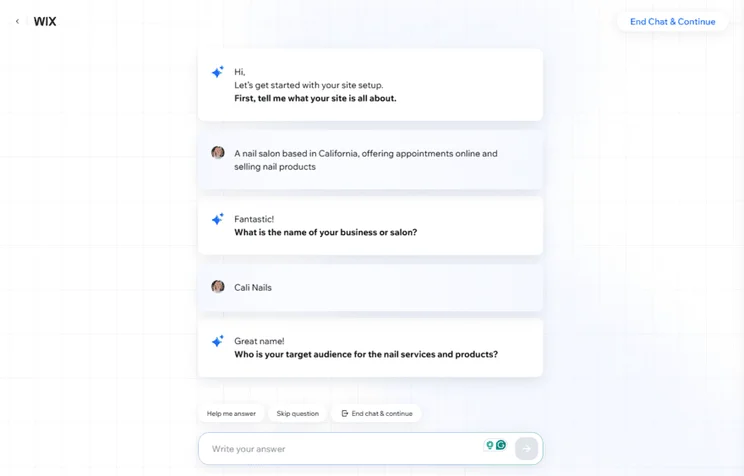
I recommend choosing Wix’s AI website builder if you want to get your store live quickly. The chatbot asked me some basic, yet personalized, questions about my business needs. How long this takes depends on how detailed your answers are, but it only took me a couple of minutes to complete in total.
From there, Wix generates a custom template based on your responses. Yes, the templates are fairly simple, but speed is its main selling point. Besides, I’d argue that Wix’s AI-generated templates are still more detailed and unique than other builders, like Hostinger.

Using Wix’s Editor
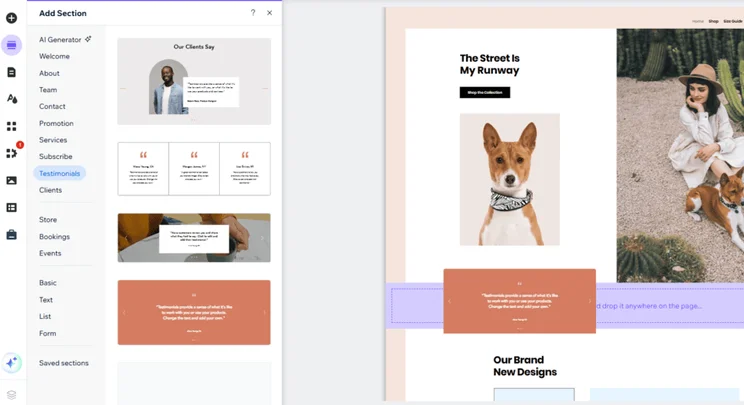
Thankfully, I could also make additional tweaks to my AI-generated template in Wix’s drag-and-drop editor. The editor shows you how your edits are impacting the design of your storefront in real-time, making it easy for me to experiment and swap things around without breaking my creative flow.
Of all the drag-and-drop editors I’ve tested, Wix’s gives you total creative freedom to position elements wherever you want. For anyone new to website building, this can feel a little overwhelming, but it does allow you to make your online store truly unique.
Adding Products
Setting up a website with Wix is pretty much the same no matter what you’re building. But, of course, with online stores, you’ll need to add your products as well. I was prompted to add my first product in the setup section of my Wix account, but you can also navigate to your inventory by clicking “Catalog” in the left-hand sidebar.
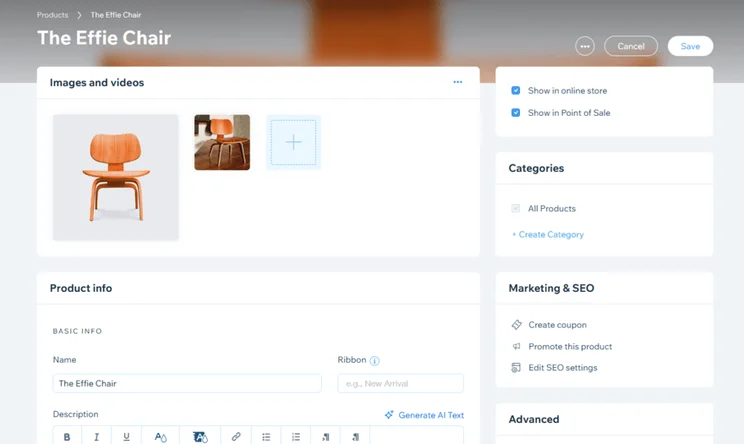
Wix lets you bulk import products as well as add individual products manually. When I first clicked “New Product”, Wix gave me the option to pick a physical or digital product.
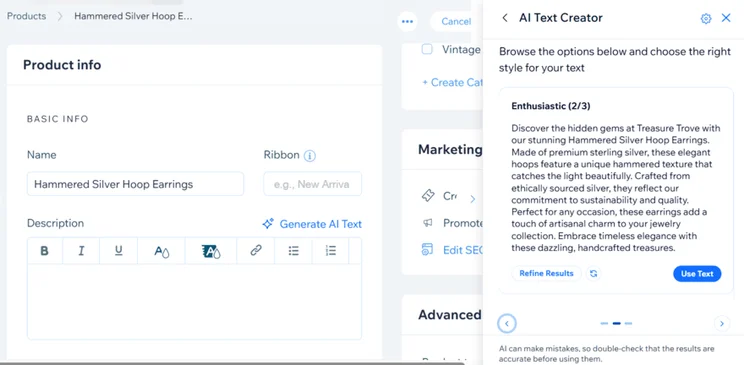
You’ll then be presented with a product page to fill out – this is all of your basic information, such as name, product description, pricing, and variants. I even used Wix’s AI text creator to help generate a product description based on a brief prompt.
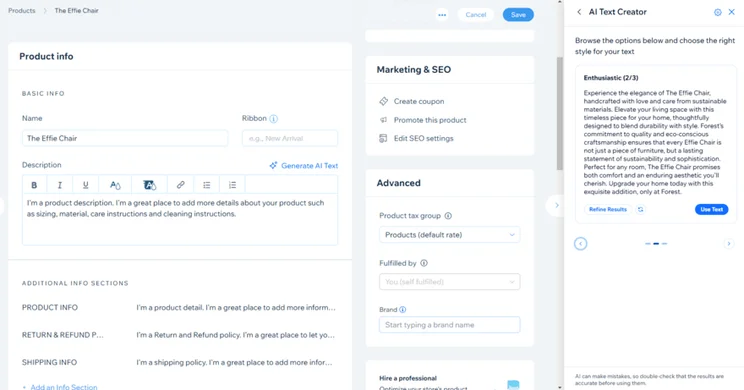
You can also upload product imagery and videos at this stage. This is a critical step and one you shouldn’t ignore – don’t leave customers in the dark about what they’re buying, so make sure to upload high-quality imagery. It’s worth noting that Wix lets you upload up to 15 images for each product.
How Much Does Wix Cost?
Wix’s pricing ranges from $17 to $159 per month (billed annually), spread across four premium plans. You can test things out with Wix’s free plan, but you must upgrade to the Core, Business, or Business Elite plan to sell online – the Core plan starts at $29 per month (billed annually).
|
Plan name
|
Price with our discount code
|
Monthly price (paid annually)
|
Monthly price (paid monthly)
|
Ecommerce
|
Recommended for
|
|
|---|---|---|---|---|---|---|
 |
|
Best Value
|
|
|
||
|
Free |
Light |
Core |
Business |
Business Elite |
||
|
$0 |
||||||
|
$0 |
$17 |
$29 |
$39 |
$159 |
||
|
$0 |
$24 |
$36 |
$46 |
$172 |
||
|
|
|
|
|
|
||
|
Trying out Wix |
Portfolios and personal sites |
Small stores and growing businesses |
Established businesses |
Large businesses with complex needs |
In my opinion, Wix is a great option if you’re looking to maximize the value of your monthly subscription, especially for ecommerce and small business owners! Out of all of the builders we researched, Wix had the biggest array of tools and features that will help you scale and grow, such as their email marketing, social media integrations, bookings tools, and AI social content planner. Also, one of the great things about Wix is its Core plan, starting at just $29 per month. You can quite comfortably upgrade to its Business plan for just another $7 per month, making it a very realistic and scalable platform.

What Sales Features Does Wix Offer?
Wix provides a comprehensive suite of native sales tools, including abandoned cart recovery, multichannel selling across Amazon and eBay, and more than 70 payment provider integrations. This makes it the perfect all-in-one platform for businesses needing to sell online and promote their products.
- Wix introduced a Printful integration in March 2025, providing businesses with access to the print-on-demand and dropshipping fulfillment services, all without having to leave the Wix dashboard
- In May 2025, Wix announced adaptive content, meaning businesses can now create personalized web experiences for their customers to help boost engagement and drive more sales
📦 Inventory
Unfortunately, Wix is a little let down when it comes to inventory space and storage, since it limits you to 50,000 products and storage capacity depends on your premium plan. The Core plan offers 50GB of storage, the Business plan increases to 100GB, and you’ll only unlock unlimited storage with the Business Elite plan.
Other builders, like Shopify, offer unlimited storage and let you sell an unlimited number of products, no matter which plan you’re on. However, Wix’s maximum capacity will be more than enough for the majority of small businesses.
Wix’s robust inventory management will help you track your store’s inventory, set up stock alerts, and mass import products and variants. You also have the flexibility to customize your inventory as well, from product colors and sizes, to unique labels so you can mark new arrivals.
🛒 Multichannel Selling
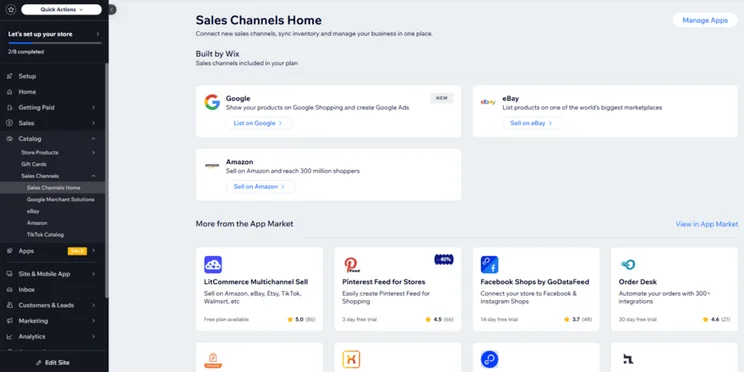
With Wix, you can expose your brand to more customers by selling across other channels (in addition to your website). Wix has fewer multichannel selling options than our top-rated ecommerce builder, Shopify, but you can sync your store with popular marketplaces, such as Amazon and eBay, as well as social media platforms, like Facebook and Instagram.
Having multiple avenues to generate sales can be a great way to engage with customers, build brand awareness, and drive traffic back to your online store.
💰 Payment Options
When it comes to accepting payments, Wix has partnered with over 70 payment providers, including PayPal and Stripe. However, I highly recommend choosing to use Wix’s native payment gateway, Wix Payments. This is designed to streamline your transactions and make them easier to manage from a single dashboard.
Wix Payments waives third-party transaction fees, which would cost 1.5% + $0.49 per transaction with PayPal. However, Wix Payments will still charge you a processing fee of 2.9% + $0.30 per online transaction. This is similar to Shopify, though Shopify decreases the rate if you upgrade to one of its more expensive plans.
📱 Can I Manage My Wix Store Via a Mobile App?
The free Wix app can be used to accept payments, manage your inventory, and add new products. Here are the most useful functions:
- Product listings: Add new products and update existing stock
- Order fulfillment: Set up shipping and add tracking numbers to orders
- Discounts: Set up limited time discounts and coupons
- Live chat: Communicate with site visitors directly or set up automated welcome messages
- Analytics: Monitor your site’s traffic, visitor behavior, and number of sales over custom periods
What AI Tools Does Wix Offer for Ecommerce?
Wix’s AI features are integrated across the entire user journey, including a Business Launcher for ideas, an AI text creator for descriptions, and an automated site chat for 24/7 customer support.
- Business Launcher – Share your skills and interests and let AI generate related business ideas and an action plan to help you launch it
- Astro – This works as your online business assistant, automating admin tasks and workflows to help your operations run smoothly as you grow, reducing the need to hire additional staff
- AI text creator – Give Wix a prompt to work with and it’ll generate three options for you in differing styles, so you can find the right match for your site
- AI theme assistant – Get design recommendations and tips within the Wix editor, including advice on what type of font to use
- AI product support – Use Wix’s AI tools to generate product descriptions and even recommend related products to customers shopping on your store
- AI site-chat – This AI tool responds to simple customer queries for your business 24/7, offering informed answers, product suggestions, and more
How Do You Design an Online Store With Wix?
After putting Wix’s templates to the test, we found it’s one of the best options for designing an online store, sitting just behind Shopify and Squarespace in our rankings.
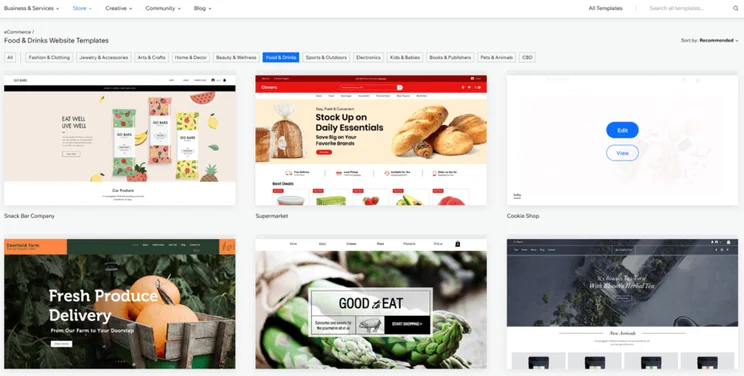
Wix has over 2,000 free and mobile-optimized templates, with hundreds of these catering to ecommerce businesses specifically. When browsing the library, I could filter to just show “Health & Wellness” or “Construction” templates.
You can’t switch your Wix template once your site has been published. To help make the right design choice, I recommend previewing the themes you’re interested in by clicking “View” when hovering over the image. If you do feel like changing your store’s look down the line, you’ll have to build a new site and re-enter your content again – or, go through the time-consuming process of tweaking every existing element individually to suit your new style.
Does Wix Have an App Market?
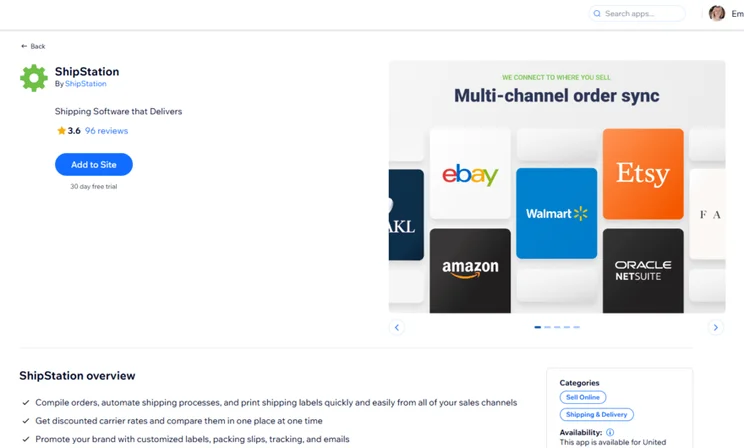
The Wix App Market offers over 800 native and third-party apps, allowing users to add specialized tools like ShipStation or Wix Bookings to their storefront.
While the majority of apps are free to use or offer free plans, some third-party plugins will require you to pay an additional subscription fee – on top of your website builder package. For example, ShipStation has a 30-day free trial, but its cheapest plan starts from $14.99 per month.
How Can Wix’s SEO Tools Help Grow Store Revenue?
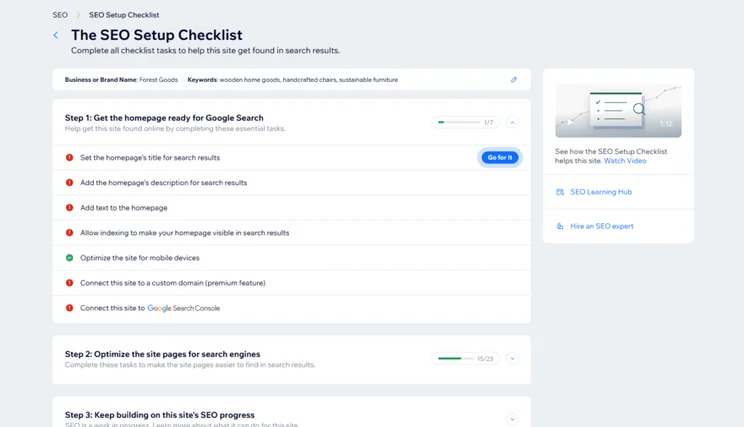
Wix is the best SEO website builder we tested in 2025, giving you the tools you need to boost your brand’s visibility and increase traffic to your pages. In fact, Wix claims that stores using Wix’s SEO tools see a 24% increase in monthly revenue!
Wix covers all of the SEO basics, such as metadata and sitemaps, but it goes the extra mile in comparison to other builders. Here are some of the key Wix SEO features you can expect:
- Customized SEO setup checklist – This SEO guide for beginners offers best practice tips and optimization advice to ensure your website is in the best shape it can be
- Integrations with Google Analytics and Google Search Console – Review data like your site’s performance and visitor behavior by seamlessly connecting your site with these Google tools
- Keyword support with Semrush – Get detailed keyword research to find other content opportunities and optimize your site for search engines
- SE Ranking app for competitor analysis – See how others in the market are performing to learn what works and what doesn’t
- SEO Learning Hub – The hub is full of resources, including blog posts, podcasts, and webinars, so you can improve your SEO skills in your own time
I’ve been taking the Wix Studio SEO course to boost my knowledge on the side of my day-to-day work, and I’ve loved being able to pause and dive back in whenever I want. So far, the modules on keyword research and link building have been my favorite! Plus, you get a certificate at the end of each module if you pass the exam.
How Do You Migrate an Existing Store to Wix?
Wix’s recommended migration method is through Cart2Cart, which can migrate over 90 platforms to Wix, including Shopify, GoDaddy, WooCommerce, and Squarespace. Here’s how it works:
- Create a Wix account on the Core plan or above
- Download Wix Stores and Cart2Cart on the Wix App Market
- Connect your existing store and your Wix store
- Choose the data you want to migrate
Cart2Cart charges a variable fee, starting at $29, depending on the amount of data you migrate.
What Data Can Cart2Cart Migrate?
- Products (up to 1,000): Titles, images, descriptions, variants, stock quantities product page SEO
- Categories and subcategories: Product categories and their hierarchical structure
- Customer information: Names, emails, billing and shipping addresses, newsletter subscription statuses
- Orders (up to 1,000): Dates, statuses, customer notes attached to orders
- Discount codes
- Static pages and blog posts
- Product reviews and ratings
Using Wix’s Customer Support
While Shopify has the best customer service we’ve tested (offering email support, which Wix lacks), Wix is still a close second thanks to the 24/7 support it provides.
Wix’s customer service is accessible through a variety of channels, including:
- 24/7 phone support
- Live chat, available between Monday and Friday (2AM-6PM EST)
- Social media – Wix has accounts with Facebook, YouTube, Instagram, TikTok, Pinterest, X, and LinkedIn
You can also tap into Wix’s bounty of online resources through the Help Center (for detailed guides), SEO Learning Hub (for SEO-specific content), and Wix Learn (for videos and online courses).

Should You Choose Wix?
Of course, Wix isn’t the only ecommerce website builder out there. Our research found Shopify to be the best platform for selling online, with Wix taking second place. But which should you pick? I’ve summarized our top recommendations below:
- Shopify offers the tools you need to scale your business – it’s better equipped to handle larger inventories than Wix, but its plans are more expensive
- Squarespace is ideal if you want to sell services, thanks to its Acuity Scheduling tool, but the builder isn’t as scalable as Wix
- Hostinger is the most affordable option, with its ecommerce plan starting at just $3.99 per month, but it lacks the quantity and quality of features available through Wix
- GoDaddy has great social media marketing tools, but you’ll miss out on the customization and scalability of Wix
Wix is a great all-rounder when it comes to selling online. You can sell a variety of product types, customize your online store to suit your brand, and add extra functionality if needed. Because of this, I highly recommend picking Wix if you’re a new business owner looking to embark on your online journey and build your brand’s online presence. Wix caters to practically every industry and it’s incredibly beginner-friendly, all for a fairly decent price point.
How We Test Ecommerce Website Builders
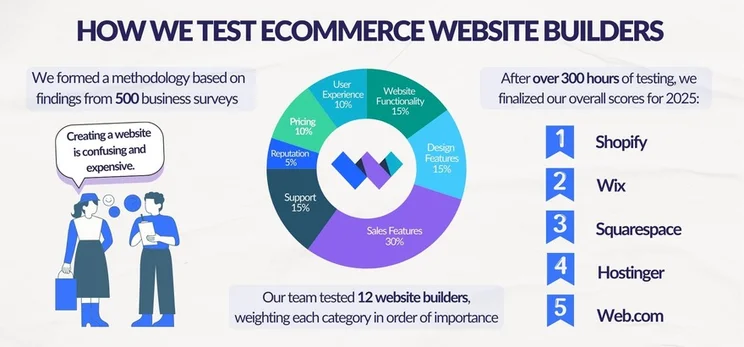
We’ve spent over 300 hours analyzing and carrying out hands-on testing to bring you our expert recommendations. Our research process looks at all of the important areas, from sales features to pricing to ease of use. From these categories, we can award each builder a star rating out of five which helps shape our rankings.
For our most recent round of testing, each category has the following weighting, based on what we know matters for online businesses:
- Sales Features: 30%
- Design Features: 15%
- Help and Support: 15%
- Website Functionality: 15%
- Pricing: 10%
- User Experience: 10%
- Reputation: 5%
My Verdict: Is Wix Good for Selling Online?
Because of all the features needed to run an online store, ecommerce builders can often be complex to use and take to get to grips with. However, while Wix is loaded with features, it combines ease of use with a brilliant range of sales tools, as well as great customization options. As a result, Wix has become one of our top choices to recommend for online stores.
Wix provides small businesses with an all-in-one platform to get and grow online. And, because of Wix’s broad audience, it’s a great option for a lot of industries and business types. But, test out its features for yourself with Wix’s free plan, and then upgrade once you’re ready to start selling.


1 reply
1 reply
1 reply
1 reply
1 reply
1 reply
1 reply
1 reply
1 reply
1 reply
1 reply
1 reply
1 reply
1 reply
1 reply
1 reply
1 reply
1 reply
1 reply
1 reply
1 reply
1 reply
1 reply
1 reply
1 reply
1 reply
1 reply
1 reply
1 reply
1 reply
1 reply
1 reply
1 reply
1 reply
1 reply
1 reply
1 reply
1 reply
1 reply
1 reply
1 reply
1 reply
1 reply
1 reply
1 reply
1 reply
1 reply
1 reply
1 reply
1 reply
1 reply
1 reply
1 reply
1 reply
1 reply
1 reply
1 reply
1 reply
1 reply
1 reply
1 reply
1 reply
1 reply
2 replies
1 reply
1 reply
1 reply
1 reply
1 reply
1 reply
1 reply
1 reply
1 reply
1 reply
1 reply
1 reply
1 reply
1 reply
1 reply
1 reply
1 reply
1 reply
1 reply
1 reply
1 reply
1 reply
1 reply
1 reply
1 reply
1 reply
1 reply
1 reply
1 reply
1 reply
1 reply
1 reply
1 reply
1 reply
1 reply
1 reply
1 reply
1 reply
1 reply
1 reply
1 reply
1 reply
1 reply
1 reply
1 reply
1 reply
1 reply
1 reply
1 reply
1 reply
1 reply
1 reply
1 reply
1 reply
1 reply
2 replies
1 reply
1 reply
1 reply
1 reply