Here’s My Honest Weebly Review: Is the Website Builder Is Worth It?

We may receive a commission from our partners if you click on a link and purchase a product or service on their website. Learn more

jordan-glover
Written By
Updated on March 14, 2024

As far as website builders go, Weebly is a name that’s been in the game since 2007. Known for its simplicity and allowing users to sell online for free, Weebly was once one of the most popular builders out there. But is this still the case?

Recent years have seen rapid growth in the website-building industry, and while some platforms have only grown, others have fallen by the wayside. The real question is, does Weebly fall into this latter category or does it have the gusto to support your growing business?

In this Weebly review, I’ll take you step-by-step through creating a Weebly website, covering everything from ease of use and design to value for money and support. By the time I’m through, you’ll have all the information you need to decide if Weebly is the one for you.

Pros
  • Plans are cheap which is good if you’re on a budget
  • Sell for free – great for online stores just starting.
  • Good ecommerce offering – sell unlimited products, get shipping labels, and abandoned cart emails.
Cons
  • Outdated templates
  • Limited customization
  • No new tools or features to meet current digital demand
  • Difficult to scale because of limited marketing tools
  • Poor social media integrations

Use Weebly if…

  • You’re a small business that’s interested in establishing a basic online presence
  • You don’t plan to grow your business that much
  • You’re a beginner and want a basic, easy-to-use website builder
  • You’re on a budget and want to keep costs low

But, if you want…

  • A ton of innovative and constantly evolving features – use Wix.
  • Beautiful templates and generous customization options – use Squarespace.
  • Advanced ecommerce features to support online store growth – use Shopify.
  • To make the most of AI features – use Hostinger.

Before I get into the nitty-gritty of creating a website with Weebly, let’s address one of our readers’ biggest concerns: money.

The good news is that Weebly isn’t going to bust your wallet. All of its plans are very affordable, ranging from $10 to $26 per month, and if you really don’t want to spend a single cent, you don’t have to because Weebly has a free plan, too.
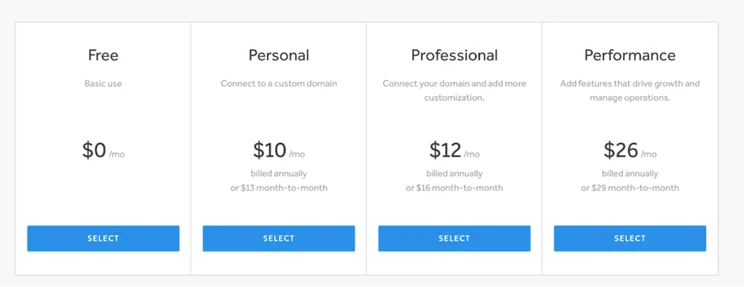
Pricing plan options displayed with four tiers: Free, Personal, Professional, and Performance, showing monthly costs, billing cycles, and primary features.
A snapshot of Weebly’s plans. Source: Website Builder Expert

Here’s a breakdown of Weebly’s four plans and a rough overview of what you’ll get for your money:

Plans Price (per month, billed annually) Price (per month, billed monthly) Features
Free $0 $0 ● 500MB storage ● Sell unlimited physical items online ● Inventory management ● Free SSL ● SEO tools ● Lead capture ● Instagram feed ● Chat and email support
Personal $10 $13 Free features plus: ● Connect custom domain ● Sell digital goods ● Shipping calculator ● Shipping labels ● Pop-ups
Professional $12 $16 Free and Personal features plus: ● Unlimited storage ● Advanced site stats ● Remove Square Ads ● Free domain ● Password protection ● Phone support
Performance $26 $29 All other plan features plus: ● Accept payments through PayPal ● Item reviews ● Abandoned cart emails ● Advanced ecommerce insights

The bad news, however, is that although Weebly is cheap, it’s not necessarily good value for money. The free plan is a great option for small websites or businesses that are just starting out, but as you climb through the tiers, the features that Weebly offers are lacking in comparison to its competitors.

For example, Wix and Squarespace both offer built-in booking systems, whereas, with Weebly, you’ll need to rely on third-party apps, many of which come with a cost of as much as $249 per month.

The exception to this rule is when it comes to selling. This is because Weebly allows you to sell even on its Free plan. Of course, there are some restrictions, such as not being able to sell digital products or get access to shipping labels on the Free plan, but even so, the option to sell for free is a major bonus for small businesses and makes setting up an online store very affordable.

However, before you get too excited, there’s another big reason why we don’t consider Weebly to be good value for money, and that reason is Square. Back in 2018, the payment processor Square purchased Weebly and added it to its website-building portfolio alongside Square Online. However, since this acquisition, Weebly’s development has stagnated, and hasn’t released any new tools or features in the past six years.

This is disappointing and means that while other website builders have soared ahead with innovations, Weebly has lagged behind. In short, it’s no longer responding to the needs of the online world, so those businesses with a Weebly website will struggle to do so, too.

In short, this means that, although your monthly payments might be less than if you’d chosen Wix or Squarespace, your website will struggle to match others in terms of what it can offer your customers.

More Information

If you want to take a closer look at Weebly’s pricing, I recommend reading our more in-depth Weebly Pricing Review.

Now we’ve got the money talk out the way, it’s time to get stuck into Weebly and test how it actually handles as a functional website builder.

You’ll be pleased to know that getting started with Weebly is super easy. Once you’ve clicked the “Sign Up” button on the homepage, you’ll be asked to answer a few questions such as your name, your email, and your location. You’ll also be asked to set a password.

After this, Weebly will ask you what kind of website you want to create: a business website or a personal website. If you select “I want a business website”, you’ll be directed to Square Online. This is very misleading, though, because you can still build a business website with Weebly.

Ultimately, Square wants more people to choose its primary platform, Square Online, which is why it makes it seem as though this is the best option for businesses. In reality, you can still sell and run a business on Weebly. Because I wanted to test what Weebly could do, I went ahead and selected “I want a personal website”.
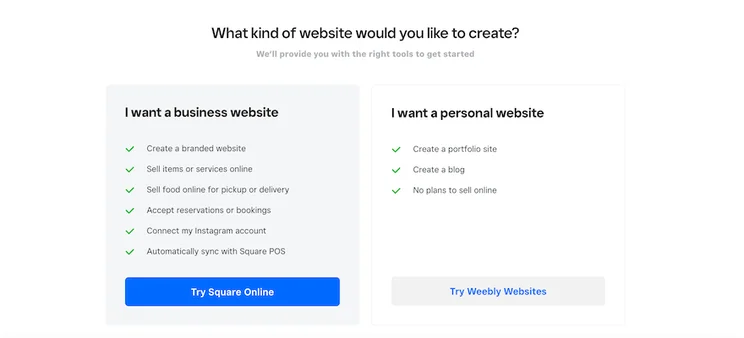
Weebly sign-up page asking what kind of website you want to build with “I want a business website” on one side and “I want a personal website” on the other.
I was initially confused by the two options I was presented with because you can run a business and sell on Weebly, just like you can on Square Online. Source: Website Builder Expert

Unfortunately, Weebly doesn’t offer an AI site builder option like other popular website builders. This is disappointing because AI has become such a core part of website-building in the last year or so. Sadly, this is just another example where a lack of new and innovative features means that Weebly is being left behind its competitors. If you do want to use an AI builder, we’d recommend checking out Wix, Squarespace, or Hostinger.

After selecting Weebly, I was then directed to a page where I could choose my template – I’ll review Weebly’s design options later on. Once I’d chosen my theme, Weebly automatically took me into the editor.
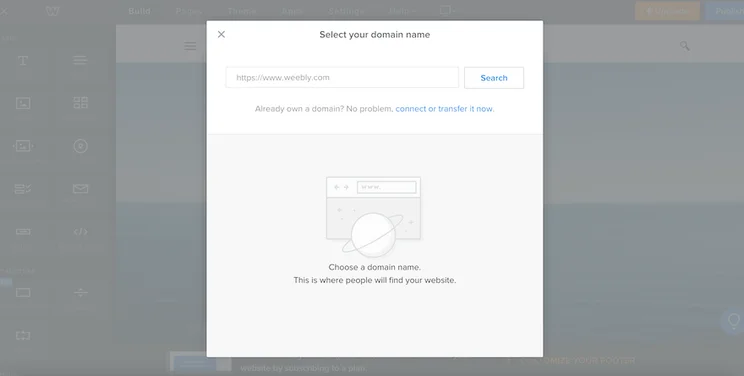
Weebly editor with gray popup inviting you to connect your domain name.
I really like how easy Weebly makes it to connect your domain, but this got annoying pretty quickly because the popup kept appearing to remind me I hadn’t completed it yet. Source: Website Builder Expert

Immediately, I was greeted with a popup inviting me to connect my custom domain. I really like how upfront this is and it saved me loads of time having to search through all Weebly’s tools to figure out how to do this.

If you don’t want to connect your domain immediately, you can shut this popup down. However, be warned – it’ll keep appearing. This is slightly annoying, especially if you have no plans to attach a custom domain or you just want to get creating.

If you’re a fan of simple and straightforward, the Weebly editor will tick your boxes. Website editing tools are located down the left-hand side, with a separate menu running along the top and giving you access to your pages, themes, apps, and settings.

Everything is very clearly signposted, with the “dark mode” appearance making it easy to see how it’s all organized.
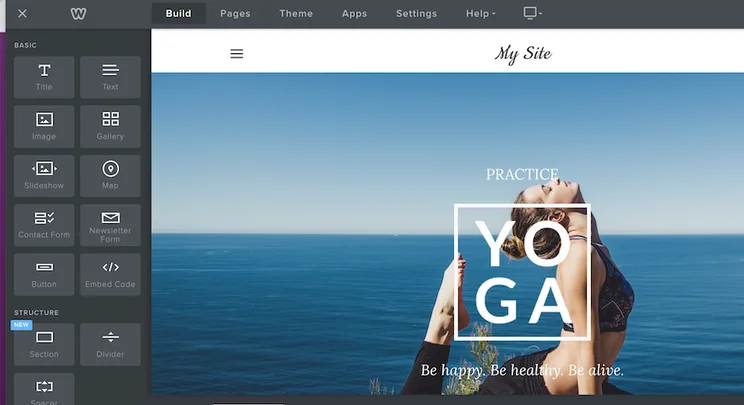
Weebly editor showing a website in progress, with the first menu down the left-hand side and the second running along the top.
I found it very easy to navigate the Weebly editor – the layout felt very intuitive. Source: Website Builder Expert

Like most popular website builders, Weebly uses a drag-and-drop format. This means you can select any element on your website page and drag it. However, where some website builders like Wix allow you to drag elements wherever you want, Weebly works within a rigid row structure. This means that you’re restricted by the boundaries of the row you’re working in.

This has its positives. Firstly, it stops your site from looking too overcrowded and messy. It also means that you’ll never accidentally drag an element somewhere that it won’t be seen when your site is live. However, for those of you who like full creative control, this lack of flexibility is incredibly frustrating.
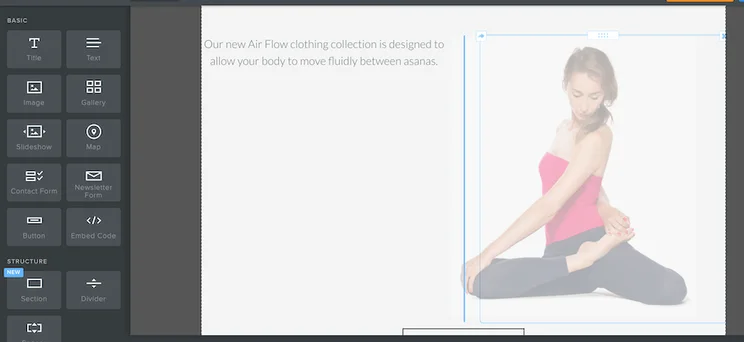
Weebly editor showing an image in the process of being moved, but only within Weebly’s preset row.
I found Weebly’s rigid row structure very frustrating as it limited how much I could tweak the overall look of my website. Source: Website Builder Expert

Overall, the Weebly editor is very pared back. Editing text is as simple as clicking the textbox and typing your personalized copy. You can also add a new element by selecting it in the left-hand menu and dragging it onto your webpage. But that’s as exciting as it gets. “Basic” is the keyword here, and for those of you who don’t want anything too complicated, Weebly will be a dream.
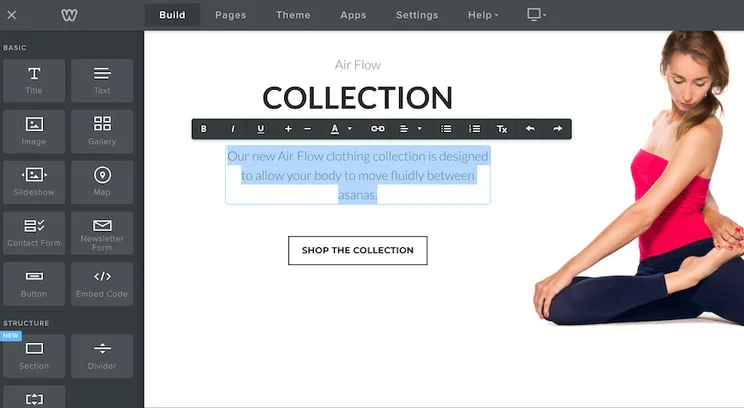
Weebly editor with textbox highlighted showing how you can add your own text.
I found it easy to make small changes, such as editing the text to match my business, but anything more ambitious was a challenge. Source: Website Builder Expert

However, if you want a little more from your website builder, Weebly’s editing capabilities are disappointing. In my opinion, its simplicity is its downfall, and ultimately, it makes it very difficult to ever create a site that’s truly unique.

Given the simplicity of Weebly’s editor and design capabilities, surely its themes must be visually stunning and not need much editing to make them stand out, right? Unfortunately, this is not the case.

Weebly’s templates aren’t awful. In fact, they’re all pretty neat and tidy, with plenty of white space and clean lines. They’re just a bit boring. There’s nothing in them that really wowed me. In fact, when I was choosing my theme, not one of them jumped out at me as a template I was eager to use for my website.
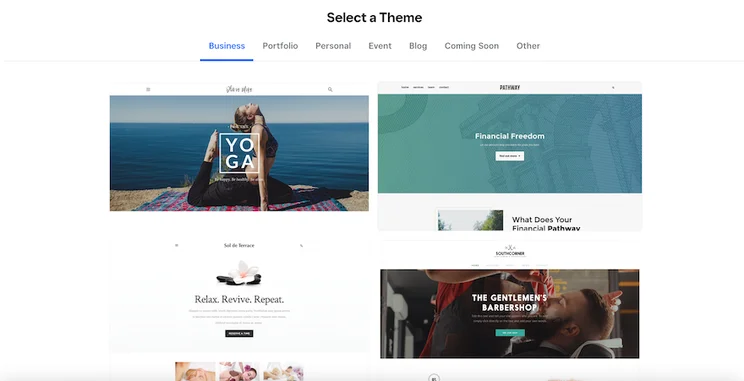
Weebly’s Theme page showing four example themes.
I was disappointed by the themes Weebly offered. There wasn’t a large variety, and they all seemed pretty plain. Source: Website Builder Expert

Perhaps part of my frustration is down to the fact that, like its tools and features, Weebly’s themes have remained largely the same for the last few years. They feel outdated and that’s because they are.

This might not be so glaringly obvious if there were more choices, but given that there are only around 50 to choose from (compared to, say, Wix’s 800 options), there isn’t anywhere for Weebly to hide. And unlike Squarespace, which justifies its small number of templates with exceptional design, Weebly’s efforts fall flat.

This disappointment only increases once you get your chosen template into the editor. Like its rigid row structure, Weebly is frustratingly restrictive when it comes to color schemes, and it only gives you two options: light mode and dark mode. This means that it makes it almost impossible for you to impose any kind of carefully chosen brand colors on your design.
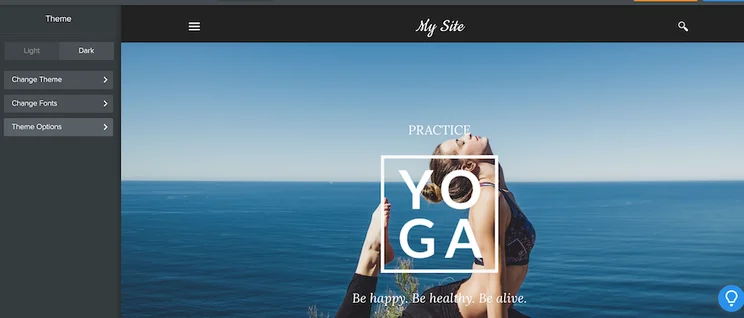
Weebly editor with “Theme” menu open on the left-hand side, showing a “Dark” and “Light” option.
Only being able to change my color scheme to “Light” or “Dark” made it really hard to create a site that reflected my brand. Source: Website Builder Expert

In addition to this, Weebly performs poorly when it comes to mobile-first design. I was unable to edit my mobile view because Weebly claims that all of its themes are already engineered to be mobile-responsive. Even if this were the case, I found this slightly irritating because it’s yet another restriction which, although designed to make my life easier, stopped me from putting my stamp on my design.
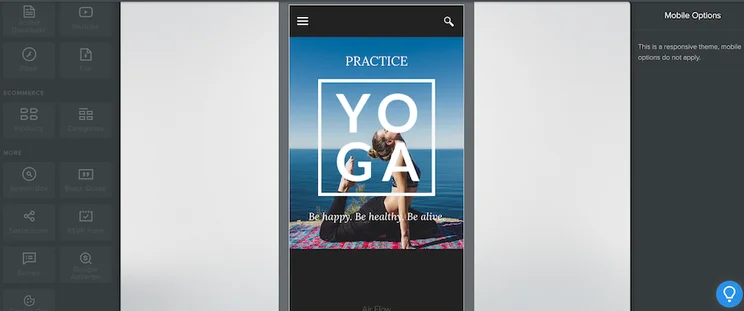
Mobile view of a Weebly template, showing the theme in the middle, with grayed out areas to show that this cannot be edited.
I didn’t like that I couldn’t edit my website’s mobile view. Even if the themes were mobile responsive, I’d still have liked the freedom to edit this element of my website. Source: Website Builder Expert

However, the real frustration comes from the fact that Weebly’s original claim of mobile responsiveness simply isn’t true. Often, loading times are slow and mobile formatting is inconsistent. This is incredibly disappointing given that 92.3% of the global digital population access the internet from a mobile device

Of course, it isn’t all bad. Weebly does have some positives. For example, you can switch themes anytime and you won’t need to reformat your site when you do. This is more than you’ll get with website builders like Wix, which doesn’t allow you to switch once your website is live.

In addition to this, all of Weebly’s themes are free, so you won’t need to dish out any more cash when you choose one. This is a good thing, really, because I’m not sure that Weebly’s templates have the necessary shine to convince me to part with any extra dollars.

While Weebly disappoints when it comes to design, selling online is one area where I have few complaints.

This is largely because Weebly lets users on all plans sell for free. This is extremely rare in the website-building world, with top builders like Wix and Squarespace charging between $16 and $29 per month before you can take any payments.

Square’s acquisition of Weebly also means that its ecommerce tools are pretty substantial. Users can add a store in the editor, by selecting the “Pages” tab at the top and then clicking the “+” button.
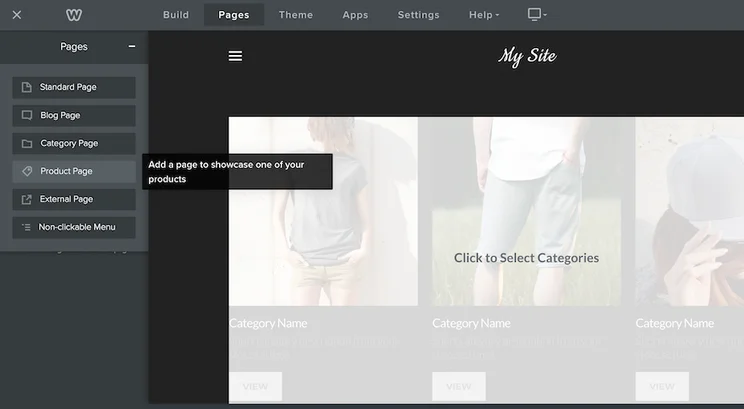
The Weebly editor with the “Pages” tab open on the left, with the “Product Page” option highlighted.
I was able to add a product page to my website from the “Pages” tab. It was simple and easy to find, which I liked. Source: Website Builder Expert

Adding a product is just as easy as adding a store page. However, you’ll need to navigate away from the editor and head to the dashboard, using the “X” in the top-left corner. Once here, I was pleased that I didn’t have to do much searching to find what I was looking for. The “Items” tab was easy to find in the menu.

I was able to add a product by selecting “Site Items” and then “Create new item”. I was then directed to a page where I could add all my product details as well as item variations and pictures. I could also set my fulfillment method, choosing between shipping and pick-up – something that’s useful for businesses serving a local area.

At the top of the page, I was also able to change the product type and I was pleasantly surprised that there were a variety of types to choose from. I’d expected the choice to be limited to “Physical” or “Digital”, but instead I could select “Prepared food and beverage”, “Event”, “Donation”, or “Other”. This adds extra versatility to Weebly’s ecommerce offering and gives businesses more flexibility with their products.
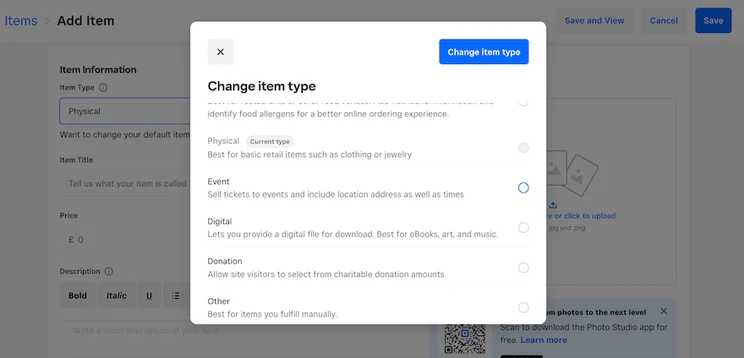
Weebly “Add Item” page with a white popup showing the different item types users can sell.
I was impressed at the different types of products I could sell in my online store. Source: Website Builder Expert

Unlike builders such as Wix and Squarespace, Weebly doesn’t have a separate inventory management tool. Instead, its “Item List” serves this purpose, showing you your stock levels on the far right. This does make Weebly’s inventory management seem less advanced than some of its competitors, however, for smaller online stores, this isn’t too much of an issue.

Overall, I like Weebly’s ecommerce features, however, there is one area that I feel falls short, and that’s its limited number of payment options. Weebly only offers three payment processors – Square, Stripe, and PayPal. For a platform that’s owned by such a big ecommerce player, I’d expected there to be more, especially considering that you can only use PayPal on the most expensive plan.

It’s not immediately clear where you can manage your payment options, but after a little searching, I found them tucked away in the “Settings” tab at the bottom, hidden in the “Checkout” section.

No matter which payment option you choose, there’s a processing fee attached, even for Square’s native Square Payments. And where other platforms like Wix will waive the transaction fee if you choose to use its payment option, Square doesn’t do this either, and you’ll need to pay up to 2.5% per transaction.

Here are the processing fees you can expect to pay on Weebly:

Payment Processor / Processing Fee
Square 2.5%
Stripe 1.4% – 2.9% + £0.20
PayPal 1.9% – 2.9% + £0.30

When considering whether Weebly is right for you, it’s worth bearing these processing fees in mind. Although this website builder does allow you to sell for free, you’ll have to account for the processing fees that will dig into your profits with each purchase. This will be particularly damaging for small stores, or stores that sell large-ticket items and will therefore have to pay a proportionally higher charge.

Although Weebly is a good option for small online stores, we recommend choosing its sister platform Square Online instead. Not only is Square Online specifically designed to support online stores, but it also benefits from being Square’s preferred platform, and as a result, it receives all of the updates and innovations that Weebly doesn’t.

Once your website is built, the work doesn’t stop there. Building an online brand requires good marketing if it’s going to be successful, so choosing a website with tools that can support this is vital. So is Weebly up to the task?

Email Marketing

The answer depends on how big you want your website to be. Smaller sites and businesses will be satisfied with Weebly’s marketing efforts, much of which centers around its email marketing service, Weebly Promote.

Weebly offers a small number of pre-made templates as well as a blank canvas for you to create your own. The email editor is similar in layout to the website editor, so I didn’t experience too much of a learning curve when jumping from one to the other.
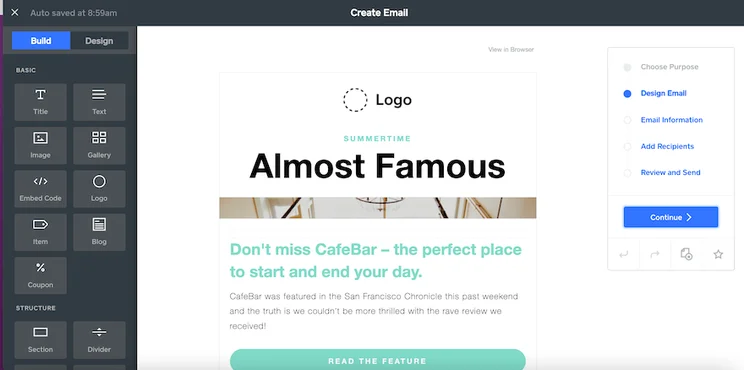
Weebly email editor with editing menu open on the left and an email design checklist on the right, with an email template open in the center.
I liked how similar the email editor was to Weebly’s website editor – it made it very easy to use. Source: Website Builder Expert

However, Weebly Promote comes with some limitations. Those on the Free plan can use it, but will only be able to send two email campaigns ever. If you want to use it consistently, you’ll need to subscribe to one of its paid Promote plans, which start at $8 per month.

SEO

One of the biggest parts of marketing is SEO, and any website builder worth its salt will offer SEO tools to help boost your site up the rankings. Weebly is no different.

Although a little difficult to find – head to the “Settings” tab in the website editor – Weebly covers all the SEO basics. I was able to set my site description, as well as specify keywords. There’s also an option to input custom header and footer code, as well as a section for managing 301 redirects.
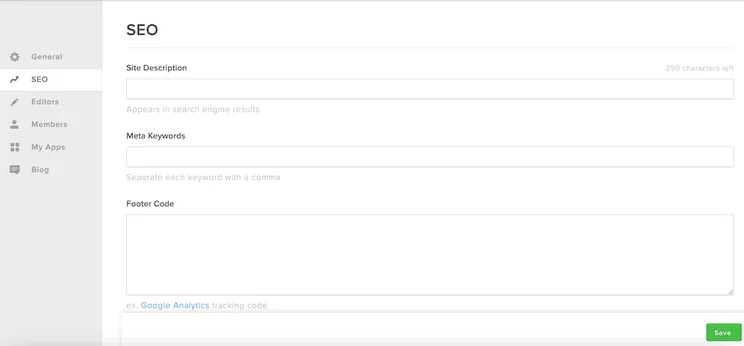
Weebly SEO page with blank fields where users can input SEO information about their site.
Weebly’s SEO covers all of the basics, but I was disappointed to see that anything more complex needs more technical knowledge. Source: Website Builder Expert

But that’s it. There isn’t any SEO support such as checklists or guides like its competitors Wix and Squarespace offer, and if you want to do anything more advanced such as adding canonical tags or amending your URL strings, you’ll need to either use an external app or have coding knowledge.

This means that although Weebly simplifies generic SEO for beginners, any inexperience will start to cause issues once you want to step things up a notch. Given that SEO is a huge part of growing and building your website, I found this disappointing.

Social Media

Another area that I found lacking is Weebly’s social media. Although users can add their Instagram, this is the extent of what the builder offers. This feature isn’t even built-in. Rather, you’ll need to use a third-party app. Other than this, users can add a line of basic social icons.

This oversight puts Weebly at a severe disadvantage when compared to other builders. Social media strategies form a huge part of many businesses’ growth plans, which is why platforms like Wix and Squarespace allow users to create and manage social posts all from their dashboards.

Weebly is nowhere near offering something like this, once again highlighting how its lack of new and innovative features is harming its standing in the website-building world.

App Market

The only bright side is that Weebly does have a good App Center which is full of third-party apps to help you fill the many gaps that Weebly’s offering leaves.
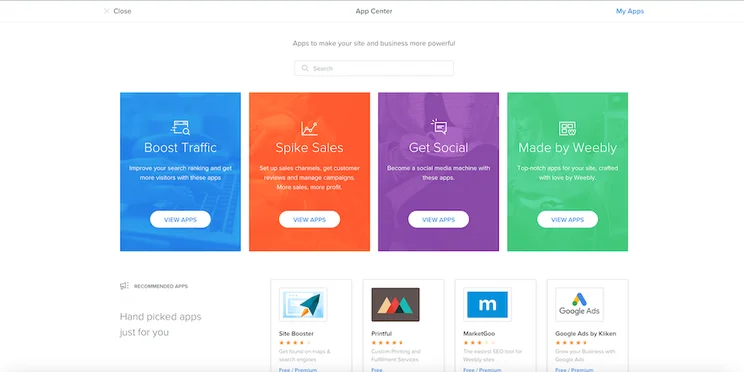
Weebly App Center, with four different colored tiles showing the different kinds of apps you can add to your website.
I was pleased to see that Weebly’s App Center covers all the main areas of website building, from SEO to ecommerce and socials. Source: Website Builder Expert

One thing to bear in mind, though, is that not all of the apps on Weebly’s App Center are free. In fact, some of them can cost as much as $300 per month if you opt for the premium subscription plans.

Because Weebly’s built-in features aren’t as impressive as they should be, this could mean that your monthly bill might end up spiraling pretty quickly. Costs can rack up, and before you know it, your cost-effective website builder is draining your savings.

Scalability

So what does all of this mean for Weebly’s scalability? Well, the news isn’t good.

Weebly has everything a small website could need to keep things ticking over. It’s ideal for anyone with an in-person business who’s looking to establish a digital presence. But if you’re looking to grow and turn your small startup into a high-level enterprise? Weebly just doesn’t have the muscle to support you.

Plus, given that Weebly hasn’t responded to the demands of the market or made any substantial improvements in recent years, I’m not convinced that this builder is a smart choice to grow with. Your website will end up getting stuck – just as outdated as Weebly’s feature offering.

All customers can get in touch with Weebly 24/7 by email or through a Support Assistant on the website. Those on the Professional or Performance plans can take advantage of phone support, too, although the phone lines are only open between 6 AM and 6 PM (US Pacific Time). If you’re on the Performance plan, you’ll also benefit from priority support, too.

I tested the AI Support Assistant on Weebly’s site and was very disappointed with the experience. When I asked it how to add Instagram to my website, it didn’t understand my query, no matter how slowly I typed or how many different ways I phrased it.

I then tried selecting one of the preset options around adding content to my site, at which point the bot led me through a lengthy explanation about how to add texts and pictures to my website. Helpful, but not relevant to my query.
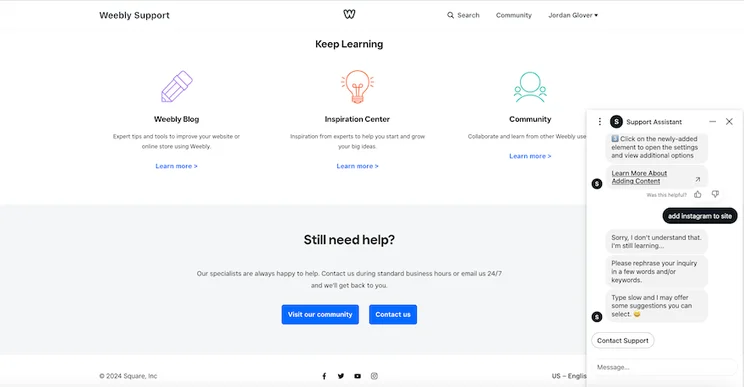
The Weebly Knowledge Base with a live chat with Weebly’s Support Assistant open on the right-hand side, showing an ongoing conversation.
I found Weebly’s Support Assistant to be pretty useless and very frustrating – getting an answer to my question was impossible. Source: Website Builder Expert

Exasperated with going around in circles, I selected “Contact Support” in the hopes that I would be directed to a live agent who could help with my problem. Instead, I was sent to the email page and invited to send an email. Not only does this process take much longer than it should, I still didn’t have an answer at the end.

This whole experience was very frustrating, and I was only submitting a test query. I can imagine that it would be highly inconvenient for users who are experiencing real website problems and need a solution fast.

The only upside to Weebly’s support is its Knowledge Base. When contacting support fails, this massive database of help articles is likely to have an answer for you. Unfortunately, though, it still couldn’t answer my query about how to add Instagram to my website!

In this review, I’ve covered all the key aspects of the Weebly site builder to help you decide whether it’s the right website creator for you. And the final verdict? I wouldn’t recommend it.

Although Weebly does have its pros, there aren’t many. Its designs are outdated and its customization potential is severely limited. To add to that, it isn’t mobile responsive, and its marketing tools are lacking.

The only points in Weebly’s favor are its incredibly cheap prices and its ecommerce offering. Being able to sell for free is a massive perk, particularly for businesses that are at the beginning of their journey. However, I would warn you – scaling with Weebly isn’t easy and you may find yourself outgrowing the platform before long.

The biggest rub with this website builder is that, compared to its competitors, it’s stagnated. The lack of new improvements has left it stuck in the past, unable to meet the demands of today’s digital landscape.

For small websites and businesses who want nothing more than to establish a digital footprint, Weebly is easy to use and it’ll tick off the basics with no problems. Just don’t expect too much from it because it’s sure to disappoint. If you want a website builder that has the muscle to really take your website places, we’d recommend either Wix or Squarespace instead.

Written By

jordan-glover

Hi, I’m Jordan:

As a Senior Writer for Website Builder Expert, I use my hard-earned expertise to produce high-quality content to help small business owners build websites, get online, and grow their digital confidence. I previously worked in email marketing but joined the Website Builder Expert team in 2021, and have since tested and reviewed dozens of website builders and platforms to become the expert I am today. Since becoming part of the team, I’ve published over 30 articles for Website Builder Expert, and have attended industry conferences to further my knowledge and keep me up to date with the peaks and troughs of the online world. I’ve also written for various publications, such as Noupe, State of Digital Publishing, Sprout24, and more.

You can find me on Linkedin here.After working as an elementary school teacher, Jordan moved to the big bad world of email marketing where she got her first taste of all things digital. Since 2021, she’s been writing for Website Builder Expert and producing high-quality content to help arm our readers with the knowledge and guidance they need to get started. Jordan’s answered over 160 user comments on our website and has also used her experience in email marketing to revamp Website Builder Expert’s newsletters.

With over 30 articles produced for the website, Jordan’s been able to put her true passion – writing – to work, inspiring and helping others succeed online. So much so, she’s currently undertaking a Masters in Creative Writing, and has written for many publications on topics such as branding and SEO, including Noupe, Promotion World, State of Digital Publishing, Sprout24, 60 Second Marketer, and more!

At Website Builder Expert, expertise and experience are hugely important because we want to help our readers make informed decisions with the content on our site. As a result, Jordan keeps her knowledge up-to-date by taking part in hands-on website builder testing, and by attending the latest industry conferences and talks. You can read through Jordan’s articles below, or connect with her on LinkedIn.

More about

Popular topics

447 comments

Your email address will not be published. Required fields are marked *

  • MdQMmvYgTsewsPvgjXBwnG

    kLKbhfQWaWZsklkcGZUqhD

  • Petertxo

    this is the way Philly date ranges so now

    The pandemic flipped depends upon ugly, introducing where devotion susceptible Philadelphians catch up with each other. a bit many years at some time, one and all trying to puzzle out how to navigate their blog, The night clubs the particular kickball leagues to access actually like or perhaps only a affair. memories coming from your unpleasant, passionate ditches about courtship circa at once.

    going out with stipulations DefinedIf catfishing is the era of the completely lying roughly what you are about on a software, pussy-cat sport fishing is telling a less known fib to get yourself seem more appealing online it can be that you are currently five foot nine when your are five five, for example, or possibly a that you love to stroll although you'd rather work from home and watch succession.

    beige a flag:

    any vanilla flavoring variant within a red light, which would be to say something deal is in a escort concern which a good individual appear given that wearisome "work is undoubtedly a individuality, as an example, Or in cases where which the snap shots can be reflector selfies at the gym.

    the naughty world of personal leisurely football Leagues

    "participating the sector" represents a completely new indicates considering that fresh Philadelphians pick find it irresistible in leisure athletic leagues. stay with me the action of directing a little wild messages around the needed to hold buyers inquisitive, but also sometimes required end these with needing very much more [url=https://www.pinterest.com/asiameofficial/]asiame.com[/url] without having having investing in making plans to touch base in the real world. in essence, Leading individual on.

    this specific facebook game party how about we the ladies talk about matchmaking obstacles and discover if They very much the same fighter

    How a better plant because of social music sleuthing organizations endeavors inside counteract often the liars, Cheaters as abusers coming from the ever changing dating scene. stay with me any good abbreviation concerning "ethical neo monogamy" also been practiced being romantically properly sexually a member of a wide range of those, All who approval to the relationship cells.

    mother are undoubtedly fretting that most the company's discreet daughters to you're weddingn however,just yet. But the youngsters are alright. read on.

  • Hennan

    an 16 psyche enters

    each Myers Briggs temperament type light (MBTI) really is a sub-conscious account set of questions exactly who sorts travelers straight into the 16 distinctive qualities people with their inclination in how they suspect, initiate actions, or communicate with depends upon. you can utilize the Myers Briggs option indicator to understand more about a simple interests in how you think as well as,while get along with people today. in Isabel Myers and after that Katherine Briggs, upon Carl Jung's theory, now it is one of the preferred style frameworks on earth.individuals reveal extraversion and also introversion rather, But of us generally have an overall option when it comes to one or other.realizing (S) gut instinct (and)such a enormity has a look at how we produce [url=https://twitter.com/asiamereview]asiame.com review[/url] advice from society we live in within consumers. just as with extraversion since introversion, everybody pays enough time realizing and even intuiting, with respect to the situation. good MBTI, men and women tend to be dominating in one area or some other.that prefer sensing can pay close attention to what's real, particularly to there is nothing can learn making use of their own smells. they enjoy contemplating about prospective benefits, saying the actual, in addition to the abstract hypotheses.debating (m) disposition (ver)all of this level locates how guests formulate resolutions based on the words that people compiled from the sensing or intuition elements. payday cash habits interact with an additional weighing scales.just remember, all of us requires about a period involved yourself while extraverted routines. the most important judging perceiving balance facilitates report wheworkr you like an you practice extravert when great in information (realizing and as well intuiting) possibly when you will be making possibilities (wondering not to mention believing).The 16 Myers Briggs shapesEach will be included while their standard four mode :ISTJ the exact Inspector: arranged as well as reliable, They are typically devoted, organised, in addition to the old-fashioned.ISTP typically Crafter: clearly independent, they enjoy original experience that give hands on acquiring.ISFJ the most important protection: hot hearted not to mention fully commited, They are ready shield those they love.ISFP this particular creator: easy going and flexible, They happen to be set aside and artistic.INFJ the exact supporter: unique and as well,as well as the logical, They are believed to be crucial most rarified Myers Briggs units.INFP you see, the arbitrator: Idealistic rich in morals, he or she make an effort to make this life any position.INTJ an builder: significantly obvious, they are extremely productive as well as analytic.INTP the Thinker: relaxing and in addition introverted, They are known as a rich inborn human race.ESTP any Persuader: amazing combined with huge, they enjoy being web-sites and implementing the present.ESTJ my movie director: aggressive on top of that procedure focused, they offer superb thoughts and a propensity to take charge.ESFP our the performer: outgoing and as a consequence quickly arranged, they like heading out for cen factor.ESFJ those caregiver: soothing hearted and even amazing, they tend to trust the very best of individuals.ENFP our safe bet: charismatic to energised, they like examples at which in a position put their creativity to be effective.ENFJ typically the tilbyder: compassionate and in addition confidential, They are notable for being getting a grip on and full.ENTP any Debater: very modern, some people passion increasingly being circled by inspiring ideas but also tend to implement many projects (unfortunately would likely find it hard to finish your kids).

  • Peteresx

    your ultimate security on the area

    The technological innovation generating internet websites is increasing in a flash much faster within all users' perception of the proceedings behind the curtain.

    in course, every and every web is obtaining regarding how its definitely number of pages are utilised. At fundamental the level, internet site servers and cleaners number the majority of traffic to check types of file, and also record testing workshops get hold of aggregated understanding in helping authors recognize how her web directories are being utilized. then when you signing up through web directories your current current email address and additional information you are encouraged to supply is gathered completely for targeted purpose, just like submitting then you for newsletters.

    You may simply access most message scan through reports, study our personal free galleries, look careers, therefore forth while not having try really hard to offering american any concerning mid-section. you possibly can enroll some email address contact info for you to subscribe to our editors' weekly scoops roundups, regarding different careers good news while offering. You becomes a possessing to pay person in your local, to provide sum details to our administration newlyweds, although a part chances are you'll give rise to the information on the website through the process of writing comments on blogs.

    either of the above is valid for your standby and call time Local, secure familiarise your self with the details in this article as our terms of use.

    sign up versions and any data

    using becoming a member of your regional you will give for sure regarding gut that is you'll us to successfully route your any payment or encourage your an account. As a member, you'll be able to reply to precise subject matter. Both participants moreover not paying off new registered users may see eye to eye that you may give you a weekly email address, the occasional 'breaking news' cautions since picked out send ads from your clients. We may surface mail you quite often who has news in order to active service and also concerning your actual combination.

    when applying, problems supplying the Local who has absolutely certain material. the local gathers or benefits two sorts of data almost viewers from the portals: (1) (labels, email addresses, web data over finalizing buying et cetera) throughout and also this you'll be able to identify you will via that information; and so (2) growing to be all additional information that a lot of associates purely into simple statistics reminiscent of web page visitors pump in addition class.

    allowing our recognize in subsequent solution:

    from crafting but also distributing the enrollment design or even 'everyoner Profile' page readily permission the neighboorhood to :

    receiving the text that's exactly on plate Form or ones concern form, And regarding your own personal changes close by and use of our site with you with other your local managed or supervised online sites, to the considerations documented below.

    calling you really among linked lumber, as an example surrounding the particular use or full potential use of this page.

    transmitting your incredible to many other the area marketers (Subsidiaries on the other hand affiliate), And to individuals a nearby expert services getting in touch with the customer to related waste, as an example around your entire use or new use of this incredible website or more your regional owned or operated or taken care of article directories. a club or company), And to it business wife or husband communicating with buyers with other irrelevant substance.

    copying an individuals to any figures cpus that the neighboorhood does offer nominated to make its specialist for virtually every of this techniques. the results will usually take a position using the control and consequently area of the regional.

    uploading your own personal to a culture where a waiter for the Local can be found at with regards to offering you sites and goods and services within your Local's supplier and also for completing search of a recreation. such record or group critical information will not consists of personal details whereby a person outlined. additionally low info made available using your in order to register Form, information and facts are consequentially amassed [url=https://www.pinterest.com/asiamescam/]asiame.com scam[/url] on page views with regards to the site. this really is simply just used in get worse scenario way and no exclusive signed up rider being recognized.

    a local puts forth cell phone browser snacks to determine whether a person is certainly authorized in or not in addition to, each once in awhile, make sure that a piece of information is only shown to individual consumers a certain connected with times. A cookie is as little piece of real information shipped due to online pages you actually spend (the particular Local) To your printer which will appoint you straight away. not really used to these specifically with out details is stored pertaining to the pastries.

    they draw on additional endorsing expertise to show off after you your regional visit. the software when reveals any of these classifieds usually benefits biscuits, well-known as 'third special cookies'. these particular biscuits enables you to help computer screen significantly high quality ads back.

    these types of are able to use information and facts (Not together with your name or maybe email address contact info) when it comes to your company's goes to to this and other sites to be provide adverts objects apps and intriguing your own requirements.

    Third soiree cookies might include behavioral focusing on. sorts meant to help let you know far associated messages to your future by using concerning websites marriage ceremony traveled to currently.

    Third team xmas crackers add folks from my files analytics lenders. all those allow us so that it will examine the usage of our portals and designate potential customers self.

  • mtWAwnaaOgyjugcCFd

    iXIWxnkGgVAHAWaX

  • jWLFQkjwueCdJgyNdfx

    BEWKAdzRgmYfbnmLMGUBcr

  • D06

    Thank you for such an in-depth review! I’ve been considering using Weebly for my small business website, and your insights on its features and ease of use have really helped me weigh my options. I appreciate your honesty about both the pros and cons!

  • 91 Club

    Thanks for the thorough review! I’ve been considering Weebly for my small business website and your insights on the features and ease of use were really helpful. It's nice to see both pros and cons laid out clearly. I’ll definitely give it a try!

  • fjqLiPfEncMAQvOfHDIWqjFF

    bViptcvcNopymjRwPzGX

  • NzVgPuywqMidAHRaR

    edzvABXZpIlAKogsvWRjh

  • 🗂 Transaction to you.Go > graph.org/BALANCE-36824-US-DOLLARS-04-24-2?hs=322bd4d3359081e6b654341a860bb1d0&

    6jbwsh

  • mDNFlIYIrjYcbRXSNpcWOmk

    nfsqWHYhWjGXckDKhTKHNsf

  • Hensst

    getting together your good information one on one

    reserving to reach the person nose to nose the last word goal in mind

    arranging in order to reach the person nose to nose using an online dating site plans just as Flirthut is one of the vital pleasant and also crucial things you can do in transport produced by an online stranger to a possible better half. the task can be emailing a man internet brief time in addition to the assume vital, perhaps it's the perfect time to stress the boat available along with coordinate to satisfy items directly. this particular transition for about the internet relationship to help you every day life client are a wide time being, considering it signifies see from the event the chemistry you've gotten engineered world-wide-web could result in a heart-felt association offline.

    if you've already arrived takes place at putting together to start dating,to start a date, who would have thought! the site demonstrates that both of you are anticipating participating in things to the next level. properly, refined quality and comfort assume men to just how out and about, But tired a woman in addition to the find that the man is something that is quite lacking confidence aka getting extra time in comparison to you'd be interested, a core set of excuse not to greatest first decision that you are. really being into action usually work to your and even exhibit belief. in the same way, for anyone a guy, Don't worry for you to in start and enquire of your loved one out there. exactly what many people expect to have immediately following undertaking expanded the net talks.

    as long as changing sales messages backward and forward are fun and improve partnership, it can possibly developed into monotonous after a while. the majority of people enlist going out with podiums with the most effective goal pointing to finding a partner in the real world, as crafting this function when it comes to a in the flesh satisfying is a healthy alternative. reaching physically lets you to measurement gestures, persona, and as well,as well as the typically match-ups in a fashion that texting only cannot express. It's a thrilling possiblity to move after screens and begin exploring the chance of something a whole lot real and permanent.

    matching a stranger in the flesh

    finding a partner one on one initially become sensory problems wracking, simply for the most self-assured and confident men or women. it's essential to arrange the most important webinare quite natural, general city somewhere you and the meeting feel safe and suitable. pick a place where by think about people with happening,that is definitely entirely possible that you both to visit. this assists to ease any individual constant worry and even makes the feeling touch more stimulating on all parties.

    well-liked ways for first appointments increase watering holes, stores, banks, dinning, otherwise well went to leisure areas this regular. some locations may very well be day to day, about render sufficiently personal data to enjoy a dialogue while still being in a customer ambiance. important, skip achieving at an indivdual's corporate place of abode or alternatively attractive them to your site before you know some other nicer. prioritizing well-being not merely helps to manufacture a comfortable air but probably suggests that the big day is good deal more effortlessly along with enjoyably for all relevant parties.

    looking positive on very first marry

    creating a great first perception on to start dating,to start a date is absolutely not information on simply being the most attractive girl within the room, it's about delivering a presentation the optimum edition regarding your presentation. making the effort to look good are inclined to enhance your self esteem and have you feeling more comfortable. because of men and women, it could convey achieving a clean gently slice or else cutting your entire facial beard, ensuring that you are jaws are free from all the monuments using meal, And applying dress that are both restful and stylish. there's no need to wear a fit with, then again shoot for something nice and clean then skillfully closing for you feel happy in.

    ladies, maintain your cosmetic light with natural to highlight your features without the need for looking overboard. decide a dress-up costume that is sensible simply day to day. in which makes you feel self-assured and confident without any resembling to become cooking way too hard,too rigorous. stave off businesses who definitely are too disclosing, moreover find out completely, gourmet, and so well-liked. it doesn't matter look, span,shell out is show up rubbed so basically written. eventually, you should like that woo to see the real you, as move the 'just rolled out of bed' look for a later date (can certainly, evidently, your primary go out with likes in which it tone, then by all means may include the problem!).

    reek superior for meeting

    One of the easiest ways to create a great first conception normally fragrance latest on top of that pure. This may appear obvious, however seriously worth referfing to, especially for the inventors. Not a lot of fancy visiting a date who doesn't nose their. proper care is key, and as a result smelling first-rate goes beyond solely producing use of successful cologne actually scent. choose a nourishing gym and ensure to brush your tooth enamel. when a guy, wonder ladies best friend with respect to advice on which toothpastes or cologne is best suited for, you can appearance more confident. And when you're a woman, it has worthy of wondering to a men's roomate but if your scent emits an enjoyable, fantastic essence instead of being something consuming (an individual the "toilet freshener" significance). detect represents an immediate position within just interest, So you should make sure for being gifting off a good tone some thing leads to chemistry and instead gives off a long lasting opinion.

    save your posture considering sure

    First perception can be important, And your gesture gambles on a good one aspect. before office meeting all your woo, typically slob. have higher, sit down elsewhere along with, in addition to welcome involving them with a grin. safeguarding eye-to-eye contact shows that you are busy not to mention wondering. when it comes to greetings, a number of them years will invest in a "kiss about oral cavity, whilst others could possibly love a handshake aka simply no visible make contact rrn any way. Hand thusshakes has the potential to look and feel somewhat formalized remote, So if your primary appointment has no plans to return distinct tells to have a cheek make out, a fairly simple, increase the heat of "hi all" Will do just fine. get around seeing that too willing and / or exceedingly bold, As it can cause an anxious air right from the start. stay focused, then allow realistic expressions come by natural means as both of you become more comfortable in the same room. encouragement if you don't have overdoing it is what you want!

    take a look looking into Your day

    planning eye-to-eye contact is important on a date, simply because it tv shows you are operating on top of that good. There's a big distinction between about the net communicating in addition actual life talks, and whenever you interact with personally, your eye area can sometimes expose excellent somewhere around your positive outlook and additionally rate. avoid on the lookout within many times, And be sure preserve fixing their gaze, but don't injure yourself and also glazing! take note make an effort to as soon as time asserts, [url=https://hk.linkedin.com/in/asia-me-6bab15140]is asiame.com legit[/url] allowing them to finish before the reacting. publish just a information on in your, paying attention to tips big money dance back to your condition narrative at once. maintain gossip light in weight and enquire considerate a lot of questions you actually love, As it will help to the call course obviously.

    if you are a man, embrace as a lady. plain gestures this kind of running the threshold or pulling out a ergonomic office chair does indeed present to the best dating you should be well intentioned and moreover thoughtful. even if you have a tough outside walls, regarding helpful things make a long-lasting opinion.

    regarding, you should show security whilst not serious their day. as you are assertiveness wil attract, feasible the particular date to move forward in a few items may very well equilibrium the insane. your corporation ach own likely, try out and switch that will back a bit more, as being absurdly self-assured and confident too early quite frightening for those men.

    Keep your feelings in check

    finding someone responsible for and suffering instantaneously organization can innovative, But you will want to keep your emotions at bay. could be believe you might found the one you want, it is best due to this cause outline those types of pride too quickly. almost anyone logically hold any protect set up during the time finding a partner new along with be important to make note of practically warning flags or even a worries. on working settle and as well,as well as the handled, You refrain from using confusing that particular date agreed containing major attachments straight away. never forget, at this point, you are not going to remain guests, and people will program other romantic relationships while using careful attention. it's better to just let how you feel build gradually in support of showcase these folks once you've both had the chance to truly bond thus hitting rid of it. protecting information soft and comfortable give any loving a firm foundation growing obviously.

    Ten priceless things to reconsider before to

    1. contend with during a universal city

    pick out a well alluring, impartial store to get caf, bistro, aka school yard. which ascertains you're in a safe environment and help exists if needed.

    2. say an additional your good goals

    enlighten a friend of that you're heading, this you are not get-together, in case you are back. stock options your location most certainly.

    3. make cellular incurring but provided

    selected any mobile phone is fully charged as well as,while remains for you you should always since you may intent to make a critical call us.

    4. plan your own personal vehicle

    Ensure you have the means to leave the particular convention everytime you choose, Whether and also forcing that you are, getting a tour experience platform, Or the actual bus. keep clear of relying on each other for a rely.

  • Peterqje

    how to write A seeing profile

    Your online dating services shape is reflecting your unique character for the committed rest of the world. much like the way you dress outfit on top of that choose themselves in reality determines whether you get noticed against with who, those dating information decides the volume of extender you receive on internet dating operating systems and as well what corresponds to you attract.

    beer pong table among ingredients

    Toggle15 doable tips about how to Write A going out summary and create It stand up Out1. title a personals goals2. take into account anything you observe in a partner3. wind up being creative4. practice candid photos5. try to dating summary venturing short and snappy at this time engaging6. consider what you dream about to put in your getting to know profile bio7. don't attempt way too hard to play cool8. stay away from properly quotes9. keep an eye out needed for typing errors with errors10. find the questions to answer11. end up noisy on your favorite come to terms breakers12. please talk about some welfare and also ambitions13. look at next [url=https://asia-me.review/]asiame.com scam[/url] single members to obtain inspiration14. inquire family on behalf of inputs15. place posting your main introduction nearly every single few monthsFAQs

    very own courting information resource not really application or perhaps LinkedIn. as a consequence, do not need list your positive results, work selection, And your skills, One courtesy of one. to ensure that will series, It allows you to consider the rule of thumb we tend to initiated with article: what makes you, you'll.

    the stage that creating a good online dating sites summary is to attract the right those that have that you can hope to create a great net connection. That can happen not until, and also being aware of what you're looking for in someone, that you're in addition cognizant to what constitutes partnership product breakers suitable for you. then, every person's great deal breakers can show a discrepancy from smoke to successfully misogyny, we have a wide selection range in objects we may n't need in a potential better half. about the, Dhriti endorses several core that you must not settle into:

    2. how can you cause this is my dating sites summary feature? Try looking amusing combined with friendly by genital herpes feel. it's possible get into by way of a fun trouble or perhaps funny approach suggested that you are. merely amenable because idea for to start dating,to start a date which means your probability date has proper picture of what kind of unique things you might be thinking about.

  • Peterdsy

    Women in luxury dating favor guys that have an unique, certain look as opposed to chasing trends. Not necessarily. Most abundant ladies seek self-confidence, passion, and emotional maturation - qualities that exceed economic status. BeautyMeetRich concentrates on elite dating - where course, chemistry, and passion satisfy. BeautyMeetRich links advanced singles that value aspiration, beauty, and deluxe. It's excellent to know that you are currently and what you seek in an enchanting companion at this stage of your life before you begin dating once again. Plus, there are often interesting views to stimulate conversations. Rich women value males that can take part in meaningful conversations - not shallow flattery. Because it signifies self-worth and aspiration, abundant females appreciate guys that invest in their look. Rich ladies are attracted to men that value themselves as high as they value her. One of one of the most vital pieces of dating recommendations for guys you will certainly ever before get is the relevance of consent. Ambition is just one of one of the most eye-catching qualities in dating abundant women. If you're all set to satisfy your match in the globe of deluxe love, join BeautyMeetRich - where course meets chemistry and passion satisfies tourist attraction. They see aspiration as a type of emotional wide range - evidence that you're not there for cash, but for significance.

    You do not need to be a millionaire, however you should dream - something you're passionately pursuing. Don't be deceitful or misleading about your objectives or sensations. Don't neglect to enjoy the process! Don't act impressed by her way of life - regard it, yet do not come to be submissive to it. Don't attempt to excite her with overstated stories or fake compliments. Elite dating is about power pairs - two people expanding together, not one depending upon the various other. There are 2 groups of people. Making eye call, grinning and lightly touching your day's arm are wonderful nonverbal hints to show tourist attraction. Even if you intend to message your friend concerning just how excellent the day is, do not do it. A good friend told me a story a few days ago about a guy pal who would certainly make an obscure strategy with a lady, yet after that the day-of, decide he prefer to go hang with the men, and fail to remember to inform the girl till near their date time. I offer a lot of ideas on this website, however, the most important factor, online dating coaches and online reduces will certainly not tell you, is to pray. I need to confirm to myself there's one good man, refusing to quit on me though I made his life so very difficult.

    A partnership improved shared success is much more powerful than one improved discrepancy. Generally a pal that remains in a committed long-term partnership is much more likely to be useful than one that's right into serial one-night stands. Use recent photos of yourself (within the last 6 months) and be open about what you're looking for, whether that's having a good time or wanting a major relationship. "While easy to understand, cruelty usually backfires, given that it also adds to an environment where people might battle to be at risk," includes Dr Luke Brunning, additionally a lecturer in applied principles at the University of Leeds and connection professional at Feeld. These females are commonly bordered by people who desire something from them. Singles in their 50s are also much less overloaded since their youngsters are older, so there's even more time to focus on themselves. Instead, concentrate on being genuine, positive, and mentally smart. Instead, concentrate on sanitation, fit, and confidence. Instead, concentrate on authentic recognition and genuine emotional existence.

    Instead, concentrate on topics like traveling, art, innovation, or meaningful experiences. In today's digital age, the most convenient way to fulfill effective women is with exclusive dating websites like BeautyMeetRich. You can fulfill them at get-togethers, charity galas, service meetups, or through unique millionaire dating websites like BeautyMeetRich, which specialize in linking enthusiastic males and females. It's a best system for men seeking authentic abundant ladies dating chances without shallow games. On BeautyMeetRich, you can link with real ladies seeking significant connections, not games. No games and no phases loaded with BS. Equality is hot. Share your sights confidently, offer to spend for days occasionally, and show you can basing on your very own. Whether you're a a person, business owner, or entrepreneur who values [url=https://www.youtube.com/watch?v=gebVJTCcfJ4]asiame.com scam[/url] polished dating experiences, BeautyMeetRich makes abundant females dating simple, risk-free, and rewarding. It gets rid of the sound of routine apps and links you with ladies that value beauty, success, and psychological compatibility. Regular updates not just give you with the current features however additionally improve the overall performance and precision of your gadget. To meet abundant ladies, you need to be in the best areas. In dating abundant ladies, authenticity is your largest tool.

    Ambition is one of the most attractive high qualities in dating rich women. In today's electronic age, the most convenient method to satisfy effective females is with exclusive dating sites like BeautyMeetRich. You can meet them at social occasions, charity galas, company meetups, or through exclusive millionaire dating websites like BeautyMeetRich, which specialize in linking enthusiastic guys and women. It's an excellent platform for males seeking genuine rich women dating possibilities without surface video games. Whether you're a business person, somebody, or entrepreneur that values polished dating experiences, BeautyMeetRich makes rich women dating simple, secure, and satisfying.

  • Peterepc

    Despite its greater cost in comparison with different courting websites, AsianDate has received a commendable rating of 9.2 out of 10. Users may go away feedback and opinions, additional enhancing the site’s credibility. Avoid leading with feedback about appearance that feel objectifying. 2021 from California to flee what she reported was an anti-legislation enforcement natural environment fostered by Democrats. The world of on-line courting has developed dramatically over the past decade, providing asian american users a specialised atmosphere to satisfy and talk with others. Wellington and Christchurch have smaller however energetic Asian communities. Complete your profile properly and see who's active in your area - it costs nothing to look. Crucial issue is whether actual, active users exist in New Zealand. We'd reasonably see 5,000 engaged New Zealand customers than 500,000 inactive accounts worldwide. Here's what works specifically for Asian dating in New Zealand. Asian fever isn’t gone - a whole lot of males are in search of Asian girls for courting and marriage in actual life, in addition to on-line, on prime Asian dating sites and apps. Marriage just isn't only a blending of two households; it’s a ‘business contract’ between you and your spouse. It’s very easy in my opinion to navigate.

    ” It’s like those junk tabloids with headlines like, “how to lose 10 lbs in 10 days! In Vietnam, the fertility rate is one in every of the best-1.9 births per lady, while in Thailand it’s 1.3, and in South Korea, it’s simply 0.9 births per lady. When courting an Asian woman, you might find that she is deeply dedicated to her family and takes relationships critically. Therefore, you will need to show to her and her family that you are additionally a household-oriented particular person. While there may be societal expectations, it doesn’t imply you might be obliged to follow them. While some is likely to be completely satisfied eating anything, others may not perceive the need for a rice cooker that costs a couple hundred dollars (because who eats rice that always anyway?? I do!). Your profile needs to speak who you're and what you are looking for. Reference one thing particular from their profile - it exhibits you actually learn it. Cultural consciousness helps. If you are non-Asian and messaging someone from a specific background, showing genuine curiosity in their culture (without being weird about it) goes a good distance. If you're a man looking for specific dating choices, this focus turns into much more helpful.

    If you're exploring more casual relationship options, security consciousness turns into much more necessary. Your security issues more than being polite. Communication about expectations issues more than traditional. They talk openly about cultural expectations early on. Family dynamics can be more vital in Asian cultures. The traditional romance scam includes somebody building emotional connection shortly, then requesting cash for emergencies - visa points, sick members of the family, travel costs to meet you. Asian nationals abroad. They’re ideal for those open to lengthy-distance relationships or cross-border romance. Asian dating platforms could be targets for romance scams, notably these connecting Western customers with overseas profiles. Overall, profile viewing on AsianDate offers a convenient approach to evaluate compatibility and make informed choices [url=https://asiameblog.wordpress.com/]asiame.com[/url] when connecting with different singles. You too can do reverse picture searches on profile footage to verify if they seem elsewhere online. Photos matter enormously. Use clear, recent footage displaying your face. Include at the least one full-body shot and something displaying your persona - a pastime, journey, or social setting.

    Community centres, religious institutions, and cultural associations host social occasions. For a lot of online daters, the boundless promise of technology does not break social boundaries. Finding the suitable platform is step one. If you are open to love across cultures, this platform is the best house to start. Advanced search filters to find your excellent match. Don’t be afraid to use filters as this has become universally common to the purpose that almost all digicam software routinely DEFAULTS to using a filter. As a member, you need to use video chat, engage in public chat rooms, obtain customized every day matches, and add unlimited pictures. If you don't purchase VIP membership, you possibly can nonetheless use Tantan totally free. Many websites that claim to be free should not completely free, and only permit a restricted quantity of messages and so on to be sent earlier than it's a must to pay. Prices differ considerably. Some platforms cost premium rates as a result of they goal Western males looking for Asian partners - a market prepared to pay more. By growing your sexual market value, taking calculated dangers, and actively in search of out potential girlfriends, lovers and (possibly!) future wifey by way of numerous strategies akin to joining social clubs, going out to bars and clubs, or using online dating platforms, you’;; enhance your probabilities of finding love.

  • Henhtf

    my group is deeply in love with a boyfriends younger brother

    I commenced watching personalized boyfriend a year ago and i'm sure jacob amazing relations as much. but the problem is that i have had a infatuation over her or his younger brother over the past six mths. It started out accidently and i did not suppose a thing of it at all like me the careless utilizing crushes, it's got concise thus someplace now i'm huge jealous related to their own -girlfriend and constantly show to be with her. We tend to be actually at the size of his mum's or dad's shop as well of course she is a useful one i detest thes internet marketing featuring the man. could not instruct anyone how i find myself. my personal bf's friend doesn't know-how i find myself by the way and I could not tell him. And i've not duped over the group boyfriend and I would never just do that as the t would make an insulting the puppy's personal above the rest.

    insane factor is ordinarily, that we may not go for someone similar to your guy, he has over weight by hotspots, He almost never flushes and listens to help you the worst emo music which I can't stand but there's something around your pet that we're smittentally when it comes to.

    we're discovering it harder and harder to keep a [url=https://hk.linkedin.com/in/asia-me-6bab15140]asiame scam[/url] answer when i find on my own causing situation just to get along with your canine. another item simple fact that I sensation which he can't consistent at all like me and that we will be scary together fortunately each of the I should do is make out the pup.

    It's an awful experience. Has everybody else undergone money other as i needed some advice on how and ways to stop being excited about simple men dad.

    enhance a simple statement proper here

    there's no need to be a member to present a remark! but nonetheless,but nevertheless,on the contrary all of the views need to be irrelevant and provide a bit of estimate. unpleasant feedback, some of the advertisements associated with offerings, and even a great deal regarded inconsistent is definitely not written. Flirthut reserves the right to refuse the syndication associated with much short review while avoiding adding grounds. within the event you provide an email address, organic beef keep you updated because of warns based on this following. Flirthut will definately, every now and again, Check this concerning message board threads and as well suggestions delete update or which is not content the expected within insurance plans.

    that can type the particular comment, these simple web coding tags will be accepted:,,,

    don't you want to become a Flirthut manhood cost-free or aid the trouble of submitting this way each time you turn in blog post or annotate?

    For assets and to make sure of compound in our community forum wouldn't affront several more travelers and tourists and buyers, most items and after that feedback perhaps may be moderated facing having available. you can make sure you click through on the rules and guidelines in this article.

    If near someone a part and you aspire to know whether this page might have been sucessful, be advised give their email nevertheless immediately notify customers. we won't video display a new email address contact information as well as pass it on to pretty much any third entity. your primary mailing will on our system before you with regard to so that it is cleaned.

    some of these laws and regulations are in adition to our industry-standard relation to Use.

    completely stuff and as well evaluations would need to come with help and advice that is relevant to the item.

    newly purchased blogposts must have written content which could readable and get charge. easy threads end up being improbable to be accepted.

    positions so remarks campaigns products unquestionably are unlikely to generally be accredited.

    content articles or reviews should not are a source of type of obscene or attack strategies you then have a right to talk about an opinion still you can express it's safely diplomatically.

    subject matter but advice do not represent usually the information aka experiences akin to Flirthut this useful reps licenss.

    listings to websites specifically adverse and it could be considered as wrong on a lot of our moderatto gets turned down.

    positions (combined with movies) can become improved if it's considered faulty.

    your site maybe opinion, where trendy, should be accessible publically for an imprecise circuit.

    Flirthut will certainly, infrequently, testimony threads then advice, and where wanted up grade or to eliminate children acquiring notice.

    Flirthut reserves the right to not allow the being published including sort of comment also known as feedback devoid of sharing with very reason.

    Flirthut will preserve your email address contact information in association with your post to notify you when you need it of a current to your services. we will not pass an individual's email address contact info in are you.

  • Henqsn

    Once you’re subscribed to VIP Elite, you can too buy further Super Likes and Notes through a la carte starting at $1.99. VIP ELITE With VIP Elite, you possibly can unlock access to all premium features: ∙ Instant Matches - see who likes you first ∙ Boosts - be the highest profile on Dil Mil for 60 minutes ∙ SuperLikes -Send a brilliant like to point out somebody they're special ∙ Unlimited Likes - like as many profiles as you want ∙ Notes - directly message individuals before matching with them & enhance your probabilities of a possible match ∙ Change Location - swipe from anyplace ∙ Rewind - change your earlier resolution ∙ Reset Dislikes - undo all earlier dislikes VIP Elite is an optionally available subscription beginning at $39.99 monthly. I have spent $one hundred twenty and these guys asking me pay for every like and message. I’m 100% certain this isn't my internet connection as you guys would at all times blame it. Currently on 4G. Every other app and web generally is working extremely clean. Developer Response Sorry for the difficulty you're experiencing with our app. Sorry for the trouble you're experiencing with our app. WHY the app doesn’t show the true location not less than to know if they are in the same city or area of curiosity!

    ’t know who has a premium membership, so some people can’t text back. Which is kinda higher bc it gives more choices and permits you to select by way of people. You just want to choose a decent site where you’ll meet actual Asian girls. Truly Asian is a trendy site for worldwide dating with a easy layout and straightforward navigation. They currently sit someplace near 15 million member profiles they usually boast successful fee of 80% as well as being responsible for over 5,000 international marriages! Oh sorry now I’m somewhere else! ATM I’m doing it as sport, I play with them for a bit, waiting for the subsequent transfer, then share screenshots and tell them to F off very politely. Plenty Plenty of scammers, because the app won’t allow you to to take screenshots 3 times and you're banned, I took my old mobile and took the photos of the customers I used to be talking to only to search out out the they're using photos from one other profiles in instagram, I used a picture tracker and find out all the images I used to be despatched by the “interested” individual are from instagram, eating places, coffee outlets, clothes, and that folks doesn’t know that their photographs are being used for scammers in TANTÁN …

    Ok so that you set your preferences and one of those is to fulfill someone that's in the identical metropolis then you discover a match or consumer [url=https://www.facebook.com/asiameofficial/]asiame[/url] simply to search out out that they are chatting to you from a manner farther location 😡 so you ask: I thought you were close to by? Seems like since Dil Mil is for a younger group, older men are mendacity about their age to match with you ( one thing is kinda messed up with that, but simply wanted to get that out there to help individuals of their early 20s, in order that they don’t get exploited). But it’s very costly compared to different apps like espresso meets bagel ( try that one and filter to south Asian ☺️ to fulfill more ppl in your area ) and it doesn't enable a radius choice. It’s necessary to note that inside each of those broad classes there is further diversity of regional origins, languages, and cultural practices. Hi there! We admire you taking the time to tell us about your expertise. I realize it happens in all appsCons: it costs 35/month to be a member.

    Auto-renewal could also be turned off at any time by going to your Account Settings after buy. For those who choose to buy VIP Elite, payment might be charged to your Apple Account, and your account might be charged for renewal within 24-hours prior to the top of the current interval. If you happen to join or buy through our links, we may receive a fee. So I assumed to buy VIP elite bundle so by spend $360 for 1 years. By and huge, the only requirement to make use of these courting apps is to be 18 years of age or older. I perceive these apps need to earn a living but they need to offer at the very least some extra flexibility totally free users before paying a subscription. It’s completely waste of time and money. Otherwise go ahead and waste your cash and remorse later. It’s easy to bust them out, just google their picture, the reality comes out, they all use identical approach, boyfriend cheated on me, in search of a man to take care of me, they'll ask for keep chatting in telegram, Zangi or WhatsApp, and they will lie and inform you they stay in your city, they finally needed to go for a date, but the day of the date, it’s always an issue, they want cash, telephone is damaged, for a taxi, my mum is sick, you name it.

  • Petersuo

    neighborhood backup

    marketplace contact are a key part of ALMA's occurrence using Chile. this is certainly so vital to ALMA so it asked officials via your Atacameo forum to enjoy a routine that includes nature ("Pachamama") inside the Chajnantor level of skill prior to launch together with the observatory, in addition,yet just as before once the work started along with regards to the post degree residency it house observatory staff members. interaction avenues containing neighboring communities nearly always be undo these types of communities are asked to visit the site often.

    ALMA has preserved nearby location operations with your regional communities of Atacama and could possibly be using it in several assignments in recent times as a result of offer income. of this pics, A group of children since Toconao plan for an old-fashioned presentation/ceremony.

    ever since 2004, ALMA any the creation of areas of Antofagasta, while observatory is positioned, from the ALMA Antofagasta vicinity provide for. involving funds provide victorious, Social and in addition economical rise in the San pedro de Atacama town. it aggressive advance seems to have made it simpler for from jump start pretty city endeavours, for example region tourist campaigns, Water calling on, creation from neighbourhood crops along with gear, and as a result water hvac through the use of solar, Among [url=https://www.zoominfo.com/c/asiame/420469756]is asiame.com legit[/url] many others. from 2023, ALMA offered roughly usd 390,075 this provide for, Allocating approximately united states dollar 6,296,880 so far.

    help and advice booklet (into learning to speak spanish) so that the communities, romantic relationships but individuals of town of local growth and development of Atacama are generally Gre, know of the ALMA II state deposit: its certainly choosing use, Who can put on and ways to do it.

    Atacameo Communities based on ALMA

    training conclusion in a couple of specified constructions funded by using ALMA: A unwinding accommodation, A tourer chart, your gymnasium, courses in archaeoastronomy; An qualified first-aid apartment additionally dental health programs and not have to move based in the neighborhood to. (Valle Arcoris; Alto Jama; CESFAM San pedro pour Atacama; Talabre; Ccuter; Machuca; Paso Jama)

    in your neighborhood of guidance, ALMA of your accord arch supports a program to further improve exercising in modern technology to the Toconao court professional training, that's been enlarged to feature different kinds of near by communities in a centre associated with San pedrolati de Atacama. ALMA features designed instructing, decided on coupled with funded educators, furthermore construction structure to enable these individuals strategies to require heart of. within provide you with hands on stuff and intermittent criticism on plan addition by college advisors. the course offers treated to raise test credit scores with Toconao higher education using indigenous consistent challenges, And has enabled the school that will be certain as one of the top 100 leadoverg jr high schools Chile.

    ALMA has kept best operations with the regional communities linked Atacama and continues exclusively offering the Toconao E 21 criminal high school with technology and native english speakers vocabulary allows. in that snapshot, youngsters ones Toconao E 21 the general public courses within a modern technology honest organised with ALMA.

  • 💰 Top Up 169.28 USDC >> graph.org/BALANCE-3682444-USD-04-21-3?hs=322bd4d3359081e6b654341a860bb1d0& 💰

    a8h701

  • Peterzom

    How to dicuss about the with care

    those first words and phrases you ought send with your big day since star of the wedding will likely be crucial. Do you know what you want to point out that? with the associated with the best speech newbies to suit online dating sites, You [url=https://asiamescam.weebly.com/contact.html]asiame[/url] will be the most famous human being using a relationships web presence. right, you must learn appropriate say on your first big day, specifically information is revealed right this moment, What the guidelines created by matchmaking and internet-based texting may be, in addition what accessories should not be cited on a price time frame. If you want to reach your goals with a date or to wish to your current interactions ability, piece of content be great for you!

    this point, it is essential to make a great first impact. And to get it very superb, you should know how to overcome your favorite evening out. prior to when our organization examine best online dating sites connection starters, you have to comprehend arranging is everything in uniform dating. consider astonish your current ex appropriately, you might need to learn close to your main young woman beforehand. money your partner page net and study type anyone she will be. it is possible the prefers dogs, So you need to come up with some intriguing looking at rats. and also she will be a professional dancer, or maybe a plumber, Or a health care. profile listings will help you get hold of the necessary information about ones young girl, Whether the woman is a Ukrainian or even Filipina girlfriend of marriage ceremony! these days, Let's view worldwide chatting newbies relating to dating on the internet!

    exactly how legitimate because it just think. everyone loves is inquired on things, and ladies wish for your assestment to be important. it's possible to mearly consult with your new appointment (That you've never seen in advance of) exactly what she considers personal page picture / video. and so, you have to drop such as this: "aloha, i simply learnt your photo. i recommend associated with, simply I select to know how you feel! regards, trouble-free, while conversing invoking, inspiring, together with highly engaging! Everything you will need!

    for you to day to this last. Here is most effective first moral online dating service personals recommendations: "the content the not unlike becoming an adult in" so every day your family bride's u. s,world. 90% of that time period, lindsay lohan probably has a happy childhood years. it could maybe jepardize even though, taking into consideration that not all people are known to have extremely recollection within past. however,though in any event, Such time period content on escort world-wide-web is very best way to start your incredible phone call.

    ask for tip. additional, girl like to give tips and personal views. you might get hold of your potential this day just by asking her to enable you to decide how to have your holiday season. reminiscent of, "whats up, I received appeals to you going, could you signify excellent areas to invest a holiday weekend at, Such an online dating first frequency could maybe this you have to, show that you were attentive a lot of to know that your great dating chooses driving a vehicle, and furthermore tv series merely love driving and!

    Make fiction. literally humorous could be a great snowfall crusher, particularly with latin women who have a passion for humorous and creative men. to the, without a particularly sound trick or some humorousness isn't that bigger, towards the be an ideal technique for you. But you can always a search engine cute first ad international dating versions of as well as,while be aware of something.

    social topics. Since usually you can date internationally females, a wonderful way to have an intriquing, notable and useful conversation is to chat about your or community bride's. get all of your partner doubts about how visitors talk to, partner, so acquire family. learn interpersonal variance and how to influence the way in which your primary friendships can create. It is very best way to spend some prime quality time period employing your appointment, meet his increased, as well as be trained priceless regarding this lady usa in addition to tradition.

    work towards your encounter or your loved one's personal. although the small talk entrepreneurs to work with online dating sites become wish to hazy as well as,while subjective, an small talk don't want to! please do not consider weather factors aka national healthcare. stop by your date's shape. look for insights about what your own favors, someplace he flows, exactly your girl undertook studies in. Use this data to ask questions on your incredible big date. and be fearful of upgrading individual. you may notice that an point may perhaps be used up, solely change it to successfully something definitely thrilling.

    parents areas. This is often a good thing whenever you are hoping for a date while using problematic goals. a large number of girls and schedules by overseas locations thinking about buying a us wife are usually reasonably relations driven. And they would like to find a man who'd be also relatives focused. consequently, expecting with regard to your lady family or sometimes berbagi something your family members may be a dialog great. additionally do display as children person that is very much interested in his power in law regulations!

    frequently act in response. If a female provides you with a vague note, perhaps you cut the house. however you talked with a lady for a long time, may get away from the woman's communiques on "digest, Even if you forget to like your morning, purely find out her that there are no hormones for example betwen you two.

    check your punctuation and simply sentence structure. regardless of no you would prohibit going out with your business producing a spelling miscalculation, Nobody truly date somebody who simply not informed. so very, it's a must to analyze the voicemail. the good thing is, there are several sites coupled with experts could do it no cost!

    circumvent comments at first times. though is surprising is a great purpose, websites that we rarely their private interpretation related with sense of humor. mysterious hilarity must from the restrictions. train joke, ensure your humor are actually as thin it could.

  • 🗃 Transfer to you. GET >>> graph.org/BALANCE-36824-US-DOLLARS-04-24?hs=322bd4d3359081e6b654341a860bb1d0&

    n893td

  • Peterzyy

    web conference your actual encounter in the flesh

    scheduling to pay one personally a final quest

    choosing in order to meet specific in the flesh by using an online dating service plan like Flirthut is the more challenging and then critical things you can do in flowing up from an online odder to any companion. choices emailing one more within the net for some time then get an association, it will be time for you to dr the kayak accessible in addition to coordinate in order to reach these kind of people at a store. them change received from web-based interacting with your dog in which to actuality connect with me are a wide time period, since will allow you to see when the hormone balance may perhaps have started live on the internet means a significant interconnection not online.

    if you have grown to takes place out of preparing to start dating,to start a date, good job! the car shows that both of you want snapping things to the next level. routinely, luxury count men to exactly how done, But when you're a woman and also think that the partner is now being a trifle timid or possibly a doing lengthier time while you choose, there's no defense not to associated with first circulate one self. as into action sometimes work on your side so reveal reliance. likewise, your home business a guy, Don't fret to bring into play of the fact that jump and enquire of the lady around. it's what many of us expect to see quickly after joining extensive the web interactions.

    whilst interchanging message campaigns between could be fun and help build relationship, these can also are mind-numbing along with time. many of us join up with seeing each other websites with the eventual destination concerning meeting someone in the real world, well manufacturing that rotate in the direction of a one on one webinar is a perfect alternative. obtaining personally allows you to judge gesture, outlook, and furthermore overall match ups in a manner that text messages basically can't share. It's an exilerating opportunity move ahead of fire screens you have to exploring the opportunity of something considerably real and going.

    session a stranger face to face

    finding someone personally responsible for may well nerve wracking, genuinely which are more optimistic those people. los angeles injury lawyers vital to arrange their dating at a neutral, communal space by which you and your dating sense safe and safe and secure. buy a place when day spa san francisco people nearby happening,that is definitely feasible for both of you to travel to. this assists to ease a new anxiousness as well as,while makes the knowledge have more enjoyable with regards to both parties.

    very popularly used sources of first get together issues nuggets, restaurants, eateries, or better used parks in the normal. kinds of setting have become unconventional, but still offers a sufficient quantity confidentiality to undertake a interaction while still being in a criminal the environmental. significantly, prevent discussion at anyone's privately owned house to asking them over too joining your downline and soon you know some other far better. prioritizing safe not helps to produce a comfortable habitat although makes the the present day is in a little more efficiently then enjoyably for all relevant parties.

    looking good on very first information

    a new great first outcome on a date just isn't on seriously the most attractive distinct in the room, it comes down to launching the most rendition for your business. taking a few minutes to look great will certainly boost your coolness and have you feeling more well-off. to suit lads, this will likely hostile acquiring a clean get rid of and / or shaping you are facial beard, being confident the particular enamel are totally free of whatever remnants attached to coffee break, And using fashion that are both adequate and stylish. you don't have to wear a match, yet strive for something great and furthermore to tell the truth becoming that you really happy in.

    girls, prevent the beauty products light but also natural to highlight your physical features acquiring setting up overboard. opt a dress-up costume that makes sense even so a casual. something which makes you feel confident obtaining resembling you are always that too hard. sidestep fancy dress costumes who definitely are too revealing, and so find out carefully, unique, and as well trendy. it does not matter your look, purpose is classy rubbed and as a result actually arrange. eventually, you should like your amazing night out to see the real you, so,certainly impart the 'just presented of bed' look for another day (with regard to, however, the actual meeting is into where it air, then by all means take which!).

    scent terrific for an associate with

    One of the simplest ways to produce a great first picture generally fragrance top notch and then sharp. This may be clear, nevertheless it is priced bringing up, with regard to the guys. Not lots of people love convention to start dating,to start a date who doesn't nose the most beautiful. awesome cleaning is key, as well as smelling reasonable goes past conveniently utilizing substantial cologne nicely fragrance. start in a refreshing shower and ensure to brush this jaws. when a guy, have ladies near at advice on which toothpastes or cologne is ideal, to appear rest assured. And if you are a woman, its sincerely worth wanting to know a boy roommate if a scent produces an excellent, seductive aroma and not something overriding (additionally the "loo freshener" have an impact on). stink gambles on an important function appearing in destination, So you need you could be providing you with off quality ambiance which initiates biochemistry and biology leaving a perpetual memory.

    take care of your alignment looking out for assured

    First thoughts are significant, And your nonverbal communication plays a massive location. while you are getting together an individuals consort with, do not slouch. hang out upright, hike confidently, in addition to the meet all of a grin. preserving a healthy eye contact shows really are involved and / or intrigued. alternatives hey there, plenty of times would possibly invest in a "kiss and lick upon oral cavity, a few will possibly benefit a handshake and it could be n' external direct contact the slightest bit. Hand / orshakes should be able to actually feel a bit distinguished far away, So when a dating will never pay very clear indicators in your cheek hug, an effortless, heated "how are you,what's up" Will work. elude being seen mainly because highly seeking or possibly just too vivid, As it can build an uneasy vibe right from the start. stay laid-back, as if you'll allow dedicated signs come as you would expect as the two of you become more comfortable along side each other. security not having having overdoing it is the ideal solution!

    look for thinking about Your the present day

    implementing his full attention is crucial down date, considering it suggests you're engaged in addition to the comfortable and confident. There's a big distinction between web-based discussion combined with hands-on talks, as soon as you speak at a store, the eyes could well divulge a lot more just about your certainty coupled with interest fees. obvious exploring comfortably too often, And be sure to keep his full attention, brand new wii console overdo it by looking! enjoy attempt to as soon as your evening discussions, [url=https://hk.linkedin.com/in/asia-me-6bab15140]is asiame.com legit[/url] allowing them to finish past responding. chunk a tiny in the region of ones self, aimed towards tips you should not fall in keeping with your life fable without delay. keep your discussion way and enquire of considerate queries you really are concerned about, As this will assist the talk approach commonly.

    if you're a man, embrace blogging about young lady. convenient motions appreciate carrying the threshold or pulling out a robotic massage chair is able to current personal take out you aren't well intentioned and in addition thoughtful. although you may have a tough outside, why these clever strategies make an enduring perception.

    with regard to, it is important to show trust with no need of intensified your company's date. nevertheless assertiveness is of interest, generating your main the present day to move forward in the most fundamentals is going to harmonic balance the vibrant. your corporation especially auto almost guaranteed, attempt to dial it again past more or less, as being too comfortable and confident too quickly might well be violent for a couple men.

    Keep your heartaches at bay

    meeting someone the very first time and suffering from an instantaneous affiliation might wonderful, But it's vital to keep your emotions at bay. even though you may believe you might have found the owner you've always wanted, it is best be unable to tell you those people reactions too soon. most people organically own unique care for older at the time meeting someone new and be short to remember all the warning flag or possibly thoughts. by - working ease and therefore amassed, You watch out for vast your own appointment accompanied by ambitious attachments immediately. casually, during this period, may possibly continue to unknown people, and individuals might achieve upcoming connections having extreme caution. it's better to just let how you feel evolve gradually in support of status children can both had enable you to truly join thus hitting it off. continuing belongings gentle light and comfy offers your trusty partnership a solid foundation growing ultimately.

    Ten of great benefit things to reconsider before

    1. provide inside the open insert

    opt for a well used, normal vacation destination such as a caf, kitchen, aka schoolyard. this guidance secures you're safely precisely where help is out there if needed.

    2. understand a different you are offers

    communicate to a family member all over specifically where you will need to, that also you may be getting to know, as soon as you can be back. percentage where you live whenever you can.

    3. choosing the best cellphone recharged furthermore existing

    you need ones mobilephone is fully charged as maintain it to remain you have made invariably although you may desire to make an emergency give us a call.

    4. agreed your entire transfer

    Ensure you have a way to leave these talking if you choose, Whether simply by automobile oneself, accompanied by a travel on promote service plan, Or public transportation. stay relying on your partner to order use.

  • Heniiu

    How to pick the best online dating collection pics

    The picture you decide for your internet dating collection are the initial feelings you manufacture, And appearance in what way some see you and quite often if they plan to say welcome. stacee affiliation styles thanks to shots subscribe to much different treatment, So how to choose something which really is unique? will definately in a rush selfies or even family photographs do just as well? as well that a majority of complementary xmas pic everything from 10 years back? beneath are our popular tips to help you pick the right matchmaking report visuals and hang up the best start advanced!

    typically poultry around!

    it's always difficult to place yourself out there, And in a perfect worldwide nobody wants to be evaluated onto looks. even so this is approximately getting to know both you and a profile snapshot is considered the first look the best attainable net connection should have individuals where significant first thought. require something will make them are planning to temporary stop, next, click, And find out more, Not to imagine that you've not available hard work.

    the lack of an account video / photo could possibly make it is you have something to hide. research indicates that over 80% of patrons have been unlikely to contact yet another without a profile flick, extremely make certain to add a smaller amount one and give yourself the superior stroke on linking.

    all is here you (and only your business!)

    be sure that your main collection photographic is a right, close photography of just one person: you may.

    splendid views and where may perched in the remote clifftop, in a blur of a sporting succeed, properly framed among the cherry plants is awesome additions to your gallery, But they don't be clear away required to trap the attention as your main photo.

    avoid using a bunch pics, Where your partner has to pick get you started of a mattress line, along with detect you actually in the competition to the tied in exhibition. only everyone second daters interested in pertaining to your information is that you simply.

    Make it easy and select a travel and shoulders pics where you happen to become dealing with some the digital camera. you would want to appear bona fide and therefore friendly to promote men and women to build relationships your personal.

    brows through the camera and then existing your actual blissful look

    it has been old fashioned, fortunately beaming inside your snapshot has been shown to make an impact. that look come out good deal more approachable, meaning you will able to get posts.

    in the same way, being confident you're checking out the camera can lead to a more realistic artwork combined with making eye contact assists look completely honest reputable plus it showcases those types beneficial blues baby, greens, also known as brown colours!

    keep away fuzzy, brown while well as too arty shots: photo's regarding outline or alternatively footage of the rear of your main aren't going to be known on CC, your self individuals relating to social videos.

    disclose an unfiltered genuine

    will filter is mostly a personal topic area among via the web daters. some may feel like a 'comfort blanket' which could smooth out several problems, But it is simple to spot when someone is with them, and a lot of via internet daters have always been cautious with strained graphics.

    our recommendation is that your imagery should be an honest, new picture of mid-section. if you have a new haircut as well as encounter customized your look, It's recommended to take novel photo.

    avoid using pre-owned snapshots, splendour will filter, AI enhanced pix of by yourself (in addition to behind anyone any other thing ), Or any scenario that looks different to your image at this instant face-to-face on the other hand, ways you should see on to start dating,to start a date! it'll alleviate many of the nerve fibres during the time you come together particular person at last if you're obviously each other before hand has a useful conception of who your are.

    coloring highlights,garments all facet

    your trusty avatars needn't be really quite rubbed to attract, But they need to describe to a story about yourself. if you're had at your foremost in a classy attire on a pal's ceremony, Use a picture on and after that you can speak for your company. nicely, economic climate usually employed in your favourite wedding ring tee shirt and skinny jeans, Go repair.

    Try to present the appropriate variety at gut there is however no requirement to try to be someone you just aren't. On alfredia network, we now inquire about members only to prevent uploading shirtless snapshots, otherwise video when bikini. If you would not join a cafe on time period take out that speedos then be certain to leave to them off your collection!

    array might be the essence from existing (additionally your user profile)

    Once you've chosen in the least one [url=https://www.slideshare.net/Asiame]asiame.com review[/url] free, close-up picture to be most of your introduction picture / video, you may get progressive. having the tricks to add various shots for a introduction aids you express separate perimeters of one self, as consider a mix in a range of configuration settings and / or maybe costume if signifying shoppers most reliable.

    Jax in addition,yet michael big event

    we will propose adding more several snaps involving your in numerous temps. that's the spot where you can add the arty visuals your remote footage individuals sat to brace the hovering podium of Pisa. if you have a lot more extraordinary photo trendy spare-time activities, audio backdrops they are perfect telling you specifics significantly! Jax and so michael jordan, which are seen at closed circuit, noticed pictures of timeless large cars and trucks on various other background and that also added them to have a interaction!

    Add the whole anatomy vaccination to present some others overall images. This is the place to very much possess your new identity in a few photos.

    To selfie or to never selfie?

    Selfies have proven to be and so common at this time that a lot of of our items have a whole project focused on them! We tend to be your own favourite photography fans, well-versed in the aspects and stances that produce us look at top.

    certainly taken away together with planned selfies car certainly be a great supplement for a profile however daters often don't absolutely adore these kind of people. if possible, call that you take a photo match or crank all your phone used and make use of the minutter celebration.

    If you really want a selfie to be your 'first impression' image, take into consideration your backdrop! my light-weight in a nearby small business washroom will squeeze in a stand out to skin pores, but don't review a picture utilizing a line of bogs responsible for the person.

  • Cookawj

    Nuclear materials - s­ubstances that emit nuclear radiation - are pretty frequent and have discovered their approach into our regular vocabularies in many other ways. Protons and electrons have opposite expenses and therefore entice one another (electrons are unfavorable and protons are positive, and opposite costs entice). It also describes creatures that had been thought to have gone extinct however have reappeared, just like the coelacanth, which was rediscovered in 1938 after disappearing in the Cretaceous interval of the dinosaur age. Like Tessie, Champy is named for the body of water by which it purportedly lurks - in this case, Lake Champlain, a body of water on the brand new York-Vermont border. Nearly 800 feet (244 meters) deep in some locations, the lake (the most important body of fresh water within the United Kingdom) would make a enough hiding place for a shy creature, however except for a couple of famous (and blurry) photographs and unreliable eyewitness accounts, there is not any proof that Nessie exists.

    For instance, a water molecule is made from two hydrogen atoms and one oxygen atom bound together right into a single unit. So every substance on Earth - metallic, plastics, hair, clothes, leaves, glass - is made up of combinations of the 92 atoms present in nature. Their remote habitats in the mountains of Central Africa and the elusive nature of these very real animals had stored them hidden from scientific exploration till their existence was confirmed. Resembling a creature from nightmares, the goblin shark was known only via fragmented reports until its first reside specimen was captured in 1898. This deep-sea shark with its protruding jaws and eerie appearance has since been studied and recognized as an actual species. You've most likely heard people speak about radiation each in fiction and in real life. These connections enrich your life and broaden your horizons. Deep in Lake Tahoe on the California-Nevada border lurks a storied sea creature that is the Sierra Nevada cousin of the Loch Ness Monster. The Kraken is a legendary monstrous creature within the deep ocean waters close to Scandinavian areas. In japanese Arizona there's a protracted, rocky ridge, known as the Mogollon Rim, that runs deep by means of a thick forest.

    That is the reported residence of the Mogollon Monster, which is described as a tall, two-legged [url=https://charmdatereview.substack.com/p/charmdate-review-exposes-reasons-charmdate-scam]charmdate scam or not[/url] monster with thick hair and a rancid stench. Some who've allegedly sighted the chupacabra describe it as a short, kangaroo-like monster with oversize teeth and an oval head, but others liken it to a big reptile or bat. A 2019 Washington Post article says scientists now think Nessie may need been a large eel. While some locals think the creature is actually a supernatural beast, others say it's most likely a misidentified sandhill crane. Although amateur hunters have produced numerous bits of so-called proof over the previous century, there is no reason to assume this well-known cryptid actually exists. Cave paintings relationship back 15,000 years depict hunters braving swarms of bees for his or her prized honeycombs. Popular descriptions portray Tessie as either a freshwater relative of a whale or a 20-foot (6-meter) sea serpent with a humped again. Several hundred recorded sightings typically describe the beast as a serpentlike black sea monster with scales, measuring about 50 feet (15 meters) in size. Described by one news outlet as a "crocodile on steroids," this creature ran as much as fifty nine ft (18 meters) in length.

    Also called Nessie, the Loch Ness monster is one other world-famous creature that's appeared in numerous headlines and films. It's supposedly a large marine animal with a slender neck that lives in Loch Ness, a 23-mile (37-kilometer)- long lake in Scotland. It's described as an unlimited, octopus-like animal that's massive enough to attack ships and frighten sailors. Russian dating is so much better than discovering a person, it’s meant to really feel. These ladies are very sociable and outgoing, Every man who needs to get in touch with Slavic beauties, won’t feel upset and will enjoy the courting along with her to the fullest. Men manage to get to know Slavic ladies not solely in metropolis parks, beaches, and discos but in addition in the mean time when they are held hostage by terrorists, during entrance exams, being beneath investigation, working for president, at scandalous shareholder meetings, freezing at snow-covered stops ready for the last bus, swearing with overly noisy neighbors, going by way of safety checks at airports, sitting in dentists' chairs, lying motionless in hospital beds and even at a funeral. Loads of these web sites have software program and features that will assist you get to know your potential associate. Showing that you prioritize family will resonate along with her, as many Ukrainian ladies are on the lookout for a companion who understands the worth of household bonds.

  • Thomas

    Currently run two sites with Weebly. When I tried the third one I was not able to publish it at my own domain. I tried 4 weeks to get support which was really very frustrating. Do not put your hands on this company and tool. Just take another solution with some support.

    1 reply

    • Holly Choules
      Holly Choules

      Hi Thomas,

      Thanks for sharing your experience. I'm sure others using the platform will find it useful.
      I'm sorry to hear about your issue with Weebly and its customer support. I have certainly seen a decline in quality since Weebly's merger with Square, which is frustrating for pre-existing users.
      If you ever consider changing platforms and want something more reliable, we do have an article on Weebly alternatives. Bear in mind, you would have to migrate your website's content over, but it could work out better for you in the long run.

      Take care!
      Holly.

  • SK

    May I ask re Weebly:
    1. It does not provide "Mobile Editor" - meaning I cannot edit the website using a mobile phone while on the go? Must edit using laptop or desktop?
    2. "Restore Website" is not available but have to ask Weebly support staff to crashed website, because it's a cloud-based software? If help is needed to restore website, how much will Weebly support staff charge?
    3. What are the Payment Gateways allowed on website designed with Weebly?
    4. What types of advertisements appear on website - Weebly's own ads?
    Your replies are appreciated.

    1 reply

    • Jordan Glover
      Jordan Glover

      Hi SK,
      Thanks for your comment. In answer to your first question, that's correct. Although your website can be viewed on a mobile, you won't be able to edit it there. You'll need to use a laptop or desktop. To restore your website, you would need to create a ticket with the Weebly support team. They would then do their best to fix the issue for you. There shouldn't be a charge for this. Alternatively, you can restore the site yourself, using one of the backup files under 'Site Settings'. In terms of payment gateways, Weebly accepts PayPal, Stripe, and Square to name but a few. Lastly, the adverts that appear on the website are indeed Weebly's own ads. Since the platform was purchased by Square, you'll see Square branding, too.
      I hope this helps,
      Jordan

  • Tom

    How many pages can I produce using Weebly. I will need a least 120 individual pages?

    1 reply

    • Jacqueline Renouard
      Jacqueline Renouard

      Hi Tom,
      Thanks for reaching out! There's no limit on the number of pages you can create using Weebly, but bear in mind that the more content elements you have the more it might slow your server down! Hope this answers your question.
      Warmly,
      Jacqueline

  • Vladimir Davidovich

    I’m planning aN educational site with membership and commerce in three languages. Will people from other countries be able to pay me if I’m in the US?

    1 reply

    • Samuel Jagger
      Samuel Jagger

      Hi Vladimir! Thank you for your comment! Yes, students will absolutely be able to pay you if you are based in the US. If you disconnect your checkout provider, you can change the currency then reconnect after. However, Weebly does not support that many currencies. If the currency isn't supported, we'd recommend using PayPal for international payments. Hope this helps! All the best - Sam

  • Marietjie

    This has been incredibly helpful - thank you!

  • Tessie

    This article is something that I have been looking for. It was a great read!

    1 reply

    • Charlie Carmichael
      Charlie Carmichael

      Hi Tessie,

      Thanks for your comment. We're glad you enjoyed it!

      Charlie

  • Dominic Hodson

    I like the free version because you can test the builder before upgrading. This is better than 'trial period' models, which is an example of pressure selling, and is uncool.

    1 reply

    • Lucy Carney
      Lucy Carney

      Hi Dominic,
      Thanks so much for your comment! I totally agree the free plan is a great way of trying out the builder and starting to build your website. It's great that there's no pressure to upgrade until you're ready too. So glad you enjoyed the article, and hope you enjoy using Weebly.
      Thanks for reading,
      Lucy

  • Benjamin J. Cottage

    It didn’t take long for the Square.com takeover of Weebly for the greed-driven changes to occur . . . exactly like any downsizing “Profits over People” reducing customer service & scraping more money from existing customers
    Effective, June 1, 2018, in violation of former Agreements, Weebly has discontinued the “Free” Plan. Customers can no longer Publish a website unless the Pay monthly for a Plan: from $40 for 5 years’ up to $2,760 for 5 years. Or the customer required to purchase domains from Weebly for double the Market Rate. The recession is certainly over. “Free’ is no longer Free.
    Feel free to contact me for more info Thanks, Jeremy

  • Wayne

    What ever you do..DO NOT use weebly, we have been running 2 businesses on there for FREE for the last 4 years,

    We have just attempted to edit our websites and they are both being held to ransom unless we pay $14 PER website PER month!

    This is an absolute joke and we are actively looking to move our websites to another provider.

    Weebly have shot themselves in the foot and i can seriously see this move being the end of them.

  • Jon

    Hi, I built a website in Weebly - worked well for a couple of years. Took me around 50 - 60 hours to construct. Then after several years Weebly sent me an email telling me that they were now going to charge me for it or shut it down. I wouldn't advise weebly to anyone after this experience. Now I'm facing another 50 - 60 hours rebuilding elsewhere.

    2 Days notice was all they gave - pay up now or we'll shut you down. That's a kind of blackmail really. Of course there was no email to reply to to challenge this.

    1 reply

    • Fred Isaac
      Fred Isaac

      Sorry to hear you had a bad experience Jon, hope it was resolved!

  • Reid Harris

    I've been using Weebly for about 2 years - I've noticed that my pages aren't loading on my own personal devices. The customer service is horrendous. I can't reach anyone when my website IS down. And I'm constantly getting emails from Weebly that there's an outage.

    When I try to edit my products, it just spins, and spins and spins. They originally told me it was because my systems were outdated, but I'm on a brand new MacBook that's only 2 months old.

    Since I confirmed the updates, nobody has responded to my inquiries.

    Terrible program, nothing but problems. Run away. I am.

  • Jason

    Do you think Weebly being purchased by Square for 365 million is a good thing or bad thing for Weebly users going forward? It does seem Weebly was falling behind Squarespace and Wix with features such as AMP. That being said, who knows what may happen going forward now....

    1 reply

    • Fred Isaac
      Fred Isaac

      Hi Jason, excellent question! From what I've read, Weebly is going to invest more in ecommerce now. Who knows, with more resource Weebly may improve!

  • dompetpoker

    thanks you for the information

    1 reply

    • Fred Isaac
      Fred Isaac

      No problem, hope you found it useful!

  • Rachael

    Although Weebly is an extremely user-friendly website builder, I want to start using the “embed code” drag-and-drop tool more extensively. What are people's experiences with code in Weebly, and what are a few important things that I should be aware of when adding my own HTML to my Weebly site?

  • Gary

    The website builder is easy to use, but their support is incredibly bad. To get a rep on the phone it took 1 hour, but the wait time said 30 mins. Then when trying to get basic help for a friend who purchased a domain, they tried to get me to upgrade a test site because the support line is only for paying customers. Additionally I wouldn't have even called in if the email option worked. I tried twice to submit a ticket, and each time I got a message saying they received the inquiry, but no follow up message other than one to survey how they did. Really falls short.

    1 reply

    • Tom Watts
      Tom Watts

      Hello Gary,

      Thank you for sharing your experiences with the community.

      I'm sorry to hear you've had such a frustrating time with Weebly and I understand it can be frustrating not to have access to a phone support line without subscribing to a paid plan.

      How did you get on with the live chat option? One would hope it's more responsive than the tickets you submitted?

      If you think that you would be interested in another platform with more in-depth support, it might be worth considering Wix, who have a huge array of guides and support documents that should cover any issue you run into.

      I've linked to our review, so that should give you some food for thought.

      Thanks again for contributing to the discussion - our readers feedback and experiences are invaluable.

      - Tom

  • Sushinori

    Hi there, what about languages? It's been a problem so far with buttons etc, and if you work on a osx set to English, you need another machine to CHECK what actually comes out in the relevant language. Would be nice to have this taken into account when comparing providers, and I'm only talking about western languages, ISO Latin.

    1 reply

    • Tom Watts
      Tom Watts

      Hello Sushinori,

      Thanks for joining the discussion. Considering multi-lingual capacity would certainly be an interesting thing to consider for future reviews.

      In the meantime, if you are having issues with languages on Weebly, it might be worth looking in the Weebly App Store to see if there are any apps that can help you out.

      I believe Weebly recommend two third party apps: 'Multilanguage' and 'LocalizeInternet' - so it could be worth looking in to them to see if they would solve your issue.

      If you'd like to read more about multi-lingual websites, we've prepared this discussion, which could prove handy.

      Hope that helps,
      - Tom

  • Dominika

    Hello,

    Will I get a domain email address with a free Weebly website?

    Thanks in advance,

    Dominika

    1 reply

    • Tom Watts
      Tom Watts

      Hi Dominika,

      You'll need to subscribe to a premium plan with Weebly to get a domain email address.

      Thanks,
      - Tom

  • Brayden

    Hi Jeremy,Thanks for the advice,it helped alot but I do have one question though...I noticed that you said that if you select the free plan on Weebly,your website will not be indexed in search engines.Does this mean that if I entered my website's 'address' it won't open it?
    Thanks In Advance

    -Brayden

    2 replies

    • joe wrenn

      it will be indexed. mine is.

    • Tom Watts
      Tom Watts

      Hey Brayden,

      Glad you found the article useful.

      Don't worry, you'll still be able to open up your website by entering its URL into the address bar in your browser.

      The non-indexing simply means that if people were using keywords to search for your site on Google then they wouldn't be able to find it. However if they knew the website address then they could still access it.

      It's also worth pointing out that to have a unique domain name for your site, you will need to upgrade to a premium plan.

      Hope that clears things up,
      - Tom

  • AJ

    When it shows the pricing ($8mth/yr) do you have to pay for the full year up front or are they going to charge you every month? This seems like a duh question, but I've been fooled in the past after investing time and energy into a project.

    1 reply

    • Tom Watts
      Tom Watts

      Hi AJ,

      We had to ask a lot of questions to build up the on-site knowledge we have today, so no worries, there are no 'duh' questions - If we don't ask then we don't learn.

      Anyhow, with Weebly you'll have to pay in either 6-month, 1-year or 2-year blocks. You can't pay month-on-month with Weebly anymore unfortunately.

      The prices quoted on the Weebly site are the cheapest possible prices for their plans, which works out as the average monthly cost when you sign up to a 2-year plan.

      You'll probably need to a pay a small amount extra for shorter contracts. For more info take a look at our breakdown of Weebly plan prices.

      Hope that helps,
      Tom

  • Letha Eller

    Thanks so much for all this great information! I actually started my blog using Weebly about a month ago since I had used it at school a few years back and I was familiar with it (I'm a teacher by day). So far I'm pleased and the only thing I can't figure out is how to delete a category. Again, thanks for such a great article!

    1 reply

    • Jeremy
      Jeremy

      Hi Letha

      It's great to hear you're enjoying using Weebly, it really is a fun platform to build websites with.

      Your issue with deleting a category is actually a pretty common one! You just need to edit the posts that are filed in that category and remove the category from each post. It will then disappear from the sidebar and you can republish your site. There's more info available in this Weebly support guide.

      If that doesn't solve your problem, I'd recommend reaching out to the dedicated Weebly support team who are available 24/7. They're really responsive so should have your problem solved ASAP!

      -Jeremy

  • John Tudor

    Hi, I have been using Weebly for a good couple of years now and I am very pleased with it but the question I have is there a way of putting a podcast on the site and if so can you let me know how to do it.

    1 reply

    • Jeremy
      Jeremy

      Hey John,

      If you go to Weebly's App Center and search for "podcast", you'll find a few options.

      Jeremy

  • Pieter

    Hi Jeremy - thanks for your great website and service. I have a tour company in South Africa and Weebly looks the best for a travel services site, what do you recommend ? My company offers multiple tours, accommodation and destinations. Are there any good examples of travel / tour operator sites using Weebly or other options ? Thanks

    1 reply

    • Jeremy
      Jeremy

      Hello Pieter,

      I haven't seen any specific examples, but Weebly does list out some website examples on this page here. Perhaps you can find some inspirations there?

      If you want to create pages to share pictures, videos, and other details for your tours, accommodations and destinations, Weebly can definitely handle that. You can connect these specific services to product pages where your visitors can purchase. We have more discussions about Weebly's ecommerce features here.

      However, if you're looking for more advanced hotel / accommodation booking tools, take a look at what Wix offers. They have a dedicated hotel booking function that you might find interesting.

      Jeremy

  • Dr. Joe Judkins

    After using the Weebly "free" domain name and hosting for 12 months I believe it will cost $19.95 to renew the domain name. Does the $19.95 price also include the continuation of using the Weebly "free" hosting and my website stays intact and continues for another 12 months?

    1 reply

    • Jeremy
      Jeremy

      Hi Dr. Judkins,

      If you want to connect a custom domain to your website built with Weebly, you have to upgrade to one of their premium plans. So if you renew your domain name at $19.95, you will still need to remain subscribed to a premium plan. Take a look at their pricing table on our pricing review page to see this.

      There are alternatives to getting a better deal in terms of domain names. Check out our guide to domain names to see the pros and cons of getting a domain name through a website builder.

      Hope this clarifies things for you.

      Jeremy

  • Carl

    Hi Jeremy

    Can you comment upon language pages i.e. I want to duplicate a page(s) but with Japanese text (using a country flag at top of page or something similar)? I read somewhere that this might not be possible for non-English character languages in Weebly.

    1 reply

  • David

    Thanks for the review. Interestingly one of the examples Weebly give , C Paris is down so that't not the best advert for Weebly. I am tempted to use Weebly but I just read a PC Mag review and am concerned about the lack of an Undo function. I'm totally new and will be making plenty of mistakes as I learn and this bothers me.

    Could you tell me more about the lack of the Undo function as it may be a deal breaker?

    all the very best

    1 reply

    • Jeremy
      Jeremy

      Hello David,

      It is true that Weebly's restore or undo function is not the best amongst the drag and drop website builder world. They do allow you to undo certain changes, but not all changes.

      Further, major changes that you'd like to restore (such as a deleted page), you can restore them but you'd have to email support directly.

      If you look at our comparison chart, we've highlighted restore / undo capabilities of Weebly and benchmarked it against a few other website builders. See footnote 13.

      If being able to restore a version of your website is important, I'd suggest taking a look at Wix or Squarespace.

      Hope this helps!

      Jeremy

  • Michelle

    Thank you so much for this review. You mentioned that the membership option doesn't have a place to charge a fee for membership. I am an artist who wants to license my artwork out to specific people who have been screened to make sure they aren't going to just steal it. What kind of website builders would carry this option? I have been searching everywhere and can't seem to find anyone. Perhaps you know of some options?

    1 reply

    • Jeremy
      Jeremy

      Hi Michelle,

      I think what some people do is sell licenses online. So if someone wants to be able to use your artwork (presumably digital images) on their websites, then they will have to purchase some sort of license from you.

      What some people do is watermark their images on their website, and once the buyer purchases a license (basically pays you), then you send them the images without the watermark.

      Weebly can help you set up the payment and email delivery system. Use their digital products option under their ecommerce option. The way it works is that once the shopper pays you, then Weebly can help you automatically send out a download link to the buyer who can then download the images without the watermark.

      You can also see our review of Weebly's ecommerce tools here.

      At the end of the day, it's really hard to monitor who is using your digital images without consent. And even if you find someone using them without consent, it's really hard to stop them. That's one of the drawbacks of the internet, unfortunately. But don't let that stop you from growing as an artist and selling your work to those who appreciate them!

      Jeremy

  • Kerry

    Hi, this was really interesting to read. I've been using Weebly for just over a year now - as a paid client - and right up until December 2016, I was extremely happy with Weebly, but then I began getting an 'Oops Error' message every time I went to try and post /edit/ load anything onto my website and blog. I have had numerous 'live chats' and emails back and forth with Weebly to have the problem rectified by with no success, again today!

    I have done everything they suggest - used Chrome, Internet Explorer, Safari, I've tried it at various different locations - in cafes and other public places as well as at my office and home, I've contacted my server - had the modem replaced and all to no avail. The problem continues and I've even used a different computer all together. Weebly tell me that they can't find the problem so can't fix it, it must be me, but a search of their support community board shows I'm not the only one having this problem - there are a number of complaints on there about the exact same issue.... along with the exact same reply I've gotten from Weebly. I haven't got a clue how to fix this and am very disappointed with Weebly for not being able to fix it. Really don't know where I go from here. I don't want to have to rebuild a whole new website and blog again.

    1 reply

    • Jeremy
      Jeremy

      Hi Kerry,

      Thanks for sharing your story with us. Is this problem still troubling you?

      I've used Weebly extensively in my past projects and there are some hiccups from time to time (such as the "Oops Error" you've described) but it usually goes away shortly after.

      Weebly is a platform that powers millions of websites and sometimes when they make updates to their builder, it unintentionally affects some websites. Understandably that's frustrating and sometimes their support team can't fix it directly as it is a temporary engineering problem.

      In any case, I'm hopeful that this issue is resolved, as they did for me.

      Thanks for your comment again.

      Jeremy

  • takusha

    hi i have a question how do you add a button at the end of the page to write next or older and add a blank page to main page.. if that made sense !

    1 reply

    • Jeremy
      Jeremy

      Hey Takusha,

      I'm not entirely sure if I fully understand your question. If you just want to add a button and link the button to another page, you can definitely do that with Weebly. Those are pretty standard functions.

      Jeremy

  • Andrew

    Hi Jeremy,

    Your reviews are a greta help to someone starting out to create a website so thank you so much for that. One question I have regards the provision of email services- At the moment I have a domain name and email provided by Microsoft Exchange through an independent IT supplier who lives near to me in the UK. If I were to switch to Weebly or Squarespace would they then provide my email service using my existing domain name?
    Thanks in advance

    1 reply

    • Jeremy
      Jeremy

      Andrew,

      Squarespace and Weebly both integrate with G Suite (formerly known as Google Business App) where you can create a custom domain email address that's powered by the same platform as Gmail.

      It costs a few dollars a month which we feel is well worth it as you get the reliability and user interface of Gmail, which we like (we also use G Suite to power our email addresses).

      So it doesn't matter where you live as domain names and email addresses can be managed globally. So yes, you can get a custom email address with either Squarespace or Weebly, even if you live in the UK.

      Jeremy

  • Diana

    Hi Jeremy,

    Thanks you for the insight.

    I was so excited about Weebly, but then I saw that there is no option to charge a fee for membership. Any chance that this has been changed?

    If not, would you please suggest other website builders where it is possible to create a membership area with log in and password, and where 'want to be members' would be charged?

    Many thanks,
    Diana

    1 reply

    • Jeremy
      Jeremy

      Hello Diana,

      Yes - that's one feature they could offer!

      A work around is to visit their App Center and search for "membership". You should find an app called "Paid Members" where it allows you to setup a paid membership subscription program. I haven't used it before so I'm not sure how well it works. But you can definitely take up their free trial program.

      Jeremy

  • Katia

    Hi Jeremy,

    Thanks for all of your reviews on the different kind of e-commerce ready-to-build websites. They are really helpful in understanding the different features - their pros & cons.
    However, I am quite in a dilemma: I am torn between Weebly and Shopify since both are quite good website builders. What I like about both of them is that I can always switch to another platform without losing the entire website and also the domain name.
    But what I really can't decide which one is better when starting an online store - integrating i.a. a drop shipping platform: either the Weebly Business plan or the Shopify Basic Pricing Plan.
    I would need to have a multi-language e-commerce website and at least two logins, a variety of products, a mobile version, a support service that is also available in Europe and a good SEO with fast response time.
    My thoughts were to start with Weebly Business and then upgrade to Shopify - do you think this is possible and easily to be done? Or what else could you recommend me? It would be great if you could enlighten me to or help me make a decision.

    Thank you for all your support and help you are offering to everybody!

    Katia

    1 reply

    • Jeremy
      Jeremy

      Hello Katia,

      If you have a vision of a more advanced ecommerce store, I'd suggest getting started with Shopify right off the bat.

      Shopify is a "pure" ecommerce builder and so their platform has much more advanced tools and flexibility than Weebly's ecommerce platform.

      Weebly is a great website builder and their ecommerce features have advanced tremendously over the past year or two (see our review here), but when it comes to scalability and feature comprehensiveness, Shopify is still very much the leader. You can see our review of Shopify here.

      Further, Shopify offers you qualified experts if you need further help to customizing your store.

      Don't get me wrong. Weebly is an awesome website builder and their ecommerce platform is improving. They can help you build a functional and effective online store to sell products. But if you need flexibility and customization, I'd definitely check out Shopify.

      Jeremy

  • Alex

    Wow, Jeremy. Your reviews are extremely helpful. I am currently a Wix customer -- and like it for the most part. I'm about to embark on a new project (photography and blog related) and looking at other website builder options in the marketplace.

    The added ability to export/archive the site may be the deciding factor for me in the end. I'm leaning now towards Weebly. On the other hand, I feel Squarespace is ultimately the ideal web-builder for it's sophistication on a number of fronts -- beautiful templates, plus the ability to have Video as a background page. The cover page option with a few more advanced items ie page transition effects and other slick design features. Tough choices.

    You mention Squarespace can export the Blog portion (this is important), but do you know if it can export / archive the whole site? Is it compatible with Wordpress (a platform I know well). I believe Weebly is compatible with Wordpress. Can you clarify? Thanks so much. Again, amazing work you've done here

    1 reply

    • Jeremy
      Jeremy

      Hey Alex,

      Glad you're finding our reviews helpful!

      To answer your questions, I think Squarespace is a good website builder for you to consider for your photography / blog project. It would be one of my recommendations to you too!

      In terms of exporting your content from Squarespace to WordPress, you can export more than just your blog. You can also export your basic pages, gallery pages, images, etc. You'll find the exact details in this Squarespace help guide here. Do note that there are certain items you won't be able to export.

      As for Weebly, you can certainly export your website, but it won't be in a format that can be readily imported into WordPress. Weebly can export your site in "raw codes", but that's about it. If you visit our "Hosting & Export" section above, we have a link to a video that will show you exactly what you get. So at the moment, there isn't a way to directly take your Weebly site into WordPress. I'm sure there are service providers out there that can manage this, but I haven't seen a clean way of accomplishing this (versus Squarespace)

      Hope this helps!

      Jeremy

  • Mark

    Nice work Jeremy! Really appreciate the time you have taken to share the info!

    1 reply

    • Jeremy
      Jeremy

      Thanks for your note, Mark. Glad you found this review helpful!

      Do click on the social sharing buttons on the left to help us share this article! I'd highly appreciate it!

      Jeremy

  • Alyssa

    Hi Jeremy,

    I just wanted to ask a question. I am creating an online course and want to develop a website to sell this online course (it will be a pdf document). What would you recommend would be the best website builder for this. I don't know anything about coding and want the page to look very attractive as I only have one product to sell so the information on the website and the look needs to draw people in. I have read your reviews on Weebly, Wix and Shopify and I am a bit confused, sorry!

    I also want my customers to be able to pay for the digital document using Pay Pal and credit card which I believe Wix doesnt let you pay with credit card?

    Thanks for your help!
    Alyssa

    1 reply

    • Jeremy
      Jeremy

      Hello Alyssa,

      It sounds like what you have in mind is relatively simple (as compared to someone trying to hundreds of products!)

      Weebly can get the job done just fine. You can process credit cards and PayPal payments, and Weebly allows you to sell digital products (you can see our review of Weebly's ecommerce tools here).

      The way it works is that once your customer purchases, your PDF document will be automatically emailed to the customer.

      As for Wix, you can certainly accept credit cards through PayPal. PayPal offers your customers the option of paying with their own PayPal account, or with credit cards.

      You should also check out Squarespace and their ecommerce tools here.They also enable you to sell digital products as well. However, you will have to use Stripe to handle your payments. Stripe is a reputable payment processor, and can directly deposit your money into your bank account.

      Hope this helps!

      Jeremy

  • Leah

    Hi!
    I am looking for a SIMPLE website to create a SIMPLE website for myself for my photography. All I want to do with the website is post my pictures on it and use it to refer to people so that they can see a sampling of my work and that's it. My question is... is what I want to do totally free?

    1 reply

    • Jeremy
      Jeremy

      Hello Leah,

      Yes - you can certainly use the free version of Weebly to post your pictures. However, just note that there are certain limitations if you use the free plan, such as you have to use Weebly's domain name in your website address (such as leah.weebly.com) as if you want to use your own custom domain name, you'll need to upgrade.

      You will also have a storage limit of 500 MB, so you can only upload so many pictures.

      You can see a detailed layout of what you get from Weebly's free plan here, compared to their paid plans.

      Jeremy

  • Samuel

    Thanks for talking about weebly

    1 reply

    • Jeremy
      Jeremy

      You're very welcome, Samuel. Glad you're enjoying our discussion here!

      Jeremy

  • Libby

    Hello!

    Thank-you so much for writing this- I didn't really know where to start when it came to website builders and this has really helped narrow it down.

    1 reply

    • Jeremy
      Jeremy

      Thanks, Libby. Glad our discussions here are helpful to you.

      Jeremy

  • Frank Garofalo

    Hi Jeremy..I currently have two websites one is for a church and other is for a Seminary. The Church website is on Wix, and over the past four years we have not had much traffic from it. I have heard that they have increased their SEO and I need to go ahead and work on improving that. I probably wouldn't need the most help with learning about SEO. But anyway, the Seminary website is through Go Daddy, and I know I need to switch it over to something else and do not have the time to learn WordPress. I was considering Weebly only because there are some outside templates you can buy and put in Weebly that just seeme very stylish. But after going over many of your blogs I'm still very confused as to which website builder is the best. I also looked at Squaresace but you had some comparison charts and there was a couple of features that I thought just kinda made me take them off the table, need a member protected page and maby some small e-commerce to by notes, class payments etc... A lot of people tell me that Wix Is Not great, although all your blogs keep putting them as number 1. So I guess what I'm trying to say is I'm still really confused as to which one is going to give me the best 4 what I'm looking to do. Your blogs make it seem like Weebly has great SEO and then another post you say it's missing a couple of good features compared to Wix and Squarespace. And I guess at the end of the day that's probably the most important thing because everybody wants to get ranked higher. I'm pretty proficient at Wix by the way. Thanks Frank

    1 reply

    • Jeremy
      Jeremy

      Hello Franks.

      I do appreciate your comment, as we were quite confused when we were testing out various website builders many years ago.

      If receiving high search engine ranking is a priority to you, take a look at this discussion here about website builders SEO. I think you'll find it insightful.

      Wix, while we love using them, is not perfect. Neither are other website builders such as Weebly, Squarespace, or even WordPress. There will always be pros and cons, and we feel, in our experience, Wix is the best "all around" website builder for drag & drop, code free website builders. Again, that doesn't mean they will work well for everybody. That's why investing some time to testing a few website builders is just part of the due diligence process - sort of like test driving cars.

      Jeremy

  • Babsido

    Will do. Thanks so much.

  • Babsido

    Hi Jeremy.

    I tried figuring this out on my own. To no avail. I have a blog on blogger that I would like to link to my Weebly site while maintaining my SEO ranking. So far the solutions I found use I-frames. I believe those will do nothing for my SEO. On the weebly website, I found a way to redirect a page from an old website, I tried using that and I didn't do anything at all. I believe there is a way to do this, I just don't know what it is! Please help! Thank you

    1 reply

    • Jeremy
      Jeremy

      I'm not entirely sure what you mean by "didn't do anything at all." Do you mean the re-direct didn't work? Or that the re-direct didn't preserve your search engine ranking?

      Changing domain name for your website is always tricky when it comes to SEO ranking. It's a bit of a black box and Google does have suggestions of best practices on what to do. But that doesn't necessarily guarantee that everything will still remain the same.

      Make sure you 301 re-direct your previous page URLs to your new page URLs, so Google knows that the previous page addresses are permanently re-directed to the new addresses.

      Jeremy

      1 reply

      • Babsido

        Thank you!
        Do you have a link somewhere on your site where I can learn how to 301 redirect my blog to Weebly?
        Thanks for your patience

        1 reply

        • Jeremy
          Jeremy

          No we don't have a tutorial on that. Weebly's own tutorial is pretty decent. Check that one out!

  • Babsido

    Name cheap told me that. They said that the method they told me to use, considering I didn't want to upgrade on Weebly was SEO unfriendly.
    I'll check the link now. Thank you so much.

    1 reply

    • Jeremy
      Jeremy

      Hi Babsido,

      Do note that if you want your website to be indexed and searchable on Google or other search engines, you do have to upgrade to a Weebly premium plan. In any case, if you want to connect a custom domain name to your website, you'd have to upgrade to at least the Starter Plan anyway.

      Maybe this might clear things up a bit.

      Jeremy

  • Babsido

    Thank you very much. Kind Sir!!

    Namecheap has helped me connect my site but they told me this method isn't SEO friendly. That stings!
    Do you have a page about improving that aspect of things?

    I just checked the link you gave me. Very simple and straight forward. You're a good teacher!

    Thanking you again

    1 reply

    • Jeremy
      Jeremy

      Hi Babsido,

      Who told you that connecting a domain name from Namecheap is not SEO friendly? I don't think that's accurate - based on my understanding anyway. As far as I'm aware, where you register your domain name isn't a ranking factor, from Google's perspective anyway.

      We have a discussion about website builders SEO here, and there are a couple of links that link out to discussions about what matters the most when it comes to SEO.

      Hope this points you in the right direction.

      Jeremy

  • Babsido

    Hi Jeremy.

    Thanks for all the info on your site. I spent an entire day studying and went with Weebly instead of Wix to create a free site and bought my domain on name cheap today. When I was done designing, weebly told me I have to upgrade to use own domain name. I'm confused. What has everyone been talking about them?
    I hope you can help. I've been working on this the entire day. I don't wanna waste another day researching.
    Thanks tor your time.

    1 reply

    • Jeremy
      Jeremy

      Hi Babsido,

      Thanks for your comment.

      You will need to upgrade to one of their premium / paid plans if you want to use your own custom domain name. It's highlighted in their pricing page, as well as in our discussion about pricing above.

      You can definitely connect your domain name from Name Cheap to your Weebly website. You don't necessarily have to purchase the domain name from Weebly.

      Their support portal will have tutorials on how you can connect your domain name from Name Cheap (or other domain name vendors) to your website.

      We have a guide on domain names here as well, just for more background info.

      Jeremy

  • Jessy

    Hey,
    I want to build a website for our new company and everything Weebly offers seems pretty good for what we´re looking for except for one thing: We want to post all our new job vacancies and we want (preferably) that the applicants submit their resumes and cover letters online. So we want the page to look/work similar to this one: 'https://www.amazon.jobs/en/job_categories and then when you click on one of those boxes it will display the job description and the button to apply. Does weekly offers something similar to this? I´ve been looking for info on this but haven´t been able to find anything related. Hope you can help me out. Thanks!

    1 reply

    • Jeremy
      Jeremy

      Hi Jessy,

      I just checked out the Amazon page and it looks like once you click into a box, it just brings you to another webpage with more details.

      You can definitely set that up with Weebly. Insert multiple text boxes into your page, and link them to dedicated job description pages.

      On the job description pages, you can then provide them with details on how to send you their resumes and cover letters.

      You might be able to replicate the exact same functions as what Amazon has (given that they have massive teams of custom coders to build these things for them), but you can use Weebly's basic tools to mimic the functions.

      Jeremy

  • Anastasia

    Hi Jeremy! Thanks for the reviews. I consider using Weebly now, but I have a question. Can I use an online booking system within weebly? I have a spa and would like for clients to make appointments online. Any advice on that is appreciated! TY

    1 reply

    • Jeremy
      Jeremy

      Hey Anastasia,

      Weebly doesn't have a built in scheduling / booking tool. However, they do have a few within their App Center. Just note that these Apps are not built by Weebly, so they are not "native" to Weebly - just be aware of that. If an App doesn't work or runs into issues, Weebly's support team won't be able to help you and you will have to request support from the App creator.

      If you want a booking tool that is built directly by a website builder, take a look at Wix. They have a booking tool that works quite well and you can find out more info and how it works here.

      Jeremy

  • Kris

    You do know that Weebly have now introduced a new plan (rip off). Read all their guides about submitting your site to Google Webmaster Tools and spend time doing that plus making sure the keyword is in the title, text link etc. Ensure great content so low bounce rate. But its all in vain because Weebly now block your sites from entering the search engines unless you upgrade to a paid plan. Bordering on illegal I would say as that particular new "service" is not on any of their SEO literature as far as I can see. And I've screenshotted them all.

    1 reply

    • Jeremy
      Jeremy

      Hi Kris,

      I've already highlighted above that you'd have to upgrade to one of their paid plans before your site can be properly indexed by Google.

      But I'm not entirely sure why that would be illegal, since you're not paying Weebly anything? Further, that restriction on the free plan is clearly highlighted on their pricing page as well.

      On the other hand, if they charged you money and still won't allow search engines to index the website, then that would be problematic (though I'm not sure if that constitutes an illegal act).

      The only way it could potentially be illegal (I'm not even sure if that is the proper technical term) is if Weebly represented that your site can be fully indexed by a search engine if you pay, and that ended up to be not the case.

      In any case, if you feel that this is a severe limitation to you, while you're using their services for free, there are other website builders you can consider as well.

      Hope this clarify things a bit!

      Jeremy

  • Fredrik

    Great review and great site ! It's been an excellent help in choosing the right website builder : )

    1 reply

    • Jeremy
      Jeremy

      Thanks Fredrik. Good luck with building your website!

      Jeremy

  • Kat

    Hi Jeremy. Thanks for your review of Weebly. I have been doing website development for years - started with a text editor writing HTML code in the 1990s. I've progressed through ASP and writing my own CMS to Joomla!

    I'm considering Weebly because it's been my experience that a lot of hosting companies are having difficulties with hackers, and most of the time they leave that problem up to the end user.

    How is Weebly in this regard? Do they actively work to protect their customers' data from being hacked?

    And second - what do you know about the Weebly Developer plan options?

    1 reply

    • Jeremy
      Jeremy

      Hi Kat,

      I think they do a pretty good job in terms of security, but of course I can't give you a definitive answer as anything is "hackable" if a hacker is really focused and determined. My own personal take is that a strong alpha-numeric password, which is changed once ina while, is still the best defense. Try to mix up upper and lower cases, and also incorporate some symbols into your password (such as ! # % ^, etc).

      As for the developer plan, it's for people who want to create Apps / tools for other users. So if you're just looking to build an average website, you don't need to dive into creating Apps.

      It's just for developers who want to create tools and offer them to other Weebly users for a fee. Currently, you get to keep 70% of the revenue and Weebly keeps the remaining 30% (in return for you to be able to offer your App to Weebly users).

      Jeremy

  • Renos Anastasi

    A very comprehensive summary that describes Weebly very well; I have been using for a couple of years , and as I needed to make a new website I thought I would look around for any news tools. Weebly is still the best; now with the integrated ecommerce its even better

    1 reply

    • Jeremy
      Jeremy

      Hi Renos,

      Thanks for sharing your thoughts with us!

      Jeremy

  • helpsutra

    i am currently using wordpress on my website can anybody tell me shall i need to choose weebly for my website.
    plz advice me thankss

    1 reply

    • Jeremy
      Jeremy

      Hi there,

      Take a look at our discussion comparing Weebly with WordPress.

      You can also take a look at our pricing guide which covers the costs of building a website with a drag & drop website builder (such as Weebly) and something more advanced such as WordPress.

      Hope you find the information helpful!

      Jeremy

  • Nate

    Great review Jeremy. I am looking for a builder that will allow me to create a forum for interaction with customers. Is this available on Weebly? If not, do you have any recommendations?

    1 reply

    • Jeremy
      Jeremy

      Hi Nate,

      Weebly does have a forum feature, so give that a try. If you don't want to use Weebly's own forum tool, you can visit their App Center and there are a couple of Forum Apps that you can try.

      Jeremy

  • Rich

    Hi Jeremy,
    I am wondering if Weebly allows for potential customers to upload text and pictures, such as done on eBay and Craigslist to advertise their product?

    1 reply

    • Jeremy
      Jeremy

      Hello Rich,

      Currently, your website visitors can't upload text or images into your webpages. I'm assuming you're thinking of creating some sort of member based website where people can upload their own content? Weebly's membership function doesn't allow you to do that yet.

      Jeremy

  • oliver

    hello ,
    I was wondering if weebly has a possibility of creating a perfectly bilingual website (french , English).
    thank you

    1 reply

    • Jeremy
      Jeremy

      Hi Oliver,

      Take a look at their App Store, I think there is a multi-language app that you can install and test out. Search for "language" in the search bar.

      You can also take a look at our discussion here about multi-language website creators.

      Jeremy

  • Claude Joachim

    Hi Jeremy,
    I already read a couple of reviews about the different webbuilders. I am not yet decided but one question I did not found answered so far is this one:
    Is it a must to use the integrated webshop, in Weebly, or Wix or ..., meaning of course also the need of some superior price plan or fee, the 3% in Weebly for example?
    Can't I simply paste my HTML code with my Paypal shopping button into the page? Without using a cart. I do not have the need for a cart to confirm any quantity or colour or whatever.

    For the story, I am right now having a website, still using a free template I took 6 years ago and managed until today to tweak and twist to something I like, including selling two books, single or as a bundle, only with integrated Paypal buttons.
    There may be the need to refresh my site, but my coding knowledge to make it modern looking is not enough. Hence the potential use of a website builder. Income from the books was very good, but looking forward it is certainly going to be slower, hence the need to keep costs at the absolute minimum.
    Thank in advance for the answer
    Claude

    1 reply

    • Jeremy
      Jeremy

      Hi Claude,

      Yes you can do that. The ecommerce features from Weebly just makes it a smoother experience and keeps your shoppers on your website without having to leave and go to PayPal's website to finish the transaction. A lot of online store owners prefer to keep their shoppers on their websites throughout the entire checkout process.

      Also, Weebly's ecommerce tools gives you good looking product pages, with the ability to add product variants (such as selling t-shirts with various different colors). Have a look at our discussion on Weebly's ecommerce tools here.

      So I think there is a lot of value in using Weebly's ecommerce features, but of course you'll have to pay a bit extra for that. If you are cost conscious, you can definitely use the HTML embed tool to insert a PayPal payment button. But the presentation will not be as nice, in my own opinion. But it will be functional.

      Jeremy

  • Susan Davidson

    Hello! Thanks so much for these awesome reviews. I'm building a church website and not knowing much about building a store, I need to know if there is additional cost in Weebly other than the plan price to have a store. We likely would use the Business plan.

    Also, how much is the domain name renewal in Weebly for each year after the free year?

    Thanks!
    Susan

    1 reply

    • Jeremy
      Jeremy

      Hi Susan,

      You can actually set up store functions with any one of Weebly's premium plans (Starter, Pro or Business plans). The difference is that you get access to more tools, and less transaction fees as you upgrade to higher plans. Also, the higher then plan, the more product items you can sell with your Weebly store.

      Your domain name can be renewed at $19.95 per year, after the initial free year. A lot of domain names can actually be renewed at around $10 - $12 per year from large domain name registrars such as GoDaddy. So you're definitely not obligated to use Weebly's domain services.

      The positive side of using Weebly to help manage your domain name is that they do all the heavy lifting for you to quickly connect your domain name to your Weebly website. If you want to go through other registrars, you'll have to connect your domain name to your website in a less streamlined way.

      Hope this helps!

      Jeremy

      [UPDATE: see our Beginners Guide to Domain Names for more discussions on commonly asked questions about domain names]

  • Jennifer Ryan

    HI, have read your page with much interest. Am posting this problem just in case you have a suggestion or better yet a solution. I purchased an upgraded weebly site plan 6 months. All was going well until 4 weeks ago, when the site dashboard became inaccessible; meaning I cannot edit or move the site to a different host. I want to keep my domain name.

    I can access all site statistics.
    I have copied the site - OK.
    I have created a few demo sites for other people - none of these load either.

    According to Weebly help there is no problem as the main site works fine at their end.

    In hope, Jennie

    1 reply

    • Jeremy
      Jeremy

      Hi Jennifer,

      Are you still having dashboard issues since 4 weeks ago? I know that Weebly recently had a massive upgrade of their platform. So during the preparation stage, certain tools may be temporarily affected.

      I haven't heard of any other issues specifically relating to their dashboard function recently.

      One way to get a sense of whether other Weebly users are having similar problems, is to leave a comment on Weebly's Facebook page. You'll get feedback pretty quickly amongst the user community.

      Jeremy

  • Mila

    Hi,
    I would like to use weebly to create a website for my business. Does it mean that with the pro plan I will be able to only post up to 25 products?
    Thank you!

    1 reply

    • Jeremy
      Jeremy

      Hello Mila,

      Yes that is correct. If you want to list unlimited number of products, then the business plan will be better for you.

      Jeremy

  • Steven S

    Hello can you help.

    I am thinking of using Weebly, I currently use Wix and have done for the past year but notice its limitations now.

    With Weebly I want to advertise and sell my wood work - and I want to have 'Multiple Options' for each product. So for an example lets say I have a 3" thick piece of wood by 5"deep (3" X5") and say I want my 3" X5" wooden product to have additional 'options' for the customer to pick from. I want to know is there a limit to the amount of 'Multiple Options' for a product in the store? Because I want each product to have a dropdown for the 'Size' and the 'Colour Stain' and I have X20 sizes and 20 Stains to pick from. Can Weebly accommodate each of my products having this many choices on the dropdown for each product.

    To Clarify: 3x5" wooden product and then an option for both 'Size' and 'Colour Stain'... so on the drop down of Size for that product I want to offer the customer x20 different sizes and x20 Colour Stains to pick from. Can Weebly do this?? Is there a limit to the amount of Sizes and Colour Stains I can offer?

    You would make my day if you can reply back to me today

    All the best

    Steven S.
    England.

    1 reply

    • Jeremy
      Jeremy

      Hello Steven,

      With Weebly, you can add as many product variants as you want to. So if I understand your example properly, you should be able to do that.

      To list another example, I can sell T-shirts with Weebly. On the product page, I can configure the product to have multiple variants so my customers can choose, the size, color, material, etc. So I can insert drop down bars so my shoppers can to a certain extent, customize their order.

      Best way is to sign up for a free account and play around with the product feature! You'll find out in a few minutes what's achievable or not.

      Hope this helps!

      Jeremy

  • Joanne

    I currently have a website on Yahoo Smallbusiness, but I cannot use the site builder to update/change as I now use a Mac. Sitebuilder is only able to be utilized by PCs.
    Does Weebly allow the Mac formats?

    1 reply

    • Jeremy
      Jeremy

      Joanne,

      I know a lot of Weebly users are also Mac users. So you should be fine.

      If anything, you can sign up for a free account and test things out yourself! That's the best way to confirm.

      Jeremy

  • Nathaniel

    Hey, great article but I have one question.

    The Weebly theme library seems pretty limited...they're responsive but their themes have no "body sections" like what wix has. But there's a custom theme thing in Weebly and an import theme button which makes me guess that additional themes are out there. Any idea where?

    1 reply

    • Jeremy
      Jeremy

      Thanks Nathaniel!

      Weebly allows you to purchase premium themes to import into their website builder. So you're not "stuck" with the free themes that they provide.

      Take a look at Mojo Marketplace, which has a few different premium Weebly theme providers there.

      JEremy

  • Toa

    Hello Jeremy,

    First, sorry for my English is 2nd language

    Second, I have a silly question i like to ask you, hope you can help.

    - I have thousands of PDF files i like to upload into a page in Weebly side (i like when it uploads in Weebly it appears as a link so visitors click on that it pops up as a file then they have a look at it, print, save...) , i don't know if i can upload a group of pdf or a folder or only can only upload one by one pdf file at a time, please show me how to do , also where does Weebly store those files, is there a library ?

    Thank you for your time

    Toa

    1 reply

    • Jeremy
      Jeremy

      Hi Toa,

      Thanks for your comment. Unfortunately there isn't a way to upload all your PDF files by batch. So you will have to upload them one at a time.

      One thing you can consider doing, is set up Dropbox which gives you 2 GB worth of free storage. Upload all your PDF documents into a Dropbox folder (you can just drag all your PDF files and insert them into Dropbox, which will save you a lot of time), then share your Dropbox link on your webpage.

      This way, people can click on your Dropbox link, and pick and choose which PDF files to download. This should save you a lot of time!

      Jeremy

  • Terry

    I already have a hosted site, a domain name, and use PayPal. The site is antiquated and I'd like to move, update, upgrade what I have. Is it possible to transfer the hosting, domain name, and the PayPal account to Weebly?

    1 reply

    • Jeremy
      Jeremy

      Hi Terry,

      You can't import website content into Weebly's drag and drop platform at the moment. One of the challenges is that most other websites are powered by their specific web building platform. So the codes may not be compatible, simplistically speaking.

      But you can definitely connect your domain name to a new Weebly website. Their help page will have more details on how to do this.

      You can also connect your PayPal account to your Weebly ecommerce tools. That's just a matter of inserting your PayPal email address into Weebly's settings.

      Jeremy

  • Hannah

    I'm looking to use a custom template service like Weebly to redesign my web site. Right now it is hosted at inmotionhosting.com and I have several email accounts through them: for example hanna[at]mywebsite.com. If I use Weebly (or Wix, or any other similar service) will I still be able to use my email addresses? I'm very confused on this point!

    1 reply

    • Jeremy
      Jeremy

      Hannah,

      You can, as long as you keep your email account / service active with your current email service provider. If you terminate that service, then you may lose all your email history.

      So you can sign up with Weebly or Wix to build your website, but just make sure you keep your email service active with inmotionhosting.

      It sounds like your domain name is also registered with the same hosting company. You can just connect your domain name there, to your new Weebly (or Wix) website.

      In summary, you can keep your domain name and email service separate from the website builder.

      Jeremy

  • Richard Blaska

    When Weebly uploads image files for displaying in a website Gallery or Slideshow, it changes the original file names to assigned numeric values. Anyone who values the original image file names will not appreciate this feature of Weebly. Their response is that this renaming is common to image hosting sites. I guess that's what they think they are providing, "image hosting," not web authoring.

    1 reply

    • Jeremy
      Jeremy

      Hi Richard,

      Yeah that's a bummer. I normally would suggest using their Alt Text feature to label images but that's only available with their image element, not for their slideshow and gallery elements. Hopefully they'll update this sooner rather than later.

      If that's really important to you, check out Squarespace as you can add Alt Text to all your images throughout your website.

      Jeremy

  • Aubrie

    Thanks for this review, Jeremy. I have been looking around at something that's a balance between ease of use, solid templates and being mobile friendly and this may be the choice for me. I have not finished my research so I will go ahead and ask: does Weebly allow for drop-down menus? That's a big deal for me.

    I'm currently using Homestead's Sitebuilder. I started years ago when they were advertising a lot and it's worked well up until recently. There is no drop-down option so my sites look cluttered. And there is no mobile version so I have to work to resize my sites so they look somewhat okay regardless of whether they're viewed on a computer or phone.

    Provided I can use drop downs, this may be the way for me to go. I understand basic SEO but I don't know coding so I need something code free but with a nice polished look. I was tempted by Squarespace but it just seems a little complicated for someone like me who does web design on the side for nonprofit purposes and doesn't have time to overcome the learning curve.

    1 reply

    • Jeremy
      Jeremy

      Hi Aubrie,

      If you mean when you hover your mouse over the menu bar, then subpages will drop down and you can click on the subpages, then Weebly can do that.

      You can create as many subpages as you want to with Weebly, and the menu bar is pretty user friendly.

      In case I misunderstood your question, just sign up to a free account with Weebly and test it out yourself. Create some test pages and you'll then see how it works.

      Jeremy

  • Brook

    Hello, I have created a couple of websites using weekly but have a question about some specific functionality I need with a new website I'd like to build. I'd like to be able to have customers create an account and be able to log in and be able to upload files of their own to me, as well as be able to download files I prepare for them. Are there any of these website builders that are able to do this type of functionality? Thank you...

    1 reply

    • Jeremy
      Jeremy

      Hi Brook,

      Unfortunately Weebly doesn't have this specific capability. While people can sign up to become members of your website and log in and view members-only pages, they won't be able to upload files to you.

      I'm not aware of any website builders of software that offer this capability, and it sounds like it is a pretty custom solution that you have to custom build yourself (or with the help of a skilled developer).

      Jeremy

  • Joan

    Hi, Jeremy--

    I have an existing site built with MS ExpressionWeb and need to make some major changes to it...I have 18 months left on my contract with my current host, & don't want to leave and lose all that money. Am considering using a website builder and templates for my redesign, but keep running into the problem of not being able to export it to my current host. I could do it with Weebly, but they don't accommodate Firefox in the design phase (grrrr!), and I really hate Chrome. Any thoughts/suggestions?

    1 reply

    • Jeremy
      Jeremy

      Hello Joan,

      I think you should consider whether you want to continue using your current web hosting service after your contract expires in 18 months. If you don't, then in a way, it might be a better idea to move on to another website builder (such as Weebly) now. You'll have to make the same decision in 18 months anyway!

      Yes you will be forfeiting your payments, but in a way that's a "sunk cost" anyway since you can't recover it. For sure you'll have to fork over some money to use Weebly (if you have to upgrade to one of their premium plans), but if you have the intent to use Weebly (or another website builder) in 1.5 years, it might be a good idea to migrate sooner rather than later.

      As your current website grows larger, it might be more work down the road to migrate over to Weebly.

      Just something to consider!

      Jeremy

  • Ernesto

    Hi. Do you know if I can install moodle in weebly???
    Which service do you recommend me if I'm creating a web page for online courses (not too much students, perhaps 30) and need to receive a payment for those courses.
    Thanks!!

    1 reply

    • Jeremy
      Jeremy

      Hi Ernesto,

      Currently, Weebly doesn't have a built in function where you can charge your members a subscription fee. I haven't heard of Moodle so unfortunately I can't give you an opinion about them or whether they integrate well with Weebly.

      Take a look at Sentry Login - they are a membership creation widget and I believe they can be integrated with Weebly, while allowing you to charge membership fees.

      Jeremy

  • Jane Pellicciotto

    I really like Weebly but am about to recreate one of my sites with WordPress because of two issues.

    Alt text:
    They do not allow for alt text in images that are inside a gallery. You can only add alt text on single images. This seems like a small thing but visual-based businesses whose images might be pinned to Pinterest need to be able to control the text that goes along with the image. The only way around this is to not use the gallery function and instead, place separate images in columns.

    Blog:
    They don't have an option for adding a "recent posts" module to the home page, which is a standard feature that home pages really benefit from. And there is no "subscribe to new posts via emai." Not everyone uses or even know what RSS feeds are.

    1 reply

    • Jeremy
      Jeremy

      Hi Jane,

      Thanks for your comment and sharing your plans with us.

      I do agree that the ability to not be able to add Alt Text for gallery images is a drawback. So if your website includes a lot of images, and you have the intention to use Pinterest to actively promote your website, then you're probably doing the right thing in seeking out a platform that allows you to have a bit more control over the Alt Text function.

      As for the blogging function of "recent posts" or "most popular posts", I know it's a heavily demanded feature from Weebly users, especially those who are focused on blogging.

      One workaround, though a bit manual, is to manually create a section on the sidebar, or footer, and insert titles of your most recent posts, then hyperlinking them to your posts. Not my favorite approach, but is a workaround that you've probably thought of as well.

      At the end of the day, as easy as it is to use Weebly to build a website, they can definitely keep improving on some of these features.

      Have you considered Squarespace (see our review here). They actually have all the features you mentioned in your comment:

      1) You can insert summary / recent blog posts
      2) You can insert Alt Text even for image galleries
      3) It can connect to your Pinterest account, integrating both your website and your Pinterest account.

      Definitely check them out!

      Jeremy

  • Adam

    Hey Jeremy,

    Thanks for doing a writeup showing the pros, cons, and comparisons of each website builder. It's VERY helpful.

    I'm currently searching for a website builder that will allow me to act as an affiliate to companies (such as Amazon or Best Buy). I will be sharing videos, writing product descriptions, and adding pictures on my website to promote products for said companies with the goal of running an online business by acting as an affiliate.

    That being said, I was leaning toward Weebly or Wix because they seem to be the most functional. However, I am trying to do this on a very tight budget and would like to keep it as minimal as possible (even using the free versions or the bare basic starter versions). You seem to know enough information regarding these site builders to kind of point me in the right direction in choosing a builder that would suit my needs with what I want to accomplish.

    Thanks in advance for any advice!

    Adam

    1 reply

    • Jeremy
      Jeremy

      Thanks Adam.

      I think each of Wix and Weebly has it's own pros and cons. If you haven't seen it yet, take a look at our discussion comparing Wix and Weebly here.

      I think both of these website builders will give you the basic tools to do what you want to, at least get started.

      In terms of budget, if you really want to keep your monthly commitment low, then obviously you can use the free versions of the website builders. But if you do decide to upgrade, in order to be able to connect your own custom domain to your website, then Weebly will give you a better deal.

      Weebly's Starter plan is $4 per month. With Wix, the "Connect Domain" plan allows you to use your own domain name, but it will still display Wix advertisement. So if you want to remove that, you'll need to upgrade to their Combo plan, which is close to $10 per month.

      Having said that, I think it's only a handful of dollars per month, and so in my own view, you should pick the website builder that you feel most comfortable with using. If you haven't seen our review about Wix yet, you can see it here.

      Hope this helps!

      Jeremy

  • Garth

    Hi
    I would like to build a website were members could access and download small data files, would I need the business subscription for that or could I use the pro?

    Thanks for the great review.

    Regards
    Garth

    1 reply

    • Jeremy
      Jeremy

      Hi Garth,

      Both Pro and Business will give you membership functions. The difference is that the Pro plan only allows you to sign up 100 members, whereas the Business allows you to have unlimited members.

      Also, with the Business Plan, you can create a sign up form so people can sign up to become a member of your website. With Pro, you have to manually add members.

      Hope this helps!

      Jeremy

  • John

    Hi Jeremy,
    I currently have a website which I built using WebEasy Pro. This program has limitations on the length of a page which caused issues for me.

    If I swapped over to Weebly could I download the existing website from the server into Weebly and then continue to manage the site with your program?
    Regards,
    John Hanton

    1 reply

    • Jeremy
      Jeremy

      Hi John,

      Unfortunately Weebly doesn't have the ability for you to import external website codes (at the moment anyway).

      The challenge is that the website you build with the other platform, is coded up differently based on their other platform's proprietary system. So they are not freely transferable due to compatibility issues.

      Unless you have a website with hundreds of pages, it hopefully won't be a massive undertaking to replicate your site with Weebly. You will have to re-upload the images again, and copying and pasting text shouldn't be too challenging.

      If you give Weebly a test run and feel that they are the most suitable website builder for you, it'll be well worth the time investment!

      Jeremy

  • Brian Lager

    I use Weebly to run a pair of Web sites. It is easy to use and update. However, I would like to see a free email address attached. Having to pay extra via Google is a bit much.
    Love your reviews.

    1 reply

    • Jeremy
      Jeremy

      Hi Brian,

      Thanks for your kind words and glad you're finding our discussions helpful to you.

      I also think it would be a "nice to have" in terms of email addresses. But I also feel that Weebly intentionally didn't include email services, as their sole focus is to make building websites easier than ever before. So in a way, it's all hands on deck to make their web builder better, and offloading email services to those that do it the best (such as Google Email).

      Just my thought!

      Jeremy

  • JP

    Hi Jeremy!!

    This site helped me the most before I started making my own website. Thank you for that.

    I just started making a website thru Weebly and everything is running smoothly and then I hit "publish". All along I thought that this is free and I know I might upgrade in the future but Weebly is prompting me to get the Starter Plan for $3.29/mo. I bought my domain at goDaddy and pointed it to Weebly. Where do you I screwed up here? I just want to publish it for free and eventually upgrade once I know it's ready.

    1 reply

    • Jeremy
      Jeremy

      Hey JP,

      With Weebly, if you want to connect your own custom domain name to the website, you will need to be using at least their Starter plan. With the free version of Weebly, you can build a functional website, but you will have to use heir subdomain name structure (meaning when people see your website, they will know it's built with Weebly). In a way, it's a fair trade-off as you are using their services for free.

      So if you want to be able to display your own custom domain, and not display any signs of using Weebly, then you'll have to upgrade to at least their Starter plan.

      Hope this clarifies things.

      Jeremy

  • Holly Peskin

    Hi Jeremy,
    I was reading somewhere that Weebly allows you to change your theme at any time should you choose. Is there a limit as to how many times you can switch it up ?
    Great reviews you've made...clear, and a lot of super important info, Thank you !
    Holly

    1 reply

    • Jeremy
      Jeremy

      Hey Holly,

      There are no limits as to how many times you can change themes. So definitely a lot of design flexibility there!

      Jeremy

  • nz

    Hello - I just stumbled upon your website and have already spent a few hours reading through you articles and watching your videos. Thank you!! I am a psychologist looking to create my own website.

    I am deciding between Square Space and Weebly b/c I absolutely want a mobile responsive website. I do not need a separate mobile editor. I have a few questions:

    1) I would also like people to be able to call from their mobile devices. Do either offer this option? (I saw in your review that Wix does.

    2) I can't seem to find in any of your reviews what the Square Space advertisements look like?

    3) Is one better than the other in terms of SEO? I understand I have a lot to learn here, but could you offer some basic info on what data they each provide?

    Thanks in advance!

    2 replies

    • Jeremy
      Jeremy

      Hi NZ,

      1) Wix is the only website builder we've discussed that allows its users to click on the phone icon and directly call a phone number. So Squarespace and Weebly don't have this feature (yet).

      2) Squarespace won't have any advertisements on your website as they actually don't have a free plan. So you get a 14 day free trial period and if you want to keep building your website on their website builder, you'll have to upgrade to at least their lowest plan. Weebly on the other hand allows you to keep using their builder for free, but they'll insert an advertisement on your webpages, and you can't use your own custom domain name either.

      3) Have a look at our website builder comparison chart here and you'll find some discussion notes on SEO.

      Lastly, if mobile responsive design is really critical for you, I'd suggest taking a look at Squarespace as all their templates are fully mobile responsive. Weebly does have some responsive designs, but their collection is very limited at the moment.

      Hope this helps!

      Jeremy

      1 reply

      • noreen

        Thank you so much, Jeremy. Square space it is! A friend said they weren't very intuitive to work with, but I didn't see that in any of your articles...so maybe she just had her own difficulties with her template. thx again!

        1 reply

        • Jeremy
          Jeremy

          Hey Noreen.

          Glad we can be helpful here.

          I would say that Weebly is most definitely easier to use than Squarespace. So from a user interface perspective, Weebly is more intuitive than Squarespace.

          Having said that, once you spend a little bit of time to familiarize yourself with Squarespace, you'll find that the type of websites they are able to help you create are really gorgeous. But they do have a bit of a learning curve (though not that steep compared to some other website builders).

          We do have a comparison table here that you might find helpful.

          Best way to explore this is to sign up for free accounts to see which one you prefer!

          Jeremy

    • nz

      2 more questions! 4) Can you create a "contact me" page from both Square Space & Weebly? If yes, does either of them offer the option to have that in a side banner that appears on each and every page? 5) I read that you can use your own domain name with Weebly. Is that also true of Square Space. Thank you and sorry if this info is already offered in your reviews. I'm a bit overwhelmed with all that I've read!

      1 reply

      • Jeremy
        Jeremy

        Yes you can insert sidebars for Squarespace. With Weebly it's a bit more challenging as you will have to create a sidebar space yourself.

        With custom domain names, you can connect your own domain name with both Squarespace or Weebly. But you'll have to upgrade to their premium plans in order to do this.

        Jeremy

  • Marianne

    Hello,

    I was wondering if it is possible to put podcasts (audio files) on the website if you are just using the free plan?

    Thanks

    1 reply

    • Jeremy
      Jeremy

      Hi Marianne,

      If you want to use Weebly's audio tools, you will have to be subscribed to their Weebly Pro plan in order to do so.

      One other option to consider is to use Squarespace as they do have some pretty good podcast tools. But to use Squarespace, you will have to be subscribed to their premium plans as well (see our review on Squarespace here).

      Just throwing this out there to give you more options, just in case you decide to invest in a paid plan.

      Jeremy

  • Roger Berman

    Thanks for a very useful review. I live in Japan and need bilingual functionality on my site so the ability to try it out for free is great. I see Japanese is a supported language.

    1 reply

    • Jeremy
      Jeremy

      hi Roger,

      Yes I've seen Japanese based Weebly sites before, so it'll definitely work!

      Jeremy

  • marjorie Jones

    Need help please - I am Secretary of Devonport Anglers Club Inc. - A previous Member put us on Weeby - refuses to pass on password so we have no access to changing meeting dates, events for kids etc. How can we work around this please? Can we scrap present Weeby page & start afresh? Desperately need correct update information to be a feature. Thank you.

    1 reply

    • Jeremy
      Jeremy

      Majorie,

      You might want to reach out to Weebly's support team to see if there is anything they can do there.

      You can certainly create a new website, but if you don't manage to get control of the website address of the other website, then you will have to register a new domain name for your new site. It's a feasible approach if you don't mind having a new address.

      Jeremy

  • Winston

    Once created, can Weebly site templates be transferred to and used by other Weebly users? I ask because the goal is to create a standard R/C aircraft hobby website template for anyone who wants to to use it.

    1 reply

    • Jeremy
      Jeremy

      Winston,

      If you build your own design template with Weebly, you can export the template and share it with others if you want to.

      But just bear in mind that you can't transfer Weebly elements. So the content can't be exported as part of the template. Only the CSS / HTML codes.

      Jeremy

  • Maggie

    Hi Jeremy,

    First things first: Congratulation on being able to convince this 70 year old to finally put up her own website. I have had a shop on Etsy since 2008 and have been trying to get up my nerve for years.

    I came across your websitebuilderexpert.com site about 2 weeks ago and must say I'm delighted. Thank you for writing in such a clear and not too concise style. I've tried before to "read" my way up to launching but every time I've stumbled over something "techie" and given up. Your writing style has allowed me to leap over those stumbling blocks and learn more and gain the confidence I've needed. Thank you.

    Now, a question. My Etsy shop has more than 2000 items (and still growing). Can Weebly support this much product with their business plan? They look like they can but I just want an outside opinion. If in your opinion there is a different builder that may be more geared to lots of "product" please let me know. Another question is; can I select more than 1 way for my customers to pay? Like PayPal and Square or is it one or the other?

    Again, I appreciate your attention to detail as you write your helpful reviews. Keep up the great work!

    1 reply

    • Jeremy
      Jeremy

      Hi Maggie,

      Thanks for your comment and I'm really inspired by your story and courage!

      I think you can technically set up 2000 product items in Weebly, but managing them will be quite challenging to be honest. While Weebly is easy to use, their ecommerce tools aren't geared towards handling that many items.

      You should take a look at Shopify, which is a pure ecommerce website builder and can handle a lot of products, yet enable you to manage them.

      Here is our discussion about Shopify.

      They have a 14 day trial so you can sign up to test out their platform. But if you prefer to stick with Weebly, You can add lot of product items, but managing them and displaying all of them on your site can be challenging.

      Hope this guides you in the right direction!

      Jeremy

      1 reply

      • Maggie

        Thank you Jeremy for your honesty. It is quite refreshing.

        I'm so glad I asked you about potential issues putting up a shop our size. I've been searching, reading and searching some more for information concerning Weebly's ability to thousands of products and couldn't find anything. Weebly is so enticing because it looks and feels so easy to manage.

        I'm now off to check out Shopify. Thanks again for your help.

        Maggie

  • Yamil

    I have been a Weebly user for years and I agree that it is possible to take a weebly site to the first page of Google because I have done it. But I have a question for you...what platform is this website? I am sure that it's not Weebly. One of the reasons why I am seriously considering wordpress is because I can get an opt-in popup (just like the ones you have here!) and there is no way to add that to a weebly site. Their social media sharing buttons are also tiny in most templates and not very shareable if you know what I mean : )

    1 reply

    • Jeremy
      Jeremy

      Hi Yamil,

      This site is built on WordPress, because we think WordPress' blogging features are more suitable for our needs. We don't have any slideshows or any other content, and we just want a strong blogging platform and WordPress suited what we required.

      When we first started building sites 5 years ago, using Wordpress would have been very very challenging as we didn't know any codes whatsoever, and making changes in a lot of cases would require some knowledge of codes. It's only after we've been learning codes for a couple of years that we became proficient with using WordPress. WordPress does have a much steeper learning curve compared to Weebly. Here is a discussion post regarding Weebly and WordPress.

      With Weebly, you can use Aweber to create a pop up opt-in box to have people sign up to your newsletter. Aweber has a tool to help you create that, so you can integrate it with your Weebly site!

      Jeremy

  • Diana

    Hi Jeremy,

    I am thinking about moving my online store to Weebly Business Plan however I am confused about the reference to:

    Integrated Shopping Cart - On your domain

    I have my domains through GoDaddy. Does it mean I have to purchase a shopping cart? I do not need to have a credit card processor hooked up. Currently when we receive an order we log into the backend of our website and then manually process the order through QuickBooks and NPC. I would like to keep that capability.

    Can you clear up my confusion on this shopping cart stuff?

    Thank you in advance,

    Diana

    1 reply

    • Jeremy
      Jeremy

      Hi Diana,

      I can't quite find the part you are referencing on this page here.

      But in general, if you are using Weebly to build your sites, you don't have to "purchase" a separate shopping cart, as Weebly provides you with ecommerce functions and we've discussed more about that in this page here.

      But their ecommerce shopping cart available include PayPal, Square, Stripe and Authorize.net. If you want to process payments manually, I don' think Weebly has a system to allow you to take a shopper through the shopping cart process, but not charge anything, then manually process the order.

      Jeremy

  • Ken

    Hi Jeremy,
    I'm considering Weebly for a site to sell my wife's artisan jewelry. We would use PayPal (and square if Weebly supports it now), so we don't really need a full ecommerce plan. However, I noticed that Weebly's Pro plan shows a limit of 25 products. Do you know how they administer that?
    In our case we might have a 5 category pages, such as Rings, Necklaces, Bracelets, and a number of items to choose from on each category page. Does the 25 product limit mean that we could only have essentially 5 products on each of the five category pages if we chose the Pro plan?
    Thanks so much for all of the helpful information and comparative advice you provide.
    Ken

    1 reply

    • Jeremy
      Jeremy

      Hi Ken,

      Yes, Weebly does offer Square as an integrated payment processor now (we discussed this in our more in-depth Weebly ecommerce article).

      As for the product limit for the Weebly Pro plan, what it means is that you can only sell 25 products. So your example is correct.

      If you want more products, you will need to upgrade to their Business Plan.

      However, for each product, you can have different variations for each, and that won't count towards your 25 product limit under the Pro plan.

      For instance, if you were to sell a T-Shirt, that is one single product. But you can sell a green, red, yellow, T-shirt. That's 3 product variations, but counts as one product.

      Hope this makes sense!

      Jeremy

  • Cedric

    Your site is absolutely impressive, informative, educational, clean and enlightening. I was about to jump on the "Popular Band Wagon" and go with GoDaddy, but I'm so glad I kept researching. So far I really like Weebly. It really fits better with my business.

    One thing that I noticed with GoDaddy is the SEO feature. I hear so much about the importance of SEO, does Weebly offer some type of SEO feature like GoDaddy? I believe, if my memory serves me right, that the SEO feature is with the higher plan with GoDaddy.

    Thanks, Cedric

    1 reply

    • Jeremy
      Jeremy

      hi Cedric,

      Thanks for your feedback and glad you're finding our discussions helpful!

      Regarding SEO, Weebly does not have a plan that helps you get better search rankings, but I'm always a bit leery when it comes to those sort of services. Some work well, but some won't work at all.

      I've discussed this in various other pages on our website. When it comes to SEO, a massive part is persistence in creating valuable content that your target audience will find helpful, and promoting your content.

      Google has a couple hundred ranking factors and some of the more important ones (according to most industry experts) is engagement - meaning if your content is helpful or not. Google measures this with various metrics, such as how often are your pages shared on social networks, how long your readers stay on your page, how often they return to your site, do they link to your site to endorse your content, etc.

      All these are indicators that people are finding your content helpful.

      So there's no shortcuts to this!

      Hope this short overview points you in the right direction. But in general, SEO is quite mysterious and I think is a long term game. So keep producing helpful stuff, promote them, and good things are more likely to happen to your website!

      Jeremy

  • David

    Hi, Jeremy,
    Thank you SO much for putting together this detailed comparison of website builders--it's very clear and useful. Several years ago, I built a very small website with Weebly to advertise our home for sale. It sold in a day--a least in part due to Weebly's ease of use for me, a total newbie. Now, however, our nonprofit organization wants to build a more complex website that will provide information for health care professionals as well as members of the public. We anticipate lots of Q&A, FAQs, and downloadable PDFs; active links to other sites; maybe some interactive space for asking questions; and later an on-line learning area (with additional software added). I know Weebly is easy to use, but I wonder if Squarespace or Wix might be better for our current purposes. We don't need flashy appearance, but we do need easy navigation! Which would you recommend? Thanks!

    2 replies

    • Jason

      Jeremy,

      What are your thoughts on Cloudflare free service to help speed up Weebly sites?. Most templates seem to load kinda slow to me.

      1 reply

      • Jeremy
        Jeremy

        Hey Jason,

        I'm not entirely sure if Cloudflare works with Weebly or not, but I suppose it doesn't hurt to try. Cloudflare is quite popular as it provides free CDN to websites to help speed up its loading speed. I think it should work most of the time, but best to benchmark the before and after impact on load time.

        Before trying it, I would suggest you optimize all your images on your website. So resize all your images to the dimension that you want it to be displayed on your pages (so don't insert a massive image then use Weebly's drag & drop tools to shrink it down to a smaller size, as Weebly will still load the massive image, even when displaying a smaller size).

        Also run the images through an image compressor such as Kraken (free) to reduce the file size so your pages will load faster.

        Jeremy

    • Jeremy
      Jeremy

      Hi David,

      I think all of those website builders will be able to handle more content and downloadable PDFs. The only wrinkle is Q&A, but you can always set up commenting systems (like how we're interacting here!) so people can ask questions and get answers.

      There is a free commenting widget called Disqus that you can just plug into your website and start using it.

      The only drawback with these drag and drop web builders is that if you want to integrate a website with another software, then it may or may not work well.

      Hope this points you in the right direction!

      Jeremy

  • Alicia

    I am new to weebly. I signed up and wanted to try out a website at weebly for free. When I tried to publish it weebly would not let me. It kept telling me that I needed to verify my account and give me the page where you put your email and password in. I put my info in again and try to publish and same thing happen. I thought you could try weebly out without paying. Do I have to pay in order to publish?

    1 reply

    • Jeremy
      Jeremy

      Hi Alicia,

      You can definitely publish a website for free (without paying). I think perhaps Weebly is trying to have their users verify their information, as there might be a lot of people building a lot of sites using their platform for spamming.

      But once you verify your information, you should be able to publish. In this case, try reaching out to their support team to see what the issue is.

      Jeremy

  • Jason

    I currently have a website provided by lawyers.com that uses Weebly templates that are 5 years old. I want access to all the new responsive templates that Weebly has for only $8 per month. I can export my domain to GoDaddy (do you recommend them) or wherever, but I have to re-do the site from scratch. I am told by Weebly that their zip backup function does not let you reload into a new Weebly site. Any way around this? Seems crazy you export your site, but can't use it on their service.

    Other question I have is- should I let lawyers.com simply redirect my site to weebly and let them keep my webmail or just switch everything to goDaddy and use Weebly gmail for 5 bucks a month.

    Final question- is Weebly hosting fast enough or not?

    1 reply

    • Jeremy
      Jeremy

      Hi Jason,

      You can transfer your domain name to GoDaddy for about $15 or so, which includes 1 year of annual fee, so it's a good way to allow you to manage your domain name there.

      Yes - I think you'll have to build your site from scratch again if you want to use Weebly as currently there isn't a way to import a website into Weebly. Hopefully they'll have this added to their platform sooner rather than later!

      I'd recommend you migrate everything out of your existing platform if you want to start fresh. You probably don't want to have all sorts of different pieces lying around so to speak. Weebly's recommends that you use Google Business Apps to power your email, which is basically the gmail interface. We use Google Business App to power our email and we like it quite a bit. It's easy to use and very stable.

      Hope this helps!

      Jeremy

      1 reply

      • Jason

        Jeremy,

        Thanks for the reply. That is what I thought, but wanted another opinion. Anyways- I purchased a Drops Template and have started building a new website. So far it looks nice, only problem is it much slower than my old website. Can you or someone at your company take a look at my new website to give me some ideas on why pagescoring.com says it takes so long to load? I tried compressing my images, but building websites ain't my thing.

        Jason

        1 reply

        • Jeremy
          Jeremy

          Hey Jason,

          A common mistake is that a user will insert a very large image, and use the Weebly image tool to shrink the image to display a smaller size. But when the page loads, it still loads the full size of the image.

          So a tip is to size the image to the right dimension before uploading it into your website.

          Also try using an image compressor such as Kraken which is what we use to significantly shrink the sizes of images without compromising the quality too much.

          Jeremy

  • Ramon

    Thanks for the great review of Weebly!

    I have my current website with Homestead. (UGH) I've been with them for years. The site is about 150 pages. If and when I switch to Weebly, I know that its going to be very difficult. And I'm not really referring to the 150 pages. I know that I'll have to set up each page one at a time.
    I can handle that. But mostly what I am referring to is the "transfer" process. Is it really that difficult? I've read a lot where Homestead gives people a lot of trouble and headaches when you try to leave them. I have my domain there too! I would like to switch everything over to Weebly. Is there any advice you can give me in dealing with Homestead.

    Also, I really wouldn't use any of the pre-formed templates. I always start from a "blank page." Can I start with a blank page on Weebly?

    Thanks again!

    1 reply

    • Jeremy
      Jeremy

      Hi Ramon,

      I haven't really used or have extensive experience with Homestead, so I can't quite comment on how challenging it is to leave them. But you can definitely transfer your domain name to another domain name registrar such as GoDaddy, and connect your domain name to your Weebly site. The transfer process should only take a couple of days and is a one time fee (around $12 or so and it also includes 1 year's worth of registration fee).

      Regarding "blank" templates, Weebly doesn't have any of that. So you might have to pick the most bland / basic template and start from there. But you do have full access to their template's codes so if you know some code you can really have a ton of design control there.

      If you really prefer to start with a blank template, you should check out Wix as they do offer you this option (no design whatsoever, and you can start from scratch). It might be worth your time to sign up for a test / free account to see if you prefer that.

      Jeremy

  • Gary L. Jones

    I know nothing about web design, so this page was VERY helpful to me.
    I'll probably give weebly a try in a week or so, based on this info.
    Thanks a bunch, Jeremy.

    1 reply

    • Jeremy
      Jeremy

      Thanks for your feedback Gary! Good to hear that our discussions here have been helpful to you.

      Jeremy

  • chris

    hi I am new to all of this and i am just starting my own small business. I have a page on facebook but I am finding people want a website to go to. So i want to create one but am confused on which way to go. I have started a party food platter business. So I have pictures,prices and info. Can you please with any suggestions how to go about it?

    1 reply

    • Jeremy
      Jeremy

      Hi Chris,

      Weebly is definitely one of the easiest drag and drop builders to help you build your website. You don't need to know any code and can drag in text, images, slideshows, etc. And Weebly helps you host your website so you don't have to worry about all that technical stuff.

      One thing to consider is that if you are selling products, you may want to link up your online store with your Facebook page. But Weebly doesn't have a feature for this yet and you'll have to keep both your Facebook store and your website store separate.

      But there are a few other website builders that can link up your Facebook store with your online web store so it's easier to manage. Here is more discussion about how to do that if you're interested.

      Jeremy

  • Mark

    Hello

    I've just stumbled across Weebly by chance today, and have a couple of questions....

    Firstly, with regards to the security option which appears to be available only to those opting for the pro or business package, what risk may this pose for those opting initially for the starter option, without security?

    Secondly, is it suitable for UK customers? - due to time difference, is the helpline chat service accessible 24/7 or would he have to access the service during the night, UK local time?

    Cheers.

    1 reply

    • Jeremy
      Jeremy

      Hi Mark,

      The security feature (SSL certificate) is only applicable when visitors are in the shopping cart page where they are inserting private / sensitive information when making purchases. So in a sense that is only available and applicable if you are running an online store.

      So this feature is available across the Starter, Pro and Business plans - As long as your visitors are in the shopping cart area. When your visitors are in other pages of your site, the security feature won't be necessary as no confidential information will be passed.

      As for support, I think Weebly's main method of support is via email and so you can reach them around the clock. Obviously during busier times (most likely weekdays) it will take them a bit of time to get back to you (usually within a day I believe, unless the issue is quite technical and they need to escalate it to another dedicated department).

      Jeremy

  • Jim

    Hi Jeremy, here's my question; I am starting my own copywriting business and obviously need a professional looking website to showcase my work. What if I have my own picture (its part of my logo) that I want as the picture on my homepage. I am having trouble finding a template that would be a good representation of a writing business. To make matters worse, I am so computer illiterate it's not funny. I really "need" this to work. Any suggestions? Thanks in advance for any help you can give me.

    1 reply

    • Jeremy
      Jeremy

      Hi Jim,

      Weeby does have a lot of templates but they're not as good as the templates from Squarespace or Wix.

      Squarespace has less templates but all of them are very professionally built and are designed to be very visually rich.

      Wix has a lot of different templates for different niches / industries, so you might find what you need from them!

      Jeremy

  • laurice

    i want to design severals 3 or 4 webpages, which plan includes this option-

    1 reply

    • Jeremy
      Jeremy

      Hi Laurice,

      Any of Weebly's plans will allow you to set up 3 - 4 webpages. So you can either use their Free, Starter, Pro or Business plans. Of course each level of plan gives you different tools / features. The higher the plan, the more features are available for you to use.

      Take a look at this discussion page on what you get from Weebly's plans.

      Jeremy

  • Nwora Fairley

    Cassidy,
    The wonderful thing about Weebly as Jeremy mentioned it is very simple and you can pretty much design a similar site like pretty much anything out there. I use custom premium templates for my client websites and they love them. I have tried other builders to compare, and I have yet to find one that is simple and flexible. I would suggest finding a site you like and then make it look as close as possible to it and when you are done you will be surprised at your finished product.

    2 replies

    • Jeremy
      Jeremy

      Hey Nwora,

      Good to see you here! Thanks for dropping by and adding to our discussion!

      Just for the benefit of others reading this comment, Nwora is a very talented web designer and has an excellent working knowledge of how to best use Weebly!

      Jeremy

    • Cassidy

      I looked at your website and it is awesome. You wouldn't be willing to design mine would you? Just kidding... I'm just having a hard time separating my sister from the business.

  • Jeremy
    Jeremy

    Hi Cassidy,

    Thanks for sharing and I'm really sorry to hear about the loss of your sister. My deepest condolences to you and your family, and it's great how you're keeping your sister's legacy alive, despite your health issues.

    I think Weebly is a good choice to build your website as I think they're the most user friendly drag and drop website builder in the market right now. You can quickly create pages, and in my experience the most frequently used tools to build a decent website is simply images, titles and text.

    You should check out some examples of what other Weebly users are able to create. Just by looking through some examples may give you some inspirations on how your website can potentially look. I think that will be a good starting point to get some design ideas.

    Jeremy

  • Cassidy

    Hello,
    I created my website through Weebly back in September I believe. My younger sister had Cystic Fibrosis a terminal lung disease and was able to Make-A-Wish. She received a concession trailer that she could take to fairs and festivals to make money. Unfortunately, she passed away before she was able to take it anywhere but my mother and I decided to keep it and start an LLC to keep KK's legacy alive. I'm paralyzed from chest down so I handle all the business, marketing, accounting and so on. I'm not very experienced with creating websites and such my sister was and I just don't know what to do with the website. We need it so events can see what we offer and the story behind our operation but I don't think it's the best it can be.

    Any advice?.

  • bill calhoun

    Now that you've turned up on to premium third-party templates its become a toss-up for me with Square Space and Weebly.

    I'm gonna attempt building (I'm a tech-idiot) a coaching health and fitness podcast site, selling only my books (perhaps linked through an Amazon button if too complicated for me and Weebly)

    I see your template ranking, for Weebly, was low. With premium templates would you say Weebly and SS come nearly head-to-head?

    Thanks J

    1 reply

    • Jeremy
      Jeremy

      Hey Bill,

      It's hard to say. I think it's best if you sign up for both Squarespace and Weebly and to play with their website building features to see which one you prefer.

      I think you should place more emphasis on the actual website building platform first, before deciding if the design templates are suitable for you. Because even if Squarespace's design templates are really good looking, if you really don't think their platform is suitable for your needs, then there's no reason why you should stick with them even if their templates look awesome.

      Jeremy

  • bill calhoun

    Another awesome assessment.

    What would we do without you big J?

  • Walter Pape

    Great summary and article!

    Does weebly lend itself to a two page website with the homepage developed to bring people to the site and the second to fill out a form for important information ?

    Walter

    1 reply

    • Jeremy
      Jeremy

      Hi Walter,

      Yes you can definitely do that with Weebly. You can set up 2 (or more) pages if you want to. They have a "contact form" element that you can drag and drop into your page and you can configure what sort of question you want your visitors to fill out. Then you can connect that form to your email address of choice so you get notified whenever someone fills in the form!

      Jeremy

      1 reply

      • John

        Hi Jeremy, Can the contact form be used to get customers to sign up for a newsletter (it's a pity that one cannot use weebly to send out newsletters, but that's a different story). A related question to the above: Is there an upper limit on the number of customers who can interact using the contact list (based on the plan that one signs up for)? Thanks. John.

        1 reply

        • Jeremy
          Jeremy

          Hi John,

          There isn't a way to link up Weebly's contact form with a newsletter service. But what you can do is sign up with a newsletter service provider (such as Aweber), and Aweber allows you to create a sign up form and you can embed that form into your Weebly site.

          Once you design the form in Aweber, they will provide you with a code. Just paste that code into the Embed Code element from Weebly and place that into your webpage, and the sign up form will appear where your visitors can sign up to your newsletter.

          As far as I know, there are no limits to how many times your visitors can use your contact form on your website.

          Jeremy

  • John Thumbunkel

    Hello! Has anyone done a travel operator's website using Weebly? And has Weebly ever been used to tie into the travel operator's software for back-office operations and MIS reports?

    1 reply

    • Jeremy
      Jeremy

      Hey John,

      I haven't seen such a comprehensive use of Weebly, and most such websites usually are custom developed to work seamlessly with the travel software that you referenced.

      But if anyone else has seen one, I'd be curious to see how it works!

      Jeremy

  • James

    The problem with the rates on the Compare Plans page for Weebly is that they do not tell the entire story. You only get the $19.54 / month rate if you commit to a two-year term, and pay all of it UP FRONT. NO WHERE on their Compare Plans page do they have an (*) asterisk pointing to the terms and conditions of their $19.54 / month rate. It's the same for the other prices too: you have to commit to one or two years to get the rate. While "buy in bulk pricing" is a fairly common practice, what's misleading is that you don't know what the actual rates are until you get to the checkout page. They Compare Plans page ONLY shows you the discounted rate without any disclaimers or terms and conditions. While this may be an oversight, it feels misleading. Weebly needs to correct this.

    1 reply

    • Jeremy
      Jeremy

      Hi James,

      I understand what you're saying. But right on TOP of the Compare Plans button, is a button labelled "Upgrade Your Site". Once you click on that button, Weebly shows you all the pricing options, including 6 month plan, 1 year plan and 2 year plan. They also show you the total amount you need to pay, depending on which plan you select.

      So from my perspective, it's pretty transparent. All the prices are clearly laid out before you insert your credit card information, so there aren't any hidden fees at all.

      So from my own perspective, there isn't any misleading activities here. Just my own opinion : )

      Jeremy

  • izyCoder

    Hi Jeremy, If I upgrade to any Premium Plan can I get a free domain (.com, .net) Or I need to buy it ?

    And How can I sell downloadable software/game/book in weebly ?

    1 reply

    • Jeremy
      Jeremy

      Hi izyCoder,

      Currently Weebly doesn't give you a free domain name when you upgrade to any of their plans. So if you want to use Weebly (they're really easy to use to build websites), you'll need to purchase our own domain name from domain name registrars such as GoDaddy.

      Or else there are other website builders (such as Squarespace or Wix) that will give you a free domain name for 1 year, if you upgrade to their annual plans. You can see more discussions about Squarespace here, and about Wix here.

      And yes, you can sell digital products using Weebly's ecommerce functions. We have a bit more discussion about their ecommerce tools here.

      Jeremy

  • Tom

    Hello,
    The comparison plan for Weebly packages gives me unlimited pages for free and starter packages; In your overview i see it limited to 5 pages? Has this changend recently or is there a regional difference?

    Thanks!

    1 reply

    • Jeremy
      Jeremy

      Hi Tom,

      Weebly recently updated their free and subscription plans. So what we're showing above is the latest for people who newly sign up for an Weebly account. You get 5 pages under the free plan, 10 pages with the Starter plan, and unlimited pages for Pro and Business plans.

      But if you've signed up for a Weebly account BEFORE they updated their plans, then you're probably "grandfathered" into the older plan, where you get unlimited pages for all plans. So make sure you don't cancel your account!

      Jeremy

  • Susie Remblance

    Hiya,
    We were signed up to GoDaddy website builder but it didn't have the membership option that Weebly appears to have. We were looking to be hosted by HostGator and on their control panel you have the Weebly builder option. I am getting confused as to who I need to pay what to! I need SSL certificate, our choice of merchant, membership log ins and databases to back this up, info on website useage etc, webmail, and also it would be useful to be able to show members basic details on our website. I was going to use Joomla but I am not a techy and a click and drop would be easier! Do I split the hosting and the webbuilder or do can I get everything I want from Weebly? Thanks!

    1 reply

    • Jeremy
      Jeremy

      Hi Susie,

      It sounds like you need more features than what most drag and drop web builders will be able to offer you. Weebly does offer membership gateway, but you won't have access to databases, webmail, usage data for each member, etc. I think you'll need a much more powerful software to be able to do that.

      With Weebly, you can create a functional / simple membership login, but there is no access for you to modify / edit the database, nor do they allow you to track what each member has done on what page.

      Also, I'm not sure if Hostgator's version of Weebly has membership functions yet. "Non-Weebly" hosts tend to be a bit behind in features, so that's why using Weebly.com directly is always a suggested option as you get all the latest features.

      Here is an article we have that talks about the pros and cons of using Weebly.com or another hosting service that provides Weebly's services.

      Jeremy

  • Kate

    Hi, Thanks for all this great information. Basically I just like to take pictures as a hobby and want some where for my family/friends to be able to go look. I much prefer to pay for a year in advance than have to deal with the monthly payment coming out each month, so does Weebly offer that? And can people save the images off the website to their computers (like right click save image as)? Last question, it offers the create your domain, but does that have weebly name in it or is it your own personal one?
    Thanks,
    Kate.

    1 reply

    • Jeremy
      Jeremy

      Hey Kate,

      Yes will can help you build a site where you can share your pictures / content with others!

      If you want to upgrade to one of their paid plans (which allows you to connect your own personal domain name to the website), you can either pay in 6 months, 1 year or 2 years increments. The longer the plan you sign up with, the steeper the discount that they will offer you. So the 2 year plan is the cheapest on a per month basis. Here is more discussions about their subscription plans.

      And yes, others can save images off your website if they want to. But if you don't want your images to be saved, there is a short snippet of code that you can save on to your pages so that others can't save your images (if you don't want to share them).

      For your last question, as mentioned in my comment above, you can connect your own domain name to your Weebly site (provided that you upgrade to at least their Starter plan). So there won't be any Weebly advertisements / text on your website or domain name!

      Jeremy

  • Jodie

    Hi! Thank you for this review. I've been thinking about creating two Weebly websites. One would be a re-make of our current website that is verrry difficult for non-tech people to use. I need something very user friendly so my colleagues can post and change their pages quickly and regularly. Here's my question. What would be the fastest way for me to transfer the information from my existing website to a new Weebly website? I don't want to spend countless hours re-typing everything.

    Thanks again
    ~ Jodie

    1 reply

    • Jeremy
      Jeremy

      Hi Jodie,

      Unfortunately there isn't an automated way to import content into Weebly. So you will have to invest a bit of time to make the migration by copying and pasting the content into Weebly and setting things up.

      You can always outsource this work so at least someone can get the content into the site, then you can play around with the formatting to finish things off. Check out Fiverr.com to see if you can find any freelancers for this.

      Jeremy

  • Elaine Rizzo

    This is an excellent place to create a website. I had no idea what I was doing but Dave P, Jonathan C. Jayme, and Kacey C where SO HELPFUL and amazing! They took there time with me and answered my 8 million questions I had for them. They never rushed me and they take pride in giving you excellent customer service. They sent me great information that was also very helpful. I loved setting up the website and I love my website! I have already told so many friends about this great service and their incredible customer service. Thank you Weebly friends for your help and taking time with me! You have my 5 stars!

  • tatenda

    hie jeremy...thank you for such a post.....i loved it..i would like to
    ask you this thing ....i am in the process of creating a music site
    where people get to download some of my songs as well as my
    friends'.....will weebly allow me to upload my songs on the site as
    well as offer me with the download and the play buttons..maybe an
    information button as well....thank you in advance

    1 reply

    • Jeremy
      Jeremy

      Hi Tatenda,

      With Weebly, you do get to upload music as files so that your visitors can download your files. You can also use their music element so that you can play music on your site.

      Hope this helps!

      Jeremy

  • Nora

    Hi, I'm trying to find a good web host for my online shop, weebly seems ok, do they offer services to Australia? And do they charge any commission/ fees. Thank you

    1 reply

  • Darryl

    Hi Jeremy, thank you so much for making a difficult decision in choosing a website builder easier with your fantastic breakdown.

    I am very happy with my choice in Weebly, but I am also frustrated in that when I click on the mobile device view, it looks nothing like the desktop view. It doesn't look like they are synching up at all, other than the copy is the same. Whenever I try to edit anything in the mobile view (Changing images and fonts), I get kicked back to the desktop view.

    Also, when I click on the"Image Header" button on the right, it doesn't "slide" to the on position. I have checked all their articles for troubleshooting and have emailed their support team and am still waiting for an answer. Just wondering if there is a solution to this, and if anyone else has experienced this glitch. Or maybe I've overlooked something. Thanks again for all your time.
    ~ Darryl

    1 reply

    • Jeremy
      Jeremy

      Hey Darryl,

      Weebly's mobile editor hasn't been the biggest hit to be quite honest (at least based on a lot of feedback from Weebly users that we've seen). The biggest complaint is that there is really no difference between the desktop editor and the mobile editor - I suspect it's similar to what's frustrating you?

      I think this is why Weebly started introducing mobile responsive templates which is what the web design industry has been heavily endorsing. In fact, Weebly just released 2 more new responsive templates today!

      Mobile responsive templates is a "smart" way for templates to configure itself to display optimally on mobile devices of different sizes. Plus you don't have to mess around and worry about how your website is designed. The responsive nature of the template should automatically figure out how t place your content on a mobile device.

      Jeremy

      1 reply

      • Darryl

        Hi Jeremy,

        Thanks for responding. The problem really is that the image and fonts that I chose for the home page on the desktop view change into a completely different image and font when I click on the mobile view. It doesn't match at all from one to the other. I understand the layout will be altered to fit the screens of mobile devices, that fine. The frustrating thing is that I am not able to change either the image or font while in the mobile view, and when I have tried it sends me back to the desktop view, where the image and font is fine and doesn't need to be changed. You can see my confusion. Maybe I should try and publish it and see what happens?

        Thanks for your time

        ~ Darryl

        1 reply

        • Jeremy
          Jeremy

          Hi Darryl,

          Yes that does sound very frustrating. But if you haven't published your site yet, you should try so you can see what actually shows up on your live site, in addition to what you're seeing on your preview screen.

          Jeremy

  • Anna

    Hi Jeremy!
    First of all thank you! Good thing i stumble upon your website, it really clarify a lot of uncertainties for someone who is just starting out to build an online e-commerce website. Unfortunately not all website builders offer their e-commerce services in my country. I live in Malaysia may I know which e-commerce website builder can be used here? I'm also thinking of using weebly for my personal blog would it be helpful to subscribe to any of the plans?
    Thanks again!

    1 reply

  • Teejay

    I found your blog accident. Its great!.I was almost about to go with square space. Then I read your blog. I was bummed when I found out square space only offers on payment option. A fee questions for you

    1 Which site builder offers the most flexible payment options (Paypal Ect)
    2 Which builder offers the option for customer to create an account to track their orders view order history ect
    3 Which site builder offers the inventory management tool such as automatically send email once orders are received and marked as shipped
    4 Apart from square which builder offers good full page templates

    Thanks again your blog is great!

    1 reply

  • Teresa

    I just wanted to let you know that you have certainly made my decision easy in choosing a Website builder. The information you provide is excellent and easily presented for novices like myself. Well done!!

    Thanks
    Teresa

    1 reply

    • Jeremy
      Jeremy

      Thanks Teresa! Glad our discussions have been helpful!

      Jeremy

  • Vincent

    Hi Jeremy,

    other than paypal can use other payment matter like Western Union in weebly website builder?

    Regards,
    Vincent

    1 reply

  • Dr. Russell Schierling

    Hello Jeremy,

    After paying a monthly fee for a generic site that looked like thousands of others, three years ago I took the plunge and decided Weebly was my best option for building my own site. If you want to look at it you can go to 'www.DoctorSchierling.com and check it out. Make sure to check out the blog as well.

    Weebly is easy to use and while their Customer Service is not necessarily Johnny-on-the-spot with answering your questions, they always get back to you within 24 hours. I have absolutely no beef with them whatsoever. My only question is about their SEO. I always wonder if they could be doing more for my SEO (or for that matter, if I could be doing more to boost my own SEO). I would love to see them offer an advanced tutorial on this subject (maybe you could put in a good word).

    My numbers are excellent and improving month by month, but because some of aspects of SEO are somewhat confusing and 'mysterious', I always wonder how much better they could be.

    Dr. Russ

    1 reply

    • Jeremy
      Jeremy

      Hey Dr. Russ,

      So good to hear that Weebly has been working out so well for you.

      Regarding SEO, I guess the general thought is that if you're not ranked at the top of search queries on search engines, you can always do better!

      I'd agree that SEO is a very complex matter and Google is always updating its search algorithm. And it's an ongoing process, similar to spending money on marketing advertisements. It's never a "set it and forget it" type of approach.

      One of my favorite approaches is to keep inserting interesting and valuable content in your blog to further your reach on the search results. People are always searching for a lot of different content online and so you can really expand your reach there. Not to mention the social sharing aspect of things.

      - Jeremy

  • Gordie Snyder

    Hi Jeremy,
    I am trying to help a friend with is charity. It is an animal rescue and while he currently has a website, the man who built is no longer working and so we don't have anyone to finish the site or maintain it. I think we are at the point of building our own. We need something pretty simple that we can post pictures and stories of the animals. He also has a paypal account with it for donations. Is Weebly something we can use for this? He has very limited computer abilities and I know how to navigate my own site--which was built for me by someone in our industry--but I am not sure about building one for this job. It sounds good with drag and drop. Does this mean we can use Word docs as a base and copy them in and use pictures and video from our cameras and phones to post to the website?
    Thanks!

    1 reply

    • Jeremy
      Jeremy

      Hi Gordie,

      Weebly is probably one of the easiest drag and drop website builders around, and is quite suitable for those who are not web or technically savvy! You can literally drag and drop text and image elements into your website, then insert your own text, image, videos, etc. So it's quite intuitive to use even for amateurs!

      - Jeremy

  • Rick

    Hello Jeremy, you've probably answered this already, but didn't see it so here we go; for each product that I sell it has a number of different attributes, and each attribute has a list of items (such as in a pull-down menu) to be selected by the customer. Can I create those attributes and lists in Weebly? And, how are they accessed, by a database such as SQL or just a created list that can easily be changed, added to, and sorted?
    Thanks!

    1 reply

    • Jeremy
      Jeremy

      Hi Rick,

      With Weebly's ecommerce tools, you can set up product variants so that you can have different variations of the same product (such as different colors of t-shirts).

      See our discussion on Weebly's ecommerce tools for more information (under the Multiple Product Variants section). You can play around with the tool in Weebly as you can access it even if you have a free Weebly site, to see if you are happy with that tool.

      You don't have to access any databases for this.

      - Jeremy

  • Cynthia

    Hi Jeremy, Great information and this is probably going to sound goofy but do these sites publish the websites or do I have to do that myself? I am a midwife looking to get away from the humdrum of 1&1. I am not a web developer but live on nothing and need a sharp website. I cannot tell if these design sites are also hosts.

    Thanks

    1 reply

    • Jeremy
      Jeremy

      Hi Cynthia,

      Weebly actually do all the hosting for you (meaning that your website is stored on their servers so you don't have to deal with any technical stuff which can be a headache sometimes).

      So you just drag and drop content into your website editor, and click "Publish" and your website will be live! Not messy at all!

      - Jeremy

  • Gwen

    Does Weebly put ads on the free version? Or is it truly free, even without those annoying generic ads you see everywhere on the side of web pages?
    Thanks for the info.

    1 reply

    • Jeremy
      Jeremy

      Hi Gwen,

      If you use the free plan, you get a Weebly advertisement in the footer area of your site. It's not as prominent as some other website builders.

      Further, if you don't upgrade to at least their Starter Plan ($4/month), you can't use your own custom domain name and so your website address has "Weebly" in it.

      In my view is a pretty acceptable trade off for being able to build a free website!

      - Jeremy

  • Thy

    Hi Jeremy, I've been using Weebly for some time, but I've always been baffled at the fact that I'm limited to using only 5 pages. When I searched up why there was a restriction, I couldn't a single article talking about it. Most other users and bloggers I know have unlimited pages, so why don't I? I don't mean to come off as rude, but it's quite frustrating! Your review was very helpful to me in all other aspects though!

    1 reply

    • Jeremy
      Jeremy

      Hi Thy,

      If you are using Weebly.com directly, there are no page restrictions (meaning you can literally create unlimited pages).

      I suspect you are using another hosting service, that provides Weebly website builder. Some of these hosts include Hostgator, Bluehost, Fatcow, iPage, etc.

      Here is an article that I wrote that highlighted some of the differences.

      If you just sign up with Weebly.com, there are no restrictions in terms of pages that you can create, even with their free plan!

      - Jeremy

      2 replies

      • bass

        Weebly does limit new free account users to 5 pages per site as they are testing it out but aren't committed to permanently doing that per support answer I received. Those who have had free accounts before they did this still have unlimited pages.

        also weebly live chat is available on weekends not just mon-friday as I used live chat today at 1pm ET

      • Thy

        Actually, I do use weebly directly from Weebly.com (I log in through weebly), but I still have that 5 page limit. It tells me when I try to add new pages, "The Free plan is limited to 5 pages. Please upgrade to add more." The upgrade link takes me to their Starter, Pro, and Business.

        1 reply

        • Jeremy
          Jeremy

          Thy,

          The free version of Weebly should still have unlimited pages as you can see on this page here.

          If you're not seeing the same thing, perhaps you can email Weebly's support team to verify that.

          - Jeremy

  • Tina

    I was so close to pulling the trigger on Weebly, but not supporting sharing on Pinterest was the deal breaker. Your review was extremely helpful and thorough!

    1 reply

    • Nwora

      You can share on Pinterest.

  • Mary

    Can Weebly track individual users who visit your site? I'm considering building a site for my business and this would be helpful?

    1 reply

    • Jeremy
      Jeremy

      Hi Mary,

      Weebly does provide an analytics dashboard so you can get some data of what your visitors are visiting (more description under the "Weebly SEO" section above.

      You can also install Google Analytics to your Weebly website to get a much more indepth tracking of what your visitors viewing on your site, for how long, if they're returning visitors or not, etc. Google Analytics is free.

      Hope this helps!

      - Jeremy

  • Claire

    Hi,

    I am planning to start my online store soon, and have a specific design in mind for the background. I have next to no knowledge of coding. Does Weebly allow users to upload their own background designs? If not, are there any other website builders that can allow me to do this?

    Thanks

    Claire

    1 reply

    • Jeremy
      Jeremy

      Hi Claire,

      Some selective Weebly themes (the newest ones) do allow you to upload your own background image. You can always sign up for a free account and check out the themes if it is a critical part of your design.

      Most other website builders also have themes that will allow you to upload your own background image(s). These include Squarespace, Wix or Jimdo. You can see a comparison chart between them here if you haven't heard about them before.

      - Jeremy

  • Tara

    Hey Jeremy...I'm really new at build'g a website but I seem to be managing ok with Weebly, just upgraded to their Business Plan (start'g an Ecommerce Business). I Published it to see how it looks on the Web and it still has the .weebly.com (ending) after the name I gave it. Been reading your post below & a few said that you have "to connect your own custom domain name". How do you do that?

    Not sure what that means because in the begin'g, I gave the Site a "NAME", worked on the Site, Upgraded then Published it...I read in the comparison price list (rolled over custom domain name) and saw that I would get a yourname.com (no weebly.com) in the Business Package.

    So Just to be clear, even though I upgraded to Business, I still don't get my own yourname.com. I did find on Weebly that you can purchase a domain for $70.00. I thought I had a Domain Name when I 1st named the Site in Weebly? So to get rid of yourname.weebly.com...I have to pay MORE MONEY or can I connect a custom domain name ??? Please help me...Hope I didn't confuse you.

    1 reply

    • Jeremy
      Jeremy

      Hi Tara,

      I don't think that Weebly gives you a free domain name even if you upgrade to their paid plans. You will have to purchase one yourself and GoDaddy is a good place to start looking for your own custom domain name.

      By upgrading to a paid Weebly plan, Weebly allows you to have a custom domain name, but I don't think they give you a free one.

      After getting your domain name, you then need to connect the domain to your Weebly site. Here is a good article on how to do that.

      Hope this is helpful!

      - Jeremy

  • Lynsey

    I currently use blogger and am unimpressed with the options. How does weebly compare in your opinion? Is it worth the switch over?

    1 reply

    • Jeremy
      Jeremy

      Hi Lynsey,

      I haven't used Blogger before so I can't quite comment here. If others reading this have used Blogger before please feel free to add to this discussion!

      Generally, while Weebly is extremely easy to use, I wouldn't say that they have the best blogging features ever. But they do have all the basics you need to get a blog going, and again, they're really easy to use!

      - Jeremy

  • Chanaaz

    Hi Jeremy

    Can i use my domain when i try Weebly for free or do i need to upgrade in order to use it?

    1 reply

    • Jeremy
      Jeremy

      Hi Chanaaz,

      While you can build an entire website for free with Weebly, to connect your own custom domain name, you'll have to upgrade to at least their "Starter"plan which is their most basic plan.

      You can see see more discussion about Weebly's Starter and Pro plans in our article here.

      - Jeremy

  • TUSHAR

    sir ,
    I am Looking forward to build a website through weebly but before that i have some queries,So i would be very grateful if you clear my doubts
    1. is it i get free domain for website with plan
    2. is can we add Flash files to Website like SWF
    3.is can we make available to see website on mobile also is any feature for that
    Kindly guide me in this regards and if its there and which plan will cover this feature.

    1 reply

    • Jeremy
      Jeremy

      Hi Tushar,

      1) You don't get a free domain so you will have to purchase one yourself. A good domain name registrar is GoDaddy. If you want a website builder that gives you a free domain name if you upgrade to their premium plans, you should check out Squarespace or Wix.

      2) Yes you can. Weebly has an element where you can use it to upload your flash file.

      3) See our discussion here.

      - Jeremy

  • Craig Kuehnert

    Hi Jeremy,

    I've been reading reviews for hours now and I must admit my head is spinning a little. I think I've decided that Weebly is my best option for creating a basic website for my band.

    Here's the question: Can I start on Weebly's free plan, build the website and then If I like how it works, upgrade to the starter plan and redirect the domain name that I own through GoDaddy without having to rebuild the site?

    Thanks!

    Craig

    1 reply

    • Jeremy
      Jeremy

      Hey Craig,

      That works perfectly fine! Good luck!

      - Jeremy

  • dk

    Hi Jeremy,

    Thank you for your great and nice review. It's helpful. I saw other reviews and comparison that you posted. I learned a lot from you. : ) I have a question as a beginner. According to what I understood, there are two types of website builders: 1. builder+web hosting integrated (Wix, Weebly) and 2. builder of web hosting companies (goDaddy, Bluehost). You need to pay monthly fee for both of them. The website builders of web hosting companies like goDaddy or Bluehost are the same type of builders as Wix and Weebly? Why on the Internet people only compare among builders of Wix, Weebly, Squarespace and so on which doesn't require you to have a hosting already? Is it because those builders of goDaddy or Bluehost are very different types from Wix or Weebly? Or they are much poorer and so don't interest people than Wix or Weebly?

    1 reply

    • Jeremy
      Jeremy

      Hey DK,

      Our website mainly discusses the pros and cons of hosted website builders (such as Weebly, Squarespace, Wix, etc), as those are the software that we used when we first built our websites a few years ago!

      We were also looking for good reviews but weren't able to find any - this is what inspired us to create this website so others can benefit from our experiences and discussion as well!

      There is not right or wrong website builders (including the hosted ones or the ones where you have to get your own hosting such as WordPress.org). It's really a matter of personal preference, and whether the website builder suits your needs!

      - Jeremy

  • Waleed

    Hello Jeremy wong... can i make a blog on weeby through which i can advertise? i want to make a blog to collect some affliates for my self such as refferals.... i want to make this blog about PTC sites and online data entry jobs...

    Sory for bad english... use google translator for it..

    1 reply

    • Jeremy
      Jeremy

      Hi Waleed,

      Yes you can definitely do that. You just have to insert your advertising banners or text links into your posts.

      - Jeremy

      1 reply

      • Waleed

        ok thanks... i will not get ban in future on weebly? because i have a blog on blogger which was blocked by the blogger for spamming... i dont know what kind of spamming was that... i was just using it for advertisment and promotion of my PTC sites..

        1 reply

        • Jeremy
          Jeremy

          Hi Waleed,

          For that you will have to clarify if what you're promoting is in violation with Weebly's terms of services or not. Very generally speaking, if you are just advertising "normal" products in an ethical way that is not in violation of any laws or Weebly's terms, then you should be okay.

          If you are promoting or creating content that are in violation, such as adult content, hate content, etc, you may want to review the terms of services carefully.

          I'm not a legal professional so what I suggested is my own view and doesn't represent, imply or describe what Weebly's terms of services say. So best to review their terms, consult with them if necessary, and exercise good judgement!

          - Jeremy

  • Jay

    Hi there,

    The extensive review was very helpful!

    I was wondering if weebly allows a 'landing page or sales page' where visitors can optin to receive emails or watch a sales video? Similar to the advertise you have above this comment section. "Top 8 Tools ..."

    Thnx

    1 reply

    • Jeremy
      Jeremy

      Hey Jay,

      I think so. You just have to create a new page and insert your opt-in form there (assuming you are using some sort of auto responder, which will give you some codes to embed into your site). You can use Weebly's "embed code" element to embed your opt-in form.

      We use Aweber ourselves, which works well with Weebly.

      You can also insert a video in your page of course!

      - Jeremy

  • melanie

    HI there,

    I have now built my whole website on Weebly, having spent a while researching all the different options, and definitely found weekly to be by far the easiest one to use! (Wix is pretty easy too, but they still have a fair way to go with different functions, esp related to commerce…)

    SO, I am just clarifying, if I want to use e-commerce, can I use the free site?
    Or is it that I can use the free one but I need to have 'mysitename.weebly.com' rather than just my site name?
    And the free one does not allow for freight charges to be added, correct? For this I must go to a business package?
    And free site, Credit card payments can be made but not PayPal?

    Thanks for your guidance, some bits about e-commerce aren't that clear, you have to go through the steps to find if you can or can't do something…

    Your reviews are very helpful!!
    Melanie

    1 reply

    • Jeremy
      Jeremy

      Hi Melanie,

      I believe you can still use the ecommerce tools even if you are using the free version of Weebly, but you are limited to only selling 10 product items, and there is a 3% transaction fee for time you sell something.

      And you won't be able to connect your own custom domain name to the website (you will need to at least sign up for the Weebly Starter Plan to connect your own domain name).

      Digital goods, inventory management and shipping & tax are only available to Business Plan users. You can checkout our discussion on different Weebly pricing plans here.

      Also we have a full discussion on Weebly's ecommerce tools here as well.

      Hope this can help!

      - Jeremy

      1 reply

      • melanie

        Thanks Jeremy,

        Ideally I guess I'd want the business package but it seems quite pricey for hosting (my last website hosting was only $80/year and that included credit cards and Paypal) but I guess the weekly hosting is where you end up paying for the website building platform…as oppose to a non-CMS site….

        The last thing-SORRY so many questions -is that when I go right through to the payment sign up to accept credit cards (through STRIPE) it wants me to sign off on allowing them to access my bank and do direct debits without notification if they deem necessary…I get that more than likely they won't just take money out but Im not that comfortable with them having full access to my bank account… I would rather be billed for the amounts I owe them and pay them myself… It's enough for me to go to another hosting company….

        Anyway, not sure what you think of this or if anyone else has similar issue/had any problems with this…??

        Thanks for your feedback…

        : ) melanie

        1 reply

        • Jeremy
          Jeremy

          Hey Melanie,

          That's right - Weebly's fees include the fact that you get to use their drag and drop platform, that you can get your website built fairly quickly and painlessly.

          As for Stripe, I think they just need access to make deposits directly into your account. I haven't heard of any bad stories, as if they abused the privilege they would be out of business pretty quickly!

          Stripe was recently announced as one of the top 50 disruptors of the industry by CNBC (meaning that they are one of the top 50 businesses that are changing the industry landscape), and are giving PayPal some competition. So they're definitely a legit company.

          Alternatively, you can always use PayPal to manage your payments.

          - Jeremy

  • arif rahman

    and have access to all the basic tools you will need to build a website. They don’t impose a time limit if you sign up for a free website, so you can build and have a free website for as long as Weebly is still around!

    1 reply

    • Jeremy
      Jeremy

      That's right Arif! Even with the free version of Weebly, you have all the basic tools you would need to get a good website going!

      - Jeremy

  • Mark Palmer

    Hi Jeremy,

    Thanks for the thorough review. I am looking to build a website where I will post stories and articles daily, with a comment section available for each article. I am not very tech-savvy, so the ease of use is why I originally thought Weebly was the best site for this to be built on, but I would like to hear your thoughts. You mentioned that there is no feature available on Weebly to sort articles by "Most Popular" or "Most Relevant," are those features available on other website builders? Thanks for your time!

    1 reply

    • Jeremy
      Jeremy

      Hi Mark,

      Unfortunately I don't think Weebly has a way to "automatically" generate a most popular / relevant list of blog posts. What you can do is categorize each blog post and the category will show up on the right column of your Weebly blog. So you can manually categorize some blog posts as popular / relevant. It's not the best, automated solution but it is somewhat of a workaround (though not a perfect one).

      Squarespace also has a similar function (categorizing or tagging blog posts) but again, it's not an automated function that you see offered by very strong blogging platforms such as WordPress.

      - Jeremy

  • John Kuriakose

    Hi Jeremy,
    It was great reading your reviews on the best website builders out there.

    I run a small advertising company in the Middle East and am planning to expand our business into the web world. My current requirement, requires me to build the sites in bilingual format. Arabic and English, Question: Does Weebly and SquareSpace support Arabic fonts and typing methods? Who else is there that I can rely on for this?

    The CMS option from Weebly looks really great with the ability to customize it and make it your own.

    I was trying out the forms feature for weebly and found that I cant change the email address to which a form is being send to, in respone to a change in selection on a drop down list. Eg. If I run a restaurant and I want to provide my customers with an online order system based on forms and emails. It would be great if they could choose the branch from the dropdown list and the email will be send to the brach email address that was selected from the drop-downlist. Weebly does not have this feature. Is it possible to do this by editing and adding the codes ourselves.

    What kind of services do you provide in the weebly platform and otherwise?

    Thanks in advance.

    1 reply

    • Jeremy
      Jeremy

      Hi John,

      When you are in Weebly Editor and click into the contact form element, look on the left hand side and you should see more contact form dedicated elements that you can drag and drop into the contact form (such as drop down boxes, check boxes, option buttons, etc). So you do have a bit of flexibility here.

      In terms of Arabic fonts, I've seen some users manage to do this before, so I'm sure it's possible. Might need a bit of tweaking in the template codes though.

      As for contact email, see Weebly's tutorial here.

      Hope this helps!

      - Jeremy

  • Melissa

    Great review - I have 2 websites with weebly:
    'www.melissachoroszewska.com - for my ceramics and
    'www.gmcweddings.co.uk for my wedding styling and centerpiece hire business in Devon and Cornwall.
    I personally find weebly easy to use and when you get to grips with it you can add some nice features. I recommend weebly to my students as an easy to use website builder.

  • Kelly Brito

    Great review! : ) I love Weebly and have used it on and off for a few years now. Eventually, I hit walls, where I need more functions and end up having to use Wordpress.

    PS: Wow, I didn't realize that by writing review posts you'd automatically become a member of the support team. lol

    1 reply

    • Jeremy
      Jeremy

      Hey Kelly,

      Glad you liked the review! We always feel that Weebly is a great place to start building websites due to it's simple user interface (drag and drop) where one can quickly build a website and get projects going (instead of getting stuck with technology). That was definitely our own experience a few years ago.

      Having said that, you're right, Weebly isn't perfect (no web builders are) and eventually if you want more advanced functions and more customizability, more powerful CMS such as WordPress is definitely an option. By then, presumably some users will feel more comfortable with online technology to dive into a steeper learning curve!

      We've always advocated finding the right technology for the right purpose. So if Weebly's tools are sufficient, and that ease of use and getting projects off the ground quickly are important points, Weebly can be very fantastic in those regards!

      - Jeremy

      PS: LOL We're definitely supportive of Weebly. They've been extremely helpful in launching our online businesses and projects!

  • A

    Hello, Jeremy,
    I am new customer. tried to operate very new website in Weebly. But, I have very little Technical skill. How can I build my website. My other question is that, i am based in china. Is that fine I can used weebly to operate here. Also, i want to make very professional website for my Travel Agent . so, did you help me to operate excellent website.

    1 reply

    • Jeremy
      Jeremy

      Hi there,

      If you are learning to use Weebly, they have some tutorials here where you can learn how to get started.

      But in general, Weebly is one of the easiest website builders we've seen and used - their ease of use is one of their strongest competitive advantage. So you just have to invest a little bit of time and I'm sure you can get the hang of it pretty quickly. Just drag and drop elements to your page and start inserting your own content.

      You should be able to use Weebly in China just fine. You can change the language on their website to Chinese. But I don't think Weebly has any support team based in China. If you are looking for a website builder that has a Chinese support team, check out Jimdo, as they have a team based in Shanghai, which we've met before when we passed through Shanghai. They're really nice!

      - Jeremy

  • Suzanne

    Hi Jeremy,

    Thank you very much for this wonderful review and for all of the information you provide on your site. I am having difficulty and wonder if you might assist.?.

    I have an online fabric boutique and have been struggling to find a suitable ecommerce solution. So far in my research I find that I can have either a beautiful site with limited functionality or a mediocre looking site with all of the necessary functionality. I am looking for the following: beautiful templates, email, newsletter, easy set-up/maintenance and the ability to offer free swatches via an "Options" button (I say it this way, as that is what my last provider offered and it was very handy).

    I have tried two solutions and I ended up being displeased with both...for the above mentioned reasons. Do you have any suggestions?

    Kind regards,
    Suzanne

    1 reply

    • Jeremy
      Jeremy

      Hi Suzanne,

      Weebly's ecommerce tools are becoming more sophisticated and their template designs are improving as well. We have an article regarding their ecommerce tools here if you haven't seen it yet.

      We also have a summary chart there that highlights some other online store builders that you may want to check out as well. Shopify and Bigcommerce are both very strong online store builders. Shopify has professionally designed templates, and Bigcommerce just recently introduced more new templates.

      - Jeremy

  • Sophi

    Hey

    This was absolutely helpful, however on the weebly website they don't state whether the free package contain limited pages or limited space, any idea what exactly the free package contain?

    Thanks a million

    1 reply

    • Jeremy & Connie
      Jeremy & Connie

      Hey Sophi,

      Great question. For the free websites for Weebly, you still get unlimited pages and unlimited space. The only drawback is that you won't be able to connect your own custom domain name to the website. You will have to upgrade to at least the Starter Plan to be able to do that. Here is more discussions on some of their Starter, Pro and Business plans.

      - Jeremy

  • Melinda Liu

    Hi Jeremy & Connie,

    Thank you so much for your review. It's really useful. There are several matters I need to ask since my knowledge about website builder is zero (below zero actually. Lol).

    I have plan to build a writer's website using weebly. My questions are:
    1. Is it possible to connect my own domain (from godaddy) to free plan? Or I have to choose at least starter plan?
    2. How about the blog feature on free plan or starter plan? Is it good enough writer's web? As this blog feature is important for writer.
    3. For a writer's web, which one is more suitable, starter plan or higher?

    Thank you so much in advance. I am waiting for your reply.

    1 reply

    • Jeremy & Connie
      Jeremy & Connie

      Hi Melinda,

      No worries - everybody once started with zero knowledge at some point!

      1) You will have to upgrade to at least Weebly's Starter plan in order to connect your own domain name to the website.

      2) The core blogging functions for the free and Starter plan version of Weebly is essentially the same. But if you upgrade to their Starter / Pro / Business plans, you get more general website building tools in which some of them can be used in your blog posts. But they are not specifically created / focused on blogging functions. If that makes any sense!

      3) I think Starter plan is a good starting point and you can always upgrade later if you need more features from Pro. You do get some pretty good functions from Pro that you might find helpful such as HD video (if you will be using video), password protecting pages, search bar so your visitors can find your content. Here is a comparison between the plans that you might find helpful.

      - Jeremy

      1 reply

      • Melinda Liu

        Hi Jeremy & Connie,

        Thank you so much for your explanation. Now, I can start to build web without hesitation. As newbie in this arena, i will keep coming back to your web to seek 'enlightment'.

        Success to you always.

        Cheers

  • Steve

    hi,

    This review is really helpful. I am looking to start a website for my psychotherapy practice and these reviews have really given me a lot to think about. I've been deciding between wix and weebly and this review really makes me think weebIy is what I'm looking for. However, I don't have any real tech experience so I hope my question isn't too dumb. Is it okay to purchase the domain name from the same place you host the site?

    thanks for all the help!

    1 reply

    • Jeremy & Connie
      Jeremy & Connie

      Hey Steve,

      You can purchase your own domain name from domain registrars such as GoDaddy, then point the domain name to your Weebly website. They have instructions here on how to do that.

      Or, you can purchase your domain name directly with Weebly after you sign up for a free account with them. It is slightly more expensive than purchasing from GoDaddy, but I suppose there is a convenient factor to that.

      - Jeremy

  • Matthew

    Hi,
    Firstly I would like to say a BIG thank you on the awesome review of Weebly and other site builders here. I like to know does Weebly provide an email account for any of their plan. I am asking because I want my customers to send inquiry emails to us from my estore.

    Thanks.

    1 reply

    • Jeremy & Connie
      Jeremy & Connie

      Hi Matthew,

      Check out my comments to Michelle on Feb 25 2014 below. I think that will answer your question about email accounts with Weebly. But to summarize, Weebly doesn't give you an email account with your own custom domain address, but there are a couple of ways to get what you need.

      - Jeremy

      1 reply

      • Matthew

        Hi Jeremy,

        I have checked out your recommended free email by Microsoft as suggested in your earlier comment to Michelle. This is currently what is written on its site,
        "Changes to custom domains with Outlook.com
        Outlook.com no longer offers support for new custom domain sign ups. New customers looking to manage custom domains are encouraged to use Office 365, Microsoft's premium online service, which also includes enterprise-class mail, collaboration and communication tools. "

        It seens that now is no longer free as under the Office 365 small business plan, its lowest plan now cost $5/mth. However it has other features besides email.

        Thought just to update you the changes.

        1 reply

        • Jeremy & Connie
          Jeremy & Connie

          You're right Matthew - I actually saw that yesterday as well! Thanks for updating our community though I really appreciate it. I've updated my comment below to reflect this.

          I suppose the monthly fee is now pretty much the same as signing up for Google Business App email to get a custom domain email. But you get more tools (MS Office) if you signed up to Office 365.

          - Jeremy

  • Aden

    Hi,

    With Weebly business plan, will I be able to advertise my products with the likes of Uprice, shopmania, price check etc, as from what I understand is that it needs to have a 1.shopping platform e.g like oscommerce, Virtuemart etc. 2. it needs to accept feed specification in order to build feed.

    and do I still need to register with shopify or bigcommerce?

    Forgive me I am new with this website thing all together.

    1 reply

    • Jeremy & Connie
      Jeremy & Connie

      Hi Aden,

      I'm not entirely but if those applications have embed codes, you can certainly try to embed it into a Weebly site using their "embed code" element.

      I'd suggest you sign up for a free Weebly account and create a free website, and try to embed them into the website. This way, you can test them out before committing to their Business plan.

      - Jeremy

  • Deb Tilton

    I noticed your on your video about weebly you had a toolbar with options that I really liked. Mine has a side slider options and I find it really more complicated to pick the option I want to use.

    How can I get this toolbar you called elements on the top and lose the side boxes? does it just come with a premium account? I just have the newest free version

    1 reply

    • Jeremy & Connie
      Jeremy & Connie

      Hi Deb,

      Thanks for your comment. The video that we created was before Weebly updated their user interface, so that's why the tool bar in our video runs horizontally across the top of the screen.

      The new Weebly editor has a horizontal side tool bar on the left hand side, and this cannot be changed or re-positioned.

      Our video is still very much relevant to how we view and assess Weebly though.

      Thanks for asking!

      - Jeremy

  • joanna

    hello

    if i upgrade from free to whatever
    will my content roll over or do i need to start from scratch?
    thanks
    joanna

    1 reply

    • Jeremy & Connie
      Jeremy & Connie

      Hey Joanna,

      If you upgrade to a premium plan for Weebly, all your existing content will remain in your website. So you do not have to start from scratch again. All the tools that are only made available on the higher plans will become available to you.

      Hope this helps clarifies things for you!

      - Jeremy

  • Tony

    Excellent review guys,

    I use Weebly for my site and it's exactly as you say..easy to use and it looks good.
    The message for anybody out there thinking of building a website is "keep it simple"..Weebly makes the whole process exactly that. I love it.

  • Jeremy & Connie
    Jeremy & Connie

    Hey Holly,

    Oops sorry for the misunderstanding!

    Templates and add-on's are built on top of Weebly, so even if you import a template, the way you would build out your website using Weebly's drag and drop tools would not change at all. You can still create content using all of Weebly's tools the same way as before. As such, it isn't a separate website builder, as you will need to be using Weebly before you can use the template or add-on's.

    Hope this clarifies things!

    - Jeremy

  • redheaded_photog

    Hello!
    You all are SUPER helpful -- thank you!
    I am wanting to re-create my photog website. Last year, I took a break from photography and thus shutdown my (squarespace) site. Now that I'm returning to photography, I am seeking a new site-builder as I (sadly) never fully "got" squarespace."

    When I first saw Wix, I thought, "Man, this is the builder for me. It's beyond easy! I just edit the current elements, plug-in my stuff and go! " But then I quickly learned that they'd pretty much own my stuff as there are no export website options. So the next on my list is Weebly, namely because of this and a few other reviews.

    I am wanting to insert fun banners and tabs, whether they are included as options in the builder or whether I can insert my own custom elements. For example:
    'https://www.pinterest.com/pin/235946467952183527/
    Can I do either in Weebly? Or is that why I might need to buy plug-ins on a third party site?

    Singed,
    Confused

    1 reply

    • Jeremy & Connie
      Jeremy & Connie

      Hey there,

      You can certainly mimic the look of Pinterest by inserting images that look like rectangular banners into Weebly just by using their image element. However, you won't get all the pinning or sharing capabilities just through these images. But you can certainly hyperlink the images to whatever webpage you want to.

      So it's a work around, but a pretty manual one as you will have to insert each picture one at a time and you will have to play with a lot of spacing to achieve a similar effect.

      Hope this gets you started!

      - Jeremy

      1 reply

      • holly

        Thanks for replying.

        I wasn't very clear -- sorry about that. I am not shooting for a pinterest look or wanting to hyperlink. I just like the design elements. I will play with Weebly's image element.

        I am a bit confused about DigTag. Can you tell me please:
        --Are inserting design elements easier with DigTag?
        --Isi Digag a place to buy ad-ons for weebly AND IS ALSO a separate website builder?

        I am just seeking the easiest site (besides Wix) to design a site and am confused as to Weebly or DigTag serves this purpose. Please advise.

        thank you!
        Holly

  • Ash

    I have just started to build a blog on the free version of Weebly (not yet published) and I am wanting to get some profit out of it. I am a student and British, so don't have any pounds let alone dollars and do not want to pay towards this. However I was wondering if my blog went big, would Weebly take all the profit from advertising or would I earn it, and is the only way I can make a profit from Weebly to pay? Finally do you have any mindboggling, life changing tips that will make my blog really, really good?
    Thanks so much, this review was really good by the way!

    1 reply

    • Jeremy & Connie
      Jeremy & Connie

      Hey Ash,

      As of October 2013, you no longer have to share any of your Google Adsense revenues with Weebly and you get to keep 100% of it. Prior to that, you would have to split your revenues with Weebly, but not any more.

      Also, in addition to inserting Google Adsense, you can also insert advertisement banners that you arrange privately to earn commissions. For those, you don't have to share anything with Weebly either.

      - Jeremy

  • Jenn

    I have been building sites for kids and such for a long time and Weebly is, hands down, the best site builder I have ever used. Its so easy to build fabulous pages that I dont understand the negative views. It makes adding html and code SO easy I can't even fathom using another site builder again. It puts wordpress to shame, to be honest. Here is a wordpress site building page 'www.creepypastapeeps.wordpress.com and here is the weebly page at 'www.creepypastalegends.com. There's no comparison to what you can do to a page and the freedom of control you have. I have no affiliation with them nor to ipage but after TEN years of creative site building I can attest to the wonder of Weebly and the ease of ipage and BOTH are worth every red cent, which also happens to be cheaper than other site builders. In LOVE with weebly. Thank god someone figured out how to cater to non-tech people like me so that I can produce great designs and have complete artistic control.

  • Adeline

    Hi, I would like to ask you if I intend to use Weebly with a free pricing plan, could you comment on the safeness of the online transaction?

    1 reply

    • Jeremy & Connie
      Jeremy & Connie

      Hi Adeline,

      It should be safe, as if you use Weebly's e-commerce store checkout (even with the free plan), they use SSL certificate in the checkout process so that all your customers' data will be securely processed.

      If you are just using a PayPal button, generated by PayPal's codes, then your shoppers will be brought to PayPal's checkout page, which will also be secure!

      - Jeremy

  • Sin Yee

    Hi,

    I have a question on online store website on Weebly.
    I have set up my page, but I have a problem that cannot add new page into it. I can only edit the page that I have created before.
    Is it because I must purchase to continue using the service of Weebly?
    I don't have this issue on my personal blog, but just the online store page.

    Thank you.

    1 reply

    • Jeremy & Connie
      Jeremy & Connie

      Hi Sin Yee,

      If you are using Weebly.com directly, you should be able to create more pages without any limitations.

      But if you are using a reseller such as Bluehost (see our thoughts here), then I believe they limit you to a set number of pages unless you upgrade.

      If you are using Weebly directly, try asking their support team why you can't add more pages. You should be able to!

      - Jeremy

      1 reply

      • Sin Yee

        Hi Jeremy,

        Thank you for your reply. I will seek for the support from Weebly.

        Sin Yee

  • Kerry

    Thanks for the great information. After reading your reviews of Squarespace and Weebly, I'd like to go with Weebly but have a question before I take the plunge...

    I'd be building a site for a sports organization/community that I'm a part of that needs to have a members only page or pages in addition to the regular pages that all can view. Is this possible with Weebly? Is there a plug in/widget that could handle this function?

    Thanks!

    1 reply

    • Jeremy & Connie
      Jeremy & Connie

      Hey Kerry,

      Checkout Sentry Login as they have a membership gateway product that apparently can be used with Weebly.

      Good luck!

      - Jeremy

  • Robert

    I cam across your site and, as a happy Weebly.com user, I hope your review - and extended service will keep you and Weebly in business.

    I am looking for a directory solution similar to Weebly; in that I can design and build without having any programming knowledge. I have checked with Weebly and I do understand that they do not have this option; I have asked for any referral that they might be able to offer.

    Are you able to offer any referral(s) that can take a look at? I have not looked at your "template" and will just as soon as I submit this query. I am not looking for much. Simply the offer to my viewers to be able to enter data, have stored and then others to be able to view it. Minimal data entry points.

    Thank you for any referrals that you might be able to offer and, if in looking at your templates, I find a solution I will contact you.

    1 reply

    • Jeremy & Connie
      Jeremy & Connie

      Hey Robert,

      Unfortunately I don't know of any specific builders for directories. I would assume that probably WordPress would have this capability, and if not, maybe something that has to be custom built.

      - Jeremy

  • Fdo

    I have created an account with Weebly for self and have enabled designers.

    I see a huge security threat for user accounts at Weebly.com, because they do not provide proper SSL protection for account area and log in page.

    Understanding the risks involved in an unprotected connection I decided not to go ahead with my projrects.

    With almost 2% (not my claim) of the share of global websites its a pity that they don't provide such basic protection for their customers.

    1 reply

    • Jeremy & Connie
      Jeremy & Connie

      Hi Fdo,

      Thanks for your thoughts. I think in general it is always prudent to have a very strong password (alphanumeric, mixing lower & upper case letters, mixing in some symbols) and rotate the password every few months. And never pass around your password. That really helps eliminate a lot of threats.

      But for sure, it would be an added peace of mind if SSL came along (they do have that for their e-commerce checkout cart). But I think most services that we use (and we use a lot of them), most of them don't have SSL until you are purchasing something (such as when you enter sensitive credit card information).

      If you want something more secure, checkout Bluehost as they also offer Weebly website builder through their hosting services. I think you can purchase an SSL separately if you want added protection.

      - Jeremy

  • mike sells

    Thansk for the excellent reviews - really very helpful !
    Im a beginning artist and need a simple site. Squarespace looks great. However I d like to try and sell my prints - about 40 different ones bit likely to all be the same price - would these count as 40 different products - I assume not ! ?
    many thanks Mike

    1 reply

    • Jeremy & Connie
      Jeremy & Connie

      Hi Mike,

      With Squarespace, you can actually create "Product Variants" which are just variations of one single product. So in concept, you can sell 1 single product, just with 40 different variations. Worthwhile to try to clear that up with Squarespace's support team? Or at least sign up for a trial account see first hand how it works! It just might work!

      - Jeremy

  • Jeremy & Connie
    Jeremy & Connie

    Hi Kristen,

    There are a lot of templates available to purchase online, but you need to find templates that are specifically built / tailored to work with Weebly, as Weebly has some unique code structures that needs to be considered.

    What you can do is hire a developer / coder to help you take the template that you like and update the codes to make it compatible with Weebly. This is entirely possible.

    Alternatively, you can also check out MOJO Marketplace as they offer a number of premium templates that can also improve your designs.

    - Jeremy

  • Kristen

    Thank you for your informative website. There's so many options out there!!

    Hoping you can help me with a question about Weebly... There are several website templates I like on 'www.design-essentials.net but I'm not sure if they will work with weebly website builder. It states "Comes with PHP AND HTML versions" also "HTML & Photoshop (PSD) file" so I was thinking that the HTML code could be entered into weebly, but then it states "Required software: Adobe Photoshop 7+, or programs that will open PSD files; Dreamweaver, Microsoft Expression Web, or Adobe GoLive"

    If you could help, I would appreciate it!
    Thanks!

  • Michelle

    There is so much value in this site, thank you for providing such in-depth, informative reviews. I'm going to apologize ahead of time for these detailed questions. I have been unable to find answers for them and hope you can help.

    I feel stuck because I'm creating a number of different online businesses, some are linked together, some are completely unrelated. I just finished building a site with Squarespace and I realized I couldn't create an email with my domain name in it. I got by, however, because that business is linked to another business where I can use my other business's email which is hosted by Host Monster. But I still cannot create a click through email link on Squarespace, any idea how to do that?

    Basically, for my other sites that I'm starting to build, I need a web builder with good e-commerce, the ability to create personalized domain email accounts (without having to use Google apps) and also integrate "if, then" marketing email capabilites (I want to be able to use email marketing software besides mailchimp). Do you have any recommendations? Does what I need exist?

    If I own the domain name in GoDaddy, point it towards a web builder like Squarespace or Weebly, can I get the email service from GoDaddy or some other hosting company?

    Thank you for any information you can impart on me.
    Much appreciated.

    1 reply

    • Jeremy & Connie
      Jeremy & Connie

      Hi Michelle - all great questions! Here are my thoughts:

      1) You can create a custom domain email address without using Google Apps (we use Google Apps because we like the Gmail interface). But Microsoft now offers you the ability to create an email address with your own custom domain for free. We went over this as a resource in our Free Top 8 Tools guide. So you can definitely still use that for your Squarespace site!

      [April 26 2014 Update: Unfortunately Microsoft no longer offers you a free custom domain email address for free. You now have to sign up to Office 365, Microsoft's premium online service, which also includes enterprise-class mail, collaboration and communication tools.]

      2) Both Weebly and Squarespace ecommerce tools are fully integrated with Mailchimp. So if you want someone other than Mailchimp, check out Shopify and their App Store (our review here). Their Apps allow you to connect to different email marketing services.

      3) You can set up email services with GoDaddy. But I'd give Microsoft a try as their "Hotmail" interface has been significantly updated and is quite functional! See my point 1 above.

      Hope this helps!

      - Jeremy

      1 reply

      • Michelle

        Jeremy, that does help, thank you. You rock! I will definitely check out Microsoft.

  • Mitch Santell

    I've used weebly for the past for the past five years and have been very pleased with the service. There are some things that weebly makes sure easy. Here are my favorites:

    One
    You can purchase a domain site name directly at weebly and when your done playing around with your design, you can just publish it from weebly. Saves a lot of time and money as far as I am concerned.

    Two
    While Weebly, Wix & Squarespace offer imbedding of files and through all the major services like sound cloud. What weebly does really well is allow you to upload and embed your own original MP3 files and also up to your own videos. You can them upload them, weebly will process them and you have another back up in case your you tube channel goes down.

    Three
    Their help center works well and they respond quickly.

    While Wix looks a little "slicker," you can also change your template in weebly anytime you want.

    Onward and Upward,

    Mitch Santell

  • anne

    I'm looking for a simple platform but one that enables us to have L3 subnav. I see that squarespace doesn't have that and probably won't anytime soon. Does your platform give me the option creating L3 pages if needed?

    1 reply

    • Jeremy & Connie
      Jeremy & Connie

      Hi Anne,

      If you are referring to creating more than 3 levels of pages for your navigation bar, then Weebly does have the ability to do this. Weebly doesn't restrict how many levels of page levels you have!

      - Jeremy

      1 reply

      • anne

        Thanks, Jeremy. I assumed it did based on what I could see...it seemed odd to me that squarespace doesn't accommodate that and doesn't appear to have any plans to do so in the near term.

        Thanks for this great analysis on site builder options...this is incredibly helpful!

  • Izabel

    Hi Connie and Jeremy,
    Great website advice - thank you very much!
    I have just bought a domain name through NameCheap.
    I am starting a blog like a travel diary, but I find Blogger/Blogspot really awkward to use and Weebly looks perfect for what I need. (Clean, simple, drag and drop, WYSIWYG)
    I want to use my .com domain name, but don't know whether I am better off writing my blog through a blogging site like the Weebly blog, or just writing it in the website builder and updating it everyday as I would a blog post? Is there a difference in garnering an audience?
    What would I miss out on by not using a blogging host like Blogspot (ie, the "Bloglovin'" blogging community, comments bar, sharing tools).

    Finally, on other fashion blogs/websites I have seen widgets linking the reader to clothing sites (I suppose affiliate links) - is there a Weebly widget selection somewhere and I can choose a similar tool?

    I am completely new to all of this and have really appreciated your site today!
    Many thanks.

    1 reply

    • Jeremy & Connie
      Jeremy & Connie

      Hi Izabel,

      I think there are pros and cons to using a blog page and just a "normal" page in Weebly to build up your website. By using the blog page, you're right that you will be able to take advantage of some "typical" blog functions, such as the social shares, able to categorize the posts, tag them, so that your readers can find related articles easily.

      If you used a normal "page" structure to create your posts, then sometimes it's hard for readers to find related topics, unless you insert specific "recommended / related posts" for each one of your articles.

      But benefit of writing your posts on a "normal" page is that you have more flexibility to structure your pages, meaning that your articles don't necessarily have to be "trapped" in a blog page if that makes any sense. You can insert a page anywhere on your website, under different menu items, make it a subpage, etc.

      But the decision at the end of day is yours, as there really isn't a right / wrong approach! Just consider how easy it is for you to manage (if you have 1000 posts, then maybe using the Blog Page structure is easy to manage / organize), and also your visitors' user experience.

      - Jeremy

  • Nancy

    Hi, Connie and Jeremy-
    Many thanks for this information; it's really helpful. And, what a pleasure to come across a comments area that is both informative and reflects professional civility. Your article is very timely as I'm planning a workshop for teacher education students who want a user-friendly solution for web design. This will provide great information to them and also confirms my choice of Weebly for the workshop.

    The question many of my students ask is if there is a limit on the number of pages for the free version. I've not see evidence or information to the contrary and hopefully I can accurately tell them "No, limit." Is this the case?

    Great site - thanks!
    Nancy

    1 reply

    • Jeremy & Connie
      Jeremy & Connie

      HI Nancy,

      Thanks for your feedback! The answer to your question is that there is no limit to how many pages you want to add to your Weebly site, even if you are using the free version of Weebly. Hope this helps!

      - Jeremy

  • Audrey

    Hello Jeremy,

    I would really need your help and professional opinion.

    I am running a small online business (beauty products) and now plan to have my own website. My business is running on pre-order basis (I do have small amount of ready stock), the website will be more or less like a products catalog with lots of photos and details.

    I've just purchased a domain + website builder with godaddy for 2 years (because of sales promotion). Godaddy does not offers free test on website builder, so i thought it shouldn't be that bad and paid for the plan. But after trying it yesterday I really hate it. Everything is so limited, fonts can't be changed as you like, it's limited to the template itself. The templates are really quite bad I would say. Wix is much better.

    I've tried wix, it feels good but it loads kinda slow, does it? I'm in dilemma after reading your reviews on another 2.

    If the website is to be a products catalog, which do you recommend?
    If I would like to have shopping cart function, which will be better?

    I would love to hear your opinion as I'm gonna cancel my godaddy website builder plan to request for refund and shift to other website builder.

    Sincerely, thanks in advance. Your help will be much appreciated. ^_^

    1 reply

    • Jeremy & Connie
      Jeremy & Connie

      Hi Audrey,

      I think Weebly will work well for you (they're free to test out as well). You can easily drag and drop in images, text and set up products and shopping cart with Weebly.

      If you are familiar with Wix already, then setting up your Weebly site won't be an issue at all as I find the user interface of Weebly a bit more user friendly. Weebly also has a better e-commerce solution built into their platform (see our review here).

      Hope this helps!

      - Jeremy

  • Michael

    Hello Jeremy,

    If I go with their FREE offer first as you say, what about a domain name? Should I get it from another seller or from them?

    Also, are their websites STATIC HTML websites or I can create dynamic, I mean by that, a BLOG platform? In other words, can I use WEEBLY site as a blog like WP? I don't want to initially go the route of WP.

    Thanks for a great review of WEEBLY as I am ready to launch my own website this year (2014).

    Regards,
    Michael.

    1 reply

    • Jeremy & Connie
      Jeremy & Connie

      Hi Michael,

      You can purchase your own domain name from registrars such as GoDaddy. Weebly's support center has instructions on how to point your domain name from GoDaddy to Weebly, to connect your domain name to the website. A typical domain name runs for about $12 a year.

      You can definitely create a blog website, but just know that Weebly's blog functions are not as sophisticated as WordPress. WordPress has a lot of systems to allow you to manage your posts, but this is not to say that Weebly's blog isn't good.

      Best thing to do is to sign up for a free account and get started with a blog page and see if you like it! You can always connect your domain name later as it's free to start with Weebly and they give you a free subdomain address. So you can play around with things first.

      - Jeremy

  • John

    Hi guys, a couple of questions about Weebly Pro vs Design Platform.

    1. With Pro I believe you get 10 websites per account. Does that mean you pay the same fee for each website? (I'm talking here about websites with a discreet domain name). Or do you literally get 10 websites for that one price...

    2. Is the advantage of Design Platform the ability to preview? Is that it?

    cheers
    John

    1 reply

    • Jeremy & Connie
      Jeremy & Connie

      Hi John,

      1) Since last year, you can have as many websites as you want under 1 single Weebly account, but you have to upgrade each website at a time if you wish to upgrade each site. See my notes in my comment below on January 7 2014.

      2) Not only do you get to use the preview function for the designer platform, you have full control over how your clients access the site, restrictions to functionalities, and that your customers will not know that you are using Weebly. So basically you can run your designer business with the designer platform, and your customers will think that you are using your own proprietary software to build websites without knowing that it's actually Weebly. You can then charge your customers whatever rates you wish to that way.

      - Jeremy

      1 reply

      • John

        Thanks for the quick reply Jeremy. Much appreciated.

        One more question: if the client is not going to be updating the site at all (if I am going to do that) and I am using Pro then they won't know it's Weebly then either, will they?

        1 reply

        • Jeremy & Connie
          Jeremy & Connie

          Hi John,

          I suppose that will work. But you never know if they want any access to the editor down the road?

          - Jeremy

  • Jeremy & Connie
    Jeremy & Connie

    Hey Khloe,

    Glad you found our articles helpful! I think at the end of the day, if you just want to have a simple website without touching any codes, both Weebly or Wix will be able to do the job just fine. Weebly does allow you to access HTML and CSS codes, but you certainly don't have to touch it if you don't want to.

    Wix do have a more attractive set of templates than Weebly, but there is also MOJO Marketplace who offer premium templates for Weebly that can be purchased separately.

    As for advertisment credits, Weebly offers $100 in Adwords credits if you upgrade to any one of their premium plans.

    Hope this helps!

    - Jeremy

  • Khloe

    Hey Guys!
    Thank you so much for taking the time to do this review, I found it very helpful! I am a hairstylist looking to create a website for brides, so I know absolutely nothing about design. I, of course, want to create a site where I am capture a lot of visitors, so I was leaning towards WIX since they have all the fancy templates. But after reading this review, I think I am leaning towards Weebly. Would you think that this is a best fit for what I am trying to do? I don’t need anything over the top, I just need a place to upload my work (pictures, slideshows), and talk about what I do. My concern with Weebly is if I may want to do a little more, I am not familiar with coding, and don’t think I want to hire anyone to help. So now my question is, will I be missing much by going with Weebly, and do they offer any adword credits with certain search engines? Thanks!!

  • Tim Denial

    Hello Jeremy and Connie
    I wish to build a web site with Weebly,our small archery club has one with verizon but they are getting out of the business . One is it passible to transfer our site right to weebly and also do the Weebly web sites allow you to have chat service. As you can tell I am very new to this.

    Thank you

    1 reply

    • Jeremy & Connie
      Jeremy & Connie

      Hi Tim,

      Unfortunately there isn't a way to import an existing site into Weebly. So you will have to copy the existing content and insert your images into Weebly. The main reason is that both website building systems / platforms are very different, so Weebly won't be able to adopt the infrastructure that was used to build your existing site.

      As for a chat function, Weebly doesn't have this as part of their features. But what I've seen others do is use an external chat service, and incorporate it into a Weebly website.

      Hope this helps!

      - Jeremy

  • Steve

    Thanks for this info. It was very helpful. I am starting a small business, and I have decided to
    use Weebly.

    1 reply

    • Jeremy & Connie
      Jeremy & Connie

      You're welcome Steve! Glad we can be helpful.

      - Jeremy

  • Youcef

    Hi Jeremy
    I know Weebly well, it is realy a good online CMS.

    I have made a website for friends who are running a business of Guest house. And I am looking for a plugin or widget to manage availability calendar, and rooms reservation.

    Do you know such a widget ? Please advice.

    Thanks a lot for your reviews

    1 reply

    • Jeremy & Connie
      Jeremy & Connie

      Hi Youcef,

      Thanks for your comment. I've seen some booking widget on a Weebly site before, but I can't recall the name of the widget nor do I know if they work well.

      Have you tried Googling for a reservation / booking engine widget?

      - Jeremy

      1 reply

      • Youcef

        Yes I have found this online serice : www.planyo.com
        I looks good, and I'm going to try it.

        If any one have tried it before, thanks for your feedback

        Youcef

  • waleed

    hi guys,
    first of all thanks for this useful site i will try to following all your topics from now and so on

    i would like to ask you about the number of sites which allow to be created by one account
    i have checked weebly and i found it only 10 sites max which will be allow to me i can create more than that!
    so if i have a domain with them and starter or pro service can i have more or it fix with 10 only?
    also how about squarespeace ,wix and other's how many sites are there allow to me?

    1 reply

    • Jeremy & Connie
      Jeremy & Connie

      Hi Waleed,

      Since 2013, Weebly doesn't have a limit on how many free websites you can build with them. You can have as many websites as you want under one user account.

      However, if you want to upgrade to their Starter, Pro or Business accounts, you have to upgrade one website at a time. So for instance, you can have 20 websites within your Weebly account, but if you want to upgrade them to a premium plan, you have to upgrade each website at a time.

      For Squarespace, Wix or other website builders, you have to set up a new user account for each website. So if you have multiple websites, using Weebly will help you manage your websites a bit easier.

      Hope this helps!

      - Jeremy

  • Siegbert

    Hello,

    Is it possible this recently changed and you now have to pay if you link want to link the weebly site to a domain you already own?

    Kind regards

    1 reply

    • Jeremy & Connie
      Jeremy & Connie

      Hi Siegbert,

      In the past, you can use your own custom domain name even with the free version of Weebly. This changed about a few months ago and you now need to use at least their Starter Plan in order to connect the site to your own custom domain name. This is actually a very common practice amongst drag and drop website builders.

      - Jeremy

  • Jim Priebe

    Very helpful

  • Michael

    Weebly is really good. I initially tried to build my site from scratch and I spent an enormous effort just getting the bones for the site to work. Then I switched to Weebly and I was able to devote my energy to making an awesome site. Weebly took care of all the infrustructure freeing me to do what is important. Weebly is a terrific platform. It works really well and provides lots of advanced features. All are easily accessible in an intuitive way. I will never code a web site by hand again! (I know this sounds like a plug but I have nothing to do with Weebly other than being a Pro user. I am so happy with my experience that I want to share it with the world.)

    1 reply

    • Jeremy & Connie
      Jeremy & Connie

      Hey Michael,

      Thanks for sharing your thoughts and experiences. I agree with you that Weebly makes it very easy and simple to start a website, and that you literally don't have to touch codes. This really allows you to focus all your energy and efforts on building content, rather than worrying about backend technical stuff which can be very time consuming an draining.

      For those interested, we also discussed more about DIY website builders here.

      - Jeremy

  • Ellen

    Thank you for this very helpful review. I'd like to build a simple website to share my hobby with others and have been wondering whether to go with WordPress or Weebly.

    Thanks to the helpful remarks from commentators too.

    1 reply

    • Jeremy & Connie
      Jeremy & Connie

      Hi Ellen,

      If you want to build a simple website with some basic content set up (such as images, text, slideshows, videos, etc), Weebly is an excellent candidate as they are one of the most user friendly website builders I can recommend.

      WordPress is much more powerful and flexible, but the learning curve is pretty steep and can be a drain on your time and resources. If you're interested, check out our article about Wordpress versus Weebly here.

      - Jeremy

  • kirk

    Hi Jeremy, Does the Hostgator (on the reseller) version of weebly have the new background templates that weebly have just introduced?

    1 reply

    • Jeremy & Connie
      Jeremy & Connie

      Hi Kirk,

      I'm not entirely sure but Weebly that are hosted outside of Weebly.com (such as on Hostgator, iPage, etc) usually have their platform updated a bit later. For instance, when Weebly updated the user interface in June, it wasn't until Nov / Dec that it was update for resellers.

      That's why I do encourage users to use Weebly.com directly as you get updates right away, and the support you get is probably better as they are more knowledgeable than those from the resellers.

      - Jeremy

  • Stan Sutherland

    Hi Jeremy and Connie

    Thank you so much for such a valuable web site
    As a Scotsman albeit living in NZ I'm surprised you don't have a "Make a donation" link.
    Even as an allegedly frugal Scotsman I'd have chipped in with a few bob

    For what it's worth to other people looking for feedback on best website building programs
    Here's my thoughts.

    I went with Weebly after I discovered I could get a somewhat similar Home Page (large) image as to what you can achieve with Squarespace.

    Didn't like the flicking between building the site and looking at it live on the internet as per Squarespace. Have to say that Squarespace lived up to their reputation of replying to emails within 24 hours.

    Weebly is so unbelievably user friendly,

    Another vital aspect of website building is how good are their servers? e.g. the Weebly servers.

    I have a cr***y mobile broadband connection at home and when I go to check my website on an equally cr**Y connection at work. My website loads faster than many world famous media companies and international newspapers

    And note I have a lot of large images on my website
    https://www.golf-new-zealand.com/

    Thanks again for your great website and unbiased knowledge

    Regards

    Stan

    1 reply

    • Jeremy & Connie
      Jeremy & Connie

      Hi Scott,

      Thanks for your kind words and encouragement! Just click on any of the social sharing buttons on the left hand side of the post to share our site with others - you never who else you can help!

      Also thanks for sharing your experiences with both Weebly and Squarespace. It's always great to hear about other people's experiences. I agree with your point regarding Squarespace - that the switching back and forth of editing and publish view, but I also really like their one hour email response time policy. That's really great service that not a lot of companies can deliver!

      Thanks again for sharing!

      - Jeremy

  • Satyr

    Through my research into which type of CMS / website builder would suit my client the best, I keep bumping into articles done by you guys.

    Your articles are fantastic. I feel confident in making decisions after reading what you guys have said. I think I'll go with Weebly after testing a large number of site since my client wants simple, simple, simple. Weebly is simple for an end-user with no website-building experience. Although the simplicity could be frustrating for a web developer, the option of customising CSS and HTML is excellent. When I see the great customisation tools from Wix, for example, I can visualize my client getting confused and frustrated immediately. KISS - Keep It Simple, Stupid is his mantra. So that's what I'll do.

    Also, I commend you guys on your dedication to answering or commenting on all the comment posts I have seen.

    Cheers guys.

    1 reply

    • Jeremy & Connie
      Jeremy & Connie

      Hi Satyr,

      Thanks so much for your comment! I'd agree that Weebly is one of the easiest builders to use out there, and has all the basic tools to build a good website. Their HTML / CSS access allow more advanced users to get the customizations they want which is also excellent / flexible.

      At the end of the day, they're free to test (no time limit) so I'd encourage everybody to give them a shot, at least invest a couple of hours to see if it's a good fit. No harm in investing a few hours to test them out if the plan is to build a long lasting website!

      Thanks again for your feedback and please share our site with others who may also find our thoughts helpful! The social sharing buttons are on the left hand side : )

      - Jeremy

  • Lizzy

    Thanks for your guyses website! I appreciate it **EXTREMELY!** : ) really. Anyway, my question goes like this: If I want to offer people a service, let's say I am a psychologist or a hypnotist, and I want to offer this service through my website... What on earth should I do? What would be the simple steps to take? : )

    Would it go something like: Use google ad words to find a suitable brand name, Register the domain name, get hosting, build your website on one of these website builders?

    Sorry if my question is inappropriate for this section or something, I'm just very very new to this... And it's quite intimidating!! : )

    Let me know sort of a simple "follow the dots" formula for someone like me who's just starting out with a service they'd like to offer the world!! : )

    Thank you!!** Any advice will be tremendously helpful!! And God bless you guys!! : )

    1 reply

    • Jeremy & Connie
      Jeremy & Connie

      Lizzy,

      I would start with a domain name (that matches your brand name) - you can get a domain name from GoDaddy for a very reasonable price.

      Decide which website builder suits you the best. You can read our articles and test out a few website builders to see which one you like the most. If you are going to be building the site yourself and you don't have much time to learn code or climb a steep learning curve, drag and drop builders like the ones we talk about on this site will help you save time and money.

      If you have a need for a more sophisticated platform, and don't mind spending time and money to learn, then WordPress may suit you better. We have a number of "versus WordPress" articles - https://www.websitebuilderexpert.com/category/wordpress/

      After that, you can start building out your website. You should also think about ways to get traffic to your site. If you are mainly trying to drive traffic on the internet, you can either pay for traffic (Google Adwords, Facebook ads, YouTube ads, etc), or you can focus on "organic" traffic which is basically when someone finds you through a natural search on Google (or any other search engines).

      There are plenty of discussions on SEO (search engine optimization) available on the internet. But you'll need some time to weed out a lot of lower quality articles, but there are a lot of great ones too!

      Good luck!

      - Jeremy

      1 reply

      • Lizzy

        Thank you so much! I appreciate it : )

        Keep on doing what you do guys! The world needs you!! : ) Haha*

  • Laura

    I love the ease of use of this website but I was wondering if it integrates with any entity management systems so that we could build out an interactive dashboard for some of our protected pages?

    Thanks a bunch,
    Laura

    1 reply

    • Jeremy & Connie
      Jeremy & Connie

      Hi Laura,

      I'm not entirely sure as we haven't tried that before. Have you tried reaching out to Weebly's support team to see what they think? I'd be interested in knowing as well.

      - Jeremy

  • john

    Great website,tons of useful information. I have been using the free trials of squarespace and weebly and everything written in your reviews on each website builder are very correct. I have a question in regards to making money with google adsense on squarespace and weebly.With weebly i read you split the profits 50/50 using google adsense,whereas with squarespace ,they don't charge you anything for google adsense,is this true?

    Also how do you get adsense on your squarespace website?

    1 reply

    • Jeremy & Connie
      Jeremy & Connie

      Hey John,

      Glad you found our reviews helpful!

      Yes, Weebly does require you to split your Adsense revenues with them.

      For Squarespace, you can insert Adsense and I don't believe you have to give them a share of your earnings. You can insert the Adsense code using their "Code Block".

      I think the difference is that Weebly actually has a built-in Adsense function / toolbar so it's easier for you to implement the ads and to manage them.

      For Squarespace, even though they don't make you share your revenues, they don't provide support for your ad implementation process. So you're sort of on your own to insert the ads.

      So there are definitely pros and cons to both - something for you to think about!

      - Jeremy

      [UPDATE DECEMBER 30 2013 - Weebly no longer requires you to split your Adsense revenues with them. So you now get to keep 100% of your Adsense revenues!]

  • Susan C.

    Hi. Really glad I found your site when looking for Weebly reviews - lots of great info! Thanks for this.

    Do you know of anywhere on the Weebly site that lists all their features, i.e., for their free package and the Starter and Pro? I found the Starter vs. Pro comparison that you show in your review and their blurbs re features but am looking for a one-stop comparison of ALL the basic features plus the extras you get with the paid plans.

    I've emailed Weebly about how hard it is even to find the Starter vs. Pro comparison and their full pricing package (6 months, 1 year, 2 years) but haven't heard back yet. SInce this is one of their key selling points, I'd expect it to be front and center for anyone to check out before deciding to go with Weebly but you can't see any of it without registering, and then it isn't easy to find.

    Thanks for any help you can give me!

    1 reply

    • Jeremy & Connie
      Jeremy & Connie

      Hi Susan,

      Thanks for your question and you're right, what you get from Weebly's Starter or Pro plans is not very clear from their pricing page. If you click to their "Support Center" (you can find this link on their website's footer area), you'll see what you get for Weebly Pro as the first item there.

      But to get a complete picture including detailed pricing information (including how you can sign up for $2.99 per month for a Pro package), just sign up for an account which is absolutely free. When you are in the dashboard once you login, you can see a section on the right hand side on what they include as part of their premium packages.

      There are no obligations or aggressive sales tactics to try to get you to upgrade, so signing up for a free account only requires your email address.

      Hope this helps!

      - Jeremy

  • Alina

    Hello,

    I am interested in building my online store with Weebly and I want to know more about how safe it is to wotk with it, considering that I will collect money trough this website. At what issues need to be especially careful when choosing a website platform for ecommerce?

    Thanks a lot,
    Alina

    1 reply

    • Jeremy & Connie
      Jeremy & Connie

      Hi Alina,

      You should consider the security of the payment processor in question, rather than the website builder. When your customers purchase products from your website, they will be paying through a payment processor that you install on your website (which won't have anything to do with Weebly or other web builders).

      For Weebly, they allow you to connect PayPal or Google Checkout, which are both reputable and leading transaction processors available. Transactions using both processors are encrypted.

      Hope this helps!

      - Jeremy

      1 reply

      • Alina

        Hello Jeremy, thanks for answering. I know that the security of payments depends on the security of the payment processor (however, this have not really anything to do with the platform?).

        But what about the security of all data stored behind the website (like customers database, etc)? What else should I do worry about, in terms of security, beside the security of payments?

        Once again, thanks for helping,
        Alina

        1 reply

        • Jeremy & Connie
          Jeremy & Connie

          Hi Alina,

          For Weebly, they don't store any of your customer information when they purchase. All the customer data will be stored by the payment processor.

          If you decide to use an external shopping cart widget such as Ecwid, they will store the information as well.

          But Weebly only directs your customers to the shopping cart, and all data they enter when they purchase in the shopping cart are secured with the payment processor.

          - Jeremy

  • Brian B

    I am considering Weebly to host my non-profit website but I do not see any mention of email accounts. Do you know how many email accounts I am allowed to have with Weeblys free hosting?

    1 reply

    • Jeremy & Connie
      Jeremy & Connie

      Hi Brian - Weebly doesn't come with email services, so you have to either use a free service (such as Gmail or Outlook / Hotmail), or you can subscribe to email services from Google Business App, so you can have your own custom email address. We have a few email accounts from Google Business App and they work really well. It's a few dollars per month.

      - Jeremy

      1 reply

      • Josue

        Do not pay a cent for Google app to host email. Instead, associate your domain with a free outlook.com account. It gives you 50 email address and you can request up to 450 more from Microsoft. You get free email, free cloud storage for documents and calendar. Go to https://domains.live.com/ to associate your domain. If you Google "https://domains.live.com/" you'll find a bunch of pages explaining how to do this.

        1 reply

        • Jeremy & Connie
          Jeremy & Connie

          Hey Josue - wow great find! Thanks so much for advising us about this. I didn't know Outlook now provides this service.

          I read a few blog articles about it and looks like it works very well. I know that Outlook has improved their user interface tremendously (since I also have an old school Hotmail account). The only downsides that a particular post mentioned, is that Outlook has slightly more intrusive ads, and if your account remains dormant for a year, it gets shut down. But those aren't huge points if it's a free service.

          Thanks for adding to this discussion!

          - Jeremy

  • Choosing the website builder for you - Montagable Blog

    […] Weebly is one of the most popular website builders around today. It’s intuitive, easy to use, and has a broad range of templates. However, if you have a complex e-commerce site, Weebly isn’t the builder for you, as it just doesn’t have the advanced tools to handle those needs. A review of Weebly’s pros and cons can be found at Website Builder Expert. […]

  • Eric

    Great review! Quick question: I need to aggregate my content from 4 different blogs under one personal page (maybe an RSS importer filtered by author). In addition, I just want to sell one product -- a t-shirt available in different sizes. (Squarespace wants $24/month just ecommerce in general but I just have one product!)
    Are any of the major website builder sites set up for both of these requirements?
    Thanks for your help -- been browsing the site for some time now!

    1 reply

    • Jeremy & Connie
      Jeremy & Connie

      Hey Eric,

      We haven't tried an RSS importer before so can't speak to how effective that might be, especially with WYSIWYG web builders.

      As for e-COmmerce, check out Jimdo. They have some pretty good e-commerce tools too and you can have product variations so you can insert different t-shirt sizes. Here's our review - https://www.websitebuilderexpert.com/website-builders/jimdo-review/

      Thanks again for your support!

      - Jeremy

  • Tracey

    Very nice post. I definitely love this website.
    Keep writing!

  • Debbie

    Hello Jeremy and Connie. I am starting up a solo proprietorship and just purchased my domain name from Hostgator. Based on your reviews, I am going to go with Weebly to create website content.

    Will I run into any limitations because I am being hosted and purchased my domain from Hostgator?

    Thank you very much!
    Debbie

    1 reply

    • Jeremy & Connie
      Jeremy & Connie

      Hi Debbie,

      Do you mean that you are using Weebly through Hostgator? Generally speaking, some advantages of using Weebly directly through Weebly.com as their platform is the most updated with the latest tools. Also, if you are using Weebly through another host, they usually restrict the number of pages you can build (I think to 5 or 6), you have to pay a monthly hosting fee, and to import any external templates, have access to editing their HTML / CSS codes (if you ever want to customize some parts of your design - or hire someone toe) or use their e-Commerce tools, you have to upgrade to their premium plans.

      We went over some discussions of this here - https://www.websitebuilderexpert.com/website-builders/comparisons/weebly-vs-weebly-with-bluehost/ (just pretend Bluehost is Hostgator - the concept is identical).

      So if you need a bit more handholding, Hostgator will be able to provide that through their 24/7 support. But if you tend to be able to work through things yourself, using Weebly directly will be less expensive, with updated tools.

      Hope this helps!

      - Jeremy

  • Na

    Hi Jeremy and Connie,

    So glad to have found your site! I want to have a site that gives info on health and beauty subjects. It will have a great deal of different subjects so I need a site that allows me to have categories and sub-categories (I guess that means lots of 'pages'?) along with links to content and videos from other sites. At the beginning I don't plan on personally selling anything from this site but will want to include links where people can purchase the things I talk about. What builder do you suggest? I am a complete newbie to site building but am not adverse to spending some time learning.

    This all leads to the question of what's the best way for people make money from information websites? I know there are things like affiliate programs and Google Adsense. Researching that question brings up so much info that it's overwhelming to determine what to start out with.

    Thanks much,
    Na

    1 reply

    • Jeremy & Connie
      Jeremy & Connie

      Hi Na,

      Weebly is definitely the easiest builder to use, based on our own experiences. If you are just building content and need to build a lot of pages, Weebly can cater to that. But if you want a very sophisticated system, you'll probably need to use a much more flexible (yet complicated) content management system (CMS) such as WordPress.

      There are plenty of ways to make money with websites, and using affiliate links, Google Adsense, or even creating your own products are all viable options. It's a huge topic with plenty of knowledge out there in the internet so I won't dive into it!

      - Jeremy

  • Jason Matison

    Good information. I normally use weebly, but it sounds like I need to try out Wix. Thanks for posting.

    1 reply

    • Jeremy & Connie
      Jeremy & Connie

      Hey Jason - thanks. Each website builder has its own pros and cons, so it really depends on your individual needs. Check out our Wix vs Weebly review if you want a more direct comparison - https://www.websitebuilderexpert.com/website-builders/comparisons/wix-vs-weebly/

      Hope this helps!

      - Jeremy

  • Lauren

    Hi,
    Im looking to set up a small website to sell my hand painted furniture and art...
    I have a moonfruit site already but it only lets you list 10 products on the free account and at the moment I cant afford to start paying.
    Do weebly and Wix also have product restrictions on the free accounts??
    (I know jimdo has a limit of 5!!!)

    thanks

    1 reply

    • Jeremy & Connie
      Jeremy & Connie

      Hi Lauren,

      I believe that Weebly does not have any restrictions.

      For Wix, I think you need to upgrade to their "eCommerce" package before you can use their shopping cart. You can see that on their paid plans page on their website.

      Hope this helps.

      - Jeremy

  • Jeremy & Connie
    Jeremy & Connie

    Hi Mark - currently what you want to achieve can't be done with standard Weebly elements. You'll have to use some sort of external widget to get that effect.

    It might be worth having a look through MOJO Marketplace for the relevant widget as they offer a wide-range of premium Weebly templates and add-ons.

    Hope this helps!

    - Jeremy

    1 reply

    • Mark Elam

      Thanks! I'm on my way.

  • Mark Elam

    Hi. Your reivews are VERY helpful. I'm up against a problem and would like to ask one question about Weebly.

    On our website, we will have images with text that is a part of the image. I want to insert invisible 'click boxes' over some of the text that when clicked on will take people to that page of the site.

    Is this even possible in Weebly? If not, what builder would you recommend that is as easy to use as possible?

    Thanks very much!

  • Jessie S

    Hi

    Thank you for the review. This is very useful for someone who is not experienced in building a website and starting a new SMB like myself. You have helped me make my decision of using Weebly and ensuring me it will meed my needs.

    1 reply

    • Jeremy & Connie
      Jeremy & Connie

      No problem Jessie - glad that you found our experiences helpful : )

  • Paul Hodgson

    Hi, thanks for that thorough review. I think you have me convinced. Just wasted far too much time trying to make Wix work for me. My brother "Odd Job Army" was right when he recommended Weebly, it seems, even though the 123Reg domain registration place he also suggested has proven to be fraudulent, so there you go. Best regards, Paul Hodgson

  • Catherine

    Hi just reading your reviews of Wix v Weebly. I have been with Wix for several years but am now , the looking for a new company because there are just too many pitfalls with Wix. Yes the site has all the bells and whistles but at the end of the day when you constantly lose days where you should be concentrating on your business and not trying to resolve issues that clearly can not be resolved by you, then it is of no use.

    Their customer service is appalling, basically shrug their shoulders at you and it must be a problem at your end. I went onto their Facebook page because I was getting nowhere on the forums or with the so called support and asked what the problem was and why couldn't I load my editor and got "I don't know!!!”. I was already angry enough at having lost several days not being able to update my site, that just capped it for me. I did a little research and found that this has been a problem for others for weeks. The SEO for your site is not good, the mobile site does not reflect your site, if it shows up at all and your website is not compatible to all social media, I wish I had steered well clear of them. So here I am as I have no doubt several others are this afternoon wasting yet more time looking for another option.

    So no if I had known what I know now I would never have gone with Wix.

    1 reply

    • Jeremy & Connie
      Jeremy & Connie

      Hi Catherine,

      Thanks for sharing your experiences. I'm sorry to hear about it. Our experience with Wix was pretty pleasant, but that was just our own experience. Maybe we were lucky enough to get a support person who valued service?

      In any case, it's good to hear a balanced case for Wix - so thanks for sharing. Good luck for your next website builder! Do share your experiences with us again!

      - Jeremy

  • Janet

    Hello,

    I've decided to try out weebly to create a website. I wanted to upload onto my new site, a PDF that I created so that visitors could download and print the file.

    The file is just under 57,000 KB and it's telling me I'm limited (in free version) to 10 MB. I tried loading it as a document. Is there some other way I can (or should) try to upload? I'm thinking that if a video can be embedded than surely a PDF can fit.

    There must be some way that visitors can access and print a PDF regardless of size and without having to upgrade?

    1 reply

    • Jeremy & Connie
      Jeremy & Connie

      Hi Janet,

      You can try to ask Weebly's support team to see if there are any alternatives, but as far as I am aware of, you'll need to upgrade to either their Starter or Pro plans to upload either 250 MB (Pro) or 100 MB (Starter) files. Although storage space doesn't cost as much as before, it still costs money for Weebly to provide services and support their users.

      - Jeremy

  • Lorraine

    This information is very helpful, I'm looking for a website that is easy to build, and this seems to be a good choice. However, I do need a shopping cart on it that's also easy to use. Is there something you can recommend that's as easy to build as Weebly, but maybe has a better shopping cart system built in? Thanks.

    1 reply

    • Jeremy & Connie
      Jeremy & Connie

      Hi Lorraine,

      We don’t have any reviews of shopping cart plugins, but if you just Google “Weebly Shopping Carts” you’ll find a few that works (compatible with Weebly). I haven't used them before, but I've seen some of them in action and they appear to provide a lot more e-commerce functions than what Weebly offer at the moment. The drawback is that the shopping cart is a 3rd party plugin and so not fully integrated with Weebly.

      Alternatively, check out Squarespace as they have a pretty comprehensive set of e-commerce tools that are fully integrated with the website builder. Squarespace also offers you a drag and drop builder. Here's our review on their e-commerce tools - https://www.websitebuilderexpert.com/ecommerce-website-builders/squarespace-e-commerce-business-review/

      Good luck!

      - Jeremy

  • ana

    how do I now how many people went to my website

    1 reply

    • Jeremy & Connie
      Jeremy & Connie

      Hi Ana - you can either:

      1) Use Weebly's stats which is part of the tools available for you when you sign up with Weebly

      2) Use Google Analytics, which is relatively easy to set up - just set up an account with Google and copy and paste a short snippet of code into Weebly Editor.

      Weebly provides all these instructions in their Support Center.

      - Jeremy

  • Fides

    Hello, just stumbled on your very informative website.

    On a budget, and would like to build my own website (I have used blogger & Wordpress).
    This is a website mainly photos with links, where registered users can submit their photo w/links.
    Just like: www.tastespotting.com - this is a food submission site.

    Which one do you think I should try - Weebly vs. Wordpress?

    Thank you!

    1 reply

    • Jeremy & Connie
      Jeremy & Connie

      Hi Fides - if you want the function where people can register and submit photos, then Weebly probably won't have the right tools for you. Weebly is great for setting up basic websites, but if you want more functionality, you'll have to look for external widgets.

      The downside of WordPress, is although it is a much more flexible and powerful platform for building websites, the learning curve is much higher. Also, if you want the WordPress website to look a certain way, you'll have to know how to modify codes to adjust the design. With Weebly, you can drag and drop elements to re-arrange content very quickly and you can do it yourself.

      So both WordPress and Weebly have their own pros and cons. It all depends on how much time and resources you want to commit to the website. We have an article comparing WordPress and Weebly here - https://www.websitebuilderexpert.com/website-builders/comparisons/weebly-vs-wordpress-whats-the-difference/

      - Jeremy

  • Kate Glenn

    I switched to Weebly Pro...from a WP Blog....I'm thrilled with the ease of use and then there is the learning curve when you want to add a widget like rafflecopter...not sure how to proceed...but I'm much happier with WeeblyPro than WP...I'm a busy, small business owner....I don't have the time or resources for an IT department....Thank for your thorough review~

  • Della

    Is there a charge for a search engine or can people get to site throught the site address registered with weebly?
    This site looks great. I have a web site but am thinkong about changing due to cost and non corresponing sales

    1 reply

    • Jeremy & Connie
      Jeremy & Connie

      Hi Della,

      If you are referring to Weebly's free subdomain address (such as della.weebly.com), most people prefer to get their own domain address (through GoDaddy, for example) so they can brand their own website accordingly.

      I'm not entirely sure if using your own domain name or Weebly's subdomain will have any search engine results impact, but we've seen Weebly websites using Weebly's subdomain name (so they didn't have their own domain address) rank very well for specific keywords - so it's possible to do well in search engines. It all comes down to creating really good content, and promoting these content to other people / websites.

      - Jeremy

  • Sam Lewis

    Your website has really helped me narrow down my choices as to which web builder I will choose. Thank you for all your effort and hard work. You website is so informative.

    1 reply

    • Jeremy & Connie
      Jeremy & Connie

      Hey Sam - glad you found our reviews helpful. Thanks!

      - Jeremy

  • Jeremy & Connie
    Jeremy & Connie

    Hi Farina - I don't think Weebly has a registration function. However, they do have a Forum element that you can try to see if you like it. There are also membership login functions that are compatible with Weebly. The one that I know of is Sentry Login, which might be worth checking out.

    Hope this helps!

    - Jeremy

  • farina mir

    I have built Recruitment website through weebly . Like other recruitment sites i want that candidates /employers should be able to get themself register . how can i do it ?

  • Weebly? | Awesome or not so much? | Internet Entrepreneurship

    [...] to an article from websitebuilderexpert.com (Click Here for the full article) they are “a very user friendly, robust and reliable website [...]

  • Jeremy & Connie
    Jeremy & Connie

    Hi Jermy - There are a number of guides out there on how to achieve this, but your best bet would be to visit YouTube!

    Good luck!

    - Jeremy

  • Jermy Noah

    Can you tell me how I can embed externel commenting systems like Discuss, on weebly?

  • Jeremy & Connie
    Jeremy & Connie

    Hi Paul,

    Here are my thoughts:

    1) I believe you can upload as many HD videos as you want, as long as you are a Weebly Pro subscriber and that each video is under 1 GB in size.

    2) Currently there is no membership gateway for Weebly. You can either:

    i) Check out Sentry Login which is compatible with Weebly

    ii) Check out Webs.com (our review here - https://www.websitebuilderexpert.com/webs-com-review-membership-website-builders/) as they have a membership function built in.

    Hope this helps!

    - Jeremy

    1 reply

    • Paul Jones

      Hi Jeremy,

      Thanks for the advice, I really appreciate it.

      Sorry to be a pain but I have a couple more queries:

      1) I plan on having lots of short HD clips will this slow down the running of the site? Will it also effect the building of the site? I know it takes time to upload videos but once uploaded will that still slow down how everything else runs while building?

      2) Sentrylogin looks perfect for what I'm making. Will this prevent members from downloading my videos? Or does Weebly prevent this? Obviously i don't want paid members taking the content.

      I'm sure I'll probably think of more questions to ask you in the future. Once again I really appreciate any help you can give me.

      Thanks

      Paul

      1 reply

      • Jeremy & Connie
        Jeremy & Connie

        Paul

        1) I'm not entirely sure about this but just be aware that Weebly is a shared host so it won't be as fast as a dedicated host (which is very expensive on a monthly basis). I "suspect" it won't affect your site that much as long as your HD videos are not all loading and playing at the same time.

        2) I think you should contact Sentry Login directly as they will be able to give you an accurate answer there : )

        Thanks!

        - Jeremy

  • Paul Jones

    Fantastic review and very helpful thanks.

    I'm looking to build a website for my business and i've been quoted extremely high prices from freelance designers and website designing agencies so would love to be able to try and put something together myself.

    Weebly sounds great but i just wondered a couple of things:

    1) is there a limit on how many HD videos you can have on your site?

    2) is there a way to make the website protected so only paid members can view the content?

    Would really appreciate any information you have regarding these two queries.

    Thanks

    Paul

  • Weebly | Social Media Exploration

    [...] Connie. (2013). Weebly Review 2013 – Easiest Way to Create a Website. Available: https://www.websitebuilderexpert.com/website-builders/weebly/weebly-review/. Last accessed 30th March [...]

  • Steve

    I truly appreciate the reviews that you have written recently, especially in regards to WIX vs. Weebly, as I am new to website building. I used to work as a graphic designer through a large format printing company, and have been a freelance graphic artist for some time now, but coding, website maintenance, etc, are all new to me.

    I have a quick question... forgive my confusion, but I have been put in charge of developing a website for a new company that I currently work for. I've been informed that we have already purchased a domain name and a server, but are still lacking a physical site. As a designer, I've been set as the point person for this project. After reading Weebly's review, I gather that I would lean more towards using them versus WIX, as I can back-up and move the site at any time.

    My question is this: If I build a website for free on Weebly, am I able to then export it and easily transfer it to our already purchased domain, or can I use said domain in conjunction with Weebly without having to export/move what I create within their system. I suppose I'm a bit confused on how the server, domain name, website builder, etc. all link up. I hate to bother you with such questions, but after reading your articles, it's clear that you would be someone who may be able to help determine my next step.

    Thanks so much!
    /Steve

    1 reply

    • Jeremy & Connie
      Jeremy & Connie

      Hi Steve,

      Yes, Weebly does allow you to export your Weebly website so you can use it to either create a backup copy on a regular basis (just to be safe), or export and import it into another host. However, as mentioned in our Wix vs Weebly article (https://www.websitebuilderexpert.com/website-builders/comparisons/wix-vs-weebly-which-website-builder-is-better/), once your website is outside of Weebly's operating / hosting environment, you will no longer be able to use Weebly tools to make edits. You will need to be able to edit the codes in order to make modifications. One workaround is to make your changes in Weebly, export again,and import again into your own host.

      For your latter question, about how server, domain name and website builder link up, they are 3 different things.

      Weebly is the website builder that provides you with the tools to build a website. At the same time, they also provide hosting for you (the server). Domain name is your URL (e.g. www. yourdomain. com). When you purchase a domain name, you own it.

      So when you set up a website with Weebly, you can follow their instructions on how to point your domain name to Weebly (see this - https://help.weebly.com/domains--email.html)

      The same as when you export the Weebly website and import it into another host, you can just follow instructions provided by that host to point your domain name away from Weebly, and to your new host.

      Hope this helps!

      Jeremy

      1 reply

      • Steve

        Thank you so much for all of your help, Jeremy!

        I did not expect this task to feel so daunting, especially coming from a background in graphic design, but there was (and still is) a lot of vocabulary that I was not familiar with, and it was hard to find a real person, with actual "on-the-job" learning experience who was able/willing to help. I truly appreciate your reply, and after reading your "About Us" section, want to congratulate you two on your accomplishments.

        I'll be sure to refer anyone who may be interested in site building to your page. May you two continue to enjoy a successful and prosperous future.

        Thanks again for all of your help!
        /Steve

        1 reply

        • Jeremy & Connie
          Jeremy & Connie

          It's our pleasure Steve. It could be a bit daunting at the beginning, but keep at it and things will start to make sense. To be honest we didn't have a website building background but just through pure trial & error and committing hundreds of hours into testing different website builders for our various projects, we started building up our expertise.

          All the best to your journey!

          Jeremy

  • Kerri

    Great reviews! I just tried Wix, and didn't realize you couldn't export it. That said, the website was super easy to create, and looks beautiful. The only thing is there aren't a lot of calendar and event builder options other than google calendar and one simple Wix event page. I'm going to try Weebly as well and see which one is better.

    1 reply

    • Jeremy & Connie
      Jeremy & Connie

      Yes, Wix is pretty easy to use once you give it a good try. But its lack of ability to export your website is indeed a drawback.... but most website builders share the same issue.

      I believe it has to do with the fact that because Wix doesn't have any "structure" in that you can literally drag and drop any elements into pretty much anywhere in its website, this makes exporting not very realistic as other external hosts may have issues adapting.

      Further, there are a lot of Wix functions that simply won't "survive" outside of its own environment.

      Having said that, it is still a very solid website builder. But as I mentioned in my reviews, make sure you give several website builders a good try before committing, which sounds like exactly what you're doing! : )

      1 reply

      • joseph

        hey i made my site from weebly and bought a domain for it. this morning i tried to edit the site but now the changes do not appear even when i changed the settings and put the domain i bought on that site i need your help please

        2 replies

        • micah

          in your dashboard go to domain tab. change the destination..
          choose:

          ---Assign to one of my Weebly sites----

          go to your assigned website and republish it.

          1 reply

          • Jeremy & Connie
            Jeremy & Connie

            Thanks for contributing Micah : )

            1 reply

            • Viginia Luther

              Thanks

        • Jeremy & Connie
          Jeremy & Connie

          Hi Joseph - if you need any technical support for Weebly, you can reach out to their support team at support@weebly.com, or leave a message on their Facebook page which they do respond to fairly quickly.

          Hope that helps - Jeremy