My Honest GoDaddy Website Builder Review: Is It Worth Your Time in 2026?

We may receive a commission from our partners if you click on a link and purchase a product or service on their website. Learn more

Smiling headshot of Annie Angus looking at the camera
Written By
natasha_willett
Reviewed By
Updated on October 30, 2025
Advertisement
We may receive a commission from our partners if you click a link and purchase a product or service. This does not impact our ratings, which are determined by years of hands-on testing and expert research.
For testing
Free
Try for Free

$0

  • Ads on site
  • Limited features
  • No credit card required
Upgrade ASAP
For personal sites
Basic
See Pricing

Starting from $9.99/month

  • SEO tools
  • GoDaddy Airo
  • Connect a custom domain
For offering services
Premium
See Pricing

Starting from $14.99/month

  • Take appointments
  • Accept online payments
  • Email marketing
Most recommended
For online stores
Commerce
See Pricing

Starting from $20.99/month

  • Sell unlimited products
  • Multichannel selling
  • GoDaddy POS

GoDaddy’s fast setup process, easy-to-use editor and handy marketing tools make it a great website builder for beginners who lack technical expertise. But, if you’re creating a complex website, you may find some of GoDaddy’s functions limiting.

In this review, I’ll go through each aspect of GoDaddy’s features, pricing and usability, to help you decide if it’s right for your business, right for your budget and whether it’s the best website builder for you.

I recommend GoDaddy for: / I don't recommend GoDaddy for:
  • Budget-conscious users with limited tech knowledge
  • Services and appointments businesses
  • Businesses wanting to market on social media
  • Building modern, design-focused websites
  • Users who want to add third-party plugins
  • Ecommerce stores with large inventories
  • I’ve updated this page to reflect recent changes to GoDaddy’s premium plan fees. Previously, these cost between $9.99 and $20.99, but they’ve increased to range between $10.99 and $23.99. I’ve also highlighted improvements to its editor and GoDaddy Airo, and provided comparisons to its closest competitors, so you have the most up-to-date information to make your purchasing decisions.

    To help you decide whether GoDaddy is ideal for your business, here’s a quick rundown of its strengths and weaknesses:

    Pros

    ✔️ Super-fast building experience

    ✔️ Great value for money

    ✔️ Strong marketing and appointment booking tools

    Cons

    ❌ Websites built with the AI builder can look outdated and generic

    ❌ Lack of advanced editing features

    ❌ No app market for third-party plugins and integrations

    As well as offering a website builder, GoDaddy is also a website hosting provider, known for its reliable 99.9% uptime rate. However, in this review I’m covering its website builder plans, which are solely focused on helping you build a website from scratch – without code or technical expertise.

    When booting up GoDaddy, I was asked what features I wanted for my website. I could choose between three options: “Sell with an online store”, “Book appointments online” or the ominously named “Something else”.
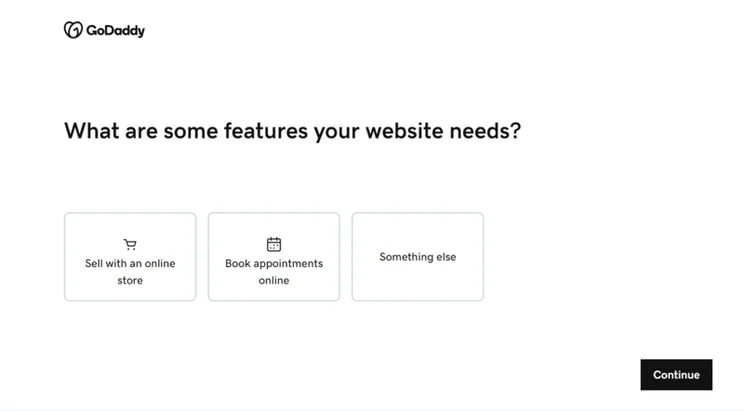
    three options available for GoDaddy's ADI
    I was greeted by this screen when opening up GoDaddy, which let me tailor my template based on the options shown. Source: Website Builder Expert

    Can I Build With AI?

    This is the first step of GoDaddy’s AI website builder which can build a personal template from scratch. Our testing found GoDaddy to have the simplest and fastest AI setup – generating unique template in under 30 seconds. Because of this, I recommended GoDaddy’s artificial design intelligence (ADI) for anyone completely new to building websites.

    However, personalization suffers at the hands of this streamlined setup, and GoDaddy’s templates can feel generic and outdated. Alternatives like Squarespace’s Blueprint AI and Wix’s AI Website Builder add a few extra steps to the setup but provide a more developed and tailored starting template.
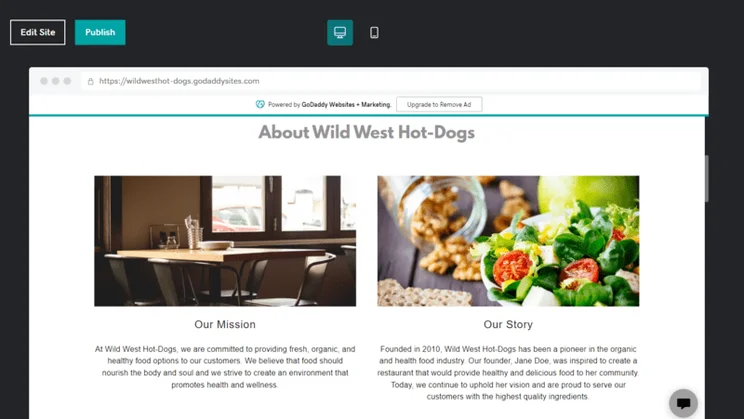
    a finished GoDaddy ADI template
    For my test website, I wanted to see GoDaddy ADI make a page for my imaginary restaurant “Wild West Hot-Dogs”. Source: Website Builder Expert

    Once complete, you’ll be prompted to choose a pricing plan, but you can ignore it and continue on GoDaddy’s free plan for as long as you’d like – but be warned, features like SEO can’t be accessed unless you upgrade. 

    Editor Checklist

    Once I’d made it into GoDaddy’s editor, a pop-up checklist of ready-made features I could add to my website appeared. This included:

    • Image Galleries: To display a carousel of high-quality imagery.
    • Reviews: I could connect my business website to Facebook and pull customer reviews onto the homepage.
    • Contact Us: A contact form alongside somewhere to display company details like emails, phone numbers and opening times if your business has a physical location.
    • Online Appointments: Add an online appointments section to your GoDaddy website where customers can book your services. However, you’ll need to be on the Premium plan to accept payments for these appointments.
    • Privacy Policy: Appearing near the bottom of your homepage, this is where you can clearly explain how your website uses user data and keeps it secure.
    • Subscription Forms: Where website users can sign up to your email list. Useful if your business has a regular newsletter.
    • Menu/Price Lists: Ideal for businesses with products or services, you can showcase your prices on your website in a sleek list.

    I thought that this was a really nice touch since it saved time from having to find and add these features in the editor. You’re then able to “Take a Tour” of your new website, showing you exactly where the most important tools are.
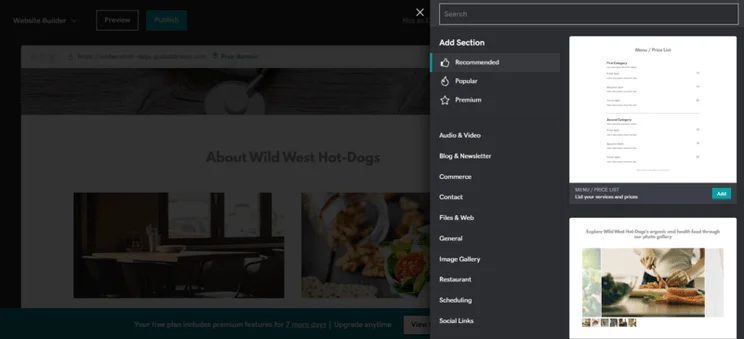
    an inner menu of GoDaddy's editor showcasing tis selections
    Clicking on the “Add Section” button opened up GoDaddy's element menu, where I could pick and choose what features to have on my website. Source: Website Builder Expert

    What’s GoDaddy’s Editor Like To Use?

    With GoDaddy’s block-based editor, I could click the “Add Section” button, make my choice from the menu and see it inserted onto the page. In our group testing, my fellow writers also enjoyed how simple GoDaddy was to use. All of us were able to have a website live in around 30 minutes of editing.

    While building a website with GoDaddy is simple, it’s also quite surface-level with limited customization. For a more visually exciting website, I recommend exploring Squarespace and Wix, which use a more fluid drag-and-drop editor and have plenty of design tools.

    GoDaddy has a free-forever plan as well as three paid plans, starting at $9.99 per month, when billed annually. 

    For context, Wix’s pricing starts at a much steeper $17 per month (billed annually). I was pleased to see that GoDaddy also brought back its free year-long Microsoft Email Essentials trial for those paying annually, which makes it even better value for money.

    You can see the full breakdown of GoDaddy’s plans in this table:

    0 of 0
    Plan name
    Monthly price (paid monthly)
    Monthly price (12-month term)
    Ecommerce
    Recommended for
    GoDaddy logo black swirl
    GoDaddy logo black swirl
    GoDaddy logo black swirl

    Basic

    Premium

    Commerce

    $21.99

    $39.99

    $44.99

    $9.99

    $14.99

    $20.99

    close
    close
    check
    Try GoDaddy Try GoDaddy Try GoDaddy

    While these prices are good, they’re introductory deals. After a year they’ll renew at a higher price. Here’s a full list of the renewal prices:

    1. Basic plan: $16.99 per month (billed annually)
    2. Premium plan: $29.99 per month (billed annually)
    3. Commerce plan: $34.99 per month (billed annually)

    I was a little disappointed to see the prices go up rapidly after a year, though you can still test out GoDaddy without committing to a full year with its free plan.

    I should mention the free plan has some limitations, such as banner ads advertising GoDaddy and no custom domain name – which is a big drawback for small businesses. But this free plan is great for giving the website builder a spin without having to commit any payments straight away.

    Are There Additional Fees I Should Know About?

    GoDaddy charges a number of additional fees on top of the initial plan subscription. Some of these are avoidable by going to other providers, or are waived for the first year of your subscription. However, selling fees are unavoidable.

    Domains

    • Price: One year free, then prices start from $12.99 per month (billed annually)

    GoDaddy is one of the biggest domain registrars on the web and offers those using its website builder a free domain for a year. Afterward, you’ll have to renew it. Regular “.com” domains are the cheapest, but more sought-after domains will have more expensive renewal fees.

    Professional email

    • Price: One year free, then prices start from $7.99 per month (billed annually)

    After your first year, you’ll also have to start paying GoDaddy to continue using your professional Microsoft 365 email. These plans are quite affordable, and worthwhile to have a branded domain email account.

    Selling fees

    • Transaction fee: 2.7% +$0.30 on each ecommerce transaction
    • Processing fee: Varies between 2.6% + $0.10 and 3.5% + $0.49, depending on credit card carrier

    If you’re planning on selling with GoDaddy, you’ll need to use GoDaddy Payments, which comes with the GoDaddy Commerce plan, a payment-processing service that charges both processing and transaction fees on all sales.

    If you want to build a website without GoDaddy’s AI builder, GoDaddy has over 200 templates to choose from. Each template contains:

    • mobile-friendly preview, which makes it easier than ever to ensure all of your site visitors have a positive experience – especially important since mobile users make up over 60% of online traffic.
    • 22 Theme Customizer options which give you different layout variations. This speeds up the editing process and gives you some degree of choice, but this is as much creative freedom as you’ll get.
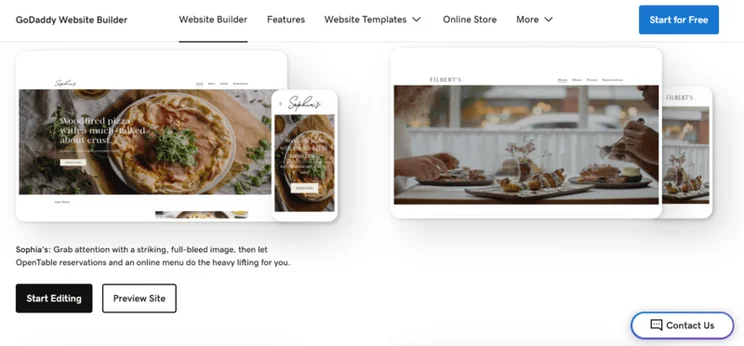
    GoDaddy theme options showing both desktop and mobile versions
    I had to leave GoDaddy's dashboard to view its template choices, which was annoying. However, the template choices themselves are attractive. Source: Website Builder Expert

    Are GoDaddy’s AI Templates Good?

    Primarily, GoDaddy relies on its AI website builder to make a custom template for you. While these templates are decent, and come with the benefit of already being specified to your answers, they can’t hide that, design-wise, GoDaddy is a bit outdated.
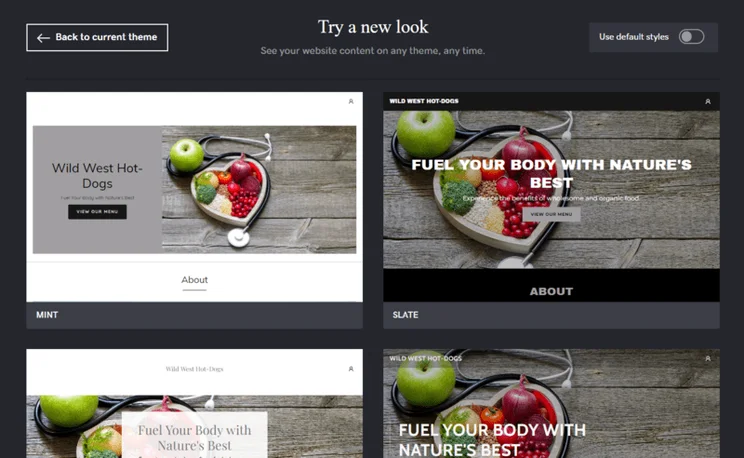
    GoDaddy's theme optimizer, with a number of different options
    GoDaddy offered different layout options for each template, both pre-made and ADI-generated. Source: Website Builder Expert

    When I saw my own site, GoDaddy had filled it with images and text, giving me a really solid idea of what it should look like. However, when I tried to be a bit creative, GoDaddy’s design tools restricted me.

    If I were to describe GoDaddy’s features, I would call them “Wix-Lite”. Like Wix, GoDaddy has all the features a small business owner would need to run a successful website. These include:

    • Blog functionality
    • Image galleries
    • Embedded video and music
    • Google Maps integration
    • Contact forms
    • Promo banners
    • Call-to-action buttons
    • GoDaddy InSight scores
    GoDaddy blog workshop in the dashboard
    I found GoDaddy's blog tools in the dashboard. This let me better plan out my content without worrying how it would affect my site's design. Source: Website Builder Expert

    However, while GoDaddy’s features get the job done, they aren’t as specialized as Wix’s — partly because GoDaddy has no App Market. If you need a specific tool or third-party plugin for your website, GoDaddy doesn’t have an easy fix for you, which dragged down its overall features score in our research.

    But that doesn’t mean GoDaddy is useless. Far from it. Here I’ll highlight some of the features that GoDaddy does best:

    📱 Social Media

    With GoDaddy’s Studio app, you can use AI to create branded content for social media in the form of videos or ads for Facebook and Instagram. These are a great, creative way to get the word out about your website, as 92% of internet users consume online video in some form each day.
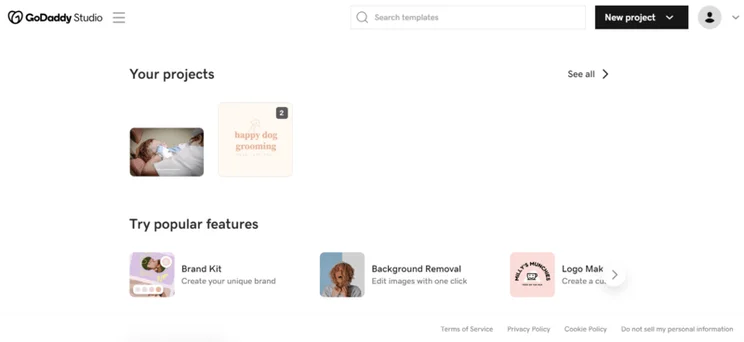
    GoDaddy Studio for content creation
    I was able to use GoDaddy Studio on both the mobile app and desktop. Here, I was able to create ads for social media and video content. Source: Website Builder Expert

    On top of this, GoDaddy offers:

    • Facebook and Instagram integrations: This lets you synchronize posts and content across both platforms.
    • Post analytics: I was very impressed that I was able to track my posts’ performance – such as impressions and likes – all from the GoDaddy dashboard.
    • A social media calendar: Create, schedule and manage your marketing efforts from a user-friendly calendar.
    • Post planner: Get personalized AI post suggestions added to your social media calendar, based around holidays, celebrations and your brand

    📨 Email Marketing

    GoDaddy offers email marketing across all of its plans, letting you send promotional emails, welcome emails and even newsletters from the GoDaddy dashboard. You are able to send up to 100 emails per month on the Basic plan, and up to 100,000 on the most expensive Commerce plan.
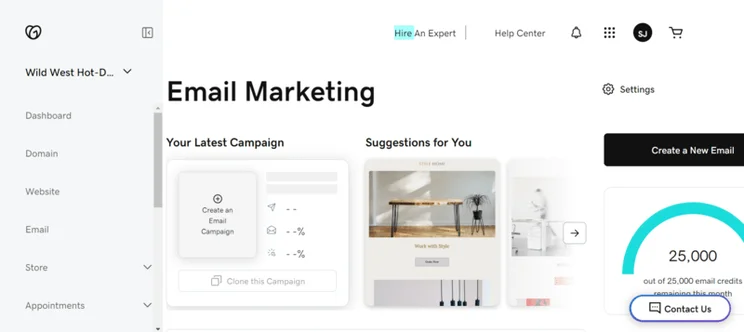
    GoDaddy's email marketing dashboard
    GoDaddy offered me a good selection of email marketing options, such as abandoned cart recovery and newsletters. Source: Website Builder Expert

    Once sent, you can track their analytics like any email campaign. You can automate these emails and, if you’re on the Commerce plan, you’ll also get automated emails to confirm orders, or encourage customers to return to their abandoned carts.

    📅 Bookings

    GoDaddy has set itself up as a solid option for online booking websites, like those for yoga instructors or therapists. Its built-in booking tool performed as well in our testing as those on Wix and Squarespace, thanks to the following features:

    • Accept card payments, without having to pay for full ecommerce capabilities
    • Charge deposits and cancellation fees
    • Create group and one-to-one bookings 
    • Share a schedule of recurring classes and events
    • Integrate to third-party calendars 
    • Text and email notifications for both you and your clients
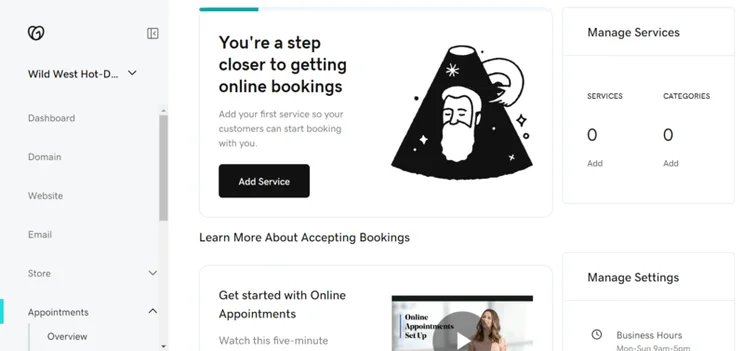
    GoDaddy's booking page with metrics and analytics
    GoDaddy has upgraded its bookings and appointments features to be accessed in the dashboard, with a full range of tools to use. Source: Website Builder Expert

    What I noticed most of all was how integrated it was with GoDaddy’s other marketing tools – from emails to social media and texting. It also adds great organizational tools, like class lists and staff members.

    While you can have one-time appointments on all plans, you’ll have to upgrade to at least the Premium plan to have access to recurring bookings and appointments. This means you can take appointments for as little as $16.99 per month (billed annually).

    🔎 SEO

    GoDaddy wasn’t the strongest SEO website builder we tested this year, but I loved how easy it was to use and understand. SEO can be a tricky skill to learn, and an even harder one to master – yet all new websites need to drive traffic to their pages.

    Here’s what you can do with GoDaddy’s SEO tools:

    • Edit meta titles and meta descriptions: You can tweak these to change how your pages appear on search engine results.
    • Change URL slugs: Make sure that these URLs are SEO-friendly and clearly indicate the contents of each page.
    • Add image alt text: You can use this feature to describe the contents of your website’s imagery. This makes your website accessible for visually impaired users.
    • Receive keyword support: I could access GoDaddy’s SEO Wizard from the dashboard to generate relevant keywords for my website.
    • Use mobile responsive themes: This will enhance your website’s technical SEO and keep your website user friendly.

    ⌨️ Domains

    GoDaddy is one of the leading domain registrars on the web, with 84 million domains and counting. The price for a domain is anywhere between $5.99 – $12.99 (VAT not included) to purchase a domain for one year, but competitive top-level domains like “.com” and “.ai” can go for more.

    With over 84 million domains, GoDaddy may be your best bet on securing that perfect domain name. If you need a bit of help, GoDaddy has an AI-powered domain search tool to help you brainstorm the perfect one.

    GoDaddy has really embraced the current AI website builder revolution. I’ve already mentioned a few of the AI features in this review, but here’s a quick recap of some of GoDaddy’s AI tools:

    • ADI – Artificial design intelligence used to build a custom template
    • AI branded content – Used in the GoDaddy Studio app to generate video content and social ads
    • AI domain search – Used to help users find the perfect domain name

    GoDaddy Airo

    GoDaddy Airo uses AI to help small businesses create an online presence even faster. This fully integrated feature will handle a lot of the work required in starting a new small business website, with GoDaddy’s research saying it will save new users $4,000 and roughly 300 hours of work. Handy!
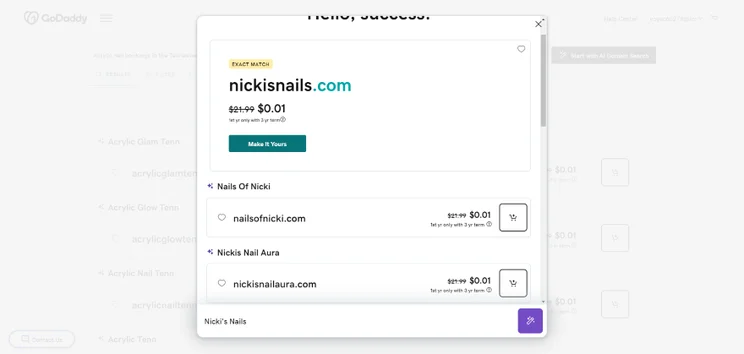
    Screenshot of domain search results using GoDaddy's AI tool, showcasing a "nickisnails.com" domain and its discounted pricing.
    GoDaddy let me test out Airo's AI domain generator on the free plan. I typed in my test website's name to see which domain endings were free. Source: Website Builder Expert

    GoDaddy came fifth in our AI website builder testing this year. While it doesn’t offer quite as many AI features as Wix or as high-quality AI designs as Squarespace, GoDaddy Airo is a low cost, beginner-friendly solution. Here’s what you can expect from Airo:

    • Logo designs: GoDaddy Airo can generate a unique logo for your business, which can help you get recognized online.
    • Create a “coming soon” website: Use this when you’re not ready to fully launch your business online yet.
    • Set up a professional email account and suggest social media handles: GoDaddy Airo bases these on your registered domain name, helping your business appear more professional within the market.
    • Generate product descriptions based on your uploaded product photos: This is similar to the Shopify Magic tool launched in 2023.
    • Register your business for a free LLC: All thanks to GoDaddy’s partnership with ZenBusiness.
    • Create email marketing campaigns: AI email templates can be automated which helps your business engage with your existing customers and target audience.
    • Generate a social media calendar and publish content: GoDaddy’s social media calendar tells you about important holidays and the best times to post. Airo can then fill the calendar with suggested ready-to-post content.
    • Create social media ads: GoDaddy Airo will help you build ads that can be placed on Google, Instagram or Facebook.
    • AI-powered SEO: This makes it easy to optimize your site for search engines.
    • Generated responses to customers: Using GoDaddy Airo, you can collect and reply to all customer interactions from across all your platforms.

    GoDaddy Airo is being rolled out to users who purchase a GoDaddy domain and is currently available in English only.

    GoDaddy’s ecommerce tools are only available on the Commerce plan, costing $20.99 per month (billed annually).
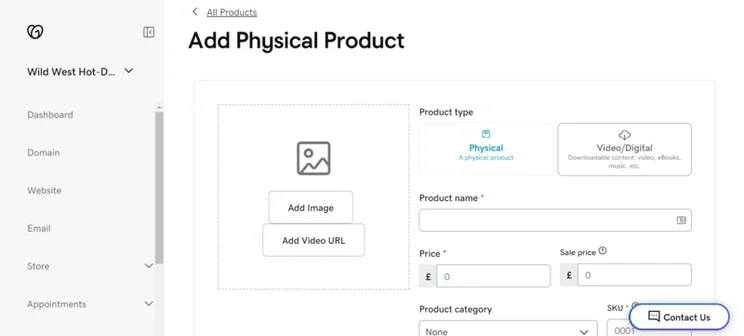
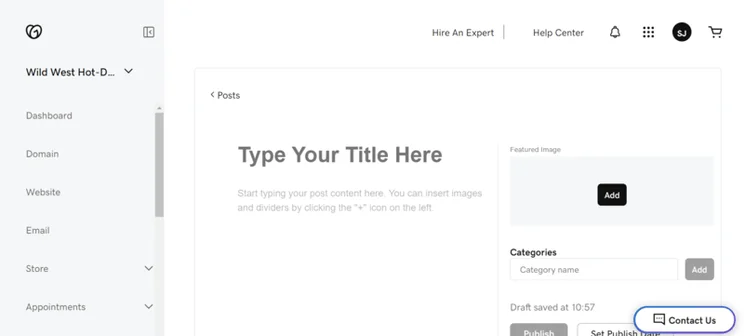
    the add a product page for GoDaddy
    I was able to add physical products to my online store. I could also use AI to generate product descriptions. Source: Website Builder Expert

    On the Commerce plan, you get:

    • To sell unlimited products
    • SSL Security to protect customer payments and transactions
    • To sell on social media and marketplaces
    • Abandoned cart recovery which sends reminders to customers when they’ve left an item in their cart
    • To accept payments from PayPal, Google Pay and Apple Pay
    • Promotions and discounts, such as digital gift cards or promotional banners
    • Free and paid shipping options
    • Site performance tracking from the dashboard’s built-in analytics

    GoDaddy Poynt POS

    Additionally, you can integrate your GoDaddy website with in-person sales. Once you’ve bought a GoDaddy Poynt Card Reader, which cost $99 each, you can start accepting payments from anywhere, be it your bricks-and-mortar store or a market stall. Just be aware that its in-person transaction fees are 2.3% per sale.

    Quote
    Are GoDaddy's sales tools any good?

    Compared with other platforms on the market, GoDaddy’s ecommerce tools aren’t much to shout about. If you’re a small business and just plan to sell a few homemade products, then GoDaddy will be perfectly suitable. Anything more than that and you’ll need a powerful ecommerce provider like Shopify that’s better suited to businesses with a large or scaling inventory.

    Headshot of Emma Ryan
    Emma Ryan Lead Writer

    What happens when you get stuck? GoDaddy offers a fair amount of help and support for customers, including:

    • 24/7 phone, text and live chat which is accessible from GoDaddy’s “Contact Us” page
    • Social media messaging, with GoDaddy’s business chat available from the official Instagram account
    • A knowledge center containing resources on account management, domains, marketing and other essential topics
    • A community forum, where you can ask other GoDaddy users for help
    • Additional video courses, webinars and podcasts
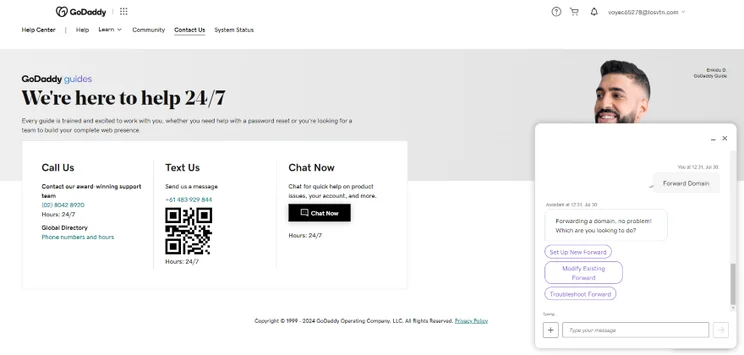
    Screenshot of GoDaddy's 24/7 help page displaying contact options including phone, text, and live chat support.
    When I had a problem with domains, I went to the "Contact Us" page and used the chat box to find help. Source: Website Builder Expert

    With GoDaddy being so streamlined to use, I rarely had to use these help and support features at all, but it’s reassuring to know that they’re there. However, there were two issues:

    • Unclear feature signposting: For example, I went to the knowledge center only to find an article for a feature GoDaddy didn’t have.
    • Poor responses: In our testing, GoDaddy’s live chat had one of the slowest response times. And when I did receive a response, it took lots of back and forth before I got an adequate answer.

    For this in-depth review, I took a magnifying glass to GoDaddy to bring you a comprehensive run-down of its most relevant features and capabilities.

    I have Website Builder Expert’s excellent research methodology to rely on, formulated by our team of researchers. They conducted over 300 hours of testing across six categories, with each category weighted uniquely based on its importance to business owners:

    1. Website functionality: 30%
    2. Design features: 25%
    3. Pricing: 15%
    4. User experience: 15%
    5. Help and support: 10%
    6. Reputation: 5%

    Each year, we evaluate top website builders across these categories, building with and testing each builder ourselves, and collecting our findings to form the scores you see in this piece.

    For GoDaddy, I was impressed by its particular strengths for new users; its super easy and quick builder, and its impressive list of business features. GoDaddy makes for a great website builder for those who need a business website but have limited technical knowledge.
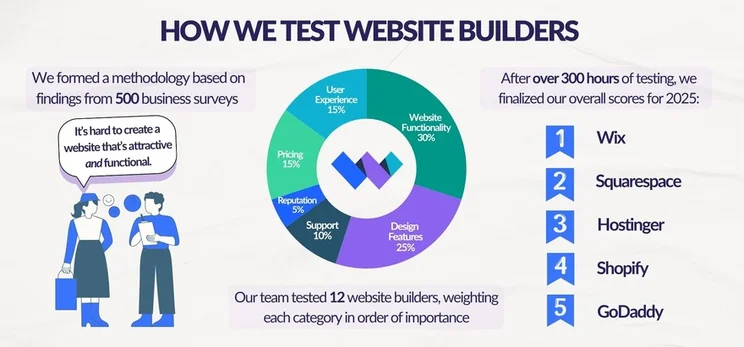
    Graphic breaking down Website Builder Expert's website builder testing into three steps: conducting business surveys to build a methodology, testing website builders, and finalizing scores

    We recommend GoDaddy for anyone looking to build a website quickly without compromising too much on professionalism. For both entrepreneurs and small businesses, GoDaddy is an ideal choice. Its ADI editor makes building your site as easy as possible and also gives you options for customization.

    GoDaddy’s website builder is great for selling online in small quantities, making it ideal for small businesses who are time-conscious and need a site live ASAP. However, if you want a personal website or your business is in an artistic industry, it may not be your best bet.

    Let’s not forget that GoDaddy has made great headway in improving its SEO and site speed capabilities, so we can only expect it to level up from here – watch this space!

    Written By

    Smiling headshot of Annie Angus looking at the camera

    Annie Angus is a Writer for Website Builder Expert with a passion for shaping jargon-heavy research into digestible content. She has previously researched and written about industries ranging from tech to fashion, and now, after testing our top website builders such as Wix and Squarespace, she is enthusiastic to share her findings with our readers.

    With first-hand experience in utilizing social media and online marketplaces to grow a small handmade clothing business, Annie understands the priorities and concerns held by SME owners, and knows precisely what they look for in a website builder. She combines this unique perspective with her knowledge of website builders to produce engaging content spanning all areas of the small business journey, from creating a strong website to growing and maintaining an audience.

    You can read Annie’s articles below, or connect with her on LinkedIn.

    More about

    Reviewed By

    natasha_willett

    Natasha brings her expert credentials – a BSc, Ma, and MMRS – to Website Builder Expert. Natasha has qualifications in Advanced Statistical Analysis, MRS certificate in Market Research, Brand, Finding the Story in the Data, and Big Data: Measuring and Predicting Human Behaviour. These have allowed her to carefully analyze over 64 providers across website builders, ecommerce web builders, and hosting.

    Natasha began building websites when studying sports science, originally using Weebly to create websites to help students learn in a more interactive way. During her first week at Website Builder Expert, she realized that website builders would become important in giving business owners full control over their websites. She began creating a rigorous methodology of research that centered around testing providers and products against a large set of mixed criteria turned into quantitative findings, comparing value for money, design, ease of use, and more. All to provide the most honest and objective insights rather than just looking at their claimed features.

    In five years at Website Builder Expert, Natasha has attended multiple expos in her field, including ESOMAR, MRS, eCommerce Expo, Ad World, Digital Customer Engagement Summit, and IMRG, just to name a few. Natasha has also worked alongside website builders directly to share her research with them, so that they might improve their products for users.

    She’s clocked an impressive 9,600 hours of product research and testing, pulling data from multiple sources and providing the Website Builder Expert team with the scores and product details they need to give you the best recommendations to succeed online.

    More about

    Popular topics

    197 comments

    Your email address will not be published. Required fields are marked *

    • Douglas Snadden

      I found the information in your review really helpful.
      Many thanks.

      1 reply

      • Emma Ryan
        Emma Ryan

        Hi Douglas,

        Thanks for the kind comment! We're so happy to hear you found the review helpful.

        Very best,
        Emma

    • Richard

      I am searching for an e-commerce site to eventually replace my Shopify store. In speaking with GoDaddy, they quoted me a price of $4,100 to build and maintain their version of Shopify. But it appears I can do a little homework and build it myself. What is the difference between $4,100 and DIY?

      1 reply

      • Emma Ryan
        Emma Ryan

        Hi Richard,

        Thanks for commenting! That's a great question - the main benefit of using GoDaddy's web design service is that their team of experts will handle building, designing, and updating your website for you. This saves you time to spend on other tasks, especially if you have a large or growing business to manage. Of course, this comes at a high cost. Using GoDaddy's DIY website builder gives you complete control over your site's look and settings, so this would be the preferable option if you want to edit and manage everything yourself. Plus, in our testing, we found it quick and easy to use. I recommend taking a look at how GoDaddy and Shopify compare to see the builders side-by-side. You could also check out our list of the best ecommerce website builders to see other Shopify alternatives. I hope that helps, but please don't hesitate to reach out again if you have more questions!

        Very best,
        Emma

    • Norris

      I am looking for a website building software for a new business consulting firm, so my needs for a very creative design is not that high.
      I have another website with WIX (email via Namecheap) but there are issues which I only became aware of after I subscribed to Wix.
      I am considering setting up new website using GoDaddy
      My needs are as follows:
      1) Website in English, Simplified Chinese and Traditional Chinese;
      WIX only allows me to use English and either Traditional Chinese or Simplified Chinese - not both.
      What would be Godaddy's capabilities?

      2) My customers are world-wide as well as in China so having the Website Searchable within China (and outside of China) is very important.
      I tried to use Baidu to search for my Website name *.com and it could not find it.
      What would happen if I did the same search assuming the website is with Godaddy?

      3) WIX seems to indicate that there might be issues with getting to the site from China.
      What about Godaddy?

      4) Is there a Website builder that will allow customers within China and worldwide to easily access my website?
      What are my options if above answer is NO or MAYBE?

      Many thanks!

      1 reply

      • Emma Ryan
        Emma Ryan

        Hi Norris,
        Thanks so much for the comment! Due to China's internet restrictions, things can get a little tricky with website builders like Wix and GoDaddy. We can share that Wix is looking into supporting multiple language dialects, but you're right to say that it's not available at the moment. As far as we can see, GoDaddy does support multiple languages on a site. Additionally, GoDaddy offers the option of building a site with a .cn domain name which we'd recommend, and once verified/approved, you'll be able to promote your business in China. You can read more about it here. We hope that helps!
        Very best,
        Emma

    • Dave

      Did Godaddy build their own website builder from scratch or are they using a white label version powered by someone else?

      1 reply

      • Jacqueline Renouard
        Jacqueline Renouard

        Hi Dave,
        That's a great question! We're not 100% sure whether GoDaddy Inc built their website builder from scratch, we would imagine they did as GoDaddy started as a domain registrar and then slowly built its way up to both website building and web hosting. Not to mention they had the funding and teams to be able to create a website builder from scratch. Hope that helps!
        Warmly,
        Jacqueline

    • John

      Dude thank you for this article. It cleared up my questions and then some! God bless.

      1 reply

      • Maura Monaghan
        Maura Monaghan

        Thanks for your comment John, I'm glad we were able to help!
        Maura

    • Nina

      As I like my GoDaddy website they are so behind with integrating an afterpay type of merchant. It is helping so many businesses right now and we don't have that option. For that reason I will have to go elsewhere.

    • Sam

      Hey there
      I'm considering Godaddy but I'm not sure if it lets me add a questionnaire for my clients before they commit to buying my services. I'm also looking to set up video conferencing calls on zoom and again I'm not sure if this is supported.
      Thanks for your help

      1 reply

      • Rosanna

        I’m on GoDaddy, (www.screenwear.com.au), they have a Zoom meeting booking function. You can call their help line and they will explain it to you. That said I haven’t actually used it yet.

    • Philip

      This was very helpful.

    • Valerie

      Thank you, yes all this information is very helpful.
      Trying to make a wise business decision after being with a large SEO / DexMedia which was way to expensive for my budget .

    • Kimberly

      How many pages are included in the ecommerce plan?

      1 reply

      • Maura Monaghan
        Maura Monaghan

        Hi Kimberly,
        There is technically no limit to the number of website pages you can have on any GoDaddy plan. However, you will start to get warning messages when the number goes up to about 50 pages, because that high volume could start to affect page load times. If you plan to run a website larger than that, you might want to look into self-hosting it for more space!
        Hope this helps,
        Maura

    • Paula

      Thank god there was something to walk me through this terrain. I’m well out of my comfort zone & would not have carried on w/o guidance.

    • Abby

      Godaddy has its perks: its easy to use and requires little to no knowledge of html code. However, godaddy is very limited in the things its able to do. I just added an online store to my website and godaddy gave me almost nothing to work with. I couldn't set a minimum quantity or price breaks. I understand the appeal of godaddy but I would not recommend it.

      1 reply

      • Charlie Carmichael
        Charlie Carmichael

        Hi Abby,

        Thanks for your comment. We definitely agree with you that GoDaddy's a really easy to use website builder but because its so simple, it does have its limitations. In terms of using GoDaddy for ecommerce, it really depends what the purpose of your site is. It's nice if you want to sell a couple of products on the side, but if your website is solely for selling, then you're probably better off looking elsewhere. Powerful ecommerce platforms like Shopify and BigCommerce are fantastic to grow your online store, but Wix, Weebly and Squarespace are great options if you want more creative control and don't have ambitions of turning your online store into an ecommerce empire! I'd recommend checking out the best five ecommerce platforms here and seeing what you think. Hope that helps!

        Thanks,

        Charlie

    • Sophia Adams

      The great guidance you have put here. Target is my fashion blog where i share my fashion blog at a low cost.
      godaddy 12 dollar Hosting - you can find all latest clothing at low cost.

    • john

      thanks

    • jasminali

      I have been using GoDaddy for 3 yrs. Over 3 year, many times I've experienced server errors in my websites, Whenever I contacted customer care for resolving the issues, they ask me to upgrade my hosting plan. I upgraded to high-end plan than they suggested, even though the problem is not yet solved. Customer support is worst and inefficient. They advise you to go for the upgraded plan, simply because of they want extra money from you. I advise don't use GoDaddy hosting, even if you receive a notification to upgrade the plan. Please don't upgrade it. Better find a good hosting

      1 reply

      • Fred Isaac
        Fred Isaac

        Hi Jasminali, thank you for sharing your experiences with GoDaddy. Good luck finding a more reliable hosting service. Bluehost is worth a shot.

    • Tami

      I've had only great experience with customer service. They have held my hand while I was learning some website techniques. I'm technology savvy, but not a programming wizard, so I know enough to understand drag and drop etc. I've called from everything from SEO to inserting tables and they are ALWAYS there for me.

    • Mark

      I posted a GoDaddy site on January 3, 2018. It was easy to do and I was happy with the look and functionality. Here's the problem: even after 3 months my site, rarely shows up ANYWHERE on Google using the keywords that I used on the GoDaddy SEO optimizer. The site does, however, show up on the first page of Bing and Yahoo. This is quite a disparity. Apparently, there is something inherently wrong with the GoDaddy template code to optimize SEO. I am very, very dissatisfied with the GoDaddy template and am in the process of converting over to a WordPress site.

      1 reply

      • Natasha Willett
        Natasha Willett

        Hi Mark,

        Thanks for joining the conversation. SEO is definitely an important factor for any website. Have you explored GoDaddy's help functionality to identify whether the keywords are being picked up? GoDaddy does have a specific SEO service department (https://uk.godaddy.com/online-marketing/seo-services), so it may be worth contacting them directly to see if they can assist you further. I've also linked you to another article we wrote last month about website builder SEO vs Wordpress SEO if you are thinking of converting.
        Best of luck,
        Natasha.

    • Karen T.

      Can you sell a website that you built on GoDaddy website builder on a site such as Flippa,?

      1 reply

      • Fred Isaac
        Fred Isaac

        Hi Karen,

        I believe you can sell a website you've built up on GoDaddy through a marketplace like Flippa. Before you list your site, it's worth going through the process of valuing it and sourcing a buyer through different means. Services like Flippa are useful, but a broker will be able to filter the list of potential buyers to only show credible options. There's pros and cons to both approaches. This page on GoDaddy might be useful to you: https://www.godaddy.com/garage/how-much-is-my-website-worth-and-is-it-time-for-me-to-sell/

        Thanks for the comment,

        Fred

        1 reply

        • Malika

          Great info, good thanks.

    • Lee Raybould

      Hi Tom, fellow website builder reviewer here (in your shadow of course), just wanted to pick your brain in relation to GoDaddy.

      You see, I just finished updating my review and as I said there, if a friend asked me if they should use GoCental and they only wanted a basic business website, then to be honest, I'd tell them to go right ahead as long as they definitely weren't going to need more of the "trimmings" further down the line.

      I'd also be confident that the support team would be on hand to help them out if they run into problems.

      What stumps me though, is there eCommerce platform.

      On one hand, I found it to be very user-friendly and it's a breeze to create a store and sell physical products. They also have some pretty cool features such as being able to create discount codes, real-time shipping calculator and abandoned cart recovery.

      On the other hand, it's quite an expensive option if you only need a small store but if you need something larger, there's no option to export products which could mean a LOT of work down the line if the user wishes to move platforms.

      I feel like I want to give GoDaddy's eCommerce offering a thumbs up but somethings holding me back.

      What are your thoughts?

      2 replies

      • Alice

        Hey Lee. As you said, there is no built in feature to export your products to a CSV. But I found a pretty handy tool that allowed me to export my GoDaddy products to a nice CSV formatted to the shopify standard. https://export-godaddy-products.com

      • Tom Watts
        Tom Watts

        Hi Lee,

        I'd agree that GoDaddy is making strides in the right direction, but for me the ecommerce functionality is still all too basic. There's just no real scope to grow your online store and as you point out, you can't export products so once you do hit your limits you are effectively locked in unless yo uwant to start from scratch elsewhere.

        Wix eCommerce offers a lot more scalability and function for the bidding entrepreneur - and costs pretty much the same as GoDaddy. I'd also recommend Weebly for eCommerce too.

        Both are ideal for small online stores or more boutique-style businesses. However, if large long-term growth is your plan then it's worth starting and sticking with either Shopify or BigCommerce.

        Thanks for joining the conversation,
        - Tom

    • michael Kelly

      Hi Jeremy,
      Thanks for the review. Have you tried the new GoDaddy webbuilder yet? It's GoCentral and does not have drag and drop capability but is pretty easy to use and looks great.

      1 reply

      • Tom Watts
        Tom Watts

        Hi Michael,

        We haven't just yet, but thanks for the heads up. I'll get a member of the team to have a look into it.

        Thanks,
        - Tom

    • Joan Mader

      Two thumbs down.....zero stars. They ade me buy a business account when I am only sharing publications with the public. The program is difficult to follow, poor instructions and very inferior to the last program they had

      2 replies

      • Tami

        I agree. You can't change fonts, not even the size. I tried to copy from Word and it stayed the same as the web builder font. Can't change the size of pictures in the layout. And some other things. It's a little too simplistic. I have to admit that my website as I'm working with it, looks more professional than any other one I've done.

      • Tom Watts
        Tom Watts

        Hi Joan,

        Thank you for joining the discussion - it's useful to have as many view points as possible.

        You're not the first to make mention of GoDaddy mischarging users, which is definitely concerning and well worth flagging up!

        Have you managed to speak to the GoDaddy customer service team at all?

        - Tom

    • luke

      nice

    • john p. anderson

      I am planning to build a web site to serve as the publication platform for books I write. I have been publishing them commercially but now wish to publish new ones simply by putting them in the public domain free of charge. The books are about 200 pages in Word. I would start with one and want to add others later on. is this feasible on godaddy? thank you.

      1 reply

      • Tom Watts
        Tom Watts

        Hi john,

        You should be able to achieve your goal on most website builders, and because you aren't planning on selling you'll actually find it's a bit easier to share your writing than you may think.

        As long as you can store your books online, e.g. on GoDaddy's back-end or a file storage service like DropBox, then you can add a link onto your website that visitors can click to download the file - simple!

        GoDaddy even have a guide explaining how to do this, which I've linked to for you.

        Hope it helps,
        - Tom

    • Robert Slone

      I have used Website Builder for a few days now and can say, without a shadow of a doubt, it's the worst thing going.

      1. So you want to change your theme? No, you cannot, unless you want to write your website entirely from scratch.

      2. So you want to rename a page? No, cannot, unless you want to write your website completely from scratch.

      3. "Oops, website builder hit a snag" messages constantly. In other words... restore from a backup and try again. If, and that's a huge if, the backup worked the last time it tried.

      These facts alone render Website Builder the worst in class. I've used a variety of other website tools similar to wsb and all are light years ahead in features, usability, and convenience. Even the small players in this arena are years ahead.

      If you have a choice in hosting providers, pick any provider but one that has Website Builder as the only choice.

      And now off to cancel GoDaddy because they force Website Builder...

      1 reply

      • Tom Watts
        Tom Watts

        Hello Robert,

        Thank you for sharing your experiences with the community, it's always useful to have as many viewpoints as possible!

        I'm sorry to hear you've had such a frustrating time with the GoDaddy builder.

        Have you considered using other builders such as Wix or Weebly, who offer a more versatile and easy-to-use experience than GoDaddy does.

        At the very least, I would recommend trying out the free trials to see if they are a better fit for you.

        I've linked to our in-depth reviews of each platform, which should give you some food for thought.

        Thanks again for joining the discussion,

        - Tom

    • Bill Z

      Currently have a website, developed by others, but hosted on GoDaddy, for our small business. We do no ecommerce, nor do we intend to. Rather than modify, intending to start over and design ourselves. We are not techo-whizzes. Sounds like the web-builder might work for us. But confused. Your business package looks fine, but why is there a monthly fee? Hosting is already covered by our contract for another couple of years. Creating a website is a one shot deal (though you may modify later). Thought we'd build on our own C-Drive, test/modify, and then drop into hosted slot to replace existing website. What am I missing? Again, we aren't that sharp, so probably an easy answer to this.

      1 reply

      • Tom Watts
        Tom Watts

        Hello Bill Z,

        Thanks for joining the discussion.

        Website builders typically have built in hosting, so even on a free plan you can create a website for absolutely nothing and still publish it online. However, your URL (website address) will typically include the builders name in it (e.g username.wixsite.com/sitename/page-url).

        Each premium plan on a website builder will cost you a monthly fee as this helps the company cover operating costs and is how they make money. In return for the monthly fee you get access to more tools, templates and apps, as well as the ability to link a custom domain (URL / your website address) and hosting.

        From what I understand it is quite complex to build website offline and upload to GoDaddy, so if you are not too technical I wouldn't persue this avenue.

        My recommendation would be to use Wix ,which is an easy platform to use and get to grips with, offers lots of tools + templates, as well as free hosting. Of course you can always pay a couple of dollars per month for a premium plan and this will enable you to use your GoDaddy domain with the website.

        Just my two cents, so I hope it helps,
        - Tom

    • Daniel R

      Although the website builder is easy to use it does have some major flaws in terms of its features, some of which you would expect from any basic website builder. Here are just a few!

      1) When hyperlinking, there is no option to open the link in a new window meaning that people are automatically taken away from the site. I raised this with GD some time ago and the answer is always the same... "our developers are working on it"

      2) There is no ability to have sub pages shown as drop down menus.

      3) You can't just add an image to a page layout, it needs to be compliant with the predefined structure.

      I have raised each of these points with GD and I was just told that I could move to something like Wordpress. There was no real accountability for the flaws of the system

      1 reply

      • Tom Watts
        Tom Watts

        Hi Daniel,

        Thanks for joining the discussion.

        You raise some really good points about potentially important features and I get that it can become frustrating when repeatedly told that 'people are working on'! And it's doubly frustrating when you can't actually see the fruit of this supposed labor!

        If you're open to exploring other builders that are more intuitive and "common sense", then check out Wix or Weebly. Both are very easy to pick up and use, offer huge functionality and give you a bit more freedom than GoDaddy currently is.

        Hope that helps,
        - Tom

    • WpHound

      Thank you very much for your effective post. very well explained much needed helpful article...

      1 reply

      • Tom Watts
        Tom Watts

        Hi WpHound,

        Thanks for your feedback, good to know the discussion proved useful for you.

        Feel free to share on social media if you think others could benefit too, it's a nice way of paying it forward.

        Thanks for reading
        - Tom

    • Rick Bruck

      Thanks, I'm curious and now I have something to think about.

      1 reply

      • Tom Watts
        Tom Watts

        Hi Rick,

        Good to hear you found the discussion useful.

        Feel free to give us a share on social media if you think others may benefit too! You never know who might find it handy too.

        Thanks for reading,
        - Tom

    • theresa spross

      I have had a website built on GoDaddy's website builder. I have been getting zero business from it. I recently found out from a client that the contact form was bouncing back. I check it and everything was correct form my end. I contacted GoDaddy, and after about 45 minutes of them testing and "fixing" something, it worked.
      I was extremely disappointed with their resolution.
      I was always a fan of GoDaddy, but not anymore.
      I would not recommend them.

      1 reply

      • Tom Watts
        Tom Watts

        Hi Theresa,

        Thanks for joining the discussion and sharing your experiences.

        Sounds like you've had a frustrating time with GoDaddy and one that has potentially cost you in sales too! Did the team explain what the issue with your contact form was?

        Have you considered other ecommerce platforms such as Wix or Shopify? I've linked to our in-depth reviews which will provide a lot more information.

        Hope that helps,
        - Tom

    • Joe

      The part where you say there is no ecommerce option is not accurate. GoDaddy also offers a GoCentral Online store with the following features:

      Smartphone-ready site + shopping cart
      Add up to 1,500 products
      Accept credit cards, PayPal and Apple Pay
      Track inventory and orders on the fly
      Maximize your sales with abandoned cart recovery
      Cut deals with your own coupon codes
      Built-in SEO tools

      It's quite a robust package and it works very well. How do I know this? Because I'm a GoDaddy customer and an employee of the company.

      Additionally, several new functions are coming down the pipeline in Q4 and Q1 of 2018 that address most of the real weaknesses you're pointing out.

      For those out there complaining about the customer service, I'd like to make two points:

      1. The customer support you get is free, at no additional cost, and we're all experts at what we do. For the same services in my private business, I charge $150 an hour.

      2. We are not your personal designers and we cannot fix issues that aren't covered under our support guidelines. We do offer professional services at a very low cost for most issues you might run into.

      If your team would like more info about GoDaddy products or blogs on it, I'm happy to help out. Just contact me at the email provided with this post.

      1 reply

      • Tom Watts
        Tom Watts

        Hi Joe,

        Thank you for the heads up, this is definitely something I will look into and look to explore in more depth on the site.

        You also make some excellent points about GoDaddy's customer service, so thanks. It's always useful to get an inside perspective on these key topics.

        Thanks,
        - Tom

    • Carla

      wix has virtually no live customer service...I can't contact them about a billing matter OR a screw up on my 2 sites! If you don't phrase your question correctly, you'll never get to the right answers, or a call to help you. It's just horrible. I'm dropping them.

      1 reply

      • Tom Watts
        Tom Watts

        Hey Carla,

        Sounds like a bit of a frustrating situation on your end - sorry to hear that!

        It's true that the Wix support can be a little tricky to navigate at first simply because it is so all-inclusive and covers the vast majority of issues that might arise for most users - although you're spot on that it can be a challenge finding the right answer straight away!

        Have you tried arranging a call back with customer support? You can find out how to do that at this page.

        If you're still set on leaving Wix, are you considering any other platforms? Weebly could be one to look at as the editor is similar to Wix and the support staff are very helpful too with longer opening hours than Wix.

        Hope that helps,
        - Tom

    • Meg

      These reviews are really helpful. Thank you so much for taking the time to write and share them!

      1 reply

      • Tom Watts
        Tom Watts

        Hey Meg,

        Thanks for the feedback, it 's always appreciated!

        If you found the article useful, feel free to share it using the social media icons above. Really helps to spread the word and you never know who you might be helping.

        Thanks,
        -Tom

    • David

      Helpful review!

    • harjinder

      Hi Jeremy,

      Thanks for the great article.

      Can you please help me out - i'm putting together a site based on informing and giving solutions on health problems. I wil also use affiliate links for certain health products and solutions.
      Which is the best type of site use?
      Godaddy? Wordpress? Hostgator?

      Kind regards,
      Harj

      2 replies

      • John Pankratz

        Hi Jeremy,
        I have a HUGE issue with Go Daddy website builder. I signed up for a free trial, but had to have my credit card charged to get a free trial. I cancel my free trial and never received my refund of almost $400. I just got my American Express bill and Go Daddy Website builder billed my card for a renewal free of $239.76
        I spoke with Adrianne, a guy at Go Daddy who informed me that the 30 day cancellation period has passed at there is nothing he can do. I asked for his supervisor and he says he does not have one.
        i have used Go Daddy to purchase several websites and never really cared for their up-sell tactics.....this takes that to a whole new level.
        DO NOT TRUST GO DADDY NO MATTER WHAT THEY SAY. They will screw you however they can.

        1 reply

        • Jeremy
          Jeremy

          Thanks for sharing John. I'm surprised at how bad your experience has been, it doesn't sound good at all! I've always found the GoDaddy team to be quite handy whenever I've needed to get in touch. But it's always useful to hear of other's experiences!

          I'd recommend setting up a reminder in your calender when the refund expiration date is. This way, you can ensure that you don't miss the refund deadline. Organizations tend to have hard refund period deadlines, so the support person is only abiding by company policies (took me far too long to realise that setting reminders is the best way of doing things!)

          If you're looking for another platform, it could be worth checking out Weebly, Wix or Squarespace - they might prove less stressful alternatives.

          -Jeremy

      • Jeremy
        Jeremy

        Harjinder,

        It really depends on your technical abilities. If you use a WordPress + Hostgator combination (or Bluehost), it works great but if you are not hands on with managing the technical aspects of your website (such as making sure your WordPress version or plugins are all up to date, know how to code so you can edit your design, etc), then GoDaddy website builder will probably be better.

        The pros of using WordPress is that it is very flexible and powerful and there really isn't much you can't do with WordPress (as long as you know how to code or if you have a budget to hire a good developer).

        Alternatively, drag and drop websites (see our comparison table here) can be helpful for those who don't want to manage the technical aspects of their website. These website builders are all "code-free" meaning that you don't need to know any code, or manage your hosting at all.

        Jeremy

    • Behrouz

      The biggest unforeseen problem with Godaddy. You cannot have a backup copy of your website on your own computer. As such godaddy ground you forever unless you go through time and trouble of developing your websit all over by a new host.

      Godaddy's 5 backups stays in godaddy's system. You cannot get it out. You can re-install your website using any or your backup. But these all stays there.

      1 reply

      • Jeremy
        Jeremy

        Hi Behrouz,

        This function caters to most users - the ability to revert to a previous version of their websites.

        If you want the ability to export your website to another platform, take a look at Squaresapace or Weebly. We have more details about this in our website builder comparison guide.

        Jeremy

    • Tarun Lakhanpal

      Hi Jeremy,

      I am a fan of your detailed write-ups on different websites. I am building a simple website for my travel business and am a bit confused between, go daddy websitebuilder, Wix and weekly. I find Wix more impressive and easy to use although Godaddy is also a good option with renowned customer support. I am a non technical guy but will be managing my site on my own. Can you help?

      Regards
      Tarun

      1 reply

      • Jeremy
        Jeremy

        Hello Tarun,

        I think Wix or Weebly are good website builders. Take a look at our comparison chart to see how GoDaddy compares to these two website builders.

        With Wix or Weebly, you don't have to be technical at all as they're designed for people who don't know how to code. Both of them have good support as well.

        What I'd suggest you do is test out these website builders (they have free accounts for you to try their platforms) and see if you enjoy working with them. There's no rush to decide if you want to upgrade or not, as there is no time limit to their free plans.

        Good luck!

        Jeremy

    • David

      Godaddy sitebuilder is becoming so bad of late. Yes the % of downtime is same BUT... it has many technical script problems, problem uploading images, making changes that actually do 'change' when they've been uploaded....i can keep going. Apart for having your HTML looking like a dogs breakfast your site will never listed well.

      Yes you can backup the product but you can't take it away with you. On days it's almost unusable editing as their server speed is extremely poor.

      1 reply

      • Jeremy
        Jeremy

        Hi David,

        Thanks for sharing your feedback with us. Have you considered other website builders? We have a comparison chart and you just might find it helpful.

        Jeremy

    • Peter

      Hello Jeremy,
      Is there a website builder for a online store that will let you integrated auction software?
      Many thanks.

      1 reply

      • Jeremy
        Jeremy

        Hi Peter,

        I'm not familiar with one. Sorry about that.

        If others reading this comment thread have suggestions, please do share!

        Jeremy

    • Greg Iseral

      Where do I find a simple website that finds people that know how to work on a Godaddy website? I need photos posted and some wording...

      1 reply

    • Susie Martin

      I already have a godaddy account and 2 domains- I used to do websites back in the 90's but things have gotten so complicated I cannot put one together...
      I have found not a single WYSIWYG builder for OFFLINE/upload use that makes a darned bit of sense to me. I managed to put a few pages together but the godaddy ftp instructions are clear as mud...
      What do you recommend I do? Give up??

      1 reply

      • Jeremy
        Jeremy

        Hi Susie,

        Have you tried Weebly? You can see our review of Weebly here.

        They're probably the easiest drag and drop website builder available today. They're free to sign up to, and you can upgrade later if you want to.

        You can connect your domain name from GoDaddy to your Weebly site. Weebly's support center has tutorials on how to do that.

        Jeremy

    • Reg

      It looks like godaddy has managed wordpress ability now with woocommerce included with SSL provided on the highest tier. They bought ManageWP in September. Looking forward to your updated review.

    • Rajesh

      Hi Jeremy, Thanks for your detail reviews.

      I Need to build my webpage through web builders. I am starting an e-commerce site.

      In your review ( side by side comparision of website builders) , you mentioned GoDaddy doesn't have ecommerce supporting features but I see that they have some option called online store for people looking at building the ecommerce website. https://in.godaddy.com/websites/online-store

      Is this online store different from what you mentioned in your comparison?

      Is this helpful to buy the online store web page or any other suggestions will help.

      Thanks
      Raj

      1 reply

      • Jeremy
        Jeremy

        Hey Rajesh,

        Yes that's right. The one we discussed in this review is different from the one you highlighted.

        If you're looking to build an ecommerce store, have a look at our comparison chart here. It will also give you a few other options.

        Jeremy

    • Anthony

      Weebly and other sites are 100 times better. No one can find your godaddy site, build the same site on another platform and your keywords appear but do not on godaddy. When you ask for help they alway attempt to sell another feature.

      1 reply

      • Jeremy
        Jeremy

        Thanks for your feedback, Anthony.

        For others who don't know what Weebly is, you can see our review on this website builder here.

        Jeremy

    • Charles

      Sadly, GoDaddy was quite proficient at taking my money and running. I had set up an account for a friend (as I have done with dozens of other hosting companies). I was very careful to make sure that auto-renewal was turned off and confirmed this over the phone with GD support.
      Over time, my friend suffered a stroke and could not access her account, so I called support for her to get it shut off. Unfortunately, she did not have her password, and nothing I could give them would allow access to the account. I told them that we would let it lapse the following month, and they said that would be fine.
      To my surprise, I was charged again for 2 years the next month, quite against all my settings and conversations. They then played ping pong with me for different support folks until the 30 days had expired and they stopped talking but kept my money.
      As I am in Australia, going to court is not possible, so I am left with no money and just a few articles to publish...it is a good lesson in not buying overseas.

      To reiterate, GoDaddy has not proven to be reliable or honest in my opinion.

      1 reply

      • Jeremy
        Jeremy

        Hi Charles,

        Thanks for sharing your experiences with us. As with Michael below, what happened to you surprised me.

        I've had a few "accidental" renewals before as I didn't switch off that feature. I just emailed GoDaddy's support team and they were able to refund me pretty much in 1 - 2 days. So I had the exact opposite experience. And I'm not based in the US, either.

        Jeremy

    • Paresh Patil

      Hi,
      We are also using GoDaddy services and facing more problem.If you are relay want to develop you company and want to received mail as wail as reply immediate then don't use GoDaddy services.Better you pay more and go for gmail or another reputed company.
      There service

      1 reply

      • Jeremy
        Jeremy

        Thanks for adding to this discussion, Paresh.

        Personally, We use Google Business Apps to power our business emails. We like working with the Gmail interface, its security, reliability, and the fact that we can brand our email addresses using our domain name.

        Jeremy

    • Michael F.

      I just shut down my GoDaddy account, because of the auto-renewal policy and what seems like an in-ability to shut off the auto-renewal process. When I signed up for my website 3 years ago they give you a rate of $135.00 for a basic website and domain name, which is rather good value. I made sure to not have auto-renewal set, so that I can make a decision when the time comes to renew. Well to my surprise there was a renewal on my credit card statement for $330.00. I thought this was strange and I called GoDaddy and said my account was not supposed to auto-renew, they said yes it is and there is nothing I can do about it since it was past the 5 day cancellation period. I once again tried and stop the auto-renewal and called them and said are all of my services set to not auto-renew again. The agent informed me that they will still auto-renew, I was now frustrated and figured the only way to stop them was to cancel all of my services. This is a bit of a buyer beware thing, I am out of my money and my website, but still feel if I didn't then next time they would get me again.

      1 reply

      • Jeremy
        Jeremy

        Hi Michael,

        That's very unusual. I've used GoDaddy products (such as domain names, etc) for years now and I was always able to configure the auto-renew function and it never malfunctioned. Also, when something auto-renews, I always receive email notifications right away so I'm made aware of it. Interesting to hear your story though...

        Jeremy

    • Corri Milner

      Built my website on Wix for 4 1/2 months only to find afterwards it didn't translate to the mobile version and you have to rebuild it there. It was such a headache, I'm junking the site.

      Had a 2nd website with Weebly for a different business, still have it - it was super easy to build in 15 hours, translated well to the mobile version.
      However it has nearly 0 SEO going on. After several months it may list your website, but no SEO at all of your blogs or other things like SEO works on hosted other sites.

      1 reply

      • Jeremy
        Jeremy

        Hi Corri,

        Thanks for sharing your experiences with us.

        Wix has a separate mobile editor, which allows users to configure and to a certain extent, customize their websites' mobile layout. So yes, it does take a bit more work but the flexibility is a plus. We have a discussion about the mobile features across various website builders here.

        With regards to SEO, take a look at our website builder SEO guide here. I share my thoughts about this topic there.

        Thanks for sharing your comment with us!

        Jeremy

    • Vidya

      Hey Jeremy,

      Thanks for the detailed article.
      I am stuck with a major doubt for a few weeks now. I have read your articles on other website builders(Wix/Weebly/Squarespace,etc) and decided to go with Wix due to their awesome collection of templates and ease of building the online store. But only after building the site, when it was time to upgrade, I learnt that it doesn't support payment gateways for Indian cards i.e, my customers wouldn't be able to pay online. That was so disappointing.

      I see that GoDaddy supports Indian cards for my customers to shop from my site, but I noticed that you have mentioned that it doesn't have great e-commerce tools. So, here I am, asking for your suggestion on which website builder should I opt for, considering the payment gateway for India and the ease of using the tools too.

      Thanks,
      Vidya

      1 reply

      • Jeremy
        Jeremy

        Hi Vidya,

        If you need specific payment gateways that supports India, take a look at Shopify (our review is here).

        They support over 70 different payment processors (see them here). Search for "India" and you'll see the specific processors that might be relevant to your situation.

        Hope this helps!

        Jeremy

    • Dan

      Jeremy,

      I have been with GD for a long time and am pleased with the service and how they keep things manageable. I started with Website Tonight a while ago, then Website Builder which were easy to use, but fairly limited in features. They are now changing again to a program I find awkward to use and again, limited in features. I am not a techno geek (no offense) but decided to look at Wordpress only to come away feeling it was too complicated. Are there more modest programs better than the latest GoDaddy program and more intuitive than WP I could use still supported by GD? Should I jump ship and go to somewhere else who does it all like they do?

      I have been in business using this site for about 10 years, so it is important I keep it up and running and be able to edit it every few days. The site is primarily copy and pics. A slide show might be good and a counter.

      Thanks in advance for your thoughts.

      1 reply

      • Jeremy
        Jeremy

        Hello Dan,

        Take a look at other leading drag & drop website builders such as Wix, Squarespace and Weebly. You can see a side by side comparison chart here.

        All of them are very easy to use - so you can build a very good website all by yourself, even if you're not a "techno geek"! You can edit your site (add, modify, remove content) without touching any codes at all.

        Hope this helps!

        Jeremy

    • Candace Hitchcock

      If you want to create an award winning, industry leading website, what do you suggest?

      1 reply

      • Jeremy
        Jeremy

        Hi Candace,

        I'm not entirely sure what the evaluation criteria is when it comes to awards, but I'd think that past winners probably have very customized sites, built from the grounds up by a very strong team of designer(s) and developer(s).

        In other words, probably expensive (generally speaking, but not always the case).

        Jeremy

    • Shashank

      does godaddy personal website let me publish ads on my site or what will i do to publish ads on my site, and which pack i have to choose for it.
      thnaks

      1 reply

      • Jeremy
        Jeremy

        Hey Shashank,

        Yes - you can insert banner ads or Google Adsense into a website built with the GoDaddy website builder.

        Jeremy

        1 reply

        • elwin

          Ive been trying to add adsense and cannot figure out what I am doing wrong. there is no longer an adsense app in website builder... do you have any suggestions?

    • Chris

      Greetings,

      I have built a website with godaddy and would like to add a members only section and a calendar, but cannot seem to figure out how to do such. Also is there a way to have drop down boxes or slide outs?

      Thanks in advance

      1 reply

      • Jeremy
        Jeremy

        Hi Chris,

        Unfortunately I don't think GoDaddy has a membership tool. If it is important to you, take a look at Wix or Weebly. Both have membership functions (you can find the Wix membership function in their Apps Market).

        However, neither are paid membership gateways. If you want to have a paid gateway (meaning that you charge your members a recurring fee to access the membership area), then take a look at Sentry Login which is a membership widget that you can bolt on to Wix or Weebly.

        Jeremy

        1 reply

        • Maria Lagonia

          Do you know if Sentry Login can be used with GoDaddy's newest version of their Website Builder? Thank you, Maria

          1 reply

          • Tom Watts
            Tom Watts

            Hi Maria,

            I don't see any reason why SentryLogin shouldn't work with Version 7 of GoDaddy's website builder.

            It allows you to add custom HTML to your pages and this is all you need to add SentryLogin, so I'd be super surprised if GoDaddy put restrictions on you using it!

            Hope that helps,
            - Tom

    • Barb McConn

      Hello Jeremy,
      My husband and I have invented an awesome product that we want to promote online. In our haste to make sure that the product name and domain name are the same we bought it at Go Daddy. Now that it's time to set up the website we're learning that using it on other website builders isn't as easy as we'd hoped. Our only concern with Go Daddy after reading your articles, is that you don't recommend it for ecommerce. Our needs, perhaps, are not typical. We will have just one product without many, if any, options. Do you think Go Daddy would work for us?

      1 reply

      • Jeremy
        Jeremy

        Hi Barb,

        If you want a good website builder, take a look at our comparison chart here.

        We do recommend Shopify as they are a pure ecommerce builder. You can see our discussion about them here.

        You can most definitely connect your domain name from GoDaddy to another website builder such as Shopify. In fact here are some instructions on how to do it.

        Hope this points you in the right direction!

        Jeremy

    • Zainab

      Hello Jeremy,
      Wonderful article, it really helped a lot. I intend starting a clothing line, i have registered my domain name and i want to open an online store as well. I don't know how to go about it, and also i don't know if building a website would be better and i don't know what hosting is all about.. Please i would like you to enlighten me and kindly advise me on what to do.

      1 reply

      • Jeremy
        Jeremy

        Hello Zainab,

        The GoDaddy website builder that we discussed here doesn't offer ecommerce tools.

        Have a look at our recommendations for ecommerce builders here. Or you can also take our Quiz here to see which platform might be helpful to you.

        All the builders that we suggest don't require you to get your own hosting (which powers your website so to speak). They provide all the hosting services so you don't have to worry about that part.

        Jeremy

    • francis

      Hi Jeremy

      Thank you for the info. I havefound it really helpful. This is prob a really naive question, but do any of these web builders allow you to add Amazon as an affiliate?

      1 reply

      • Jeremy
        Jeremy

        Hey Francis,

        Yes I think you can. I haven't used Amazon affiliate links before, but I suspect it's just a URL link that you embed into your site (similar to how you can create a link to direct people to other websites).

        So you can use any of the website builders outlined here to do that.

        Jeremy

    • Fiona

      Hi Jeremy, I'm a complete novice. I used to have a blogger blog that I basically used as a diary. I have an eBook on Amazon and. registered with WordPress for a blog/website that I need to share my posts and promote my books. GoDaddy offered me a package for $78 for s year to set me up with domain name and hosting etc should I take them up on it? I need to get going but I'm frightened of all the extras. I'm quite skint - haven't made my millions yet

      1 reply

      • Jeremy
        Jeremy

        Hi Fiona,

        One option to consider is to choose to go with the non-technical route, and use a drag and drop website builder (code free). They provide all the hosting requirements for you so you don't have to worry about connecting your website with your host, and hiring a coder to help you design / modify your website.

        Here are a few really good drag & drop website builders for you to consider. You literally can just drag the content around to design your website. With WordPress, you have to know how to code to modify your page layout.

        Hope this points you in the right direction!

        Jeremy

    • conrad

      Hello, based on the review I feel its better to go with WIX ? I plan to have an event management website which offers 3 different services including wedding/party planner. Kindly advise.

      Best regards,
      Conrad

      1 reply

      • Jeremy
        Jeremy

        Hey Conrad,

        Wix is a really good website builder. You can see how it compares to GoDaddy in our comparison table here.

        The best way to see if you like using them is to sign up to a free account and give them a test run!

        Jeremy

    • Navin

      Hello, I have already purchased Godaddy website builder plan before 2 months. Can I use the registered domain with self created php or html website? Can I upload my site using FIlezeila?
      Please Guide me as don't have much technical knowledge

      1 reply

      • Jeremy
        Jeremy

        Hi Navin,

        With GoDaddy's website builder, you can't do those things that you mentioned.

        But if you just use their hosting services (and not their website builder), then you can custom build your site (such as with platforms like WordPress).

        Jeremy

    • David

      Excellent article. Thank you. I tend to be techno ignorant so any advice is greatly appreciated. I have two questions you may be able to help me with. I'm a writer with several published books. I have a domain name but I've been unsure about committing to a website because I don't know if it will have the functions that I want. Does the GoDaddy Personal webpage have a function where a button can be used to link to a site where by books are for sale? Also is there someplace I can go to view the template options before I commit? Thank you.

      1 reply

      • Jeremy
        Jeremy

        Hi David,

        With domain names, you can connect it with any website builders, so you are not "stuck" with any particular website builder if you want to change builders down the road. So let's say you connect your custom domain name to a website that's build by GoDaddy, and later on you find another website builder and you want to change platforms. You can retain your domain name by disconnecting it with GoDaddy's website builder, and connecting it with the new platform.

        And yes you can hyperlink a button to any webpage that sells books.

        As for templates, click here and scroll down and click on "view all templates". The preview feature for GoDaddy isn't that great at all. So if you want more "transparency" as to template options, take a look at Wix (our review) or Squarespace (our review). For both of these builders, you can sign up for free and play around with their drag and drop platforms before committing - giving you a chance to "test" things out.

        Jeremy

    • Kittiecat

      Hey,

      Is the GoDaddy tool responsive? Does it fit all screens no matter the size?

      1 reply

      • Jeremy
        Jeremy

        GoDaddy's websites are not mobile responsive. But they do have a mobile display feature but it's pretty basic. We've discussed that under the Top 3 Pros & Cons above, specifically under Point 3 of the "Cons" section.

        If you want to have a website that is fully mobile responsive, I'd suggest taking a look at Squarespace, as their design templates are really great looking and are very mobile friendly.

        Jeremy

        1 reply

        • Tim

          Hi Jeremy,

          Isnt Godaddy Website Builder a white label version of Squarespace?

          It looks very similar.

          Cheers,
          T

          1 reply

          • Fred O'Brien
            Fred O'Brien

            Hi Tim,

            They're definitely different builders, though we wouldn't be surprised if GoDaddy modeled its look on Squarespace. The main white label product in the market right now is probably SiteBuilder.

            Cheers,

            Fred

    • Keren

      Hi,

      In the past I've had bad experience choosing a template. Can anyone share some tips on how to choose the best templates for a site?

      1 reply

      • Jeremy
        Jeremy

        Hey Karen,

        I think picking the right template depends on the design and also its functionality. For more advanced website builders (such as WordPress), each template may have difference functions, so it's more important to pick the right template for WordPress. But for drag and drop builders such as GoDaddy, it's less important as it is the platform that powers the function of the websites, and not the template.

        So I would suggest picking the design that you like the best and best represents the image you want your website portray.

        Jeremy

    • Mahen

      Hi,
      Thank you for your review on GoDaddy websie builder. I used it to design my website and published it. Now I get feedback from visitors that the web pages are too wide and some of the browsers have to zoom down to 75% and some it works with 100% zoom. I used page width of 1000 px. I am wondering if the pages can be made auto sizing so viewers do not need to keep adjusting the zoom ratio.
      Thanks.

    • Sunil

      Thanks...this is a very helpful article.
      The one thing I'm looking for is to create all my blogs within my website. Can I do this using the godaddy web builder 7?

    • Mark Green

      This was a fair review, I thought, having subscribed a couple of weeks ago.

      The one serious problem I have encountered is that the "save" function is not reliable- it freezes regularly. I complained to Godaddy about this (having lost 60 mins work, having "saved" throughout), only to be politely told that I should have made a backup- frankly I was relying upon the "save" function actually saving! The backup function is not easily found. This need to leave the system and then come back to continue, once the frozen "save" function has unfrozen (you can't backup either in this frozen state) I have found to be a real time waster and very, very frustrating.

      What I have achieved so far does look good, in fairness, so I am going to battle on, eventually hoping to end up with a finished and saved/backed up site, which I hope will look good.

    • Tricia

      Thanks! This was very helpful information!

    • Tera

      hey! Great article...

      So, I'm trying to install wordpress on my Website Builder, and it says I have no hosting. I also can't figure out how to install via FTP.

      I thought Website Builder *is* hosted?

      Please advise! I would hate to have to purchase extra hosting. But if I do, could I keep my Website Builder pages in tact and use my Wordpress installed on another part of my site? (like mysite.com/wordpress)

      Hope that makes sense! Thank you!!

      1 reply

      • Jeremy
        Jeremy

        Hi Tera,

        GoDaddy's website builder provides hosting services for you, and is an entirely different website builder than WordPress. So with GoDaddy's website builder, they offer you the ability to build a site with their drag and drop tools.

        If you want to use WordPress, you shouldn't be using GoDaddy's website builder platform. You just need to purchase their hosting services, then use their WordPress installation program. So it's completely separate from their website builder.

        We have a very basic tutorial on how to set up WordPress with Bluehost (here). It should be similar to the way you'd do it with GoDaddy.com

        Jeremy

    • Karen Grube

      GoDaddy provides no SSL support for its web builder websites. How dumb is that?

      1 reply

      • Jeremy
        Jeremy

        Hi Karen,

        It's not uncommon for drag and drop web builders to not offer SSL support for your non-ecommerce pages. Generally speaking, SSL security protection is only critical if sensitive / confidential information is passed (such as credit card data), so website builders only offer SSL in check out carts.

        So if you want to use SSL protection for all your webpages, you will need a more advanced website builder where you can implement more customizations (such as WordPress).

        Jeremy

    • jo

      I have tried to use the website builder and it keeps saying

      Oops!
      We're not quite done setting up your account. Please wait 30 minutes and try publishing again.

      1 reply

      • Jeremy
        Jeremy

        Hi Jo,

        Strange. Have you reached out to GoDaddy's support team to see what they have to say? I didn't have any issues before.

        Jeremy

    • Ruwan

      Hi Jeremy,
      i am a new user for godaddy i have just created the web site using godaddy web site builder. after complete the site i publish the site but i cant find this on search engine such as google.
      can you please explain what should i do ??
      Thank you

      1 reply

      • Jeremy
        Jeremy

        Hi Ruwan,

        It does take some time for Google to index the site. You can set up Google Webmaster Tools for your website, and manually submit your site to Google so they know your website is available for indexing into the search engine.

        It's free to set up and it's a tool that offers you traffic insights into your website.

        Jeremy

    • Jon

      Jeremy,

      Can you pay for help with Godaddy on a one time basis when setting up your site and then maintain it yourself ? I only see plans with Design Builder that are ongoing monthly that are much more than the standard plan. Alternatively, how much time will support spend with you without referring you to the Design Dream team?

      1 reply

      • Jeremy
        Jeremy

        Hi Jon,

        You can always hire a freelancer to help you set up your site with GoDaddy. There are freelancers for hire in marketplaces such as Elance or oDesk.

        Once they're done setting up your site you can then maintain it.

        Jeremy

        1 reply

        • Jon

          Jeremy, thank you for the where to look for help. Do these freelancers usually charge by the job or hour? Any idea what average costs might be per hour or for a relatively simple website?

          1 reply

          • Jeremy
            Jeremy

            Jon,

            It's really hard to say as some prefer to charge by hour and some prefer to charge by project, depending on the scope of your work. If the scope tend to change then it makes sense for them to charge by the hour. If your scope if relatively fixed and you won't change much after you agree on the scope of work with the contractor, then charging by project is possible.

            Average cost depends on the freelancers' location and skillset. Good luck!

            Jeremy

    • Tatenda

      hie jeremy ..thank you for the review...i want to create a website where a lot of people get to join my website as members..i would like to know if th godaddy website builder will allow me to do tht....preferrably unlimited members
      thnx n advance

      1 reply

      • Jeremy
        Jeremy

        Hi Tatenda,

        GoDaddy doesn't have a membership tool built into their platform, so you should check out Weebly. Their Business Plan allows you to have unlimited members and you can lock off certain pages of your site so that only your members can access them.

        Jeremy

    • WBCBlogger

      As a user I do have to set the record straight on GoDaddy web builder v7, as the 12/02/14 post by Ryan@WE is incorrect.

      In fact, you can copy and rename any webpage to create more webpages, you do not have to start from scratch. Further, all components of a webpage (header, footer, images, buttons, text boxes, more) can be selected to appear on all webpages if you wish, which is a great option.

      I do agree with Ryan though, that the v7 blog constraint is a problem. I find that right now I am targeting my users to use Tumblr for blogging and I will link that blogging site to my website (because users cannot blog directly on the website).

    • aditya

      Hello i own a website i wanted to know should i go for Godaddy Web builder permanently or should i try Wordpress ? is Godaddy Web builder SEO Friendly ?

      1 reply

      • Jeremy
        Jeremy

        Hi Aditya,

        GoDaddy is relatively SEO friendly but with WordPress you have a bit more SEO flexibility (their SEO configurations is much deeper than what GoDaddy offers you).

        But at the end of the day, it's really hard to pinpoint with absolute certainty whether certain SEO flexiblity / freedom with WordPress is actually giving your site a better ranking or not. The only way to find out is if you have 2 exact website, exact domain names, same "everything", and let both sites rank naturally then compare to see which one is better.

        Obviously such a test is extremely, if even possible to conduct!

        Also keep in mind that even though WordPress has more flexibility, you still need to put forth A LOT of work to promote your website to gain transaction with search engines. If you let your site there, it won't go anywhere (generally speaking anyway!)

        Hope this is helpful!

        Jeremy

    • Dominic

      Thank you for the great review! After having switched from wix to godaddy due to wix's non existent support, I am confident that my site will run well. I do mix a lot of Wix's apps and features to make website building easier such as their "pull up or push down bar" to shift the page's contents as a block. Although I sum much happier with go daddy's support and simple web builder, I am still searching for that one to suite my design wants and needs. Maybe I'll check out squarespace before my 45 day period runs out.

    • Ryan @WebEminence

      Hey Jeremy,

      Good overview. I recently reviewed V7 on my blog and it's much improved from previous versions. The biggest downside I thought was the absence of an integrated blog. You can add an RSS widget that links to an outside blog, but you can't integrate a blog into the site.

      Another thing people may not realize until they actually build their site is that they are really working with a blank canvas when they create a new page. There may be a few pre-populated pages that you can copy, but beyond that, you're working from scratch.

      Compare this to Weebly for example where you can choose page header options and other website builders where you can have a sidebar, and you realize you have some work to do to create each page.

      Overall though, version 7 is a big improvement so I'm interested to see what they come up with in the future.

      1 reply

      • Jeremy
        Jeremy

        Hey Ryan,

        Thanks for your comment and update! Good to hear that they're moving in the right direction with V7. I think they have a lot of potential going forward!

        Jeremy

    • rakoon

      Can we use adsense on website created by using godaddy website builder ?

      1 reply

    • Talia

      Jeremy,

      Can I make a duo-language site with GoDaddy's Website builder or would I have to make two different websites and just add links to each one on the sites in the top right hand corners?

      Also, just to clarify... I can with GoDaddy's Website building have my own @mydomainname.com e-mail address?

      One more thing... If I add another site's advertisement, there is no way with Website builder to obtain data on click-rates, etc... right?

      Thanks in advance for your answers, I am very skilled with computers (well not HTML or CSS)... but this is my first time website building and I'm still learning the ropes. I like WordPress for what it can offer but prefer the freedom of Website builder for the moment.

      1 reply

      • Jeremy
        Jeremy

        Hi Talia,

        I don't think GoDaddy currently has a multi-language feature set up as part of its platform. So you will have to make two separate sites and link them up (using subdomain for one of the sites perhaps), or insert both languages in one single site.

        We do have a bit more discussions about creating a multi-language website here, but it has been a challenge for most website builders to cater to this.

        Yes you can your own custom domain name email address if you sign up to their Business plan or higher.

        I wouldn't say it's impossible for them to track your stats, but then again I wouldn't imagine they have a good reason to!

        Jeremy

    • Jeremy
      Jeremy

      Hi Yvonne,

      Thanks for your note. The drag and drop website builder is actually separate from GoDaddy's online store builder.

      Our discussion on this page is only about their drag & drop website builder, which doesn't include any ecommerce tools.

      Their online store builder is specifically targeted at "pure" ecommerce stores (a lot of products for sale), where as some people just want to build a "normal" website and add a couple of products for sale.

      Pure ecommerce store builders tend to be a bit more rigid, and "normal" website builders tend to have a bit more design flexibility (such as moving content around without as much restrictions).

      Hope this clarify things a bit!

      Jeremy

    • Naderade

      I work for Go Daddy and here is a tip for you - most employees don't even know this exists... If you want to edit the Go Daddy templates, enter the old school Konami code with your keyboard and you will have access to HTML/CSS

      1 reply

      • Sean

        Your awesome!!! Thank you so much!

    • Carol

      Hello,

      Thanks for such great information!
      I have a question, am I able to used my own website template? Basically, it's possible to buy a template and upload it to my hosting?

      Thanks :)

      1 reply

      • Jeremy
        Jeremy

        Hi Carol,

        Unfortunately if you want to use GoDaddy's website builder to create your website, you have to use one of their templates.

        But if you have your own template, you can just get their hosting services (not the drag & drop website builder) and manually upload your website into one of their servers. But to make any changes to your website, you will have to hand code in the changes which can be very technical (unless you're very technical!)

        Jeremy

    • Colin

      Hi Jeremy, I was impressed with your review. I do have a question about the GoDaddy Website Builder... can I add Google Adsense and add advertisements manually. I sometimes get advertisement request (usually in html format)?

      I am looking at migrating one of my existing websites made up of many thousands of pages. Does GoDaddy Website Builder allow me to build in a reverse tree format from the home page, next level is about a dozen pages, then other pages cascade down from these dozen pages. At the second level, the dozen pages represent different "sub-home" pages from which pages cascade off.

      1 reply

      • Jeremy
        Jeremy

        Hi Colin,

        If you have thousands of webpages, you probably want to use a more advanced platform (such as WordPress) so it's much easier for you to edit your content!

        Jeremy

    • Bhaskar Sharma

      Great piece of information thanks for sharing.

    • Saiful Islam

      I already have bought domains from godaddy but haven't bought hosting from it. I think I should try at least for once :P

    • Daniel

      Hi Jeremy,

      May I ask, I am one of the godaddy user.

      Previously I remove the "social media share icon / button" at the bottom of my website.

      Now I try to add it in, but I jus cannot put it at the bottom of my page.

      I have tried using "bring layers forward / backward" but still do not work.

      My bottom of the website is dark gray or black tone. (the default)

      So how do I put it in at bottom again?

      able to help in layman way? (by the way, I am not a web developer etc, so don't know programming etc)

      TIA

    • liveonfred

      Thanks for the great review. Do you know if you can remove the GoDaddy web builder logo at the bottom of the site? I see this on websites and it's a bit tacky? Thanks!

      1 reply

      • Jeremy
        Jeremy

        Hey there - you should be able to as all paid subscription plans generally have this option.

        - Jeremy

    • Tim Kline

      To Whom This May Concern:
      Hi,

      I have always received amazing customer support from the Go Daddy Crew. But, today was taken to the highest level of excellence by a guy named Nick Brouwer. My Website Crashed and it was a mess. Nick was not only friendly and cordial, but fixed the problem and was sympathetic and empathetic to every need I had. As a business owner I have never in my life came across such outstanding customer service. This Guy named “NICK” just blew me away. He was detailed in everything he told me, and even though I told him I knew a bit, he made sure I understood everything he was telling me. I just am still in disbelief that this just happened. This not only made my week, but made my year. That’s how ecstatic I am about this service provided by Nick. There is no word in the Human dictionary that explains the level of customer service, knowledge, and straight empathy that was provided by Nick Brouwer. My whole Team overheard the conversation and they just couldn’t believe it either. Their Jaws dropped when he fixed everything in such a small time frame. I truly believe there has never been such a perfect experience in the history of mankind’s customer service, knowledge and communication.

      The communication between Nick and I was outstanding. I not only understood and was explained everything but was given amazing advice in which I asked for. I asked for his personal opinion as well as Go daddy’s policies and they were both right on. Perfection. fulfillmentintegrity starprecision starquality starvirtue starcompletion starsublimity starwholeness starachieving starperfectness star excellency star….these are all words that describe My encounter with Go daddy, and Nick. Astonished. Astonishment! This all describes Go Daddy. I don’t even know what else to day but today will stick in my mind and spirit for as long as I live and this just set a precedent to my whole staff who got to hear the whole conversation. I think I got my point across and I could go on for 802 more paragraphs about this day, service and just Go Daddy in General. If I had just 1 Nick on my Team I would be the most successful company in San Diego California. If you have a place or some guidelines you use to train your employees, please send it to me.

      Thank you Go Daddy TEAM. Thank you Go Daddy Company. And Most of all, thank you to Nick Brouwer. I would of lost so much money, Time and Stress if I wouldn’t of been greated by Nick Brouwer today. I don’t even think I can do anything but think about how amazing you guys are. I will never ever leave your hosting and services, and as a matter of fact, I am building 3 new sites over the next 6 months. I have 10 domain names and am purchasing many more. I am putting a Ping and Star out through my Social Media sites (27) and may very well make a video just about Go Daddy and your customer service. I own a Cinematic Video Production Company, and this is the first of many many amazing reviews about go daddy and Nick. You guys Rock! That is an understatement. I am going to make up a new word for all of you. Precisionperfectionestality! Keep up the awesome work and expect many many more sales coming your way through my Blog, Facebook, Social bookmarking, Twitter, Facebookbusiness, google places, yahoo local, bing local and a million more. Then, on each post, I will repost it to each of my sources making it a web of Perfect Complimatary reviews.

      Thank you to everyone over there at Go Daddy, especially Nick Brouwer.

      2 replies

      • Mukul Sheopory

        Hi Tim.. I am an employee at GoDaddy and reading your note here just made my day! Makes me so proud to work for a company like GoDaddy. I've shared your note with Nick, his manager, and some other folks on our team who would be happy to learn about your experience.. I'd love to chat with you about your experience if that is ok. Would love to understand how we can serve customers like you better. Can you please email me at msheopory@godaddy.com. Thank you so much!
        Regards,
        Mukul

      • Jeremy
        Jeremy

        Hi Tim,

        Thanks for your detailed feedback! I'm glad that you had such a wonderful and exceptional experience with GoDaddy.

        In my experience (I also register some domain names with GoDaddy), that whenever I have questions, they get back to me pretty quickly and their answers are always very detailed (yet easy to understand).

        - Jeremy

    • Charlen

      OMG I am so happy I found this post. I've built a great site with Go Daddy's web builder, it looks AMAZING!! BUT... I need my customers to be able to chose product sizes and the quick PayPal cart doesn't give you a drop down menu for sizes. So Go Daddy told me to purchase they're Quick Shopping Cart - UGH and now it's like a whole new world, My site is complete all I need is a drop-down menu for my customers to to pick a size. Why is this so hard. UGH i am so frustrated, it just seems so easy, yet so hard.

      What would you suggest? Please help!

      1 reply

      • Jeremy
        Jeremy

        Hey Charlen,

        Yeah it's a bit of a pain as the GoDaddy website builder doesn't offer any built in e-commerce tools at the moment (we mentioned this as a drawback in our pros & cons discussion above).

        One workdaround is to use Shopify's Buy Button or Ecwid.

        While Shopify is a full ecommerce website builder (see our review), if you want to keep using your own website (such as GoDaddy), while being able to convert it into an online store, Shopify’s Buy Button can do that.

        Ecwid is an independent ecommerce add-on that should be compatible with GoDaddy. Ecwid adds a lot more advanced ecommerce related tools and options for you.

        - Jeremy

        1 reply

        • Naderade

          Hi,

          I work for Go Daddy and have some tips. If you have the Business or Business Plus version of Website Builder, there are e-commerce tolls built in. They are in the "Apps" section on your toolbar. There is a handy PayPal app you can use to create a shoppping cart or Buy Now function for items you would list for sale on your site.

    • Varmeet

      Does godaddy website builder provide hosting to in it's monthly subscription ? eg; in personal plan.

      1 reply

      • Jeremy
        Jeremy

        Hi Varmeet,

        The fee that you pay to use their website builder includes hosting services. So you don't have to pay for hosting separately!

        - Jeremy

    • Ahmed

      I have a problem with website builder which is I can't download my website builder to copy it to a regular host. Do you have any suggestions?

      1 reply

      • Jeremy
        Jeremy

        Hi Ahmed,

        You can export your website to your own host if you are using Weebly (see our discussion here).

        You can also export your site to WordPress if you are using Squarepace.

        Here is a chart that shows you which website builder has export functions - be sure to read the footnote for more details!

        - Jeremy

        1 reply

        • Ahmed

          I'm using Godaddy website Builder, is there any way?

          1 reply

          • Jeremy
            Jeremy

            Not at the moment. We mentioned this in our discussion above under the "Hosting & Export Options" section. Hopefully they'll make this feature available!

            - Jeremy

    • Bek

      Hello! This review has been so helpful. I just recently created a website on godaddy with the website builder. I am very pleased with it. I put in a tab for "Shop" and am ready now to get a store going so that people can link to the store from the website. And that now is where I am stuck....is the go daddy quick shopping cart not the way to go? (If I used that, I would need the premium offer...does that include everything I need to be set for an online store?) I'm trying to figure out the best route to go. Am I better off with making a store from shopify? I didn't see you mention anything about the go daddy quick shop that they offer. I'm new at this, so any advice would be welcome and appreciated! Thanks!

      2 replies

      • Naderade

        Hi,

        Go Daddy employee here to help :) If you only have WSB business or business plus, there is an Apps section on your tool bar at the bottom. Here you have a Pay Pal shopping cart and Buy Now options to use, you can take donations, etc etc.

        There is something easier, better, and cheaper than going with Website Builder AND Quick Shopping Cart... call and ask for "Online Store" it is a new product that is AWESOME, but not yet sold on the website depending on what market youre in. We have been selling it since summer 2014 but it wont be fully released until this winter.

      • Jeremy
        Jeremy

        Hi Bek,

        Unfortunately as mentioned in one of our "cons" of GoDaddy website builder, it doesn't have e-commerce tools integrated into the builder (yet).

        So you have a couple of options here, and both involve using another e-commerce platform tool and integrating it into your GoDaddy site.

        Shopify has a widget in which you can insert into your GoDaddy site. So basically you will be powering up your website using Shopify's e-commerce tools, while your website is still built with GoDaddy. You can check out this article we have here which talks about Squarespace using Shopify widget. The idea is the same, but just apply it to GoDaddy.

        Or, you can use Ecwid, which is an e-commerce widget, to power your website.

        Hope this is helpful!

        - Jeremy

        1 reply

        • Bek

          Thanks for replying so quick! I know the website builder doesn't have those tools built in, but what about the GoDaddy Quick Shopping cart? From what it looks like, it is something you purchase separately from the website builder. Thanks for all of your help!

          1 reply

          • Jeremy
            Jeremy

            Hi Bek,

            I "think" so though we haven't used that ourselves before, so we can't give you any concrete feedback. Perhaps try to reach out to GoDaddy and see if that is an option?

            Alternatively, as I mentioned, you can also use e-commerce widgets to power your store.

            - Jeremy

    • Cindy

      I am going crazy trying to get my email working. I have domain with Godaddy and it points to WIX, but my email needs some MX records and I don't know what to enter or where to enter it.

      I've been waiting for four hours for a representative. Boy am I pissed at Godaddy!

      1 reply

      • Jeremy
        Jeremy

        Hi Cindy,

        If you just go to Wix's support page, and type in GoDaddy you will then see a list of supporting articles that will show you how to connect your email to Wix (they have an article on MX as well).

        Sorry to hear that you had to wait a few hours for GoDaddy's support team. In my experience with them they usually get back to me fairly quickly, and 1 day at most.

        But hopefully the Wix support articles will help!

        - Jeremy

    • Tamara Moore

      I am currently building a site with Website Builder. Can anyone tell me how to add a section for visitors to leave comments? I can't for the life of me figure it out. Thinking another program would have been a wise choice, not very user friendly compared to other builders I have used. Thank you for your time.

      1 reply

      • Jeremy
        Jeremy

        hi Tamara,

        Have you tried using Disqus (which is a very popular commenting widget)? You can create comment boxes for individual pages, then embed the Disqus widget code into your webpages. Use the html embed function that GoDaddy should have.

        - Jeremy

    • Keziah

      Does godaddy cater wordpress for website and designs?

      1 reply

      • Jeremy
        Jeremy

        Hi Keziah,

        You can certainly use GoDaddy's hosting service to host your WordPress website. But you cannot blend a WordPress website with GoDaddy's website builder service.

        So there is a distinction between GoDaddy's hosting services(which can host WordPress sites), and their website builder service (which is what we're discussing in this article here).

        - Jeremy

    • Michele

      Hi,
      I just purchased GoDaddy Website Builder and realized after half an hour that it is not what i was looking for.
      According to GoDaddy refund policy, I know i can ask for a refund but i am struggling big times to understand where i can ask for a refund on their website. This is not very customer-friendly and it has an impact on the assessment of GoDaddy products such as Website builder.

      1 reply

      • Jeremy & Connie
        Jeremy & Connie

        Michele,

        You can either email them through your GoDaddy dashboard, or just call them. I've had to process a few refunds before (not the website builder, but a few other items I purchased from them) and the refunds were processed very quickly and smoothly.

        - Jeremy

        1 reply

        • Michele

          Hi Jeremy,

          thanks for the message. I have indeed called them and got the refund within a couple of days.
          Weird I couldnt find out how to email them through the dashboard.

          thanks
          michele

          1 reply

          • Jeremy & Connie
            Jeremy & Connie

            Hi Michele,

            THanks for updating. I'm glad it worked out for you. In my experience in dealing with GoDaddy, they are quite reasonable and responsive.

            - Jeremy

    • Tess Cavacuiti

      Hi,
      I have built a website with Go Daddy, and I'm so pleased with it. I am retired, and not of the technology age. However, Go Daddy WebSite Builder has been so user friendly. My site has 25 pages! The online support is brilliant. I was able to chat live to sort out a problem. The Go Daddy team had it sorted in a jiffy. I also made a huge mistake, and was able use the 'back up' feature to restore to a 24 hour earlier version. Phew, I can't tell you what a relief that was.
      However, there is one massive drawback; loading issues! It's embarrassingly slow to load, and I feel it makes the site feel unprofessional. The support team have assured me that Go Daddy are working to speed things up. I trust they will.

      1 reply

      • Jeremy & Connie
        Jeremy & Connie

        hi Tess,

        Thanks for sharing your feedback! I do love the ability to back up your site with GoDaddy - it's a really nice feature that I wished that more website builders provided.

        As for loading speed, one of the drawbacks of shared hosting is that they are a bit unpredictable. At times they will load really fast, but if at a particular time frame when there are a lot of traffic across other websites in the same server that you are hosted on, then it will also impact your loading speed.

        But I think in general across the website builder industry, that technology will improve and loading time will improve along side as well.

        - Jeremy

    • Brent Tharp

      The lack of access to code is a deal killer with GoDaddy's Website Builder. Even more annoying is that GoDaddy offers SEO optimization, but no way to tag certain elements such as images (which is a huge part of SEO optimization), so what's the point of even offering it in the first place. All in all, great for an easy way to create a simple site, terrible for any type of customization or true SEO optimization.

      1 reply

      • Jeremy & Connie
        Jeremy & Connie

        Hi Brent,

        I agree that the lack of access to the HTML / CSS codes really limits those who know code, or want to make further customizations. It's the same issue as Wix and I think it has to do with the ability to place any elements anywhere (thereby creating a "pure" drag and drop website builder).

        If you look at builders like Squarespace or Weebly, both only allow you to insert elements in a "modular" way (if that makes any sense) but both grant you access to their codes.

        - Jeremy

        1 reply

        • Mark

          Hi! I just wanted to say that your reviews and the service you offer here are AWESOME! I Google web site building questions and your site always comes up and your answers are forthright, to the point and really helpful! Thank you for providing this service to the world! Keep up the good work!!!

          1 reply

          • Jeremy & Connie
            Jeremy & Connie

            Thanks Mark! If you found some of our discussions helpful, please do click on the social sharing buttons at the top or on the left side of our pages to share the knowledge. You never know who else you can also help along the way!

            - Jeremy

            1 reply

            • Arden Warner

              Great information. Great site.
              I'm old. Really old. I built my first site on Godaddy with html long ago. (ardenwarner.com) No more. I want to use their site for a new domain, and have developed about fifteen pages for a framework. I'm ready to start placing permanent items on the pages. Buy I cannot create links. I feel like I'm insane. That should have been item one. Or two. Surely it's there. I just cannot identify it. There's a very sophisticated discussion that gives ME no idea how to find it. It references areas I cannot locate. I hope you can offer a ten word solution for me.
              Thanks.
              Arden

              1 reply

              • Jeremy
                Jeremy

                Arden,

                You just need to highlight the text that you want to hyperlink, and a hyperlink option should show up, where you can insert whatever URL (website address) you want to.

                If you need more support, GoDaddy has a really good support team that can help you (live chat, phone call, email).

                Jeremy