

- Wix Pros & Cons
- What's It Like To Use Wix?
- How Much Does Wix Cost?
- How Many Templates Does Wix Offer?
- Are Wix's Features Any Good?
- Can You Sell Online With Wix?
- What AI Tools Does Wix Come With?
- Does Wix Have an App Market?
- How Does Wix Protect Your Site?
- How To Contact Wix for Support
- Is Wix Better Than Its Competitors?
- How We Test Wix's Website Builder
- Final Verdict: Should You Build a Website With Wix?
Wix is our top-rated website builder for the tenth year in a row. It offers unmatched website features, a large library of stunning templates, and an easy-to-use editor. Because of this, Wix caters to a broad audience, helping users create portfolios as well as online stores.
- Wix has the best AI builder, but also offers over 2,000 free and fully customizable templates
- The platform provides a range of built-in features and extensive creative freedom, although this can be overwhelming for beginners
- Wix provides 24/7 phone and live chat support but doesn’t offer email support
- Wix has a free forever plan, but you’ll need to upgrade for advanced features and ecommerce, which start at $17 per month
- While Wix plans come with plenty of features, you may want to budget for premium apps and features, such as advanced email marketing
I’ve recently updated this review following the rollout of our 2025 research and rankings. While Wix’s position as our top choice has remained unchanged, I’ve made sure all of our copy is up-to-date and accurate. I’ve also added more personal insights about my experience using the builder.
Wix Pros & Cons
To get started, I’ve highlighted Wix’s pros and cons below:
What I Like
✔️ Total website management
✔️ Drag-and-drop editor
✔️ 2,000+ professionally designed templates
✔️ Suite of Wix AI features
✔️ Personalized SEO tools
✔️ Ecommerce functionality to sell online
✔️ 24/7 help and support
✔️ Wix’s free forever plan
What I Dislike
❌ A lot of features to wrap your head around
❌ Unlimited storage space only available on Business Elite plan
❌ Can’t swap your chosen template
❌ Wix’s plans are more expensive than other builders
❌ Slow loading times during my testing
Wix performs the best in our 2025 website builder research, outranking all others to take the top spot once again. And I’m not surprised – Wix’s drag-and-drop editor is easy to use, and the builder offers a range of built-in features and 2,000+ free templates. Because of this, Wix caters to a diverse audience, from personal portfolios to growing online businesses, and it’s an easy recommendation for me to make if you’re looking to get online.

You can get a quick overview of Wix’s key selling points – as well as its drawbacks – in our Wix review video:
What's It Like To Use Wix?
Wix is highly intuitive, offering two distinct setup paths: an AI chatbot for automated creation or manually editing from a template. Wix will nudge you towards the AI builder, and this is the route I recommend as well since it’ll help simplify the onboarding process.
Using Wix’s AI Website Builder
Using Wix’s AI chatbot for setup takes a few minutes to complete, but you’ll get a more personalized and custom experience than the regular onboarding process.
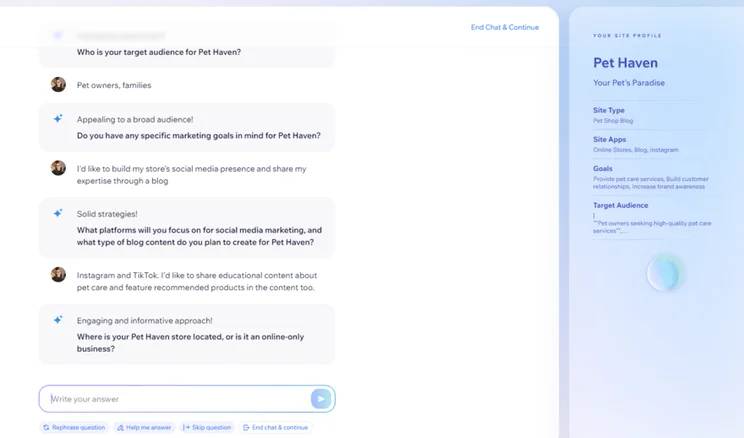
The conversational chatbot asks questions about your website needs and target audience, pivoting and reacting to your responses live. Based on your answers, it then creates a custom dashboard with a personalized template, pages, apps, and content for your site.
For example, after mentioning I wanted to improve my store’s social media presence and use Wix’s blogging platform, it asked me what social media platforms I’d like to focus on and what type of blog content I planned to create.
What’s It Like To Design a Website With Wix?
Wix’s unstructured drag-and-drop editor allows for much more precise placement of website design elements than Shopify or GoDaddy‘s section based editors, although the choice can feel overwhelming.
The AI website builder generates a template based on the AI chatbot site profile – this took some time to load for me so be patient if it doesn’t appear immediately.
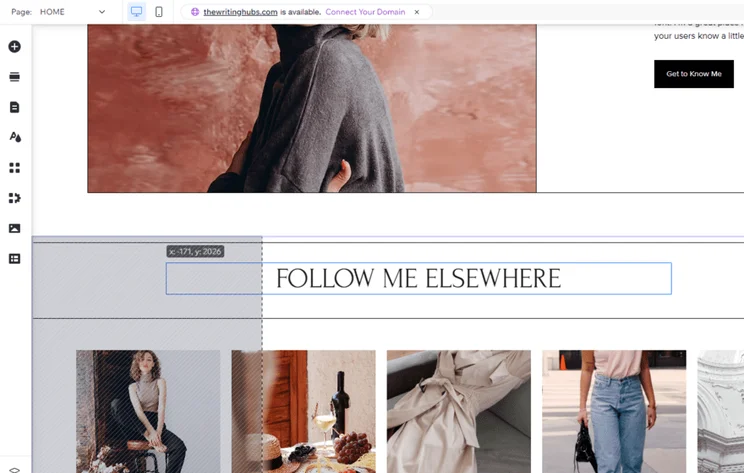
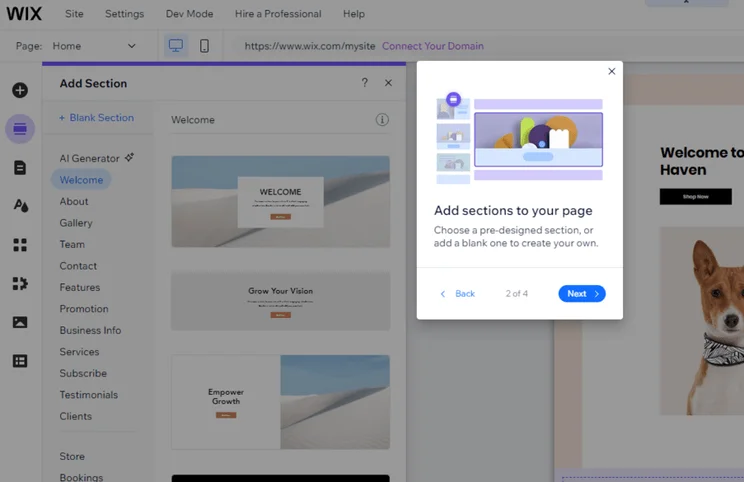
If your AI-generated template doesn’t match your vision immediately, you can use a template instead or make changes in Wix’s editor. Wix’s drag-and-drop editor allows elements to be placed anywhere on the page, and pre-designed sections can be stacked on top of one another to create the page’s core structure.
Using Wix’s editor to move elements around and align them neatly takes practice, since you have to drag them across multiple areas. Take time to experiment with Wix’s tools and watch tutorials to gain confidence with the level of creative freedom it grants.
How Much Does Wix Cost?
Wix’s pricing ranges from $17 to $159 per month (billed annually) across its four premium plans: Light, Core, Business, and Business Elite. While Wix is slightly more expensive than other builders, you get a lot of features and value for the fee you pay.
You can get 10% off any Wix plan with our code “TAKE10” – see the discounted price in the table below, along with each plan’s key features:
|
Plan Name
|
Price with our discount code
|
Monthly price (paid annually)
|
Monthly price (paid monthly)
|
Storage space
|
Ecommerce
|
Key features
|
Recommended for
|
|
|---|---|---|---|---|---|---|---|---|
 |
 |
|
|
|||||
|
Light |
Core |
Business |
Business Elite |
|||||
|
$17 |
$29 |
$39 |
$159 |
|||||
|
$24 |
$36 |
$46 |
$172 |
|||||
|
2GB |
50GB |
100GB |
Unlimited |
|||||
|
|
|
|
|
|||||
|
|
|
|
|||||
|
Portfolios and personal sites |
Small stores and growing businesses |
Established businesses |
Large businesses with complex needs |
Wix has a free plan that you can stay on for as long as you’d like. However, your site will feature ads, a Wix-branded domain name, and you’ll only have 500MB of storage space.
While this can be a great way to build familiarity with the builder without spending a cent, premium tools are locked behind paid plans. It’s best to upgrade as soon as possible to give your site a professional appearance and provide the features you need to help your site grow.
After a week or two on the free plan, you’ll likely know that Wix is the right builder for you – when you’re ready to publish your site, choose a premium plan to upgrade to that suits your business.
How Many Templates Does Wix Offer?
Wix’s library of over 2,000 free templates is the largest among the top website builders we’ve tested. For example, Squarespace (our top builder for design features) has less than 200 templates to build your website with.
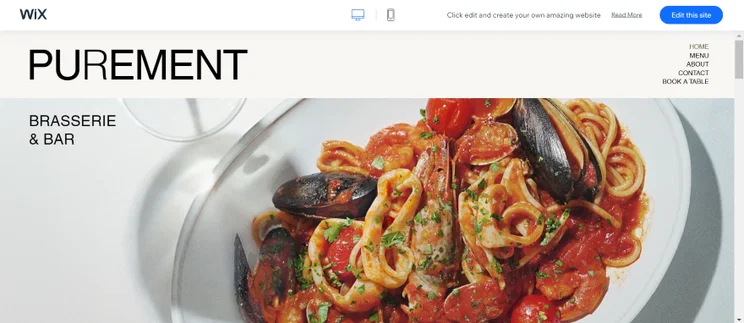
I used the preset filters to browse Wix’s template library, but there’s also a search bar to find relevant themes. Wix’s templates are broken down into categories and industries, such as “Real Estate”, “Pets & Animals”, “Restaurant”, and “Online Education”.
Wix’s “Portfolio & CV” templates have such a variety of styles to match different industries, from business-focused templates to themes for illustrators and creatives. Whichever template I pick, I know I’ll have a great foundation to build on when in the editor.
Are Wix's Features Any Good?
Wix had the strongest set of website features in our 2025 testing that cover a diverse range of needs. These high-quality features include tools for events and bookings, blogging, and social media, giving users everything they need to build and grow their website.
I’ll cover a few key areas in the sections below:
🔍 SEO
Wix is the best SEO website builder on the market, offering built-in features to help optimize your website, such as:
- Customizable URLs
- Meta titles and descriptions
- Keyword support from Semrush
- Google Business Profile integration
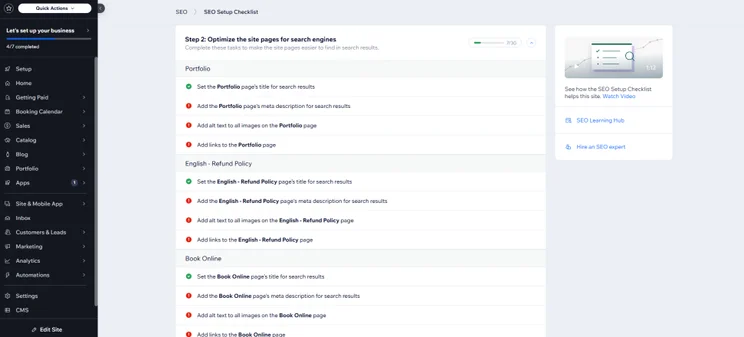
Wix’s personalized SEO checklist is really useful for beginners or anyone who needs help with the SEO basics. This Wix SEO tool, which sits under the SEO dashboard, clearly outlines areas for improvement and offers advice to help get your website seen and understood by search engines.
📨 Email Marketing
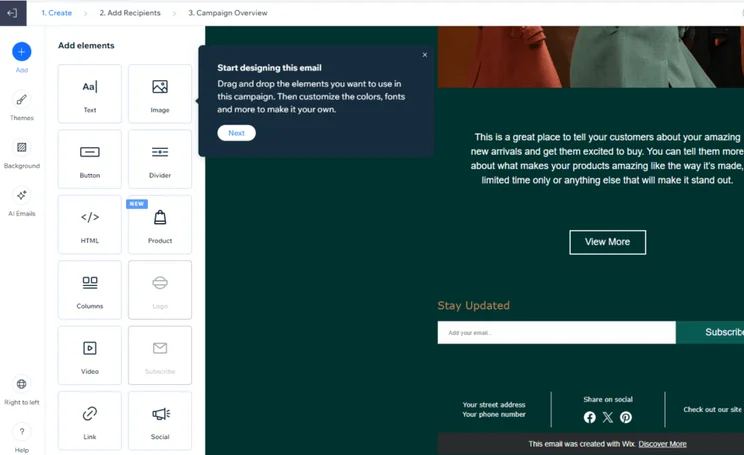
Wix provides a built-in email marketing suite to help you connect with your audience and build engagement. When testing, I could customize a small range of email templates to suit my brand or create an email from scratch with a user-friendly editor. It has the same drag and drop editor as Wix’s website editor, which makes it easy to place elements.
With Wix, you can also set up automation to streamline workflows and view email-specific analytics. In comparison, this is a paid extra on Squarespace which really highlights the value of Wix’s plans.
However, Wix’s email marketing is capped at 200 email sends per month, so you’ll have to upgrade to one of its three premium email plans, which are billed on top of your Wix plan, to send more:
- Essentials ($10 per month): 500 monthly email sends
- Core ($24 per month): 5,000 monthly email sends
- Advanced ($49 per month): one million monthly email sends
🤳 Social Media
Syncing your Wix website and social media accounts will help you connect with people on the platforms they’re already using. This is a great way to increase traffic to your website, boost engagement and generate leads.
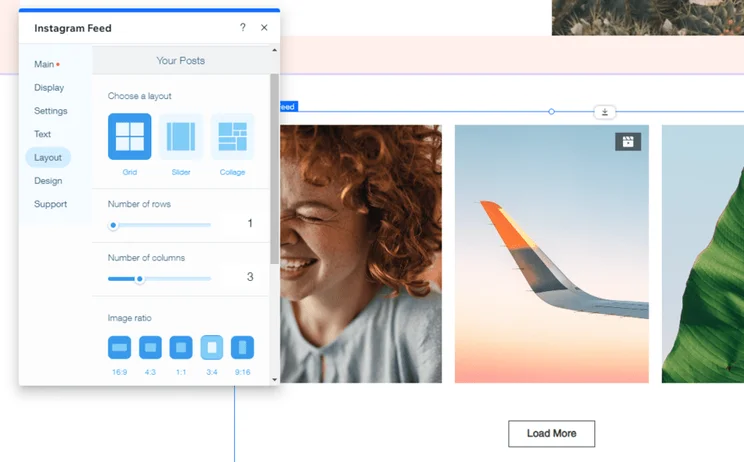
With Wix, you can create new social posts from your Wix dashboard to publish on Facebook, Instagram, YouTube, LinkedIn, and X. You can also add an Instagram feed section to your site, blending your online presence across your site and the social platform.
Can You Sell Online With Wix?
You can start selling online with one of Wix’s three ecommerce plans: Core, Business, or Business Elite. Pricing starts at $29 per month (billed annually) for the Core plan.
If you’re thinking about setting up an online store, Wix is a fantastic choice! What really stood out to me – and why we rated it so highly – is the huge range of features that make it easy to manage everything in one place. I especially loved the ability to customize invoices for that personal touch, the detailed analytics that show exactly what’s selling (and what’s not), and the seamless integration with channels like Google Shopping and social media. Plus, you can sell anything – from physical products to subscriptions – making it a great way to keep customers coming back!

Wix eCommerce provides essential sales features, including abandoned cart recovery, discounts, social media selling, and back-in-stock notifications. More advanced functionality, such as automated sales tax and multiple currencies are only available on the Business or Business Elite plan.
In November, Wix teamed up with shipping supplier UPS to streamline order fulfillment. This new UPS integration for Wix Shipping, which is available for merchants in the US and Canada, allows sellers to automate UPS fulfillment and manage everything from their Wix dashboard.
What AI Tools Does Wix Come With?
Wix’s AI website builder helps you begin your online journey, but you can also use its suite of AI tools to create content and tweak your pages.
Wix’s AI features can support with:
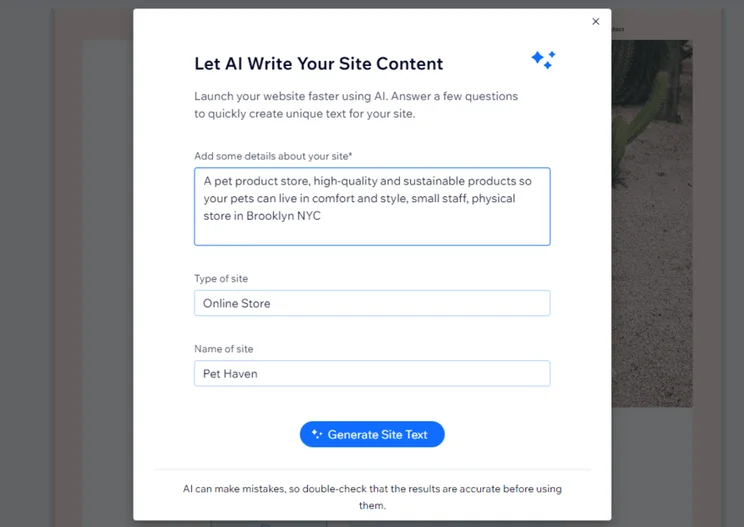
- Content generation – Use AI for content creation, including text for your site, trailers for uploaded videos, product descriptions, and more based on a brief prompt
- Theme design – an AI theme assistant was introduced to Wix’s editor in September 2024, offering real-time recommendations on design elements
- Color schemes – let AI pull inspiration from your brand’s logo or describe the type of color style you’re looking for, such as “colorful and bold”
- Page sections – choose from a variety of section types, such as “About”, “Services”, or “Subscribe” and add text that the AI tool should include
- SEO – Wix can create meta titles and descriptions for you, helping users tackle SEO best practices
- Image editing – use AI to enhance and edit visuals, improve the quality of images, and even remove or refine image backgrounds
- Email marketing – let Wix create email templates and marketing content
- Website analytics – get AI-generated insights into your website’s performance and traffic, and also receive recommendations to help optimize your site
- Customer engagement – Wix’s AI site-chat responds to queries for you, delivering customer service 24/7 and offering helpful information to website visitors, such as product suggestions
- Business support – Wix Astro is a built-in chatbot that can offer assistance, carry out tasks for you, produce content, and more
Wix introduced a new AI tool for small businesses in January 2025: Business Launcher. This tool helps you build a new business from scratch, generating business ideas that complement your skills and interests and curating a detailed launch kit. When I tested the new feature myself, I was impressed by the content in the kit, which outlined actionable steps to help me get the ball rolling.
Does Wix Have an App Market?
Wix has an app market with over 800 third-party apps to enhance your site’s functionality. You can browse Wix’s team picks, trending apps, or filter the market by category, such as “Marketing” or “Services & Events”.
How Much Do Wix Apps Cost?
Some apps are free to use, such as Wix’s native apps, which include Wix Bookings (for scheduling appointments) and Wix Pro Gallery (to showcase professional images), an essential add-on for photography websites.
Other apps offer free trials or premium plans, so you can spend as much as you’d like on these optional extras. For example, email marketing app Omnisend has premium plans that start from $10 per month (billed annually).
How Does Wix Protect Your Site?
Wix provides all of its websites with a free SSL certificate to help keep your site encrypted. This reassures visitors that they can browse your pages safely without risking their personal data.
Wix also guarantees that its sites are PCI compliant and anti-fraud protection is in place, meaning online payments are safeguarded. You can rest assured that Wix’s expert security team is constantly looking out for suspicious activity on the Wix network to address any information security threats.
How To Contact Wix for Support
Along with Shopify, Wix offers the best customer support out of all the builders we’ve tested. Wix provides the following support channels:
- 24/7 phone support
- Live chat, available Monday to Friday, between 2AM and 6PM EST
- Social media platforms, including Facebook, Instagram, X, and TikTok
- Help Center full of guides on topics such as “Connecting a domain” or “Promoting your site”
- SEO Learning Hub for expert support on all things SEO
- Wix Learn provides video tutorials and online courses
- Community forum so you can connect with and learn from other Wix users
- Support within the editor – you can browse the Help Center for guidance without leaving the editor, and you can get a tour of the editor’s features by selecting “Help” in the navigation bar
- Expert advice on a variety of topics, including marketing and content
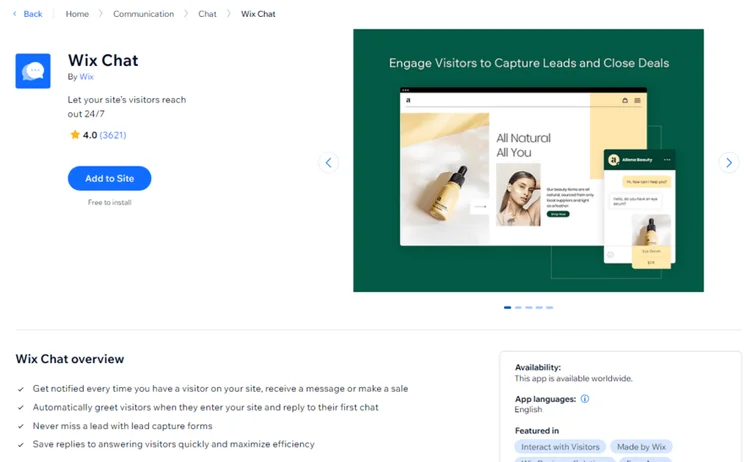
Wix offers responsive support via live chat, which is a fast way to get help with your website. Wix doesn’t provide email support like Hostinger and Squarespace, but its live chat connects users to an AI-powered assistant in under 10 seconds (based on our testing).
Is Wix Better Than Its Competitors?
Wix is the best website builder on the market – it’s been our top-rated choice for 10 years in a row. That said, it won’t be the right fit for every website owner or business, so it’s worth checking out the competition too.
➡️ Squarespace is the easiest website builder to use, according to our research. While Wix is also beginner-friendly, Squarespace’s drag-and-drop editor offers more structure than Wix, and its quality designs make it easy to create something stylish.
➡️ Hostinger has cheaper starting prices, making it a more affordable option for those on a tight budget, though its website features don’t match Wix’s.
➡️ Shopify is the best ecommerce website builder, outperforming Wix with its intuitive product backend and superior sales features, such as customizable checkout pages. If you want to build an online store, I recommend trying a dedicated ecommerce platform like Shopify.
➡️ GoDaddy has a quicker onboarding process, plus it has some of the best pricing on the market. In fact, it’s a simple, yet affordable, alternative to Wix if you’re only looking to build a personal or informational website.
How We Test Wix's Website Builder
We regularly test and review website builders so we can bring you accurate and up-to-date recommendations. Our in-house research team has carried out over 300 hours of data collection and analysis, meaning we have the data to back it up when we say that Wix is the best website builder overall.
I also spend hours testing each builder – in this case, Wix – to share my personal experiences with the editor and available features. This helps me share unique insights and opinions that only someone who has used the builder can provide.
To determine our rankings, our research process looks at six core categories:
- Website Functionality: 30%
- Design Features: 25%
- Pricing: 15%
- User Experience: 15%
- Help and Support: 10%
- Reputation: 5%
Final Verdict: Should You Build a Website With Wix?
Wix caters to a wide range of industries and users of all skill levels. It’s a great option if you’re looking to build a simple site, like a blog or portfolio, and you can get started with its free plan to test things out. However, it’s also ideal for small businesses looking to manage and grow their brand online.
Our 2025 research highlighted Wix as the best website builder overall, thanks to its impressive features, easy drag-and-drop editor, and customer support options.


1 reply
1 reply
1 reply
1 reply
1 reply
1 reply
1 reply
1 reply
1 reply
1 reply
1 reply
1 reply
1 reply
1 reply
1 reply
1 reply
1 reply
1 reply
1 reply
1 reply
1 reply
1 reply
1 reply
1 reply
1 reply
1 reply
1 reply
1 reply
1 reply
1 reply
1 reply
1 reply
1 reply
1 reply
1 reply
1 reply
1 reply
1 reply
1 reply
1 reply
1 reply
1 reply
1 reply
1 reply
1 reply
1 reply
1 reply
1 reply
1 reply
1 reply
1 reply
1 reply
1 reply
1 reply
1 reply
1 reply
1 reply
1 reply
1 reply
1 reply
1 reply
1 reply
1 reply
1 reply
1 reply
1 reply
1 reply
1 reply
1 reply
1 reply
1 reply
1 reply
1 reply
1 reply
1 reply
1 reply
1 reply
1 reply
1 reply
1 reply
1 reply
1 reply
1 reply
1 reply
1 reply
1 reply
1 reply
1 reply
1 reply
2 replies
1 reply
1 reply
1 reply
1 reply
1 reply
1 reply
1 reply
1 reply
1 reply
1 reply
1 reply
1 reply
1 reply
1 reply
1 reply
1 reply
1 reply
1 reply
1 reply
1 reply
1 reply
1 reply
1 reply
1 reply
1 reply
1 reply
1 reply
1 reply
1 reply
1 reply
1 reply
1 reply
1 reply
1 reply
1 reply
1 reply
1 reply
1 reply
1 reply
1 reply
1 reply
1 reply
1 reply
1 reply
1 reply
1 reply
1 reply
1 reply
1 reply
1 reply
1 reply
1 reply
1 reply
1 reply
1 reply
1 reply
1 reply
1 reply
1 reply
1 reply
1 reply
1 reply
1 reply
1 reply
1 reply
1 reply
1 reply
1 reply
1 reply
1 reply
1 reply
1 reply
1 reply
1 reply
1 reply
1 reply
1 reply
1 reply
1 reply
1 reply
1 reply
1 reply
1 reply
1 reply
2 replies
1 reply
1 reply
1 reply
1 reply
1 reply
1 reply
1 reply
1 reply
1 reply
1 reply
1 reply
1 reply
1 reply
2 replies
1 reply
1 reply
1 reply
2 replies
1 reply
1 reply
1 reply
1 reply
1 reply
1 reply
1 reply
1 reply
1 reply
1 reply
1 reply
1 reply
1 reply
1 reply
1 reply
1 reply
1 reply
1 reply
1 reply
1 reply
1 reply
1 reply
1 reply
1 reply
1 reply
1 reply
1 reply
1 reply
1 reply
1 reply
1 reply
1 reply
1 reply
1 reply
1 reply
1 reply
1 reply
1 reply
1 reply
1 reply
1 reply
1 reply
1 reply
1 reply
1 reply
1 reply
1 reply
1 reply
1 reply
1 reply
1 reply
1 reply
1 reply
1 reply
1 reply
1 reply
1 reply
1 reply
1 reply
1 reply
1 reply
1 reply
1 reply
1 reply
1 reply
1 reply
1 reply
1 reply
1 reply
1 reply
1 reply
1 reply
1 reply
1 reply
1 reply
1 reply
1 reply
1 reply
1 reply
1 reply
1 reply
1 reply
1 reply
1 reply
1 reply
1 reply
1 reply
1 reply
1 reply
1 reply
2 replies
1 reply
1 reply
1 reply
1 reply
1 reply
1 reply
1 reply
1 reply
1 reply
1 reply
1 reply
1 reply
1 reply
1 reply
1 reply
1 reply
1 reply
1 reply
1 reply
1 reply
1 reply
1 reply
1 reply
1 reply
1 reply
1 reply
1 reply
1 reply
1 reply
1 reply
1 reply
1 reply
1 reply
1 reply
1 reply
1 reply
1 reply
1 reply
1 reply
1 reply
1 reply
1 reply
1 reply
1 reply
1 reply
1 reply
1 reply
1 reply
2 replies
1 reply
1 reply
1 reply
1 reply
1 reply
1 reply
1 reply
1 reply
1 reply
1 reply
1 reply
1 reply
1 reply
2 replies
1 reply
1 reply
1 reply
1 reply
1 reply
1 reply
1 reply
1 reply
1 reply
1 reply
1 reply
1 reply
1 reply
1 reply
1 reply
1 reply
1 reply
1 reply
2 replies
1 reply
1 reply
1 reply
2 replies
1 reply
1 reply
1 reply
1 reply
1 reply
1 reply
2 replies
1 reply
1 reply
1 reply
1 reply
1 reply
1 reply
1 reply
1 reply
1 reply
1 reply
1 reply
1 reply
1 reply
1 reply
1 reply
1 reply
1 reply
1 reply
1 reply
1 reply
1 reply
1 reply
1 reply
2 replies
1 reply
1 reply
1 reply
1 reply
1 reply
1 reply
1 reply
1 reply
1 reply
1 reply
1 reply
1 reply
1 reply
2 replies
1 reply
1 reply
2 replies
1 reply
2 replies
1 reply
1 reply